Most of my "chart concepts" on Flickr

Apologies for the lighter post content during the summer break. I scraped images of the various examples slides I have been using on this blog over the past year and put them on Flickr as one set.

SlideMagic: a platform for magical presentations. Free student plan available. LEARN MORE

iStock photo free images expire

More light summer posting. I only recently discovered that the weekly iStockPhoto free images expire after a number of weeks. Do not forget to download them on a regular basis, and pick the very large size enabling you to zoom in dramatically if needed.
The fact that they are picked by iStock editors adds a nice bit of randomness to the stream of images. For example, here is last week's:

SlideMagic: a platform for magical presentations. Free student plan available. LEARN MORE

A scan of your business card as prsentation slide 1

Right at the start of a presentation I always create an opportunity for the speaker to introduce herself. What visual to use for this? Definitely not a boring bullet point summary of your CV. Put a personal image that describes something unique about yourself. It can be frivolous in an informal setting, and in more formal presentations, a scan of your business card ("so last century") can be a good background.
Apologies for blacking out spam-sensitive details.

SlideMagic: a platform for magical presentations. Free student plan available. LEARN MORE

Interior shadows to smoothen edges of images

If you are not a PhotoShop artist, and use PowerPoint to take out the background of an image instead, the edges of the remaining edges can look a bit ruffled. Sometimes applying an interior shadow to the image solves this problem. Sometimes, because it works brilliantly for some images, and not at all for others. You have to try.
To apply an interior shadow in PowerPoint 2007: click the image, go to format/shape effects/shadows/inner and pick the middle one of the options.

SlideMagic: a platform for magical presentations. Free student plan available. LEARN MORE

Reflections - if you really have to use them, use them right

I am not a big fan of the reflections that are used frequently in "web 2.0" logos and PowerPoint graphics. The fact that PowerPoint enables a feature does not mean that you have to use it. As an example see a logo that Visa uses to build a relationship with small business customers.
  • Both logos would look much nicer/cleaner without the reflection
  • In the left image the reflection is not correct, the 3D compartment of your brain tells you "something's not right here". I am sure it was not the intention of the designer to create a logo in the style of Escher.

SlideMagic: a platform for magical presentations. Free student plan available. LEARN MORE

Motion graphics - blending presentations and animated video

You should design a presentation for an online audience in a different way than those for a live audience. Software such as Adobe After Effects are bringing the graphical tools traditionally used in professional video animations within reach of everyone. As an example, see this recent video produced by Paul Durban: a teaser to get people to download an ebook created by the members of Seth Godin's triiibes community.
Two more examples of motion graphics:
A few observations:
  • The text-only animations are very useful for high energy, very short commercials. The bombardment of animations can carry one message across. "This tribes ebook contains a lot of questions, what was that tinyurl again, let's back up". "Got you, women are an underused resource in the 3rd world, we should help them help themselves rather than relying on food aid". Software opens this genre up to the masses.
  • The real master pieces are the ones that include images and artwork (like video number 3). I think these remain highly specialized projects almost similar to TV commercials that can only be executed by animation professionals.
  • (Amateur) presentation designers can still learn from these techniques. See how they use fonts, spread messages over different slides and create subtle transitions between slides that are far different from the spectacularly animated PowerPoint effects.
It is interesting to see how the Girl Effect video tries to make up for the lack of images: it constantly encourages you to imagine/visualize things ("No go ahead, really, imagine her") . See my review of the book Brain Rules, describing the difficulty the brain has with processing text.

SlideMagic: a platform for magical presentations. Free student plan available. LEARN MORE

Excel instead of PowerPoint as your presentation tool

Microsoft Office is a tightly integrated application suite. Inside Excel you can find pretty much the entire arsenal of PowerPoint drawing and charting tools.
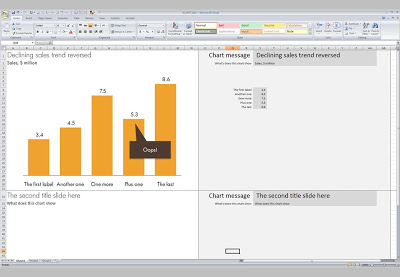
For certain types of presentations, you should consider using Excel as the presentation tool instead of PowerPoint. Quarterly results presentations are an obvious candidate:
  • Massive amounts of dense data, and a need to switch back and forth between graphs showing trends, and the actual data tables itself
  • Time pressure; the numbers come in fresh from the accounting systems and need to go straight into the Board document, without sufficient time to analyze what actually is going on.
  • Presentations that need to be updated all the time but basically look the same: quarterly results (again), market share movements. Every time the data arrives in the exactly the same format, with a column added. Lots of time is lost with copying and pasting data across. The result is usually ugly Excel tables featuring in a PowerPoint slide.
  • Complex analysis that needs to be redone, i.e., a water fall chart explaining the difference between this quarter and last quarter's results. Very few know how to do this. Even fewer know how to visualize this in a PowerPoint graph. A smart Excel template can help.
Here is what an Excel presentation could look like. Charts are laid out on the left side, data is put in on the right side. It takes some time setting things up and making all the links work, but once you do, you got yourself a very powerful tool (click image for a larger picture).
The only drawback is that you end up presenting the charts inside Excel on the screen with all the menu bars visible. On the other hand, this allows you to move back and forth between charts and data quickly.
Some guidance on how to set things up:
  • Once you have set the font sizes for the titles and subtitles, do not touch column and row sizes anymore. Do a print preview to see where the page breaks show up.
  • Switch on "snap to grid" to get all the shapes and graphs nicely aligned. (Click an object, format tab, arrange, align, snap to grid)
  • You can get to the PowerPoint objects by selecting "insert" and then "shapes"
  • Fill you cells with white to get rid of the grid lines
  • Lock cells after you are done with setting up the template
  • After the automated steps are completed, review your Excel presentation manually to add comments and see whether everything makes sense

SlideMagic: a platform for magical presentations. Free student plan available. LEARN MORE

Fewer posts during the holiday season

A heads up. In the month of August I will be spending more time with my family, and less time at the computer. I hope everyone is having a great summer break.

SlideMagic: a platform for magical presentations. Free student plan available. LEARN MORE

Chart concept - standing out (from the crowd)

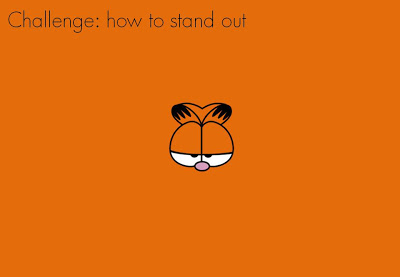
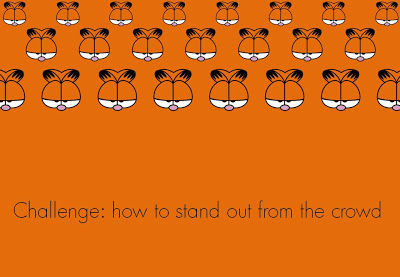
Every VC pitch presentation needs to talk about distinctiveness. There are many slick stand-out-from-the-crowd images for sale on stock image sites. This ad from Comex paints (via Frederick Samuel) triggered another idea. The comic character blending in the background is a nice setup page to introduce the problem. After this slide, you can talk about how you are making a difference in the market.

SlideMagic: a platform for magical presentations. Free student plan available. LEARN MORE

Does the multi-story-rock-star-presenter exist?

I was wondering this the other day. Many of the best presenters nurture one story year after year after year, and are getting better and better and better at it.
  • Best-selling authors previewing their book
  • CEOs pitching their company's products
  • Gurus urging us to leave our cubicle to do what we are really passionate about
  • TV evangelists trying to save our soul
  • Presidential candidates preaching hope
  • Social media experts telling us that luckily we are one of the few who really "get it"
Is there such a thing as the multi-story rock star presenter?
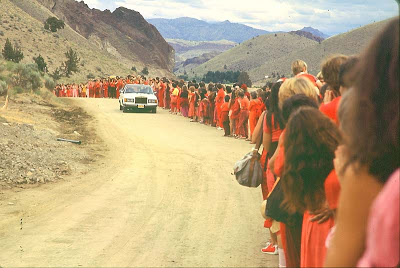
Osho greeted by sannyasins on one of his daily "drive-bys" in Rajneeshpuram, 1982. © 2003 Samvado Gunnar Kossatz

SlideMagic: a platform for magical presentations. Free student plan available. LEARN MORE

SlideShare kicks off the 2009 World's Best Presentation contest - some thoughts

The World's Best Presentation contests on SlideShare have become the closest thing we have to the annual world championship in presentation design: a lot of submissions, high-profile judges. This year's edition just kicked off (deadline September 8). The bar is moving up. Everyone has learned where to find stunning images. Everyone has learned how to accomodate the fast-clicking online viewer by dragging charts out over multiple slides. Everyone has figured out how important the first page is in catching attention.
It is a shame that SlideShare did not set a subject for the contest, this would level the playing field. Part of the competition now is to find a compelling story, many presenation design gurus are probably in writer's block as we speak.
The winner will be selected based on a professional jury, votes, and on the distribution of the presentation in social networks. So part of the effort is to design the content, part of the work of a contestant is to run an election campaign.
In the next edition SlideShare should run a finale similar to American Idol, in which the finalists have to present their slides in front of an audience/video camera.
I hope the winner of the contest will be a presentation that touches people, and makes them change their behavior in some way or another. This is not neccesarily the presentation with the most beautiful pictures, motion typography or amazing professionally crafted cartoon characters and sketches.

SlideMagic: a platform for magical presentations. Free student plan available. LEARN MORE

Book review - "Brain Rules" for presenters

I finally got around reading Brain Rules by John Medina and can confirm that it is indeed essential reading. Not only for people interested in visual communication (the likely reader of this blog). But it is also likely to change some of your fundamental perspectives on life if you are a knowledge worker, a manager, a student, a teacher, a parent, or any combination of these.
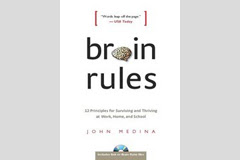
The book has been reviewed extensively elsewhere, and a good web site covers its basic ideas centered around 12 rules. I will not repeat this, but rather dive in to some of the details that I marked on the pages because I found them interesting. Most of them (but not all) are related to visual communication. Here we go.
  • Contrary to popular belief that (brain-related) things only go down after the age of 28 (millions of brain cells dying each day), the brain can renew. Just exercise and stay curious.
  • Everyone's brain is wired differently, wiring gets decided early on in a person's life. Surgeons about to operate on a patient need to keep the subject conscious with exposed brains, while touching part of it to figure out what's inside. "Someone just touched my hand". This allocation might impact performance. "Don't let the superior temporal gyrus host your critical language area. Your verbal performance will statistically be quite poor".
  • We don't register boring things, after 10 minutes of a continuous flow of densely packed information, our attention is close to zero. A presentation should have a break, or something to wake us up every 10 minutes (or better still, presentations should last 10 minutes).
  • The first few moments of exposure to new information are the most important. Presenters should not waste it on boring generic overviews of their presentation, long-winded introductions of themselves. Leverage the fact that all brains in the audience are still switched on.
  • Recalling an emotion at the moment we are fed information the first time greatly improves our ability to remember it. Dare to use creative tools. "Apologies for the ugly drawing of this huge orange turtle, but it walks about as fast as the typical decision making processes in our company". People will be talking orange turtles for the rest of the day.
  • Vision trumps all other senses is almost a cliche (the 1000 words etc.). We know that images in presentations are important. But here is interesting bit: reading text is difficult. Decode the funny shapes, construct the sentence, understand its meaning... Bullet points and text books create too many processing layers between information and memory. But this gives also food for thought to reconsider some of the "big font/powerful quote" slides. "20% of kids are obese" combined with a huge picture of a fat kid walking out of a fast food outlet. Sounds powerful, but I think visualizing the 20% will do an even better job of getting message across.
  • Vision is more than just registering an image. There are different parts of the brain that deal with color, motion, patterns. The brain is especially good at the latter. Use patterns, repetitions, in charts. Especially to visualize data.
  • The brain fills in missing gaps in a visual picture. When you imagine something should be there, you see it. Drawings don't need to be perfect. Rely a bit on the audience's imagination.
  • Meaning before details. We need to internalize what things mean before we can remember them. Out with the buzz words, out with the cliches. "Our new holistic security concept delivers scalable ROI that helps you stay competitive in an ever changing world".
  • People need to sleep to function well. Poor sleep kills 20% of your brain power, that's about 2 hours worth of work for an average working day. Brains are build to deal with short-term stress ("help a tiger!") but cannot handle prolonged pressure. Manage your deadlines. A last minute, late night presentation iterations will for sure not deliver a brilliant end product. Our brain continues to chew on an idea in our sleep, give it time. These findings put into question the whole system on which corporate work environments are managed.

SlideMagic: a platform for magical presentations. Free student plan available. LEARN MORE

"Nothing on a slide should be placed arbitrarily"

Alignment. Nothing should be placed on the page arbitrarily. Every element should have some visual connection with another element on the page.
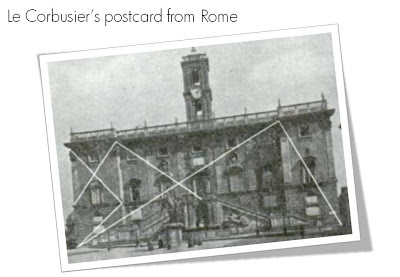
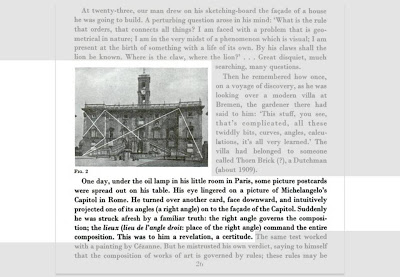
So very true, this quote from Robin William's book The Non-Designer's Design Book. Architects such as Le Corbusier are the masters in planning the proportion and alignment of objects on a facade.
The above image and quotes were taken from page 26 of Le Corbusiers's The Modulor 1&2. (Click on the page 26 Google books link or the image to read the text)

Not that you have to be like them. But still remember from now, whenever you have the option to position a shape or a text box on a slide, why not think for a second where to put it, align it with something?

SlideMagic: a platform for magical presentations. Free student plan available. LEARN MORE

Good data chart examples in this Kleiner Perkins presentation

This Kleiner Perkins presentation introducing their iFund makes good use of data charts to prove points.
Kleiner Perkins iFund Presentation at iPhoneDevCamp 3
View more documents from Raven Zachary.
  • Quiet layouts that focus on making one point only
  • Clever sequencing of charts: "you thought the iPod was big but wait untill you see it compared to the iPhone"
  • Applying a brightly colored fill under a line chart to amplify the trend (lines on its own are not very visible)
Click through the 14 pages to have a look yourself

SlideMagic: a platform for magical presentations. Free student plan available. LEARN MORE

Chart concept - giving it all a fresh new layer of paint

Sometimes you need a fresh start, begin from a clean sheet of paper, do some serious house cleaning. Covering a busy messy image with a paint roller and some stripes of fresh paint is a great way to visualize this message.
Here is an example of images on iStockPhoto that could be that basis of such a chart (the yellow paint rollers, make sure to strip out the white background color in Photoshop or with this PowerPoint trick). This post was triggered by this ad on Ads of the World:

SlideMagic: a platform for magical presentations. Free student plan available. LEARN MORE

6 suggestions for designers to increase their Return On Time

Yesterday I came across a very insightful blog post about what is probably the main source of unneccesary time wasting in enterprises: the clash between people on a maker's schedule versus those on a manager's schedule. (Paul Graham is a partner in Y Combinator, a funder of very early-stage startups.)
What is the big idea? There are 2 fundamentally different time schedules that people can work on. The clash between these two causes a lot of wasted time and frustration:
  • A maker is someone that needs to produce/design an endproduct. For a maker, meetings are a disasterous disruption of creativity. They fragment the day, making him/her postpone starting a major new piece of work because "the morning's gone anyway".
  • A manager's day is divided into 60 minutes slots in which meetings can be scheduled. Meetings are a great way to get updates on the progress of things (put all designers in a room and let them present), or meetings are great to expand your network ("let's grab a coffee").
Although people in power are usually on a manager's schedule, it is not neccessarily so that a maker is someone in a subordinate role. Anyone doing creative or problem solving work (designers, engineers, architects, yes even management consultants) is likely to be on a maker's schedule.
Why does it interest me? Since breaking away from big corporate environments half a decade ago I have been given a great deal of freedom to design my own work practices. To my surprise I have noticed how it is possible to improve productivity dramatically without relying on the leverage of a large number of more junior people working for you. I often get feedback from clients that they outsource presentation/strategy work to me because "you can isolate a piece of quiet time to get things done".
What can designers on a maker's schedule learn from it? I am on a maker schedule, here are some of the things I (try to) do to get the maximum out of a work day:
  1. Listen to your brain and figure out at what times of the day you are most productive. Do not agree to disruptions during your most productive time. (Recommended book: "Brain Rules"). Don't let others book time into your calendar automatically.
  2. Don't be afraid to suggest a phone call instead of a meeting. One on one discussions to exchange smaller comments on a presentation or a model can often be done without leaving the office, fighting your way through traffic jams, find parking, get a coffee.
  3. Plan meetings when you need them. When you need a decision. When you need input from many, many people (efficient to do it in one go). When you need to do a creative brainstorm in front of a white board. Forget about update meetings.
  4. Get tempted into distractions like email, Twitter, or admin when you feel your creative energy is dropping. Take a small walk, make a phone call before diving back in.
  5. Stress kills creativity. Avoid deadline stress by negotiating longer times for a project you need, and explain why. Teach clients (or your boss) about the creative process. Budget "alone time", to get "off the grid" as Garr Reynolds would put it.
  6. Switch between projects if you feel you are stuck on one, don't try to push it.

SlideMagic: a platform for magical presentations. Free student plan available. LEARN MORE

How can we make that growth look more impressive?

"Can we make that look a bit more impressive?"
I get that question a lot. An obvious trick with column/line charts is to cut the axis. I think that is cheating the audience, putting at risk the trust in the content of all your other slides in the presentation.
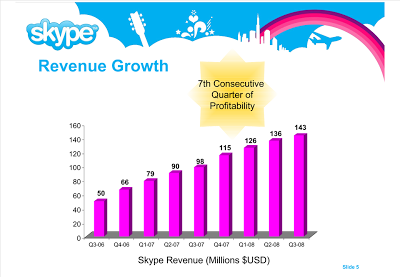
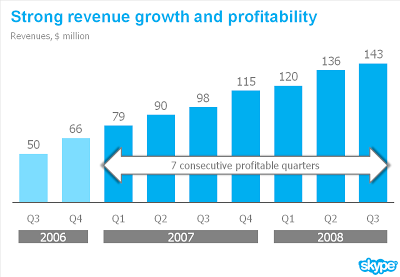
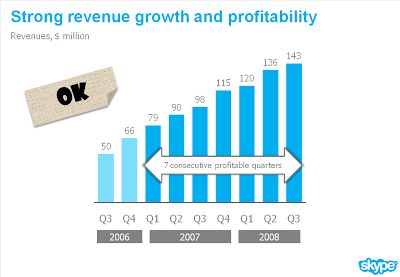
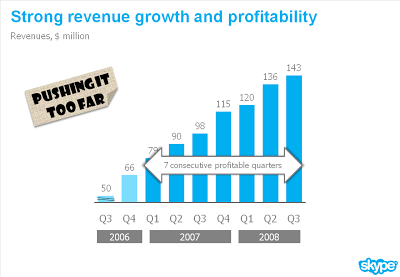
What you can do is play with the aspect ratio of your chart. As an example see the make-over of a Skype chart I used earlier. People in the comments were suggesting that the new version actually looks less impressive than the original. Maybe squeezing the chart horizontally while keeping the vertical size the same fixes that.

SlideMagic: a platform for magical presentations. Free student plan available. LEARN MORE

One year inside Seth Godin's tribe

Alongside the launch of his book Tribes, marketing guru Seth Godin has set up a social network of people interested in all things marketing and leadership. I have been a member since its launch. Initially I thought it was a smart marketing technique to increase the sales of his book (* smiling *), but it turned out differently. I got to know many interesting people around the world, contributed in many discussion and received useful input on my projects.
Many members of the tribe will be posting on this today. Here is a member that posted before me, here is one that posted after me.

SlideMagic: a platform for magical presentations. Free student plan available. LEARN MORE

A daily dose of framework napkins

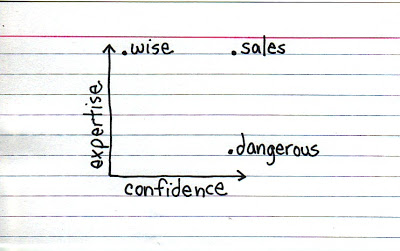
Yesterday's post about Venn diagrams led me to a blog that I seem to be the last person on the planet to discover: Indexed. Jessica Hagy posts a napkin-style framework everyday. Sometimes funny, sometimes with a valuable insight about life or an unusual way of looking at things. Here is an example:
Venn diagrams, but especially 2x2's, are very popular among McKinsey, BCG, Bain, and other management consultants. "We have put the world into 4 buckets, so now we understand it".
For solving problems they are great, and I have used hundreds of them in my 17 year (oops) as a management consultant. All issues are on the map, how we can we move from one box to another?
But take a step back and think when you want to use these frameworks in a big keynote presentation. To illustrate my point: look at the drawings on the Indexed blog, and check which ones do you get in a second. Tricky isn't it?
My advice: use these 2x2 frameworks only
  1. if you want to show movement of dots in the boxes. For example you can use the same framework in a few slides to show changes in strategy, or the positioning of a company
  2. if you want to highlight how your company/idea differentiates itself from the competition (by being in the top right box).
If you just need a structure to list 3 items, try to find a simpler way to visualize things.
Still, add Indexed to your RSS reader, it's great fun.

SlideMagic: a platform for magical presentations. Free student plan available. LEARN MORE