How to report the news

Late again in discovering an amusing video (1.3 million people saw it before I did over the last 3 weeks). Charlie Brooker is making fun of your typical TV journalist video report.


Some presentation lessons:
  • Professional journalists rigorously stick to the focus-on-one-message-only rule. The introduction summarizes the message, the question already contains the answer (the message), and the wrap up repeats the message. I am all for clear messages, but sometimes you run the risk of insulting the audience with over-simplification. I am not a big fan of the "tell what you will tell them, tell them, tell what you just told them" structure.
  • See how the background visuals are actually distracting: you switch off mentally, go in remote control TV mode, and start paying attention to "what street in London is this?", "where is that accent from?", you hardly notice that some of the interviewees are speaking Gobbledygook.Your visuals should be good, but not claiming all the attention (earlier post).
  • Videos can be great at conveying messages in a short time frame. This "boring" video took 1:59, but see what a different approach can do in 1:30 here.
Thank you Joe Mako

SlideMagic: a platform for magical presentations. Free student plan available. LEARN MORE

In defense of clichés (sort of)

I came across two interesting links about clichés last week.
  1. Seth Godin: point to a cliché and do the exact opposite (blog post). From a presentation perspective the most interesting tip is the "secret weapon" he points to: a book full of clichés: Dictionary of Cliches (affiliate link)
  2. Nikki Smith-Morgan pointed me to this wonderful list of 101 cliché images.
I now realize that I have been reinventing the wheel over the past few years. I am guilty of using many of visual concepts, and even have posted many of them on this blog. I agree that some of the images are really worn out (#1 example the handshake), but not all 100 other images are equally bad in my opinion.
Especially in everyday corporate presentations, getting people to use images instead of bullet points is a huge win, even if the images that are picked are somewhat obvious. It is the beginning of a path moving away from bullet points. I was there 5 years ago, but every day more and more people join the movement. Clichés are a good way to start.
A cliché is a visual shortcut that can prove useful in corporate presentations when used wisely. "Wisely" means picking a beautiful image. (Yesterday I was guilty of a tunnel with light at the end for example).
Obviously, the big keynote address is a different story from tomorrow's management review meeting.

SlideMagic: a platform for magical presentations. Free student plan available. LEARN MORE

Overlaps in PowerPont (redux)

Another technical post today, giving another approach to creating Venn-like diagrams without the color limitations of semi-transparent shapes.

  • Draw an extra shape exactly the same size as the others, in the color you want
  • Ctrl-X it away and paste it back in as a PNG (paste special, PNG)
  • Crop excess bits away
  • Overlay them

Blog visitor AdamV provided a link to this Microsoft PowerPoint 2010 feature that will make it very easy to combine, intersect and subtract shapes.


UPDATE February 2018: I have now added several designs for PowerPoint Venn diagrams on the SlideMagic template store that make use of PowerPoint's shape intersect function.

SlideMagic: a platform for magical presentations. Free student plan available. LEARN MORE

Immerse yourself in photography

As a child I already loved flicking through magazines, just to look at pictures. The Internet makes it so much easier to absorb vast quantities of visuals. Simple add a huge amount of photography-focussed RSS feeds to your Google Reader and hold down your finger on arrow-down, only to lift it when an image instantly touches you.
Not that I am hunting for images to use in presentations, often they are not right, often they have copy right restrictions. But still, immersing yourself in images improves your slide design skills. It is a bit like the best way to learn a language: surrounding yourself with it (maybe Hebrew is the exception to the rule though).
The most interesting images are often not the most professional ones. Stunning sun sets, volcano eruptions, can be beautiful but do not touch you on an emotional level.
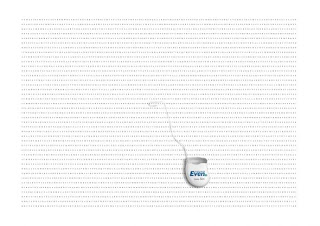
I recently added the RSS feed for ffffound to my Google Reader: a community image book marking site with a large readership. Images are picked by random users (most of them with a good eye for photography), as a result you get a frequently updated image stream full of surprises. As an example, here is an image I found today on the site:
Yay!Everyday is another example of image highlighting site, worth following.

SlideMagic: a platform for magical presentations. Free student plan available. LEARN MORE

The sort of animations we need in slideware: zooming

Most of the animations and slide transition effects currently available in PowerPoint do more damage than good to a presentation (an earlier post on the subject). The video below is guilty of some of these mistakes, but it also contains some effects that would be very useful to have in PowerPoint 2010 (preview in an earlier post):
  • Very slow moving zoom
  • Extreme image zooming
  • Image blurring
  • Zooming inside data charts
See how often I used the word "zoom" here. In the current version of PowerPoint you cannot control zooming enough: effects are blunt. Either via devices like the iPad, or via a breakthrough by software innovators like Prezi, or via improvements in Microsoft's/Apple's slideware, eventually we will get to advanced zooming capabilities in presentation software.


Video credit: Dan Meyer's 2009 Annual Report from Dan Meyer on Vimeo. Found via Fubiz
Further reading: an excellent post by Garr Reynolds about slow zooming and photographer Ken Burns.

SlideMagic: a platform for magical presentations. Free student plan available. LEARN MORE

Picking the correct logo

Many investor and sales presentations include logo pages. Improve the quality of these slides significantly by not picking the first image that pops up in Google image search:
  1. Visit the company's web site to see what the latest logo of the company in question is, logos get updated frequently
  2. Set the Google image search options to large format
  3. Pick a correct, huge logo
  4. Paste it in your presentation, reduce to the correct size, hit compress images
Companies with a good PR department have high-resolution images of their logos on the web site. Use them.

SlideMagic: a platform for magical presentations. Free student plan available. LEARN MORE

Leave some room for your chart title

The space allocated to the slide title in a PowerPoint template is constantly under threat:
Please give the title some space:
  • It is virtually impossible to win the battle against dense bullet point charts in big corporates. However, giving people some space to write the conclusion in the title of the chart might be one of the easiest ways to overcome this problem: read the title, ignore the chart content. A similar effect to how Twitter is educating people to write more concise email subject lines.
  • I find a title that runs on 2 lines hard to read: if you do not give people space they will simply add a line, and maybe even another one.

SlideMagic: a platform for magical presentations. Free student plan available. LEARN MORE

Turning any image into concrete

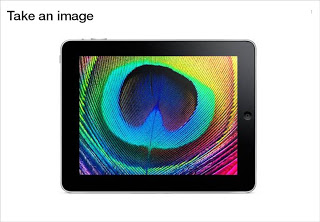
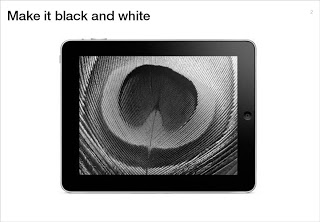
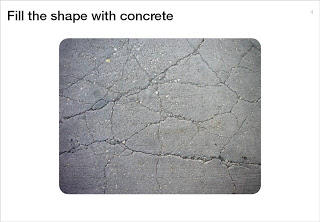
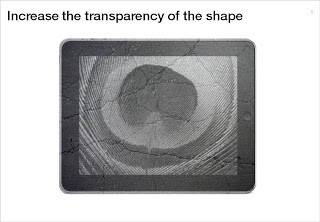
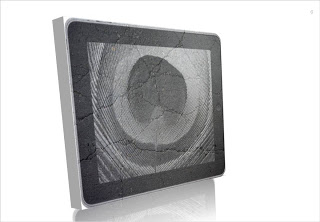
Here is a simple trick to turn any image into concrete. As an example I took an iPad and turned it into an iSlate, but it might actually work better with other images (you can turn portraits into statues for example).
To do this in PowerPoint without the help of advanced image manipulation software you need to add a shape on top of the target image, fill the shape with an image of a concrete texture (available on any stock image site) and make that shape with the concrete texture semi-transparent.

SlideMagic: a platform for magical presentations. Free student plan available. LEARN MORE

Lighter shades for bright colors

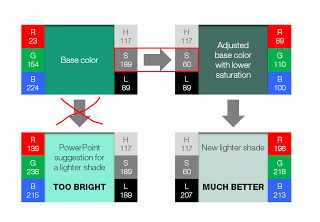
PowerPoint 2010 gives you the option of a spectrum of different shades of the same color. This is great to design charts with a consistent color scheme.
However, if your template contains colors that are highly saturated, the suggested lighter shades of your color will be too bright to use as neutral color nuances. Here is how you can fix it. (Click on the image for a larger picture.).
  • Create a new base color by reducing the saturation (in laymen's speak: make it more grey). 
    1. Open the color in your color template (format shape/fill/solid fill/color/more colors)
    2. Switch the color model from RGB (red, green, blue) to HSL (hue, saturation, luminance).
    3. Reduce the (S)aturation value, while keeping all other variables the same.
  • Use a lighter shade of this new base color instead and save this as a new color in your color template.
If you are interested in learning more about color theory, you can browse through some earlier posts on the subject of color or go straight to this one.

SlideMagic: a platform for magical presentations. Free student plan available. LEARN MORE

Message arrived - nobody understood it

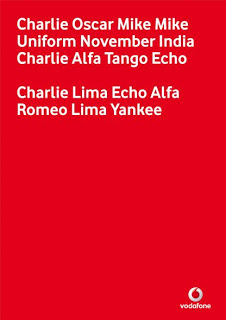
My attention was drawn to this Vodafone ad that uses the NATO alphabet to say C-O-M-M-U-N-I-C-A-T-E  C-L-E-A-R-L-Y. An excellent example of the difference between delivering a message (i.e., writing your bullet points on a slide) and getting someone else to understand/internalize what it says.
I am not sure yet how to use it yet, but this NATO alphabet is a good thing to remember when thinking about chart concepts.

SlideMagic: a platform for magical presentations. Free student plan available. LEARN MORE

The audience wants you to succeed

Fear of public speaking often stems from the speaker thinking that the audience's main objective is to criticize her performance. The opposite is true: the audience wants you to succeed. First of all because of selfish motivations; nobody wants to be bored.
But there is an emotional driver as well. People (in the audience) do not like to subject themselves to an embarrassing situation. Watching this movie clip from the film "About a boy" creates that exact feeling in your stomach (I cannot embed it for some reason).
The book "Confessions of a public speaker" has a great section on public speaking anxiety. Seth Godin thinks that fear of public speaking is the a prime example of our lizard brain at work.

SlideMagic: a platform for magical presentations. Free student plan available. LEARN MORE

Browsing for books about design

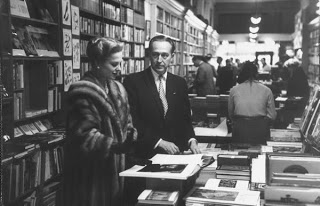
The Internet and the place I live (Israel) have cut me off of those great large book stores where you can browse endlessly for books you did not know you missed.
Presentation blogs (this one included) often talk about the same limited set of books about public speaking and presentation design. Here is a list of design books compiled by graphic designer Jason Santa Maria full of titles that look really interesting.
Found via SwissMiss. Image credit Google LIFE, an excellent source of images for non-commercial use.

SlideMagic: a platform for magical presentations. Free student plan available. LEARN MORE

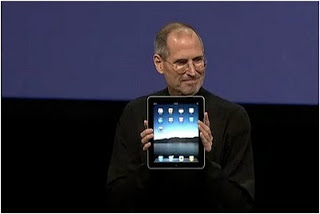
The entire Jobs' iPad speech in 180s: passion

Presenting is not a casual discussion, it is a performance. When you are not passionate about what you are presenting yourself, do not expect your audience to be. This short video compilation of Steve Jobs' iPad launch speech shows how he packed his talk with enthusiasm. Something to learn from, but also to make you smile.


SlideMagic: a platform for magical presentations. Free student plan available. LEARN MORE

You should follow this blog

Mark Suster is a venture capitalist (VC) who is quietly building one of the world's most-read blogs about entrepreneurship and VC investing. I suspect most people who read my blog subscribe to other blogs in areas such as (graphics) design and public speaking. Most of these blogs (including this one), are run by people who write presentations.
Mark's blog is different.
  • Most of the time he sits in the audience listening to people trying to pitch a venture to him, but in an earlier stage in his career he was an entrepreneur himself sitting at the other side of the table (hence the name of his blog)
  • He talks a lot about presentations and pitches, but these are mere tools to achieve a bigger goals: building a successful venture
I think anyone who is interested in presentation design should follow his blog. See his impressive list of posts about pitching to a VC. Or read his most recent post about not failing when presenting to large audiences. Full of great lessons for presenters and presentation designers, that are not only relevant in the world of VC fund raising.
Pitching to VCs is a great case example to learn about presentations in general:
  • The stakes are incredibly high ($ millions)
  • Each startup is a story that wants to change the world
  • The story and ideas are highly personal (the entrepreneurs's "baby" is on the block, people are judging the idea, but mostly the presenter herself)
  • The audience is not captive (in most corporate presentations, the audience is required to sit it through, because the boss says so, a VC will not waist her time to listen to a poor presentation)

SlideMagic: a platform for magical presentations. Free student plan available. LEARN MORE

Chart concept - word find

The concept of this ad for a dental care product can be very useful for a slide conveying "solution x helps you see the forest through the trees". It is a bit tedious to generate rows of random words, but the end result will be effective.
A larger image can be found on here on Ads of the World.
I discussed similar concepts earlier here and here.

SlideMagic: a platform for magical presentations. Free student plan available. LEARN MORE

"Why are TED presentations so polished?"

This question was asked by David Semaria on Mark Suster's excellent blog "Both sides of the table", a must read for anyone who needs to pitch to VCs.
Here is my take on the question why TED presentations are so "polished":
  1. A tough pre-selection: you need an interesting story even before the PPT slideware is opened to create the presenation
  2. A ruthless 18 minutes cutoff makes you practice
  3. Peer pressure of a good speaker line up makes you practice
  4. The "threat" of a global video audience makes you practice
You can argue that it can be hard to sometimes to meet point number 1. Number 2, 3 and 4 are all about practice, your presentation can benefit from it too. There is no excuse not to practice, practice, and practice.

SlideMagic: a platform for magical presentations. Free student plan available. LEARN MORE

Let your audience's brain fill in the missing pieces

Highly graphic and gruesome ads that should stop you from smoking or driving dangerously are not only not pleasant to look at, but also often fail to achieve their objective (according to books like "Influence").
This U.K. "wear your seat belt" ad shows that you can communicate these messages in a different way. I like the way it triggers the brain to fill in the missing pieces in an emotional way. (Books such as "Brain Rules" show that your mind is very good at this).
Watch the full 90 seconds of this ad, it is very powerful.


Via Ad Freak.

SlideMagic: a platform for magical presentations. Free student plan available. LEARN MORE

First thoughts on the Apple iPad and presentations

Apple launched the iPad yesterday (watch Steve Jobs present here): a device positioned in between a smart phone and a laptop computer. The big differentiator is a very large screen and a user interface that can be manipulated using the touch of a finger, exactly the same way you interact with an iPhone.

Would could this new device mean for presentations? My first thoughts:
  • The iPad runs the iPhone operating system, which means that you cannot simply port PC or Mac applications on it. Apple announced a version of iWorks (including Keynote) for the iPad, but for now it is impossible to run Microsoft PowerPoint on it.
  • The devices seems like a great presentation tool for one-on-one meetings. A bright, big screen and an informal user interface enable a dialogue-style presentation.
  • The need for an application like Prezi becomes more urgent. Prezi seems made for the iPad: easy zooming in and out of slides, and a non-linear way to move between slides. I have not seen the details of iWorks for iPad, but I assume that Apple is going down the track of creating a Prezi-style user interface for office productivity applications.
  • It would be great if you could use a virtual marker during your iPad presentation: drawing circles to emphasize elements, adding comments, pretty much in the style of the napkin presentation I talked about a while ago.
I am very excited about the iPad. The geek reviews might have found technical imperfections (no multi-tasking for example), but the fundamental revolution is the big touch-based user interface that have brought computing in general and presentations specifically a bit closer to a natural human interaction.

SlideMagic: a platform for magical presentations. Free student plan available. LEARN MORE

Seth Godin's Linchpin: "the good guys can win"

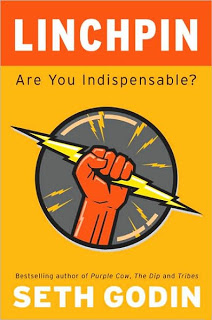
This post will be slightly off-topic: Seth Godin published his latest book yesterday: Linchpin (affiliate link) and I think it is important that as many people as possible absorb the ideas that it contains.
Seth's books have evolved over the years. What started with insights about marketing (he is the one who opened up our eyes to the fact that anonymous spam email campaigns are not effective), is now moving into the area of leadership and in Linchpin even broader: what is the purpose of the time you spend day in, day out. 
If there is one unifying theme in all his books it would be: "the good guys can win" (came up with this while listening to Leonard Cohen's song "Everybody knows"). You can be successful by doing remarkable things, without a need to cheat, interrupt, or lie.

The book opens with a grim analysis of history. Over the past 100 years we have built a society (education, advertising) that trains people to be cogs: cheap, willing, replaceable, numb, insecure people that man the production lines and purchase the stuff that the factory churns out.
It is time to escape the trap and change. It's urgent. Not changing will get you fired, and/or bore you to death, and/or rob you of your dignity, and/or paralyze your abilities and talents as you live and work in constant fear. On top of that, all of us own so much stuff that we do not even know what to do with it anymore.
The linchpin is a small but critical part that holds the wheel in place. Seth wants us to become one. "Us", the target audience of the book seems to be today's army of middle managers filling cubicles in office towers around the world.
You can see that Seth is a blog writer, the book contains many smaller ideas that are bundled together in one book cover.
  • Emotional labor creates art: work that touches people, changes them.You are not born with a talent for art, you do not have to be able to know how to draw to be an artist. If what you do changes people, it's art.
  • Gifts are powerful and will pay back somehow. Be generous without running an ROI calculation in your head. If you want a copper plate with your name in return for your gift, you do not feel emotionally strong enough about it. It is probably better not to give at all in that case.
  • The resistance is strong. Our "lizard" brain wants us to be safe, warm, and comfortable and tells us all the time to back away. One defense against the resistance is to "ship" at the time you set yourself, even if your product/idea/post is not 100% perfect.
  • The Internet/social media can be powerful to connect with people and spread ideas, but when it teams up with the resistance it becomes a huge time waster. We feel connected Twittering away, but the clock is running as well: "what happened to your art when you were Tweeting?"
  • Anger, anxiety, and a longing for revenge are destructive and time-wasting emotions deeply rooted in our lizard brain. Anxiety is very often used as a motivator in big corporates: do as I tell you or I will fire you. People under constant stress cannot perform. There is no art when you are running away from a tiger that's chasing you.
  • There is no map, no manual about how to become a linchpin. And no, this is not about Seth being lazy and not giving us the solution, being a linchpin is the exact opposite of following a manual with standard procedures.
  • It is hard to see clearly, especially when you are in the trenches doing routine cog work, spend time in useless meetings, busy reading 100s of Tweets or stressed out about the upcoming performance review
  • Being a linchpin gives meaning to who you are and what you do, but will not necessarily turn you into a millionaire. But hey, we own already too much things anyway.
You can see that it took Seth a long time to write this book.
  • It bundles different ideas. Some passages are clearly written at the height of the economic crisis last year (linchpins don't get fired, be a linchpin to hold on to your seat).
  • The language is much more deep and abstract than in Seth's other books. Many sentences require re-reading. One explanation is that they come from a set of ideas collected in a note book over a longer period of time.


Now for some connections to presentation design and public speaking:
  • Fear of public speaking is a prime example of the resistance and the lizard brain teaming up
  • Presentation design is the ultimate act of making people see clearly
  • Public speaking is a rewarding opportunity to touch and change people

SlideMagic: a platform for magical presentations. Free student plan available. LEARN MORE

Measurements that people can visualize

Mathematics has given us the ability to perform complex calculations, reducing real world quantities to simple numbers and variables that can be manipulated without interpreting what they actually mean.
In your presentations, try to go back to the stage of a child before the first mathematics class. Describe measurements and quantities in a way that they can be visualized, internalized.
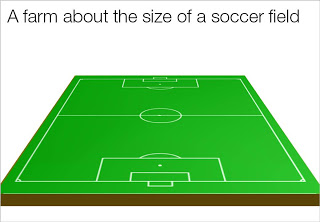
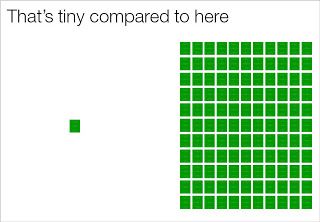
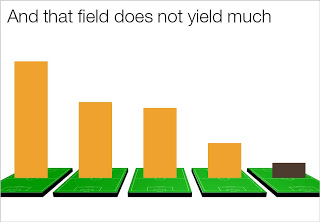
Recently, one of my presentations covered agricultural land yields in emerging markets. Rather than using abstract hectares and tons, I decided to use the soccer field analogy. It is easy to re-calculate figures from tons per hectare, to tons per soccer field, and maybe even going further: truck loads per soccer field.
You can even use the visual of the soccer field:

SlideMagic: a platform for magical presentations. Free student plan available. LEARN MORE