
First sketches with the Wacom Inkling

The Wacom Inkling Digital Sketch Pen (affiliate link) is a tool that lets you draw with a regular pen after which a sketch can be transferred to Photoshop or Illustrator for further editing. No, it does more than a regular scanner. First of all, it allows you to draw in layers and preserve them in the editing software. Secondly, the hardware is so small that you can take it any where you want.


My box arrived yesterday in the mail and the experience confirms what I have seen so far in the promotion video (my sketching skills have some way to go though). The product comes in a box the size of a regular pencil case. The pen and the receiver fit in nicely. Clip the receiver at the top of the page, and start sketching. It is as simple as that. One button opens a new file/page, another button adds another layer. The software is easy to install and works great.



The only drawback for me is that sketching has to happen with a ball point. I prefer a soft tip pen, or best of all a thick pencil to draw. There might be technical reasons why Wacom stuck to a ballpoint for sketching, but hopefully they will release a pencil-based scanner in the near future.

SlideMagic: a platform for magical presentations. Free student plan available. LEARN MORE

5% presentation, 95% Q&A

These are often the best meetings. The audience has prepared, read the material, and is ready for a discussion. What presentation slides can help you run a meeting that is mostly free discussion?

Bring your entire deck, but select from it those slides that create a mental framework around the things you want to discuss. Often, they are very simple slides, but relatively dense with content. Examples:
  • A 2x2 matrix with all the competitors listed
  • A matrix of market segments (growth, and size on the axes)
  • A simple ranking of sales and profits by brand
  • A product development timeline
  • Two market share pies: last year and this year
  • A software architecture diagram
All these can be projected onto a whiteboard (use a white slide brackground), on top of which participants in the meeting can scribble. After the meeting is over, snap a picture of the remaining group art. 

Changes are that if you look at that picture 3 weeks later, you can pretty much replicate the entire discussion. Not because the scribbles are so clear, but because your mind has allocated a physical space on the white board to store the entire debate in your memory. Similar to stories, a physical location makes it much easier for people to remember things.

SlideMagic: a platform for magical presentations. Free student plan available. LEARN MORE

Content inertia

You are a junior executive preparing a presentation for a senior manager. The problem is that when the senior manager is not fully emerged in the latest content that you want to include, she is likely to edit down the new bits. She will not present what she is not aware off, and your presentation is likely to look pretty much the same as the one she used last year at the same conference. The solution: stop the presentation design process, and take her in a meeting through the raw content and new insights you have gained. Speak without slides. Now that you are both aligned, PowerPoint can be opened again.

SlideMagic: a platform for magical presentations. Free student plan available. LEARN MORE
My friend the silhouette man

I love the simple elegance of the silhouette man. The figure can easily be constructed in PowerPoint by combining circles and rectangles and gives a lot of freedom to draw simple actions. Simple to draw, but the result does not look simplistic. If you find drawing them still to be a challenge, stock photo sites are full of ready-made files that you can use in your slides.

I recently designed a 150-page deck where he was used again and again in different situations. Here is an adaptation of one of the charts.


SlideMagic: a platform for magical presentations. Free student plan available. LEARN MORE

Better webinar software?

I now did a few online webinars and I found it a great way to connect live with an audience without the need to travel, and without the requirement to get a large group of people together in one physical location.

Having said that, the experience from the presenter point of view is far from optimal. You are talking into a microphone, staring at your screen without any feedback. Here are some suggestions to make better webinar software and make the webinar experience a bit closer to that of a live presentation.
  1. Avatars. Encourage people to upload avatars when joining a webinar as an audience member, and more importantly, have these avatars show up on the presenter’s computer. In that way you get a sense of a real audience in front of you. I am sure as technology progresses it would be possible to create a virtual audience shot of live video avatars
  2. Kill presenter distractions. Applications that I use show statistics of people online, people leaving, people joining, people that are active, versus people that are checking their email in another browser window. Some applications require the presenter to let people into the session during the presentation. This information is useful, but there should be a way to switch it off, enabling the presenter to focus on her story. In real life, the presenter on stage does not need to open the back door to let someone back in to the room.
  3. Find a better way to moderate questions. At the moment, questions get punched into a small chart window. There is a constant flow of information, and chart windows are too small to be able to read the text. In a real live presentation setting, people do not shout their questions at the presenter all at the same time. There should be a 2-stage process: 1 audience members need to indicate that they want to ask a question, then the presenter need to give them the floor, and only then can the question be asked. Either through a live voice, or through a text box that has big fonts and can easily be read by everyone.
I hope these points get picked up by software developers, the one who incorporates them definitely has an opportunity to stand out from the competition.

SlideMagic: a platform for magical presentations. Free student plan available. LEARN MORE

Should you lie with statistics?

No. I really hate lying with statistics, for example cutting the axis of a chart to make a growth trend stronger. That is cheating. Sometimes, you are giving yourself a hard time though.

Stretching out a column chart too wide on a slide, especially when you are designing for a 16:9 wide screen format. Your impressive growth all of a sudden looks rather dull. It is fine to squeeze it back a bit, even if the graphic ends up not covering the entire screen.

Using powerful graphs to emphasize a negative trend. If you had a bad financial year, and profits turned into a loss, showing that in a line graph will look like the company is on a path to disaster. The eye extends the path downward, while the financial loss could have been a one-off event. In these cases, I go back to visualizing the data in a standard text table. Data visualization can sometimes be too powerful

SlideMagic: a platform for magical presentations. Free student plan available. LEARN MORE

Skimming through Board Speak

The memo that the Yahoo! Board sent to all employees after the former CEO Carol Bartz was fired is a good example of Board Speak. Big sentences, grand words, but it is unclear whether a cynical audience believes them with their heart:
In addition, the ELC will support a comprehensive strategic review that the Board has initiated to position the Company for future growth.  We are confident that we have talented teams in place and see enormous opportunities on which Yahoo! can capitalize, and right now we are focused on leveraging the Company’s leadership and current business assets and platforms to execute against these.  We fully intend to return the Company to a path of robust growth and industry-leading innovation.  We are committed to exploring and evaluating possibilities and opportunities that will put Yahoo! on a trajectory for growth.
The likely scenario is that people skim over all the text that contains the usual buzzwords, and extracts from the memo the pieces of information that are relevant: the names of new executives and their roles. When designing corporate communication, put yourself in the shoes of the audience.

The full text of the leaked Yahoo! memo is here on Business Insider

SlideMagic: a platform for magical presentations. Free student plan available. LEARN MORE

One headline will do

Many PowerPoint slides have multiple headlines that say the same thing. One at the top, one in a bubble on the right of the chart, and maybe another arrow to make sure that we do not miss the point. One title should be enough though: a clear message an screen real estate is saved.

Multiple headlines are often the result of poor corporate PowerPoint templates. The top of the page features a heavy colored graphic, and people have gotten used to the visual distraction and are actually filtering it out. They do not read it anymore. I had several instances with clients where I reminded them that the message was already written on the page, they did not notice.

So: one headline and a good PowerPoint template.

SlideMagic: a platform for magical presentations. Free student plan available. LEARN MORE

Lessons from Vidal Sassoon

I am continuing my quest through the long tail of Netflix design movies and stumbled on this one: Vidal Sassoon the Movie (affiliate link) about the famous hairdresser. In itself, his story is very interesting, growing up poor in an orphanage, and becoming a global celebrity.

For me, there were two things that I found especially interesting.

  1. It took him 9 years to find his signature style that would change the way women looked (and thought of themselves) in the 60s. Design is hard work, even for the best and most talented among us.
  2. He says that it is easy to see when something is wrong, but very hard to come up with something that is right.

This is exactly the case in slide design as well (at least for me). Learning to design is going through lots of your own failures, eliminating stuff that is not right, leaving you with the things that do. One way to accelerate the process is to plough through design books and absorb anything design around you. It increases the odds that you will bump into something that works.

SlideMagic: a platform for magical presentations. Free student plan available. LEARN MORE

Simple - complex - simple

This is the path that financial analysis usually follows. We start with a simple back off the envelop, then complicate things in Excel. In presentation design, the last step is crucial: bringing down that Excel model back to a simple calculation.

And that simple calculation is likely to be completely different from the one you started off with. Building the complex model has taught you how your business really works financially. And only when you understand that, can you go back to simple.

Most of the times, presentations stop in the middle. They throw the data output form the complex model at the audience. That is a sign that you do not understand it yet, and if you don't get it, the audience will not get it for sure.

SlideMagic: a platform for magical presentations. Free student plan available. LEARN MORE

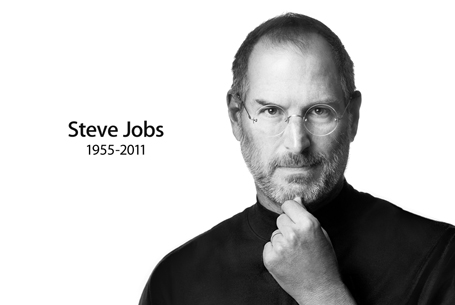
"Who is Steve?"

“Who is Steve?” my daughter asked this morning. “The guy who came up with the idea for that device you are holding. Kids, you are watching way too many movies, shut it off and go eat some breakfast”

You can admire Steve Jobs as a person (I did not know him personally), you can admire him as a successful businessman who made billions by not giving up (MBA students might be interested in this), but most of all Steve was a man who had an enormous impact on my day-to-day life.


Seeing his keynote addresses a few yeas ago made me realize that the world could be a better place if I could help people present just a little bit more like Steve. In the process, I managed to cut myself free from corporate shackles and take charge of my own life.

Today you can feel a strong personal loss for someone you have never met in person. And it is actually Steve who made that possible. Thank you for that.

SlideMagic: a platform for magical presentations. Free student plan available. LEARN MORE

Become a movie director

The second page of a business presentation is most likely the agenda page, and they all look the same: we will summarize what we are going to say, then we go through the story, and then we will summarize it again.

The rule “tell’ m what you’re gong to tell, tell ’m, and tell ’m what you just told them” is often quoted as a good structure for a presentation.

There is one place where repetition is used to force people to remember things: education. We pound, and pound, and pound, on the brains of children reluctant to absorb new facts until the brain “snaps” and finally gives up the resistance.

As a result, content is remembered, but not for long. The day after the test, it already starts to fade away. If we have to hammer in the messages into the minds of our audience, we have not got our story straight.

Stories are a much more powerful way to make people remember things. People love stories. Take for example this very short one:

“For sale, baby shoes, never worn.” 

It is the shortest story that Ernest Hemingway has ever written (and he claims that it is his favorite). Upon reading this story, your mind lights up. It is curious what happened to the baby. It starts to fill in the missing blanks.

The brain needs a framework in wich to put a story. Stories are great frameworks, and so are physical locations. Our mind is spatial.

We have all been in brainstorm sessions where the white board looks like a complete mess after an hour of discussion. If you take a picture of it using your cell phone camera, and look back 3 weeks later, there is a good chance that you can almost remember the entire debate minute-by-minute. Not because the writing on the picture is so clear, but because your brain has allocated a location on the board to store all memories form a particular fragment of the discussion. 

Consider yourself a movie director when designing a presentation. The director has the option to tell the story chronologically, but she rarely uses it. Instead, we have flash backs, flash forwards, slowdowns, different camera angels.

The logical structure of your story is the chronological script. You used it to solve a business problem, you used it to check that you have all the facts in place, covered every angle. That logical structure is not the end of your presentation design, it is the beginning: now translate that logic into a captivating story that people will remember.

SlideMagic: a platform for magical presentations. Free student plan available. LEARN MORE

The first 4 bullets

I presented at an investor relations conference the other day and a buy-side analyst made some comments about what it was in a presentation or document that gets him to read further: the first four bullets need to catch his attention.


So, does this mean that your first slide should have 4 powerful bullet points on it? 

Not necessarily. What the analyst said was that he wanted to get excited about an investment opportunity in about 1 minute. Given that most corporate presentations are a collection of bullet points, he translated that 1 minute into a number of bullets. However, that same minute can also contain a highly visual slide sequence that does a much better job pitching your idea.

Image by kcdsTM.

SlideMagic: a platform for magical presentations. Free student plan available. LEARN MORE

Reminder: my webinar tomorrow

Just a reminder that I will be hosting a webinar as part of Ellen Finkelstein's Outstanding Presentation Workshop tomorrow. Details of the event are here.

SlideMagic: a platform for magical presentations. Free student plan available. LEARN MORE

Mission statement on slide 2?

Mission statements are supposed to be the ultimate piece of prose: in one sentence you have the entire essence of a company: what you stand for, what your values are, how you treat customers, everything. This is serious stuff. Making jokes about the mission statement is often considered committing sacrilege. 

Mission statements often feature on page 2 of a corporate presentation, right after the title slide. Here you are: our company in one sentence.


It takes time to develop a good mission statement. Projects to craft one can take weeks. The entire organization needs to be involved. Words need to be adjusted. Values need to be discussed.

And that is exactly the problem for an external audience. They miss the context of the 3-week project. They miss the background of the debate. They have no idea about that offsite where you discussed your company's values. For someone who reads the mission statement for the first time, it is well, just another sentence with familiar sounding words.

The ultimate example of the Curse of Knowledge.

When I pooh pooh mission statements in presentations I did not mean to make fun about the values of your company. I think mission statements are valuable. Slide 2 of your presentation is just not the right place for them.

SlideMagic: a platform for magical presentations. Free student plan available. LEARN MORE

Software developers, please fix this

More and more applications will be a platform to deliver presentations, which means more and more applications need to do the following things:
  1. Have a good full screen mode
  2. Respond to Logitech and Apple remote controls
  3. Support dual monitors including slide preview mode, where you can see the upcoming slide on your laptop screen (not on the screen the audience is watching)
Adobe Acrobat does not have preview mode, and does not respond to an Apple remote. Apple Preview only seems to have slide shows with automated page transitions. OK, Preview might not be intended for running presentations, but Adobe at least should build in features that make Acrobat a good alternative to PowerPoint and Keynote for presenting slides.

Tablet devices would be another category. It is easy now to hook up an iPad to an HD screen. Again, presenting slides should be thought of as a required application.

SlideMagic: a platform for magical presentations. Free student plan available. LEARN MORE

What do you think of the new layout?

Google is upgrading the Blogger platform and today I switched on the new Dynamic Views. With the drop down menu at the top left of this page you can play around with a number of viewing options.

Personally, I like the way how the template invites readers to go back to some of my older posts. It comes at a price though, the current template is not very flexible in terms of design. I cannot add a lot of branding, and I do not like the (centered) formatting of the individual posts. Hopefully over time, Google will bring back more options for tweaking.

On balance, I think I will stick with the new format. What do you think?

UPDATE: I reverted back to the old layout, not so much because of the look and feel, but more because some basic functionality was not working (i.e., viewing comments).

SlideMagic: a platform for magical presentations. Free student plan available. LEARN MORE

Teaching public speaking to the new generation

Wanda Taliaferro contacted me to draw attention to her not-for-profit organization The New Jersey Orators that teaches children aged 7-18 to speak in public with confidence. The organization is also one of 10 global finalists in a Lenovo-sponsored competition that can land them $50,000. If you want, you can vote for them here, by selecting the Building Confidence - One Word at a Time entry.

SlideMagic: a platform for magical presentations. Free student plan available. LEARN MORE

Dark or light slide background?

A dark or light background for your presentation slides? Dark backgrounds work better for very large stages, where a big bright screen takes away the attention from the speaker. In smaller meeting rooms, a light background work better.

It is very inconvenient to edit and work with 2 masters of the same presentation, it is a lot of work and you always end up with inconsistencies. Presentations with a dark background give less flexibility to work with colors, and are harder to print (there are still audiences that do this, especially when presenting to institutional investors).

So as a result, I recommend sticking to a light background for most business presentations, unless you have a very specific, high-profile event that merits the design of a custom slide deck.

SlideMagic: a platform for magical presentations. Free student plan available. LEARN MORE

Dilbert on PowerPoint

PowerPoint has become such a core element of corporate culture that it features often in Dilbert comic strips. These one is from yesterday for example:

Dilbert.com

The full archive of Dilbert is now searchable by keyword, and you can license images for use in your presentations just like a stock photo site. For example, this search shows a whole lot more Dilbert comics on PowerPoint.

SlideMagic: a platform for magical presentations. Free student plan available. LEARN MORE