Popvideo iPhone projector

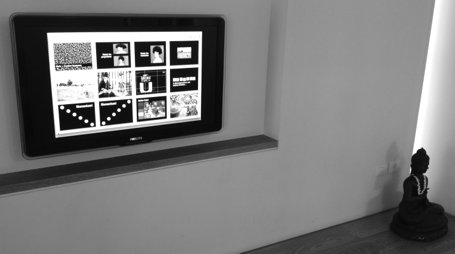
I speculated a few years ago about the potential of having a projector with you in your pocket. By that time, it was not yet possible to run presentations off your smartphone. Things have changed now and devices like the Popvideo pico projector for iPhone (comic sans alert) might be on their way to becoming a replacement for the crappy VGA corporate overhead projectors in conference rooms (the keynote hall is still too much of a challenge). I think there will never be a real market for projecting confidential business presentations on the walls of public places such as cafes. It might spur a new generation of graffiti or performance artists though...

SlideMagic: a platform for magical presentations. Free student plan available. LEARN MORE

Facebook IPO video

Facebook published its IPO video, you can watch it here. Some observations (in random order).

First of all, this video is so much more professional than the ones we saw before (Zynga, Groupon). Gone are the executives presenting their slides in slightly uncomfortable positions, and instead we see a streamlined performance of relaxed-looking people.

The videos work great to present the senior team, and to highlight case studies of selected clients (both huge corporations, and small businesses). Video is less good to present some of the extraordinary facts about Facebook. Making the point that Facebook is the American Idol final, times 2, but then every day for advertisers could be made stronger on a visual. But the video is loaded with these extraordinary statistics that could have been emphasized more, maybe at the expense of some of the product feature explanations (time line, news feed, etc.)

The video is also modest about putting Facebook in the development of the Internet. They could have claimed that Facebook is redefining the net, by putting a social layer on top of it. The video focusses most of the time on what Facebook is today. The investor wants to know what Facebook could be. The payment business for example, only comes out in minute 28 of the presentation. The legal council probably advised against speculating too much about the future of the company in an IPO presentation.

The financial section of the presentation is too short. Stats fly over the screen, and at no single point do you get a complete financial picture of Facebook. Growth, cost, margins. profits, cash flow. The designers of the video probably thought that the objective is to get people interested enough for them to seek out the detailed financial statements themselves.

The question is whether the video should have spent more time on addressing the key concerns that investors might have. We all know that Facebook is incredibly successful, and incredibly useful (I think 100% of investors considering an investment in Facebook use it themselves). But we do want to know is whether Facebook can be a profitable and growing business, and most of all whether it is worth paying $100b for.

So, all in all an incredibly professional video. My only comment would that they could have made it more targeted at the cynical investor.

SlideMagic: a platform for magical presentations. Free student plan available. LEARN MORE

Start with the story

When you start to write a college text book, or you are cutting up the project work for a team, you start with a structure: market, cost, competition, etc. When you start with a presentation, you start with the meat, the substance, the story, what you want to say. Big difference, often confused.

SlideMagic: a platform for magical presentations. Free student plan available. LEARN MORE

New Dropbox sharing

Sending big files as email attachments is increasingly cumbersome. Dropbox is an excellent alternative. It recently added a third option to share files with someone, it is my new favorit. Here are all 3 in a row:
  1. Shared folder. The recipient needs to install Dropbox (a barrier) and gets access to an entire directory on your computer. If she overwrites a file, your file gets changed too. This option is secure.
  2. Public folder links. You can send links to files in your public folder to other people. Anyone who has the link can access the file. If someone has your Dropbox user id, they could guess the name of a file, since the URLs are predictable. It is still hard, but not very secure. The recipient does not have to install Dropbox.
  3. Link sharing, the new one. It is now possible to get a sharing link for any file in Dropbox, not just the public folder. The link is garbled and very hard to guess. People can decide to view the file online (useful for mobile devices), or download it. The recipient cannot change the file, but if you do, the link points automatically to the latest version. If you want you can remove the link from Dropbox and other people can no longer access the file anymore. There is no need for the recipient to install Dropbox. Very useful.
The details are explained here.

SlideMagic: a platform for magical presentations. Free student plan available. LEARN MORE

Too good to be true

The other day I watched a startup CEO pitch, and his story sounded too good: “There are huge exits in my industry, a few IPOs, everyone uses this technology now, 5 similar companies in the world do really well and one is worth $1b”

“We started out 6 months ago and already have a great technology.”

While he convinced me that this is probably an attractive sector of the technology market to invest in, he also did not answer the elephant in the room question, “Are you arriving too late at the party?”

SlideMagic: a platform for magical presentations. Free student plan available. LEARN MORE

The hard bit

There are 3 levels in presentation design understanding:
  1. Spotting that a presentation looks really good (99% of people can do this)
  2. Spotting that a presentation actually does not look good (this is still relatively easy, although a surprising number of people, including some who call themselves designers, are unable to do this)
  3. Creating something that looks good, this is the really hard bit
A bit of modesty here: I too find myself stuck in level 2 often with my own work, pulling my hair out why it just does not come out right. In the end it is usually good, but it takes effort.

SlideMagic: a platform for magical presentations. Free student plan available. LEARN MORE

Most of your slides are a grid

In some presentation slides, the grid is obvious: a data table is an example. But also without the explicit lines of a table structure, you can recognize a grid in almost any composition you make. A diagram, the positioning of boxes on a slide, even a big picture with a few words of text. Recognize the grid structure, imagine the hidden lines and make sure everything lines up and is spaced out nicely. It will make for a much better slide composition.

If you are ready to dive in to hard core literature on the use of grids in graphics design, I can recommend the 1981 book Grid Systems (affiliate link) by Swiss graphics design master Josef Mueller-Brockmann (some of his poster design are in this Flickr set). The big issue for print designers is to juggle around text columns and images. Presentation slides are a bit different, but still the conceptual approach applies to them as well.

SlideMagic: a platform for magical presentations. Free student plan available. LEARN MORE

Visual memory

A year after discovering it, I finally got around to reading Moonwalking with Einstein (affiliate link), by Joshua Foer. A journalist gets fascinated by memory championships, and takes on the challenge to participate himself. On the way he explains how to train your memory, and puts memory in a historical context.

Why am I interested in these types of books? Presentations are all about helping people remember your story. We all know that forcing people to remember bullet points be repeating and repeating and repeating them does not work. The brain needs a visual story around which to store your message.
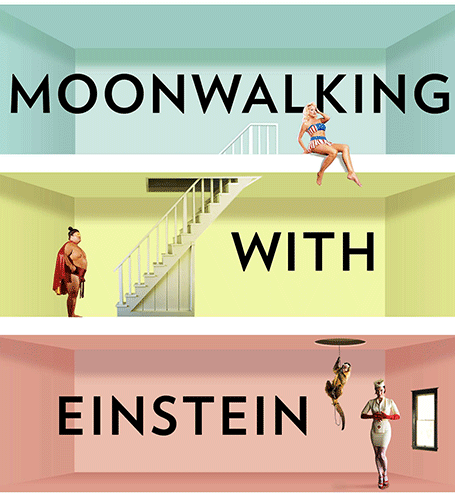


And it turns out that is exactly what memory champions do. They commit random numbers, names, facts, to rooms in virtual memory palaces in their brain. These palaces are often based on places the contestants know very well: a home, a school, a library. In these rooms, the objects are placed in the most outrageous (memorable) ways possible, including smells and sounds. After you put everything there, you can simply take a walk in your virtual memory palace and see all objects in front of you.

Scientists now think that the brain actually never forgets anything (capacity: 10-100TB). The problem is accessing the information. The brain needs an emotional stimulus (smell, visual) to unlock its memory. Slightly different than a indexed memory access of a computer. People think that we are so good at remembering places, locations, stories is survival: how to find a place with food, and then more importantly, how to find the way back home was a more useful skill in the stone age than remembering phone numbers.

With these techniques, you can teach yourself to remember thousands of unrelated items. And it just shows the power of the brain. Remembering is actually pretty simple when compared to the computing power it takes to coordinate hitting a baseball mid air.

Scientist think that forgetting is important for our mental well being. Just remembering everything is very stressful and distracting. That is the reason why some people with brain dammage can perform these extraordinary memory stunts.

The book gives interesting insight in our learning process. The brain is lazy and tries to put things in auto-pilot mode as soon as possible (driving a car for example). Once there, it does not consume a lot of energy, and does not cause distraction to do other tasks. Sometimes people experience this with learning. The cure to this is to move yourself outside the comfort zone, start trying, and most important of all make sure you are exposed to a direct feedback loop to tell your brain what worked, and what did not.

But what is the point of memorizing anything in the current time of abundant digital storage? The author argues that creativity in fact is future memory. You need to be able to provide sufficient hooks to stick new ideas, new insights to.

An interesting read.

SlideMagic: a platform for magical presentations. Free student plan available. LEARN MORE

Writing versus speaking

This blog post by YCombinator founder Paul Graham on writing versus speaking is worth reading start to finish.

What he says is probably inspired by the many conference speakers he saw. A big brand gets up the stage, unprepared, slightly rambling, but charismatic and full of catchy sound bites. In the end, when you look back, she actually did not say that much. Writing a good story is much harder.

This is what I encounter in presentation design every day. It is hard to design that story, but when you crack it, it often can be said in very little words but full of real content and insight.

But then again, I think that conference audiences are not always looking for that piece of insight or intellectual stimulation. Maybe they just want to laugh and have a good time.

SlideMagic: a platform for magical presentations. Free student plan available. LEARN MORE

Lego Simpsons

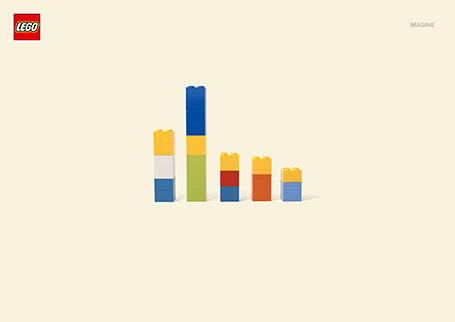
I love Lego. The ad below looks like a PowerPoint column chart, but also like the Simpsons family. It shows the power of imagination that many of us forget about when we grow up. (More ads here on Ads of the World).

SlideMagic: a platform for magical presentations. Free student plan available. LEARN MORE

Where to start?

Common presentation design wisdom is to start your design process by going analogue, sketching an outline on a piece of paper, on yellow stickers on a whiteboard, or in a mind mapping app. That is one of three components I start a presentation design with. Two others:
  1. A completely finished, random slide that is easy to make (a financial forecast for example) and just looks great to design the overall look and feel for the deck, yes going straight in to slide design software at hour 0
  2. A sketch of “killer chart”, a diagram that is the core of the whole story, the most important concept that needs to come across.
With these 3 pieces done, the biggest creative problems have been solved, and it boils down to executing your design.

SlideMagic: a platform for magical presentations. Free student plan available. LEARN MORE

Crappy fonts, better recall?

Here is an interesting piece of research published in Harvard Business Review: if you make text hard to read, people remember it better. Backed up by hard data. The possible explanation: when you go slower and you are less confident about understanding something, you concentrate more.

I agree with one of the commenters in the article: if you have to understand something, this might work. But if you are up against an audience who has better things to do than reading your material (i.e., a potential customer), I think you better make sure your material is readable.

What do you think, do you agree?

Thank you to to Akash Bhatia.

SlideMagic: a platform for magical presentations. Free student plan available. LEARN MORE

Mac screen to TV - wirelessly

I think that wireless video technology will transform home entertainment and the corporate conference room. In the latter, hopefully we might see the end of battles with laptops, cables, and projectors before we can get down to showing our presentation. It will take time before the last conference room is Airplay enabled, but I am keen to accelerate things.

It is already possible to Airplay iPhone and iPad screens on your Apple TV, but font issues still complicate the transfer of presentation files from computers to mobile devices. Currently, Airplay mirroring is not supported for Macs. The next version of Mac OSX will allow Airplay mirroring of Mac screens wirelessly to your Apple TV.

If you cannot wait, well, there is an app for that. Airparrot enables sending your Mac screen wirelessly to you Apple TV ($10). The app has many customization features, allowing you to adjust the performance/quality trade off and select which screens you want to transfer, or even which apps. You can switch off the cursor.


Still we are not yet living in the world of 1-click Airplaying of video. Television screens have a lower resolution than computer screens. So before using the app, you need to downgrade your Mac display to 1280x800, the closest to my Apple TV 1280x720 resolution. After that some fiddling with the screen remote to get the right aspect ratio. The resulting screen sharpness is OK, but not the pin-sharp feel you get from watching an HD movie. It is perfectly fine to play presentation slides (which are often 1024x768), but less than optimal for other applications.

Soon we will all laugh about this. Until then, a struggle to get rid of the cables.

SlideMagic: a platform for magical presentations. Free student plan available. LEARN MORE

5 ways to present on iPad

I am switching my own introduction presentation to iPad/iPhone, leaving my laptop home as a I go to meetings and instead bringing a small iOS to VGA converter cable with me (Airplaying the presentation to a big screen only works in my own office for the moment). I would recommend this to anyone who constantly needs to have her pitch/sales presentation ready to go.

As a result, I am trying all possible ways to view slides on my iPad. Only Keynote users have a perfect solution (Keynote), if you use other formats it is still compromising. In my case for example, I need PowerPoint to show example presentations that I designed a while ago. And a second complication is that I use a few custom fonts...

So here are your options, I use Dropbox to sync my files, it is still a lot more convenient than iCloud.
  1. Keynote to Keynote.  Straightforward and simple. Download in Dropbox, tick open in Keynote and you are all set. When you are in presenter mode, you get a preview of the next slide on your iPad, while the audience just sees the current slide on the projector. Only works with standard fonts that are installed on the iPad. 
  2. PowerPoint to Keynote. This works surprisingly well (if you use standard fonts). Download the PowerPoint file in Dropbox, tap open in Keynote and you have a file which is 95% OK. However, I am a perfectionist, and the 5% needs to be right as well. 
  3. SlideShark is iPad app specifically designed for presenting slides. You can upload PowerPoint files to their server, or tap a dropbox or email link and tell the iPad to open the file in SlideShark. The interface is nice, with the option to move randomly between slide tiles (which the audience cannot see) to break the lineair flow of a deck. SlideShark preserves animations in your slide. Using a special font requires a request to SlideShark technical support to install it in the data center. Unlike Keynote, SlideShark does not support the standard Apple fonts (such as Helvetica) SlideShark is not yet retina-optimized I think, the image looks slightly hazy on my screen, but I am sure an update will follow soon. The app has still some childhood diseases at the moment but it could be a clear winner in the future as the team there seems to working hard to make it work among larger competitors who are less focussed iPad presenting (i.e., Microsoft).
  4. PDF to Adobe Reader for iPad. Convert your PowerPoint file to PDF on your desktop, download it via Dropbox and select to open it in Adobe's Reader app (free). Fonts come out perfectly. The display is crystal clear, and the Adobe Reader app for iPad has a good full screen mode (unlike other document readers). Obviously PDF does not support animations
  5. PowerPoint to Adobe CreatePDF for iPad. The Adobe CreatePDF app works reasonably well for me (I do not understand all the 1-star ratings on iTunes), but (and it is a big but), only if you use standard fonts (and are willing to invest $10) and your deck does not have animations.
If you use Airplay to present from an iPhone or iPad into Apple TV, make sure to adjust your auto-lock settings (settings/general/autolock) to prevent the screen from going blank after a minute of inactivity.
Wrapping up: if you need to present from an iPad a lot, go 100% Keynote, if you can live without custom fonts, take SlideShark, for everyone else improvise with Adobe Reader for iPad. I am sure this post has to be re-written in a couple of weeks from now. Things are moving fast.

What are your experiences?

SlideMagic: a platform for magical presentations. Free student plan available. LEARN MORE

iPad sales app in practice?

I just got contacted by a journalist who is doing an article about the iPad as a sales tool, integrating the functions of a presentation platform and a catalogue/ordering system. I came up with iRep as an example. Do any of you know any other applications, and even better examples of companies that use this in the field?

SlideMagic: a platform for magical presentations. Free student plan available. LEARN MORE
Visualizing 6 million

Visualizing 6 million

Today is Holocaust Remembrance day in Israel and the country will come to a standstill for 2 minutes to think of those who lost their lives. Here is a small presentation I designed to try to put the number 6 million in perspective.

Remembering 6 million Holocaust victims

View more

PowerPoint

from

Idea Transplant

SlideMagic: a platform for magical presentations. Free student plan available. LEARN MORE

Searching Instagram images

Stock images sites are full of images that are not real (post from 2008). Images from Flickr with a creative commons license are a great alternative. But recently Instagram is taking over as a great source of images. The site searchinstagram.com allows you to search images on a desktop (Instagram is a mobile-only application). If you want to use an image in your presentation, you need to send the person who took it a message, because she owns all the rights to material posted on Intagram.

Instagram is the new Flickr.

SlideMagic: a platform for magical presentations. Free student plan available. LEARN MORE

Fixing standard data charts

Standard data charts in PowerPoint and Excel look ugly. Here is how I usually fix them. A raw screencast with som uhs and ohs, I am still experimenting with the software to see whether I can make these videos more often.


SlideMagic: a platform for magical presentations. Free student plan available. LEARN MORE

Should you conform?

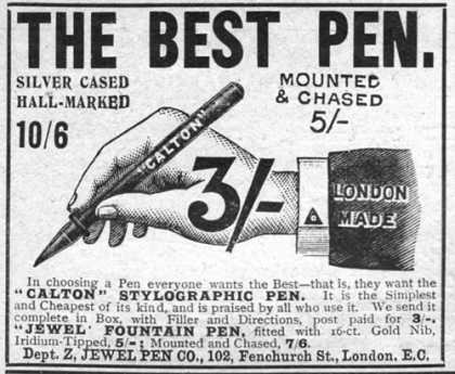
Early last century, there was a common practice in advertising: “This is what an ad should look like.”. Think about this when your boss tells you: “This is what a presentation should look like.” in response to your effort to do it in a different way.


For more of these wonderful vintage ads, visit vintageadbrowser.com

SlideMagic: a platform for magical presentations. Free student plan available. LEARN MORE

Office 14.2 for Mac available

Mac OSX Lion full screen view is now supported. I have not been using full screen view on my Mac much because Microsoft Office did not support it, so I could not switch over my entire workflow. I will give it another try now. Details of the update are here.

UPDATE: Full screen mode does not really work with multiple monitors... Well it works, but leaves the 2 other screens I have blank. So I will use full screen mode only when traveling with my laptop. Hopefully this gets fixed in a future Lion update.

SlideMagic: a platform for magical presentations. Free student plan available. LEARN MORE