LiveSurface

Putting objects on realistic 3D image surfaces requires a good eye to find an image on a stock photo site and some skill in PhotoShop. LiveSurface aims to make life a little bit easier, if focusses just on these types of images and the file you buy has everything you need (layers, filters). Still, you need to know what to do in PhotoShop though and you pay for the extra work through a higher image price.


The above was created from an iStockPhoto image that has increased in price since I purchased it a number of years ago (see earlier post)

SlideMagic: a platform for magical presentations. Free student plan available. LEARN MORE

The greys do not match!

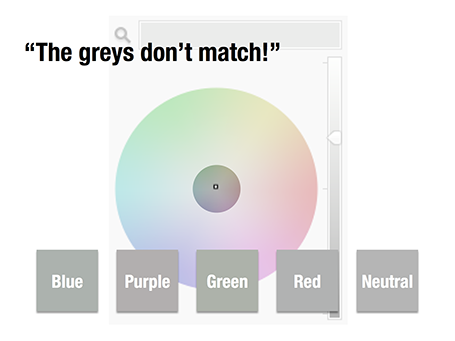
A few days ago, a friend posted a “complaint” on her facebook timeline that her husband always failed to spot fashion imperfections, in this case grey tints that did not match.

Grey colours sit in the center of the color wheel with equal balance of Red, Green, and Blue. But tipping the balance of the color mix a little bit instantly makes your grey look different. Use it as a design option to create a matching set of colours, watch out if it is not what you intended to do.

The same is true in black and white images, not every BW image is really pure grey, but it is easy to correct it, just have PowerPoint or Keynote turn it into a proper black and white image.

SlideMagic: a platform for magical presentations. Free student plan available. LEARN MORE

The story page

Many corporate web sites still emphasise 1990s-style content on their home pages: mission statements, contributions to the community, corporate history. I really like this deck with design concepts for 2013, including a suggestion to turn your home page into your story page.


SlideMagic: a platform for magical presentations. Free student plan available. LEARN MORE

Stock image pricing

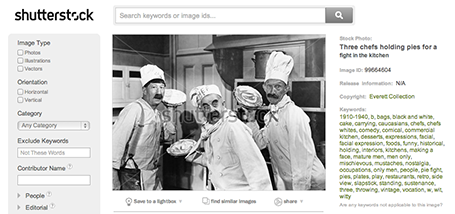
There are big pricing differences between stock image sites, especially for snaps that are different from the over-used smiling call center rep head shots. For example, iStockPhoto uses tiered pricing for images that have a more interesting composition. Shutterstock still uses flat rate pricing. These pie throwing chefs will cost you as much as an image of an orange isolated on a white background. It is worth to give Shutterstock a try. (No, I was not paid to write this).

SlideMagic: a platform for magical presentations. Free student plan available. LEARN MORE

Phasing out Excel

In email, I went from Lotus Notes, to Microsoft Outlook, to gmail. And now it is the turn of the spreadsheet: from Lotus 1-2-3, to Microsoft Excel, to Google Spreadsheets.

Excel has too many features. Even at my time at McKinsey where I built very complex spreadsheet models (mostly company valuations), I only used the very basic functions (numerical operators) to ensure that I completely understand what is going on in the model. Bugs could mean billions of dollars for my clients.

The features come at a price, on my Mac Excel 2011 has annoying delays when entering even the most basic of calculations.

The design of the Google apps have come a long way. Especially for spreadsheets, collaboration with multiple people is important. And finally, the Google spreadsheet is perfectly accessible on a mobile device.

Goodbye Excel.

SlideMagic: a platform for magical presentations. Free student plan available. LEARN MORE

Zoho Show mini review

Zoho is a web app suite targeted at small businesses. One of the apps is Zoho Show, a presentation design suite. Yesterday, I gave it a test ride.

A cutting-edge presentation design tool is not the key selling point of Zoho, it is just one of the components of a broader offering of business software with different benefits: attractive pricing when compared to Microsoft Office, access to your files from any location with an Internet connection, and easy collaboration on documents with colleagues.

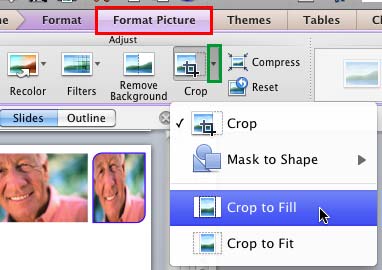
You do not notice that the Zoho slide design interface is run in a web browser. Interactions are smooth and fast. The application is designed to resemble Microsoft PowerPoint, menu colors look similar, and menu options are stored in familiar places. Unlike Google Docs, Zoho does allow you to crop images (a very important feature).

The basic PowerPoint user will have no problem working in Zoho Show, with one big exception: the ability to create data charts. In Zoho, you need to create them in the spreadsheet application and port them across using an image. This is an issue for people that live and breath bar and column charts day in, day out. (Google Docs has the same issue, it is probably complicated to include a full spreadsheet chart engine inside a presentation app).

For more advanced presentation designers, there are certain things missing. Template management is poor (same as with Google), and you miss the ability to align objects, snap them together on the screen. Font selections are limited, and as with all web apps it is hard to configure a tool bar for fast access to functions you often need (aligning objects, etc.).

Presentation mode also has lower functionality. Zoho requires a live internet connection to present your slides (not as big an issue anymore as it was a few years ago), and even in full screen mode there is a white browser bar on top of the slides. But presenters will miss the presenter screen most: a small window that shows the next slide that is coming up, plus speaker notes and a clock to keep track of time.

I now have tried out Google Docs, SlideRocket, and the Zoho presentation apps. SlideRocket is the only credible alternative to PowerPoint/Keynote in terms of features but it lacks the file ecosystem of Zoho and Google. The fact that Google does not allow you to crop images (a corner stone feature) puts Zoho ahead of it (for the moment, deep-pocketed Google can fix things fast).

But then again, the presentation app will not be the deciding factor when enterprises make a decision between Google Docs and Zoho.

I tested Zoho only briefly, if something I wrote in this mini review is incorrect, please let me know and I will update the post as soon as possible.

SlideMagic: a platform for magical presentations. Free student plan available. LEARN MORE

Creative commons Flickr search

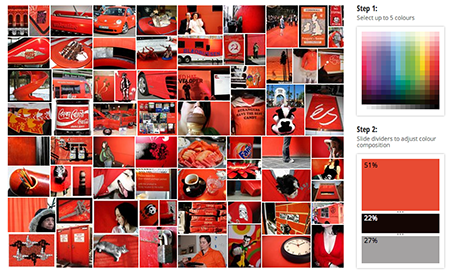
TinEye Labs has developed a cool image search engine. Select multiple colors (unlike Google image search), and the tool will mine 10 million Flickr images with a creative commons license (unlike Google image search).


Image by Mitali Mokerjee

SlideMagic: a platform for magical presentations. Free student plan available. LEARN MORE

What is your advice?

Sometimes, people ask you one question that forces you to focus. Yesterday: “So, what is your most important piece of advice to design better presentations slides?”.

Without thinking, I answered that he should forget about the way PowerPoint slides are supposed to look, and view it as a canvas that he can use in whatever is best to make his story stand out.

Hmm, that is what came out. Maybe still a bit concentrated and hard to act upon for a design novice, but that is actually what it boils down to.

SlideMagic: a platform for magical presentations. Free student plan available. LEARN MORE

Shape fill with a data chart

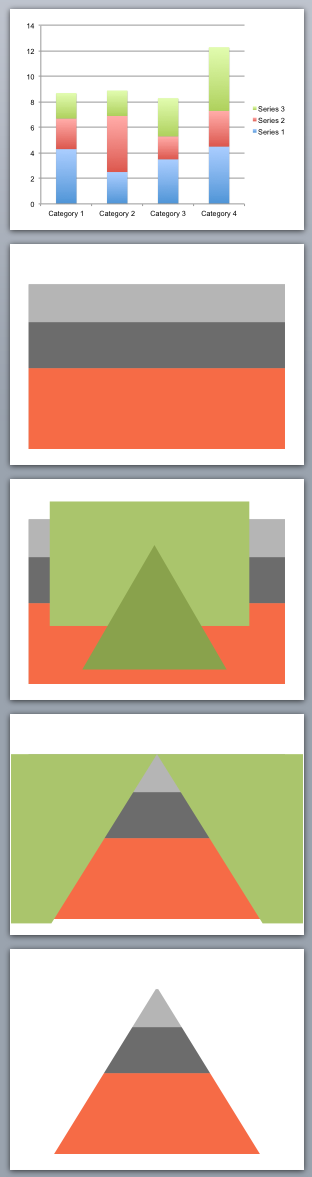
You can use shape cut outs as masks to create unconventional data charts. Here is how I created the pyramid-shaped stacked column chart:
  1. Insert a standard stacked column chart
  2. Cut away clutter until you are left with one huge column
  3. Insert a rectangle and a triangle
  4. Align the two shapes, select the rectangle first, the triangle second, right click, grouping, and hit subtract (PowerPoint 2011 for Mac)
  5. Color the remaining mask in the background color and position it over the graph

SlideMagic: a platform for magical presentations. Free student plan available. LEARN MORE

The technical VC pitch

Some startup pitches to venture capitalists are all about trying to explain a completely new revolutionary idea. Big bold images, stunning visuals, clever analogies, all needed to get the investor to understand and feel what you are talking about.

The other day, I designed one that goes completely in the other direction. An eCommerce startup with a very specific niche audience that is totally neglected by online offerings. It takes 2 seconds to explain that.

But the interesting part is to explain the VC how the magic of the numbers work. Seasoned investors in Internet businesses have seen hundreds of startups and can probably benchmark in their heads how your company stacks up in terms of LTV, CAC, conversion rates, basket size, repeat purchases, cohort developments.

To the outsider, the presentation might look a bit boring (pages with numbers), but it is the substance that is required for the discussion. To spice it up a bit, use custom fonts (watch out with compatibility) and a slightly bolder color scheme than you normally would use. Also make sure that you show the link between all those numbers: simply pulling numbers from Excel in random order will not sound and look very coherent.

SlideMagic: a platform for magical presentations. Free student plan available. LEARN MORE

Newspaper screen shots 2

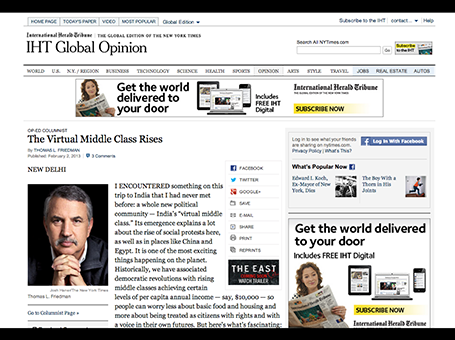
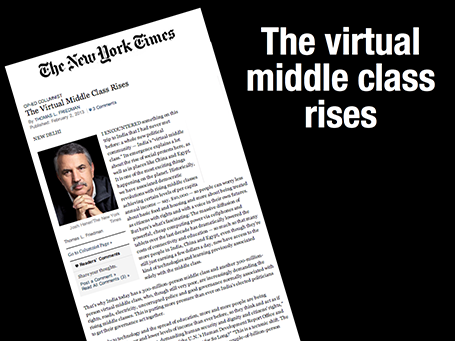
Following up on my post of last week, here is an example of how to show a newspaper clipping that is different from a standard screen shot.


If you are interested in the NYT article, it can be found here: The virtual middle class rises.

SlideMagic: a platform for magical presentations. Free student plan available. LEARN MORE

Cover those ads

Screen shots of news articles are useful to give your audience a sense of the sign of the times. To make them look more interesting, I reduce the zoom of the screen to get a nice long, vertical shot of the article with the headline and the newspaper logo still readable. On a page with a non-white background, I title it a bit and cover and distracting ads or facebook and Twitter buttons with a white box.

SlideMagic: a platform for magical presentations. Free student plan available. LEARN MORE

Fonts in Excel

A reader sent me a question the other day: what font to use in Excel instead of the boring and over-used Calibri/Arial?

I think there is not much to gain from using custom fonts in Excel. Readability is requirement number one, and the standard ones deliver. Moreover, Excel sheets are often emailed around to multiple people, and changing fonts creates compatibility issues.

The biggest opportunity to make Excel sheets look better is in the layout of your worksheets and typography. Subtle use of bold, carefully selecting the language you use, grouping similar items together, subtle grey box fills, etc. With a few little adjustments you can make your Excel sheet look like a nicely formated page out of an annual report.

SlideMagic: a platform for magical presentations. Free student plan available. LEARN MORE

High-res images from YouTube

Increasingly, YouTube is proven to be an excellent source of images. More and more videos are uploaded in 1080p HD (you can change the resolution in the settings menu at the bottom right of the video) which creates very good stills when you pause the video and make a screen shot.

To get the best results, try to size the YouTube window in such a way that it is around 1080 pixels wide.

If you want more control over what images to take, you can download the YouTube video to your machine (instructions here) and load the video into a video editing program such iMovie. Here you can move the playhead frame by frame to get the perfect shot.

Because of video encoding, you will see that images get blurrier when there is a lot of movement in the scene. If you want to show action, go ahead and grab the screen shot. If you want a crisper picture wait a few 1/24th of seconds until everything is calmed down again.

An obvious point: make sure that you have the rights to use the content.

SlideMagic: a platform for magical presentations. Free student plan available. LEARN MORE

Showing off your clients

Three different ways to show off your client list, depending on what you want to emphasize:
  1. Page of logos to show that they include the biggest names in the industry (here is how to design one)
  2. Map with dots to show that they are scattered around the globe
  3. Bar chart with sales number ranking to show how much you sold them (if you can share this information)
Mixing them up might not give the best picture: logos of completely unknown companies, a world map with lots of dots in New York City.

SlideMagic: a platform for magical presentations. Free student plan available. LEARN MORE

Anticipation

Most of the time, it is more powerful to show events that are about to happen rather than the event itself. It is very well done in the ad below for an automatic braking system that anticipates the movement of objects on the road. It brings great tension to the visual, almost making the still image move.


Commenters on Ads of the World were less enthusiastic though. Maybe the plusses and minuses should have been made a bit bigger. And well, if there is something wrong with the chart, it is in its 3D composition. The dog is too close and actually not running towards the cat. But I am probably the only one who bothers about that...

SlideMagic: a platform for magical presentations. Free student plan available. LEARN MORE

Excel to recover from a PPT crash

PowerPoint 2011 for Mac does not work well with Apple’s Time Machine backup system. You cannot change the backup timing, so my machine always tries to backup during Israeli office hours (night time US), and guess what, one of the few files that needs a backup is the presentation file I have open right now in PowerPoint. While I am sure there is some sort of file conflict mechanism in place, it is not very effective and I had PowerPoint crashing on me numerous times.

What to do about it? This is a relatively friendly crash, your program is not stuck, it just refuses to save your work (with a frequent autosave setting, that should be about 10 minutes of work). Now here is a nice trick to rescue that chart: select all objects on the page, hit copy, and paste them in an empty Excel sheet. Force quit PowerPoint, re-open, copy the objects in Excel and paste them back in. You just saved yourself from having to redo that 15 layer animation.

SlideMagic: a platform for magical presentations. Free student plan available. LEARN MORE

Political communications

Yesterday was election day in Israel, and I was shocked how hard it is for a voter to find out what a party actually stands for. In the end, decisions are not based on information provided by the parties themselves, but election guides provided by the news media.

The cause of this is probably rooted in the way political parties work. Policy documents are hammered out after long internal debates, where people fight over nuances and single sentences. Translating that watered down policy document in a clear message to voters is very hard. As a result, fresh new parties do a better job at communicating what they stand for with a small group of people enjoying the benefits of a white sheet of paper.

Put everything away, take a pause, and sketch out what you really want to say.

SlideMagic: a platform for magical presentations. Free student plan available. LEARN MORE

Centring objects

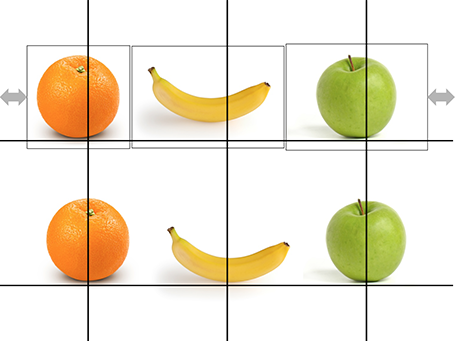
Images with objects isolated on an empty background are not always cropped perfectly. Centring the image will not center the object. Draw a some quick guide lines and you can align things properly.

SlideMagic: a platform for magical presentations. Free student plan available. LEARN MORE