** Footnote

In tables, I prefer to right-align numbers with the same amount of decimals after the dot. A footnote reference can break that line. Two ways to solve it: One: add the ** as a separate text box on top of the table. Two: if you have to use many footnotes use numbers [i.e. 7) instead of ******] to keep your footnote references short.

SlideMagic: a platform for magical presentations. Free student plan available. LEARN MORE

So, in short?

This is a great question to ask yourself after you finished designing the presentation.
“Well, what I really want is raising a bit of extra equity to de-leverage the company (slide 12, yellow bars). I think it is a really good deal for investors, since it looks like the stock is undervalued (slide 24, bottom right). Management has delivered on all its promises over the past 5 years (slide 15) and no one in the industry has a scale that is even closely to ours (slide 37 on the left), so it looks like our advantage will hold out for the foreseeable future.”
 Your presentation can be shorter: focussed slides upfront, with extra info in the appendix.

SlideMagic: a platform for magical presentations. Free student plan available. LEARN MORE

White on white

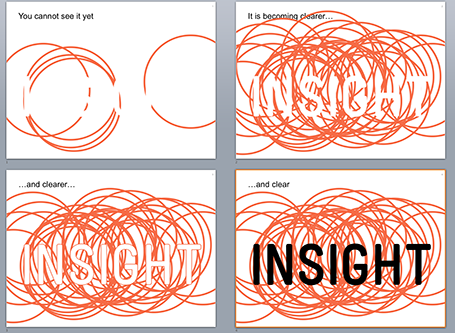
White letters on a white background enable you to make a nice slow-reveal slide. I used it for a client in BI (business intelligence) that creates insight by overlapping multiple analyses.


SlideMagic: a platform for magical presentations. Free student plan available. LEARN MORE

Custom fonts - redux

Custom fonts (fonts that are not installed as standard on most computers) give your presentation a nice distinctive look from the rest of the world that uses Calibri and Arial. It comes at a price: viewers who do not have your font installed on their machines get a poor experience.

For these practical reasons, I leaned towards sticking with standard fonts in business presentations. Things are changing though:
  • PDF is now my preferred format for sending presentations to people: it can easily be viewed on mobile devices and has a nicer, more permanent feel to it than an editable file. Once a PDF is created, fonts will display correctly on any device
  • There are more and more free fonts available that make it technically easy to download and install a font quickly, without having to count the number of seats that use the font in order to get in trouble with the license I paid for.
So, when do I consider using a custom font?
  1. Smaller organisations that are relatively tech-savvy. The big traditional Fortune 500 company is still locked into Calibri for the time being I am afraid.
  2. When I can use an open source font, not so much to save money, but to save the hassle of having to deal with license seat counts

SlideMagic: a platform for magical presentations. Free student plan available. LEARN MORE

Project pictures

Many business presentations contain pages with images of projects: real estate, solar farms, factory installations. Usually, they are small, low resolution, many on a page, and backed up by a dense paragraph of explanation.

To make your presentation look better: do the opposite. Stretch them across the full page, use high res images, use 1 image per page, and set a brief explanation text over the image.

The audience will not notice that you clicked through 7 slides when discussing your project portfolio. For them, it is just one slide.

Another way to show off your portfolio is to use the images throughout the presentation on separator and title pages that mark the beginning of a new section in your story. So, you have 1 image on your portfolio slide with the explanation that is 1 of 35 buildings. The audience gets a sense of the other 34 throughout the presentation without talking directly about them.

SlideMagic: a platform for magical presentations. Free student plan available. LEARN MORE

Using Prezi sensibly

For people bored with PowerPoint, Prezi can be an alternative presentation design platform. It is web-based, has powerful zoom effects and enables non-linear presentations. I would suggest to keep the following in mind when using Prezi for a business presentation:
  1. Stick to a linear story line, especially for larger audiences. If you have 20 minutes in front of 500 people, it has hard to get your message across using a random and unpredictable flow.
  2. Use the Prezi zooming and moving effects where you really need it, and not just for spectacular slide transitions. The audience will get motion sickness, or worse, will start giggling when you discuss your very serious business topic.
  3. Try to bring the look and feel of your Prezi in line with your regular PowerPoint colours. You will not have time to design Prezis for every presentation you do.

SlideMagic: a platform for magical presentations. Free student plan available. LEARN MORE

Deck inertia

In the beginning of a presentation design project, things are fluid. You are open to different approaches to tell the story, the look and feel of slides. But once you created a good first draft, you become hesitant to change it, even when smart people give good advice. I have seen many decks that started with an apology: this was the slide deck that they used since last year, but now we tell the story a bit different. Have the courage to change your presentation as your story evolves.

SlideMagic: a platform for magical presentations. Free student plan available. LEARN MORE

What is that font?

I get this question a lot. My logo is set in Futura Condensed Extra Bold. Other major brands have followed me...


SlideMagic: a platform for magical presentations. Free student plan available. LEARN MORE

Cheating with headshots

Pages with headshots of people are always a pain to design: the names and titles of people can vary greatly in length.


I spotted this neat trick in a promotion email for this book. People with long titles have been moved to the bottom where a 2 line job title does not break the grid. Also, the right column looks a bit wider than the first 2 to me, again creating a bit more breathing space for long names and/or titles.

Now, hopefully your CEO has a short name (she always wants to go first).

SlideMagic: a platform for magical presentations. Free student plan available. LEARN MORE

Data chart consistency

There are many options to format a data chart: write million or m, put percentages in columns or not, a thin baseline or a fat baseline or no baseline at all, tick marks or not, grid lines or not grid lines, drop shadows or flat, you can go on and on.

Whatever you choose, choose the same preferences on every page so your presentation will look consistent.

SlideMagic: a platform for magical presentations. Free student plan available. LEARN MORE

Infographics that try too hard

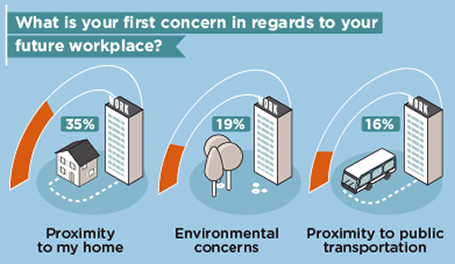
Many (maybe even most) infographics focus primarily on a cute visual concept and forget about the data they need to communicate. The result: pretty pictures that are impossible to understand.


First, focus on the data and think what you want to show: a trend, a comparison, a ranking, a contrast. That should be the basis for the design of your graphic.

Then, remember that cute icons can be as hard to understand as a bullet point: sometimes it can be more effective to write down the words “home” and “work” than trying to come up with illustrations of a house and an office.

Clients often request a cool infographic to get their message across. My response is to stuck to a more traditional presentation format, but if they insist on an infographic look, to go more creative on colors, shapes, and especially fonts at the expense of technical compatibility and the ability of everyone in your organisation to edit the slides for their own needs.

The WTF Visualizations blog is full of bad infographics, enjoy! (Via Daria)

SlideMagic: a platform for magical presentations. Free student plan available. LEARN MORE

iOS7 and PowerPoint templates

Most PowerPoint template designers think that what you put on the empty template page sets the look and feel of the presentation. Gradients, watermarks, logos, color bands. I have long been arguing that the template can just be a blank white page, what sets the look and feel is your approach to how your design the slides: what shapes, what colors.

The new iOS7 is a good example. Icons that looked great in iOS6 now look dated instantly in iOS7. The design philosophy has changed, without new logos, or repeated graphical elements on the page. It is the combined power of the new iOS7-ready icons that together create that new fresh layout.

So in PowerPoint, pick your colors, your fonts, your approach to shadows and gradients and you can use a simple blank page as your PowerPoint template.

SlideMagic: a platform for magical presentations. Free student plan available. LEARN MORE

Instant poll during a presentation?

One reader is interested in a simple, easy to use and set up smartphone/tablet solution to run a quick poll during a live presentation. I could not help him. Any suggestions?

UPDATE: some good suggestions came in in the comments and via Twitter:

SlideMagic: a platform for magical presentations. Free student plan available. LEARN MORE

Explaining big data

Many of my clients are now in “big data” and need to explain why what they do is so clever.

One approach to do this is the mathematical research paper approach: describe the algorithms and point out on what data sets they work.

A much better one is the take one practical case example throughout your entire presentation. Show how you searched millions of health records, cross matched them with facebook location data down to the square kilometer, overlayed that with climate data for the past 300 years and came to this very targeted, very unexpected insight that you would never have found out using a Google search, buying a research report, or other 2 common search methods.

The scientist will like approach number one: no ambiguity and a perfect explanation. The rest of us will prefer option two.

SlideMagic: a platform for magical presentations. Free student plan available. LEARN MORE

Amateurish format or no format?

It requires some skill to get a presentation to look professional. And when you are a boot strapping startup, I think most investors will forgive you if you did not have time or money to get your investor slides look completely perfect. You decided to put your effort elsewhere, rather than spending it on PowerPoint looks.

So, the bare PowerPoint template with a tiny logo on the bottom right looks, well, bare, but you could still say it is professional, sort of. Worse is when you put in a lot of effort and the results do not look good:
  1. Clashing colours
  2. Too childish, or too cute for predominantly machine/male investors
  3. Tacky, cheesy stock images
  4. Super complex gradients and other template graphics that take over 50% of the slide surface
No format works for an early stage startup investor pitch with a good idea, it will not work in a sales presentation though. 

SlideMagic: a platform for magical presentations. Free student plan available. LEARN MORE

The ponder slide

Not all PowerPoint presentations are in front of 500-seat TED audiences. Many presentations get emailed around and read on screens.

Strategic decisions are usually a careful trade-off between options. Some choices are clear, fact-based and objective. Others are qualitative, and yet others are complete leaps in the dark.

To make a decision you need to have all of the factors on some page somehow. Yes, this dense slide violates all the rules about good presentation design. But there is one big difference: the audience that will appreciate it are insiders, who suffer from the Benefit of Knowledge (the opposite of the Curse of Knowledge [what?]). They have heard the arguments before and they are ready for decision time.

How to design a good decision slide for these people?
  1. A table: options in the columns, arguments in the rows
  2. Group the options and arguments somehow, sort options by risk, how radical they are, something. Group arguments: similar arguments go together, if they are sort of the same thing, you collapse them into one. Group the factual arguments, to make the more contested ones stand out.
  3. Label your options and arguments for the audience with the Benefit of Knowledge, short labels or placeholders that are enough for them to understand the full picture. After months of discussions “Blink first” might be enough to describe a strategic scenario covering 25 pages.
  4. Frame the options so that the answers are in the same direction: I usually pick positive ones: no cannibalisation, retention of talent, limited competitive threat. Etc. 
  5. Now the tricky bit: score options (1, 2, 3, low, medium, high) and use colours to distinctive good or bad. Re-group, re-sort options and arguments until you get the maximum number of continuous good and bad fields.
  6. Look at the result and tweak scores and weights until you reach your conclusion. If you had the push up the weight of the leap-of-faith type of arguments a lot to balance the factual criteria, you know what you will have to explain in your presentation
  7. Once you reach your conclusion you can make a hugely simplified version of this matrix, collapsing all similar arguments together and boiling it down to the 2 or 3 points that will tip the balance

SlideMagic: a platform for magical presentations. Free student plan available. LEARN MORE

Substance first

So, you have been assigned the responsibility to get 15 senior business unit leaders all over the world to produce one coherent company strategy presentation in 2 months. Your role is just process, you are a relatively junior executive in the organisation, and the only leverage you have is backup by your CEO. A dream assignment...

It is tempting to try to make it as easy as possible by creating standard presentation structures, standard colour templates for everybody to follow. On top of that you could force deadlines on everybody to write down the key messages of the presentation first, ahead of the actual slides. You can write all this down in a beautiful Gantt chart.

In theory, this all makes sense. In practice though, I see that people only really start to focus when the actual content of the story is produced. So, here is an alternative and slightly more messy approach.

Start with the substance. Have each business unit Frankenstein together a deck of existing slides, and use that first presentation as a basis for a discussion what the business unit actually wants to say. What matters here is the sound track, the verbal story, not the actual slides. You need a trigger for them to start talking to you.

Second, try to get a fellow junior executive in every business unit who takes ownership of the presentation. This person will be easier to access and more skilled in PowerPoint than the business unit leader.

Now, start working with your 15 colleagues on getting to a uniform presentation. Create the common PowerPoint template and sketch out the structure of a business unit-specific deck based on the verbal briefing you had. Give home work to your 15 colleagues and follow up with frequent progress reviews. Create some competition by putting up draft presentations for everyone to read throughout the 2 months progress.

While visually the presentations should look the same, it is OK that each presentation deviates slightly in structure. Each business unit is likely to have its own story, requiring its own flow. And listening to 15 presentations that follow exactly the same rhythm is very boring.

Good luck!

SlideMagic: a platform for magical presentations. Free student plan available. LEARN MORE

The new Yahoo! logo

Marissa Mayer “Geeked out” on a new Yahoo! logo in a weekend (pretty much the same way in which the gmail logo was created) and designer Oliver Reichenstein rants about how she violated every best practice of corporate branding.

I am somewhat in the middle between the 2 extreme viewpoints. What Marissa did, was not a major rebranding of the company, she fine tuned the existing logo. I think it actually looks better than the old one, but - to Oliver&rsqo;s point - the Yahoo! brand has not changed for me. Marissa is only showing that she is making an effort to change things.

On the other hand I do find that big corporate branding projects often have a “the emperor has no clothes” feel to it. A company’ brand is more defined by what a company actually does: what product it delivers, and how she interacts with customers. Fluffy marketing slogans and long brainstorm sessions about logo personalities do not change much.

You could say that the Curse of Knowledge also applies to multi-million dollar logo redesign projects: for the people who were part of the design process and sat through all the workshops, it is perfectly clear that small green oval (no, not a circle) at the top right symbolises openness. For everyone else, it has no meaning. In that respect, many logo design projects are similar to mission statement crafting projects.

I guess there is a difference for companies with different logo audiences. If you are a big holding company, your corporate logo probably only speaks to 500 investment analysts. If you are a big retailer that needs to stand out in a busy high street full of visual clutter, your logo all of a sudden becomes a lot more important.

From a presentation design perspective, I do not care much about logos. If the client insists, I will put a tiny, tiny logo at the bottom right of a page. What is hugely important though is the colour scheme. The colours define the look and feel of a presentation and should be consistently used on every slide.

Startups often ask me whether they should invest in a logo. I usually advice to put their money to work somewhere else for the time being. Put something together quickly and make it look cleaner and more professional than the first gmail logo. Think about colours. Later on, invest money in a logo redesign.

SlideMagic: a platform for magical presentations. Free student plan available. LEARN MORE

Business English

I left the Netherlands in 1994 and have since then worked in international environments where English is the business language. And business English is different from regular English: it has a very small vocabulary. Why? Many non-native speakers have to speak it, and you actually do not need a very rich vocabulary to get the basic business concepts across.

Now and then I come across business communications from the Netherlands and am surprised to see how the English language is invading the Dutch business language as well. I am not a big fan. You either write in English, or in Dutch. While I would not go as far as the French and insist on inventing new native words for English concepts (Internet browser?), I think it is a bit strange to see a Dutch sentence with 25% English words in it. Even if you did not intend to, the English words contribute to a feel of fluffy buzzword abuse.

For a presentation, the safest solution is to write the document in 100% English, so you can use it for every audience and change the language in which you present depending on your audience.

SlideMagic: a platform for magical presentations. Free student plan available. LEARN MORE

Investor pitches evolve

As your company evolves, so will your investor pitch. At the idea stage, you are mainly concerned with explaining your idea and establishing you as a credible entrepreneur.

But with a product up and running, a few customers, and some revenues, investors will turn to other things like customer acquisition cost, churn, customer close rates, whatever is relevant for your industry. Inevitably, your deck will become less creative and resemble more a standard business presentation full of numbers and data.

Do not use the pitch deck from last year for your next investor meeting.

SlideMagic: a platform for magical presentations. Free student plan available. LEARN MORE