Too much colour (2)

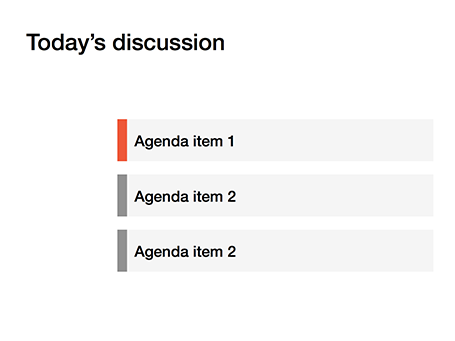
Following frequent requests after my previous post, I have included a picture here that shows the concept of the narrow coloured bar replacing a fully coloured slide object.

SlideMagic: a platform for magical presentations. Free student plan available. LEARN MORE

Too much color

Colours brighten up your slides and are a great way to group related items together: USA is green, Europe is blue, Asia is purple for example.

But applying bold colours to big text boxes makes your slides too busy and nervous. Instead, keep those text boxes light grey and add a very narrow colour box attached to it at the left side, almost like a fat line.

SlideMagic: a platform for magical presentations. Free student plan available. LEARN MORE

Mess illustrates mess

“Hey, that chart looks very messy?”
“Yes, but that is what we want to show, right?”
“True.”

SlideMagic: a platform for magical presentations. Free student plan available. LEARN MORE

Uncovering

When you need a complex animation, it is often easier to uncover objects by removing a white box than build up a shape step by step, especially if the shape includes a data graph (columns, lines, bars).

SlideMagic: a platform for magical presentations. Free student plan available. LEARN MORE

Design for reading

The other day, a client needed a presentation meant for reading, something that would be sent out to the employees by email. So, we designed it for reading and used the fact that for an internal audience we could be a bit more radical with the format.

Here is the concept: a dark 16:9 background. Each chart has a big visual on the left side while the message of the chart is spelled out in full sentences in a relatively small font in a column on the right. Full sentences, because nobody will be around to explain what the abstract graph means. A narrow column in a small font because it is easier to read than a very wide sentence spanning an entire 16:9 screen.

SlideMagic: a platform for magical presentations. Free student plan available. LEARN MORE

Use that style guide

If your company logo was designed by a professional designer chances are that somewhere in the bottom drawer of the marketing department you can find a complete graphical style guide that goes with it. Usually, it gets only used for commissioning other design work (brochures, web sites, etc.), and hardly any PowerPoint user knows of its existence.

Ask for a copy and use it to inspire your presentation design. See what colours the designer recommends, there might be more than present in the logo. See how pages are laid out. See what fonts and font colours are used. Lots of inspiration.

And yes, the section for the PowerPoint presentations in these style guides is usually pretty bad. Professional designers are not used to working in PowerPoint (an inferior product in their minds). Beautiful design work gets reduced to Arial, heavy top banners and watermarks. So, use the design inspiration of the first pages of the style guide to create your own PowerPoint template that fits it. Hopefully the marketing communications department lets you get away with it.

SlideMagic: a platform for magical presentations. Free student plan available. LEARN MORE

Every word counts

Often, presentation slides are filled with verbal padding: words that take up lots of space but do not add any additional meaning. Every sentence you write in a slide is like thinking of a newspaper/blog article headline: it should be as short as possible without diluting the content to an overly generic statement. Unlike a text document, in a presentation, every sentence needs careful consideration and scrutiny.

SlideMagic: a platform for magical presentations. Free student plan available. LEARN MORE

The audience expects it

Some presentation slides live for years, and that might be the reason that we are hesitant to change them, we think: well, the audience will expect this slide.

If nothing about your story has changed, then this is a valid point. If not, it is the wrong approach. The same slide signals no change at all, business as usual. Also, even if you did change its content, the audience will think it is the same slide as last year, and will not notice the different content.

Sometimes, change is good.

SlideMagic: a platform for magical presentations. Free student plan available. LEARN MORE

Hide to emphasize

One way to draw attention to a specific object on your slide is to apply all of these at the same time: pink colour, bold, italics, underline, big drop shadow, fat circle around it (also pink), big arrow pointing at it. Maybe it will stand out of the clutter on the rest of your slide.

The other way: hide everything else around it. Semi-transparent white shapes are great to dim items on your slide.

SlideMagic: a platform for magical presentations. Free student plan available. LEARN MORE

Cover images

The ideal cover image of your presentation (the slide that sits on the projector while the audience walks in) would be one that tells your whole story so perfectly that the presentation itself can be skipped. Many people try to reach this level of perfection by putting up a messy collage of different images, a very tricky visual concept or a highly tacky and cliche stock image that represents the values of the brand: young, healthy, lively, dynamic, and social.

I am less ambitious and usually pick an image that fits the corporate colour scheme of the client and is a preview of an image that I use on a very important slide somewhere inside the presentation. It looks nice and calm when the audience enters, and it will generate that instant recall of that important slide when I show it for the 3rd time on the closing slide.

SlideMagic: a platform for magical presentations. Free student plan available. LEARN MORE

PowerPoint template mix up

Copying PowerPoint slides from one presentation to another can have disastrous format implications. Some survival advice.
  • When saving/defining a new PowerPoint theme, stick to the suggested colour uses that PowerPoint suggests, i.e., text/background dark should be a dark colour for example. If you move slides across between templates in properly defined colour schemes, the damage will not be that big
  • Make sure you copy slides into the file with the desired template and not the other way around. Sometimes this might require you to create a 1-slide presentation in your preferred template, and then copy the 35 other slides into it.
  • There is a way to merge PowerPoint slides and keep their original formatting, see an old blog post on the subject.
  • At the top left corner of the ribbon is a layout button that opens a drop down menu of slide formats that are present in the master. Use to to correct disasters.
Good luck!

SlideMagic: a platform for magical presentations. Free student plan available. LEARN MORE

Presentation template recipe

Here is an almost sure recipe to get a good look and feel for a presentation template, even with an Arial font:
  • One nice accent colour, but used sparsely for only that: provide an accent
  • The other objects in shades of grey, using relatively more light ones than dark ones
  • Text in dark grey, not black
  • No lines around shapes, let the color (i.e., grey) do the work
  • Everything flat: no shadows, no gradients, no reflections
  • Black & white images only

SlideMagic: a platform for magical presentations. Free student plan available. LEARN MORE

Hidden Microsoft Office data

Take care when sending Microsoft Office files to outsiders, you might send hidden confidential data with it.
  • The presenter notes fields in PowerPoint might contain notes you do not want others to read
  • Taking out the data labels with confidential numbers from a data chart does not remove the actual data in the underlying spreadsheet
  • The PowerPoint sticky notes links are very small, which is great so they do not obstruct the design of the slide, on the other hand, you might just forget to remove them.
PDF-ing your document will solve most of these issues.

SlideMagic: a platform for magical presentations. Free student plan available. LEARN MORE

Learn to see

A child find it hard to draw realistic 3D perspectives, because her brain is still developing 3D perception. She draws a house with a front, and a side wall without that wall disappearing towards the horizon. She is not drawing what she sees, she is drawing what she thinks the house looks like. When the drawing is finished, she notices that someone is not right, but she finds it impossible to lay her hand on it what it exactly is.

The same is true for grown ups and graphics design. You see a beautifully designed page, you want to make something similar in PowerPoint and somehow, it does not come out. Why? Because you stuck to your own mental model of a PowerPoint slide (and what you think it should look like) and did not really see how the designer deployed white space, used of grey scales in text rather than blunt black, and set the space between title lines slightly tighter, and was careful not to overdo it with the colours.

Here is an exercise. Take a poster or design that you really like and literally recreate it in PowerPoint (or Keynote) until it looks exactly the same. Now apply that template to your presentation.

SlideMagic: a platform for magical presentations. Free student plan available. LEARN MORE

Presenter fatigue

Giving your presentation over and over again makes you a better story teller. You need to know your stuff inside out in order to be spontaneous. Pretty much like a musician who can only start to improvise after the basic song can be delivered on auto pilot.

But, some presenters go to the other extreme, they get bored of their own presentation. Energy levels drop, and slides get cut and reduced to generic bullet points that say it all. They say it all to the experienced presentation, they say nothing to the novice audience who hears the story for the first time.

So, how can you freshen up a presentation? Some thoughts
  • The most important one: now that you are more confident about your story, you can move toward much more daring and unconventional slides.
  • Add stories or anecdotes
  • Go for a totally new look and feel (dark background, light text)
But different slides can only do so much. In the end you have to power yourself up to tell that story the way did it the first time to your audience who hears it for the first time.

SlideMagic: a platform for magical presentations. Free student plan available. LEARN MORE

We are big

What you measure is what you get is a common management saying. Most line managers in large corporations are focussed on market share rankings and top line sales figures. Chart after chart of many investor presentations often repeat that same message, look how big we are. But a simple “We want to bet the biggest” is unlikely to be a compelling strategy to investors. How are you going to turn that size into shareholder return?

SlideMagic: a platform for magical presentations. Free student plan available. LEARN MORE

Listen to yourself

Most data charts are cluttered with numbers that hide the actual message that you want to convey. So next time, listen to what you actually say when you walk people through the chart. Next, try to design a chart that only contains the numbers and items you spoke about, leave everything else out. It does not matter that you do not have the full comprehensive analysis on the screen, what matters is that your message comes out.

SlideMagic: a platform for magical presentations. Free student plan available. LEARN MORE

Slides = confidence booster

Most clients give an almost perfect verbal investor or sales pitch in our first briefing meeting. Somehow, in one on one meetings it is easy to connect with the 1-person audience, and construct a compelling story with a natural flow.

As soon as the number of people increases, something goes wrong.  Luckily we have our presentation slides projected big on the wall to remind us to get on with telling our story just like we did in the 1-on-1 meeting.

And here is the secret of the professional presentation designer: I often follow that first raw 1-on-1 pitch very closely in my story flow design. But do not tell anyone.

SlideMagic: a platform for magical presentations. Free student plan available. LEARN MORE

Two types of detail

  1. A tangent that distracts from the overall story, especially confusing for a novice audience who comes in completely cold to what you want to say
  2. A deep dive that serves as an example to support a major point in your presentation.

SlideMagic: a platform for magical presentations. Free student plan available. LEARN MORE

Audience perspective

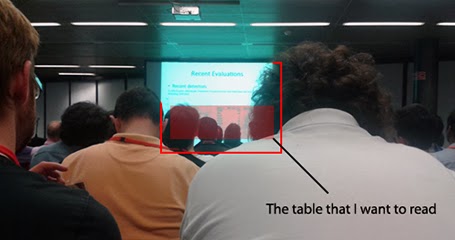
The PowerPoint or Keynote slide sorter view with the small thumb nails is a good proxy for how the audience will see your slides. But sometimes, they are even worse off as in this image by Ali Eslami.


While I would not go as far as recommending to fill the top of the slide with all the important content, it is true that this is the part of the slide that will get the most visibility. At least write the message clearly in the headline, rather than using the space for a descriptive title.

SlideMagic: a platform for magical presentations. Free student plan available. LEARN MORE