
We need video!

Before investing a lot of time and money in designing a video to complement your presentation, take a step back and think why you want it, then brief the designer accordingly. Some uses of video are more useful than others:
  1. A spectacular, wow, stunning, noisy, beat drumming, flying effects filled, splash opening that leaves the audience shuddering in their chairs
  2. Customer testimonials and/or other interviews of people that are hard to bring to the presentation room
  3. An explanation/demonstration to show how your product works, is used in practice
  4. A high-paced, scripted story
  5. A funny, cute cartoon to support your message
  6. A complex animation that is hard to execute in PowerPoint or Keynote
  7. A narrated slide sequence that you can send to people you being present to explain it

SlideMagic: a platform for magical presentations. Free student plan available. LEARN MORE

Non-stock stock photo sites

A friend of mine posted a question on her facebook timeline: where to get stock images that do not look like stock images. I am shamelessly copying the list of URLs that were posted in response:

http://unsplash.com/
http://thestocks.im/
http://www.stocksy.com/
http://thenextweb.com/dd/2014/05/15/53-free-high-quality-image-resources/
http://www.caddis.co/blog/free-quality-non-stock-photo-resources-for-blogging


SlideMagic: a platform for magical presentations. Free student plan available. LEARN MORE
If your edge is the team...

...well, highlight it. In most presentations the management bios are all crammed on one page in the presentation. If you are starting a company and your team is the only asset, you might as well spend a bit more time/space on it.

SlideMagic: a platform for magical presentations. Free student plan available. LEARN MORE
Then the usual blah, blah, blah

And after that we come in with the usual “blah blah blah” pitch. I hear this often in briefing meetings.
  1. You are offending your audience
  2. You probably do not believe in your own story
  3. You have become tired of given the same pitch all over again
  4.  You are probably winging the story, a true blah, blah, blah experience for your audience
Invent a fresh approach to telling your story, believe in it, and stand for it. No more blah, blah, blah in the story outline.

SlideMagic: a platform for magical presentations. Free student plan available. LEARN MORE

The opposite of a job interview

Y Combinator, a successful early stage investor, is opening its applications for the Winter 2015 program. Their advice on how to apply successfully (2009) is full of valuable advice that I apply daily when helping people to design investor presentations.

The advice is targeted at the first phase of the investment funnel: sending in a cold email with your pitch in the hope of getting an opportunity to talk in person. Paul Graham mentions a few times that writing a pitch to an investor is different from writing a CV to an HR person in a huge company.
  1. Be extremely concise. Cut fluff, buzzwords, jargon. “every unnecessary word in your application subtracts from the effect of the necessary ones” These people read about 100 applications a day.
  2. Say what you are doing, people need to put you in some sort of box to start thinking about your idea. Even if this means that you run the risk of limiting/narrowing down the upside potential of your idea.
  3. Realise that your write-up is an excuse to figure you out, see how smart you are, how good you are at getting things done. It is not about your idea, it is about the insight you bring with the idea. Did you anticipate the obvious questions any intelligent person might have?
It is well worth to read the whole article.

SlideMagic: a platform for magical presentations. Free student plan available. LEARN MORE

Slide negotiations

There are different uses for a PowerPoint deck. One is to serve visuals for a live presentation. Another is a replacement for a word processor. I currently use it as a user interface design tool for a web app (the irony: PowerPoint is designing its own successor...).

In big corporations, a PowerPoint file is often the working document that different stakeholders use to negotiate on strategy, budgets, or planning. Through a series of meetings, a document iterates towards a solution that is acceptable to all parties involved. The slides do not have to be attention-grabbing, emotion-triggering, memorable calls to action.

Instead, often the most important part of a slide is the detailed footnote that summarises the compromise that has been reached after 3 weeks and 6 meetings. Others: the order in which the boxes are placed on the slide, the relative position of the boxes, dotted lines versus straight lines, preliminary versus final decisions, etc.

Use PowerPoint for whatever you want to use it, do not mix things up though. Budgeting presentations should only be used in budgeting meetings.

SlideMagic: a platform for magical presentations. Free student plan available. LEARN MORE

Who do you need in the briefing?

Many clients suggest to bring all experts that contributed to a project to the presentation design briefing meeting. I actually prefer to have a briefing meeting with just one person: the presenter. The experts have done the work and delivered the solution. Now it is time to focus on how to tell the story. A one on one conversation is the best way to bring it to the surface.

SlideMagic: a platform for magical presentations. Free student plan available. LEARN MORE

Mentioned in Forbes

See an article on Forbes by Mark Fidelman with 20 tips to make better presentations. Due to the format of the article (an email interview with presentation design experts including me), the suggestions are slightly random, but useful nonetheless.

SlideMagic: a platform for magical presentations. Free student plan available. LEARN MORE

What software did you use?

That question is a big compliment for your PowerPoint presentation: you have succeeded in making your PowerPoint not look like PowerPoint. Here are some simple steps that can help you:
  • No hierarchical bullet point texts (if you have to put three messages use 3 grey boxes with a short sentence)
  • Switch the standard Microsoft Office font Calibri typeface for Arial (other exotic fonts will cause issues on tablets)
  • Avoid the standard Office colours (blue, faded red, faded olive) and use your own colour palette, also in data charts
  • No dirty gradients, drop shadows
  • No heavy graphics and/or colours behind the title or at the bottom of your slides
  • Create many slides with page-filling images
  • Remove the default clutter of data charts (tick marks, etc.)
The same applies to Apple Keynote. Although a standard Keynote slides looks a bit better than a standard PowerPoint slide, Keynote also has ugly defaults (colours, texture fillings of data charts). 

SlideMagic: a platform for magical presentations. Free student plan available. LEARN MORE

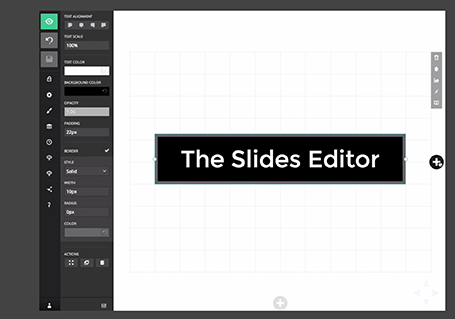
The new slides.com

Slides has updated its slide editor. It is another example of people moving away from 1990s drop down user interfaces. The UI is simple and looks great. It has very powerful capabilities to insert HTML code in it. Still - as with all presentation design software - the average user is likely to use it to create bullet point slides... Check out the demo here

SlideMagic: a platform for magical presentations. Free student plan available. LEARN MORE

1st impression web page

For most companies, a web page is a store front, a shop window. It should look professional, give a basic sense of what you are about, and provide instructions how to get there/contact you. Sophisticated visual effects, carefully crafted strategy paragraphs, mission/vision statements, marketing buzzwords might be important to you, but not to the reader of your home page.
  • Cut back the amount of content
  • Ditch the sophisticated custom design for a good looking template (such as squarespace.com)
  • Make sure the basics are up to date (address information, management bios, the "news" section)
It is that simple.

SlideMagic: a platform for magical presentations. Free student plan available. LEARN MORE

Upstream like a salmon

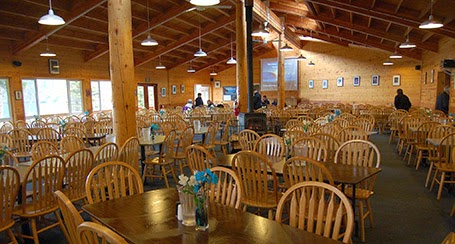
A few days ago I saw a National Park Ranger present in this setting below: 200+ getting and eating their lunch, continuing their conversation, while the ranger used a microphone to top the noise level of the crowd, reading from a piece of paper. A bit like Alaska salmon swimming up river, or the jazz band that is ignored in the background of a cocktail party.


A better approach: shorten the talk to focus it solely on the memorable facts: how big this National Park is, how powerful the 1964 earthquake/tsunami was and what permanent changes it made to the landscape. The philosophy behind the National Parks is less interesting for the hungry crowd.

Photo source: alaska.org

SlideMagic: a platform for magical presentations. Free student plan available. LEARN MORE

Writing for skimmers

Busy investors do not have (want to make) time for long verbose cover letters/emails for your presentation. Write for a skimmer:
  1. Keep it really short
  2. Cut out all management buzzwords and padding (synergies, engagement, strategic, flexible, ROI, etc.) that everyone else is using and which have become verbal white noise. Use conversational, human language
  3. Say how you got to her (our dads were in high school together)
  4. Say what you want early on (advice, money, intro to someone), and ask for a very specific next step.
  5. Prioritise interesting content of the pitch (unusual facts, case example, unexpected advantage over a well-known competitor (2x as many users as Facebook, etc.) over a well structured, complete, business school essay. You are not trying to get a grade for your mid terms, you are trying to get a follow up phone call. 
  6. Make it highly/relevant/specific to her: complements portfolio company x, y, z, matches what you spoke about at a conference last week.
  7. Use typography to break the text, to make it easier to speed read: big concept, 3 (short) supporting bullets, another concept, supporting bullets.

SlideMagic: a platform for magical presentations. Free student plan available. LEARN MORE

Building signage

I drove by a big office tower the other day that featured a new signage:
  • The biggest font size possible, covering the entire width of the building, no (white) space left what so ever.
  • As close as possible to the top, no white space here either
  • The characters' rhythm and spacing seemed to clash with the repeating patterns of the window.
Typical corporate executive thinking: big and high. What should they have discussed with the architect and the signage supplier instead?
  • Give the logo space, more white (stone, concrete) space around the graphics creates a much stronger presence
  • Adjust the size of the logo based on the characteristics of the building: time the spacing of the characters in such a way that disturbing repeating window patterns are neutralised.
  • Avoid the logo being an after thought, instead explicitly reserve space for building signage when designing the exterior of the building

SlideMagic: a platform for magical presentations. Free student plan available. LEARN MORE

Writing in a box

Newspaper headline writers are masters in packing a lot of information in very few words, link bait bloggers write titles that people just have to click on.

In day-to-day business presentations, you might not have time, energy, budget to come up with an artistic visual master piece on every slide. The biggest difference to the quality of your slides might simply be your writing.
  1. Cut words that add no content: in order to, etc., avoid passive sentences (Harry was seated on by a bird), management cliche verbs (monetize/strategize/analyze/incentivize)
  2. Avoid long words (small/narrow boxes create uneven line breaks)
  3. Think carefully where you break a line, do it manually
  4. Work with labels, introduce a short catchy name for a more complex strategy, option early on in the presentation, so you do not have to repeat the enter-the-Indian-market-first sequence all the time. 
  5. Stay within the constraints, if you have 2 lines, do not make it 3.
  6. Emphasise the contrast between a series of boxes and cut text that is common to all of them: entry in China, launch in India, Japanese entry: becomes China, India, Japan
  7. If you have to, write exceptions or other details in a tiny footnote

SlideMagic: a platform for magical presentations. Free student plan available. LEARN MORE

Summer posting frequency

I will spending more time with my family over the coming weeks, so I might skip a post on some days. I hope you are all having relaxing summer.

SlideMagic: a platform for magical presentations. Free student plan available. LEARN MORE

Over edited

You write that paragraph, again, and again, and again. Share it with the team, incorporate the input, re-write, again, and again. In the end, you probably got a politically correct piece of prose, but at the same time you killed of the spontaneous, raw enthusiasm about why your company/idea is so great.

Maybe say the pitch out loud one more time and just write down what comes natural to you?

SlideMagic: a platform for magical presentations. Free student plan available. LEARN MORE

One chart, multiple levels

A good novel has multiple levels of depth, the basic story, below that the deeper themes.

In presentation design I often apply similar techniques. The top level message screams from the chart through the use of colours (target: the listener), but for the reader, there are ways to find richer information to back up the bold conclusions you draw.

One example could be a simple table of pros and cons. Big colour contrasts indicate "in favour" and "against" for each of the criteria, but small text inside the boxes that is not meant to be readable for a live audience gives the more detailed explanation.

For TED-like big budget presentations, you it is worth to take out the detail. But most business presentations are used in multiple settings, it is just more efficient to have one set of slides supporting both of them.

SlideMagic: a platform for magical presentations. Free student plan available. LEARN MORE

Meet me in Anchorage AK

I will be “presenting about presenting” in Anchorage, Alaska on August 14, at 17:30. The talk will be about how to pitch your ideas to investors. Details of the event can be found here on the page of AK Entrepreneurs Meetup community. Drop by if your are in the neighbourhood!

SlideMagic: a platform for magical presentations. Free student plan available. LEARN MORE

Human stories

I see that only a handful of my facebook friends follow Humans of New York: a photographer taking pictures of strangers in NYC, adding a little personal story. The way these stories are written is brilliant: an unexpected starter question, followed by a very short story, that usually ends in an unexpected twist or life lesson. Add them to your facebook feed if you have not already done so.

SlideMagic: a platform for magical presentations. Free student plan available. LEARN MORE