SlideMagic versus the competition. Today, I added a slide to the SlideMagic template store that shows how I usually visualise some sort of competitive comparison or product differentiation. I took SlideMagic itself as an example
Juggling URLs. All the SlideMagic businesses and web sites run on different platforms. Through design, I have tried to keep a consistent look and feel as you click from one environment to the other. Yesterday, I made some drastic changes to URLs, and consolidated the facebook pages into one.
Cliche ads. Business speak is full of cliches, and when you take a cliche headline, and use a cliche image composition to visualise it, you get a cliche ad.
The origins of PowerPoint. This article The improbable origins of PowerPoint is probably the most detailed story of how PowerPoint became what it is today I have read.
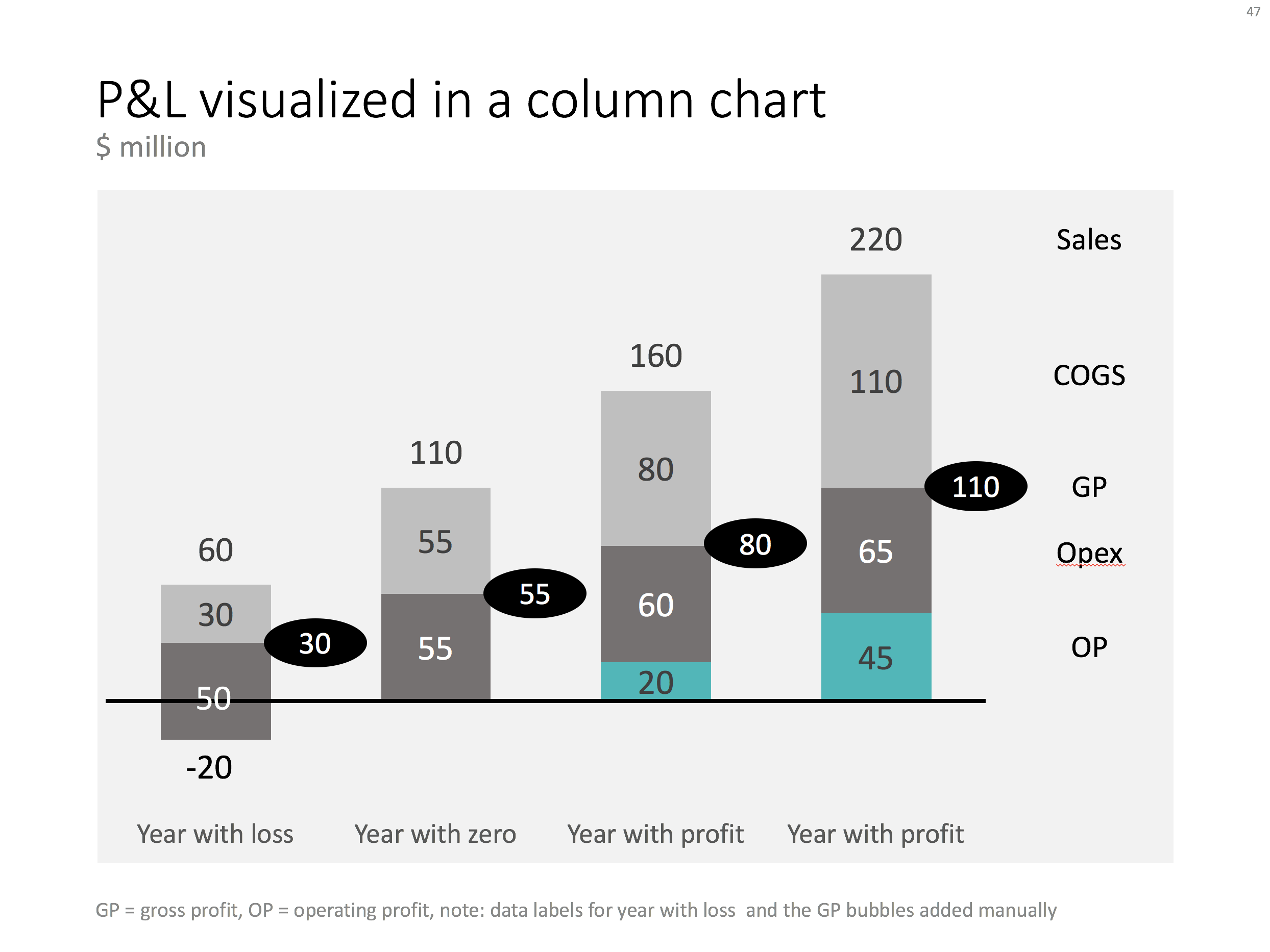
When you want to show a P&L with very few lines, consider using a column chart instead of the more traditional data table. In the chart below you can see how to go about it. Use a bold color for the profit series, a light color for the COGS, and manually add the gross profit as bubbles.
Things get a bit trickier for years where there is a loss. You create a separate data series in the same color as the last cost category (opex in this example), and calculate how much of the opex goes under the line and how much above. Tweak data labels manually. For these types of charts it is best to sketch them completely on a piece of paper, and then fiddle with PowerPoint/Excel to get it right.
The column chart works well, it shows a number of trends in 1 slide: sales growth, profit growth, and how fixed/variable certain cost types are.
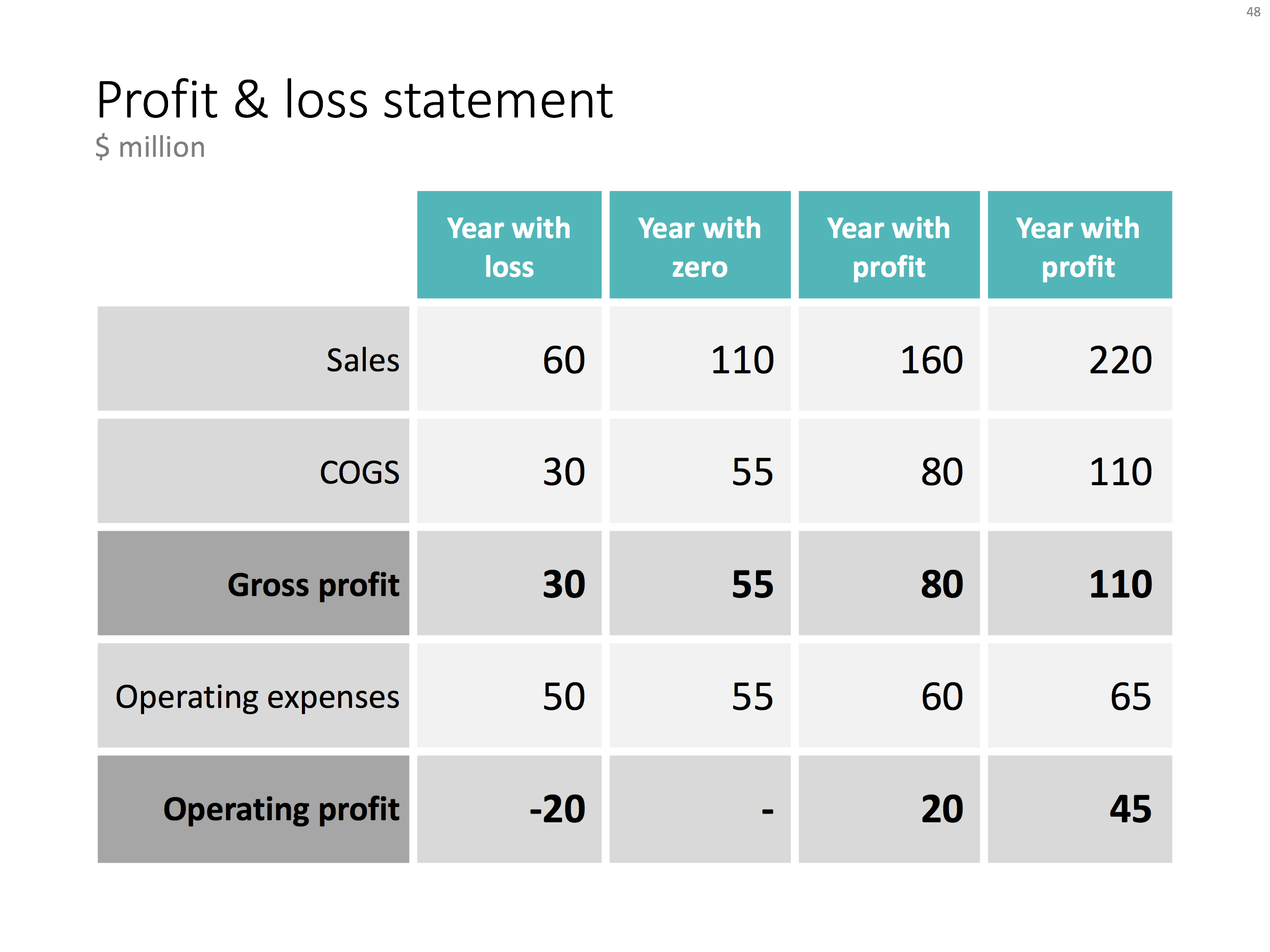
Below is the data I used to create this chart.
You can recreate your own chart with the description above, or download the example from the SlideMagic template bank.
I am across this chart recently:
You will find more statistics at Statista
This chart can be improved in a number of ways:
I replaced the chart with the one below in PowerPoint, using a line graph with big markers instead of the bars.
Ideally, I would have like to flip the chart 90 degrees, but this would require quite a lot of PowerPoint surgery (you can probably do it with a scatter chart somehow). The other option is to construct a highly complicated "waterfall" chart.
PowerPoint templates get corrupted over time. It usually starts with a template that was designed by a print graphics designer as an after thought after designing the logo and the business cards: creating slide layouts without paying much attention to the technical issues of programming a template that can be (ab)used by thousands of employees. Then over, slowly but gradually, "foreign" templates infect the original until nothing is left of the original.
I go back to zero every time I design a new presentation. The file that I put up in the SlideMagic template store is pretty much the one I start every new presentation design project with. It is really simple. You can customise it with your own colours and you are good to go.
When creating a new slide, go to the "Layout" button in the top left of the menu to create a select a new slide layout.
A while ago, I discussed how to create a "focal point" slide, where a series of triangles can create the illusion of text boxes all disappearing in one big point. You can read the instructions how to create it in this blog post, but now you can also find them in the template store.
I am spending part of my daily time that I used to invest in blog posts, and increasing the library of my template store, I have an infinite amount of template ideas in my head, so there is still a lot of work for me cut out. Ultimately, the value of this store will be some sort of subscription, as a sign of support for me, in return for which you get unlimited access to all the designs. The combination of a powerful search engine and the largest library of useful charts on the net, I think the proposition of 1 second downloads will beat the alternative of manually copying my designs. Let's see how it goes.
Drones enable a new type of photograph by amateur photographers. A lower camera position than areal photos taken by planes, a higher camera position than what is typically possible from a rooftop, pictures that look down outside of big mountain ranges or dense high rise cityscapes. So you get that sense of perspective, but are still close enough to get very rich detail.
But most importantly: the lens can look 180 degrees down, which is very hard to do from a building or plane. The photos that are starting to emerge are beautiful and I assume we will see them a lot in presentations and other marketing materials.
On a few occasions, I had to use a combination of a cluster and a stack chart. This chart is not available as a standard option in PowerPoint. Here is how to make it:
You can create one yourself using the above ingredients, or you can download the one I made in the SlideMagic template store:
Many users of the SlideMagic presentation app ask for the slides that the app generates in PowerPoint format. In response, I have built a SlideMagic presentation slide template store. The basic store infrastructure is finished, but the amount of slides available is still small.
It was quite interesting to see how in 2017 it is possible for a designer to pull of a full-fledged digital content eCommerce store with downloads and payment processing in a matter of days. (OK, my computer science engineering degree came in handy a few times when I had to go deep into HTML to customise the store template in a few places). A few years ago I was toying with the same idea, but the required investment in technology would have been a lot higher.
The main shortcoming of PowerPoint templates vs my presentation design app also applies to my own template store: templates are hard to customise. Adding a row of boxes to an existing design and getting everything to line up properly requires a bit of design skill. It is a trade off you have to make. The app is free to use, and makes these adjustments really easy. Where possible I will add slide variants to accommodate the layman designer where possible.
There are thousands of presentation template stores on the Internet and I tried to make mine different. All stores try to hard: designs are too sophisticated, full supporting graphical clutter that makes slides hard to customise and hard to fit in to corporate templates. My slides are incredibly simple and should blend in nicely when pasted into another corporate colour scheme.
The other missing item in template stores is search, how to find a decent template that fits your specific business concept you want to visualise. In my template store, I will start with paying close attention to tags and search terms. For future releases, I am working an "AI engine" that can guide you through a process to match your visualisation challenge with an actual slide suggestion (this is the biggest source of value, a library with thousands of suggested layouts is not).
I will build up the slides in the stores gradually. My first challenge is the complete the basic library of the store, then I should be able to add a few slides per day. Maybe changing the scope of my blog a little bit, discussing a possible visualisation of a business concept, and then putting the final result up in the store. With 250 blog posts a year, this will get us to a nice library over time.
I am using the gradual approach as well to get feedback. The most important one is customers voting with their money. Which slides will sell, which ones not? I have no idea yet. Secondly, I am encouraging users (you) to post requests for slide designs. If I can can accommodate them, I will add the relevant slides to the store.
The business model for the site is not yet finished. Once the library gets bigger, an "all you can eat" subscription model seems the most sensible. This is especially valuable for users as I keep on adding slides and concepts from blog posts and user requests.
Some of my clients have already noticed that I have a bit bandwidth for bespoke projects at the moment. I might drop a daily blog post here and there as I am trying to focus to get the slide library to a decent size over the coming weeks.
As I make changes to the store, the site might go "black" now and then, apologies in advance. I would invite you to look around and send any feedback to jan at slidemagic dot com. Let me know what you think!

The US patent office has awarded me a patent on parts of the SlideMagic user interface, I am very excited!
Microsoft has been adding some new features in Excel recently (I am using the Mac version). I am so used to working with the software that I rarely look at new feature additions, unless they are staring me in the face.
One of buttons that got my attention are Bing maps: you can now plot data on locations in a map. You enter a table with locations and a numeric value, and they get plotted in the appropriate location. The map zooms in and out. When you drag the map from Excel into PowerPoint, it becomes a static image of the last zoom level.
I think this is very useful as an analysis tool for for example a retailer who wants to visualise stock levels across its stores.
The implementation on a Mac is still a bit crude: it would be great if you could shade entire countries based on a value, conditional formatting. (I see that the Windows version is much more advanced).
Also, the graphical appearance of a Bing map is not designed with a presentation in mind. The map has lots of unnecessary clutter, and random geographical labels are displayed depending on zoom level, pretty much like the map you are staring at when the in-flight entertainment system is switched of just before your plane lands.
Hopefully the Mac version will be upgraded to the features of the Windows version soon.
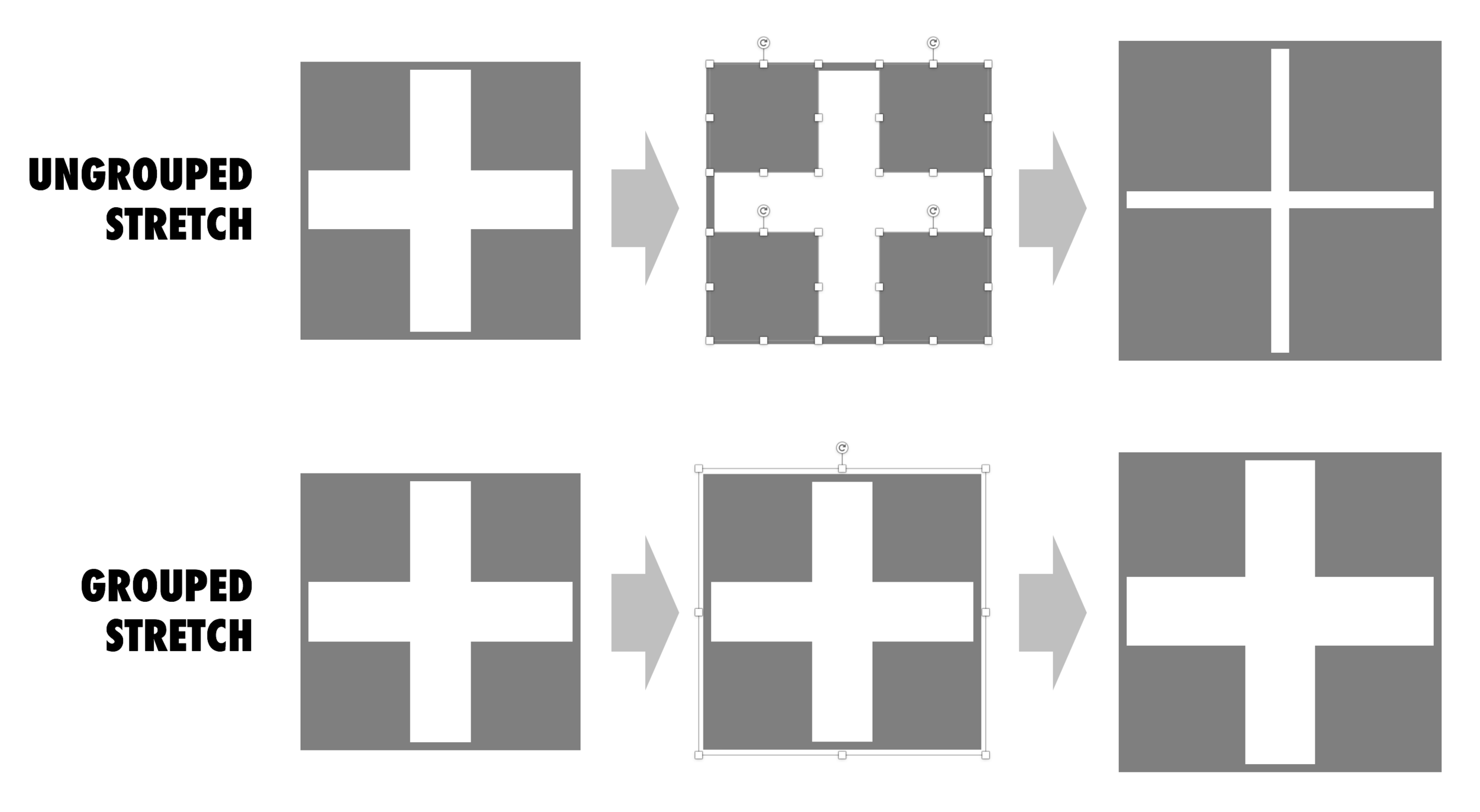
Use these 2 ways of stretching objects in PowerPoint to your advantage. One will make objects closer together, the other maintains the spacing between them. I never paid much attention to this in the first 2 decades of presentation design, but after noticing it, it has proven very useful over the past weeks. Better late than never.
Tech product pitches are different for a enterprise IT purchase officer and an investor.
The purchasing department might be interested in the full list of user benefits, a detailed description of the features, all written in a language that sounds familiar and resembles the one that is used by the billion dollar tech giants, creating a sense of security that they are dealing with a stable product company that knows what it is doing.
The investor is probably too impatient to read through long tech marketing copy highlighting benefits such as productivity, efficiency, scalability, central dashboards. Yes, there is one box to tick whether the company is able to sell to corporate IT departments, but the bigger question is whether this technology fills a big enterprise need that should be very easy to explain. On the back of that, it should be logical to understand why existing players have not/could not have solved this.
Marketing pitch <> Investor pitch.
Image via WikiPedia
See fragments from it here:
Here's how something called "NetFlix"--like Kozmo for Blockbuster!--was pitched to me in 2001, after I apparently ignored a call about it. pic.twitter.com/B3ODp9Zcj1
— Harry McCracken 🇺🇸 (@harrymccracken) October 15, 2017
It is easy to say "haha" now that we are in 2017, and think of all those VCs in 2001 that missed this "great" opportunity. Remember, Netflix actually struggled for a long time, even after their IPO. And back in 2001, there were other companies that could pursue Netflix' business (Blockbuster itself, Amazon). Not an obvious investment decision then.
Leaving the content aside, you can still learn from this email pitch. It is incredibly personal, even informal and it does a good job in explaining the whole business in just a few sentences. A big bold slide deck full of stats about how people are switching from tape to DVD, would not have done a better job.
Image by Marit & Toomas Hinnosaar on Flickr
Financial projections of new business ideas are totally made up / not accurate, so being of by a few million here and there would not matter? We can make quick changes in our financials in the presentation slides, and then "forget" about updating our financials spreadsheet with the new information.
While the absolute numbers of your financial model might be totally pulled out of the hat, it is the thought process of how you got to them that is still valuable for investors. How does your business model work? What would I have to believe in order for your year-5-dream-scenario to come true?
And that model should be consistent across all your documents: presentations, spreadsheets, budgets, everything:
So, even if nobody can predict the future accurately. there is still value to create a consistent financial model the same way as you would for a business in which you know every single detail (next year's budget of an established company for example).
What can you do to incorporate the fact that numbers are highly uncertain?
Slightly more complex models might actually be simpler to understand.
I am on a short break at the moment do not maintain a blog post pipeline to pretend that I am working 365 days a year. I will start posting again soon when I am back at my desk. Sorry...
As a developer of an app, you are deep into its features. How do you stack up versus alternatives, we offer x, we offer y, we offer z. It can sometimes sound offensive when, as a presentation designer, you come back with a very simple visualisation of a competitive differentiation. This is not a simplistic dumbing down of the story, this the way users / buyers make decisions, and investors understand your story.
I had the opportunity to drive a BMW the other day with al all digital instrument display panel. Car manufacturers have something to learn about design. The display tried really hard to look like an analogue one, reflections, depth effects, glow edges, gradients. The whole thing feels very PowerPoint 2007 / Windows 7 / Nokia to me.
Also, a digital display opens up the possibility to re-arrange how the smaller data elements are displayed (kms, fuel tank, etc. etc.), but BMW did not (yet) do that.
Car instrument panels are up for a big shake up. I think the answer is not displays that mimic analog gear, plus eliminating buttons and replace them with touch screens and menu diving. Instead, I would opt for a beautiful, minimal display of essential information, and actually, very high quality, regular "analogue" buttons.
It affects not only the user/driver experience today, but also whether cars will eventually turn into a classic or not. To make the parallel with electronics, old gear from the 1960s / 1970s can still look/work beautiful, while designs from the 1980s and 1990s with low res/poor digital interfaces look cheap and ugly. Digital displays that look advanced today, will be totally obsolete in 5 years from now.
We will see what happens.