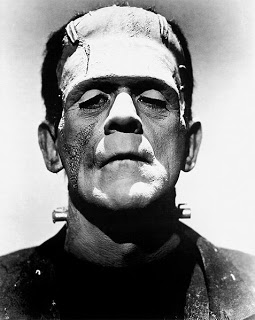
Frankensteining a slide deck

"Frankensteining", what a brilliant verb! Most people have been tempted to stitch together a slide deck quickly by yanking slides from old and/or other people's PowerPoint presentations.
  1. Open all presentations, go to slide sorter mode
  2. Copy and paste any slide that looks vaguely relevant into a new file. It is even cooler when you know this little trick on how to preserve formats when copying slides across.
  3. Re-shuffle the order of the slides and add agenda tracker pages
  4. Skip the bit about practicing
  5. Done in 1 hour and 34 minutes
It will not be surprising that the end result is not a good presentation. It is not your story, you do not completely understand it, and if you do not understand it, the audience won't either.
The better way to Frankenstein:
  1. Sketch your story on a piece of paper
  2. Add simple slides to support the key elements of the story
  3. Go back to the graveyard of old slides to add backup slides where you need them ("here is the full architecture of our global CRM system, as you can see it is really complex" [* click next slide *])

SlideMagic: a platform for magical presentations. Free student plan available. LEARN MORE
Boring conference panels

The panel session with the CEO of Twitter bored the audience in a recent on-stage conference interview. And Mark Suster recently wrote another excellent post about conference panels.
I have sat through so many boring panels in business conferences here in Israel. The boring panel recipe:
  1. Try to find as many prominent individuals as possible to feature as speaker on the conference invitation flyer
  2. These people are busy, so you do not require a lot of preparation from the panelists
  3. Get a verbose moderator: long panelist introductions, long questions, [short answer], long recaps of the answer
An easy way to fill 45 minutes, but not a very good way for the audience to spend its time. You cannot wing a presentation, you cannot wing a discussion panel. I wonder why it is that most people go to conferences to meet people in the coffee breaks.

SlideMagic: a platform for magical presentations. Free student plan available. LEARN MORE

Why school text books are so boring

School text books and many business documents are written with the content creator in mind. Organized in sections, a clear structure nicely summarized in a detailed content page (or a PowerPoint agenda tracker). We make a point, provide supporting arguments, repeat the point, go back to the tracker page, open the next section, repeat. Perfectly organized, perfect logic. Studying equals forcing your brain to memorize a sequence of bullet points against its will. ("Hey, the first letters of each point make the word A-P-P-L-E when I swap the last 2 bullets!")
Stories are sequential, they are not designed to reference back to later by jumping to section 3. Stories have no tracker pages. Stories arrange their points in such a way that they are most interesting and memorable, maybe the most important message does not come first. Stories use analogies.
I am not advocating to abandon all structure in presentations. But still, have that school text book in mind when designing your next series of slides. Maybe your 30 minute presentation should be a story, maybe your 200 page final document should be a text book.

SlideMagic: a platform for magical presentations. Free student plan available. LEARN MORE

Putting data labels where they work best

In consulting firms such as McKinsey, there are very strict rules about formating slides. Data labels for example are always placed outside the horizontal bar. The chart below (ripped out of its context from this NYT article) uses a different approach:
The data labels are placed next to the horizontal bars where you would expect the axis labels to be. I am fine with this approach. The relative size of the bars gives a global view of the order of magnitude of the values, and for whomever is interested the data labels provide the exact values.

SlideMagic: a platform for magical presentations. Free student plan available. LEARN MORE
Teflon headlines

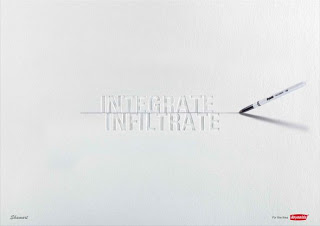
This ad is a good example of how your brain adjusts reality to what it thinks it should look like. I read this sentence the first time as "Don't drink if you drive", a familiar slogan.
I find myself doing the same thing when reading headlines full of buzz words and jargon in PowerPoint slides. Skim over it, and see whether there is something more interesting to be seen on the rest of the slide. A teflon headline, it definitely did not stick.
Try this book "Brain Rules" if you are interested in finding out more about how the brain processes information. Ad via Ads of the World.

SlideMagic: a platform for magical presentations. Free student plan available. LEARN MORE
If you can't explain it, you don't understand it

The best way to prepare a presentation is to practice on a complete (but intelligent) outsider. Even (maybe especially) if your audience consists of industry experts.
You see this often in pitches of technology startups to venture capitalists for fund raising. The entrepreneur is an expert. The VC audience knows a thing or two about technology. Buzz words, generic truths, and jargon fly through the room. The message did not come across...
Any intelligent person should be able to understand your story in 15 minutes, even if she does not have any background in your specific field of expertise. If she does not get the point, it is your fault, not hers.

SlideMagic: a platform for magical presentations. Free student plan available. LEARN MORE

Calming down your typography

Powerful graphics software is enabling a wave of font art. While each of these images might be digital artistic master pieces, I am not convinced of how effective they are in communicating the message. They catch attention, but do they stick? What do you think?
See a list of 150+ of these type of ads here on Unstage. Found via Noa Adamsky.

SlideMagic: a platform for magical presentations. Free student plan available. LEARN MORE

One of my investor presentations in the public domain

Almost all presentations I design are highly confidential. Presentations of publicly traded companies to stock analysts are an exception. Recently I supported Psion in designing their 2009 preliminary results presentation.
Most of you will remember Psion as one of the pioneers of PDAs and the Symbian operating system. After some M&A transactions, Psion today is a leader in the field of rugged portable devices used in ports, in warehouses and by police forces, just to name a few customer segments.
Back to the presentation:
Psion Preliminary Results Presentation
View more presentations from Jan Schultink.
Some comments:
  • The presentation contains a few animations that did not come through in the PDF file
  • As with most analyst presentations, the number pages in the presentation are very dense, almost similar to a printed page from an annual report. Most of the people in the audience will have followed Psion's financial statements for many years and are looking for a complete picture of this year's results versus the previous period which they probably know by heart.
  • The dark corporate template of Psion provided an interesting challenge and created a very distinctive look and feel.
  • Interestingly, this presentation was not just about presenting a stack of numbers, but the announcement of a major new strategic direction for the company: a modular product platform. It was a challenge to fit this into a 30 minute presentation, and many tough decisions had to be made on what slides to cut out of the deck.

SlideMagic: a platform for magical presentations. Free student plan available. LEARN MORE

VC pitch: don't spend time/slides on the obvious

Time is precious when pitching to a venture capitalist (VC) for funding your startup. Don't waste it on things the VC is already convinced of. Examples:
  • Common beliefs, i.e., in 5 years from now people will be downloading dramatically more data to their mobile devices than they do today. This can be conveyed in 1 slide, or you can spend 15 minutes on it, showing all possible research that point to the same answer.
  • Specific VC beliefs. If a VC has told you in previous meeting that she is a true believer of - let's say - the software industry moving into the cloud, you can save yourself the effort of trying to convince your audience of that point. Someone else did it for you.
One important note about common beliefs though: they could be wrong! If your perspective deviates from what everyone else is copying form each other, you (obviously :-) ) should spend time/slides on it.

SlideMagic: a platform for magical presentations. Free student plan available. LEARN MORE

Beyond images that just show things

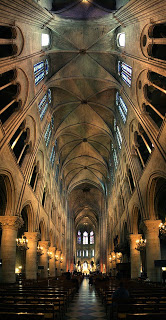
Most stock images are descriptive: search for "ice cream truck" and you get what you asked for. The position the image puts the audience in, is at least as important (maybe even more important) than the object it represents. Look at this image of the inside of the Notre Dame cathedral in Paris (Wikipedia link). Six images stitched together to create the sensation of small child looking up to the ceiling of this vast place. It puts the audience inside the image.
Image credit: eso-teric, visit his site for a larger picture. I linked to these images as a source of inspiration (earlier post), check copy right restrictions before using them in an actual presentation. Found via TwistedSifter.

SlideMagic: a platform for magical presentations. Free student plan available. LEARN MORE

It is still hard to do it right in Prezi

Here is a Prezi-presentation (see earlier posts) with some facts about the growth of data sent over mobile networks. Praise for Byte Mobile to experiment with different presentation formats. Here: Prezi is used in the following way:
  1. Animated slide transition
  2. Zoom in on the title with the message of the chart
  3. Zoom in on the data in the chart
  4. Zoom in on the foot note with more detailed explanations
For me, this is not yet the best way to use the power of Prezi. But if you ask me what is the right way, I must admit I do not have an answer yet. 

SlideMagic: a platform for magical presentations. Free student plan available. LEARN MORE

More motion graphics about the size of the Internet

Another motion graphics video, again about the size of the Internet. This time by graphics designer JESS3. My opinion remains unchanged:
  • Beautiful graphics, and a beautiful color scheme
  • But (moving) text is not the best way to visualize the billions and millions
I do however like the slowly moving time line with the launches of social networking sites over the years towards the back of the video.


Found via Nancy Duarte.

SlideMagic: a platform for magical presentations. Free student plan available. LEARN MORE

Subtle light effects in fonts

Inspired by this ad, here is how to create the effect of fonts that seem sunk below the surface in PowerPoint 2007 (as shown in the last 2 images).
  1. Choose a background color
  2. Enter text, preferably in a fat font (I used Helvetica Neue Heavy in this example)
  3. Select the text, go to format, text effects, shadows, and pick inner shadow with light from the top
  4. In text effects, pick a text fill that is just slightly darker than the background


SlideMagic: a platform for magical presentations. Free student plan available. LEARN MORE

Creativity and chaos

A nice presentation from Jason Theodor on creativity and chaos (the click-click-click SlideShare type). I agree: creativity is everything but a linear process (example). Browse through this presentation:
  1. Good content
  2. Some original use of images, visuals, and fonts

SlideMagic: a platform for magical presentations. Free student plan available. LEARN MORE
Gaining the confidence to tell your story, your way

The more you practice, the more you rehearse, the more you get on top of your story. And the more comfortable you get with your material, the more confident you get in delivering it. Confidence goes beyond getting rid of fear of public speaking, confidence enters chart design and story telling as well.
  • The confidence to get rid of "business school"-style structuring frameworks: let's talk about the market, let's talk about the competition, let's talk about the distinctiveness, etc. and only spend time on those issues that really matter for your particular story, in the order that best fit your specific situation
  • The confidence to use personal stories and case examples to illustrate your point
  • The confidence to make your charts more minimalist and more abstract
  • The confidence to insert blank/black/white slides inside your presentation to have the audience just focus on you
It is a bit like the abstract painters of the last century: having the confidence to communicate emotions and ideas without relying on realistic techniques. For example Piet Mondriaan's Broadway Boogie Woogie painted in 1942-1943.
The pulse of a Jazz beat, and the energy of the New York traffic squeezing its way through the city's grid all captured in one painting without showing Jazz bars, Times Square neons, and/or New York traffic jams.

SlideMagic: a platform for magical presentations. Free student plan available. LEARN MORE
Iconic images

What a wonderful advertising campaign: if 4 pixels can tell a story, imagine what millions can. Here is one example, but there are lots more on Ads of the World (click the previous and/or next buttons).
I like using iconic images in presentations, an endless repertoire of visual shortcuts stored in the brain of almost any person on the planet.

SlideMagic: a platform for magical presentations. Free student plan available. LEARN MORE
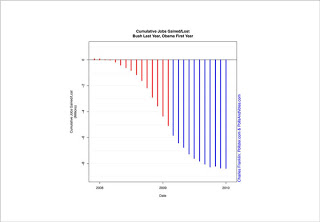
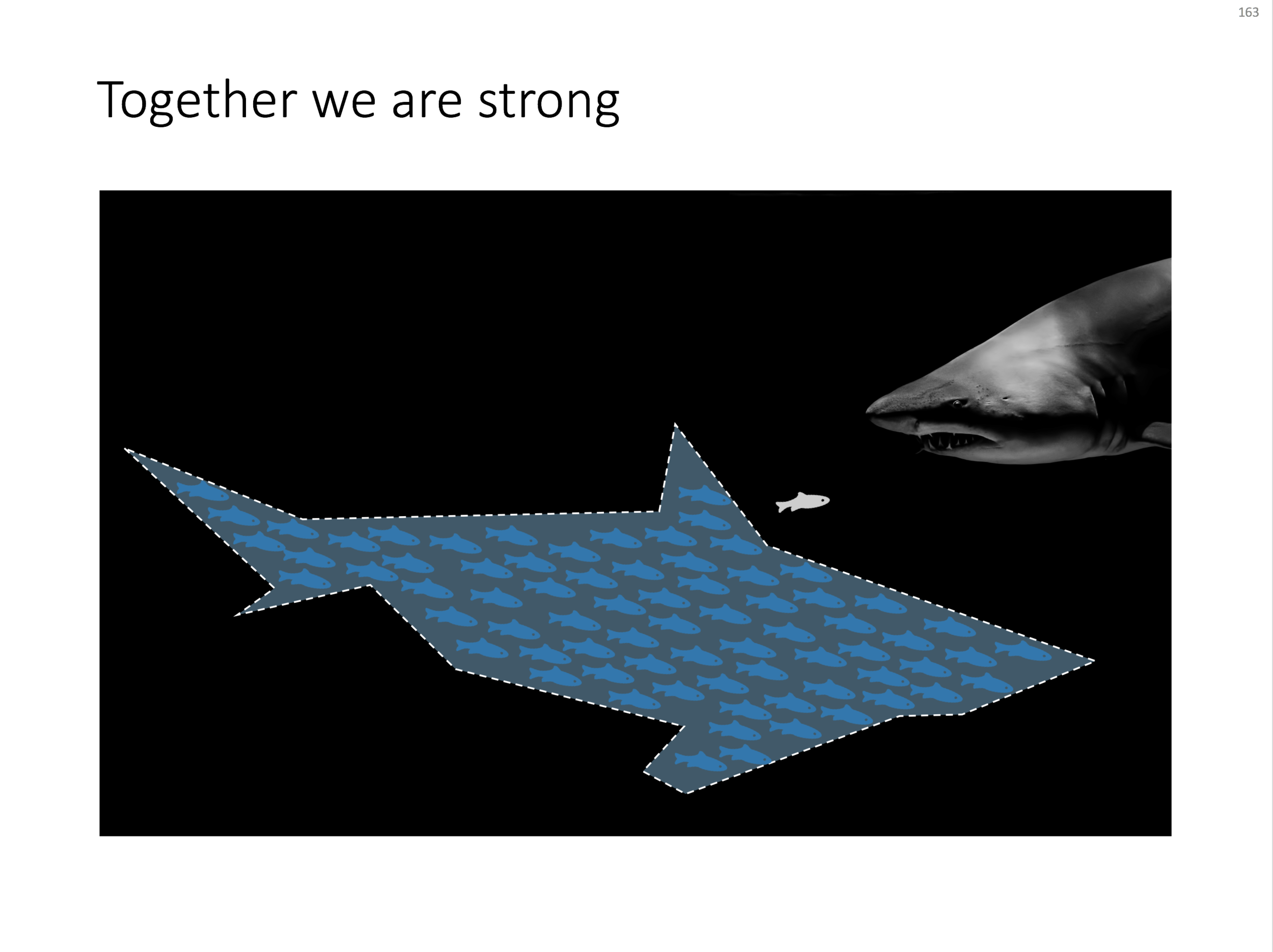
Chart concept - shark!

Chart concept - shark!

Some might consider it a cliché, but I found it still useful: the school of fish swimming in formation to create the illusion of being a shark. For when you need to visualize how many smaller/weaker entities can work together to become very strong as a group.

An image like this can easily be created by searching for "fish silhouette" or "shark silhouette" in a stock photo site. Resize the small fish, paste them over the shark's silhouette, and off you go.

Inspired by a scene from the movie Finding Nemo:


UPDATE: I have now added a slide with many fish forming a shark on this concept in the SlideMagic template store.

SlideMagic: a platform for magical presentations. Free student plan available. LEARN MORE

Adapt your "presentation interface" to every presentation setting

This presentation that I found today on SlideShare is not about about presentations, but about application design for the iPad. Still, it deserves a mention on this blog because of the fundamental philosophy of the designer: each user interface deserves its own kind of design approach: the iPad is not an iPhone, is not an iPod.
The same is true for presentations, different audiences, different settings, require a completely different presentation (earlier post): cosy meeting room, big audience keynote, SlideShare document for online viewing, one-on-one with a venture capitalist, etc.
I think iPad-like user interfaces (like the one Tom Cruise uses in the movie Minority Report) could turn the world of presentation design upside down. Early thoughts here.

SlideMagic: a platform for magical presentations. Free student plan available. LEARN MORE

Obama infographic and picking the right metric

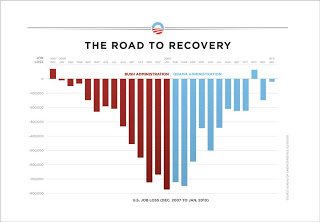
The infographic below released by the Obama administration (here) is a good example of using the full arsenal visual techniques to make your point stand out.
  • Use fat columns to make the trend stick out (much better than a thin line, earlier post here)
  • Use recognizable, contrasting colors
  • Pick a metric that is favorable (monthly job loss)
On the Fast Company site, Prof. Charles Franklin put out a second graph depicting exactly the same data, but using a different metric, cumulative job loss:
The formating of the graph is a bit improvised, but it shows the power of picking the right metric. Someone speed-reading a newspaper first notices the sea of blue, and a trend that does not seem to reverse.
Fast Company seems to have taken down the story, so I had to source Franklin graph from Google chache. Thank you Ellen Daehnick for pointing me to this.

SlideMagic: a platform for magical presentations. Free student plan available. LEARN MORE