Christoph Niemann and LEGO presentations

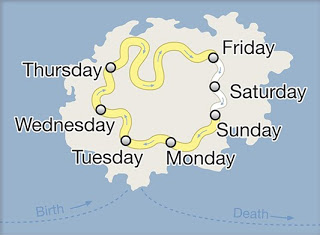
Christoph Niemann (web site) is a highly talented artist whose illustrations have appeared on magazine covers ranging from the New Yorker to Wired. He posts on a regular basis on his blog in the New York Times, where this set of cartoons based on Google maps caught my attention.
He recently published a new (board) book with snap shots of New York modeled in Lego bricks: I LEGO N.Y. (affiliate link). A sample image below.
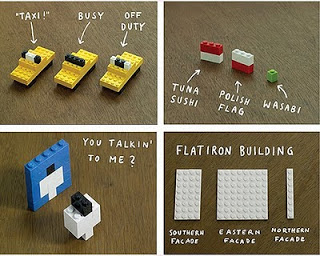
Now here is a presentation challenge: construct your entire presentation in tiny Lego scenes, photograph them and paste them into PowerPoint. Not as crazy as it might sound.
UPDATE. One of my readers, Daniel Cabrera, used LEGO images to construct a presentation for a university project. In this case, the images were sourced from the web.

SlideMagic: a platform for magical presentations. Free student plan available. LEARN MORE

CNN-style lettering tape

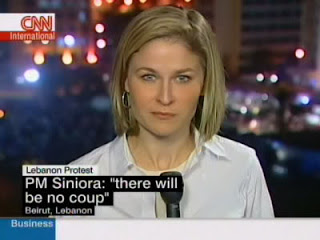
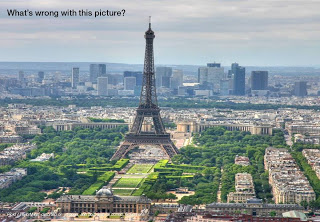
A semi transparent overly is one way to keep text readable over busy images (previous post). CNN uses a different one: black and colorful bars behind white text. The length of the bar varies with the length of the text that it covers.
It is easy to recreate this effect in PowerPoint. Here an example with an image from one of my favorite boulevards in Paris (image credit to jfgornet). You can go further and imitate the retro lettering tape using stock images like this one.

SlideMagic: a platform for magical presentations. Free student plan available. LEARN MORE

OK, so what do you do exactly?

Startups that are pitching to venture capitalists for funding often start off with a barrage of product benefits, the great qualifications of the team, and the remarkable patent that you secured for the entire world (well, excluding Japan, but that is not a really important market anyway, and we have a way around this black spot on the globe through working with a great distributor we know there who happened to be my room mate while I studied biology, molecular biology to be more precise, in Oxford).
Pause, rewind.
What is it that your company does? "Aah, now I understand more or less in what part of the world I am in." And your audience is ready to put the rest of your messages in context.

SlideMagic: a platform for magical presentations. Free student plan available. LEARN MORE

Invest in a group picture if you want people to invest in your company

The "team" pages in most investor pitch presentations and on most web sites are uninspiring. Some people have a picture, some have not. Some people wear a tie, others wear casual clothes. Some have a dark background, some light. Some pictures are taken from a distance, others are in close up. Some are cropped in 3:4, others manually.
Pictures and avatars are increasingly becoming your trade mark on the web. People do not have time to read names, and sometimes (in my case at least) most people are not able to pronounce it properly.
But why use individual pictures? The team and its ability to work together is one of the key assets an early startup has. At the next board meeting, get a good camera (or even better, a good photographer) in the room an take a group shot in a relaxed atmosphere. Stretch the image to a full page in PowerPoint and add arrows/name tags to point to these great people that are going to make this company a huge success.

SlideMagic: a platform for magical presentations. Free student plan available. LEARN MORE

Adding value to the value

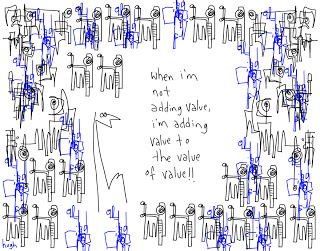
Presentations use too many buzz words and empty phrases. Hugh MacLeod (gaping void) made a great cartoon about the abuse of "adding value", you can buy a print here (no commercial interest) or subscribe to his daily cartoons by email here.

SlideMagic: a platform for magical presentations. Free student plan available. LEARN MORE

CVs are coming to PowerPoint

The end of the standard CV or resume is near (Seth Godin post). The classic A4 CV full of woolly language/blurb is similar to the infamous "Executive Summary" of an investor pitch, or the 2-page "fact sheet" of a software product: people do not absorb any information from them.
Why not use a presentation to present yourself to a potential employer?.
  • The number of pages is a useless restriction: it is the time it takes to digest them that counts. A 5 page presentation with attractive graphics provides more info and is faster to read than a dense A4 sheet.
  • It makes you stand out. If the potential employer does not appreciate you deviating from the standard practice, it might not be the right place to work.
  • Data charts and timelines enables you to visualize things that are hard to capture in writing: i.e., the length you stayed with one company versus another
  • Images can convey passions and interests that are hard to capture in words
I wrote about using a PowerPoint presentation for an MBA application in an earlier post. My suggestions would be similar for a presentation CV. My own (slightly outdated) introduction presentation gives some examples of a graphical representation of a career timeline, and using data charts to quantify and visualize your experience.

SlideMagic: a platform for magical presentations. Free student plan available. LEARN MORE

Extreme close-up

An extreme close-up of a face can have a dramatic effect in a presentation. I used photographs of animals and people before (Miles Davis for example), but never a painting. What a great ad based on a painting by Renoir.
The ad encourages people to come visit an art museum (MASP in Sao Paolo). In case you have difficulty reading the text:
I saw paint turn into Impressionism. I saw Renoir painting me. I saw the disappointed banker who ordered me. I saw his disregard while throwing me into a dusty room. I saw years go by. I saw Europe finally acknowledge my value. I saw Brazil embrace me. I saw a new home. I saw that same home turn into the country’s most visited museum. But, having seen all that, there’s one thing I haven’t seen yet: you. Come. I wish to see you.
Two more examples on Ads of the World. If you are interested in art, try this book.

SlideMagic: a platform for magical presentations. Free student plan available. LEARN MORE

Dealing with ugly corporate templates

Corporate PowerPoint templates are often (in fact, most of the time) too busy and too cluttered for presentation design. Lots of graphics that is repeated on each page, big logos with reflections, legal disclaimers, huge page numbers, all of this eats valuable screen real estate. Depending on how strongly the corporate communication department insists, here are some work-arounds:
  1. The most radical option: go into the slide master and take all the unnecessary stuff out. [view, slide master]. But then do something extra: go into [design, create new theme colors] and enter the exact RGB colors of your company's color scheme, a step that is often overlooked in corporate templates
  2. Keep the front page, but design a presentation full of large images that you stretch across the page (including the cluttered graphical elements). "What, I did stick to the template, the images just did not fit in in any other way".
  3. If 1 and 2 do not work, create a window inside a window: design your slides inside the frame that is left, using the correct corporate colors and ignoring the bullet point default template. If the window is consistent, the audience will slowly loose the attention for the clutter around your chart, in pretty much the same way as is the case in big conference halls with distracting sponsor logos around the projector screen.
Thank you Gonzalo Álvarez Marañón for suggesting this topic.

SlideMagic: a platform for magical presentations. Free student plan available. LEARN MORE

Un-stretch those images

Many presentation images are distorted: the proportion between height and width got confused somewhere along the way. It is easy to correct this. In PowerPoint 2007: right click the image, format picture, reset picture, and you got your original image back. Now hold the shift key while resizing your image and the proportions will be preserved.
Here is an earlier post with a more advantaged tutorial how to scale images to a full page without distortion.

SlideMagic: a platform for magical presentations. Free student plan available. LEARN MORE
Credible customer testimonials in presentations

Credible customer testimonials in presentations

An excellent post on copy blogger: hardly anyone reads/believes a customer testimonial. They all sound the same, they use sugary language and buzz words, they are one sided. Most sales presentations have the customary slide with customer quotes in text bubbles inside:

  • Far too much text
  • Stuffed with generic adjectives
  • No specifics related to the customer situation
  • Not a specific source who said it
  • No facts, numbers

Do not send a blank piece of paper to your customer and ask "write something nice", instead, interview the customer, write down a very specific story with facts and have her approve it. The "reverse testimonial" suggested by copy blogger is a powerful structuring technique.


UPDATE January 2018: we have now added customer testimonial presentation slides on the SlideMagic template store

SlideMagic: a platform for magical presentations. Free student plan available. LEARN MORE

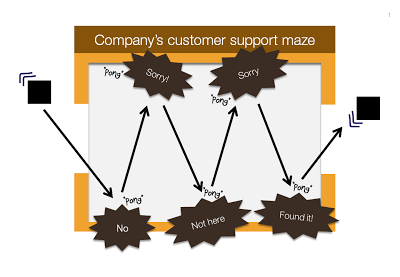
Chart concept: "Pong", "Pong", Pong"

Cartoons have a great way of adding movement to an image. Images can be static and without animations (easier to share online). All you need to do is use an informal font such as Boopee and add some arrows and loosely drawn lines.
The following chart example was inspired by the first "pong" video games that came out in the 80s.
While the style of the slide is informal, the content is serious enough that I would not hesitate to include it in presentation to the Board. I took out the specific customer example to maintain client confidentiality.
I am a big supporter of the global "ban comic sans movement", try not to use that font.

SlideMagic: a platform for magical presentations. Free student plan available. LEARN MORE

A VC investment case in the public domain

The Internet opens up everything, including investment cases by venture capitalists. If you are working on a presentation to pitch your startup to a VC, read Mark Suster's recent post on his investment in Burstly. Here is the full content on how he convinced his partners to back him with the investment.
Valuable input when you design your pitch deck. Mark is not the only one, many VCs now run blogs, given very good transparency in how their mind works. Much better input than what their portfolio looks like and/or the standard blurb on the VC's web site. Every VC is different, every VC pitch is different. Do your homework before opening PowerPoint.

SlideMagic: a platform for magical presentations. Free student plan available. LEARN MORE

I am jealous of this artist

Images are hardly ever exactly right. Changing reality, even with the most powerful software, is very hard (previous post). Artists and/or cartoonists can use their skill to their advantage. Adding contrasting characters to images. One example is Johan Thornqvist (more images on his site). I am jealous not to have these drawing abilities.
Found via unstage.

SlideMagic: a platform for magical presentations. Free student plan available. LEARN MORE

Slideshows: also in investigative journalism

The biggest worry of a presenter is to bore her audience. The biggest worry of the journalist is for readers to skip her article. Interesting visuals can be a solution for both challenges.
Investigative journalists are a special breed of news writers, they rely on their own original research (time consuming) and the end result is often a story with nuances that requires more words than the average newspaper article. There is pressure to summarize the article into something that does not do justice to the effort that was put in: news media budgets are under pressure, and the attention span of readers gets shorter and shorter.
Journalist Bill Dedman tried a slideshow on msnbc.com (here), read an interview about the project here on PoynterOnline. The text in his slideshow is 2,788 words, a typical article like this would get 600,000 readers for page one and 10% for the following pages. This report got almost 80m online views.
The use of slideware is no longer limited to supporting live presentations. It is a powerful and under-utilized alternative for web content/blog posts as well.
Thanks to communication consultant Surekha Pillai for pointing me to this.

SlideMagic: a platform for magical presentations. Free student plan available. LEARN MORE

You are better at line wrapping than PowerPoint

When you starting using fewer and fewer words on a slide (keep up the good work!), line wrapping becomes more important. Make sure that words that should be connected, stay connected, and enter a manual SHIFT+ENTER if you need to deviate with the automatic option.

SlideMagic: a platform for magical presentations. Free student plan available. LEARN MORE

Image sequences to set your audience's mood

Presentation designers can learn from film directors. Inserting a sequence of good (and real) images can take your audience from the conference hall to a different place. Beautiful and sad at the same time, click through some of these urban decay images to get the feeling: here, here, here, and here.

SlideMagic: a platform for magical presentations. Free student plan available. LEARN MORE

Google Docs as an alternative to YouSendIt

File sizes are getting out of control. YouSendIt is a tool to overcome size limitations on email attachments, but it has one big drawbacks though: confidentiality. If you do not sign up for the premium version, anyone who gets her hands on the file link can download it.
One solution is Google Docs. Recently, Google updated the service and it is now possible to upload and download files that are not in Google's propriety format. Plugins such as OffiSync create a seamless integration between Microsoft Office and Google Docs. The advantages:
  • Tighter security
  • The ability to maintain one master document that you iterate, rather than emailing multiple versions of the same presentation around.

SlideMagic: a platform for magical presentations. Free student plan available. LEARN MORE

Presentations versus spreadsheets in the cloud

I am making radical shifts to the way I work with my IT infrastructure. Over the past week, I have moved many of the software tools I use "in the cloud".
  1. I stopped using Outlook and are now managing email through gmail with a custom domain (tagging, search, excellent spam management and the Outlook PST files simply became to big to manage locally)
  2. My client invoicing is now run via Freshbooks (affiliate link), enabling clients to log in directly into my system
  3. I am experimenting with Google Docs and Microsoft Office Live to set up shared workspaces with clients
  4. And last but not least, I started to experiment with spreadsheet and presentation software in the cloud.
I am learning a lot here, and get lots of inspiration for new blog posts, but let's talk about one thing at a time: how likely is it that presentation software such as PowerPoint will move into the cloud. Unlike spreadsheets and databases, I am not that optimistic.
At first sight, it seems like the benefits of going into the cloud should apply to presentation software as well: access from anywhere, group collaboration, easy sharing, no more file size issues with storage and email.
There are two aspects to cloud processing: online storage and collaborating with shared files using online tools. Online storage is incredibly useful for presentations, files get increasingly big/harder to email. It is the online collaboration that is the problem.
  • Unlike a spreadsheet, the design and look and feel of a presentation are paramount. If the fonts are a bit off, if you cannot position the object exactly as you want it, if you cannot use all the colors you would like to use, you are in trouble. Moving back and forth between PowerPoint and online editing tools will drop a few formats here and there.
  • Collaboration on presentations is different than collaboration on a spreadsheet. Presentations are very personal. Having someone else edit my slide, add a bullet here and there, change the title disrupts the design process. I welcome input, but like to keep control of the pen. (To contradict myself: the one exception might be the slideument, where slideware is used as a vehicle to write a document rather than prepare graphics for a presentation.
  • The number of toolbars, shortcuts, functions you use in a presentation program is far greater than you use in a spreadsheet tool. At least, that's the case for me. I have created incredibly large and complex Excel files basically using "+" "-" "*" "/""sum" and some basic formating. A presentation design interface is more complex, and people will find it more difficult to migrate. This is why Prezi is having trouble taking off.
  • After a presentation, the slide document often starts to live its second life, becoming a source for "Frankensteined" follow-on presentations. 99.9% of people who Frankenstein use PowerPoint.
  • The sharing element is different for presentations and spreadsheets. Some presentations are aimed at getting the widest possible audience, just uploading them to a tool like SlideShare (without group editing capabilities) is enough, while this is almost never the case with a spreadsheet, that needs to be edited in a small group that can access the confidential data.
To make a long story short: I see databases and spreadsheets going into the cloud, but presentation design software staying on our PCs, with some tools to help them reach a wide audience (SlideShare) for viewing only.
Here is a list of more online slide design tools.

SlideMagic: a platform for magical presentations. Free student plan available. LEARN MORE

Optical illusions - the brain just sees what it expects to see

Another example of how the brain just fills in the missing blanks . Unless you are one of the 0.7% of people who suffer from schizophrenia, you are unable to instruct your brain to see the hollow side of the rotating mask.
Remember the lazy visual brain when designing slides. The brain tends to follow lines in the reading direction, and sometimes finds it hard to spot the word "not" in a sentence, just to name a few examples.
I can recommend the book "Brain Rules" if you are interested in learning more about how the brain absorbs (and does not absorb) information.


Thank you Orli Naschitz and Dep for pointing me to this.

SlideMagic: a platform for magical presentations. Free student plan available. LEARN MORE

Retro formats

Here is an unusual presentation format. Hand-draw your slides, photograph them, and paste them back on slides. I like it.

SlideMagic: a platform for magical presentations. Free student plan available. LEARN MORE