
The sales presentation is only a small part of the sales meeting

A potential customer has many ways to get information about your product:
  • There is information on your web site
  • Your competitors bring the client up the learning curve about the industry
  • In your preparation phone calls with the prospect, already a lot of information gets exchanged
  • Maybe you sent the customer a copy of the slides of the sales presentation in advance
  • There could be a product demo that the client already has been playing with
So, when you finally enter that meeting room, it is good to think about the value of the precious 1.5 hour of face time. Maybe it is not about information transfer. Maybe it is about giving your client an opportunity to get exposed to what they have not seen before: you in action, in person.
  • What type of supplier are you?
  • What about integrity?
  • Can you be trusted?
  • Do you understand their questions?
  • Are you flexible?
  • Etc.
The sales presentation is an excuse to figure you out.

SlideMagic: a platform for magical presentations. Free student plan available. LEARN MORE

A review of PowerPoint 2010 (Windows) versus PowerPoint 2011 (Mac)

I have now spent a few days doing real presentation design client work on PowerPoint 2011 for Mac. This post brings together impressions published in earlier blog posts.

The bottom line is that the average user will not notice any differences between the 2 versions of PowerPoint. Some positives:
  1. The application has slightly more Mac fee to it
  2. I like the organized way fonts weights are grouped together.
  3. The integration with Aperture, a photo organizer is very good. If you buy images from iStockPhoto, somehow a lot of keywords are saved with the file. PowerPoint 2011 integrates seamlessly with Aperture, making the full library of images on your hard drive searchable by keyword.
The professional presentation designer however, will notice a few differences. PowerPoint 2010 can do a bit more than PowerPoint 2011:
  1. The selection pane, a great tool construct complex layered diagrams is missing. (An earlier post about the selection pane here)
  2. Toolbar customization could make PowerPoint 2011 crash. Especially, do not try to drag the straight arrow connector into your top toolbar. If your software has been corrupted, see this Microsoft post about how to fix things. [UPDATE, THE RELEASE OF SP 1 MIGHT HAVE SOLVED THIS ISSUE]
  3. Whenever you try to move or resize an object very close to the static guides, PowerPoint will decide to move the static guide, not the object, and staying on the subject of static guides: you cannot space the interval at which you want to set static guides. 
  4. Color rendering can be a bit off. When give the text and its background shape the same color, you can still read the text on the Mac, but not on the PC. PowerPoint for the Mac handles colors for shapes and text differently.
  5. PowerPoint for Mac cannot embed custom fonts (PowerPoint Ninja explains what this is)
  6. You cannot insert vector shapes in the Mac version of PowerPoint (see here why this is can be useful), so if you want to adjust the color of a vector diagram, you have to do it in Illustrator and import the illustration as a picture into PowerPoint.
The bottom line: professional presentation designers should check their end product on both machines before shipping it to the client. For the rest of the users (99.9%), people probably will not notice the difference.

Thank you to Pierre Morsa and Magda Maslowska for contributing some of the ideas in this post. Pierre sums up: "There are many good reasons to use a Mac, PowerPoint is not one of them."

SlideMagic: a platform for magical presentations. Free student plan available. LEARN MORE

Images from Chernobyl

The current crisis at Japan's nuclear plants triggered this morning's NYT article about Chernobyl, which will need to wait for another 300 years before it can be inhabited by humans again.

The confusion and uncertainty experienced by the people in Japan must be similar to the surreal experience I went through here in Israel while unpacking government-issued gas masks and constructing a biological/chemical shelter in one of our bed rooms just before the 2nd Iraq war in 2003. I remember taping the windows during live TV coverage of Tony Blair's speech in the House of Commons advocating military action.


This photo set on Flickr by Tim Suess is both scary and beautiful at the same time.

SlideMagic: a platform for magical presentations. Free student plan available. LEARN MORE
I think I found the cause of the Office 2011 toolbar bug

I was in the process of designing a beautiful chart on my new Mac when I got too confident and decided to modify the toolbars of PowerPoint 2011 and... lost all my work again (see my previous rant about this bug)

In sbort: if you customize your toolbar in PowerPoint 2011 for Mac, the program will crash as soon as you enter slideshow mode. Googling around reveals that many users have similar problems: corrupt toolbar files that cause crashing. I decided to dig a bit deeper and through a process of trial and error found that the offending customization button are the straight arrow ones that you find in the autoshape menu. The icon of these bars still have the old PowerPoint 2008 look, I think Microsoft forgot to update them.

They are probably not that many geeky PowerPoint users that would customize their toolbar with straight arrow connector buttons so it would have been hard to uncover the bug. :-)

I am forwarding this post to someone in Microsoft I know, but if there are any Microsoft MVPs reading this post, please pass it on and ask Microsoft to fix the bug.

The post that I originally planned to post will to have to wait a bit...

SlideMagic: a platform for magical presentations. Free student plan available. LEARN MORE

Narrow fonts: Beebas

Some fonts are suitable for small text, some for large text, and some for headlines. Narrow fonts are especially useful for the latter. You can still fit in a lot of information, even for large type sizes. See the differences below. Beebas Neue is a free font that is very space efficient, you can download it here.

SlideMagic: a platform for magical presentations. Free student plan available. LEARN MORE
Mindmapping on the iPad: iThoughtsHD versus DropMind

Triggered by the iPad touch interface, I started to use mindmapping for the first time in presentation design. Mindmapping is a process in which you jot down ideas and the connections between them quickly, and edit, clean up, and move things around later to get a more organized picture. I must say, it works a lot better than my previous approach: the pencil and a piece of paper. Especially since it is a lot harder to lose that piece of paper with your notes on it.

I purchased 2 iPad apps: iThoughtsHD and DropMind. iThoughtsHD was designed specifically for the iPad, and is the cheaper of the 2 ($10 versus $50 for DropMind). The DropMind app is an extension from an existing suite of desktop and web applications. The latter probably explains why it took a relatively long time for DropMind to come out with the app, a working iOS 4.2 version only appeared last week in the app store.

When reading my impressions remember that I am a light-weight mind mapper, just using it to structure ideas for a presentation. Reading around on the Internet it looks like mindmapping is a whole design approach taking things much further than I do.

For the purpose I use it for, iThoughtsHD works perfectly fine. The interface is straightforward and clean, and it is every easy to export mindmaps to PDF or sync them using a Dropbox account.

DropMind's user interface looks a little bit more sophisticated with more graphical options. When you buy the iPad app, they also offer a perpetual license for the desktop client, and the web app. You can exchange mindmaps between the applications. There is a wide arsenal of tools available that I did not yet have time for to explore. The one drawback I found is that when you export a map to PDF or JPG, the resolution seems to be very low (not an issue with iThoughtsHD). I think this is a bug, or maybe I did not configure the settings correctly).

The bottom line. For basic presentation outline scribbles, iThoughtsHD works just fine and costs a lot less than DropMind. Personally, I tend to favor the DropMind app, because of the cross-platform integration and the ability to start using some of the more sophisticated tools available once I have come up the learning curve (on the condition that they fix the resolution of the exported images).

Let me know your experience with mind mapping and mind mapping software.

SlideMagic: a platform for magical presentations. Free student plan available. LEARN MORE
No thank you, we will just ask questions

A story. I just finished designing a sales presentation for a client that is pitching in a major mobile-related services tender. I started off with minimalist slides for a standup presentation that would be perfect to support the facts that were all written down in the tender submission documents. Rather than focusing on the details of the system specification, I focused on the track record of the company, the many reference installations, the experience in preparing for a successful launch.

Then came the call: "Don't bother to present, we will email your slides to everyone involved and just use the time to ask some questions."

It is actually understandable. The tender issuer can read product documentation, read web sites, and is overloaded with (the same) facts about the industry from all the companies competing for the tender. It would be have been polite to let a tender candidate speak, but it is not the most efficient use of the time.

So, I u-turned on slide design, as I feared that many of the tender committee participants would not bother to read through the full documentation and would rather rely on a PowerPoint file as preparation for the pitch. I added more slides, and added explanatory text on the slides.

Lesson learned: with these multi-million dollar tenders, stay in close contact with the person organizing the pitch meetings to make sure that you carry the right type of presentation document with you.

SlideMagic: a platform for magical presentations. Free student plan available. LEARN MORE

Presentation suffering, live

Just searching for "boring presentation" in Twitter gives you an idea of the suffering that presentations are causing right now, wait a few seconds for the tweets to come in.

SlideMagic: a platform for magical presentations. Free student plan available. LEARN MORE

Clockwise or counter-clockwise

I do not understand software applications that do not use small arrows in their menus for rotating pages 90 degrees clockwise or counter-clockwise. It creates the exact same visual delay as bullet points:
  1. Read "clock wise"
  2. Imagine clock movement
  3. Project movement on image
  4. Think: "No I need the other one"
  5. Select menu option "counter-clockwise"
A visual shortcut is needed (i.e., a simple arrow)

SlideMagic: a platform for magical presentations. Free student plan available. LEARN MORE

Visuals are emotional shortcuts

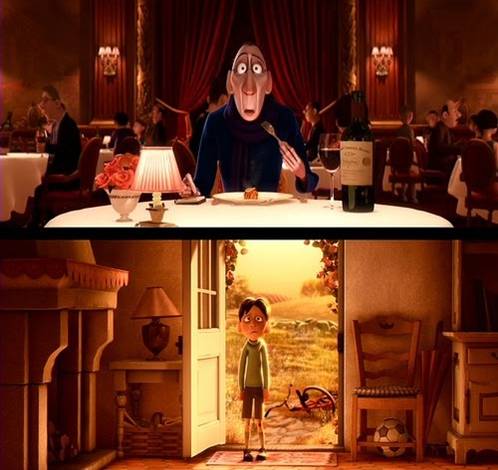
Visual slides are emotional shortcuts. A powerful image or visual concept unlocks something that was already (at least partially) stored in our memory. This scene from the movie Ratatouille (affiliate link)is perfect example: a taste sensation that unlocks a childhood flashback.

SlideMagic: a platform for magical presentations. Free student plan available. LEARN MORE

I will be speaking in NY 5-6 April [details]

I will be speaking in New York on 5 and 6 April (click the bullets for full details):
The events will take place from 18:30 to 20:30 at the NYU Stern School of Business. Tickets are $25, but readers of this blog can get a 40% discount by applying promotion code  "ideatransplant".

I am honored to be invited by Sean Black, CEO of SalesCrunch, the organizer of these events. SalesCrunch is a social selling platform in which online presentations play a central role. The business has 3 elements (my seminars are part of #3):
  1. CrunchConnect  makes it easy to share sales presentations with prospects. Moreover, it tracks to what extent they are viewed and how effective the presentations are. The service blends web conferencing, presentation sharing, social networking into one platform that salesforces can use to interact with prospective clients.
  2. CrunchTrainer uses presentation sharing to create a powerful online salesforce training tool
  3. SalesSchool is a community that organizes events about sales-related topics, my 2 seminars are an example of these.

SlideMagic: a platform for magical presentations. Free student plan available. LEARN MORE

The logic is more important than the number

A claim in a sales presentation: "we will save you $10m over 5 years". A nice statement, but it does not have instant credibility. How can you make it credible?
  • The best option: show real case studies of other customers where you managed to pull it off. Not every company has this data ready though (especially startups).
  • The second best option: show the logic of you how you got to the number with a simple and transparent multiplication of a few numbers. "We save 10 minutes per procedure, we estimate you do [x] procedures, therefore we get to this cost saving." You shift the debate from arguing about the absolute number, to how your product adds value.

SlideMagic: a platform for magical presentations. Free student plan available. LEARN MORE

Khan Academy: Prezi in action at TED?

You should watch this TED talk by Salman Khan, a former hedge fund analyst who is now fully devoted to turning the education system upside down (see his Khan Academy). His key concept is to humanize the class room using technology: have kids watch videos at home at their own pace and use the time of the teacher in the class room to provide individual support instead of one-size-fits-all lectures.


Now to Prezi. I think Salman is using it as his presentation engine. I am still not convinced that it is a good large audience presentation tool (see an earlier discussion on whether Prezi is a PowerPoint killer). However, the tool does a good job in visualizing the enormous video library Salman has constructed, and the carefully thought-through construction of the curriculum he is proposing. What do you think?

SlideMagic: a platform for magical presentations. Free student plan available. LEARN MORE

Drifting slide titles

A highly competent presentation designer asked me why I put my slide titles always at the same position (top left). Good question. My slide titles have started to drift, depending on the composition of the chart.

SlideMagic: a platform for magical presentations. Free student plan available. LEARN MORE

The Q&A visual

Many presentations end in some sort of Q&A session. During this discussion, the slide show usually comes to a standstill, and the last visual used stays on the projector for a long time. Make sure it is a useful one, since it might be the image that the audience will remember best. To be avoided:
  • A completely random slide from the deck (the one that sparked the discussion for example)
  • A "thank you" or "Q&A" slide
  • A slide that addresses one of your weaker points (i.e., you got a touch question about the competition and did the best you could using the competitor comparison slide), move it after you used it.
  • A dry list of bullet points recapping the content of your presentation using language full of abstract concepts ("ROI") and buzz words ("key competencies")
What could work: a visual that links back to a key point in your presentation. For example, if you spend 5 slides on describing how a teenager will use your mobile social network, just putting a picture of her back up will remind the audience of the story. (This time you can leave out the bullets arrows, boxes, just an image to refresh the memory).

SlideMagic: a platform for magical presentations. Free student plan available. LEARN MORE

Bullet points in a Steve Jobs presentation

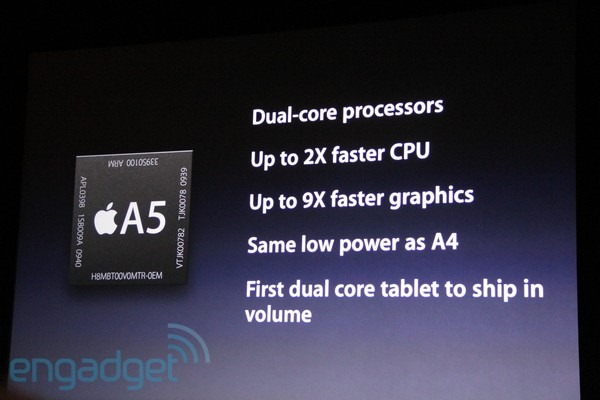
Bullet points happen to the best, even Steve Jobs uses them. See the slide below from the iPad 2 launch presentation (thank you Engadget).


The good:
  • They are short
  • They do not have a bullet in front of them
  • He has them pop up as he speaks, so you can't read ahead (good here, but not recommended for all presentations though)
The bad:
  • The "volume" orphan at the bottom
  • All those "dual core", "2x", "9x", "CPU" makes it a bit hard to read
  • You can see Steve Jobs looking down, pausing to read them off a screen
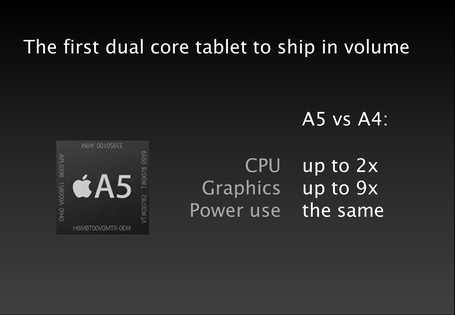
What do you think of this alternative?

SlideMagic: a platform for magical presentations. Free student plan available. LEARN MORE

Skip to 4:03

Videos that are posted online often come with an explanation: "skip to 4:03". Think about that when designing your presentation: the audience is watching a video without a remote control or Tivo. It should be interesting from 0:00 to 15:00.

SlideMagic: a platform for magical presentations. Free student plan available. LEARN MORE

Euler's identity explained in 5 minutes

A weekend post. Talking about cramming in a lot of information in 5 minutes... This entertaining video by Oliver Humpage manages to remind me about lots of math I forgot about a long time ago. I think the speaker could actually have done a better job by cutting out even more content from the story. Maybe it would have been possible in 4 minutes...

SlideMagic: a platform for magical presentations. Free student plan available. LEARN MORE

Getting into the investor's mind

The Internet is full with layouts of investor pitches, they all go something like this:
  • What's the pain
  • What's the solution
  • What's the revenue model
  • What's the edge over the competition
  • Who's the team
  • What's the traction of the company
Your pitch should address all these issues, but think about your potential investor's mind when deciding about the structure. You might have to deviate from the text book approach.

Investors are constantly evaluating critical questions. And when they (think they) have answered them, they move on to the next one. Questions are not always in the order of your pitch deck.
  • "That guy looks 12!" "Oh, he is 28 and already climbed Mount Everest"
  • "They are doing what exactly?" "Ah, something to do with mobile payments"
  • "Isn't that a Groupon me-too?"
  • "That would take 5 years to develop!"
  • "Great idea, but where are the dollars?"
If there is an obvious elephant in the room, you might as well address it early on in the pitch. Your audience will be calmer and more open to digest the other important points you want to make.

Far more important than sticking to the text book pitch structure.
Far more important than spending time repeating the obvious (i.e., stats on how big Facebook has become).

SlideMagic: a platform for magical presentations. Free student plan available. LEARN MORE

In New York early April

A heads up. It looks like I will be in New York April 4-7. I will be giving one or two presentations about making better presentations (VC pitching, sales). More details to follow.

SlideMagic: a platform for magical presentations. Free student plan available. LEARN MORE