Prezi not a PowerPoint killer?

I stumbled on this post on the Dutch Presentatie Blog: 3 reasons why Prezi is not a PowerPoint killer. In short (and in English):
  1. Non-linearity is great for conveying information, it is poor for building up the suspense of a story
  2. Dramatic zooming effects take away attention from the speaker to the screen (the blog speaks jokingly about "Prezi motion sickness")
  3. The graphical capabilities of Prezi are (still) poor (colors, fonts, shapes, data charts) when compared to other applications
I must say, I tend to agree with the assessment for the traditional stand-up presentation. Does that mean Prezi should be written off? I am not sure either. Where it could be useful:
  • In the hands of highly specialized designers, rather than the mass market. It could be the basis for a great way to let people discover a product or service interactively on a web site. It would be expensive and time consuming to develop, but once it's there it should provide a great return on investment.
  • For the mass market, maybe the product should be simplified to create a basic web-based presentation tool with great ability to embed things into web sites and blogs. With the advent of HTML5, I think we are going to see a dramatic shift in how web sites look. And there will be a huge market for a simple tool that can create great web content. Obviously here it is open to competition from Sliderocket, Google Docs, and others (a PC World review of PowerPoint alternatives via Tony Ramos).
I have been trying hard to get Prezi to work (see an earlier posts about Prezi and my first attempt at making one myself), and I really want Prezi to succeed against the dominant and sometimes ugly PowerPoint monster, but I have not succeeded yet. Hopefully one of you will prove me wrong in the comments.

SlideMagic: a platform for magical presentations. Free student plan available. LEARN MORE

The invisible structure

The structure of your presentation sets the flow of the story. There is no one fits all structure though. I am discussing three different types of structure here, the names are invented by me and do not refer to well established definitions.

Analytical structure. A rigorous and organized framework that cuts up the material in all the components required to solve a problem or run an analysis. Management consultants use issue trees, university text books have section headings going down three levels. It makes sure you covered everything, that there are no overlaps, and that it is very easy to find a piece of information without having to read through the entire text. Despite that this structure is too boring, and too exhaustive for a presentation, it is often used.

Logical structure. The sequence of facts that provides a rock solid proof of your point, every aspect is dealt with, the logical deductions and implications cannot be disputed. Not as exhaustive as the analytical structure,  it still usually uses some sort of agenda or summary page that prepares people for the logical drill that is about to follow. Market is big, competitors s**ck, etc. Better, but lacking emotion.

Implicit structure. My preferred one for a presentation. You tell a story, the audience is captivated without a rigorous agenda page, your listeners are not aware of an underlying structure of the story. It's there, it's just hidden.

I use the analytical structure to solve the problem, the logical structure to develop the check list of points I need to cover, and then construct my story free of these rigorous frameworks. When I am done, I go back to the first two to see whether I covered everything.


The audience should enter a ride in a theme park, not completely clear about the exact path you are going to take them through.

Image from Coney Island by Julia Manzerova.

SlideMagic: a platform for magical presentations. Free student plan available. LEARN MORE

Topic suggestions for the blog?

I am not suffering (yet) from Fred Wilson's blogger's block, but his call for blog topics is a good idea. What presentation design issues would you like me to discuss on these pages? Let me know in the comments.

SlideMagic: a platform for magical presentations. Free student plan available. LEARN MORE

Can I mention competitors in a VC pitch?

A post inspired by a question on Quora: how to talk about competitors in a VC pitch?

  • There is no business that does not have competitors. If you say so, you just lost a lot of maturity and credibility points. Maybe there is no company that does the exact thing you do, but people have alternatives. (Before the advent of the car, people used horses to get around). Discuss them.
  • There is not much point in hiding the truth. Smart investors will find out in subsequent phases of the due diligence, and when they find a big competitor at this stage, you will have lost significant integrity points. 
  • Find a good visualization to show your distinctiveness. Put the competitors in some sort of 2x2, or a heat map that shows on what aspects you are similar and what aspects you are different. 
  • Sometimes competitive differentiation is not just about product features. Maybe your competitors are not focussed enough (they are part of a larger organization), maybe you move faster than your competitors ("look at their roll outs over the past year"), maybe you focus on a different geography.
In short be honest, but have a good story at the same time.

SlideMagic: a platform for magical presentations. Free student plan available. LEARN MORE

The cliff


I have seen many presentations likes this one:
  1. Stunning slide
  2. Stunning slide
  3. Boring slide
  4. Boring slide
  5. Boring slide
  6. Boring slide
  7. Etc.
A shame. It shows that the designers of these decks understand slide design. Why not push it through to the entire presentation?

A great image of the Mohr cliffs by Christmas w/a K

SlideMagic: a platform for magical presentations. Free student plan available. LEARN MORE

Good VC pitch presentations

A copy of a new section I wrote for my corporate web site.

In the very beginning, the only asset a startup has is often the VC pitch deck. Here are some suggestions for designing good VC pitch presentations. In the end I will list some of the resources you can tap in. There is a lot of information and advice available about startup pitches.

Different pitches for different meetings
There are different investor presentations in a fund raising process. There is the line up in a big conference where everyone has 1 minute to pitch (not very effective). There is the 10 minute phone call, the 20 minute coffee chat. The first meeting at the VC office, the presentation to the full partner group. Prepare your story and deck for each situation. As you go through the investment process funnel, your story will shift from talking about what the company is about, to how the company will do it.

Do a pitch without a deck
Practice a 20 minute pitch without slides in front of a friend. Record yourself, listen to your self. What sequence did you use to tell your story? What examples did you use? Where did you have the urge to take a piece of paper and sketch a framework? Where were you tempted to open your laptop to show a detailed chart with financials? All this gives you a clue about the sort of visuals you need to support your natural story.

It is about you
When an investor looks at entrepreneur, 50% of the attention will go to the content of the presentation, the other 50% will be spent on making a personal assessment of you, the presenter. Are you a good person to work with, who takes input from a Board? Do you have a sense of realism? Are you fired up for the roller coaster ride or hedging by keeping your day job? Can I trust you? Can you actually sell? Can you pull it off? These are all questions that cannot be answered by the slides you are presenting, they are answered by reading in between the lines.

Explain what you do
Very early on in the presentation, tell the investors what you are actually doing. Otherwise, they will be guessing and guessing in their minds what your talk is actually about. And people who guess do not pay attention to the content of the presentation. Do not be afraid to compare yourself to existing companies technologies in the market. This does not say that you are a me too, it just serves enables investors to put you in a box and understand in what market context you are operating.

Cut the buzz words
Buzz words, jargon. Experienced investors will see through it immediately. They get bored, and you lose maturity points. Talk like a person without verbal padding.

Sell the problem not the solution
Investors need to believe that there is a big potential market out there for your product. The best way to do that is make them feel what the pain in the market is. This is much more powerful than spending a lot of time on the solution.

Use interesting slides
Ditch the bullet points. Big fonts. Big images. The last thing you want is to bore the audience. Investor pitches can usually be bold and creative, especially for the first section where you sell the problem. Remember that it is not the number of slides that counts, it is the time it takes you to go through them.

Slick does not equal good
Having very sophisticated graphics and animations usually does not add to fundability of your business. Usually, sophisticated graphics do not add much to the story (if they are just background visuals that are repeated on every slide). Even worse, they could show poor judgement (spectacular animations do not come across well in a serious VC partner room). And even worse, it could give investors the impression that you are trying dress up the bride (a bit too much). Think about that car sales man with en expensive but poor taste suit and a heavy after shave. Do you trust him?

Be realistic about the competition
Any business has competition. Talk about them. Be realistic. And show how a seed startup can beat them to it. Acknowledge that it will be difficult, but that you have good odds. You will score a lot of realism points by doing this.

Address your weakness
Address the issue that is obvious with your company. Maybe it is a junior team, maybe it is a big competitor. Not that you need to blow it out of proportion and undermine your own story. The other extreme, not addressing the elephant in the room will not get you any investment either.

Do not skip the technology
An investor audience is usually intelligent. Skipping the technology is insulting them. Skipping it shows that you are unable to explain/sell your product to an intelligent audience. And finally, at this early stage of the company, the technology is probably the only distinctive feature that you have.

Transparent, simple estimates
Data provided by market research organizations saying that the market for x will be $1bn in 5 years does not really help you. Far better is a very simple and very transparent estimate of your market. A simple multiplication of 5-10 factors that you can scribble on a white board. The same is true for the company forecast. Everyone will put $50m as a revenue target for year 5 on a slide. You need to convince an investor that this number is optimistic (points for being a fired up entrepreneur), but not totally impossible. Again, this can best be done with a simple multiplication: what would you have to believe in order for this to be true.

No live demo in short meetings
Demos can go wrong because of stupid practical issues. Demos can take time (moving around menus, setting things up). These are all the wrong ingredients for a short pitch that builds up momentum to the final slide. Instead, use a pseudo-demo with a sequence of screen shots that shows investors what the product is about. Mention that you have a live demo and invite them to a separate meeting to play around with it.

Practice, practice, practice
Steve Jobs takes 3 full time days to rehearse his keynote speeches. You should practice as well. Strangely enough, it takes practice and rehearsal to be able to be spontaneous. Time your presentation and check that you can stay safely within the time slot you have been given.

Tap into the resources available on the web
Over the past years an enormous amount of information has become available about pitching to investors. Mark Suster is essential reading (posts about raising venture capital, posts about pitching VCs.) David Rose has recorded a classic TED video on investor pitches. Dave McClure has his own distinctive style of suggesting ways to improve your pitch. I have been posting extensively about investor pitches on the blog over past 3 years, see the investor pitch category here, or browse through a deck I prepared with presentation lessons for entrepreneurs. Quora is a new question and answer site with direct participation of some the world's most famous investors, see the investor pitch section here.

SlideMagic: a platform for magical presentations. Free student plan available. LEARN MORE

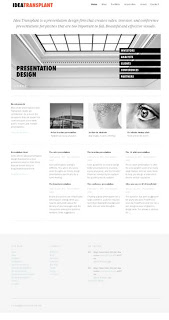
New web site!

Finally, I am happy with the design of my corporate web site. The previous one was still too cluttered, but now I have reached the appropriate level of minimalism.

SlideMagic: a platform for magical presentations. Free student plan available. LEARN MORE

PowerPoint 2011 for Mac review

I have been working for a few days with Microsoft Office for Mac 2011 now (affiliate link), having upgraded from the earlier version PowerPoint 2008. For me, the Mac is still a secondary machine, and testing this software is one of the key determinants whether I can move across all together to a Mac environment. All my clients use PC-based Microsoft Office software, so Keynote cannot replace office.


Initially I was a bit wary of Office 2011, having read some poor reviews on Amazon and by columnists such as David Pogue. Maybe it was because of this that I wrote this impulse post about stability issues of PowerPoint 2011.

I managed to solve the problem (after a lot of searching online). Somehow, PowerPoint 2011 can crash every time you enter slideshow mode after you have done some heavy toolbar customization. It happened to me a few times in a row. All fine, customize toolbars, crash, reset toolbars, all fine, customize toolbars, crash. At the moment I stopped the poker game (do I have the courage to add another toolbar customization or not, at the risk of having to reset all previous modifications?) at a level that I am happy with my current toolbars. So the issue remains.

For the rest, I must say that I actually like PowerPoint 2011. The differences with the PC version are minimal, someone with experience with PowerPoint on a PC can switch over instantly. The previous version (PowerPoint 2008) had a user interface that was different from the PC, and also lacked some functionality. Now there is a level playing field. (Well almost, for some reason you cannot change the spacing of the grid in PowerPoint 2011, making it hard to set a grid line exactly at 0 of your slide).

So in conclusion a great piece of software, but I am waiting for that one upgrade that will kill this toolbar customization issue.

I have not yet reviewed Word 2011 and Excel 2011 (the latter got the harshest verdict from David Pogue).

UPDATE 1: OK, there is one big difference with PowerPoint 2010 for Windows: boolean operations on shapes. On the PC version you no can join and subtract shapes. Not in the Mac version. See an earlier post where I praised shape subtract.

UPDATE 2: I think I managed to track down the source of this toolbar bug myself. Do not try to drag the straight arrow connector buttons into your customer toolbar, see a later post here.

SlideMagic: a platform for magical presentations. Free student plan available. LEARN MORE

Designing board presentations

Board presentations have a typical setting. The audience is usually relatively small and consists mainly of insiders in the company. Usually, Board papers get send around a few days before the actual meeting. Board members are experienced executives with busy schedules that want to make decisions and get to the point. They will not hesitate to urge you to move on when they think they got the message. (A big difference from a conference presentation where the audience can either walk out or check email on their mobile device if the presentation is not interesting).

The basis of the Board meeting material is usually a large slide deck full of facts and analysis. The most important recommendation is to put that aside as the basis for your presentation. Strategy documents are highly structured, highly organized, highly detailed, and exhaustive. As a result, they contain too much information, do not get to the point fast enough, and are frankly boring. This is great if you want to solve a problem, it is not effective if you want to communicate the solution.

Start off with thinking about what you want your Board to decide. Board meetings are all about decisions, not about fact sharing without a purpose. Set up the agenda, and put the decisions you want taken right upfront. The presentation challenge is now how to convince the Board that your suggested decisions are the right ones.

Every Board presentation usually has a few slides that form the stage for the group discussion. Anticipate what these slides should be and spend most of your effort on these ones. Key slides are usually those that map the possible options and shows the key trade-off that is required to chose the best one. Often, I use a heat map in these situations. A heat map is a simple table with the options as columns, and criteria on the rows. You can color the cells of the table with green, orange, or red to make the trade-off visible. Another way to show trade-offs is to plot your strategic options on some sort of 2x2 matrix, or show yourself on a 2x2 matrix now, and where you want to be in the future versus competitors.

So, the difficulty of these slides is not the design of a 2x2 or a heat map, it is picking the right criteria. Right means useful to make the right trade-off, and suitable for a live discussion in the Board. It is the latter that is the most difficult. Board members usually have strong perspectives and meetings can spin out of control if they are not managed well. Good slides are an essential part of this.

The secret is to simplify the degrees of freedom and the amount of uncertainties in the decision. There are a number of ways to do this. The most powerful one is quantification. Often it is possible to boil down different strategic options down to a single number the NPV or net present value of the future profit stream for example. This number combines assumptions about market size, market growth, market share, pricing, margins, risk, investments, (and their timing). You list the NPVs of the different options, and show sensitivities only to those variables that are controversial (risk, competitive behavior), while leaving some of the obvious ones out of the equation. What matters is not so much whether you come up with the exact NPV value, what matters is that your trade-off is right, this option is more attractive than the other one by a wide margin.

Another way to simplify beyond quantification is to group similar criteria together. Can we do it, do we have the right people, etc. all can be collapsed in one factor. The best outcome of this simplification process is to get stark trade-offs between options. That makes deciding between easier.

Once you have set up the basic argument, you can support your red, yellow, and green scores with charts. Skip the charts with obvious information that everyone knows already. Do not waste to much time re-formating highly detailed charts from the fact pack, it is an internal audience after all. Do spend time though on information that might be different from the usual. Analysis that you have done beyond the standard reports, consumer feedback from the latest round of market research, new market share data, etc. Often you know beforehand what the big controversial issues will be in the meeting. Anticipate those, and prepare charts with facts to address them.

During the meeting come back all the time to your central decision map. It might even be recommended to project your slides onto a white board so that people can stand up and scribble on your charts. It is powerful way to control the dynamics in the meeting, someone who holds the pen, speaks.

So in short, the challenge with Board meetings is not so much the slide design, it is anticipating the debate and managing the discussion.

SlideMagic: a platform for magical presentations. Free student plan available. LEARN MORE

Small scenes showing big opportunities

Most startups pitching for VC money would pound the audience with billion dollar market forecasts produced by market research firms such as IDC or Gartner. They are important, but they do not touch the gut feel of an investor. Often, showing a small street scene without a single number in it, does the trick.

As an example, take online gambling, and let's go to Spain. Anyone who spend some time there has seen the numerous lottery stands scattered across the cities. What if all these people could get the same thrill of purchasing a lottery ticket on their mobile device, rather than standing (visibly annoyed) in a long line? The opportunity is staring you in the face, right in front of you. The VC is reminded of it every time he drives to the office, every day of the week.


If you are interested, a recent blog post by Seth Godin about why these people are not buying the ticket to win the big prize. Image credit to Paul and Jill.

SlideMagic: a platform for magical presentations. Free student plan available. LEARN MORE

Images from the past

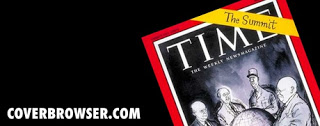
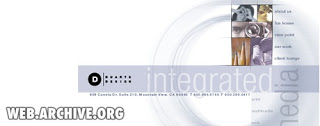
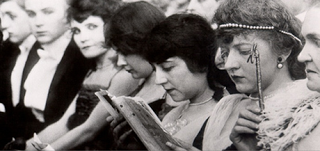
The majority of stock images are boring, why not look for real ones? The Internet offers now some interesting ways to get your hands on images from the past, great to transfer your audience to a point back in history. Here are a few of my favorite sources:

The images used here:

Creative commons images on Flickr, search by date

Vintage ads, watch out for copyright

Vintage magazine covers

Vintage websites (duarte.com ~2000)

SlideMagic: a platform for magical presentations. Free student plan available. LEARN MORE

Notice how you skip the introduction?

Have you noticed how, whenever you start reading an article with a promise in the headline "The 18 secrets to [x]", "Why is it that [y]", you usually skip the introduction and/or skim the text to find the answer the headline promised? Introductions usually repeat the headline and contain background information such as the bio of the speaker that we do not have time for. Not the interesting stuff the reader is looking for.


Your audience wants to do the same with your presentation, except, they cannot. Taking the clicker, fast forwarding and asking you to get to the point would be rude. Instead, they start checking email on their mobile device until it gets really interesting.

Detail of an image claimed by John McNab.

SlideMagic: a platform for magical presentations. Free student plan available. LEARN MORE

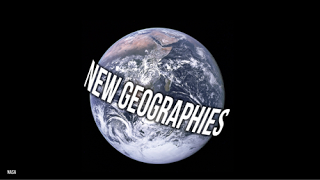
Slide idea - global expansion!

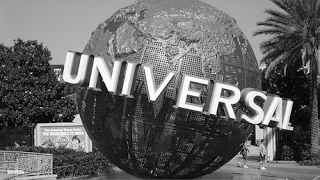
A startup has the master plan to spread out across the globe. A variant on the Universal globe


How to create this text effect in PowerPoint: select the text (in a narrow font if your text is long), go to format, text effect, "can down" (somewhere in the middle right). Go back to format, select glow, glow options and set a color (I picked black).

SlideMagic: a platform for magical presentations. Free student plan available. LEARN MORE

18 reasons why PowerPoint looks like PowerPoint

This question has been bugging me for years: why does PowerPoint look like PowerPoint and not like a well designed piece of graphics design work. The answer is obvious for poorly designed slides full of bullet points. But still, even when slides are designed by a professional designer (including me), they will not reach the professional and designer look of a good piece of print design.

I have not found the answer yet, but am getting closer (maybe). Especially after reading an enormous amount of books on graphics design and typography, and a renewed interest in graphics used in television productions (Fox is horrible, MTV is good). Here we go (written in random order):
  1. PowerPoint presentations use over-used fonts. Arial, Verdana, Calibri, it just does not look as good as Helvetica or other print classics
  2. Presentation design = filling Microsoft's default bullet template
  3. PowerPoint presentations are stuck in between text and display sizes. An average presentation sentence is so short that we can put it in bigger characters than a text-size, but still too long to put it in an enormous display font. Fonts are not designed for this twilight zone. (Helvetica is an example)
  4. Most good PowerPoint designers understand the concept of white space, and use it. However, we still tend to keep margins around the slide very small, making the whole composition look cramped.
  5. It is tedious to change the leading(the vertical distance between lines of text) in PowerPoint, so we end up using the standard proportion that was designed for small font sizes (and too large for display font sizes)
  6. Nobody really uses a consistent grid structure slide after slide
  7. PowerPoint designers hardly break up a text string to play around with a sentence's typography. Lower part of the sentence, color part of the sentence, flip parts of the sentence. For example: if you want to visualize squeezed, you could pick a cliche stock image of a squished orange, or your could crush the typography of the word "squeezed" in between 2 forces.
  8. Presentation designers pick images that are too powerful, overwhelming, creating a constant barrage of inconsistent visuals with too much going on. Look at a quality piece of print: calmer images, with consistent colors, more white space, more coherent.
  9. We use too much color. Quality graphics design often has muted colors, with a few bright accents. Presentation designers cannot resist the urge to use the full spectrum of colors forcefully on every slide in the presentation
  10. Presenting like Steve Jobs is making your presentation white on black
  11. Images always have the standard rectangular shape, roughly the same as the screen aspect ratio. Why not use very narrow images, round ones? Something different
  12. Presentation designers mostly use text size to emphasize what text is important, and what text is less. Subtle color differences that are so important in print graphics design are not used
  13. Text sizes should always be the maximum possible. Cutting words is great, but why not use the extra space to create more white space on the slide, instead of filling it all up with a bigger text size?
  14. Too much symmetry. Most objects are still centered in the page.
  15. Not used to mixing fonts (partly because of the text/display size twilight zone). Good graphics design uses a few on a page to give interesting contrast. Presentation designers use one (usually).
  16. The limitations of the 4:3 and 16:9 screen, we presentation designers have to do without the vertical dimension that a poster designer can leverage
  17. The one-distance-has-to-fit-all situation. When you look at a poster you can view it from a distance and see the big characters and shapes, intrigued, you can come closer to read the details in the fine print. No such thing in PowerPoint. You sit where you sit, in a fixed distance from the screen.
  18. Presentation designers always hold back and never go to the creative edge a poster designer would go. We have seen too many bar/column/pie charts, bullet point lists, boxes and arrows. It is hard to leave the classical slide compositions behind, and to come up with something daring and new (for 20 slides in the deck).
Continuing my journey into the world of graphics design.

SlideMagic: a platform for magical presentations. Free student plan available. LEARN MORE
UPDATE: PowerPoint 2011 crashing when entering slideshow mode

UPDATE: PowerPoint 2011 crashing when entering slideshow mode

UPDATE: To readers arriving here via Google: this is a post from February 2011. However, as I write this in January 2015, Microsoft PowerPoint 2011 for Mac again is crashing frequently. I recommend saving your work often. I corresponded via Twitter with the Microsoft support team and they pointed me to their general cleanup suggestions here (basically removing all your preferences).

Want to try out an alternative to PowerPoint? Request a beta invite for the new presentation design software SlideMagic here!

Here is the original post from 2011:

OK, more searching solved the issue, which can be found here: http://support.microsoft.com/kb/975723 My toolbar folders were corrupt.

Everything is working again without toolbar customization. But when I start modifying the toolbars again (I need a set of 20 buttons or so to be really fast an efficient in PowerPoint), the whole saga starts again. I will keep you posted about my experience with Microsoft PowerPoint 2011.

I have been battling with PowerPoint 2011 for the Mac for the past hour and it seems seriously flawed. When entering slideshow mode, it just crashes. Searching online for a solution reveals dozens of forum discussions about the same issue that are unresolved. Do not upgrade from Office 2008. Repeat, do not buy it, it is not stable yet! Usually I am an early adopter of software and can live with a few bugs here and there. Not being able to go into slideshow mode kills the purpose of PowerPoint, this is a serious flaw.


SlideMagic: a platform for magical presentations. Free student plan available. LEARN MORE

Turn Valentine's Day into Generosity Day

Sasha Dichter is the Director of Business Development (fund raising) for Acumen Fund,a global non-profit venture fund that invests in enterprises that fight poverty in the developing world. (Example: investing in a mosquito net manufacturer creates employment/income for a local community and fights malaria at the same time.)

He is building support for a great initiative: turn Valentine's Day into Generosity Day. The idea is that you say "yes" to anyone who asks for help for 24 hours. He himself went through an initiative like this, but kept going for a month, see a video below explaining what he learned form that.


If you are interested in the work that Acumen does, join the community of supporters all around the world. I know that this blog is read by many presentation designers, and doing presentation design work as a gift for a worthy cause is a great way to make a difference. A much better way actually than sending a check (see an earlier post about pro-bono presentation design).

(Disclosure: I help Acumen now and then with their fund raising presentations).

SlideMagic: a platform for magical presentations. Free student plan available. LEARN MORE

Can I use humor in an investor presentation?

Can I use humor in an investor presentation? (Well, the question applies to all serious presentations). I would be careful. Humor is a great ice breaker when it comes naturally, even in serious presentations such as a pitch to investors. However, making it come naturally is hard to plan. That rehearsal in front of your friends in the living room sofa is a different environment from the corporate conference room.

If you used a joke spontaneously in a previous presentation, you could try to use it again (i.e., program it), in another one if you feel that mood and energy in the room is right. But only then. And never put jokes in writing on slides or in images, you lose the option to pull them out at the last minute. Also, you do not control the digital after-life of the presentation file after the live presentation.

SlideMagic: a platform for magical presentations. Free student plan available. LEARN MORE

Hey, presentations don't look like this!

Client: "Hey, investor presentations don't look like this! I have seen many before. This one has too many slides, too many images, we need to fix this."

Me: "That's exactly the point"

SlideMagic: a platform for magical presentations. Free student plan available. LEARN MORE

New French presentation Bible

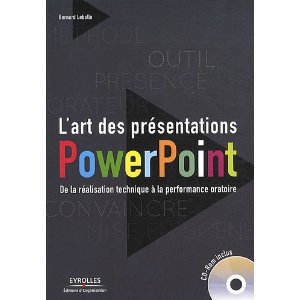
Recently, I received a review copy of  L'art des présentations Powerpoint, by Bernard Lebelle, a frequent commenter here on the blog. A very interesting book (obviously for those who can read French).

L'art des presentations PowerPoint

My first impressions:
  • Besides the big presentation and speaking insights (often covered in many other books on the subject), this book is a treasure of smaller insights, many of them illustrated with a little diagram or a quick scribble. Almost like reading a constant flow of interesting blog posts. My French is probably not good enough to read this book from page 1 to 386, but the layout with the bite-size illustrated tips and tricks enables me to digest much of the content.
  • It covers a broad range of subjects, all the way from speaking suggestions down to the basics of typography and detailed suggestions on how to use the PowerPoint software
  • Bernard integrates concepts and ideas from many sources (books, web sites) with clear references to them for further reading.
Congratulations Bernard.

SlideMagic: a platform for magical presentations. Free student plan available. LEARN MORE