Fly through that circle!

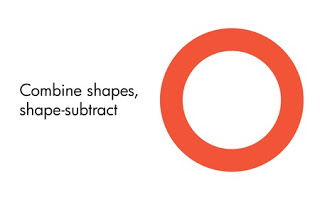
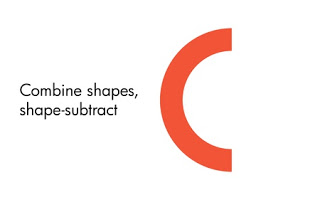
The shape combine function in PowerPoint 2010 is great. Here is an example of how you can create text that seems to be flying through a circle. The key is the create 2 half circles and send one of them to the back. In earlier version of PowerPoint, this was very hard to do. (See a review of PowerPoint 2010 here).

Draw 2 circle shapes
Center them horizontally and vertically
Select the shapes, (inner last), shape subtract
Draw a rectangular shape
Same trick: select them both and do shape subtract
Copy and flip the half moon
Send the right half moon to the back and put some text

SlideMagic: a platform for magical presentations. Free student plan available. LEARN MORE

The sales presentation

Sales presentations have a specific setting. Often, the audience is relatively small. Most of the time you would have time to discuss and prepare the meeting in phone calls before hand. Where as in a VC pitch presentation the audience is probably constantly testing for reasons not to invest in you, someone sitting through a sales presentation would actually really want to buy something from you. Here are some observations (in no particular order) to help you design better sales presentations.

A good sales presentation does not always equal a slide deck Some sales meetings can be conducted without PowerPoint at all. An alternative is a meeting sketched out live on a white board. For example, you could run your client live through a calculation of the financial benefits of your product. It will be clear that although there are no PowerPoint slides involved, these type of presentations might actually require more preparation than regular slide shows.

Talk about the customer issue rather than yourself. Pages and pages about the history of your company, how many employees you have, where your offices are located, are all about your, and not about the issue your customer is struggling with. If you are a startup and you need to establish that you are a financially stable company, do so, but in (most) other cases do not bore your audience with talking about yourself.

Listen, listen, listen. Each customer has specific issues, and customers are very keen to explain them to you. Listen carefully in the phone calls leading up to the meeting. Listen in the meeting. Focus your sales presentation exactly on the customer. Look the audience in the eye and see whether you maintain the attention, there is still eye contact. Rigorously sticking to your script even when the customer signals (questions, interruptions, eye movement) she wants to take the discussion in a different direction is a sure recipe for a turn down.

Sell the problem rather than the solution. Showing that you can articulate/understand the customer's problem is much more effective in sales presentations than spending pages and pages on the benefits of your product. Once you have sold the problem, the customer is likely to buy your solution.

People buy on emotion, justify with facts. Pages of pages with quantified facts are in most cases not the swing factor in a buying decision. Rather, the decision to buy a product or service needs to feel right. I can trust this company, I can work with this person, I can identify with this brand. The real buying decision is emotional. Facts and data are for the justification after the decision is made. As such, your sales presentation should provide both. (Thank you Bert Decker for reminding me of this)

Be careful with attacks on the competition. There is always a temptation to lash out at the competition in your sales presentation. Be careful. First of all I suggest never write these things down in slides. Rather, address these issues verbally during your presentation. Secondly, make sure you got your facts right. If a customer is sitting through presentation of multiple suppliers, they might actually have more knowledge about your competitor's offering than you have. Comments without substantiation are an instant loss of credibility.

Avoid generic statements. People have been reading the same jargon of product benefits all over: cost effective, efficient, scalable, reduces churn, good ROI. If you use this language without a specific context or backup, it is highly likely that they will not register in the mind of your customer. Be specific. Use anecdotes. Present unexpected visuals.

Talk value instead of features. A customer sitting through a sales presentation is interested in the value your product or service brings, not in the list of features. Long feature lists are boring to listen to and not relevant for the purchasing decision. Talk value, and point to a detailed page in the appendix with all those great product features.

Show real images. Stock photography is artificial. Beautiful people and perfect settings working together perfectly. Why not show the real face of your company? A picture of the first shift at 6AM in the morning. A picture of the great people in your customer service department in the middle of the night. Your central London store that just recently opened? These are not images of the logo that is stuck to the front door of your head office. These are images of the real people that make up your organization.

Tell your story once. Repetition is not always good. Some sales presentations tell the story on the summary page at the opening, then repeat the story using the slides in the deck, and then wrap up the same story one more time with the final conclusion page. The introduction page of a sales presentation should be a teaser, promising a specific solution to a specific problem your customer has. The body tells the story. The final summary reminds your customer about the solution.

SlideMagic: a platform for magical presentations. Free student plan available. LEARN MORE

Presentation outlines should be visual

Everyone knows that it is important to think about the story and flow of your presentation before opening PowerPoint and start designing slides. Paper sketches are great, sticky notes are great. But there is one common approach that usually does not work: writing the story out long-hand in Word.

Long-hand text looks final. When you want to discuss it with a team of people, they start paying attention to wording, fine tuning messages. This is wasted energy at this stage in the process.

But more importantly, text is not visual. "Here we need an image of a man standing in the street holding his phone up in the air in despair". It is much more powerful to discuss the draft or first ideas of a visual presentation with - well - visuals!

As a result I often end up scribbling the first version of a presentation in PowerPoint. But in this case PowerPoint is not the slide design tool, rather a simple note pad to organize ideas.

SlideMagic: a platform for magical presentations. Free student plan available. LEARN MORE

Spend time on your weakness

A startup pitching to a giant:
  • This will save you millions of cost!
  • Your users are asking for it!
  • We enable you to break into new markets!
  • Your competitors already have something like this!
25 minutes later with 5 minutes left: "convinced?"

"Yeah sure, but we have a policy not to work with startups that might go bankrupt tomorrow..."

It is important to find out the major concern of the giant before pitching. When someone mumbles in a phone call that they have a policy not to work with startups, it is most likely not a side comment. Focus your pitch on this issue. Not explicitly, but in between the lines.
  • Show your blue chip investor base
  • Show the partnerships you have with very established players
  • Show your positive cash flow
  • Show your customer list
  • Show them anything that might support the point
The real battle is here. Maybe it is a hard one to win, but at least you should try.

SlideMagic: a platform for magical presentations. Free student plan available. LEARN MORE

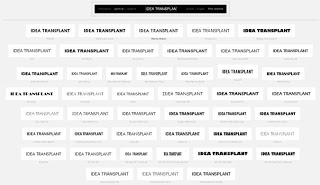
Sticky Slides becomes Idea Transplant

OK, I have re-branded. One more time the first blog header that I used back in the summer of 2008. (the details: Verdana font, and the standard Microsoft "Trek" color scheme). All the best Sticky Slides...


All links and RSS feeds should continue to work:
http://blog.ideatransplant.com
http://www.stickyslides.com
http://www.stickyslides.blogspot.com
http://feeds.feedburner.com/stickyslides

SlideMagic: a platform for magical presentations. Free student plan available. LEARN MORE

Can your audience see it's PowerPoint?

If they can, maybe it is time to change the slide design and get rid of:
  • Repeating graphics
  • Titles in the same spot
  • Page numbers
  • "Confidential" on every page

SlideMagic: a platform for magical presentations. Free student plan available. LEARN MORE

Book review - "Thinking with type"

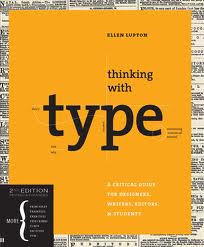
Regular readers will have noticed that I am reading up on typography lately. Some basic understanding of typography can improve the quality of your presentation designs dramatically. The book Thinking with Type (affiliate link) by Ellen Lupton is one of the most useful ones I read so far. Clear explanations of all the basic concepts with great examples. It comes with great online resources on the Thinking with Type website, covering a lot of material of the book. (See the type crime section, and how I use the wrong quotation marks all the time on this blog).


Earlier reviews of typography books:
  • Just my type, stories about the most important fonts and their designers, useful information, entertaining reading (and great dinner party stories).
  • 20th century type, a more scientific overview of fonts and designers of the past century.
  • 1000 fonts, just what the title says
  • Design elements, a broader review of graphic design concepts
  • Bibliographic, an overview of classic graphic design books

SlideMagic: a platform for magical presentations. Free student plan available. LEARN MORE

Cheap hotel rooms!

It sounds great, but we discount it completely because we have heard and read it so many times. The same for text in presentations.

Even this Zen minimalist slide text (with a nice picture in the background) might not convince your audience:
IN SHORT, WE HELP YOU
  • Acquire new customers
  • Sell more to existing customers 
  • Prevent customers from leaving
  • Cut cost
These are the exact things big banks and mobile phone operators are worried about. But, every company pitching to them is putting these words on the summary slide. It does not stick anymore. They have heard it before.

Increase the signal to noise ratio. Instead, try reminding them on the final slide about the specifics of your company that create these benefits. Maybe a small icon-size thumbnail of an image you used before. It will make you stand out in the noise.

SlideMagic: a platform for magical presentations. Free student plan available. LEARN MORE

Going beyond the presentation screen borders

A long introduction to the post today. You can skip the plot sideline and go straight to the end if you want.

It seems that many visual artists that somehow documented the thoughts behind their work reach higher levels of fame. One example is Vincent van Gogh, who through the letters to his brother Theo gave us a lot of background on his art. Vincent van Gogh spent some time in this white house in the same street I grew up in the Dutch town of Hoogeveen, and it is striking to see how his descriptions of the place, the features and character of the people still applies today (except for that people there have moved on from living in huts). His subsequent transition from the cold/dark Netherlands to the bright Mediterranean is another interesting parallel I share with the painter.

Vincent Van Gogh, farm house in Hoogeveen

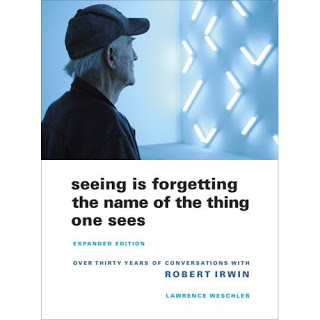
Recently, I have been reading a biography about Robert Irwin, an American artist starting off with expressionist paintings to move on to minimalist, large art installations. The book Seeing Is Forgetting the Name of the Thing One Sees (affiliate link) provides lots of his personal perspectives behind his own work, but more importantly about art in general. I have changed the way I like at art after reading it.


Irwin wonders why art ends with the frame of the painting. He wonders why art ends with the room the painting/installation is exhibited. Art and beauty is all around us, we just need to be able to perceive it.
"But paintings are like what you can barely make out through a keyhole compared with the richness of perception that's just waiting there in the world to be experienced all the time. [...] It's strange. With food, for instance, people seem to understand what's involved: you savor the taste rather than just feed the body. But people have a hard time understanding that it should be the same way with visual experience."
Popping the bubble and bringing us back to the world of presentations. What got me to write this long post introduction is the insight that you need to design an overall presentation experience that does not end with the borders of your screen. The background, the stage decor, the way you/the speaker appears, the light in the room, everything. Your presentation is a mini art installation maybe with a more banal subject than these great artists, but still it is an installation. Imagine what a video of your performance would look/sound like and design acoordingly. The TED presentations are a good example of this.

SlideMagic: a platform for magical presentations. Free student plan available. LEARN MORE

Poster design goodness

Some interesting visual concepts in a Core77 poster design competition. I borrowed the image by the winner Miryam Melkumyan, you can see all entries here.

SlideMagic: a platform for magical presentations. Free student plan available. LEARN MORE

Sorry Degas...

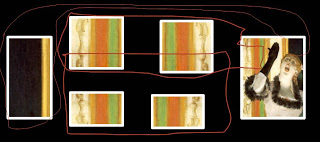
One of the images in the slider of my Idea Transplant web site needed some extension. Here is how I re-used some components of Degas' original painting and make it fit in today's widescreen format. I hope he will forgive me.


SlideMagic: a platform for magical presentations. Free student plan available. LEARN MORE

Book review - "Just my type"

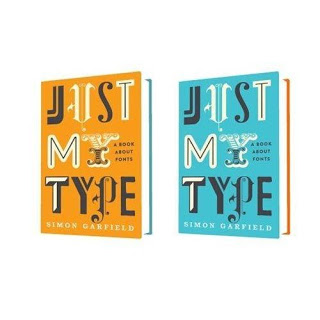
Most books about typography and graphics design are nicely illustrated reference books full of theory. Just My Type: A Book About Fonts (affiliate link) by Simon Garfield is different; through a number of stories and anecdotes you a get a wonderful introduction to the history of typography.


It is a great read: both informative and entertaining. A more extensive review of the book in the New York Times. I purchased the book for my Kindle/iPad to save delivery time and charges to Israel. If you live closer to Seattle, I would suggest you buy a paper version to get a better view of the font examples inside the book.

SlideMagic: a platform for magical presentations. Free student plan available. LEARN MORE

Juggling personal brands

No presentation insight today, but some musings about my personal branding. Skip if you are not interested.

The URL www.stickyslides.com might be down today as a result of scary shifting and moving of my online properties. Things should propagate over the next 24 hours back to normal. It is all the result of a personal branding project. I am a strategy consultant, so here are the recommendations:
  • Jan Schultink, used as my Twitter handle. I do not have a name like Steve Jobs, so chances are that if you do not happen to be a native Dutch speaker you will find it hard to remember, spell, and pronounce my name.
  • Axiom One, the name of my company. This name was picked without much thought from a dictionary (I was still in the "A" section). Axiom was trade marked in Israel I think, so we added the "One". There are thousands of companies called Axiom in the world (even a few are called "Axiom One", and the connection with what I actually try to achieve in the world is zero.
  • Sticky Slides, the name of this blog (renamed already once from "Slides that Stick"). I like the name, it covers what I do, still it comes across more as the title of a high school newspaper rather than a serious presentation design firm in discussions with CFOs of publicly traded companies. BUT I have built a lot of equity with the 1,000 or so blog posts in the archive
  • Idea Transplant, the name of my shiny new company web site. It covers what I do (better than Sticky Slides), unique, serious, and fun at the same time. No brand equity what so ever.
So I am biting the bullet and shifting gradually to Idea Transplant. The longer I wait, the more difficult it will become. Yesterday I followed a crash course in HTML 301 redirects and Blogger custom domains to avoid minimal disruption and to make sure that all links and RSS continue to work. I even managed to swap the user names of 2 Twitter accounts without affecting follower bases (@janschultink became @ideatransplant, and @ideatransplant became @janschultink).

Sticky Slides is moving to blog.ideatransplant.com and at some time I will change the name as well. I will keep the Blogger blog engine to preserve the archive of posts.

SlideMagic: a platform for magical presentations. Free student plan available. LEARN MORE

Designing analyst presentations

Some random thoughts about designing good investor presentations. Investor presentation in this context is a presentation by a larger publicly traded company to equity analysts and institutional investors, for example a quarterly results announcement or an investor conference.

My blog contains a lot of ideas that visible for only one day, I plan to start writing some longer articles about certain topics that deserve a more permanent presence, and update them with new ideas or input from my readers.

Begin working on the presentation early
The worst presentations are finished at 3AM the night before the investor call. It is possible to create 75% of the content of the investor presentation with preliminary data, or even the data from last quarter. Usually changes in data are not that dramatic that completely new visualization approaches are needed. Use existing data to decide on what type of graphs you need and replace the dummy data with the real thing as the information comes in. And: not all sections in an investor presentation are about data. The section with the update on the company strategy can be completed independently of the availability of the latest financial results.

Get the basic formating right
Use the correct corporate template, set the colors and the fonts to the correct values. Avoid clip art. Use professional, high resolution images. Use one template throughout all the presentations at the event. Pay special attention to the way data charts are formated. There is nothing worse than a straight copy-paste from Excel. Look the way newspaper or magazines such as The Economist pay attention to the layout of graphs: clean and focussed on one message. A PowerPoint presentation to investors differs from an annual report: it is OK to round up numbers to make the chart more readable. People who want the full detail can always refer back to the accounts. In a 20 minute call those last 3 digits behind the dot do not matter.

Keep breakdowns transparent and consistent
Make it clear to the audience at any time where they are in a financial breakdown. A breakdown in geography adds up to the total sales number they saw on page 1. Gross margins by product line average out to the gross margin of the company they saw before. Even if you explain small deviations in the foot note (sorry we excluded the cost of the headquarters, added government tax, and left out royalty sales) will confuse the audience. This could be OK in a detailed financial report, it definitely is not in a 30 minute on-screen presentation. You as a CFO suffer from The Curse of Knowledge, you know the company financials inside out. But the audience is just getting to know the figures, and it is re-assuring to see the total getting back to that $14.8bn that they remember from a previous page.

Do analysis to back up trends
If the company performance was impacted by certain factors (volume went up, prices went up, cost went down, but what got to us is a huge increase in foreign exchange losses), show and quantify this in analysis. A waterfall or sources of change chart can make the impact of multiple financial drivers perfectly clear.

Apples and apples
It is hard to compare different benchmarks in one financial picture. Absolute revenue and cost numbers is one. Gross margin, operating margin, cost as a percentage of revenues is another one. Growth rates is yet another category. Use different slides to talk about them one by one.

Use non-financial figures
Investors are not only interested in your financial performance. If confidentiality permits you to share some non-financial operating data, this can add a very powerful dimension to your story. Market shares, order numbers, customers all add to the overall picture of the performance of the company.

Bullet points are poor at creating a financial picture
Bullet points are bad practice in any presentation, but they are particularly poor at giving a financial picture. A simple table is a much more powerful way to get a quick sense of what is going on. Bullet points simply provide a verbal translation of this table, that the audience then needs to reconstruct in their mind. It is easier to skip these steps and stay to the source data.

Create original content
Especially under time pressure, there is the temptation to stitch together a slide deck quickly from existing presentation material. A few slides from the Board strategy review, some slides from the recent new product launch, a few Excel tables with the latest results: the Frankenstein presentation design method. Results are quick, but poor. A good presentation should have a consistent format and style on every page. What works for the Board, does not automatically work for your investor community. It is fine to be inspired by existing content, but use them as input into the design process rather than a straight copy-paste.

Think of different audiences
Equity analysts usually know the company and its financials inside out. They are waiting to fill in the next column in their pre-configured Excel sheets with this quarter's numbers. Show the key numbers that they are waiting for first. Analysts spend a lot of time sitting through conference calls and presentations. Cut the fluffy language, the buzzwords, the jargon: they will see through it. Rather cut to the chase. Journalists are less familiar with the financial data of the company. For this audience it is important that the company strategy is summarized clearly. It is not all about numbers. Online audience. After the press conference, most investor presentations will start their second life online. It is likely to be viewed by a small retail investor, a student, a potential customer. The challenge with online presentations is to communicate the message without verbal explanations. Make sure that charts and slide headings are clear.

Strategy is story
An investor presentation is more than a set of numbers. Behind every company is a strategy, and behind every strategy is a story. Tell that story in your investor presentation.

Practice, practice, practice
It is rumored that Steve Jobs spends 3 full time days rehearsing his annual presentations at Apple. This sounds counter-intuitive: you need to practice, know your presentation inside-out, in order to be spontaneous. Even CFOs and CEOs with significant speaking experience cannot afford to rely on "winging" it for external presentations. This is especially true for conference calls or presentations delivered over the Internet. There is little connection/feedback from the audience and stuttering, improvising, uh/oh will sound much worse than it does in front of a live audience.

SlideMagic: a platform for magical presentations. Free student plan available. LEARN MORE

Do you do backgrounds?

Not really.

Background watermarks such as these are often used in PowerPoint templates to lighten up a slide that is loaded with bullets. They are supposed to look sophisticated and fancy. They might work for a restaurant menu card or a birthday party invitation, but not for a professional presentation.
  • They make text hard to read (including bullet points)
  • They clash with any type of graphical element that is not a bullet point
There are other ways to make a slide look sophisticated with a completely blank background:
  • A nice image
  • Big text in a nice font 
  • Minimalist / simple elements (boxes with a few words in them will do) in colors that match your corporate identity
Take off the logos, take off the watermarks, take off the page numbers, remove the date, get rid off the file path, convince your lawyer to write just one page that all pages in your presentation are highly confidential rather than repeating it on every page.

SlideMagic: a platform for magical presentations. Free student plan available. LEARN MORE

The investment banker said all investor presentations look like this

I was discussing a presentation for a public share offering with a client the other day and we kept on coming back to the presentation advice that the investment bankers were providing.
Every investor presentation should have a "business card" slide as page 1. It should contain the history of the company, the main shareholdings, and sales, gross margin, operating profit, earnings per share and top line growth for the last 5 years.
Investment bankers know how to buy and sell companies. They have seen thousands of investor presentations. And yes, most of these investor presentations look a certain way. But that does not mean that this is "the way things are supposed to be done".

You can stand out and design a first page that gets potential investors sitting on the tip of their chair, getting really excited about a great investment opportunity. When the company was founded, or that 2007 operating profit was $34.2m will get addressed at same stage in the presentation, just not on slide 1.

The investment banker's advice can actually be understood. Whenever they ask a company for the investor presentation, out comes a very long bullet loaded PowerPoint deck that takes 2 hours to go through. Instead of redesigning this monster they ask: great why don't you put everything that is important on one page or write a 2 page executive summary? In that way they know they can get through a pitch in 20 minutes.

The secret to a good 20 minute pitch is writing a full slide deck that takes 20 minutes to present.

SlideMagic: a platform for magical presentations. Free student plan available. LEARN MORE

Marketing speak

The blog "Things real people do not say about advertising" is a collection of pictures with imaginary people responding to advertising. Amusing to read, and reminding us that we are designing presentations to real people that are totally not interested in marketing speak.


This contribution was suggested by Paul Alex Gray.

SlideMagic: a platform for magical presentations. Free student plan available. LEARN MORE

Designing good keynote slides

Some random thoughts on designing keynote slides (in no particular order):
  • A keynote is a specific presentation setting. A large audience, an audience that sits there because of its own free will (i.e., not the annual budget review). An audience that has alternatives (walk out for a coffee, check email on a mobile device). You have to capture their attention
  • Every keynote speech starts with the story you want to tell. Don't  open your slide bank and see how you can stitch together something form existing slides. This might work in your weekly management meeting, it won't for a big audience
  • It should be possible to tell your story without slides at all. Use graphics only for specific purposes. A picture that clarifies an example. A minimalist data chart that shows a trend. A few words that highlight what you are talking about, or to signal a transition. A map of competitor logos that shows how you are different. One big number to show how huge something is. Insert black slides into the presentation sequence for those passages that do not require visual support. 
  • Dense bullet point slides won't work. But a constant barrage of "stunning" stock images that change every 2 seconds will make the audience dizzy and distracts attention from the speaker. 
  • If you have to use images, use real ones. Creative common images from Flickr with real people for example. Use images with a lot of white space. Scale images to the full size of the slide. Don't use images with a negative emotion: something aggressive, something ugly, something revolting, something depressing, something "college humor". Think aesthetics. 
  • Dark slides with light fonts work better, slides with white backgrounds on a huge screen makes the speaker disappear in a sea of light.
  • Have the mindset of creating a video: think of someone filming your presentation and putting it online for everyone to see. What combination of you as the speaker and supporting visuals will create the best effect. Use a beautiful, calm, non-standard font. Strip out all corporate logos, repeating graphics. page numbers, source references, confidentiality stickers, everything. 
  • Practice, practice, practice, and then: practice one more time

SlideMagic: a platform for magical presentations. Free student plan available. LEARN MORE