Designing sliders in web sites

I have been upgrading my business web site recently, and it now includes a slider with continuously scrolling images. All of these were created in PowerPoint. I am new to the world of web design but sense an interesting trend where corporate web sites go from complex to simple, only communicating the key messages about a company.

My site is still far from perfect (slides are too busy, slider goes too fast) and I plan to improve slowly (when I have the combination of inspiration and time).

Here are some things that I think are important when designing these sliders:
  • Avoid plastic/cheesy/standard stock images
  • Pick images with lots of white space
  • Make sure the color of the images sort of match the color scheme of the site
  • Put text elements at exactly the same spot on each slide to avoiding jumping titles
  • Align items in your image with the grid of the web site design
  • Take over as many features from the automated web site template as you can. I am still constrained by my web template (fonts, positioning of headlines etc.). Some low-level HTML editing and conversations with the template designer made things a lot better though.
  • Use a smooth slide transition, avoid aggressive animations and the worst: the fast rewind at the end of the last slide
Let me know if you have more thoughts on this. I am learning.

SlideMagic: a platform for magical presentations. Free student plan available. LEARN MORE

Book review: 20th-Century Type

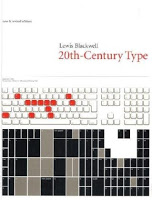
The book Twentieth-Century Type (affiliate link) by Lewis Blackwell gives a history of type fonts developed in the last century. I found it useful because it puts all the names of the fonts that sit on your computer into a historical time line:
  • Books copied by hand in the middle ages
  • Metal setting: serif fonts
  • Bauhaus aesthetic and sans serif type
  • Photo setting, advertising, display fonts and using fonts as elements in abstract compositions
  • Desktop publishing

Professional graphics design has made quantum leaps because of technology. I find a mirror of this in my own personal development in design from starting to experiment with typography in the time of WordPerfect to 2011 where I am getting interest in applying poster design concepts into PowerPoint.

SlideMagic: a platform for magical presentations. Free student plan available. LEARN MORE

Poster design: "If you have to explain it, it ain't workin' "

Currently I am in the process of reading book after book about graphics design and typography and it interesting to see see the similarities and differences between presentation slide design and poster design.
  • Similarity: both are meant to communicate a message instantly
  • Difference: designers think days/weeks about a single poster, slides are usually slapped together in 15 minutes.
This TED video of famous graphics designer Milton Glaser (you know the I heart NY campaign) popped up in my Twitter stream this week (Tweeted in 2011, recorded in 1998).


It sparks a few thoughts:
  • It always interesting to hear these very senior, experienced people speak in very abstract language: they can make a short point and their eyes show that they just shared an incredible insight with you.  The ultimate curse of knowledge: I need a few decades more of life experience to grasp it. A bit similar to me saying to my children: "really it does not matter how many toys you have, believe me". Response: blank stare.
  • Milton summarizes the essence of designing a poster: "If you have to explain it, it ain't working". I guess here is where the distinction between art and design comes in, an artist might be happy with an ambiguous interpretation of her work, the poster (and presentation) designer's job is it to get a specific message across.
  • It was very interesting for me to see/hear Milton describe the creative process he goes through when designing a poster. Maybe we should invest a similar amount of time into designing a slide for a presentation?
And here is the biggest idea that got me thinking. We simply do not have the time to create a deck of 25 posters, and we do not have to. The 5-year P&L forecast is a 5-year P&L forecast. But there are always a few key slides in the presentation that bring together your entire idea. Instead of a "stunning" stock image (sense the cynicism?), a boring 2x2, 5 bullet points, maybe create a page in which you experiment a bit with typography and sell your idea in one poster to the audience?

SlideMagic: a platform for magical presentations. Free student plan available. LEARN MORE

Not just bold

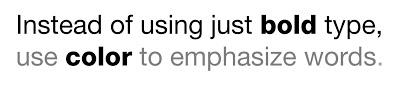
Putting body text in a slightly lighter color gives you opportunities to emphasize words beyond putting them in bold.

SlideMagic: a platform for magical presentations. Free student plan available. LEARN MORE

McKinsey slide ruler nostalgia

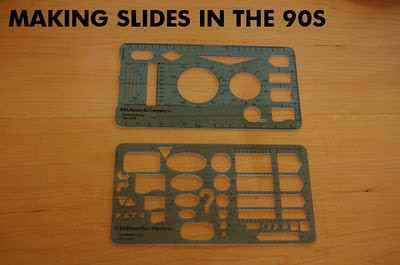
Look what I found in the box with drawing tools of my children: my old McKinsey exhibit rulers! I would carry these with me 24 hours a day in the 1990s. All charts were sketched by hand before being handed over to graphics assistants who would convert them into computer visuals (first overhead slides, then PowerPoint slide shows).

The sketching by hand is a really good thing. But the limited number of available shapes restricted the creativity somewhat, all charts looked very similar as a result. See that big question mark? In case you did not know the answer (yet) :-).

SlideMagic: a platform for magical presentations. Free student plan available. LEARN MORE

The Sartorialist

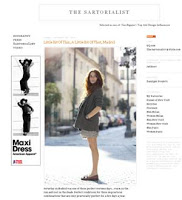
I am not sure to what extent people who read presentation design blogs also have a large number of fashion design feeds in their RSS reader. I follow one: The Sartorialist, the blog of Scott Schuman who wanders around city streets with a camera, taking pictures of regular people wearing interesting creations.

Browsing through his site will show you how poor staged stock images are, and how much more emotionally powerful images of real people can be in your presentation.

To the left is a small screen shot of the web site. Photography on The Sartorialist is under copyright, so you can use the site only for inspiration. Use Flickr to search for relevant images with a creative commons license.

Update: below a mini documentary that came out just today.

SlideMagic: a platform for magical presentations. Free student plan available. LEARN MORE

A collection of sticky slides

I have frankensteined (what?) together a slide deck of around 50 slides that were used in blog posts here on Sticky Slides over the past 2.5 years. All completely unrelated, and out of context but maybe good enough for some creative inspiration.

SlideMagic: a platform for magical presentations. Free student plan available. LEARN MORE

Dropbox beats YouSendIt / Google Docs / Office Live

PowerPoint designers are struggling with big file sizes that consume storage and make it hard to email documents. I have discussed solutions such as YouSendIt and Google Docs before (here). Recently, I switched to Dropbox:

  • Seamless integration with all my devices (desktop, laptop, mobile phone, tablet)
  • Seamless integration with these devices' operating system (you do not notice it is there)
  • Two solutions in one: 1) sharing big files 2) always access to your own files
  • Nice extra 3) a service that keeps history of your files so you can roll back a version in case a file got corrupted or you made a horrible design mistake.
  • Minimalist design interface
The Dropbox pitch to venture capitalists from 2007 pretty much still holds.

YouSendIt requires sign in all the time, and all the advertising and branding does not look very professional. Google Docs is still hard to integrate with Microsoft Office. Office Live does not integrate fully with the Windows operating system. It also suffers from feature overload: I do not always want to create a full virtual team room with calenders and contact lists, just sharing files is enough.


If you sign up with this link for your free 2GB account, you get 250MB of bonus space (disclosure: and I get another 500MB). You see, they know how to market as well. The regular link is here.

The last word probably has not been said about this subject, I wonder whether the conclusion still will be the same in January 2012.

SlideMagic: a platform for magical presentations. Free student plan available. LEARN MORE

A tool for exporting PPT images

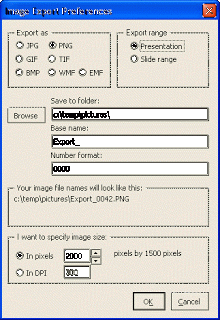
I find it easier to create visuals in PowerPoint than Adobe software. However, the image export functions in PowerPoint are not very sophisticated. It is hard to set resultion/DPI, choose format, set the exact image size, and/or control the naming of the exported files.


PPT ImageExport does all of this. The software creates an add-in in your ribbon. This is not a very sophisticated piece of software, but it has proven very useful for the design of my new company web site. A full license costs $30.

SlideMagic: a platform for magical presentations. Free student plan available. LEARN MORE

Angry Birds fonts in PowerPoint!

Here is the post to close 2010 and wish you all the best for 2011: Angry Birds fonts in PowerPoint.
  1. Close PowerPoint
  2. Install the Feast of Flesh BB font on your computer (link here)
  3. Open PowerPoint
  4. Type a text, and set the font as Feast of Flesh
  5. Increase the size
  6. Select the text, and click "format"
  7. Pick a nice yellow in "text outline", set the weight to 1pt
  8. Staying in "format", select "text effects"
  9. Select "glow"
  10. Select "more glow options"
  11. Pick the black one
And you are done!


SlideMagic: a platform for magical presentations. Free student plan available. LEARN MORE

More than 400,000 work days lost with Angry Birds - every day

There is a stunning statistic in this interview with the developer of Angry Brids by Hilz Fuld: More than 200 million minutes every day is spent on playing Angry Birds. This sounds like a lot, but it is still hard to put the figure in perspective.

  • Wow that's big: 200 million minutes equals to around 400,000 full time working days. Now that's sounds like a lot.
  • Maybe not that big yet: if around 75% of the world population has access to some form of TV and spends 3 hours watching it, you get a far bigger number than 200 million minutes
Statistics need to be put in some form of context. Pick the one that is most useful in your presentation.

SlideMagic: a platform for magical presentations. Free student plan available. LEARN MORE

Watch those bold fonts

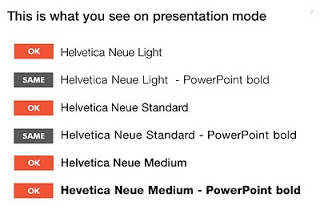
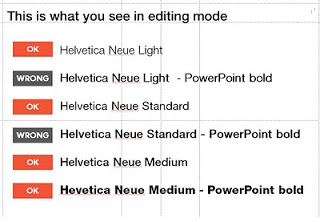
When PowerPoint does not have the right bold or italic font variation installed, it tries to emulate the real thing. For example in the case of bold, it plots slightly overlapping version of the same letter next to each other to make the characters look heavier.

But when you install the correct fonts they get put in slightly random places. Look at the editing screen below (click on the images to see a larger picture). You can see where things go wrong as PowerPoint tries to fill in the missing gaps. Strangely enough in presentation mode, it displays these fonts as regular type.


Secondly it takes some tweaking to get the right font you want:

  • A bold version of standard Helvetica Neue is the medium variation that I have installed
  • To get the heavy variation (which I also bought) I need to take the medium variation and have PowerPoint set it to bold.
Fonts remain mysterious.

SlideMagic: a platform for magical presentations. Free student plan available. LEARN MORE

Going analogue with mechanical pencils

Most of my charts start with a pencil sketch. I burn literally through piles of paper when designing a presentation (a good use of those 1-sided print outs you do not need anymore). So what are my favorite pencils?

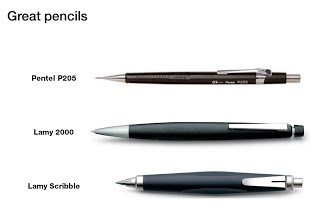
When I started at McKinsey, the Pentel P205 was my initial favorite. Per pencil, it is actually very cheap. That was exactly the problem, people considered it cheap enough to borrow it all the time. I kept on buying new ones.
I experimented with various much more expensive pencils only to discover that these are actually pieces of jewelry rather than sketching instruments. Beautiful to look at, but not very useful. Check out the site of Joon Pens in New York to see some examples.


Recently I discovered Lamy pencils as the perfect in-between. Two pencils are my favorite. First there is the classic Lamy 2000. Designed at the end of the sixties, and still in production pretty much unchanged. A beautiful minimalist look, very light and a nice, almost wood-like feel. People say that over time the mat finish will wear off at those spots where you hold the pencil though.
I use a 0.7mm pencil for regular writing. But when it comes to sketching a wider pencil is much better. The Lamy Scribble
comes in a version with a 3.15mm fill. It has a very nice grip and is beautiful to let your creativity go.

(All links to Amazon are affiliate links).

SlideMagic: a platform for magical presentations. Free student plan available. LEARN MORE

My top 10: most popular posts of the year

SlideMagic: a platform for magical presentations. Free student plan available. LEARN MORE

Happy holidays

Here is a picture taken from my window on December 23, you see that winter has not really arrived in Tel Aviv yet. A wonderful holiday to all of you.

SlideMagic: a platform for magical presentations. Free student plan available. LEARN MORE

The about slide

Many presentations start with the about slide. It is useful to give the audience some background about who you are, where you are from, when you were founded, and what your company does (more or less), that your company is financially stable and not about to go bankrupt. But don't overdo it:
  • There is no need to tell the entire story at the about page, tell it again in the presentation body, and summarize it again on the conclusion page
  • The audience needs to warm up before it is ready to receive your message (see my post from a few days ago)
  • The presentation should be about something that is interesting for the audience, and listening to you talking about yourself is probably not the best use of their time

SlideMagic: a platform for magical presentations. Free student plan available. LEARN MORE

U-turning on custom fonts

I used to recommend to stick to standard Windows fonts in order to avoid compatibility issues when presenting on other computers than your own. I am changing my mind, the risk of technical issues is still there, but the benefits of custom fonts is much greater.

Standard PC fonts (Times roman, Calibri, Arial, etc.) just do not look good. In dense body text, this is not such a big deal. But as PowerPoint slides get fewer and fewer text, their design start to look more like a poster with big headlines. And in posters, typography is a huge deal.

This post on the PowerPoint Ninja blog explains how to overcome compatibility issues by embedding your custom font inside the presentation. When you send it to someone else, she will see the correct font.

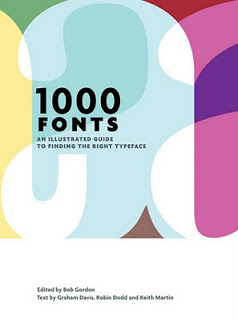
You can find your inspiration for fonts on one of the many fonts web sites, paying close attention to the small prints in books (they often mention which font was used) or through books like this one that I picked up in a Tel Aviv book store: 1000 Fonts (affiliate link).

SlideMagic: a platform for magical presentations. Free student plan available. LEARN MORE

Book review - Design Elements

Recently, I have picked up a lot of books about graphics design and typography. Design Elements: A Graphic Style Manual (affiliate link) is a book that takes all the basic principles of graphics design one by one. It is built around 20 reminders for designers. Reminders and not rules, because designers have the opportunity to break them (see the cover of the book with 2 paragraphs of text put on top of each other).
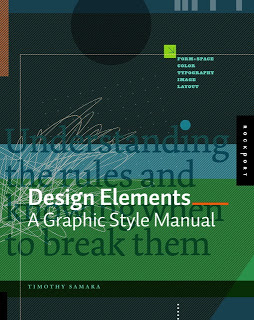



Most books about graphics design use an incredibly complex language to describe visual concepts. This books is no exception. Rather than try to translate the text into concepts, I skimmed the prose and focused on the many beautiful illustrations, images, examples, and their explanations.

Things that I was reminded of (not as a graphics designer, but as a designer of business presentations in PowerPoint):
  • Think of which fonts you use (I am u-turning on earlier assertions that you should only use standard fonts in PowerPoint to avoid technology issues)
  • Pay attention to the style consistency across pages in a presentation beyond just colors. Other things to watch are placement of objects, style of images, the way images are displayed, etc.
  • Make sure your slide looks elegant, maybe even by reducing the font size somewhat and creating more white space around the slide. Margins do not have to be set at 0.4 inch all the time.
  • Use color carefully, instead of "which color of the scheme have I not yet used on this slide"-type thinking, think about the distribution of light and dark, ask yourself where color is needed, and then pick the one that supports the slide message best.
  • Try to incorporate rhythm in the design of a slide. 
A very interesting and useful book, a sharp contrast with the many "coffee table" books about graphics design with pages full of complex and sophisticated illustrations without something to learn from them.

(By the way, my refusal to use proper apostrophes and quotation marks in blog posts puts me firmly in the box of non-graphics designers according to the book)

SlideMagic: a platform for magical presentations. Free student plan available. LEARN MORE

Idea transplant logo poll

I am in the process of re-branding my professional site to idea transplant (what?!?) and would appreciate some input on logos. Here are a bunch I created. Which one works best? Or should I just stick with the words "idea transplant" in Helvetica Neue?


SlideMagic: a platform for magical presentations. Free student plan available. LEARN MORE

That perfect opening sentence

You think hard about that perfect opening sentence that encapsulates it all: what the company is about, what you sell, what customer problem you solve, when you were founded. You write it down, change it, discuss it with your team, edit it, and memorize it by heart.


Then you use it for a live audience: all key messages stashed in just 10 seconds of beautiful prose. All your audience has to do is register this, and they can basically skip the presentation. All that has to be said, has been said.

But hey, it did not stick?

While you were uttering your first sentence, the audience was looking at the woman in the picture of your opening slide (I want a jacket like that), trying to figure our your accent (Canada?), wondering when the next coffee break would be (11:15 on the agenda, but we are behind schedule). In short, all but pay attention to that perfect sentence.

Gear up your story slowly and give the audience time to familiarize themselves.

Image credit Markus Bollingmo.

SlideMagic: a platform for magical presentations. Free student plan available. LEARN MORE