
Explaining your business model

Most investor pitches I see claim year 5 revenues of $50m to $100m, so putting in just that piece of information is not going to convince investors, you just sound like everyone else. What you need to make believable is why you are going to hit that target. Showing an incredibly complicated Excel model (”look, we did our homework”) is not going to get you there either. So the top line number is not convincing, nor is the detailed model, what works? The napkin.

When a modeling economics, I usually go brought a cycle. Start with a very simple calculation that gets to a ballpark answer, and is easy to follow and verify. Then, go I to incredible detail in an Excel model, understanding why I do, or do not get close to my initial ballpark. After the rock solid model is finished and bug free, it is time to simplify down to the level, of that very first ballpark number.

Simplification is not simple. You need to pick which drivers of your business are the most important, you need to decide which factors to show, which ones to hide. Your challenge is to stay close to values that are linked to everyday reality, not accounting. Messages per user per month, price per message instead of $m depreciation.

With all this preparation, you are now able to let your potential investor write her own ballpark or napkin calculation of the company's potential. You provide her with the basic framework, what are the 6 numbers you need to multiply in order to get to your $75m in year 5. She might not agree with all the numbers, but you gave her a framework to which to apply her own estimates. Getting the point estimate right is not important, agreeing on the order of magnitude, and the way how to get there, is.

There is also psychology involved here. Your numbers are likely to be outrageous, but can you defend them using more or less realistic inputs? Are you open to input and change your calculation? Again, discussing the financials is another way to figure you out as a CEO. Are you a sane person to work with on a day–to–day basis?

Everyone understands that you basically made up the numbers for your business forecast and their credibility might not be as high as an investment analyst forecasting next quarter’s earnings of IBM. Still there is something that will completely kill the credibility of your analysis: lack of consistency.

If you use 2 different sales numbers on 2 different pages it is a red flag that you might not be on top of your material. Even if the footnote says that the number on page 34 includes VAT and the number on page 22 does not.

Calculation errors are the same, if an investor starts checking your math on every page in the presentation, she will not be paying attention to what you have to say. When the final version of the presentation is ready, take out the calculator and check every page carefully, even if you copied data straight from Excel. Look for typos, or funny rounding errors and correct them manually.

You probably noticed that we have not discussed data from market research agencies to support your financial forecast. I consider them a data point, but not the most important input for your business plan. Almost all markets discussed by IDC or Gartner are a $billion, and most of the time have a far too broad scope for a new startup. There is one useful thing about these forecasts though, they provide a good categorization for technology markets. So now you can say “where a in the so and so business”. On the other hand, I have seen startups that had great difficulty explaining what they do because a VC could not put them in an IDC box.

So in short, explain your business’ economics in a simple human language.

SlideMagic: a platform for magical presentations. Free student plan available. LEARN MORE

Abstract versus realistic

I do a fair amount of presentation design work in the medical field and in every deck there is the challenge of explaining the technology to a layman. The medical profession uses elaborate, highly realistic, illustrations to visualize a condition or a procedure. I actually find the other approach much more effective: highly abstract, minimalist sketches that show only what needs to be shown, and eliminate everything else. The visual needs to explain what is going on, not what something looks like.

SlideMagic: a platform for magical presentations. Free student plan available. LEARN MORE

Pitching your startup

A nice and short video with tips for pitching your startup to investors on #startupstories. The lessons from entrepreneurs are useful, but pay special attention to what the investors have to say, they are your audience.

SlideMagic: a platform for magical presentations. Free student plan available. LEARN MORE

Spirals

Spirals are a great way to visualize an endless repeating of something. Stock image sites are full of images of real staircases, rendered ones, or other images that have a spiral structure. You can use the visual as-is, or add text (maybe in circles that get smaller and smaller) to shows that something is going on forever, that something is repeatable.


Some people associate a diagram like this with a downward spiral. I do not see it that way, you?

SlideMagic: a platform for magical presentations. Free student plan available. LEARN MORE
Something is missing...

Almost every pitch presentation talks about something that is missing. A simple image of a paper hole is a great way to visualize it. You can have one, you can have fifteen, you can cut out the white background and put the whole into something else. You can find hundreds of paper holes on stock image sites.

SlideMagic: a platform for magical presentations. Free student plan available. LEARN MORE
Demo presentations on iPad

I just returned from London and it was my first international business trip without a lap top in my bag. I used an iPad to demo my slide decks to potential clients.

In a (still) imperfect world, here is what I did:
  • Rely on different applications for different types of documents. Keynote presentations in Keynote, PowerPoint presentations with standard font in SlideShark, and PowerPoint presentations with non-standard font in Adobe Reader.
  • Ensure that you can find your decks easily, that they are all pre-loaded with good title descriptions and first slide icons.
  • Go through every single presentation start to finish, to make sure that there are no glitches in fonts, animations and fix them if necessary (there were a few).
  • Make sure you operate the device smoothly. All the presentation apps that you need in a meeting together on one blank home screen. Know how to get in and out of presentation mode in each of the applications (sometimes you tap, sometimes you pinch). 
The result was great and much more personal than having to open a laptop, browse through the file directory and fire up Keynote or PowerPoint. The demo was much more informal and the best features was that I could go through slides randomly, making my own story as I go along.

SlideMagic: a platform for magical presentations. Free student plan available. LEARN MORE

iPhone Keynote remote

I recently used my iPhone as a remote control to move between slides for an on-stage Keynote presentation.

This is one of 2 ways you can now use an iPhone/iPad to give a presentation. The first is to run the presentation in the device itself and connect it to a screen via an Apple TV (or a cable if you are sitting around a conference table). The second, is to use your iPhone/iPad to control a computer via WiFi or Bluetooth.

I used the latter. While it did work there are 3 glitches, one of which is a big one:
  1. Both your iPhone and your computer need to be hooked up to the same WiFi network, which requires some fiddling with technology. For some reason Bluetooth failed to connect the devices. So it is different from using a standard plug and play Logitech remote that works always in a second. Budget time to make it work.
  2. You move between slides by sliding the screen, which is a movement that is a bit hard to do with one hand. I would have preferred it when the volume + and - buttons would have been allocated to do this, like in the camera application. 
  3. And here is the big one, your remote can get stuck in the middle of a presentation. It happened to me twice where I had to wait for some buffer to clear before I could move on to the next slide. Not good when you are standing in front of a big audience.
Because of number 3, I would hold off using an iPhone as a Keynote remote for very important presentations.

SlideMagic: a platform for magical presentations. Free student plan available. LEARN MORE

Ugly colors

When your company has an ugly corporate color scheme it can be hard to make good looking charts. Here is one solution: go mainly for shades and grey and use one or two of the corporate colors as an accent color to highlight things. In 99% of cases this will look very elegant and nobody can accuse you of deviating from the prescribed colors.

SlideMagic: a platform for magical presentations. Free student plan available. LEARN MORE

The CEO can edit

CEOs should not spend time writing their own PowerPoint presentations and as a result, most of them did not get around learning how to use the software. That is a shame. I recommend that every CEO should familiarize herself with some basics: editing text,  moving/deleting/pasting slides and inserting big comment boxes electronically on slides. It can be picked up in a 2 hour training and will make life so much easier for them when they fine tune the final 1% of the deck before going on stage.

SlideMagic: a platform for magical presentations. Free student plan available. LEARN MORE

Scalable

Using a visual cliché can happen to the best of us... I recently was guilty of this one. “We are scalable!”

SlideMagic: a platform for magical presentations. Free student plan available. LEARN MORE

Startup in Israel? Map it

A bit off topic, but this blog is popular among Israeli entrepreneurs. You can add your company to this map of startups in Israel.

SlideMagic: a platform for magical presentations. Free student plan available. LEARN MORE

Breaking conventions

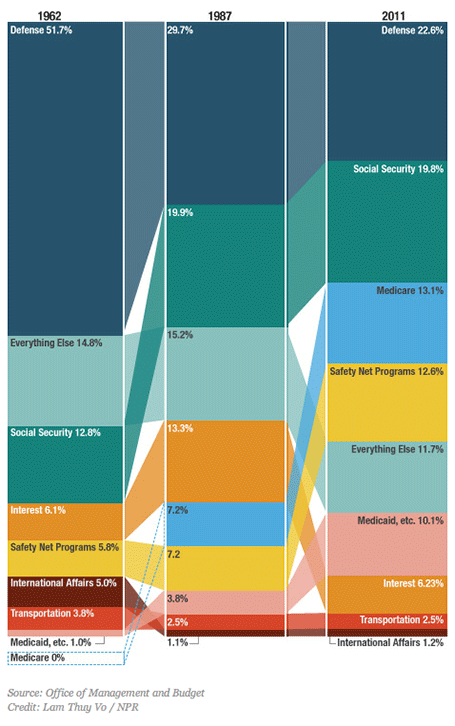
This column chart about government spending on NPR breaks a lot of conventions. Years at the top, no totals, data labels inside, not on the second column, repeated in the third, and it tries to visualize both the size of the values and the order in which they appear with the semi-transparent connections. For an on-screen presentation it is too much to digest, for careful on-screen reading it might be OK. What do you think?

SlideMagic: a platform for magical presentations. Free student plan available. LEARN MORE

Facebook IPO comparison

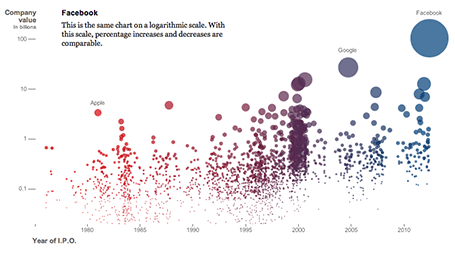
The NYT published an infographic that compares technology IPOs over time, including the facebook IPO of last week. At first, it looks really nice, it resembles bubbles going up in the air (a sentiment shared by many left out in the golden rain). It shows just how many of these IPOs we have had, and the billions in value they have created. And that is probably all the casual reader is left with when clicking to the next page.


On closer inspection, things are less clear. The value on the y-axis is the same as the size of the bubble. A good description of the axis labels is missing. And the things that the graph wants to display, could be visualized much better in a dedicated data chart for each conclusion:
  • How many IPOs in what year: column chart
  • Top ranking of IPOs by value at the opening day: bar chart
  • Top ranking of IPOs by value in 2012 $: bar chart
  • % share price movement on day 1: bar chart (probably only show big, well-known offerings)
  • % return on investment 3 years later: bar chart (again for household name IPOs)
Still, if you are a newspaper, maybe getting across that bubbly feeling is more important than the visualizing the insight.

SlideMagic: a platform for magical presentations. Free student plan available. LEARN MORE

Star burst

The star burst is often used in retro advertising. You can pick one up from any stock image site to create a background for a composition with a lot of depth.

SlideMagic: a platform for magical presentations. Free student plan available. LEARN MORE

Photoshop/Illustrator CS6

Adobe has released its new Creative Suite 6 software (Photoshop, Illustrator, etc.). I am only a casual user of this software, my core design work is in PowerPoint and Keynote. Still now and then, I need capabilities that are not available in these slideware solutions and dive into the world of Adobe. I have been working with the software for a week now, and here are some of the features that might be interesting for a presentation designer:

In Photoshop CS6
  • Better context-aware fill and the ability to take objects entirely out of an image (not very useful), or move the object around in an image (very useful). I am desperately looking for a way to extend the background of an image, stock image photographers always crop to narrowly around a subject, leaving no space for text. The current tools are not there yet.
  • Sometimes it might be the hidden things that are best. I have just the impression that the general selection engine to isolated subjects from their backgrounds is better.
In Illustrator CS6
  • The pattern generation engine is much better. It is cumbersome to generate patterns of repeating objects in PowerPoint or Keynote. In Illustrator it is easy, and you can apply them to any shape as a fill. 
  • Photo tracing. It is now very simple to turn a photo or hand-drawn sketch into a scalable vector image. This will make it easy to convert images into more neutral silhouettes in presentations.
There are a lot more new features that will appeal to heavy users of both programs. Should you upgrade as a casual user? Your call. Since I am a professional presentation designer, I just install the latest software without really making the trade off every time. What do you think, if you have upgraded, was it worth the investment?

SlideMagic: a platform for magical presentations. Free student plan available. LEARN MORE

The best iPad stylus

I now have almost completely eliminated paper from my workflow after I switched to hand writing on the iPad. My meeting notes are better organized and searchable, and I can now make design doodles in multiple colors on which it is much easier to erase part of your sketch. I have tested 3 iPad styli extensively and the best one is the Adonit Jot:
  • The Cosmonaut is a cute, beautifully designed, fat pen that resembles a whiteboard marker. Nice for my kids to draw, but not suitable for writing or precision drawing. The fat tip makes it impossible to see what you are writing. I am also not a big fan of the rubbery material on the outside.
  • The Wacom stylus is built of quality materials, feels nice and light and writes comfortably. A close second. The soft tip wears off quickly.
  • The Adonit Jot is my favorite. A small, flat, transparent disk protects your screen while giving completely visibility what you are doing. A very nice, heavy build quality. The disk makes a clacking sound when you write, some if you might find this inappropriate in meetings with other people. I bought the Flip version that has a pen on the back (which I actually never use).
I did extensive research on the web before buying my own styli, and discovered that there is a huge difference in personal preferences. So you are likely to buy a few before finding the one that fits you best. (The links in this posts are affiliate links).

Some earlier posts about hand writing on the iPad:

SlideMagic: a platform for magical presentations. Free student plan available. LEARN MORE

Loud people in a meeting

Here is a strategy to sabotage new ideas in a meeting. Have a dominant personality. Be very loud. Make general statements. Distract attention from the point discussed. Avoid difficult questions. Shoot from the hip. Make personal attacks.

Such meeting dynamics requires careful presentation design. Identify all the key points you want to make. Make very bold, very simple, even simplified visuals to support each one. The objective is that the highly simple chart becomes a mental placeholder for the verbal discussion, its actual content is not that relevant (factual details can be in an appendix). Burying the sentence “Having 2 IT help desks in Luxembourg does not make sense” somewhere in a list of 7 bullet points does not help. Showing tiny Luxembourg on the map with 2 looming call center org charts will create that mental logo.

Now group all the discussion points in terms of importance and controversy. Then, create a final check list, overview map, pro/con table with a visual link to the mental place holders you created before. As soon as a random comment comes up, you can deflate it by pointing out that you already talked about it. As soon as someone tries to deviate the discussion you can point at it and say, we are now discussing this one.

Visual agendas can be more powerful than written or verbal ones to keep a discussion on track.

SlideMagic: a platform for magical presentations. Free student plan available. LEARN MORE

iPad "books"

Whenever there is an innovation in visual communication, people initially struggle how to use it best. Hand-written text scrolls did not have page numbers, spaces between words, or sentences. The first ads were either paintings or primitive, poorly designed pamphlets. Color and photography took some time to be used properly. It took 10 years or so after the arrival of PowerPoint before Garr Reynolds had his insight and write Presentation Zen, and he is still busy convincing the world to kill the bullet points as I am writing this.

So here we have this iPad and the iBooks writing platform that enables anyone to create apps that incorporate touch and can be read away from the office chair. I have started to write an app on this platform myself and am constantly changing my approach. I started with the concept of a book in my mind (pages of text with images), but then discovered all this other things you can do: Prezi-like zooming diagrams, embedded slideshows, videos, Keynote presentations, questions. This is not a book writing tool, it is a software development tool. All these visual tools were available before on the web: zooming images, videos, data visualization. But somehow they never made it as the basis for the development of visual stories. I think the fact that an iPad can be used away from the office chair/screen will change that.

Nancy Duarte recently ported her book Resonate over to the iBook platform and the result is beautiful. And it gives some good examples of how new visual techniques are more than just making content prettier or more spectacular. Many of the effects in the Wired magazine iPad edition are just like poorly used animations in PowerPoint or Keynote: interesting, but they do not add to the story. When Nancy analyzes a speech by Ronald Reagan, it is just very useful to be able to watch the actual thing alongside.

This app development platform has great potential beyond books. I can see uses in combined investor presentations and business plans, on-premise sales applications, product demos. But still I feel that I have the text scroll perspective, and the real innovative application will be discovered sometime in the near future.

SlideMagic: a platform for magical presentations. Free student plan available. LEARN MORE

Snapseed image editing

Back in the early days, you had to use aperture, shutter time, and chemicals to create special effects in images. Then came Photoshop, and now we see a stream of apps written for touch-based mobile devices. The success of Instagram has taught the amateur how to apply simple filters with the touch of a finger.

I am starting to use these applications for professional presentations, usually not to recover a poorly shot image (most stock images are of excellent quality), but to harmonize images across a presentation with a certain look and feel that is consistent.

Photoshop is still great for removing backgrounds from images, and inserting a 2D image onto a 3D surface. However, its artistic filters are far too dramatic. And making quality adjustments is tricky. It requires a lot of skill to darken a background, lighten a foreground or vice versa. You had to familiarize yourself with alpha channels and the fundamental ways digital images are stored.

Tel Aviv this week, on filter steroids
My favorite app so far is Snapseed. Next to the dramatic filters that I do not use, it has a set of easy tools that give great control over an image. Ambience to change the balance between foreground and background, sharpening to make images crisper, structure to emphasize texture without destroying the edges of a subject, and best of all, the ability to adjust these effects to part of the image. I find it easier to use and more powerful than iPhoto.

Initially I bought the iPad app, which made me purchase the Mac app as well.

Still, I need to rely on Photoshop to control the exact dimensions and DPIs of images. Software innovation by small independent companies comes at the price of a more complicated workflow.

SlideMagic: a platform for magical presentations. Free student plan available. LEARN MORE

Common pitfalls in IPO presentations

I was asked to mention common pitfalls in IPO presentations the other day. Here are some of my thoughts in random order

  • Using an internal strategy deck as the basis for your presentation, rather than starting from scratch. Internal presentations are targeted at insiders, IPO presentations are meant for people who do not suffer from the Curse of Knowledge.
  • Talking management speak, full of buzzwords. Institutional investors are sifting through investor pitches and data all day long, they are trained to cut out the noise. If you provide a lot of noise and padding, they automatically think there is no real substance to talk about.
  • Over-structuring, repeating, repeating again. In a short investor pitch tell a story, do not try to get investors to remember key facts by drilling it in their heads.
  • A generic investment thesis. Very high-level bullet points that could apply to just about any company: growth, profitability, etc. Diluting the core of what is special about your company with many, many other positives that are valid, but not that important. Like in marketing: too many benefits, no benefits.
  • Avoiding the elephant in the room. institutional investors probably are pretty well informed about your company, and the key questions they have (often shared with journalists and bloggers) are pretty clear. Your presentation should address those, maybe not explicitly (here are our weaknesses), but implicitly. These questions are the only thing that people are worried about.
  • Avoid the long-term growth options. There are legal restrictions to what extent management can provide business forecasts in an IPO filing, but that does not mean that you cannot educate investors on how you can think about valuing your business. Give a framework on what value components could be there for the long-term.
  • Focus only on the company, not on trends in broader society. Sometimes the key driver behind the success of a company is a fundamental shift on how people are operating, how things are changing in the world. Your IPO is an opportunity for an investor to invest in that trend. If that is the main driver, discuss it.
  • Confusing financial data. A 30 minute pitch is not enough time to go over the financial data in full detail. Still, there is no reason why you should confuse things instead. Give a good overall picture of the components of your company. Show how the revenue model is working. Show how the cost structure works. 
  • Forget the front line. Management talks about a company in terms of top line revenue, overall market share, but the real action is in the front lines. Give customer case examples, they are often a much more powerful illustration of the attractiveness of a business than top line figures.
  • Recording your presentation in front of a camera, without an audience. Unless you are a professional TV host, people find it difficult to look natural in front of a camera. Invite a small audience when you are video-ing your tape. If that is not possible, maybe tape some images of people on some chairs in the studio/conference room so you can imagine talking to the people who are listening/watching you later.

SlideMagic: a platform for magical presentations. Free student plan available. LEARN MORE