Custom font U-turn

After a year of experimenting with custom fonts, I noticed that I am going back to Arial more and more in my presentation design, so my decks can be read on Windows, Mac, iPad, PDF, Dropbox, SlideShark, Keynote, PowerPoint on any device in any place. Well at least it forces me to make more effort to let my slides look good if I cannot rely on a pretty font...

SlideMagic: a platform for magical presentations. Free student plan available. LEARN MORE

Dirty typography

Watch out with the text effects in PowerPoint or Keynote. A drop shadow, stroke line, and worst of all: a glow and a gradient fill can reduce the contrast of your test and make your text look dirty, especially on low-resolution screens which are often old VGA projectors in conference rooms. I prefer to keep things clean and crisp.

SlideMagic: a platform for magical presentations. Free student plan available. LEARN MORE

Startup selling to big corporate

Seth Godin wrote an excellent blog post about pitching to a large corporate: the lowest possible price is not always the most important selling point. If you are a startup, it might result in the exact opposite effect: you just reinforced the image of the small, unprofessional, desperate, unreliable, financially instable company that is too high-risk to do business with.

If all the above are in fact true for your company, there are still some easy ways to camouflage it, and become a credible business partner to a large organization:
  • Show up on time, reply to questions promptly, confirm Outlook calendar invitations
  • Fill out forms, purchasing orders, even if you already provided the data in a previous email
  • List your real street address, list your real non-mobile phone number (can be a Skype redirect)
  • Have an email address with your company domain (can be forwarded back to gmail)
  • Use a decent web site template that contains more than an "under construction" place holder
  • Use high res stock images in your presentation, as opposed to solen low-res Google image search results
  • Get a professional photographer to make decent head shots of the team
  • Do not use ad-supported free, or worse: pirated software
  • Invest in business card paper
  • Create a professional email signature
  • Avoid Comic Sans
  • Clean up your computer desktop and hid embarrassing family pictures
  • Be careful with humor hardwired, written-down, in your slides, the company might not think it is funny
  • Understand hierarchies, going behind someones back to her boss does not mean you made a successful move up the ladder
The list goes on. Act like the company you want to be, and you are who you want to be.

SlideMagic: a platform for magical presentations. Free student plan available. LEARN MORE

Book content requests?

I am in the middle of writing a book using Apple iBook creator platform, and hopefully it will see the light of day soon. Sorting out ISBNs and US tax numbers is almost more difficult than writing the book itself.

Other people have written extensively about why bullet points are a bad idea, my book will be a highly pragmatic and practical guide that helps you put a slide deck together that gets you funded, lands you a sale or delivers your Board approval.

This iBook format is wonderful, I can use text, slideshows, images, and interestingly videos which makes it easy to put software advice inside using a simple screen cast (software explanations are hard and very boring to put in text). And best of all, I can update the book with new content pretty much like apps update on your iPad, which allows me to ship early and improve content over time.

So, ultimately my book will be an iPad app that is open at your desk when you are putting your slides together at home, or in the office. The content is not frozen yet, so please let me know if there are specific issues I should cover, and I will see if I can incorporate them in the flow.

SlideMagic: a platform for magical presentations. Free student plan available. LEARN MORE

Online versus offline

Online, advertisers pay by the click. In the offline world, not yet. This slide was made using Photoshop's vanishing point filter and some fat Futura Condensed Extra Bold


SlideMagic: a platform for magical presentations. Free student plan available. LEARN MORE

That's it?

I sometimes get that reaction from a client. Very few slides, very simple graphics. Sometimes the most powerful stories can be pitched really sweet and short. No need to waste more words/time/slides. Consider yourself lucky.

SlideMagic: a platform for magical presentations. Free student plan available. LEARN MORE

To demo or not to demo?

If you are in the high tech sector you face the challenge of demonstrating your product in an investor or sales pitch meeting. If that meeting is short (an hour or less), my advice is not to show your product in a live demo, but use a series of carefully planned screen shots.

Murphy's law says that whatever can go wrong, will go wrong. And it seems to apply especially to high tech demos. There are just so many variables that can go wrong: Internet connection, screens, the application itself.

If you are in the middle of a short pitch, any interruption will pop the momentum of your story. Ideally you want your pitch to be one focused burst of energy that gets the audience craving for more at the end. A hiccup because of WiFi password will definitely not get you there.

There is another problem with demos, not all application functionality is Interesting. Logging in, creating profiles, entering some data, all things you have to do, but they are not the piece of technology that will wow your investors or customers. And finally, a live computer screen is most of the time not readable when put on an overhead projector, most fonts are probably smaller than 12 points.

So, what to do instead. Prepare an interesting story, set it up beforehand in your application, take lots of screenshots and paste them in the right order in your presentation. Zoom in to those aspects of the screen that are interesting, crop out those window bars, ads, anything that you do not need. Circle what people,should be looking at. Put big bold explanation text boxes on the slides.

Now you have a demo that will not go wrong, is high–paced, is readable, and shows exactly the things you want the audience to see. Still it might be useful to bring your application along, but the purpose is not to showcase it in a demo, but rather point at it and say: “look here it is, we have product that you can touch”. If people in the meeting are interested to find out more, set up second, longer, meeting just to play around with the demo, after your 20 minute pitch has been delivered flawlessly. Not everyone in the audience will have an engineering degree, or will be able to understand the ins and outs of your product.

Still you should be able to explain the basic idea behind even the most complicated technology to a reasonably intelligent audience. Telling them “you won’t probably understand” is a huge offense to the audience. And remember that Einstein said that if you cannot explain something to a 6-year old, you probably do not understand it yourself.

SlideMagic: a platform for magical presentations. Free student plan available. LEARN MORE

Explaining your business model

Most investor pitches I see claim year 5 revenues of $50m to $100m, so putting in just that piece of information is not going to convince investors, you just sound like everyone else. What you need to make believable is why you are going to hit that target. Showing an incredibly complicated Excel model (”look, we did our homework”) is not going to get you there either. So the top line number is not convincing, nor is the detailed model, what works? The napkin.

When a modeling economics, I usually go brought a cycle. Start with a very simple calculation that gets to a ballpark answer, and is easy to follow and verify. Then, go I to incredible detail in an Excel model, understanding why I do, or do not get close to my initial ballpark. After the rock solid model is finished and bug free, it is time to simplify down to the level, of that very first ballpark number.

Simplification is not simple. You need to pick which drivers of your business are the most important, you need to decide which factors to show, which ones to hide. Your challenge is to stay close to values that are linked to everyday reality, not accounting. Messages per user per month, price per message instead of $m depreciation.

With all this preparation, you are now able to let your potential investor write her own ballpark or napkin calculation of the company's potential. You provide her with the basic framework, what are the 6 numbers you need to multiply in order to get to your $75m in year 5. She might not agree with all the numbers, but you gave her a framework to which to apply her own estimates. Getting the point estimate right is not important, agreeing on the order of magnitude, and the way how to get there, is.

There is also psychology involved here. Your numbers are likely to be outrageous, but can you defend them using more or less realistic inputs? Are you open to input and change your calculation? Again, discussing the financials is another way to figure you out as a CEO. Are you a sane person to work with on a day–to–day basis?

Everyone understands that you basically made up the numbers for your business forecast and their credibility might not be as high as an investment analyst forecasting next quarter’s earnings of IBM. Still there is something that will completely kill the credibility of your analysis: lack of consistency.

If you use 2 different sales numbers on 2 different pages it is a red flag that you might not be on top of your material. Even if the footnote says that the number on page 34 includes VAT and the number on page 22 does not.

Calculation errors are the same, if an investor starts checking your math on every page in the presentation, she will not be paying attention to what you have to say. When the final version of the presentation is ready, take out the calculator and check every page carefully, even if you copied data straight from Excel. Look for typos, or funny rounding errors and correct them manually.

You probably noticed that we have not discussed data from market research agencies to support your financial forecast. I consider them a data point, but not the most important input for your business plan. Almost all markets discussed by IDC or Gartner are a $billion, and most of the time have a far too broad scope for a new startup. There is one useful thing about these forecasts though, they provide a good categorization for technology markets. So now you can say “where a in the so and so business”. On the other hand, I have seen startups that had great difficulty explaining what they do because a VC could not put them in an IDC box.

So in short, explain your business’ economics in a simple human language.

SlideMagic: a platform for magical presentations. Free student plan available. LEARN MORE

Abstract versus realistic

I do a fair amount of presentation design work in the medical field and in every deck there is the challenge of explaining the technology to a layman. The medical profession uses elaborate, highly realistic, illustrations to visualize a condition or a procedure. I actually find the other approach much more effective: highly abstract, minimalist sketches that show only what needs to be shown, and eliminate everything else. The visual needs to explain what is going on, not what something looks like.

SlideMagic: a platform for magical presentations. Free student plan available. LEARN MORE

Pitching your startup

A nice and short video with tips for pitching your startup to investors on #startupstories. The lessons from entrepreneurs are useful, but pay special attention to what the investors have to say, they are your audience.

SlideMagic: a platform for magical presentations. Free student plan available. LEARN MORE

Spirals

Spirals are a great way to visualize an endless repeating of something. Stock image sites are full of images of real staircases, rendered ones, or other images that have a spiral structure. You can use the visual as-is, or add text (maybe in circles that get smaller and smaller) to shows that something is going on forever, that something is repeatable.


Some people associate a diagram like this with a downward spiral. I do not see it that way, you?

SlideMagic: a platform for magical presentations. Free student plan available. LEARN MORE

Something is missing...

Almost every pitch presentation talks about something that is missing. A simple image of a paper hole is a great way to visualize it. You can have one, you can have fifteen, you can cut out the white background and put the whole into something else. You can find hundreds of paper holes on stock image sites.

SlideMagic: a platform for magical presentations. Free student plan available. LEARN MORE

Demo presentations on iPad

I just returned from London and it was my first international business trip without a lap top in my bag. I used an iPad to demo my slide decks to potential clients.

In a (still) imperfect world, here is what I did:
  • Rely on different applications for different types of documents. Keynote presentations in Keynote, PowerPoint presentations with standard font in SlideShark, and PowerPoint presentations with non-standard font in Adobe Reader.
  • Ensure that you can find your decks easily, that they are all pre-loaded with good title descriptions and first slide icons.
  • Go through every single presentation start to finish, to make sure that there are no glitches in fonts, animations and fix them if necessary (there were a few).
  • Make sure you operate the device smoothly. All the presentation apps that you need in a meeting together on one blank home screen. Know how to get in and out of presentation mode in each of the applications (sometimes you tap, sometimes you pinch). 
The result was great and much more personal than having to open a laptop, browse through the file directory and fire up Keynote or PowerPoint. The demo was much more informal and the best features was that I could go through slides randomly, making my own story as I go along.

SlideMagic: a platform for magical presentations. Free student plan available. LEARN MORE

iPhone Keynote remote

I recently used my iPhone as a remote control to move between slides for an on-stage Keynote presentation.

This is one of 2 ways you can now use an iPhone/iPad to give a presentation. The first is to run the presentation in the device itself and connect it to a screen via an Apple TV (or a cable if you are sitting around a conference table). The second, is to use your iPhone/iPad to control a computer via WiFi or Bluetooth.

I used the latter. While it did work there are 3 glitches, one of which is a big one:
  1. Both your iPhone and your computer need to be hooked up to the same WiFi network, which requires some fiddling with technology. For some reason Bluetooth failed to connect the devices. So it is different from using a standard plug and play Logitech remote that works always in a second. Budget time to make it work.
  2. You move between slides by sliding the screen, which is a movement that is a bit hard to do with one hand. I would have preferred it when the volume + and - buttons would have been allocated to do this, like in the camera application. 
  3. And here is the big one, your remote can get stuck in the middle of a presentation. It happened to me twice where I had to wait for some buffer to clear before I could move on to the next slide. Not good when you are standing in front of a big audience.
Because of number 3, I would hold off using an iPhone as a Keynote remote for very important presentations.

SlideMagic: a platform for magical presentations. Free student plan available. LEARN MORE

Ugly colors

When your company has an ugly corporate color scheme it can be hard to make good looking charts. Here is one solution: go mainly for shades and grey and use one or two of the corporate colors as an accent color to highlight things. In 99% of cases this will look very elegant and nobody can accuse you of deviating from the prescribed colors.

SlideMagic: a platform for magical presentations. Free student plan available. LEARN MORE

The CEO can edit

CEOs should not spend time writing their own PowerPoint presentations and as a result, most of them did not get around learning how to use the software. That is a shame. I recommend that every CEO should familiarize herself with some basics: editing text,  moving/deleting/pasting slides and inserting big comment boxes electronically on slides. It can be picked up in a 2 hour training and will make life so much easier for them when they fine tune the final 1% of the deck before going on stage.

SlideMagic: a platform for magical presentations. Free student plan available. LEARN MORE

Scalable

Using a visual cliché can happen to the best of us... I recently was guilty of this one. “We are scalable!”

SlideMagic: a platform for magical presentations. Free student plan available. LEARN MORE

Startup in Israel? Map it

A bit off topic, but this blog is popular among Israeli entrepreneurs. You can add your company to this map of startups in Israel.

SlideMagic: a platform for magical presentations. Free student plan available. LEARN MORE

Breaking conventions

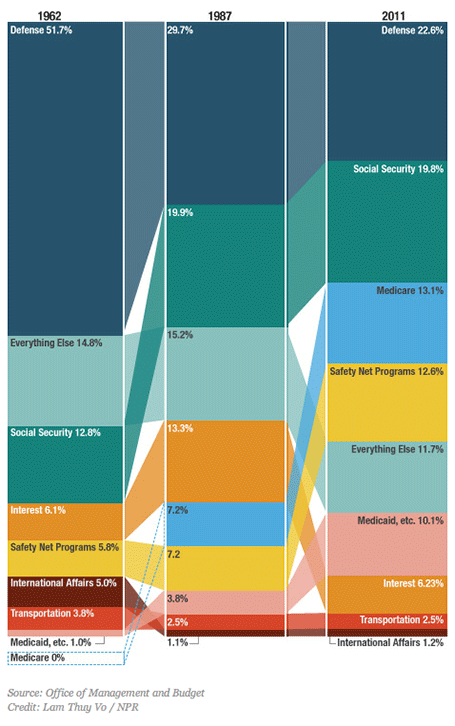
This column chart about government spending on NPR breaks a lot of conventions. Years at the top, no totals, data labels inside, not on the second column, repeated in the third, and it tries to visualize both the size of the values and the order in which they appear with the semi-transparent connections. For an on-screen presentation it is too much to digest, for careful on-screen reading it might be OK. What do you think?

SlideMagic: a platform for magical presentations. Free student plan available. LEARN MORE

Facebook IPO comparison

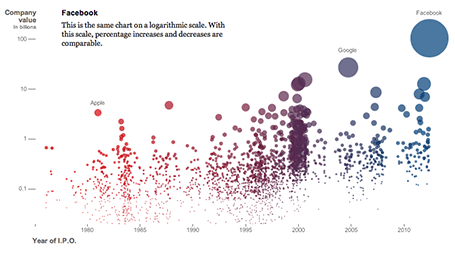
The NYT published an infographic that compares technology IPOs over time, including the facebook IPO of last week. At first, it looks really nice, it resembles bubbles going up in the air (a sentiment shared by many left out in the golden rain). It shows just how many of these IPOs we have had, and the billions in value they have created. And that is probably all the casual reader is left with when clicking to the next page.


On closer inspection, things are less clear. The value on the y-axis is the same as the size of the bubble. A good description of the axis labels is missing. And the things that the graph wants to display, could be visualized much better in a dedicated data chart for each conclusion:
  • How many IPOs in what year: column chart
  • Top ranking of IPOs by value at the opening day: bar chart
  • Top ranking of IPOs by value in 2012 $: bar chart
  • % share price movement on day 1: bar chart (probably only show big, well-known offerings)
  • % return on investment 3 years later: bar chart (again for household name IPOs)
Still, if you are a newspaper, maybe getting across that bubbly feeling is more important than the visualizing the insight.

SlideMagic: a platform for magical presentations. Free student plan available. LEARN MORE