
Presenting to your CEO

You are the country manager of one of a company’s 100 territories, and the CEO is coming to visit. You probably have a deck somewhere that you can use to Frankenstein the all encompassing presentation about your country organisation.

But maybe it might be better to start from scratch for this new audience.

Some content can go, all the tactical details about combatting that local competitor really excites you, but is not that interesting to the CEO.

Some extra content is required. What is special about your country compared to others? You never had to worry about that before when presenting inside your own market. It might be good to take a step back and go further back in time than the last 2 quarters to show the evolution of your market. Your staff knows it, but the CEO does not. Adding some pictures of staff, or some examples of marketing material will add even more flavour to your story. Maybe it is necessary to  convert all financials in a different currency.

In short, Frankensteining is not enough.

SlideMagic: a platform for magical presentations. Free student plan available. LEARN MORE
How to position a logo

Many logos come with tag lines and/or (R) or (TM) attachments. When positioning a logo on a page, ignore these and focus only on the main text or graphic to align the image on a slide (even better: violate the logo style rules and crop them out). For horizontal alignment of a number of logos in a row, draw a temporary line and make sure the text of all the logos sits right on it.

SlideMagic: a platform for magical presentations. Free student plan available. LEARN MORE
"Hot"

Some sectors of the technology market are “hot”, everyone wants to buy the products, all investors want to get in.

But writing that sentence explicitly in your presentation might just give the impression that you are in a bubble that is about to pop. Get the sizzling temperature of your market across without saying it directly.

SlideMagic: a platform for magical presentations. Free student plan available. LEARN MORE
Your James Bond opening?

James Bond movies always start with an opening scene before the title roll. You get lifted out of our audience chair and thrown into the action. In presentation design, you have a similar option.

The conventional route is to put up a summary chart with the key messages you want to give. The James Bond option is to start with some interesting stories and case examples that are not completely tight together in some logical structure. After that short introduction you can put up the page that puts it all together.

SlideMagic: a platform for magical presentations. Free student plan available. LEARN MORE

Story procrastination

Life is tough in the corporate world today. Endless (often useless) meetings, short-term requests that frustrate your attention to get the big job done, a relentless stream of emails. With all these distractions, it is hard to find the time to simply sit down and design/write/dream the story you want to tell. And on top of that, managers assume (correctly) that they know what they want to say, so there is no point wasting two hours to go over the obvious. Incorrect.

Managers suffer from the Curse of Knowledge. Yes, they do know the substance inside out, but cannot explain it to outsiders. Buzzwords and corporate speak have become a morse code, a short cut, that management understands perfectly, but that does not stick with outsiders.

Moreover, outsiders might have difficult questions that do not follow the business-school-like structure a manager would use to explain her business. Writing a story to lecture someone on a new topic is different from writing a story to address the concerns of a highly cynical audience.

And finally, writing a presentation without a proper story brainstorm takes out those personal anecdotes and jokes that can make your presentation so much more interesting.

In the end, many corporate presentations work out and are great. But very often this is the result of a reset in the middle of the design process. After the presentation is almost ready to go, people take a step back and start discussing the story, which often in  a complete redesign of the deck.

Maybe that meeting should have been the first in the design process, not one of the last ones.

SlideMagic: a platform for magical presentations. Free student plan available. LEARN MORE

One framework fits all?

Some presentations are a series of ideas, a number of products, a string of business unit updates. Most people try to force some sort of uniform framework to discuss all options: market potential, challenges, next steps, etc. But often you find that that one framework does not work for all the stories you want to tell. In those cases, feel free to drop the uniformity and pick the visualisation that fits best for that particular story.

SlideMagic: a platform for magical presentations. Free student plan available. LEARN MORE

VCs can also improve their pitch!

As a startup you are used to sitting in the hot seat while the VC (venture capitalist) is grilling you on your business idea, and in the process gives you some advice on how to pitch it better. True, VCs probably know best how it is to pitch to them.

But VCs themselves can improve their pitches as well. I have designed many fund raising presentations for VCs and later-stage private equity (PE) funds pitching their next fund to institutional investors and high net worth individuals. Here are some of the common mistakes in version 1.0 that comes across my desk:
  • A lot of attention to the mechanics of the fund; how the due investment process works, and how the fund is organised. 
  • Very generic descriptions of what sort of companies the fund will be looking for: great product, great management, no competition, sound business model
  • (Every fund does this) a chart emphasising that the fund (unlike all other funds) will actually be really hands-on with their portfolio companies
  • A dry summary of the investments made and financial returns, forced in the same generic framework that is applied to all the portfolio companies (with completely different stories) often lacking the real story behind the investment decisions and the portfolio's company progress over time 
  • Investment banker-style, dense, bullet point slides that are meant for printing and reading, not for presenting.
Investors in VC funds have heard the exact same story from all the other funds that are pitching for their money. VC/PE funds need to really think hard and articulate their story, and how it stands out from other funds.
  • For a second time fund, highlight the real story behind your investments, how you picked them, how you made a difference. Track record is the most important aspect institutional investors are looking at.
  • Yes, institutional investors can also respond well to more visual slides. The dense stuff can go in the backup or the PPM (private placement memorandum)
  • Make the audience excited about the field of technology you are investing in. Where do you think the opportunities are.
  • Without mentioning them explicitly, differentiate yourself from the competition / other types of investors that are out there in the market.
Some VC/PE funds have such a track record that they can just pick up the phone and raise a fund by asking the question “Come on, are you in or out?”. For all the other ones, and especially first-time funds, fund raising is as hard (maybe even harder) than the process a startup has to go through. Better get your deck sorted.

SlideMagic: a platform for magical presentations. Free student plan available. LEARN MORE

All the big points by page 3

Many clients insist on making sure that all the big points of a presentation are made by page 3. Why? Decades of boring PowerPoint has shown them that things past page 3 get lost in an endless stream of bullet points. Making sure your point gets made by page 3 means making sure that your point gets made in the first 20 minutes of a pitch.

The result: you are stuck in the middle. The story up to page 3 is too long to serve as a really crisp summary, and falls short on conveying the message with full impact (the real killer chart sits on page 37). A shame that people will switch off on page 4 and beyond.

Here is a better strategy: design a deck that takes 20 minutes to present with all the important points inside, telling your story once instead of saying what you will tell them (by page 3), saying it, saying what you just told them (slide 78).

SlideMagic: a platform for magical presentations. Free student plan available. LEARN MORE

Infographic hieroglyphs

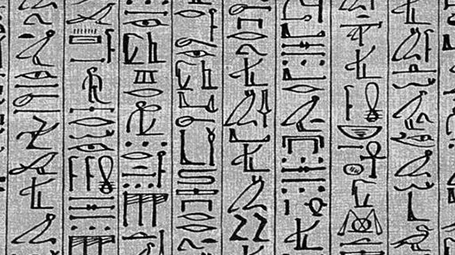
Sometimes I come across slides that simply try too hard. A stunning image with a hard to understand analogy, or an infographic-style rebus that looks like ancient Egyptian hieroglyphs. OK, it is a visualisation, but a puzzle does not make it easier for your audience to understand what you try to say. Even worse, an overly simplistic symbol might play down the seriousness of the business you are trying to pitch. Instead of creating a puzzle, why not simply write down what you want to say. Image via WikiPedia

SlideMagic: a platform for magical presentations. Free student plan available. LEARN MORE

Hey, where is the colour?

A recent client was wondering why I turned all images in his presentation to B&W.

The answer: because I matched the colours of the presentation to the colours of his brand; shades of grey plus a strong blue as accent color. These type of colour schemes are actually my favourite ones. They look elegant, are recognisable, and it is very easy to create a harmonious, consistent set of slides through the deck with out the distraction of clashing colours. Definitely not a presentation with a 1980s, pre-colour monitor, look and feel.

SlideMagic: a platform for magical presentations. Free student plan available. LEARN MORE

Data chart make over

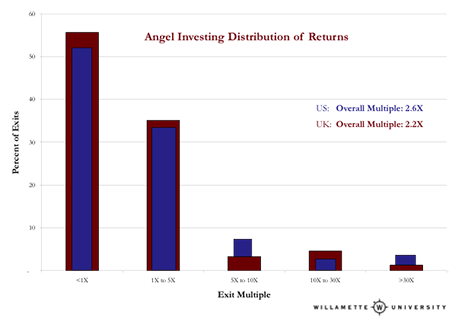
Here is diagram published on TechCrunch about the financial returns of angel investors. There are 2 ways to improve the diagram:
  1. Make it a simple stacked column diagram that adds up to 100%, 1 column for the US, 1 column for the UK next to it.
  2. Use more contrasting colours than the dark blue and red
Then there are a few more things you can do to make it look less like Excel: tick marks out, big title at the top left, replace the Times Roman font from something sans serif, value axis title below the main title (i.e., no vertical text).


SlideMagic: a platform for magical presentations. Free student plan available. LEARN MORE

Slides from Barcelona

Following requests, I uploaded the slides I used for my talk in Barcelona about investor presentations. They are pretty minimal, so it will be hard for those who did not attend to grasp the full meaning, sorry. (I am working on documenting its content though, watch this space) Thank you Barcelona entrepreneurs for a great event!


SlideMagic: a platform for magical presentations. Free student plan available. LEARN MORE

Too generic to sink in

Opening slide bullets:
  • Industry #1
  • 15 consecutive quarters with growth
  • 40% EBIT margin
  • Offices in 35 countries
Pretty impressive, but when you put on a slide like this the audience is unlikely to digest the numbers fully. Almost every opening slide of almost every corporate presentation has numbers that look like this (something about growth, something about margin, something about locations, we do not pay that much attention to the actual numbers).

Instead, break up the slide, show that you are bigger than IBM, show a column chart with growth in the past 15 quarters, show that competitors are struggling to achieve 5% EBIT margin, show a map with 35 dots. It takes the same time to present, but your audience will remember.

SlideMagic: a platform for magical presentations. Free student plan available. LEARN MORE

The conversation first

Yes, many of the slide decks I design for clients are meant as support for a stand up presentation. But I think these cases are the minority.

What most clients are after is a different concept: the documentation of their story. The idea in their head, captured, recorded, somehow. This story can then be emailed, shared online, discussed in a 1-on-1 meeting and yes, presented live.

And when I stand back and see from which perspective I design, I think - to my surprise - that it actually is the 1-on-1 personal dialogue. When that conversation is nailed, I make the adjustments for bigger audiences.

Maybe not so strange after all though. Everything starts with a simple human conversation.


SlideMagic: a platform for magical presentations. Free student plan available. LEARN MORE

Handling an unfriendly audience

Audience members are not always friendly. Unfriendliness comes in 2 types:
  1. the civilised audience who is reluctant to agree with your proposal (I faced many of those as a management consultant) and  
  2. the heckler who is out there to interrupt and derail your presentation (probably on his own).
Audience 1. A fatal mistake with audiences that do not agree with you is to invite the full debate before you have had a chance to tell your story. Highlight all the points and data quickly before you get to some slide that presents the trade off your making. That trade off slide is very important. Many of these strategy debates go in circles and keep on repeating the same points. If you have written down the point on the slide you can point at it and say “You are right, I have captured that here.”. Group/isolate/give less space to the points everyone agrees to and focus on trading off the difficult ones.

Audience 2. Hecklers are difficult. The best strategy is to try to get the audience on your side. If you ask - after 3 detailed questions - whether the audience agrees that these points are better discussed one-on-one after the presentation, there is a good chance that the heckler will stay quiet.  In addition, after you answered the heckler’s question, turn away from her, and make eye contact with another person with a question.

SlideMagic: a platform for magical presentations. Free student plan available. LEARN MORE

Stick to your grid

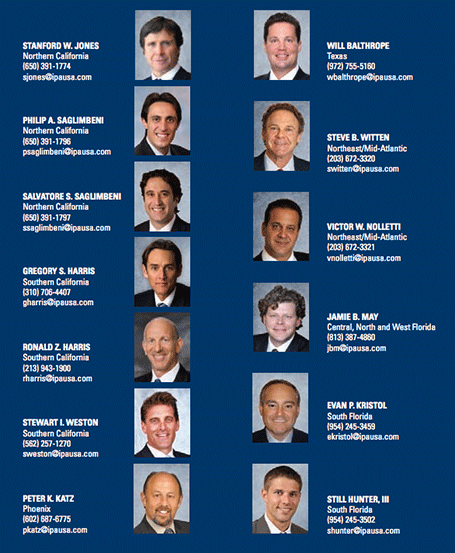
The grid is the imaginary set of horizontal and vertical lines along which the objects on your slides are aligned. Breaking the grid is a key tool that designers use to add an interesting tension to a page layout. But in most cases, it is better just to stick to it. See the example below, your eye will immediately pick up that there is something wrong with the layout of these head shots.

SlideMagic: a platform for magical presentations. Free student plan available. LEARN MORE

Do I actually need a deck?

Good question, and the answer is “Not always”. TED talks are a good example of people delivering complex messages without the support of slides. But:
  • In order to give that naked talk, you need to understand your presentation insight-out, you need to live and breathe your presentation. In the early phase of your learning curve, slides will give you a good backbone to hold on to. You start by presenting your slides, you end by telling your story. A lot of practice can of course make you jump straight to the end of this process.
  • Certain types of information have to be conveyed visually. Examples are graphs with data, the latest quarterly results, or an image of a surgical procedure.
  • In many cases the live presentation is actually not the main purpose of why we design slides, often we send out material ahead of our discussion. It is hard to avoid slides, unless you have the confidence to email a short recorded video of you explaining your idea (without slides).

SlideMagic: a platform for magical presentations. Free student plan available. LEARN MORE

4:3-ing that LCD screen

Most people design their slides for a the 4:3 aspect ratio of older TV screens and computer monitors (I still think it is actually better than 16:9).

Increasingly conference rooms are using large 16:9 LCD screens that are much brighter than the traditional on screen projectors. And most of these 16:9 screens are set to stretch 4:3 input signals. As a result your slides will look bloated.

Grab that monitor remote (you cannot control this from your computer) and set the aspect ratio to 4:3 before you start presenting. The tech person present usually will say “What, you want those black bars?”. You can answer affirmative. Your slides will look much better, and if you use a black slide background, no one will even notice the black vertical bars.

P.S. Ancient post that touches on slide backgrounds.

SlideMagic: a platform for magical presentations. Free student plan available. LEARN MORE

A deck for a 5 hr meeting?

After my presentation in Barcelona last night, one of the audience members came up to me and asked whether for 5-hour presentations, you should take a different approach from the one that I had been advocating for the 20 minute investor pitch. Two answers:
  1. Break up your 5-hour presentation in blocks of high-energy and well-designed 20 minute pitches and discussion sessions.
  2. But better still: cut that 5 hours. Give people the opportunity to read things beforehand and just do a discussion rather than going through details for 5 hours. Obviously this might require a culture change in your organisation if people usually do not do their pre-meeting homework.
Kicking off my talk in Barcelona last night

SlideMagic: a platform for magical presentations. Free student plan available. LEARN MORE

No watermarks please

When graphic designers start with the design of a PowerPoint template, they are faced with a white page. A common way to fill it is with a faded, washed out, water mark. It might look OK on an empty page, but it will clash with any other object than a text bullet point. To be avoided.

Unless other prescribed corporate template elements that are hard to change, a water mark can be easily taken out, simply delete the graphic on the page, or cover it with a white box.

SlideMagic: a platform for magical presentations. Free student plan available. LEARN MORE