
Known issues

I am working on the release of version 1.1 of my book about presentation design, iBooks does not process submissions over the holidays, but hopefully in January a new version will get pushed to your iPads.

So far I discovered/received feedback that some internal bookmarks do not work, and that there are still a few lorem ipsums hidden deep down in the book. I will fix this.

The book is now available in 50 countries, but readers have pointed out that the book cannot be bought in the Israeli app store. This is due to Apple’s strategy of not allowing the sale of paid iBooks in Israel, free iBooks are available. I do not understand this, but so be it.

I will keep you posted.

SlideMagic: a platform for magical presentations. Free student plan available. LEARN MORE
No executive summary

I do not like the term “executive summary”. It suggests that if you are senior and executive enough, you are somehow rising above the masses who are swimming and drowning in detail. Most executive summaries are over-summarised with buzzwords and hollow phrases.

Clients often ask me to write an executive summary of a presentation, and I usually say they do not need one. A careful selection of the key slides of a presentation is much better suited for the purpose. Nobody likes to read 2 dense pages of prose, flicking through a number of visual slides is much more interesting. As a result, the message gets across better and faster.

SlideMagic: a platform for magical presentations. Free student plan available. LEARN MORE

How to download from YouTube

Videos in your presentation can be powerful, but embedding them using a YouTube link that needs a working Internet connection is a risky strategy in a live presentation, technology always fails when you need it most.

The website keepvid allows you to download YouTube videos to your computer and embed the video file in your presentation. The program comes with a few health warnings though:
  1. Watch out for copyright. Keepvid is legal as long as you use it legally for material for which you have permission to use it
  2. Keepvid is covered with ads and buttons that say “Download”, these usually link to a sponsor site and do not download your actual video. Watch carefully on what link you click.
  3. Technical issues. It takes some time before the Java applet downloads, be patient. There is something funny going on with Java and Google Chrome, so when I use Keepvid I switch to Safari which works fine.

SlideMagic: a platform for magical presentations. Free student plan available. LEARN MORE

Saving time

Maybe stupid, but until recently I hardly ever used a slide template for a visual. My template used to be the white or black page, and everything on it was created from scratch. Data chart, insert followed by 15 actions to kill the standard PowerPoint formatting. Same for tables. Same for text boxes.

So, I am a late discoverer of the slide template. It requires some time though to set things up in a clever way. Maybe I gave you an idea as well.

Another big time saver: a custom toolbar, here is a very old post on the 19 buttons you need in a PowerPoint tool bar.

SlideMagic: a platform for magical presentations. Free student plan available. LEARN MORE

Making the emotional case

President Obama’s key influencing strategy for convincing the audience of the need for tougher gun control laws in the US was appealing to shared values, the values of parents in the audience and in front of television and YouTube screens.


And it is interesting to see how he did it; taking time to let the point sink in, emotionally. The President elaborated about the process of raising a child, letting it separate from you with pain in your heart. In the end he came back to that emotion by mentioning the first name of each child that was killed. If he had just put in the elevator pitch “we need to protect our children”, it would not have been convincing. We have heard it too many times from too many politicians.

The same is true in business presentations: just giving the sound bite is often not enough to let the audience feel the point you want to make.

SlideMagic: a platform for magical presentations. Free student plan available. LEARN MORE

Touching your nose

Scientist do not yet agree whether lying makes people touch their nose, but the popular belief is so strong that you better avoid getting rid of that annoying twitch at critical moments in your presentation: “.. and this is how I will save the company! ” [scratch] [scratch]

SlideMagic: a platform for magical presentations. Free student plan available. LEARN MORE

Google Presentations review

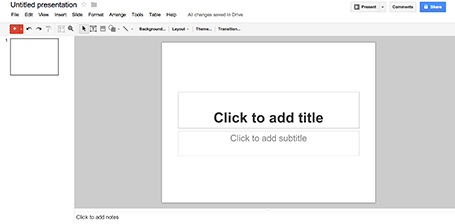
As part of my attempts to write a PowerPoint killer I am researching all the presentation apps that are currently available. Today, I have Google Presentations a test drive.

Web apps have come a long way, and the overall user experience is pretty much the same as local software: snappy and fast (that is, if you are connected to the Internet). Right-clicking, dragging, drop downs, it all works. Google Presentations is integrated into the Google Drive environment which makes accessing and sharing files really easy.


While I think that PowerPoint is too bloated with features, Google Presentations is still at the other extreme of the spectrum. Here are the things I a missing:
  • Big, big problem: you cannot crop images
  • Poor integration of data charts (you need to create the chart in a Google Spreadsheet and then copy it across as an image
  • If you create custom templates, everyone can see and use them
Google is making huge improvements in the design of its software, gmail, Google+, mobile apps all look fantastic now. Google Spreadsheets are already a workable alternative to Microsoft Excel sheets. With some additional features, Google Presentations can be come a credible PowerPoint alternative as well.

SlideMagic: a platform for magical presentations. Free student plan available. LEARN MORE

Subtle textures

The majority of my presentations have either a pitch black or bright white background. But now that monitors are getting Retina-like resolutions, it becomes possible to add a tiny, tiny texture to the background. Here is a site that has a few candidates: subtlepatterns.com. (Update 7 April 2017: new link https://www.toptal.com/designers/subtlepatterns/

On the average crappy VGA office overhead projector this effect will not come out though.

SlideMagic: a platform for magical presentations. Free student plan available. LEARN MORE

Wireframing in Keynote

I have started to wireframe my PowerPoint/Keynote killer in... Keynote. Presentation design software is excellent to make mock up web sites or mobile applications, no need for special software. You have all the shapes at your disposal and can add basic interactivity with hotlinks that point to other slides in your deck. You can design icons yourself or use standard packs such as these, or these to make things look even more real.

SlideMagic: a platform for magical presentations. Free student plan available. LEARN MORE

The Meeker deck 2012

Mary Meeker has updated her deck about the state of the Internet:


The slides inside are typical examples of investment banking/consulting visuals with lots of information, they are best read offline rather than presented in front of a live audience. Record the eye movements you have to make in order to absorb all the information on the slide below:


When presenting, you can simplify the chart, but shortening/cutting titles and subtitles, making sure that a few really stand out, and that the rest is put on the chart in small print visible to the reader, but not really to the live audience.

A more general point about this presentation though. I have followed many editions of it over the past few years (going back to the time when she was still an equity analyst), and actually find that the current one disappoints a bit in terms of content. But maybe that is the state of the Internet today, little surprises?

SlideMagic: a platform for magical presentations. Free student plan available. LEARN MORE

My book is available!

UPDATE 1 February 2015: you can now access the full content of the book free online here.

I am very excited to announce that my book Pitch It! is available in the Apple iBook store! I am looking forward to receiving your feedback as early adopters (you can post them here, or send them to contact at ideatransplant dot com). The beauty of the iBook format is that I can update and change content based on your input, which will get pushed to your devices. The link to the iBook store is here:

SlideMagic: a platform for magical presentations. Free student plan available. LEARN MORE

Alanis Morissette

I attended a concert by Alanis Morissette the other day in Tel Aviv. A critic of the local Israeli newspaper Haaretz found she did not sing well, but despite that everyone in the audience loved her performance.


This presentation design blog is not the right place to go into technical artist reviews. What is interesting however, is to see how Alanis managed to win the crowd over simple by being her natural self. No professional crowd pleasing techniques, no real eye contact into the audience, just pacing back and forth staring in the distance left and right of the stage. She actually came across as shy.

The audience wants you to succeed, and preferably using your own natural style.

SlideMagic: a platform for magical presentations. Free student plan available. LEARN MORE

PowerPoint killer?

Now that my book is nearing completion I am switching attention to a much bigger side project, I might have the initial idea for software that can be a PowerPoint and Keynote killer. Many have tried before me, and all of them have more or less failed, so I need to be careful. I keep the idea under wraps for the moment (sorry), but what I can reveal are the fundamental flaws in slideware that I want to take out:
  1. The bloated programs have their roots in 1980s mouse-based drawing software
  2. Templates are technology- or graphics- rather than business content-driven
Things are very early at the moment, and I am trying to get a handle on the budget and timing aspects of a project and start to look into possible design partners (UI, backend). Let me know if you think that there are design studios out there that I should be aware of, especially those that have experience with visual/slide apps on desktop and mobile. You can send me a message via the contact field in my website.

I hope that this post will be the beginning of a solution for death by PowerPoint, rather than a note in the margin like Fermat’s last theorem...

SlideMagic: a platform for magical presentations. Free student plan available. LEARN MORE

Prevent PowerPoint from crashing

I have Microsoft Office software open on a Mac for 10 hours a day and while the program is very stable, there are a few occasions where it can crash. I have my theories why some of these happen, but even if they are just superstition, I would recommend anyone to set a very aggressive autosave window (5 minutes or less) and hit save before going into specific actions.
  • If Dropbox (and probably Box as well) start syncing a file that you have open in PowerPoint you are at risk. Especially when they are large and saving takes more than a second. You can see the Dropbox icon moving when it is syncing, to be save cancel sync for the time that you are editing
  • The same problem (and in a much bigger way) is Apple Time Machine backup. If Time Machine backs up a big PowerPoint file while you have it open you go down. Stop Time Machine backup, or install a utility that enables you to control when backups are happening. (There are many of them here, I have not tried these, so at your own risk)
  • Rapid clicking and editing of data charts, open one, edit one, close one, change one. Excel might get confused, is waiting for some input from PowerPoint, who is waiting for input for Excel. Always hit save before and after major data chart manipulations.

SlideMagic: a platform for magical presentations. Free student plan available. LEARN MORE

In this ever changing world...

Please do not use that sentence in a presentation.

SlideMagic: a platform for magical presentations. Free student plan available. LEARN MORE

CEOs get used to slides

If you want to make a dramatic difference to the look of a presentation, do it early in the design process. After a number of iterations a senior executive gets used to the look and feel of a slide, even if it is not a pretty one. The CEO sees a placeholder (no longer a slide with content) as the back drop of which to tell the story. Changing the design of a placeholder her makes her feel she has to redesign her story from scratch.

SlideMagic: a platform for magical presentations. Free student plan available. LEARN MORE

2 great creative movies

Here are 2 movies I recently watched that talk about the revolution in the creative industry and how individuals can now deliver the work that a few years ago only could be done by big firms. This is also true for my own firm, where I often work alongside big PR or Investor Relations consultancies.

Indie Game: The Movie is about independent game developers realising their dream and incorporating some very personal stories in their work


PressPausePlay is a more general film covering a lot of creative disciplines

SlideMagic: a platform for magical presentations. Free student plan available. LEARN MORE

Face or no face?

It depends:
  • To make an emotional point, or show a human connection to whatever you want to say, show the face (pick a stock image that is not fake, but shows a real person)
  • To show a gesture or an object, it is better to crop the face out and zoom in on what you want to show

SlideMagic: a platform for magical presentations. Free student plan available. LEARN MORE

The same boring framework

Frameworks are great to structure information but incredibly boring to present, especially if you have to repeat them many times over.

“Over the next 30 minutes I will describe each of the 15 business units using this framework: challenges, opportunities, profit potential, next steps. Here is business unit 1. ”

Oh no! 14 more to go...

It is better to tell a specific story about each business unit, actually on purpose using a different approach to tell it. The 15 data tables can go to the appendix for bed time reading.

SlideMagic: a platform for magical presentations. Free student plan available. LEARN MORE

Announcing Pitch it!

UPDATE 1 February 2015: this book can be accessed free online here

I have been working steadily on my first book: “Pitch it!" and I am reaching the final stages of editing. The book is written as an Apple iBook, which allows me to create a great-looking interactive document, rapidly, at the expensive of cutting people off that do not have iPads (sorry for now). I am planning to ship early, and using reader feedback to upgrade the book which will get pushed automatically to people who purchased the older version. Stay tuned!

SlideMagic: a platform for magical presentations. Free student plan available. LEARN MORE