Join me for a G+ Hang Out

I am glad to speak live about startup investor pitches in a Google Hangout organised by the Google Developer community in Israel. The event is this Wednesday 14:00-14:30 Israel time. I think up to 9 people can join the interactive conversation, but Google will live stream the event so other people can follow it “on mute”

Details of the event can be found here.

SlideMagic: a platform for magical presentations. Free student plan available. LEARN MORE

Give your eyes a break

When someone emails you a PowerPoint presentation, PowerPoint remembers the screen size that was last used. If that version was created on a small laptop, the slides will show up as tiny rectangles on a big desktop monitor.

All the time I see people making edits to presentations in tiny tiles. Why not give your eyes a break and scale up the slide to fit the page? Getting rid of toolbars, the speaker notes field, and reducing the outline on the left will deliver some more screen real estate.

SlideMagic: a platform for magical presentations. Free student plan available. LEARN MORE

If you are not excited...

Observed in a presentation: “Oh, yes this last bullet point, almost forgot about it, hmmm, well, it is not that important (should have taken it off), as you can see it says [read out aloud], let’s move on to the next slide.” Out comes another 10-sentence list. If you are not excited about your presentation, your audience for sure will not be moved...

SlideMagic: a platform for magical presentations. Free student plan available. LEARN MORE

Changing a corporate template

I am close to convincing a large client to change its corporate presentation template (at least for one event). Here is my strategy:
  • Convincing people that a high-profile, external event merits a format that can deviate from everyday documents that are mainly used for internal audiences
  • [But this is the most important one] Comparing the 2 template options not based on a blank slide, but on one of the most important slides of the entire event. Seeing a straight comparison of what is, and what could be for one of the most important messages of the company makes deciding easy. You pick the one that looks better.

SlideMagic: a platform for magical presentations. Free student plan available. LEARN MORE

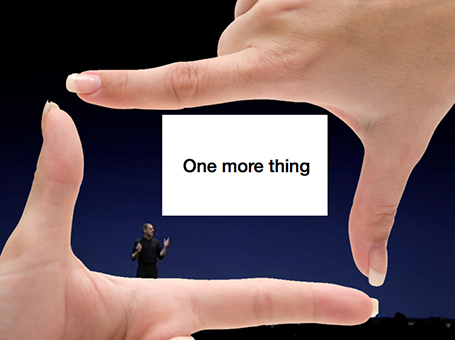
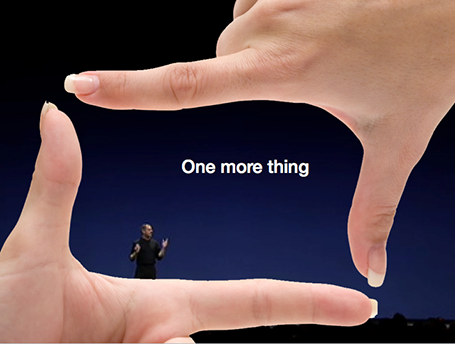
Pause slides

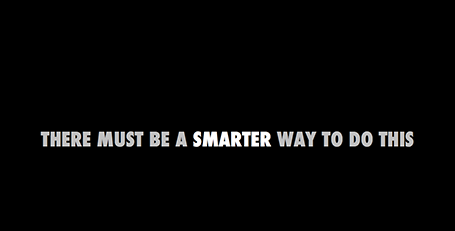
Some slides require a more dramatic introduction than just plopping it on the screen. I often use a blank slide wit a teaser sentence (not “the solution”) for this purpose. It breaks the flow and brings the audience attention back to the presenter.

SlideMagic: a platform for magical presentations. Free student plan available. LEARN MORE

Gestures

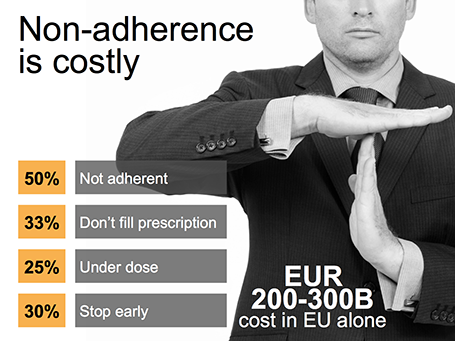
Sometimes simple human gestures make the most powerful background images. See the example below about people not being compliant with their medical prescription.


SlideMagic: a platform for magical presentations. Free student plan available. LEARN MORE

iPhone mock ups

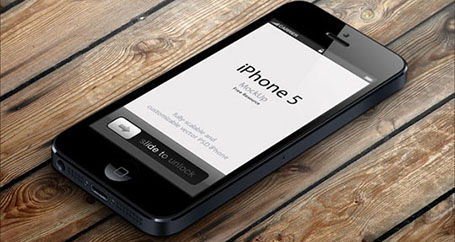
Many high-tech presentations involve some sort of show casing of a mobile phone app. This site has a number of iPhone mock ups that could work great in presentations. With elementary image editing skills, you can take a front-facing image and past your device screen shot in. More advanced Photoshop users can probably get the 3D tilting to work.

The full list of iPhone mock ups are here on Design Beep.


Someone suggested this link on Twitter, but I forgot who it was... If it was you let me know and I will give you credit.

SlideMagic: a platform for magical presentations. Free student plan available. LEARN MORE

Saving time with files

An annoying part of my workflow is clicking through file hierarchies to open and save documents and images. I do not understand why it took me around 20 years to figure out to pin the folders of the current projects I am working on to left of my file open menu. On the Mac, you simple dag a folder onto the side bar (you can do something similar in Windows as well).

SlideMagic: a platform for magical presentations. Free student plan available. LEARN MORE

Found it!

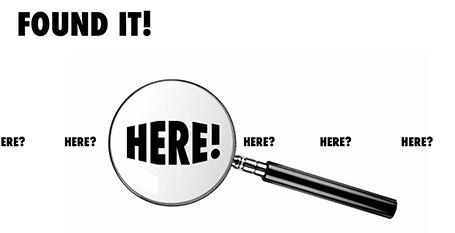
A client spend a lot of time and effort looking for a solution to a problem, until they discovered it in an unexpected place. The chart below is simple to make: a magnifying glass and different font sizes (and a transform font effect if you want), that is all.

SlideMagic: a platform for magical presentations. Free student plan available. LEARN MORE

Zap!

In case you want to use laser beams in your presentation, they are easy to make: red lines, black background and a small dot with a huge red, semi-transparent glow.

SlideMagic: a platform for magical presentations. Free student plan available. LEARN MORE

Marker nostalgia

I sometimes think back of the early 1990s, before we started putting Microsoft Word text pages on overhead transparencies using a photo copier. The only thing you had was an empty transparency and a big marker. The resulting slides were a lot more creative than many of the bullet point slides of today.

SlideMagic: a platform for magical presentations. Free student plan available. LEARN MORE

Presenting the presentation

A client was using a presentation to explain the presentation to people who had to present it. After a short discussion, it was decided to try to design a presentation that could be understood instantly by the presenter. If the presenter gets it, the audience probably understands it as well.

SlideMagic: a platform for magical presentations. Free student plan available. LEARN MORE

Framework homework

Some corporates manage by strategy frameworks and push down a prescribed template down the hierarchy lines: “Tell your story by filling this out”. Should you obey and stock to SWOTs, 7Ss, Porter boxes?

Strategy frameworks are useful to solve a problem. Managers can make sure that everyone covers all the right things. If a framework worked before in a similar business, or during last year’ strategy discussion, then there is a good chance it will work here as well. If you are the CEO of a number of similar businesses, having all your strategy presentations come to you in the same strategy template makes it easy to compare them.

The problem is that strategy frameworks are often too dense to present to a live audience, and that generic templates often do not completely fit the specific situation of a business.

My suggestion: if you are somewhere in the middle management layer of a big company, it is probably best to do your homework and fill out the boring strategy templates. But I would not stop there.

After you created the required pages, do not invest any effort to make them look more interesting, but rather stick them all in the appendix section. Then step back and start crafting your story from scratch ignoring the prescribed frameworks if you have to. When submitting your presentation call your tailor-made presentation the - overused word alert - “Executive Summary” and say in the body of your email that your homework is still featured as the appendix of the document.

I think the senior executive who has to sit through 15 template presentation will welcome your fresh approach.


SlideMagic: a platform for magical presentations. Free student plan available. LEARN MORE

We are robust!

Sometimes, putting up a slide that says explicitly “We are a robust company!” might make the audience actually think the exact opposite. “Hey, so far this was a fantastic and professional presentation, I did not realize these guys are a tiny startup, that is until now...”

SlideMagic: a platform for magical presentations. Free student plan available. LEARN MORE

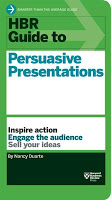
New book by Duarte

Nancy Duarte is probably the only person in the world that has managed to create a very large business in the presentation design market. As a result, she is a true authority on the subject because of here experience with designing presentations ranging from the high profile money-no-issue keynote presentations to the day-to-day high volume make-overs of slides for internal management meetings.

Her new book HBR Guide to Persuasive Presentations is different from the previous two (Slide:ology and Resonate): it is far more practical. Out goes the glossy paper, the beautiful diagrams, the client case examples, and instead we have a highly useful list of tips and tricks that can help you make better presentations the moment you put the book down. Almost every paragraph starts with an action verb, a recommendation of something that you can do better.


The book covers a wide range of subjects related to presentation design, from analysing your audience to building an online social media following for your decks, but the core of the book is in story and slide design. Some new ideas that I got out of the book:
  • Create two endings in your presentation, if you run out of time you can always stop at the first one
  • Pick the right type of slide: walk-in slide, title slide, navigation slide, bullet slide, big word slide, quote slide, data slide, diagram slide, conceptual slide, video slide, walk out slide
  • Ideas how to translate words into diagrams.
One point of disagreement, the book advocates using a 10% rule for executive summary slides, so a 50 slide deck needs 5 summary slides (5 minutes), and 45 appendix slides. Pretty much what we tried to do at McKinsey. I increasingly try to shorten that executive summary to one super short summary, and follow it to a slightly longer story that encapsulates the entire story, hoping to be able to hang on to senior management attention for maybe 10 or 15 minutes instead of 5 when the cross fire of questions begins and your slide presentation in the conference room basically ends.

So in short, if you are in doubt which of the 3 Duarte books you should start reading first, I suggest it is this highly practical one. A great and useful read.

Disclosure: links in this post to Amazon are affiliate links and I did receive a free copy of this book for review.

SlideMagic: a platform for magical presentations. Free student plan available. LEARN MORE

First impressions of Windows 8

Although I have switched to a Mac, I dip into the world of Windows now and then on a virtual machine, for such things as running .EXE CD ROMs with medical images on them, or editing a chart for a client still on PowerPoint 2003. The latter is no longer necessary, and that is a good thing, since Windows 8 is no longer supporting PowerPoint 2003.

So, I took the plunge and installed Windows 8 on my Parallels 8 virtual machine. I ignored all the scary warnings on the Parallels web site and managed to get a perfect install.

As a non-Hebrew speaker in Israel I always have an additional issue when installing new software. Trying to change the system language on a computer without being able to read most of the text on the screen. Gambling, plus comparing English and Hebrew screen shots finally did the job, but my computer science undergraduate degree came in handy. Not something for novice computer users as languages for application screens, keyboards, user accounts and welcome screens all seemed to be controlled in a slightly different way.

OK, back to the software. I will not describe the ins and outs of the new operating system here, but stick to my personal impressions. Detailed descriptions can be found in other reviews.

I really like the new Microsoft graphical look and feel of the new Metro interface. It is calm and clean, with simple clean graphics without shadings, gradients, drop shadows and near-realistic leather or paper effects. Some of the tiles on your home screen update in real time with weather, stock market information and a flow of pictures of your facebook and Twitter friends. I switched these live updates off, too distracting.

I hope that Microsoft will push this new tile design philosophy fully into the design. So, no more disguised Windows 7 user interfaces, and a deep application of the concept in its Office application suite (including PowerPoint).

The new super thin iMac eludes to the desktop computer of the future: a super powerful, large iPad-like device that can be put on a stand. High-end Wacom touch screens are also a sign of things to come. You put the screen up to view, or write text, put it down to design and draw, and interact with the screen using touch. We need software that can handle this type of design environment. I like the new PowerPoint (my PPT 2013 review here) but it nowhere near a touch application.

Microsoft lost the battle for consumer touch devices, but if it manages to move the corporate world that uses Office applications and that is afraid of Dropbox to a touch environment with a secure Microsoft Sky drive, it might have a chance to turn the tides.

The key is to innovate the applications such as PowerPoint and how they work. The actual operating shell matters less.

Have you tried Windows 8?

SlideMagic: a platform for magical presentations. Free student plan available. LEARN MORE

The exact marketing messages

Marketing messages cannot be translated 1-on-1 into a presentation. Do not forget to make the translation. The language translation requirement is obvious (everyone can see that marketing jargon does not resonate with a consumer). Sometimes though, you have to further than that and cut messages out, or move them from the explicit text, to the implicit part of your presentation: in between the lines, or told in the verbal explanation of the slides.


Image found on Things real people do not say about advertising.

SlideMagic: a platform for magical presentations. Free student plan available. LEARN MORE

Is it really about the presentation?

“My boss wants me to make a presentation about our strategy next Wednesday, help!”.

What does she mean? In most of cases (especially for an internal audience), she probably does not want you to focus all your energy on making the slides as pretty as possible (that would be a nice-to-have).

Instead, she needs to have the strategy itself ready and nailed. And the process of designing the presentation-that-presents-the-strategy might reveal holes, inconsistencies, and ambiguities in the strategy itself.

Your boss wants the strategy to be ready by next Wednesday. (Help!)

SlideMagic: a platform for magical presentations. Free student plan available. LEARN MORE

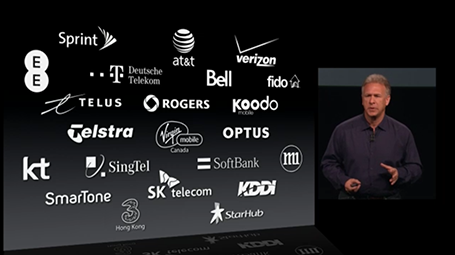
Uniform logos

A page full of logos in different colours can look cluttered. Apple re-did their partner logos in white on black in their recent product presentation. I am not sure whether all the graphic designers that were behind the logos would agree to this, but it sure looks better. I would have taken the slide design one step further though, and organise the logos in a rigid grid.

SlideMagic: a platform for magical presentations. Free student plan available. LEARN MORE

Light or dark background?

For big audiences, you need to get the entire look of the stage right, not just your slides. Below you see that a dark background works better. A light background on a huge screen overpowers the presenter. For small conference rooms, a light background will do fine, and for reading on screen, a light background is actually better.


SlideMagic: a platform for magical presentations. Free student plan available. LEARN MORE