
Hidden megabytes

PowerPoint files can be very large, especially if you use high resolution images, or even videos. In the near future, all of us will have moved to a cloud-based storage solution, where we no longer email actual documents to each other, just a link. In the mean time, we need to try to keep our PowerPoint files below 10MB, the email architecture limit that was invented in the 1990s.

In the format pictures menu of PowerPoint is an option to compress images to save space, I usually go down to 150DPI. After compressing, always check what happened to the images in your presentation, the compression tool can do funny things (ruffle transparency borders, undo re-colouring, etc.)

If your files are still big after compression, or even when you do not use any images at all, have a look in the slide master (view, slide master view). There might be templates for title pages and/or separators there with full-size images. These get saved with the entire presentation. You can delete the template slides if you do not need them.

SlideMagic: a platform for magical presentations. Free student plan available. LEARN MORE
The investment banker

Investment bankers use presentations that are documents for reading, they are even denser than the slides a management consultant typically produces. And whereas a management consultant usually can be convinced easily to change a presentation approach, investment bankers stick to their traditional approach. I have been thinking why this is the case, because I believe that a more visual presentation approach also works in the world of finance. Possible reasons:
  • Finance is a conservative industry, and a different looking presentation might give the impression that you are not serious.
  • Bankers are actually good sales people and do most of their sales pitches verbally, they put up the confusing and dense slide with all the facts, but when you listen to the audio track, the story is quite clear. The slides are for reading after the meeting, the presentation is for listening only
  • Bankers work under very strict time pressure, so there is simply no other practical way than to produce a deck by writing bullet after bullet.
  • Bankers usually do not get very deep in to the strategy of a company (like a management consultant does), a company is a company with sales, growth, margins, PE multiples, and leverage. As a result, the presentation will look more generic.
  • Bankers are used to reading/interpreting financial ratios: a EV/adjusted EBITDA ratio of 6.8 instantly rings a bell. A less financially savvy audience might need more than a bullet point to be impressed by this.
In most of my projects with a conservative investment banker, I try to negotiate a highly visual summary deck that goes in front of the dense appendix. Over time, we iterate the summary deck more and more, and the appendix gets used less.

For very high profile events (i.e., big IPOs) I see that bankers start to invest in visual presentations, things are also starting to change in the world of finance.

SlideMagic: a platform for magical presentations. Free student plan available. LEARN MORE
"My story is more complicated"

A client told me the other day that she had seen many of my presentations, and thought they were really good, but all very simple. Her story would for sure be more complicated... It made me smile.

SlideMagic: a platform for magical presentations. Free student plan available. LEARN MORE
The joy of tables

Tables in PowerPoint are a great basis to set up a slide in PowerPoint. Everything is instantly lined up in a grid, it is easy to add and remove boxes (lines). I often use tables with a very light grey fill and fat white lines.

SlideMagic: a platform for magical presentations. Free student plan available. LEARN MORE

OS X - Windows compatibility

Now that the installed base of Macs is growing, especially outside the large enterprises, you need to take into account that your PowerPoint presentation is likely to be opened on both machines.

There are obvious differences to be aware of. The key one is fonts: there is a large set of fonts that are available on both operating systems, but very obvious ones are not always part of the overlap (Helvetica for example is not available on a standard Windwos machine, and Calibri gets only installed on a Mac once the user buys Microsoft Office).

But here are the less obvious ones. Even if you stick to standard fonts, there are still tiny differences in how both operating systems insert line breaks. Watch out especially for tight text in boxes.

Also, there is an annoying difference in the way PowerPoint for Mac colors text and shapes. You pick the same colour for both, but they look different. A design can look perfect on a Windows machine, but off on a Mac.

There is no quick solution to all of this. Installing a second virtual machine on your computer might be a bit overkill. I guess there is no alternative but to ask a friend or the recipient of the presentation to send back a quick PDF file to double check, especially for important presentations that will be presented on screen (as opposed to a document meant for reading).

SlideMagic: a platform for magical presentations. Free student plan available. LEARN MORE

From memory

I realised that I hardly look back at my notes from a briefing meeting when designing a presentation. The big story is designed from memory, only for facts I need to revert to my scribbles.

I guess that your brain gets used to recording stories when you design presentations for a living. When I listen to someone (more important than seeing an existing presentation) I record the information by creating a story flow in my head that is more memorable than scribbles on paper.

SlideMagic: a platform for magical presentations. Free student plan available. LEARN MORE

Designing on a MacBook Pro

After a second hard disk crash (long live Dropbox) I decided to write off my 17" MacBook Pro, and upgrade to the new 15" one with a retina display.

Buying a new computer used to generate the same level of excitement people experience when upgrading their mobile phones today. Used to, because buying a new computer now mainly is buying a new utility. Re-install your apps, sync Dropbox, and things are pretty much business as usual (albeit a bit faster).

This 15" retina display though slowly lured me into something I have not done in years: sit in a sofa and do serious design work. The amount of screen my laptop covers is tiny compared to my Thunderbolt screen (you see this when dragging a laptop window across), but the incredible pixel density makes the whole experience wonderful.

SlideMagic: a platform for magical presentations. Free student plan available. LEARN MORE

But it is the same image?

Sometimes I get this question when using the same image multiple times in a presentation. I re-use it on purpose (not to save stock image costs, or for lack of inspiration). Throughout the presentation, an image can become a brand, or a logo, for a complex idea. Putting up the image again (either in full size, or a smaller icon) communicates that complex idea in a nano second.

SlideMagic: a platform for magical presentations. Free student plan available. LEARN MORE

On the way to average

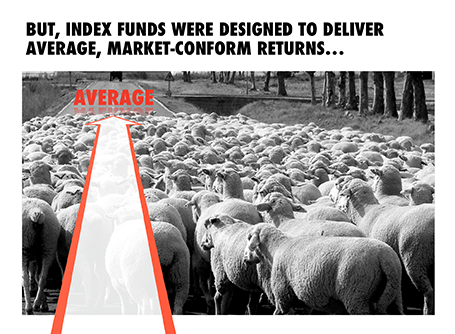
I designed the chart below for a sales presentation for an asset manager who is about to go on a roadshow to pitch a new investment fund to potential distribution partners. Yes, you saw that right, I did use a reflection effect.

SlideMagic: a platform for magical presentations. Free student plan available. LEARN MORE

Demos are stories, not feature lists

A 20 minute presentation is usually to short to carry a live product demo. You might run into technical difficulties, and you are losing time/attention with banal product features such as logging in, etc.

In those cases it is better to use application screen shots, rather than the real thing. You can still point at your computer and say that there is a working prototype, and that you are more than willing to take people through in a separate, longer meeting.

The next level up is to crop/magnify the screen shots and focus only on those aspects you want the audience to see. Your Skype window, menu bars, and all other unnecessary screen real estate can be cut out.

Next level up: put big, bold, explanation arrows explaining what the user should see. Say that it is a really minimal UI, if it is minimal.

Now here is the big difference. Do not just structure your product demo alongside the feature list of your app. Instead, create a user story and let the app screens flow with the story. You can also include visual images that are not screen shots into this story board. Even better, link back to story elements you have used elsewhere in the presentation.

A product demo is a user story, not a list of features.

SlideMagic: a platform for magical presentations. Free student plan available. LEARN MORE

Presentation design phases

Every presentation design effort goes through a similar process flow:
  1. Brainstorm of the content, sketching, scribbling
  2. Designing the big idea
  3. Creating the bulk of the content
  4. Small tweaks
You need to think about these phases when designing a presentation for a big deadline. Often, critical data for slides only becomes available at the very last minute. And most of the time, stakeholders only start to focus on the presentation in the last minute, and only when they see slides that are ready. The result: a lot of stress and sleepless nights. So what to do?

Early in the process, move from phase 1 to phase 2 and start crafting the critical slides that convey the most important ideas of your presentation, with imperfect data, maybe even without data at all. It forces senior management to get out of the blah blah blah zone, and gives specific input on the story line. When phase 2 is completed, nobody will be nervous anymore that the project might not come up with a good end result. Everyone is calm.

I find that a long-hand story board written in a word processor is equal to phase 1.5: people will react to it and give input, but when you turn that into slides, the whole thing can go upside down again. Push for phase 2 early, and do not get stuck in 2 pages of bullet points.

Now the bulk of the sweat work is phase 3. There is no reason to postpone that to the last night, you can prepare 98% of most business presentations with incomplete data.

With these preparations you are just left with phase 4 at the very last moment in the project. These changes can be done on auto pilot with the creative brain asleep at 3AM in the night.

SlideMagic: a platform for magical presentations. Free student plan available. LEARN MORE

What I really want to say, is this

In many draft/briefing presentations I see, there is a page 1 that was inserted after the full presentation was finished. It contains the things the presenter really wants to say.

Do not feel guilty to discard almost the entire presentation (slides 2-50), take page 1 as a story board to build up the entire presentation from scratch, focussing just on the things you really want to say.

The three weeks of work you invested in page 2-50 where necessary to get you to write page 1, which you can now turn into a full presentation in less than a day, because the full picture is crystal clear, very different from where you were 3 weeks ago.

SlideMagic: a platform for magical presentations. Free student plan available. LEARN MORE

Leading

One of the typography elements I play with all the time is leading, the space between 2 lines of text. PowerPoint sets the leading standard to 1.0, or 100% of the typeface size. What leading looks good depends on:
  1. The typeface you use
  2. All caps, sentence caps or lower case
  3. And most importantly: the size of the font, bigger fonts need less leading
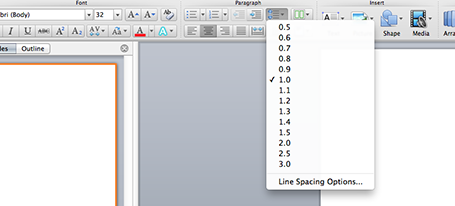
There is no general rule here, you need to fiddle and see what looks best. On a Mac, there is a button that controls the leading of your paragraph, see the screenshot below. It is one of the buttons I use most.

SlideMagic: a platform for magical presentations. Free student plan available. LEARN MORE

Designing a good logo page

Most sales presentations contain some logo page to show off your impressive client list. Make sure that the page looks impressive from a graphics point of view as well. An unstructured clutter of low-res logos makes an impression of an amateurish startup best to be avoided for serious business.
  1. Check whether you got the latest logo of a client (visit the home page)
  2. Use high resolution images
  3. Where possible, use the logo that has a white background
  4. Do not distort aspect ratios
  5. Make sure the logos are more or less the same size
  6. Distribute things evenly horizontally and vertically in a nice grid
  7. Keep the page simple: just logos
  8. If things look too busy, you can consider moving all the logos to black & white

SlideMagic: a platform for magical presentations. Free student plan available. LEARN MORE

The learning pyramid

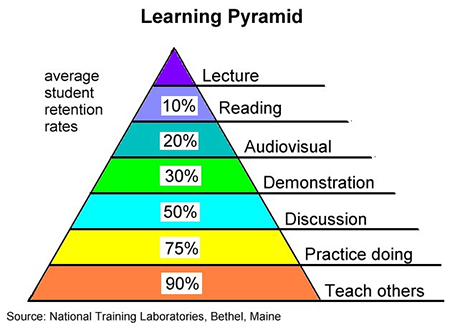
I came across this image the other day, showing retention rates of students by delivery form. A lecture is the worst, teaching others is the best. I am not sure about the accuracy of the exact percentages, but there is something to the overall hierarchy presented here. And presentations are definitely somewhere high up there.

But we can learn from this pyramid to make our presentations better.
  1. Audiovisual: This will not be a shocking new insight: use visual material in your presentation, avoid text 
  2. Demonstration: Keep things highly practical, use case examples that people can relate to
  3. Discussion: Easy to do in a small setting, but harder for large audiences. In sales presentations for example, this would mean improvising your entire sales pitch on the client specific situation.
How could you get to teaching others in a presentation?

SlideMagic: a platform for magical presentations. Free student plan available. LEARN MORE

Look serious

It is difficult for a startup to sell to a big company. Even if your solution is really innovative, large companies prefer to work with financially stable, large companies.

The look and feel of your sales presentation can add to that nervousness in the under belly of a big-corporate purchasing officer. Looks to avoid:
  1. Amateurish layouts with childish colours and water cooler fonts such as Comic Sans.
  2. Overly cute, touchy feely, retro look and feel, especially when selling in a male-dominated corporate culture (sorry).
Now we all know that the a slick visual deck full of stories and very little text will do great in these meetings (option 3), but, there is one surprising other option (4): the big corporate, lots of bullet points, serious, boring slide deck. Purely from a look and feel perspective, you will fit right in with all the other technology vendors, unlike option 1 or 2.

If you cannot pull off option 3, option 4 is still preferred over option 1 or 2.

SlideMagic: a platform for magical presentations. Free student plan available. LEARN MORE

16:9 layout

The 16:9 format was invited for movies not for presentation slides. Over the past 500 years, there is hardly any print work in a wide 16:9 format. Text that spans a wide column is hard to read, and most diagrams, paintings, visual concepts are more square than rectangular.

If you want to design slides in a 16:9 format you could consider breaking some of the slide design conventions. Examples: putting a multi-line slide header at the top left or even bottom left of your slide, saving up valuable vertical slide real estate. Or maybe even simpler: leave a lot of calming white space on the left and right of your slide.

SlideMagic: a platform for magical presentations. Free student plan available. LEARN MORE

The big picture first

Doing the product spec slides of your sales presentation is relatively easy. The big picture, how you position yourself versus the competition is harder. It is tempting to start with the easy bits and worry about the difficult things later. Still, I suggest to take on the positioning first since all other slides will depend on it. Moreover, it is the overall product concept that you are selling, not the features of individual products.

SlideMagic: a platform for magical presentations. Free student plan available. LEARN MORE

Flattening a story

Business school books and consulting reports have a clear hierarchical structure. This is great for reading a document: you can skip what you do not need, and go right into then detail when you do need it more explanation.

In short stories, hierarchy can be boring, you sound like you are given a university lecture. I often flatten that hierarchy, making the presentation more sequential. Out go the slides with the 3-5 setup bullet points, and instead I just let the story flow. If I have to, I bring back the structure at the end of the presentation to sum things up.

This works great for 20 minute presentations, for marathon presentation days we might have to revert back to the business school rigour though. But there is a reason why marathon presentation sessions are so stimulating for the brain...

SlideMagic: a platform for magical presentations. Free student plan available. LEARN MORE