Romanticising without apologies

After you told a story, try to avoid downplaying it: “Well, maybe I romanticised things a bit”, it is like a cold bucket of water for the audience. Decide the level of romanticising beforehand, and then stick to your choice without apologising and/or blushing.

SlideMagic: a platform for magical presentations. Free student plan available. LEARN MORE

The nose is a lie detector

When people make big statements in a presentation they get a bit nervous (“we are the cheapest solution in the market”) and often cannot suppress the urge to touch their nose to get rid of that subtle itchy feeling. Train yourself to be strong and do not touch your face when making big claims.

SlideMagic: a platform for magical presentations. Free student plan available. LEARN MORE

PowerPoint for iPad review

Yesterday, Microsoft finally released a full version of Office for iPad, including PowerPoint. Unlike a previous release for iPhone, this version allows you to create and edit documents.

I blogged before about the strategic mistake of Microsoft restricting its Office products for its own operating systems, and I think the recent change in CEO might have something to do with the sudden release of the iPad app which was rumoured to have been ready for a long time.

So what do I think? First of all, the design looks great. It is a good blend of the iOS environment with Microsoft-specific UI elements (ribbon). The app works fast/snappy and is intuitive to use.

The best thing is that finally PowerPoint will look normal when opening them on an iPad. Fonts work, no need for PDF-ing, or using specific apps such as SlideShark. This takes an important uncertainty out of business meetings. I had many instances where I needed to pull out a deck quickly and unexpectedly, and if an iPad is the only devices you have on you, you keep on apologising for the horrible look of your slides.

And I think this will be the main use of PowerPoint for iPad: showing presentations plus the occasional last minute text edit, or slide show re-order. Serious slide design work is not possible, first of all due to the small screen that is not comfortable to work on for a long time, and secondly because critical functions are missing when compared to the desktop app.

It was expected that Microsoft had to make compromises on what functionality to include, and more importantly, what to leave out. And understandably, there are a few big ones missing. You cannot edit/create data charts for example, which are a big deal in business presentations. Also it is not possible to edit the slide master, which means that any presentation you have to start from an existing document, (which is probably not a bad option).Microsoft did add things that I think are less important, it is possible to manage slide transition effects for example. Not really important in a business presentation.

There are simple, but really important things missing though. Auto-snap alignment of objects is not there. You drag objects around the slide and it is impossible to get them to line up perfectly. You will not see this on a small screen, but when you go on stage for a big audience, your whole slide will look garbled. Second critical function missing: cropping images. It is impossible to make a decent composition of multiple images on a slide. A big deal. Hopefully Microsoft (are you reading this?) will fix this in a subsequent release.

The delivery of presentations is very important on a mobile device, and Microsoft left out one important feature: Airplay. You need to get it to work via the iOS7 interface, and then it works fine, but Microsoft should have made it very prominent in the app. In a few years from now, the low resolution VGA office projectors will all be replaced by Airplay compatible devices (I predict).

Nice touches for presentation delivery are a button to black out the screen (and focus attention on the presenter), and a marker to annotate slides as you present them.

The file system you work in is the Microsoft 365 OneDrive, it is a shame that Microsoft does not allow support for iCloud, Google Drive, and Dropbox, but it is understandable that this feature did not make it because of strategic reasons. Microsoft finally got the insight that Office for iPad will lose them some sales of Windows tablets, but on the other hand might be their strongest weapon to have a change in the battle for enterprise cloud storage environments.

Inserting photos is done through the camera roll, or photo stream, and not via OneDrive. A bit cumbersome for business presentations, since the images you are likely to use are not the ones of your family trips.

Wrapping up, I think the PowerPoint for iPad is actually a really useful app for what it is designed for: displaying presentations in small meetings, and even for big audiences with the option for emergency slide edits. When Microsoft fixes the alignment of objects and image cropping it will be even better.

SlideMagic: a platform for magical presentations. Free student plan available. LEARN MORE

From 90 to 100 percent

Sometimes I work with really good presenters that already have a really good presentation. How to get from 90 to 100%?

My approach would be to sit in the audience of a real live presentation, or watch an entire presentation from start to finish on video. Then, create a series of slides that exactly mimic the story. Take out slides that do not really add anything and are just a prompt for the presenter to tell a story. Add black slides to switch off the projector all together. Use very simple graphics and words to support a story. Be a movie director and look at each frame of presenter and slide together.

SlideMagic: a platform for magical presentations. Free student plan available. LEARN MORE

You are not presenting slides

Back in the old days at McKinsey, my first project manager explained to me that I was supposed to “present the slide ” (Exhibit in McKinsey speak) to the client. This involved taking the audience (a small conference room) through all steps of the analysis.
And also we found... And then we found... And also we analysed... And also the team discovered...
Presenting a slide is probably still useful in internal team meetings among management consultants or scientists, but in most story-driven business presentations slides are there to support you in a subordinate role rather than claiming the lead role. The slides run in the background, as you tell your own story.

SlideMagic: a platform for magical presentations. Free student plan available. LEARN MORE

Presenter backgrounds

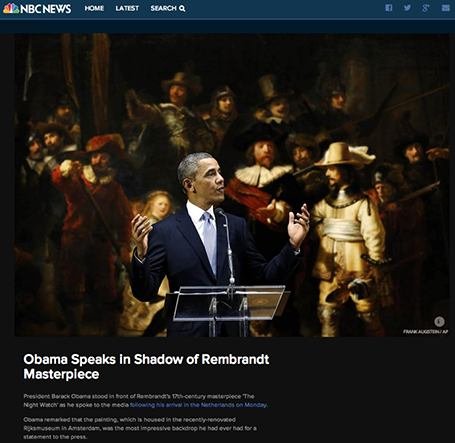
The Obama press conference yesterday in front of Rembrandt’s The Night Watch is an example of how a nice presenter background can make a big visual impact. The dark painting background looks great in close up photos, although less interesting from a distance.


Conference organisers should think beyond the curtain, blank wall, or list of sponsor logos.

SlideMagic: a platform for magical presentations. Free student plan available. LEARN MORE

Two screens

There are two adjustments in my IT setup that hugely increased my productivity: 1) move to a huge monitor, 2) add another monitor making a total of 3 screens: 2 big ones, 1 small one.

In this article, it is argued that 2 screens actually reduce productivity. I agree if you use the second one to check on your email, facebook, and Twitter streams. If you use the second screen for a different version of your presentation with comments, or the directory with the images you are using, a multi screen set up is a life saver.

Employees in large companies find it difficult to be productive, and when you look at people sitting in large open plan offices staring at tiny lap top screens, you understand why.

SlideMagic: a platform for magical presentations. Free student plan available. LEARN MORE

Demos need a story

A series of screenshots is a better way to give a product demo than a live demonstration of your product. You can control the flow better, skip the boring bits (logging in, etc.), and eliminate technology risk.

Many demos are a list of features: the user can do this, the user can do this, the user can do this. That is pretty boring. A better way to give a demo is to invent a story, or use a real life case example.

Set up the context, with some images. Put up the questions/issues the user has, and show how your product can solve them. Throughout the demo, stick to the same use case, use the same consistent data set.

Demos can be stories to.

SlideMagic: a platform for magical presentations. Free student plan available. LEARN MORE

Speed up

OK, you learned how to make visual presentations and now you have a beautiful deck with lots of slides full of powerful images.

The next thing is to adjust your presentation style. In the old days: people used to present a slide: take time to read the bullets, elaborate on the graphs, go off on a tangent, improvise a story. Each slide would be up for 5 minutes or more.

With a 50 slide visual deck, you need to speed things up and be prepared. Make the point of the slide (and no other point) and - click - on you go. You are no longer presenting slides, slides are supporting your story in the background.

SlideMagic: a platform for magical presentations. Free student plan available. LEARN MORE

You can be a pro

I did a quick reformat of slides that a client had edited overnight this morning. Here are some of the things I fixed:
  • Recolored red boxes to the correct red
  • Re-applied the correct slide master template to all slides, zapping left overs from other PowerPoint files
  • Re-applied the correct fonts, replacing the standard Arial/Calibri where appropriate
  • Make sure all objects fit within the slide margins
  • Re-sized images so that series have the same height/width
  • Replaced title case with sentence case
These are all simple things, no need for a pro here, you can do it as well!

SlideMagic: a platform for magical presentations. Free student plan available. LEARN MORE

European borders time lapse

This video shows how the political map of Europe has changed in 1,000 years. There is a lot of information packed in here, but the only one that gets across is: “lots of things have changed”. To bring more information to the surface, you need to slow down the pace, and add labels/stickers to highlight the key changes and go into the detail. Both visualisations work, the third option - stuck in the middle - will not.

SlideMagic: a platform for magical presentations. Free student plan available. LEARN MORE

Video without the audio

Short videos can fit really well into a presentation. The audio track can be a problem.
  1. Bombastic loud music can feel out of tone, especially if the sound was not set up correctly (too loud, too soft)
  2. A spoken voice over might feel out of tone with your overall presentation
  3. It is hard to edit/change video audio, maybe your message has changed over the past month, the voice over of your video has not
A good option can be to run a silent video, where you the presenter, gives live commentary in a voice the audience already has gotten used to, perfectly blended into your overall story.

SlideMagic: a platform for magical presentations. Free student plan available. LEARN MORE

Free quick logo design tool

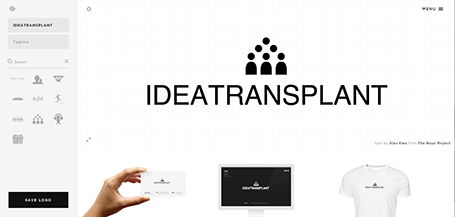
I am a big fan of the web design tool Squarespace and am currently turning a restaurant web site template into the marketing site for my presentation app. Hidden inside Squarespace is a cute free quick logo design tool that uses icons from the noun project. If you are a startup on a tight budget, it could be a good source for your first graphical identity before you are ready to pay serious designers.

SlideMagic: a platform for magical presentations. Free student plan available. LEARN MORE

SketchDeck - overnight slides

Most investment banks and management consultancies have the luxury of an overnight, low-cost slide production factory in countries such as India. Raw slides (even hand-drawns on the fax machine in the evening, the result in your inbox when you are back in the office the next morning.

SketchDeck is now opening this production capacity to everyone. Prices are very attractive, and they can ramp up capacity quickly to work under very tight timelines.

Not every presentation is an all-or-nothing investment pitch or TED talk, and most PowerPoint presentations are visual documents that are put together quickly to support decision making inside big corporates (Nancy Duarte calls them SlideDocs in her new book). It is for these types of presentations that SketchDeck is a good solution.

As it competition for me? Yes and no. For long-standing clients, I have done slide make-over work helping them in emergency situations, going at such a speed that I could probably be price competitive with an India operation on a s $-per-slide basis (I have the advantage tough of having the confidence/ability to edit/cut/change wording put in by very senior executives in a company, something they might not appreciate from everyone). But ultimately, my 1-man operation will not be able to keep up with the race to the bottom (as Seth Godin calls it). I will continue to focus on bespoke work that is in a different price category, and - in my spare time - am busy developing a web app that can hopefully automate a large part of the work that a mass volume slide production facility typically does.

Over time, SketchDeck could grow into a competitor for larger presentation design firms (such as Duarte) if they manage to train up and retain (=pay more for) talented designers, and develop long-term relationships with big volume clients. But at that stage they would have manage the big company challenge of maintaining a large sales pipeline to fund the cost of an increasingly larger fixed cost base.

Time will tell!

SlideMagic: a platform for magical presentations. Free student plan available. LEARN MORE

Slide design TV

Fellow presentation designer Nick Smith is starting a weekly series of short videos with presentation design lessons. Worth checking out and encouraging him to keep on going! Watch Advance Your Slides TV here.

SlideMagic: a platform for magical presentations. Free student plan available. LEARN MORE

Executive Summary RIP

An executive summary that sits on top of a management consulting document is usually a page that summarises the recommendations, next steps, and decisions. It is meant for an insider, the executive reading it is likely to have a 90% understanding of what is inside the document. There is no need for graphics here, a few dry bullets with decisions will do the trick to remind everyone of what will happen next, and who will do it.

So, this is totally the opposite of the other use of an executive summary that I come across often: a short teaser to someone who has no understanding at all of what you want to achieve. Here, a dense text, or a dry list of bullets will do the opposite of attracting attention.

Feel free to step away from the habit of sending dense text pages to get people excited about your project. Instead, think of the time you want the recipient to spend on your document. Now, fill that time with the most visually pleasing and exciting way to present your case. Lower your expectations, you do not want to close a deal at this stage, you want a phone call, or a next meeting. Sending a short, visual presentation that can stand on its own without verbal explanation is a perfect reply to the request for an executive summary.

SlideMagic: a platform for magical presentations. Free student plan available. LEARN MORE

Advice for investors

I see (and work on) a lot of presentations that investors use to raise their own money from high net worth individuals or institutional money managers.

Pitching an venture capital (VC) fund is harder than pitching a regular company. Companies are different by nature, different market, different product, different type of people. Investment funds on the other hand, or more or less the same when you listen to pitches “from a distance”, i.e., with the same level of attention that VCs would use themselves when opening the email inbox in the morning and page-downing some decks that hopeful startups have sent overnight.

Most VC/PE (private equity) pitches would talk about that there are lots of great companies out there that cannot get financing, that the team has a stellar track record, and that - unlike all other VCs - this fund will work hands on with their portfolio companies to create value (strategic help, contact network, access to more financing).

So when to the untrained ear all of these pitches sound the same, it is really important to bring out the distinctions. Bring hard data that show that your target companies cannot get financing. Discuss example deals and show why other investors would not be interested in them, and why you can turn them around. Beef up your track record with quantified exits (unlike most presentations, here the more detail, the better). And - sometimes - reconsider your investment strategy and make it very focused and specific, because believe me, you are not the only one out there pitching for money.

SlideMagic: a platform for magical presentations. Free student plan available. LEARN MORE

Bit by bit

Listing pages and pages of market size numbers that are related to your industry are hard to digest for the novice (for example, a potential investor in your company). This number includes devices, that number is 2011 only, this number excludes Eastern Europe, that one is number of users, that one is in Euro, and this is the percentage growth, but the growth of the average basket size.

An investor who is seriously considering putting money in your company will try to piece this data together to come to some consistent picture. You might as well do the work for her with reasonable assumptions. Size up the 2011 market to 2013, add your estimate for Eastern Europe, convert everything to dollars, etc. etc.

Start with some sort of overall market estimate, compare it to something the investor can relate to, then start adding complexity, break things into pieces.

Obviously your estimate will biased and very optimistic, but your analysis has at least provided the investor with a framework of how to think about your market. Put all the raw data that you used in the appendix so that the investor can do her own homework when she returns back to her office.

SlideMagic: a platform for magical presentations. Free student plan available. LEARN MORE

Getty Images - free embed

Getty Images (a huge database of both stock and news photos) is open sourcing non-commercial use of its collection if you publish an image via their embed widget. Web sites only for the moment, presentation design software will have to wait...

SlideMagic: a platform for magical presentations. Free student plan available. LEARN MORE