White <> plain

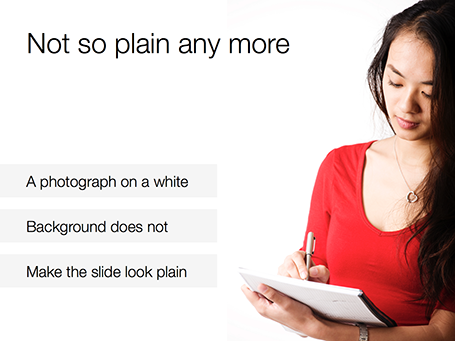
No one likes the plain, white, standard PowerPoint slide. And sometimes when I design a slide with an image on a white background and a lot of white space I get the comment that it looks very similar to a boring, plain PowerPoint slide. I beg to differ.


SlideMagic: a platform for magical presentations. Free student plan available. LEARN MORE

"I need a conference presentation"

You have a sales presentation that - despite the fact that it is loaded with bullet points - has been very successful in 1-on-1 meetings with customers. Now you have an invitation to speak at a conference for an audience of more than 100 people for a maximum of 20 minutes. What next? Here is a recipe.
  1. Trim down the content. In the conference audience are competitors, analysts, journalists, all kind of people that might not be suitable to receive the ins and outs you would discuss with a prospective customer. Remember, the object of a conference presentation is not to close a deal, it is to tease people into calling/emailing you to set up a first meeting.
  2. Flatten the story. Take out overview/summary slides, and spread them out: one slide covers one bullet. We want a story, not a structured table of contents of a business school text book.
  3. Beef up the “problem” section of your presentation to let the audience connect with the issue you are trying to solve. The problem might be totally obvious to you, and 60% of the audience, the other 39% is not there yet.
  4. Avoid repetition. If you talk early on in the presentation how highly accurate your product is, group that together with the a slide in the back that shows test data confirming accuracy.
  5. Find big bold visuals that support your points (one point per slide). Stretch images to a full page size, and cut text.
  6. Take out any live demos or demonstrations
  7. Use your videos (if you have them), BUT only if you can integrate them seamlessly in your presentation flow. Embed it and test it 300 times to make sure there are no technical glitches. Think where you want to insert the videos. Videos are excellent wake up calls, anticipate where in your story the audience runs the risk of getting bored.
  8. Practice, practice, practice, until you can deliver the whole talk in 15-17 out of the allocated 20 minutes.
Good luck!

SlideMagic: a platform for magical presentations. Free student plan available. LEARN MORE

Historical images - CC

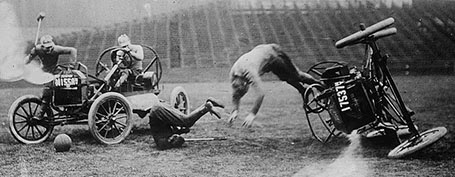
Another source of images that are in the public domain: the publicdomainreview.org You could pick one set of images and use them throughout a presentation to get a consistent look and feel of all your slides. Below a preview of a car polo game in the early 1900s.


Thank you Joann Sondy

SlideMagic: a platform for magical presentations. Free student plan available. LEARN MORE

Unsplash: CC image library


Unsplash is a frequently updated blog of creative commons images. Mostly background and nature shots. Via Orli. Image by Dyaa Eldin Moustafa. 

SlideMagic: a platform for magical presentations. Free student plan available. LEARN MORE

Should we do a video?

I get this question often from startups who are in the process of fund raising. If you are on a tight budget, you might be able to hold off the big expense of producing a video.
  1. There are videos and videos. Many of the animated videos you see today on the web (“So, you want to [FILL IN UNMET NEED]”) are presentations in disguise: an animated sequence of static slides. For some products, showing moving footage of the product is really useful. Examples are gadgets and other hardware that you often see on sites such as Kickstarter. If your product does not depend on a live demonstration, a sequence of presentation slides can be as effective.
  2. Unlike consumers, investors are usually perfectly happy to click through a sequence of slides instead of playing a video
  3. Videos are permanent and very hard to edit. Startup stories always evolve and change.
So, the best approach might be to start with an animated series of static slides. You perfect the flow over time and if you really feel you nailed the story flow (and you have the budget), you can make the expensive of creating a pitch video.

SlideMagic: a platform for magical presentations. Free student plan available. LEARN MORE

Who are you?

I am in the process of beefing up my software skills (Logic Pro X, nothing to do with presentations), and am spending a lot of time watching screen shot movies. I am just wondering why in these training sessions, the face of the presenter is not shown? OK, the screen real estate needs to be as big as possible, and a constant “talking head” on your screen distracts, but maybe a small introduction, at the beginning of a lesson?

This could be an idea for presentations that are used in cold email approaches: put a very short, very short, intro video of yourself on page 1 (to keep file size emailable and not take away the attention from the slides that follow).

SlideMagic: a platform for magical presentations. Free student plan available. LEARN MORE

Slidedocs by Duarte

Nancy Duarte published her fourth book: Slidedocs, about how to design visual documents in PowerPoint (or Keynote) that are meant for reading rather than presenting.

She is on to something. Business communication is getting shorter and shorter, and the role of word processors that used to write long boring memos is taken over by presentation design software that is used to create more visual documents.

Slidedocs is a free download (it is actually a PowerPoint file) that talks you through an approach to make these documents better. Most useful might actually be the file itself, that can serve as a template for your next Slidedoc!

SlideMagic: a platform for magical presentations. Free student plan available. LEARN MORE

"I need only 10-15 slides"

Some clients ask me whether a project can be cheaper if we cut the number of the slides, the answer is: not really. If your presentation designer is charging you by the slide, it means that she is likely to focus only on beautifying graphics page by page, rather than turning your entire story upside down and designing it from scratch.

Every presentation design project has a big fixed cost component: getting to know the client, getting to understand the story, setting up the overall look and feel of the presentation. After this, you need to put in however many slides it takes to tell the story, and I tend to err on putting in more than less. 30, 40, or even 50 slides, it does not make a lot of difference in the cost of a project.

SlideMagic: a platform for magical presentations. Free student plan available. LEARN MORE

The wow intro

Bombastic animated introductions are often used to promote movies, and some people might think they make spectacular product presentations. However, I think that a 3D animated product name with loud music does not make a good connection with the audience.

SlideMagic: a platform for magical presentations. Free student plan available. LEARN MORE

Always beautiful

I try to keep ugliness completely out of my design work. Ugliness tends to spread like a virus that wants to take over your work.

Even if you make a quick mockup or even a paper sketch of a slide, it should look orderly, balanced, clean. This is what I learned on my first day at McKinsey, when a client walks in you should be able to talk her through the hand-written deck.

SlideMagic: a platform for magical presentations. Free student plan available. LEARN MORE

PPT for Mac colour bug workaround

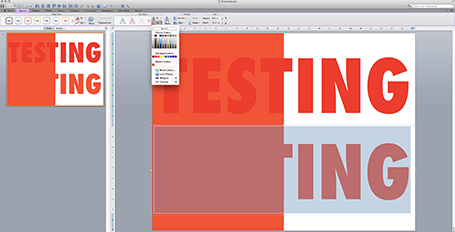
Microsoft PowerPoint 2011 for Mac renders colours of shapes and text differently, it has given me many headaches and inspired many blog posts over the years. So - finally - here is the simplest fix: create a thin outline in the same colour as the text around your characters, done!

The screen shot below shows how normally text get rendered differently even if you apply the same colour code to it (#!@$#@). Below that, the same text, with the same colour, but now with a tiny outline (same colour) around it. In the small preview window at the right you can see that the text and the shape have the same colour.You can see how I selected the text, and picked the line option from the format ribbon to do it.


Microsoft, please acknowledge this as a bug and not a feature (which you suggested in the past) and fix it in the next Office 2011 patch.

SlideMagic: a platform for magical presentations. Free student plan available. LEARN MORE

Web site = company presentation

Now and then I get stuck on the border of web site design and presentation design. And increasingly, the border is blurring. I am not talking about big eCommerce sites or sophisticated web applications here, I deal with a straightforward web presence for a high tech startup.

How can a presentation designer be helpful here?
  1. There is hardly any need for extensive technical content. Viewers are looking for a simple and professional looking page that quickly answers a few basic questions: what do you do and who are the people behind the company. If your page looks like a 800-pixel wide website from 2002, your company is probably from that time as well. If I cannot find details and names of the management team, nor a postal address then the company might actually not be real.
  2. Web-based presentations and web sites have the same audience: click, click, click-ing to find out what you were looking for. Elaborate text, buzzwords, spectacular videos, auto-play music all distract and delay in exactly the same way as animation and bullet points do in a PowerPoint deck.
  3. There are great what-you-see-is-what-you get tools out there for novices to build web sites. Wix has a very consumer non-professional feel, Webydo is like Adobe InDesign put online, and my favourite is Square Space. My own web site is still based on Wordpress, which missed a great opportunity I think to become a simple web site creation platform.
Basic web presence design will become increasingly standardised, but I still encounter many web designers who continue the bespoke route of the past decade. Prediction: something similar will happen to presentation design and enterprise communication: you can instantly recognise two types of presentations: 1) the bullet list by the non-designer, 2) the presentation that is prettied up by a professional graphics designer (icons, banners, logos, effects). I am working hard to eradicate both.

SlideMagic: a platform for magical presentations. Free student plan available. LEARN MORE

Feature laundry lists

Many tech presentations contain have the feature laundry list table in them: 15-20 great things your application can do. Here is how to make them better:
  • For reading: reduce the font and add more text to make the feature and its benefit explicit: from “historical overview” to “Compare usage levels over the last 30 days and spot unusual drops in demand”
  • For presenting: Option 1: if you only want to show that you have lots of features, keep the text short and put 20 boxes in a nice 4x5 grid on the slide, do not even bother to go into the specifics. Option 2: if you want to go into the specifics, create 20 slides addressing one feature/benefit each, make sure you can present each slide in 10 seconds while at the same time being specific enough so people can understand things beyond a vague description.

SlideMagic: a platform for magical presentations. Free student plan available. LEARN MORE

Icons in PowerPoint

With smaller screen sizes, icons are becoming an increasingly important element of user interface design. Not everyone of you is likely to be using PowerPoint to design a web app (hey I do), but icons can also be useful in regular presentation design.

I am not talking about floppy disks and other ancient icons we still use, but stylised symbols that can be an effective visual short cut to a category of (pick the appropriate) products, benefits, user problems, etc.

One option is to create your own icons in PowerPoint, set the zoom to 400% and create miniature shapes using shape booleans. Often you can use a quick Google Image search to find inspiration for your icon.

Stock photo sites sell endless amounts of icons, but there are compatibility issues when using them in PowerPoint or Keynote. Most icons are design as a vector graphic in Adobe Illustrator. It makes them infinitely scalable (like a PowerPoint shape), but PowerPoint does not read this file format. Copy-pasting Illustrator objects (if you have the software installed) is unpredictable and results in a shape that is hard to manipulate (changing colour for example).

Cropping icons out of a JPG or PNG file is not a solution either, if you forget to compress the small image file, you end up storing a huge image file with all your icons multiple times on a PowerPoint slide. Cropping also kills the vector-like scaling of icons, and background transparency.

A recent trend in web design might provide a solution: custom icon fonts. Modern successors of Zapf Dingbats (what?) provide clean icons that are scalable and can be manipulated (colours, shadows, and - do not use this - reflections).

The web is full of free icons fonts but not all of them work with PowerPoint and Microsoft Office (Font Awesome for example). There is a solution for this problem: custom font creation tools such as Fontastic. You can select icons from multiple sources and use them to create your own custom fonts. If you do not see the icons you need available, you can upload your own SVG files from stock image site purchases.

Obviously, using custom fonts in PowerPoint has its issues: users need to have your font installed in order to see the characters correctly rendered. PowerPoint has an option to embed fonts inside presentation files, but unfortunately this does not work on Mac OS X.

It is interesting to see that a software trick to scale Arial in a web browser is turning into a broader software solution for scalable graphics, including very large objects across different display engines.

SlideMagic: a platform for magical presentations. Free student plan available. LEARN MORE

Is the tablet love affair over?

A partner in VC firm Andreesen Horrowitz confesses that his love affair with the tablet is over. People will stick to a desktop device the laptop and a pocket device, the phone (which will get slightly bigger).

Putting things in context of presentation design (leaving the consumer world aside for a minute):
  1. I think tablets are here to stay for managers that need to view documents, but do not make edits beyond small corrections
  2. Serious presentation design work will never work on a small touch screen (maybe a similar statement to that of IBM estimating the world market for computers). One, there is the physical constraint, but more importantly, I think you need that space, that big screen, that calmness, to think/focus and create beautiful presentations
  3. One thing that the tablet has done is change user interface design forever: I predict most new desktop software will slowly migrate to a tablet-like interface (simple, big buttons).
  4. I think we are likely to see another big innovation in laptop user interface design. Either very large touch screens (still, the distance to the screen will be an issue for a workable user interface), or giant touch pads (maybe integrated with a keyboard) that allow us to scroll through information Minority Report-style.
  5. Document creation and design software is too complicated and a left-over of ideas from the 1980s. Enterprise documents can be much simpler/uniform while still being effective and distinctive (watch this space). So the innovation in enterprise computing/communication might be in software, not hardware.
This post will probably stay online forever, so we can check back in in 50 years from now to see what happened :-).

SlideMagic: a platform for magical presentations. Free student plan available. LEARN MORE

Passion

VC Mark Suster reconfirmed how important in-between-the-lines-body-language is when pitching investors.
If I had to put a number on it I’d say 1 in 20 pitches – maybe 1 in 30 – are by an entrepreneur who comes across as truly passionate about her project. Y [...]
The other 29 pitches consistent of many smart people who “think they have an angle on making a buck” which I know is an unfair over-characterization of the situation but you can genuinely tell when somebody isn’t “all in.”  
I am not sure about the 1 in 30 ratio, but I have seen similar dynamics when clients approach me to upgrade their investor presentation. When you are a professional manager-for-hire that makes a career in big firms, your affinity with the product is usually not that super important, you manage people and deliver the goods. When you are the CEO of a startup raising its first round, it matters a lot.

If the CEO herself cannot portray the required passion for the product, maybe it is wise to include the person on the team who can. I have seen many successful combinations of a CEO who is focussed on a execution and a “product guy” obsessed with the technology, but slightly disconnected from the harsh reality of budgets and timelines. Still, if you need to rely on this combination you definitely lost some points with VCs that you need to make up for in other areas.

SlideMagic: a platform for magical presentations. Free student plan available. LEARN MORE

Two ways to keep it short

Option 1: lots and lots of benefits, but each one is described in just one, really short bullet point (i.e.: “A flexible solution”)
Option 2: Only 3 benefits, but each is described with rich and elaborate stories

The same amount of words, but guess which option will be remembered best. Too many benefits equals no benefits.

SlideMagic: a platform for magical presentations. Free student plan available. LEARN MORE

Making the story bigger

In projects, I typically help out with 2 things:
  1. Making things look pretty
  2. Lifting the story, making it bigger
I rarely do major surgery in fixing the flow of a story (this is where all time was spent when writing McKinsey documents). In a short 20 minute pitch the sequence of the messages is usually more or less right. What I see often though is that people do not pitch their story big enough, they take out the big picture of how their solution can really change things in a fundamental way. For you, the expert, it is obvious, for the outsider it is not.

SlideMagic: a platform for magical presentations. Free student plan available. LEARN MORE

Scribling

I keep on looking for a good electronic solution for note taking, doodling, and scribbling. None of them are perfect. A new option has been added recently.

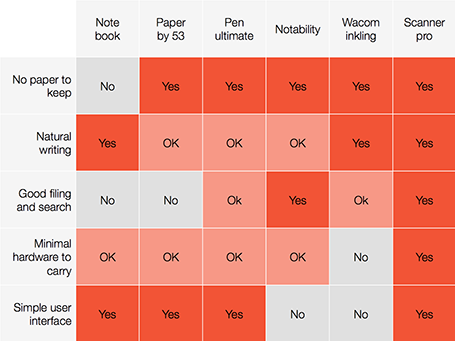
A good note taking solution needs to combine a number of things:
  1. No paper to keep
  2. Natural writing interface
  3. Good filing and search
  4. Minimal hardware to carry
  5. A simple user interface
See my highly sophisticated analysis below.


The new option is a smartphone-based scanner. Scanner Pro is a brilliant app. It takes photos, and lets you easily crop the image. You can keep the image as a photograph or flatten it to bold, fax black and white. Then upload the scan to Dropbox or Google Drive where you can store and search things.

So the best note taking might be scribbling on a piece of paper, scanning it, and throwing away the paper.

PS: earlier review of the Inkling, Penultimate, Paper and styli (?) for iPad.

SlideMagic: a platform for magical presentations. Free student plan available. LEARN MORE

How the Fed learned to talk

An interesting piece in the NYT: how the Federal Reserve is moving to communication as the core of its strategy to steer the US economy.

More, and more bastions of corporate waffling are being torn down as journalists, analysts, bloggers, and the audience itself becomes more ruthless in cutting to the chase of what is actually being said.

Historically, there were probably two reasons for people to waffle:
  1. Status: lawyers, politicians, doctors, scientists, priests, CEOs used their jargons to re-emphasize their authority towards us, the ignorant masses.
  2. Cover up: if you get an unexpected question, waffling is the default strategy to gain time
Reason 2 is probably here to stay. Reason 1 is no longer an excuse. 

SlideMagic: a platform for magical presentations. Free student plan available. LEARN MORE