Putting text on images

Putting text on images

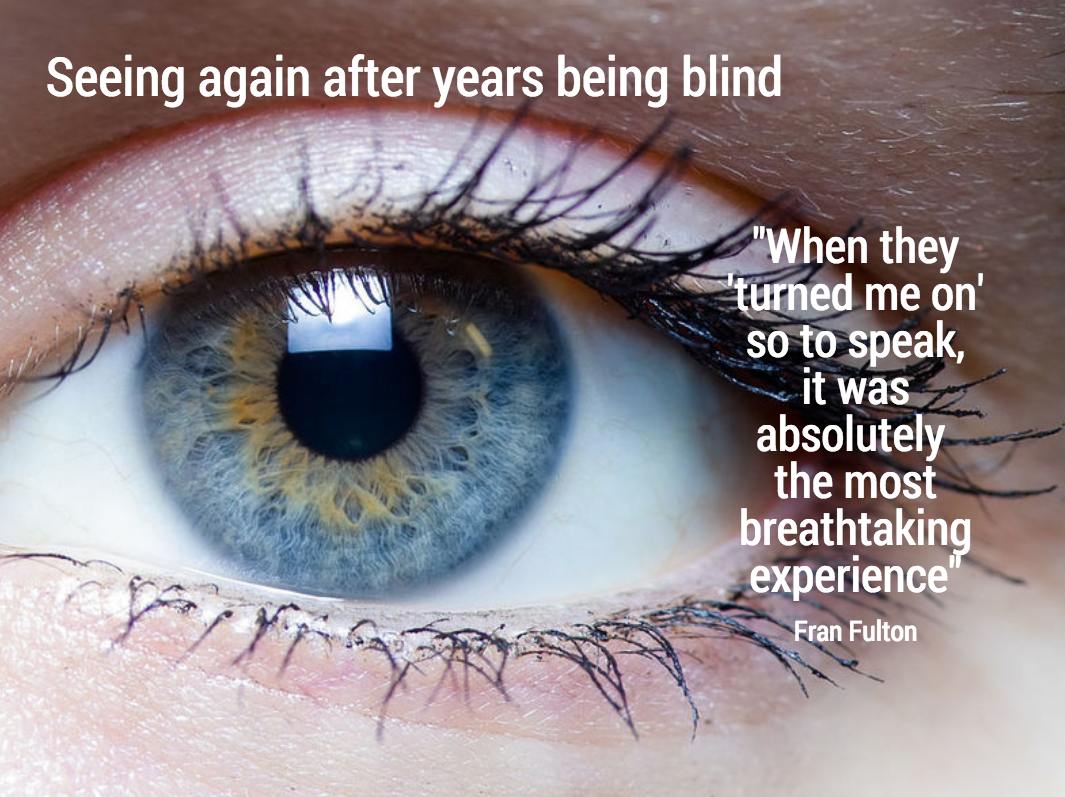
This image that I saw on Twitter has composition problems that you often see in presentation slides:

  • The text in the box does not have enough breathing space,
  • The quotation marks disturb the balance and alignment of the text box
  • The line breaks are not placed carefully enough, breaking apart words that belong together.

I tried to come up with an alternative design in SlideMagic (which does not support the giant quotation marks [yet]). You clone these two slides to your own SlideMagic account here and use them in your presentations if you want. Image taken from WikiPedia.


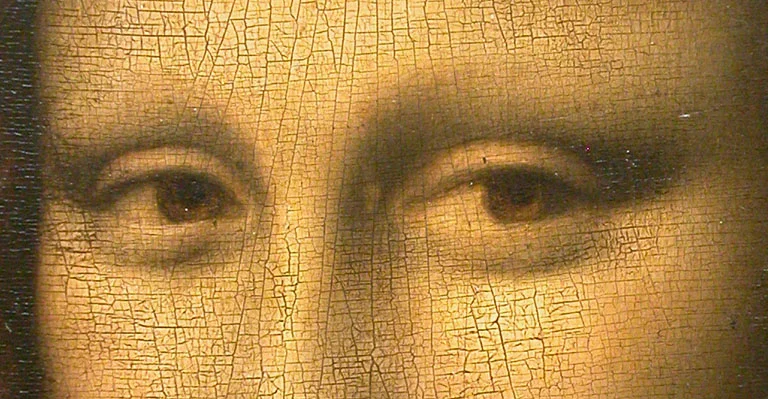
Art: detail of the Mona Lisa

SlideMagic: a platform for magical presentations. Free student plan available. LEARN MORE
Photoshop alternatives?

Photoshop alternatives?

Adobe is moving to a subscription pricing model for its major software products (Photoshop, InDesign, Illustrator, etc.). I signed up for a $20 or so monthly introduction offer but then forgot that I got upgraded to around $55 charge after one year. This is probably good value if you use many Adobe products, and use them frequently.

As a presentation designer, I fall in between the typical user segments. Here is how I use Adobe products:

  • Acrobat:
    • Stitching together multiple PDFs into one
    • Reducing file sizes of image-heavy PDF files
  • Photoshop:
    • Removing backgrounds from images
    • Compressing, re-sizing large image files
    • Putting text on blank 3D objects
  • Illustrator: opening, selecting groups, re-coloring of stock vector files before saving them as PNGs.

Is there a combination of alternative software packages that could do these basic functions?

Some responses to an earlier tweet:


Art: Typesetter at the Enschede printing factory (was located behind the St. Bavochurch) in 1884, painting by the American artist Charles Frederic Ulrich.

SlideMagic: a platform for magical presentations. Free student plan available. LEARN MORE
New SlideMagic video tutorials

New SlideMagic video tutorials

I am in the process of creating a library of video tutorials for SlideMagic. Here are the first three, you can expand them to full screen size for more detail.


From the 3x3 grid to a basic slide composition


How to clone a template


How to import individual slides from another presentation/template


Art: William Merritt Chase, A Friendly Call, 1895.

SlideMagic: a platform for magical presentations. Free student plan available. LEARN MORE
Adding structure to text

Adding structure to text

Sentences or titles never have the same length, so putting them on a page without some form of framing makes the whole slide look unbalanced. My solution: a light grey background  creates a box that gives structure to the text. You can also use images to reinforce the slide's grid layout. Many people use an outline, a frame around text for the same purpose. I think a light box fill looks a lot better.  

The light grey box is one of the key structuring elements in my presentation design app SlideMagic. Traditional presentation design software is not very well set up to changing grids of text boxes and images. Try doing it in PowerPoint, then try to do the same thing in SlideMagic.


Art: Piet Mondriaan, Broadway Boogie Woogie, 1942

SlideMagic: a platform for magical presentations. Free student plan available. LEARN MORE
"You don't look like a fashion company"

"You don't look like a fashion company"

Related to last week's post about looking like the company you want to look like. A client in the fashion/apparel business recently got feedback on their pitch deck: "it does not look like the pitch deck of a fashion business."

Fair point. Especially if you are in the business of fashion, jewellery, sport cars, wine, etc. businesses for which consumer branding is important, you might want to spice up your presentation a bit.

Where do you find the slide real estate to do it? You cannot put a big image of that 1961 bottle on every slide. I try to use separator pages for that. Break your presentation in sections (problem, solution, about, financials) and use the page that announces a new section as the scaffolding for a page-filling image that reflects what your company does. Make sure the images throughout the presentation are similar in style.

Here is a separator slide that I could have used in my own SlideMagic pitch deck (it was of course created with SlideMagic...)


Art: portrait by Giovanni Boldini (1845–1931) showing Elizabeth Wharton Drexel in 1905.

SlideMagic: a platform for magical presentations. Free student plan available. LEARN MORE
Look like the company you want to look like

Look like the company you want to look like

Presentation slide design has two components:

  1. The visual concept of the slide
  2. The look and feel of the slide

Number 1 can be hard, hard enough that professional presentation designers like me can make a living out of helping out clients to do just that.

Number 2, the look and feel, is a lot easier to solve, and yet people get it wrong so many times:

  • Times Roman (or even Comic Sans) fonts
  • Standard Microsoft Office 2010/2011 colours (later versions of PowerPoint actually look OK)
  • Low resolution, cheesy images yanked from Google image search full of copy right issues
  • Three levels of bullet points (dots, dashes, stars) in different font sizes
  • Clip art

Here is a simple observation: you come across they way you look. So, if you want to come across as a successful startup:

LOOK LIKE ONE

Slides that are poorly designed, contain too much text, and use the wrong visual concepts, still can look calm and professional when the basics of layouts, fonts, colours are sorted. Most slides in Apple presentations consist of a large picture of a piece of hardware with 2-3 short sentences/words. It all looks great.

It is hard to copy a design style of someone else. You often start out great, but bit by bit your own style creeps back in. You look at your effort, you look at your example, and somehow the example looks good and yours does not. You need to stick to your example. Fonts, positioning of headlines, text, images, everything. It is a similar effect when you see a small child trying to draw a 3D house. It does not come out right because does not have the courage to simply follow what you see: lines disappearing in a vanishing point, sometimes at extreme angles. It does not match with the child's perception of reality where everything is supposed to be straight.

In my presentation design app SlideMagic I tried to do the look & feel bit for you. Upload your logo, pick a matching accent colour, and you can't go wrong with the look & feel.


Art: Georges Seurat, The Models, 1888

SlideMagic: a platform for magical presentations. Free student plan available. LEARN MORE
The impatient clicker

The impatient clicker

The revolution in presentation design over the past 5 years has mostly been about creating better on-stage experiences. Big pictures, one-message-per-slide, consistent colours, proper layout.

The definition of "presentation" is widening though. PowerPoint is replacing the word processor in corporate communication and is used to create documents that are meant for reading rather than presenting.

In my bespoke design work, I see more and more decks that are used as attachment to a cold email: VC pitches, sales presentations. The audience setting for these type of presentations is a little bit different from the classical standup presentation. Your audience is not captive and can decide to close the file, skip ahead, at any moment. A cold email deck is very similar to a web page competing with hundreds of other links to click to take you somewhere else.

Some design pointers to these types of presentations. SlideMagic beta testers will notice that I have put a lot of these requirements into my presentation design tool.

  • Look and feel. When you are on-stage, you can masquerade the unprofessional look and feel of your slides somewhat with your overall stage presence. No such thing in cold emails. If the slides look like amateurishly designed PowerPoint slides, the company that's behind them will be perceived as such.  
  • Must click. Like the beat in a piece of music, an impatient VC or potential customer has the urge "to keep on clicking". If the slides it boring, or hard to understand, she will not re-read the slide a second time, instead: "Oh, maybe the next one is clearer" [CLICK]. You do not control the beat, design your slides in such a way that the message comes across before the next click comes along.
  • The basics. You are not there to explain, you cannot keep the audience locked in the room and force them to go through your dramatic analogy as an opening. Tell them bluntly what you are about, right upfront. 
  • Keep them hooked. For standup presentations, you do not always have to throw those impressive stats early on. Here, you have to do all you can to keep people hooked. You can do this in 2 ways: mention the impressive facts (2 million paying users in 2 months) and - maybe even more important - anticipate the obvious questions: slide 3: "This looks like a Google me-too? Wrong!". 
  • Branding. On stage there is no need to remind people whom they are listening to on every page. In cold emails, a bit of reminding is actually good. A tiny logo at the bottom right of each page is hopefully enough to get people to remember your name by the end of the deck.
  • Explanation. You are not there, so super abstract slides will not be understand. Consider using 2 lines for the slide title. Or add a subtitle box under your slide with the full length narrative in point 8 fonts (SlideMagic ships with explanation boxes to the right of each slide).
  • Details later. The first part of your presentation is all about getting people to understand what you do, and why things are so great. You do not need the full detail of your team, technology, etc. for this. But, if you succeeded, the reader might want to dig a bit deeper. Consider adding the more dry information in an appendix of your deck, in a denser presentation style. Bios of team members are a good example where dense text with rich backgrounds can add value.

In short, put yourself in the position of the impatient clicker who has the urge to press the mouse button every 10 seconds and will read straight over buzzwords and fluff. Also that clicker, might tab on a table or mobile device. 

Presentation design blends with web design to design slides for an non-captive audience.


Art: Eduard Charlemont A Drink for the Drummer, 1889

SlideMagic: a platform for magical presentations. Free student plan available. LEARN MORE
Makeover of the Buffer pitch deck that landed them $500k

Makeover of the Buffer pitch deck that landed them $500k

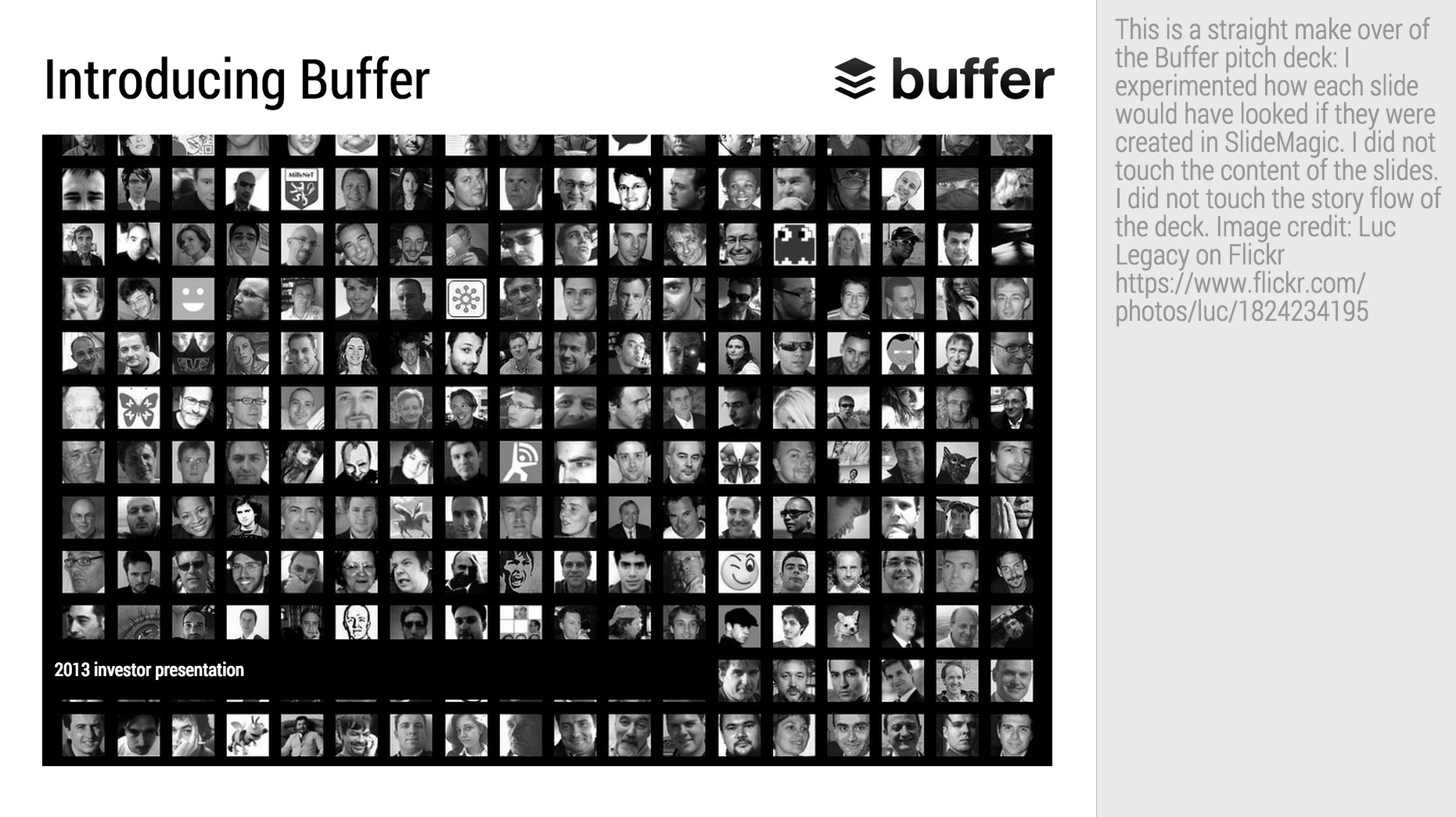
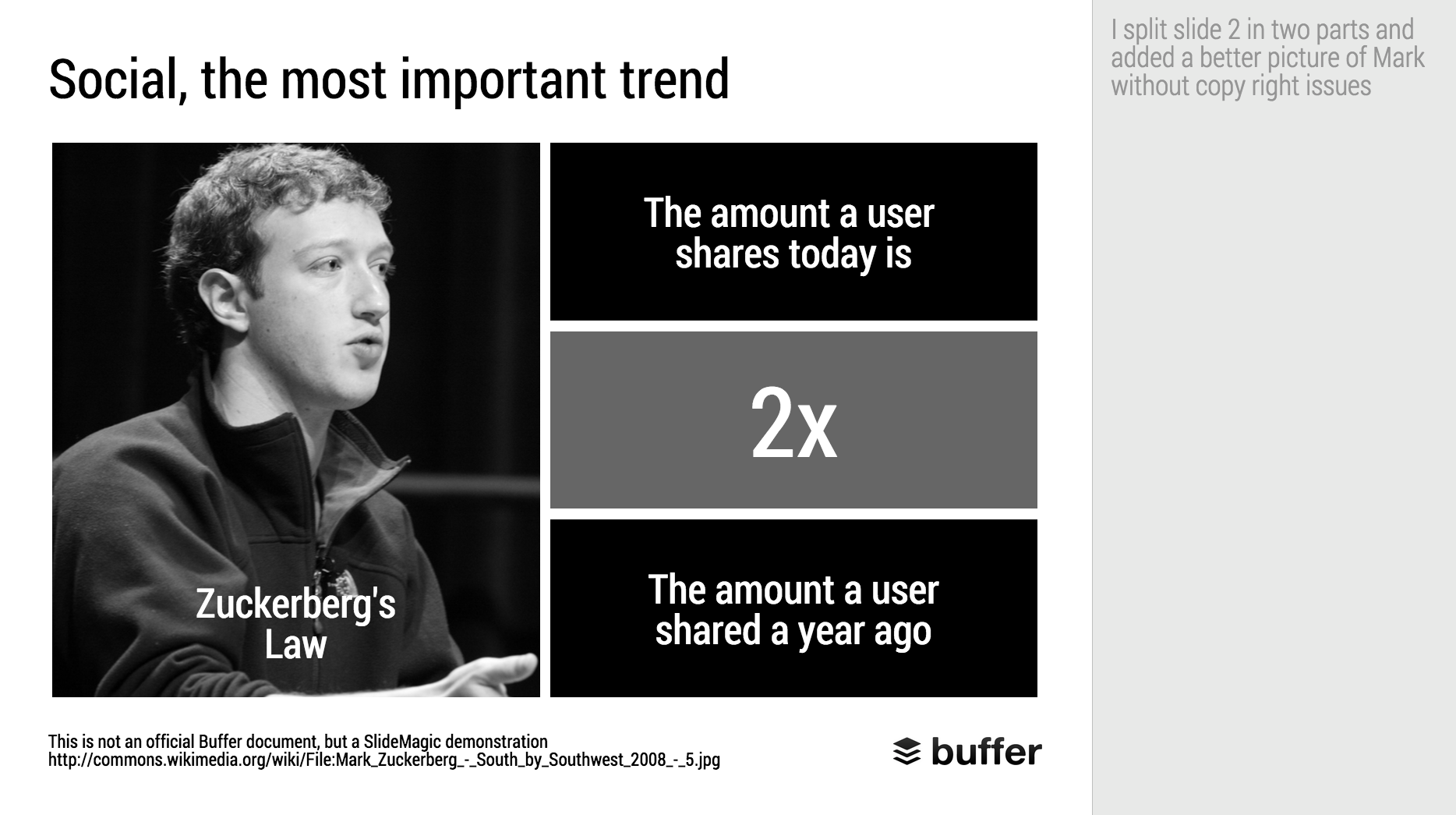
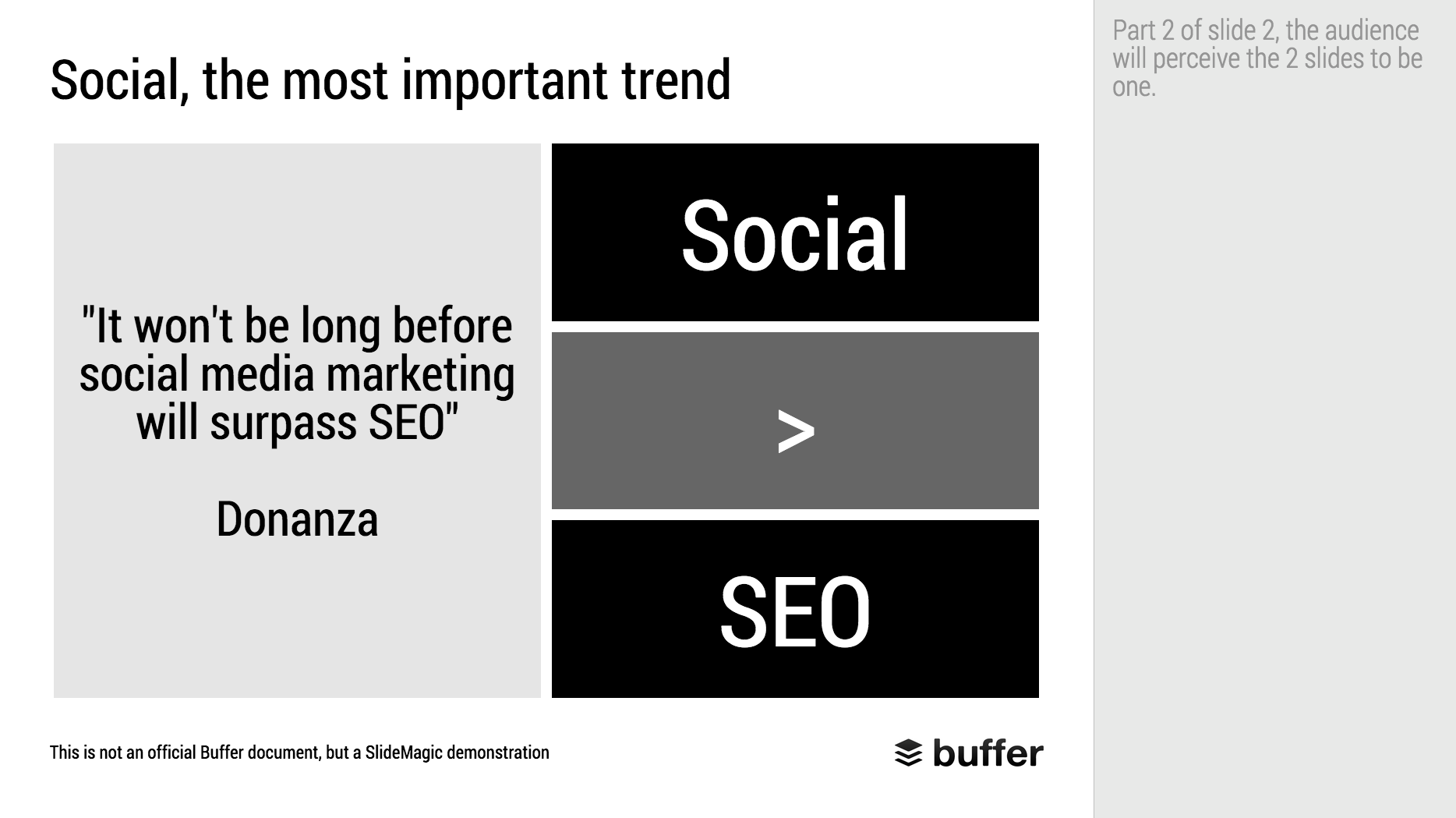
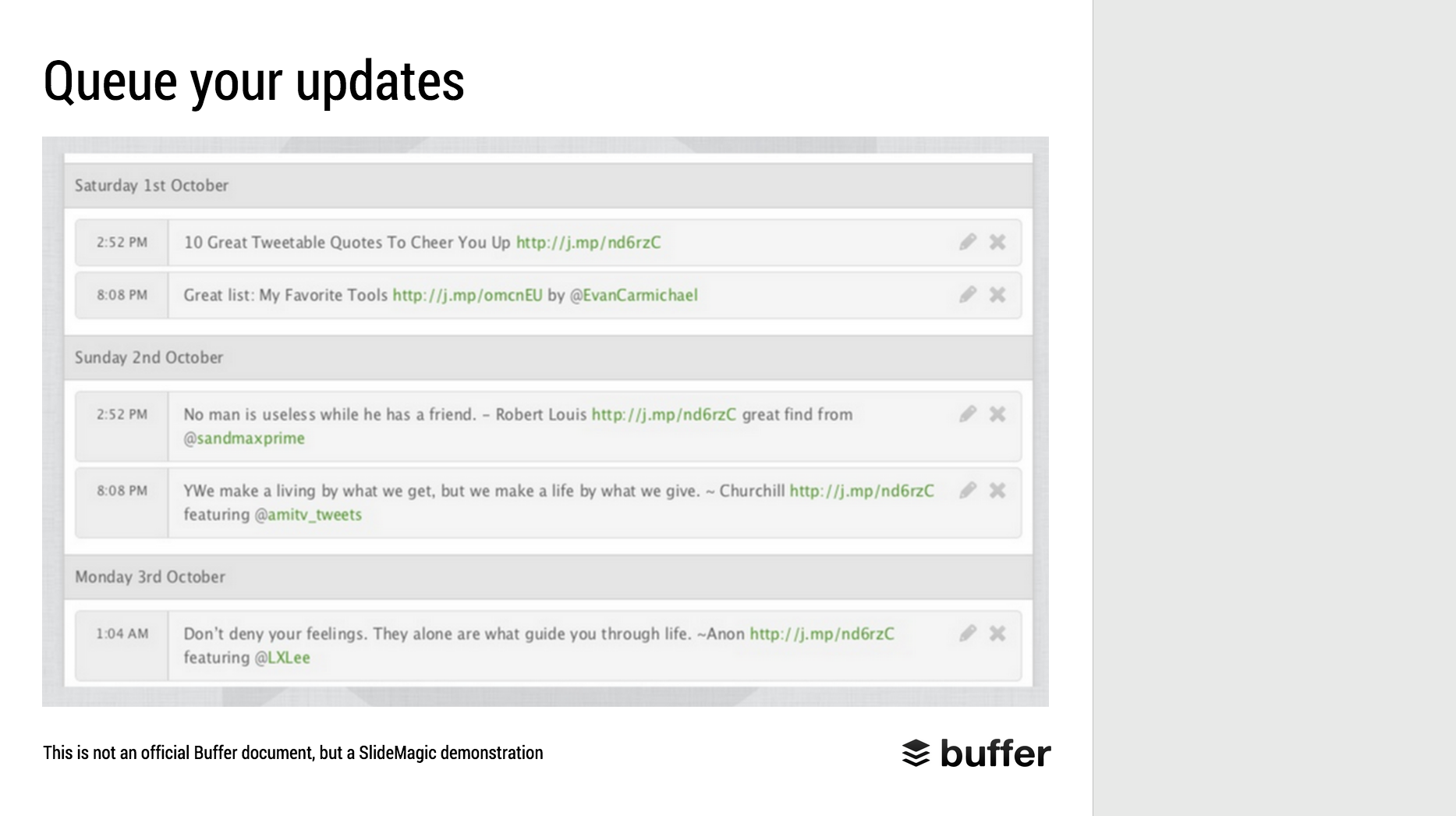
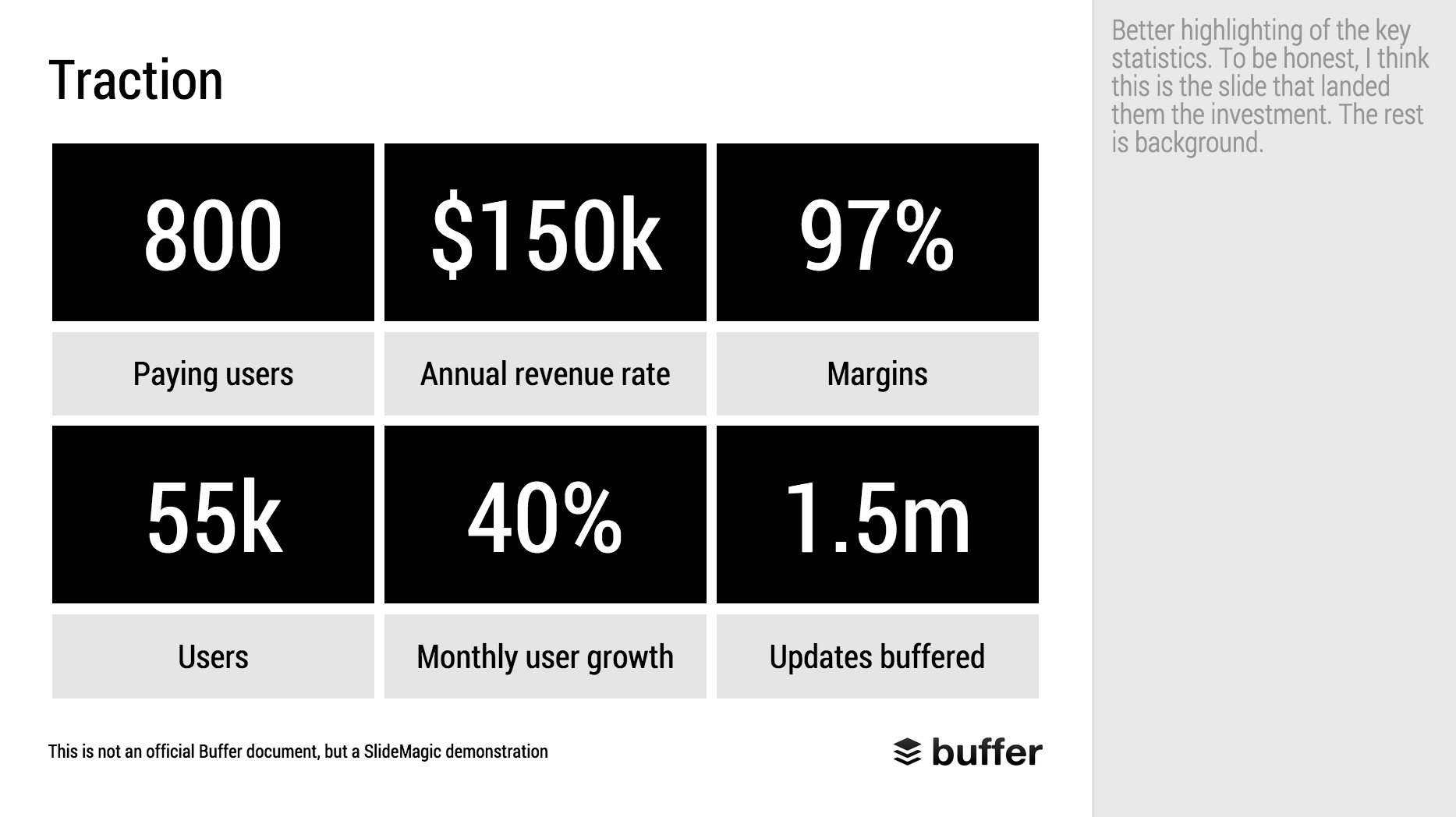
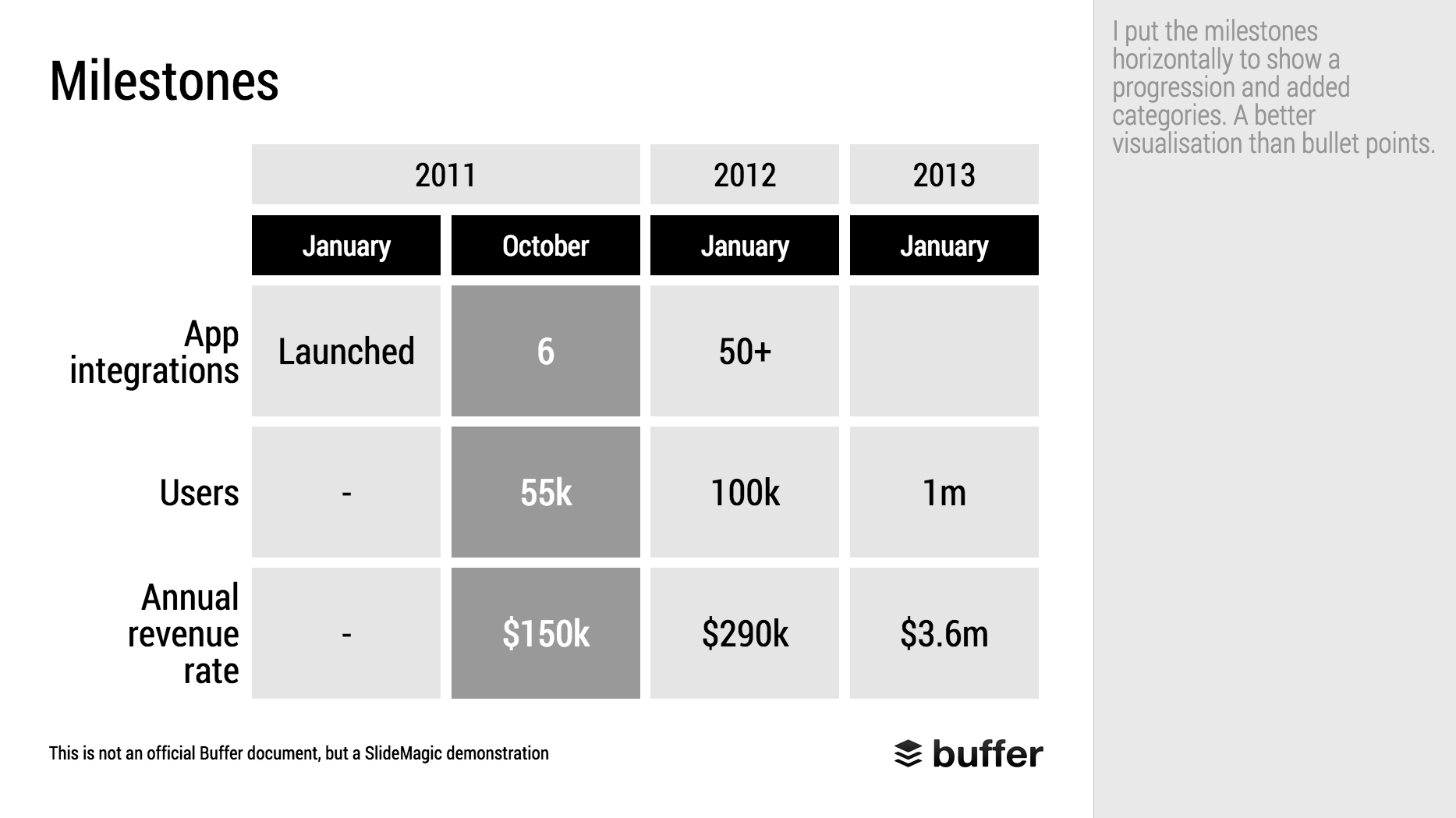
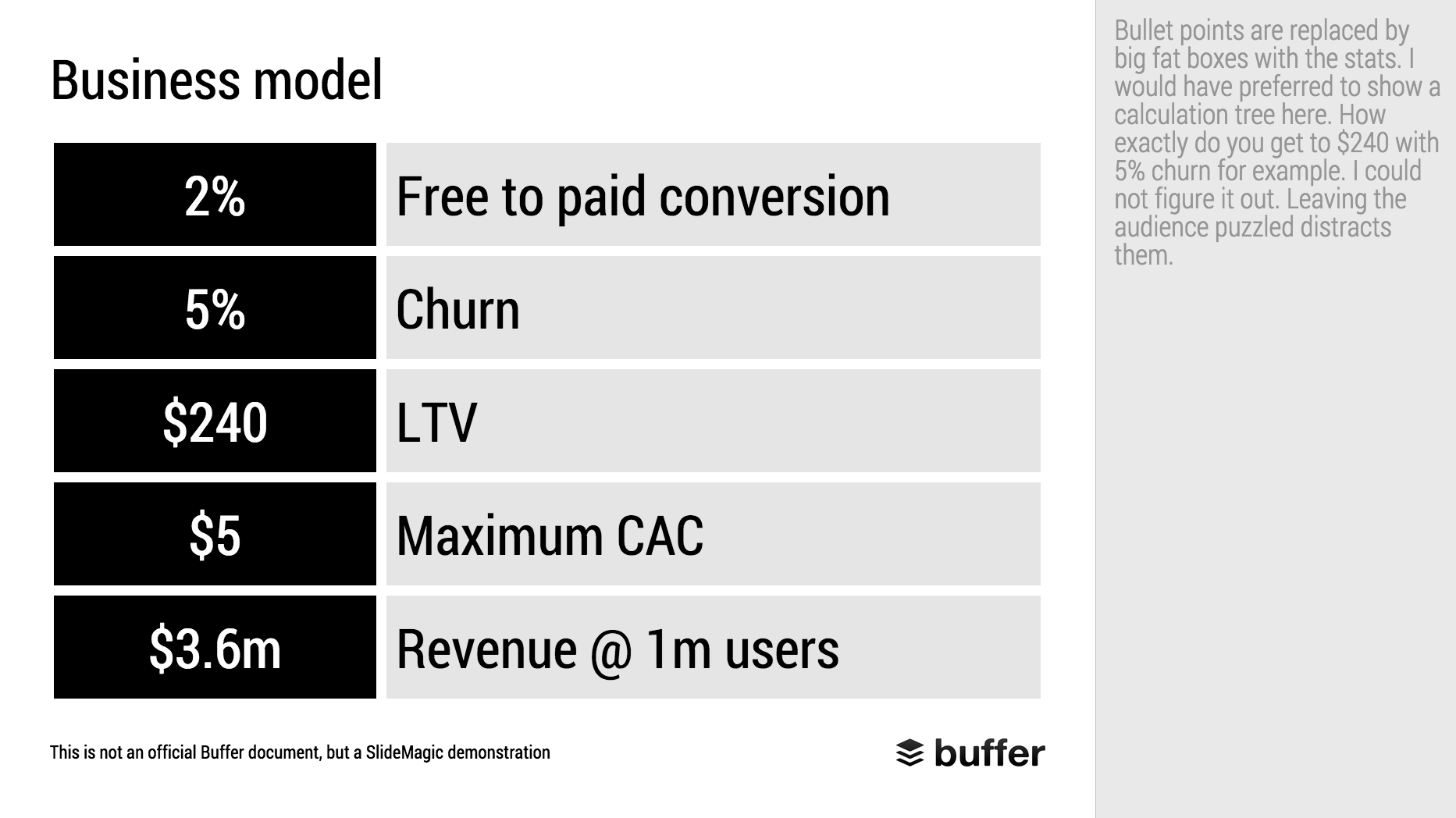
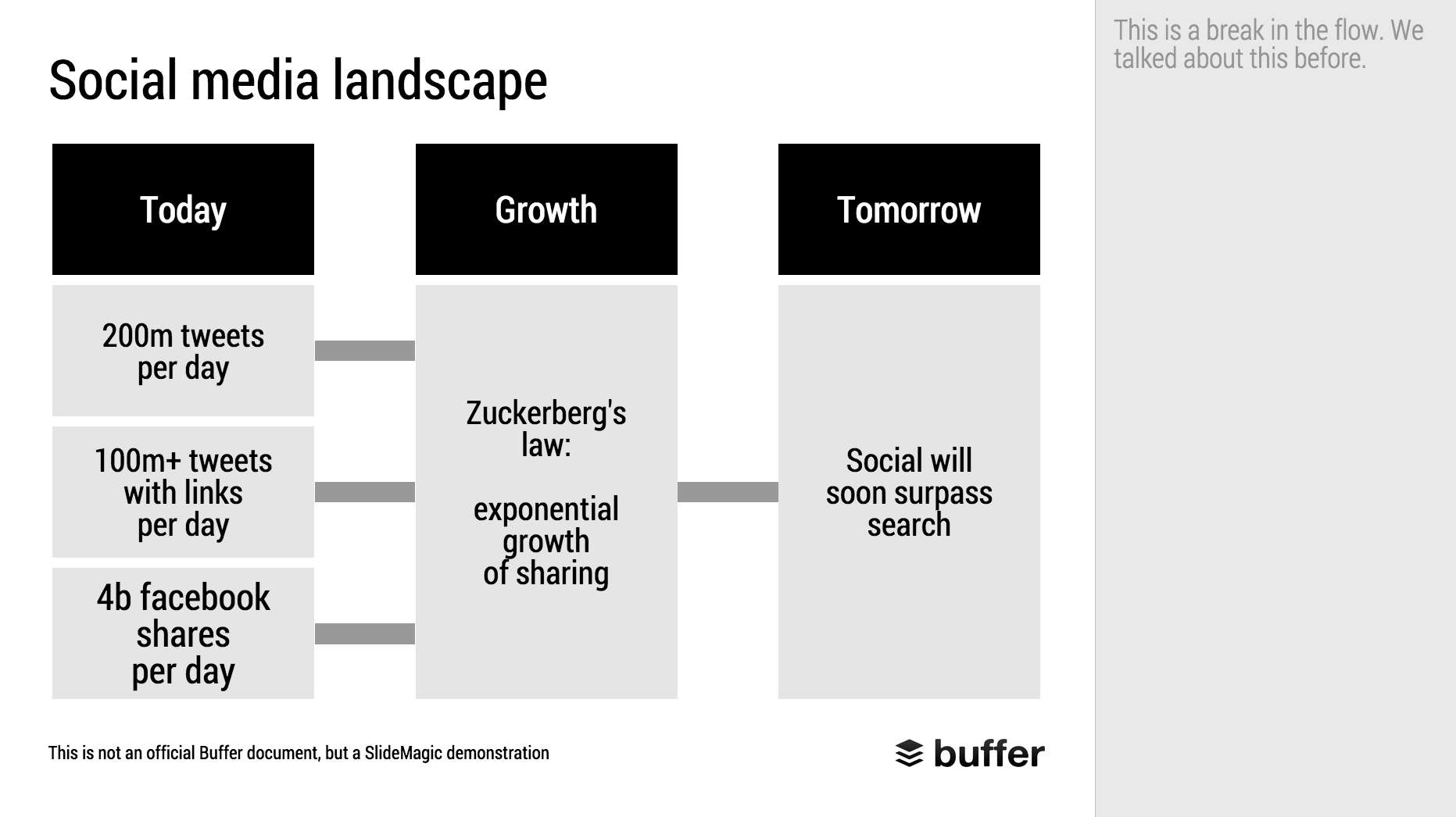
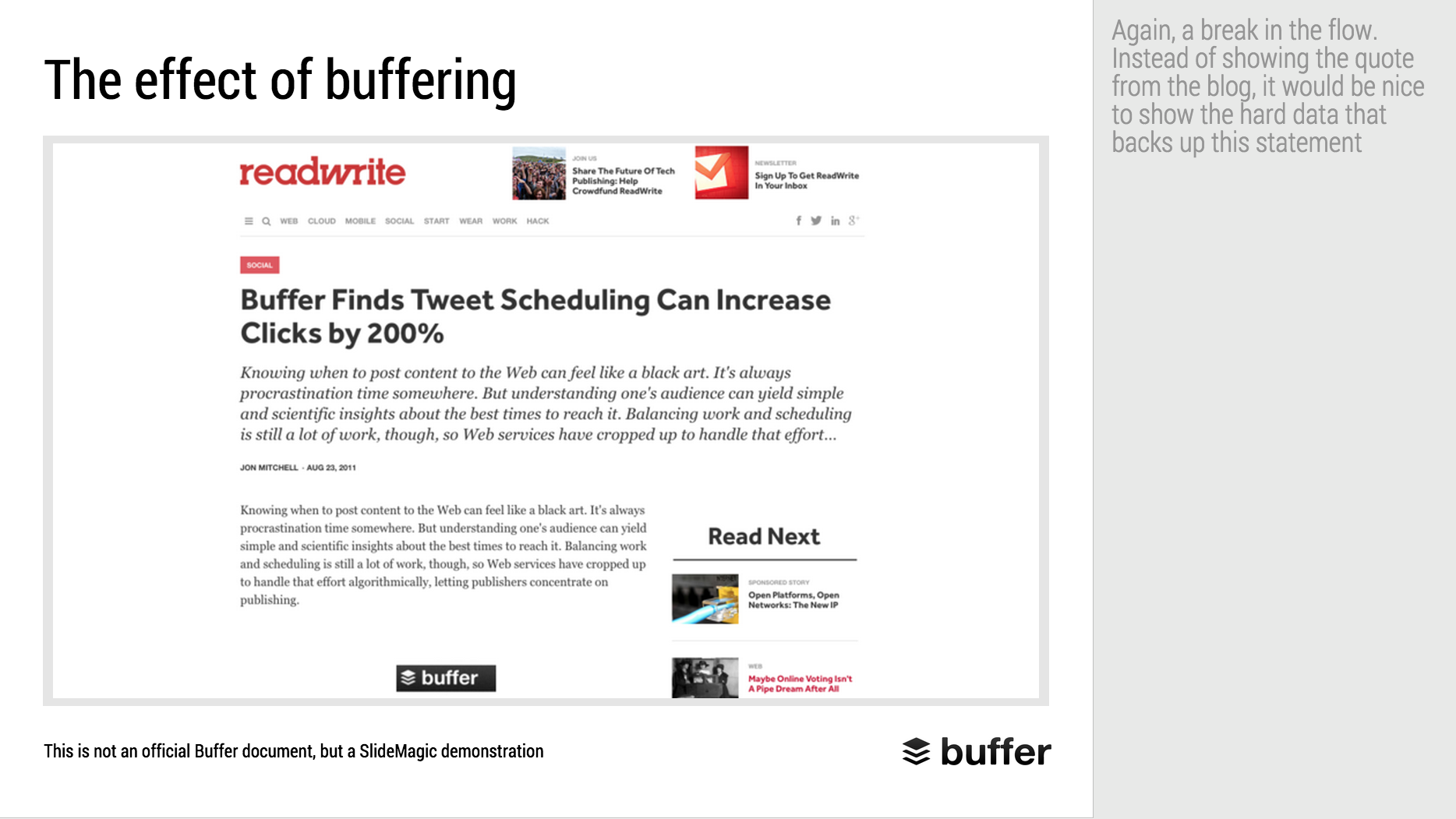
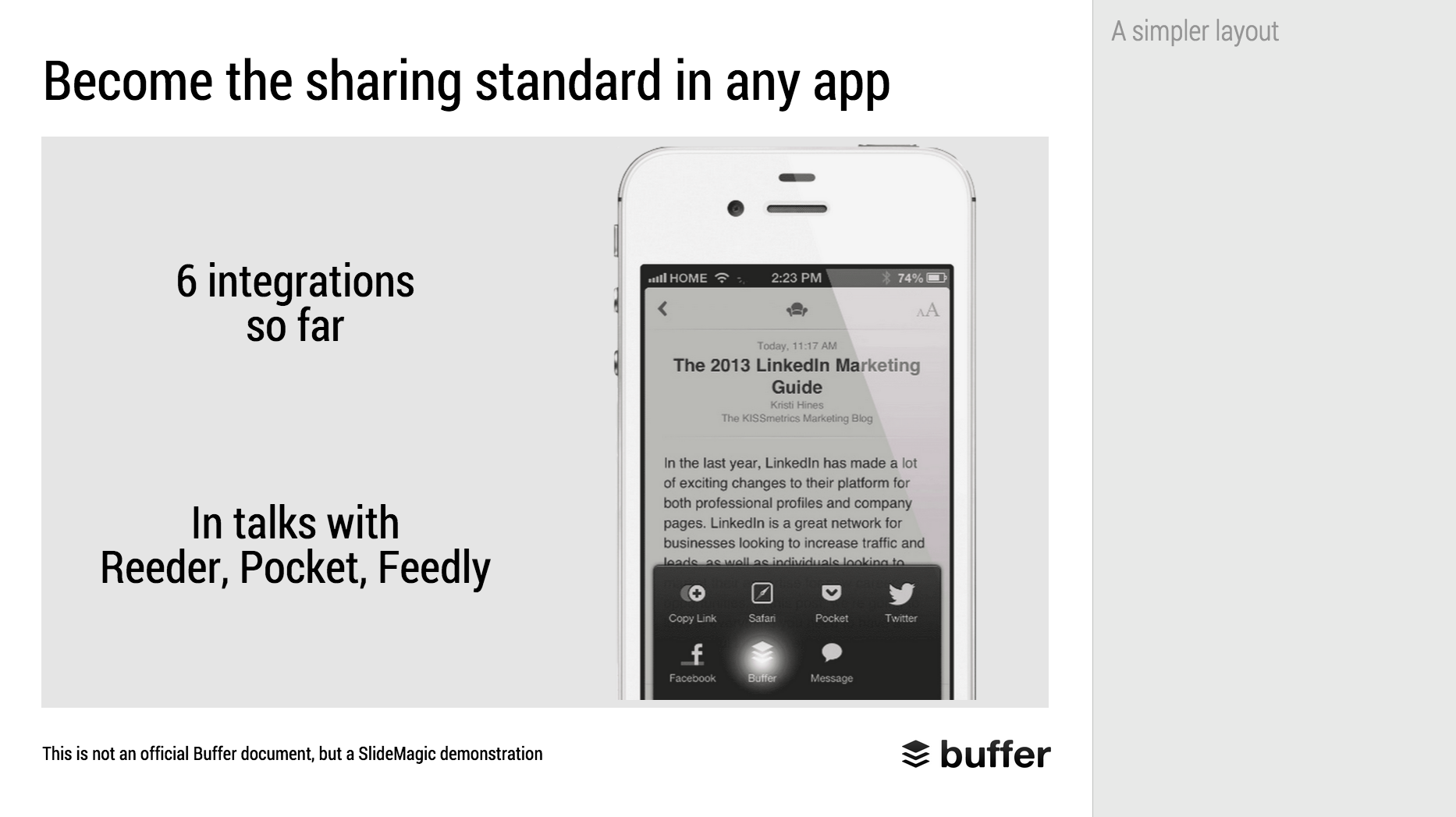
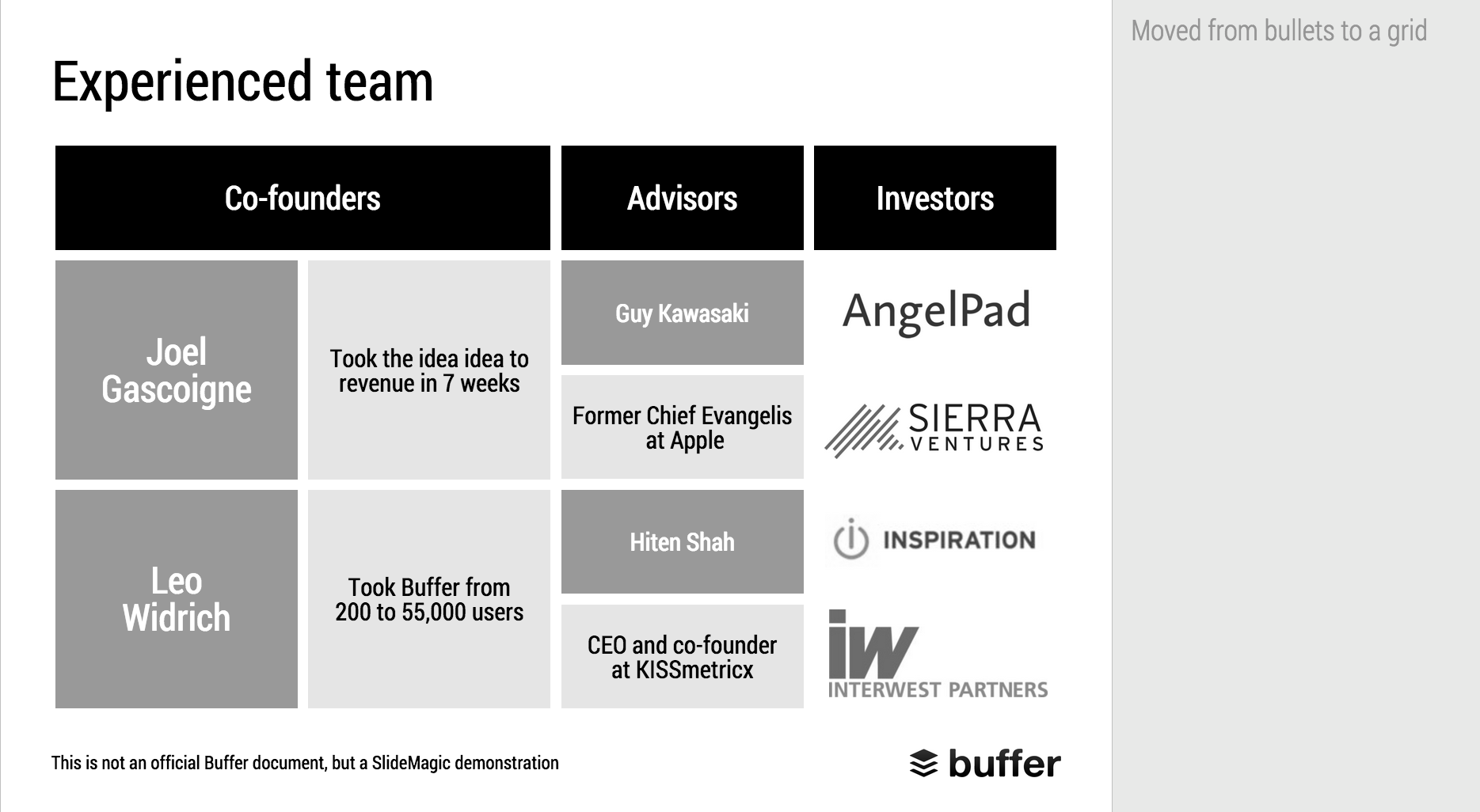
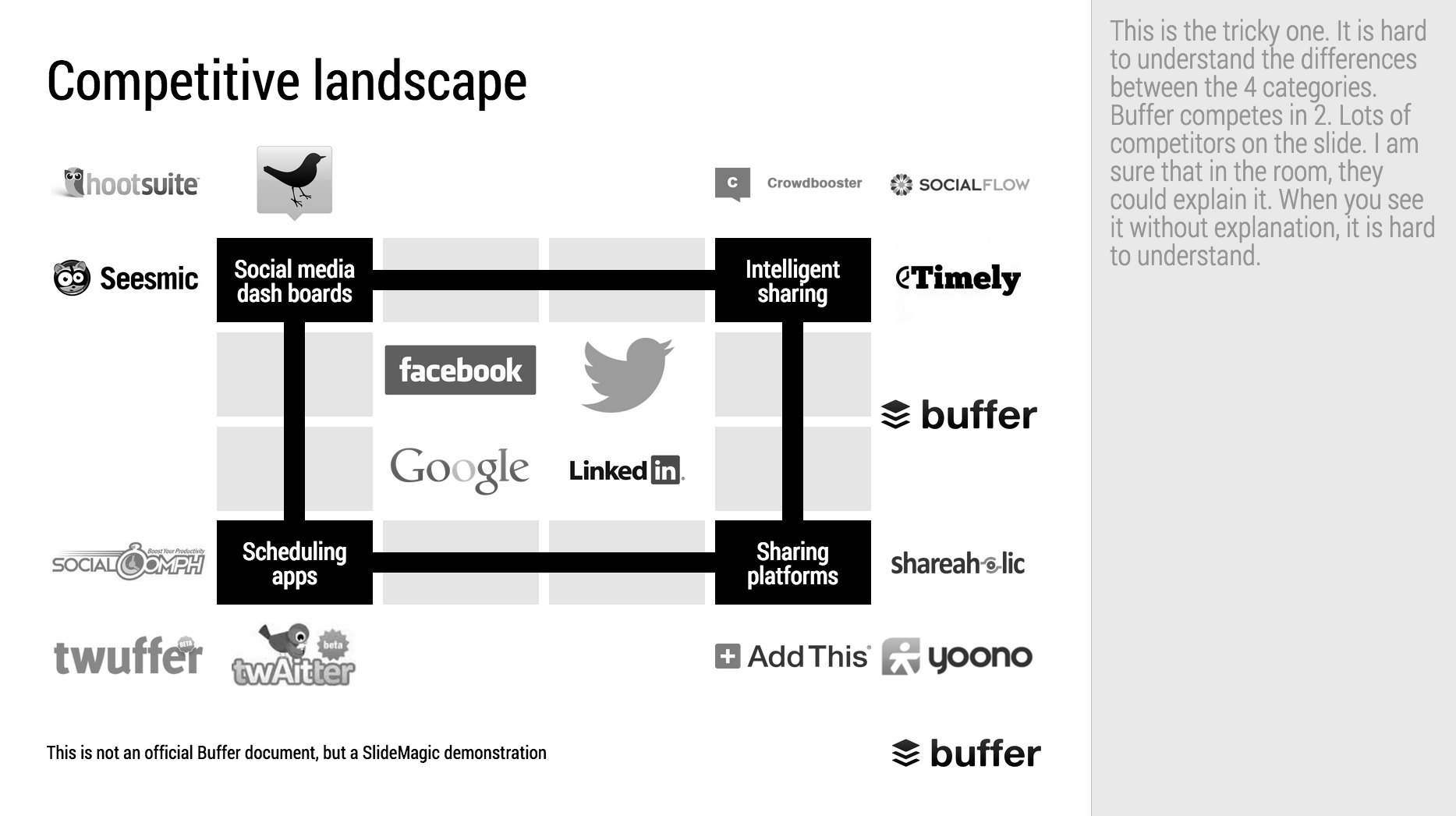
When Googling for examples of VC pitch decks, the on that Buffer used to raise $500k in 2013 ranks high. I decided to give it the SlideMagic treatment: how would the deck have looked when the slides would have been created in SlideMagic.

  • I changed the slide design to fit SlideMagic
  • I did not change the slide content
  • I did not change the story flow

I have a few comments on the slides that I have put in the SlideMagic explanation boxes.

Here is the original:

Here is the same deck in SlideMagic. You can clone this presentation to your own SlideMagic account by clicking this link and use some of the slide concepts in your own presentations. I have also added this presentation as a template in SlideMagic's template library.


Art: Johann Zoffany paints a group of Englishmen in Rome for the Grand Tour, united only by their wealth and love of art; unlike most conversation pieces, this was not a commissioned work


SlideMagic: a platform for magical presentations. Free student plan available. LEARN MORE
Reading, watching, listening, writing, presenting, telling

Reading, watching, listening, writing, presenting, telling

They are all different activities, they all require different slides:

  • Presenting and watching: The creator stands on stage with some visual support, the audience watches the performance. You have 3 types of slides:
    1. Slides that set the mood (a big picture/word/sentence)
    2. Slides that show a fact/trend
    3. Slides that show how things are related
  • Writing and reading. The creator writes text (facts and ideas held together by a story line), and the reader reads them, without assistance. Slides: text pages or bullet points.
  • Telling and listening. No slides, the creator imagines, translates to audio, the audience listens and reconstructs.

You see where it goes wrong. People use slides meant for reading to an audience that is watching.

The more I think about it, any slide that just lists stuff in a sequential order without any other relationship, should just be eliminated out of a presentation that is meant for watching and replaced by multiple "mood slide", "fact/trend", or "relationship" slides.

Fact and relationship slides could actually get complicated and busy in some cases. Bullet point slides of unrelated items can be incredibly clean and minimalist. The first are OK, the latter not.

I need to develop this quick thought a bit further in future blog posts.


Art: In England, artist Francis Barraud (1856-1924) painted his brother's dog Nipper listening to the horn of an early phonograph during the winter of 1898. Victor Talking Machine Company began using the symbol in 1900, and Nipper joined the RCA family in 1929.

SlideMagic: a platform for magical presentations. Free student plan available. LEARN MORE
Good and bad use of data charts

Good and bad use of data charts

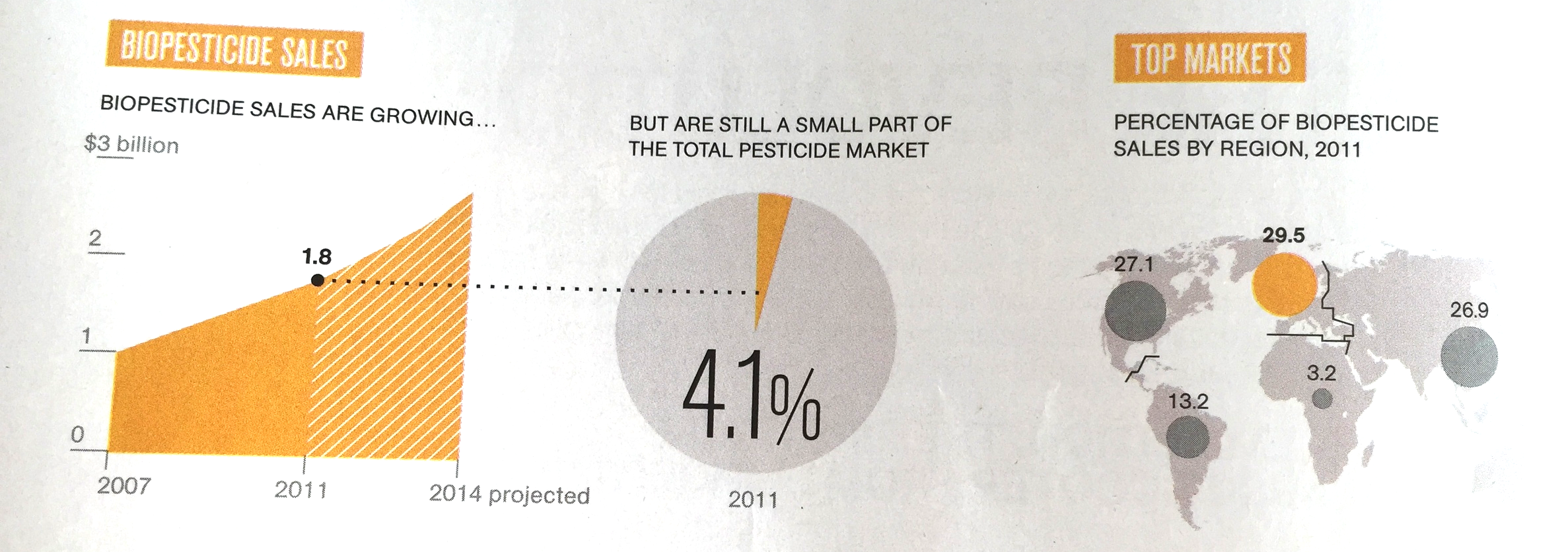
I came across these charts created by The National Geography in a special article about Food by the Numbers. The print article is an extraction from a video. (I made a poor quality image with my phone).

Like in most infographics, the rules of creating data charts are broken. It works well in the 2 graphics on the left, not so good in the map.

  • The line charts abstracts away everything you do not need. Years are omitted, the scale is really rough. It focuses on the things that need communicating. The exact point estimate for "today" (2011), but still the number is nicely rounded (not 1,800,232,433). The growth trajectory is clear (without cheating with broken axes). Real data and projection are clearly separated.
  • The connection to the pie chart is good. The pie chart itself is super minimalist with a huge data label to communicate and visualise the one number we need to know (could have bee "4%"). [Contradicting myself here, usually I do not like pie charts].
  • The map works less well. The differences in size between the bubbles is hard to see. A simple stacked column might have been better here. Also, the really interesting statistic is to show the 4% broken down by region, not the absolute size. Maybe South America uses relatively more bio pesticides than North America?

Art: Pieter Breughel the Elder, the Harvesters, 1565

SlideMagic: a platform for magical presentations. Free student plan available. LEARN MORE
Common presentation design mistakes

Common presentation design mistakes

Here are some common mistakes I see in briefings for presentation design projects. They range from typographical details to big picture issues:

  • The presentation never explains what it is you actually do
  • The slides say something different than the verbal explanation
  • Too many benefits, as a result: no positioning
  • Doubt between positioning options shines through in the slides
  • Presenter gets lost in side stories
  • Amateurish images ("funny" ones)
  • Images with copy right issues
  • Font, colour, alignment, image resolution, aspect ratio chaos
  • Inconsistent graphical style
  • Inconsistent analogies
  • Cliche analogies
  • Good data, but the wrong data charts
  • Jargon and buzzwords
  • Quotes from airport best seller authors
  • Bullet point place holders rather than a story
  • Too many words that explain too little
  • Too few words that say something generic
  • Five slides combined in one
  • The presentation spends too much time on the obvious
  • The presentation avoids the elephant in the room
  • Slides from a strategic Board meeting that talk about some strategic choice and expose weaknesses are ported straight into the pitch deck
  • Comments and notes with sensitive information are left in presentations for everyone to read
  • Sensitive data that is taken out of the chart can still be accessed when opening the graph
  • 99% solution, 1% problem
  • About us, us, us, us
  • Too long a summary, too short a body, too long a wrap up
  • Errors marked by the spell checker are still ignored
  • Custom fonts that get rendered as Arial
  • Slide title appears 3x: in the title, in a bubble, in a line across the bottom
  • Second line of a bullet point paragraph is misaligned
  • First line of a regular non-bullet point paragraph pops out as if it were a bullet point
  • Inconsistent slide templates throughout the presentation (resulting from a Frankenstein, slam the deck together, effort)
  • Some charts are still in Microsoft Graph / Microsoft Office 2003 format
  • Data charts are copied straight from Excel, without bothering to round up/down

Art: Giovanni Boldini (1842–1931), The Laundry, 1874

SlideMagic: a platform for magical presentations. Free student plan available. LEARN MORE
Dear Big Company

Dear Big Company

Most large companies have lost their ability to innovate and moved to a model of delivering small performance improvements quarter by quarter. Employees are often under a lot of pressure and busy with day-to-day activities that the help of freelancers is called in to supplement hands, brains, and most importantly distraction-free creativity.

As a freelancer, I try to accommodate the constraints of my big clients as best as I can. Reprioritise other clients, maybe work a few hours on the weekend now and then, trying to deliver the best work possible. Being flexible when some designs are considered "too creative". Working with my direct contact points usually works great.

Then comes the accounting department. The electronic invoice of my highly efficient and transparent billing system gets printed out on paper, send across to a central pan-European payment processing centre, where a clerk discovers an error (info that probably sat in the body of the email or on page 2 of a PFD that did not get printed), marks the error and mails it back in regular mail from a European capital to Tel Aviv. I provide explanation by email, which get printed out, send to the processing centre, and goes back to me by mail.

Freelancers are consider suppliers, not employees, and get the supplier treatment. You did not get that PO number right, hah, hah, perfect excuse to postpone payment to you. Got you! We expect you to be flexible and human to meet that deadline, we on the other hand can be as flexible as a brick wall.

Big suppliers can defend themselves against these tactics. They invest in the same SAP software, they employee accounting departments with people who have time to call and chase things, and - of course - they do the same thing to their suppliers. They get paid late, but hey, they pay late as well. And, the financing cost of delayed payment is anticipated and gets priced into the invoice.

Big suppliers are willing to tolerate this behaviour. Big fixed cost bases means that big supply contracts are required for survival. Freelancers don't have the resources to deal with this stuff, but also: freelancers do not have a big fixed cost base that needs filling. A good freelancers is probably 100% doing her art. A good freelancer has alternatives.

The big obstacle for large companies to innovate and be creative is the ability to attract innovating and creative talent: be it employees or freelancers. Giving your freelancers the big supplier treatment is not going to help. 


Art: Mustafa II receiving the French embassy of Charles de Ferriol in 1699; painting by Jean-Baptiste van Mour

SlideMagic: a platform for magical presentations. Free student plan available. LEARN MORE
SlideMagic bugs fixed

SlideMagic bugs fixed

Presentation software needs to be absolutely bug free. Unlike a social media mobile app, where you can wait with grazing your news feed for a few hours, the presentation app needs to be ready for that critical 20 minute slot for the all-or-nothing presentation.

That is the reason I am keeping SlideMagic still in beta as I iron out all possible glitches. Here are some we fixed recently. If one of these caused you to stop using the app, give it another try.

  • Fixed: small (but annoying) differences in font size rendering between what you see in PDF and what you see on screen, causing words to drop to the next line when you don't want them to.
  • Fixed: erratic font size behaviour when rapidly increasing or decreasing font sizes
  • Fixed: enabling multi-edit of cells to manage colours, font sizes of more than one cell in one go.
  • Fixed: no need to leave and re-enter the shape format menu to work on another cell
  • Fixed: Windows/Firefox UI freezes
  • Fixed: story mode drag and drop issues

SlideMagic is moving closer to production stability.

B.t.w, I updated the SlideMagic marketing site yesterday, making the positioning plain and simple: it is easy to make business presentations. Easy, that's it. Also made the images a bit more daring.


Art: Scène d'été, or Summer Scene, is an oil on canvas painting by Frédéric Bazille, completed in 1869

SlideMagic: a platform for magical presentations. Free student plan available. LEARN MORE
Graph screen shots

Graph screen shots

If you do not have access to the source data of a graph you have two approaches to getting the data into your presentation:

1. Use a screen shot

How to get the best looking chart from a screen shot:

  • Make the chart as big as possible on your screen. Sometimes you can click the graphic which opens in a new tab in your browser. In PDF, you can zoom in without losing quality. Take the screen shot of this big graph and paste it big in your slide.
  • Crop out all items of the graph that you can easily recreate in PowerPoint or Keynote: axis labels, chart titles, even the values on the X and Y axes. Next, recreate these items by hand in PowerPoint
  • Cover as many elements on the chart as possible with a white box. Legends for example hardly ever look good. Cover it and create your own.
  • Select the chart and pick "format picture" to see whether it looks better in black and white. Alternatively, use the colour picker to get your legend use the exact colour used in the chart.

2. Measure and recreate

When you do not use data labels in a chart (bar, column, line) but rely on a value axis instead, you can get a way with a lower of level of accuracy. You can literally print a chart out (the larger the better), measure the position of the data points and recreate the chart from scratch in PowerPoint or Keynote.


Art: Interior of a tailor workshop, artist unknown, 1780.

SlideMagic: a platform for magical presentations. Free student plan available. LEARN MORE
SlideMagic example

SlideMagic example

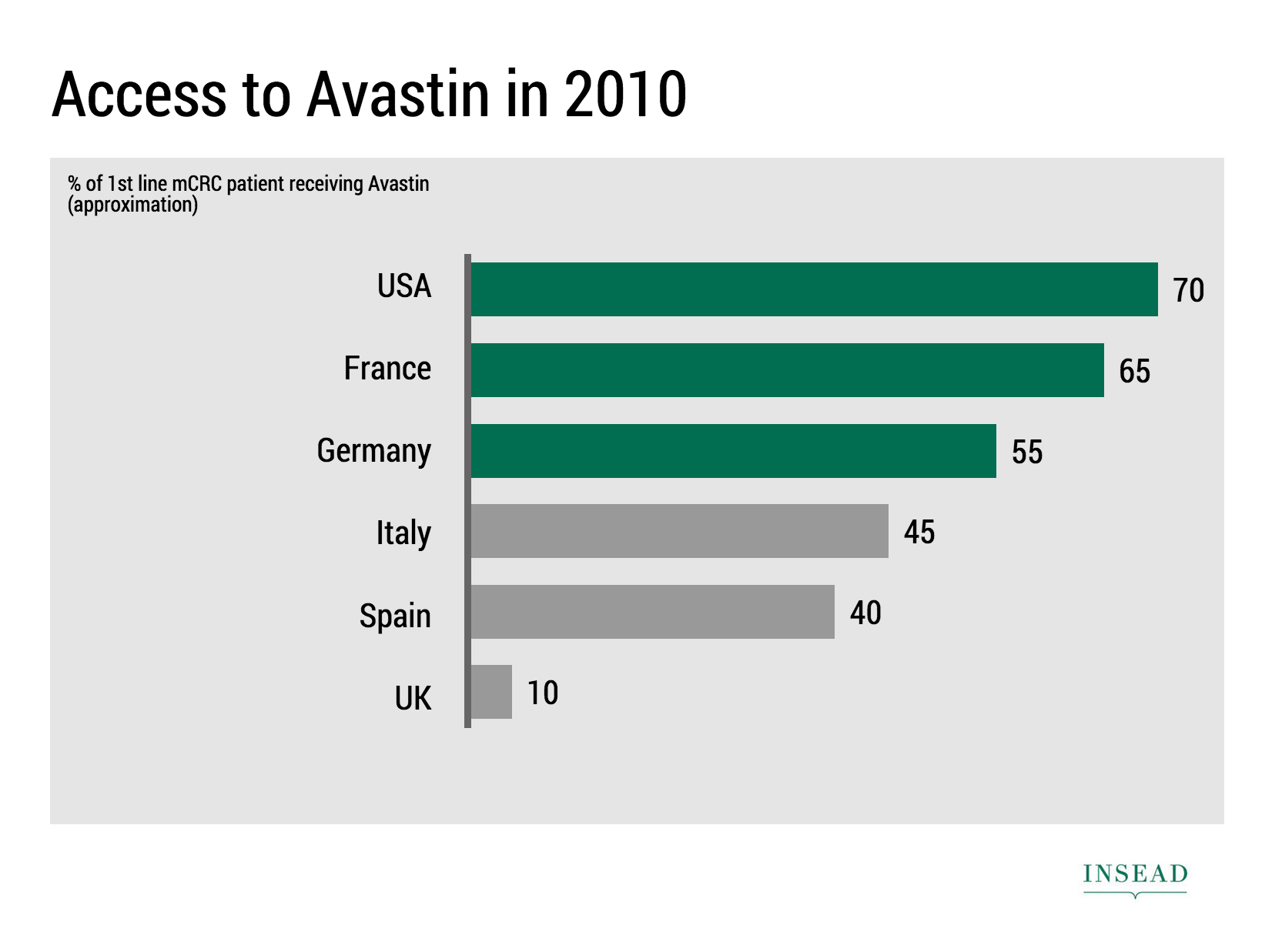
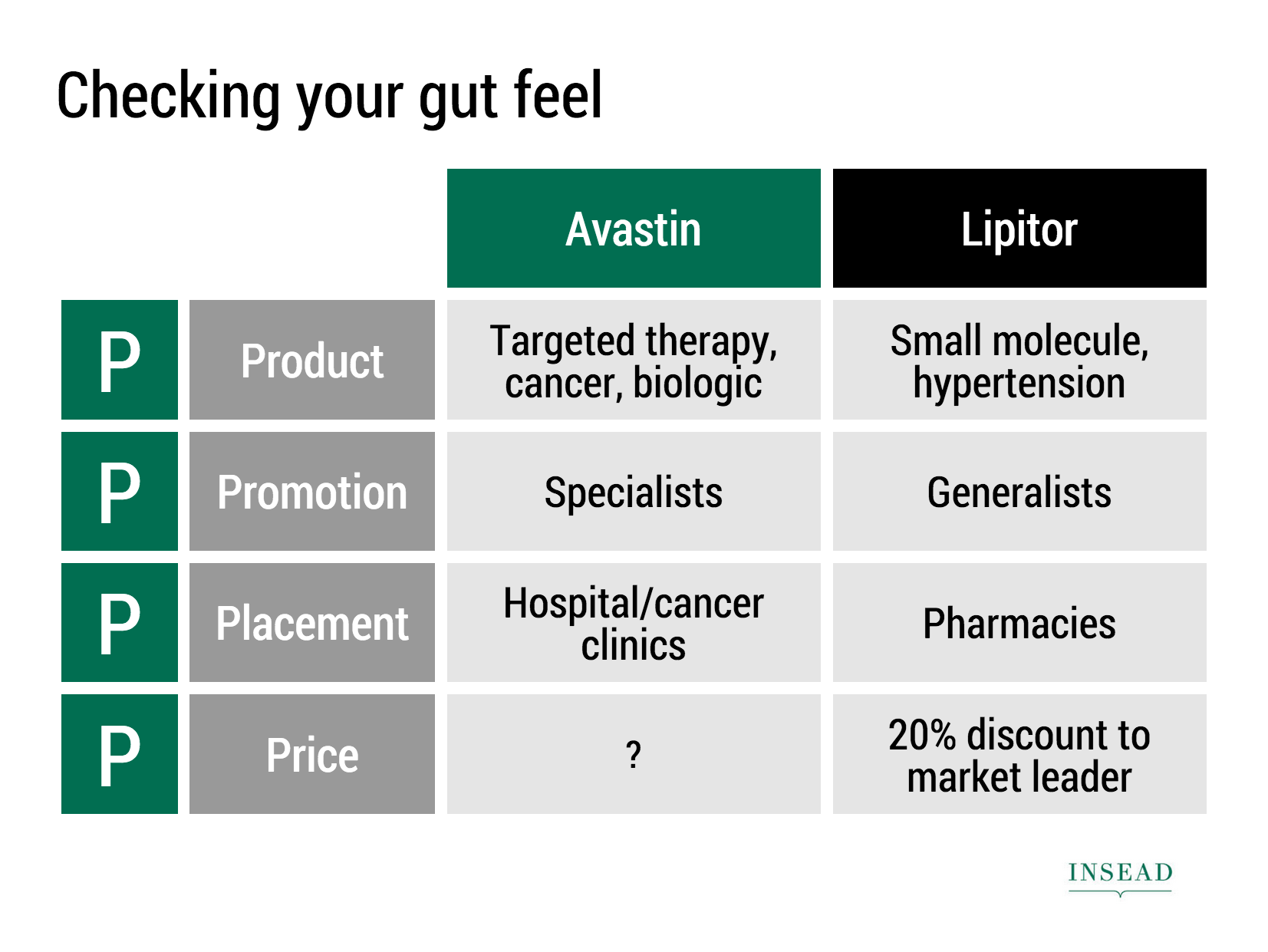
Ramzi Mrad is entrepreneur in residence at INSEAD and used SlideMagic prepare his presentation of business case: how Roche Pharmaceuticals set the price for its Avastin cancer drug in Europe. This type of presentation is exactly how I envisioned SlideMagic being used. Without any professional support, a layman designer can come up with something pretty decent. You can see his presentation here.


Art: Pierre-Denis Martin (1663–1742), Vue du Château de Fontainebleau (1718-1723)


SlideMagic: a platform for magical presentations. Free student plan available. LEARN MORE
Take that conference tag of

Take that conference tag of

Name tags are a necessary evil when visiting a conference. The security guard can see you paid, and people can read your name, company, and role casually. It is also a great way to store the day program and your lunch coupons.

But when on stage, it looks a bit weird. When presenting right that moment, when someone watches the online video of the talk 6 months later, when the entire panel consists of 12 people with the 12 white dots on their shirts.

Oh, and also ask people to take of their tags when posing for a group photo.


Art: Albrecht Drurer, Portrait of a young Venetian woman, 1505

SlideMagic: a platform for magical presentations. Free student plan available. LEARN MORE
A brief review of Think with Paper by 53

A brief review of Think with Paper by 53

I have been following Paper by 53 from the early days. It is a sketching and drawing app for iPad. The initial revenue model consisted of premium add ons (virtual pencils, pens, etc.), later they moved to hardware sales (a styles that is seamlessly integrated with the app).

Recently, they have extended/repositioned the app to corporate "white boarding": designing, prototyping, brainstorming, mind mapping, problem solving, via a new release called Think.

Here is what I like:

  • Absolutely beautiful and gorgeous user interface. The pen strokes are the best I have seen on any iPad drawing/sketching app.
  • Brilliant user interface functionality. They really thought about what functionality you actually need, and then they put in the absolute minimal amount of features. You draw a box, the app cleans it up. Resizing, moving things around, perfect. Very short help videos are embedded to unstuck you if needed. Fantastic, I am jealous that I had to retain more functionality in my SlideMagic app.
Now, here is the problem that I see to get Think adopted broadly in the corporate world. And I share the pain, as I am trying to convince people in enterprises to change the presentation tools they are using.

  • White boarding is a group activity, and the current iPads are simply too small to work comfortably with multiple people. It is even a challenge for just one user. I suspect that we will see very large tablets and tablet/laptop hybrid touch screens in the near future which would solve this problem. My guess is that the huge "Minority Report"-style whiteboard that combines user input and rendering is still far away.
  • Dealing with text (important in corporate communications) is still a bit fiddly: you need to zoom in on an object, write with decent hand writing, then shrink it down again. I agree that introducing a character-based keyboard function would kill the UI and flow of the app. Still.
  • You still need some sort of artistic talent to create cute diagrams. Yes, the app does some work for you, but in the end you are confronted with an empty canvas that needs filling.
  • The app is completely anti-columns-and-rows (180 degrees difference with SlideMagic), but in the corporate world, that is how a lot of things need to be evaluated. Not every problem is a flowing diagram of interactions.

You can export a Paper journal to PDF and PowerPoint/Keynote. The PowerPoint file contains slides for each of the pages in your journal. The objects on the page are your drawings on a transparent background. You can ungroup the fills and the outlines, but not the individual diagram elements. You could use PowerPoint and Keynote to enhance the Paper app in a number of ways:

  • Use PPT purely as a presentation engine to present your creations on a big screen (note that the app itself also allows you to do this from your iPad, but technical interfaces might not work in every corporate conference room).
  • Create your presentation in paper without any text labels, port the whole thing into PPT and finish it there with text and images. The result will be an original looking presentation, but the file will be hard to maintain edit.
  • Create a number of design elements in Paper, one on each page of your journal, then copy this file into PowerPoint and create a presentation with these building blocks.

I think 53 is on a journey to change the way we interact with productivity apps. For certain sub segments of the corporate world (designers, architects, other early adopters), it will work already. Certain consultants might have a specific methodology/tool they sell that they could fit perfectly with Think already. I am not sure wether Think is ready to break to the mainstream corporate world yet. As hardware improves though (especially canvas size) that might change very soon though.


Henri Matisse, Icarus (Jazz), 1946, image by Gautier Poupeau.

SlideMagic: a platform for magical presentations. Free student plan available. LEARN MORE
Design DNA

Design DNA

Design DNA is engrained in a company. It shows in presentations, in the web site, in the way the office is laid out. When a visitor/user/viewer gets in touch with a company, she makes up her mind in the first millisecond about the design DNA of the company, by comparing it to all other presentations, web sites, and offices she has seen. We have all seen these stereotypes:

  • The bare bullet point presentation in the standard Microsoft Office 2007 format
  • The over-designed PowerPoint template with gradients, images with faded edges and huge logos at the top of the page
  • The social media expert website full of call to actions to buy her $5 ebook on being a social media expert
  • The traditional, hierarchal office with too many big leather board seats crammed around a too small board table in a board room that doubles as a storage room for exhibition displays
  • The hipster I-don't-really-say-anything web site
  • The girly office full of plants and cute natural-material furniture
  • The macho office with an impressive collection of booz in the lunch room
  • The 1990s tech company web site: takes 40% of your screen and has detailed product hierarchies that get to pages that don't really say much about that specific product
  • The startup web site where "tour", "about us", "benefits", and "product" tabs pretty much say the same thing

At every point you come in contact with a client, user, investor, make sure you look the way you want to look. Even if your investor presentation looks right, that impression can be undone in one second when someone opens your web site.

One strategy is to change and align everything to make sure it is consistent. Another one is to recognise who you are, and change the 1920s cute art deco look of your presentation if you are in the business of selling 4x4 car suspension systems.


Art: Henri Rousseau, The Dream

SlideMagic: a platform for magical presentations. Free student plan available. LEARN MORE
Dumbing down

Dumbing down

Seth Godin believes that:

I have been thinking about this a lot, since it applies to the core idea behind SlideMagic: making a simpler presentation design tool. Usually, Seth is right, and he urges people not to avoid the inevitable critical feedback.

So, I am a dumbing down PowerPoint? I do not think so. These are two different things:

  1. Get people to adopt a different approach to presentation design
  2. Get people to use a different tool, but continue to follow their current presentation design habits

I try to do 1, and the SlideMagic tool supports the approach.

  • SlideMagic is a new corporate visual presentation language
  • It always looks aesthetically pleasing
  • 90% of your time can be spend on your idea, 10% on jotting it down at a computer

So I think I am "smarting down" business presentation design. But hey, maybe I am biased and do not see things as they really are... 


Art: British war time propaganda poster

SlideMagic: a platform for magical presentations. Free student plan available. LEARN MORE
How to make frosted glass in PowerPoint

How to make frosted glass in PowerPoint

Follow these simple steps:

  1. Apply the "blur" photo filter to your background image
  2. Create a very light grey box
  3. Add 45% transparency


SlideMagic: a platform for magical presentations. Free student plan available. LEARN MORE