The country update

The country update

I get many clients who are some kind of local distributor or agent in a country and are asked to present an update on their business to the global headquarters of the company. Most of these clients have some sort of standard presentation that they use in the local market:

  • First up: the history of the company
  • Then missions statements, organisation charts
  • Then examples of advertising and campaigns for the product

But think about the corporate headquarters, they are likely to see 150+ country presentations that look more or less the same. They hear 150+ company histories that are similar. They have seen many ads for their product. They probably have a computer system in which they can call p the sales results by country and compare them against last and year, and, more importantly, against other countries.

Here is another approach:

  • Keep the obvious stuff very short, here are our brands, here are the results.
  • Think in what way your country might be different than other markets (population concentration, market preference, local competitors) and discuss how you solved these specific challenges.
  • Use lots of photos that give a good visual impression of how your product is positioned in the local market.

Image from WikiPedia

SlideMagic: a platform for magical presentations. Free student plan available. LEARN MORE
Cold phone messages

Cold phone messages

Shortly after writing my post about cold emails, I received a cold, automated phone message. They did one thing right, don't call from a number with hidden id. But then:

  • It took a few seconds to start the message, presumably enabling me to say "good morning, who is calling"?
  • Then the message started (I heard the crackling recording background noise kicking in).
  • The voice that of a famous radio news reader, did not sound natural
  • And worst of all it started of with: "I know that these type of message.." [beep] [beep] [beep]

I wasted 2 seconds on this.

Now, automated sales messages are not the same as follow up calls for checking whether your recipient got the presentation you emailed, but still think about the parallels. An unplanned incoming phone call is always a disruption, an apology makes the experience even worse and will cost you valuable seconds. 


SlideMagic: a platform for magical presentations. Free student plan available. LEARN MORE
Designing on small screens

Designing on small screens

I have argued many times before here that design work on small screens is difficult. It is OK to fix typos in a presentation on a tablet or phone, but the small screen is not the right interface to focus your creative energy. This was the reason that my presentation design app SlideMagic launched as a web app rather than as "mobile first".

The issue is not constrained to graphics design. Recently I started venturing in iPad apps that aim to be perfect replicas of ancient analog synthesisers. The Moog Model 15 iPad app is a technical wonder by packing so much sound in a small device, and offering a graphical user interface that enables you to connect wires everywhere.

Keith Emerson in front of a Moog synthesizer  (image from WikiPedia)

Keith Emerson in front of a Moog synthesizer  (image from WikiPedia)

The problem is the lack of screen real estate. You have to scroll constantly to go from one end of a wire to another. You cannot get the full picture of what you are doing. An I think that the experience would not have been much better on a laptop either, still to small. You need a very large monitor to get the same experience as standing in front of the actual instrument.

 This goes further I think. Laptops, and before that, crappy 768 pixel, 80x25 character monitors were big contributors to the design mess in business presentations. A big empty white board works better to design charts than a small A4 piece of paper.

For good design you need a big canvas, and my prediction is that technology will evolve, screens get better, thinner, crisper, pencils and style get closer to the real thing, but if a user interface stays physically small, it cannot beat the blackboard.


SlideMagic: a platform for magical presentations. Free student plan available. LEARN MORE
Cold emails

Cold emails

Now that I am a CEO of an Internet startup (www.slidemagic.com) my email address is slowly spreading in the databases of app developers, PR people, recruiters, marketing consultants, SEO firms etc. Although not in the same quantities, I start getting the type of pitch emails that venture capitalists, journalists, bloggers must be getting.

Most of these emails actually get through spam and other gmail filters. In some way or another, the recipient will look at them. Especially now that mobile devices enable you to kill dead time with gracing through your email field.

The majority of these emails get totally ignored. First of all because of basic hygiene that has been discussed in thousands of blog posts before: generic subject line, generic "hello there" greetings, spelling mistakes in names, etc.

But there is a bigger thing that turns me of: the way they are written.

  • Too generic. The sender has not bothered to check out what my app does, what stage my company is in, what sort of services I might need. Instead, it could have been highly personal and relevant (what features my app lacks, which LinkedIn contacts we have in common, etc.)
  • Too complete. The email tries to do a full pitch of the company and its services. As a results things sound bland. You will never land a contract with a cold email. Better is to write something very short, but intriguing. Something that does not cover everything you want to offer me, but makes me hit reply to find out more.
  • Specific links to specific information are missing. A portfolio to look at, apps that you designed, not just the root of your web site.

A pitch to me good be. Hey Jan, we had a look at your app SlideMagic.com and you have set yourself quite a challenge by taking on PowerPoint. Your app requires a lot of client-side Java script, and that is our specialty. Have a look at [app], [app], and [app], examples of client work we did. We have a few ideas on how to improve your app, do you want to discuss?

When pitching investors you can do something similar. Hello VC. I read your blog post of last week in which you expressed interest in drones. We are the first company that has a solution for that issue. We can explain later in more detail, but the crux of the idea is that we combine [z] and [u] to do [d]. As you know, nobody has made that happen. Do you want to find out more?


Art: Hendrick Avercamp, on the ice, 1610

SlideMagic: a platform for magical presentations. Free student plan available. LEARN MORE
10 slides in, and we have not made the big point yet

10 slides in, and we have not made the big point yet

Impatient audiences of senior management or investors often complain (rightfully so) that they have been listening for 10 minutes, 10 slides, and still the main point of the presentation has not been made. 

The common reaction to this feedback:

  • Shuffle slides around, and drop slides from the back of the presentation all the way upfront. The result: a broken story flow. The sequence of slides in the front does not make sense anymore, and the left over slides in the back don't connect together.
  • Cram a lot of content on the first 3 slides and call them "summary". The result: your audience never gets to see you beautiful, highly visual slides in the back, as you are fighting your way through the bullet points in the front.

What causes the delay?

  • Think about why it takes you so long to get to the point. Does the audience needs all that background? The company mission? The company history?
  • Think about what the audience means when they say "getting to the point"? Do they really want the full detail of your solution on the first page, or would simply telling your audience what you are about quickly be enough to calm them down and stop them from guessing?
  • Think about whether your existing summary is stuck in the middle: too long to serve as a real teaser for what is about to come, and too short to give the full detail of the pitch.
  • Are you taking too much time to present your slides? Uuuh, uuums. Side tangents. Details, exceptions, apologies for rounding errors, footnotes.
  • Are you going off script: you put up a slide, but take the story in a different direction ("let me give you some context first")
  • Do you spend too much time on the obvious: explanation of buzzwords ("let me explain what the sharing economy is", "look at this data about the stellar growth of mobile phone penetration").
  • Are you reading out all the elements of a slide one by one, but because someone else designed the slide for you, they don't really fit the way you want to tell the story. So after you are done reading, you tell the message the way you wanted it, effectively presenting each slide twice.

Keep your summary super short, it is more a teaser of what is about to come. Then tell the story at a pace you would use when explaining your idea to a friend, without slides at all. 


Image from WikiPedia


SlideMagic: a platform for magical presentations. Free student plan available. LEARN MORE
Amazon Kindle Oasis review

Amazon Kindle Oasis review

I got my hands on a the new Amazon Kindle "Oasis" (affiliate link). It is the 3rd Kindle device I bought. The first one for the sheer benefit of not having to ship physical books across the Atlantic to Israel, the second one after the e-ink, "alway on" screen was implemented, and now the super light Kindle Oasis.

What I like:

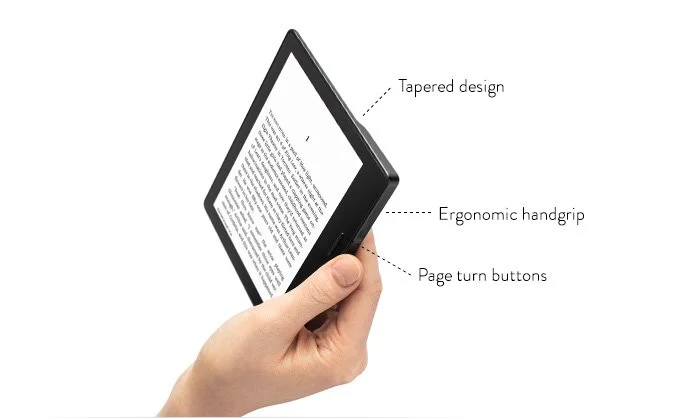
  • Super light, compact build. About as high as high as an iPhone 6, but wider. The screen size is more or less the same is my old Kindle, the edges just got a lot thinner. It is the perfect aspect ratio for reading.
  • The device fits nicely in your hand, with more battery bulk added to one side of the device. Keeping the weight close to your hand makes the device feel lighter. This lever effect makes the iPad feel heavy when held with one hand. 
  • A fantastic screen. "Retina" crisp. Works in bright daylight, works at night. (The latter apparently without disturbing your sleep patterns)

What I don't like:

  • Poor battery life. Well this is relative, but I got spoiled with my previous Kindle that I could charge every week or so. The protective cover adds an extra battery, but also a lot of weight to the device.
  • The touch screen page switching behaviour is sometimes a bit unpredictable. 
  • The price: almost $300.

Overall a great device and worth the upgrade from my ancient Kindle. If you currently own a Kindle Paperweight though, maybe wait for an upgrade with better battery performance.

SlideMagic: a platform for magical presentations. Free student plan available. LEARN MORE
"Let me explain it to you again"

"Let me explain it to you again"

A good pitch of an idea provokes feedback of the audience. If people are just sitting there, watching politely, smiling, and walking out of the room, you are unlikely to land an investment.

When you get feedback (praise, criticism, difficult questions), it is important to realise who it is coming from. Do people care about you, want to help you? Do you they have the right background?

  1. Your mother: she totally admires everything you do, but in most cases might not have deep knowledge of what it is you are actually doing
  2. An industry incumbent who cannot see any change happening having worked in the field for 30 years
  3. A (potential) competitor who is jealous
  4. A friendly investor who does not understand the field
  5. A friendly investor who does understand the field
  6. An interested investor who is negotiating with you
  7. A friend of a friend of a friend who is an expert in the field but who was arm twisted in listening to you to return a favour but does not really have time for this and/or you
  8. Etc.

Pay special attention to people who know what they are talking about, or people that are an example of a type of audience you are going to pitch to a lot (confident, successful investors, that might not fully understand the ins and outs of your market). Group one helps you bullet proof the content, group 2 helps you bullet proof the presentation.

What sort of feedback do you get:

  • Generic praise
  • Generic suggestions to change your presentation (summarise everything early on, re-order these 2 slides, cut the amount of charts to max 10, the 10/20/30 rule)
  • An easy question with 3 buzzwords in them
  • A difficult question that you know is a difficult question but you don't have the answer to
  • A difficult question that you thought you explained well in the presentation
  • A difficult question that you heard for the first time

Some feedback can be ignored (the audience is not qualified, the feedback is generic, polite small talk). Some feedback is an "attack" aimed at hurting you (a competitor who feels threatened, an investor who wants to push the valuation down). But most feedback probably is from people who try to be helpful or really don't understand something.

Faced with criticism, humans tend to go in defence mode. We hardly let the questioner finish her question. We don't read body language. We fire away our ammunition. Repeat the same answer, the same slide one more time, forgetting that it failed to convince the audience the first time. Point at a huge Excel model (cell C27) that has 5000 lines of code that proves that you are right. Do what politicians do: divert the attention to another issue.

The most useful feedback might a small unexpected question, from someone who has no reason to help you, is not negotiating with you, has no time for this meeting, and is a huge expert in the field. Read the body language. Ask the person to elaborate on the question. Ask why she thinks it is an issue, what experience does she base it on.

Other good candidates for feedback are potential customers or users. Hold your fire, and listen carefully.

Sometimes it is useful to ask a lot of questions to the people who ask you questions.

 

SlideMagic: a platform for magical presentations. Free student plan available. LEARN MORE
Who are the SlideMagic pioneers?

Who are the SlideMagic pioneers?

There are 2 categories of people that are trying out my presentation design app SlideMagic for real, and they are encouraging me that I on to something useful.

  • Business school / university students. They work in a relatively risk free environment. Risk free from a creative perspective, there is no boss who tells them to stick to the rules. But on the other hand, the audience for their pitches is smart and pretty brutal when it comes to feedback. And finally, this younger generation appreciates good design.
  • Former clients who have come to appreciate my presentation design style and now discovered that they can get there 80% of the way without paying for a bespoke project

Art: William Hahn, Going Home, 1878 

SlideMagic: a platform for magical presentations. Free student plan available. LEARN MORE
Curves in PowerPoint

Curves in PowerPoint

PowerPoint allows you to draw curves as lines, but it is harder to make fills under a curved line without resorting to actual data charts. Here is what I do: I use rectangular shapes to cut/shave a shape. See below. Notice that it is also possible to fill your custom shapes with images.

Draw a shape

Draw a shape

Position your knife

Position your knife

Use the "subtract" function to cut the shape

Use the "subtract" function to cut the shape

Horizontal knife

Horizontal knife

One more cut

One more cut

Fix the edges with format shape - edit shape - edit points

Fix the edges with format shape - edit shape - edit points

Add an image if you want

Add an image if you want

SlideMagic: a platform for magical presentations. Free student plan available. LEARN MORE
Fixing investor pitches

Fixing investor pitches

Each investor pitch project is different, each requiring upgrades in specific areas. Here is a list of what I typically encounter. Usually a client did a few right, but needs help in a few others.

  • Too PowerPoint: all the standard colours, fonts, etc.
  • 1990: clip arty or 2005: cheesy stock images
  • Too TED: so minimalist that it is impossible to understand what the company is actually doing
  • Missing business case (revenue model, etc)
  • Grand opening full of obvious facts that takes forever before turning attention to the company itself
  • The company does not explain why what they do is so hard, clever, original
  • Bullet point overload (but I see less and less of this)
  • Not addressing the elephant in the room, the obvious big question that is screaming out to be answered
  • Not enough "meat" to show that there is real science, technology, substance here
  • Visual analogies are too complicated to understand
  • Excel data dumps straight into PowerPoint
  • Too many benefits, as a result the audience perceives: "no benefit"
  • Unfocused feature expansion list: "and we will this, and we will do this, and we will do this"
  • Too much design: icons, cute fonts, Adobe Illustrator shapes mixed with PowerPoint 

SlideMagic: a platform for magical presentations. Free student plan available. LEARN MORE
Anticipating the next question

Anticipating the next question

We all understand that story telling is a better way to get an idea across than reading out bullet point after bullet point. Still, most presentations happen in a business context. And in business, people do not have the patience a movie audience has (15 versus 90 minutes).

One approach I use to plan a story flow for a business presentation is anticipating the next question of a smart audience. Each pitch, each situation, each industry, each vertical, each country, each type of meeting has their own sequence of questions:

  • What is it they actually do?
  • Will it work?
  • Why is this a big deal?
  • Why has this not been done before?
  • Can they pull it of?
  • Can people game the system?
  • Will anyone sign up for this?
  • What happens if Google enters the market tomorrow?
  • Can they make money?
  • Will people pay for this?
  • Can they sell it?
  • Are they focused enough?
  • How financially stable are these guys?
  • Do I like these people?
  • What is the accent?
  • When is lunch?
  • Do they have data to prove it?
  • Why did no one else invest?
  • Isn't this exactly the same as the idea I heard last week?
  • How can a 25 year old make this happen?
  • Can it scale?
  • Will the government agree to this?
  • What if a "Black Swan" event happens?
  • Why is she not answering my question?

Text book structures for business presentations follow a generic, logical sequence of questions. Your pitch might have to deviate from that.

SlideMagic: a platform for magical presentations. Free student plan available. LEARN MORE
Letter spacing in PowerPoint

Letter spacing in PowerPoint

"Kerning" is tweaking the spacing between characters in a word. Not to be confused with line spacing, tweaking the vertical space between lines.

Line spacing is important in presentation design. When you use very large font sizes, PowerPoint adds too much wide in between lines, you need to trim it.

As an amateur designer of PowerPoint slides for a business presentation, you probably never need to worry about kerning. The one exception is cleaning up the mess that other users and/or templates have created. On the Mac, select all the text on a slide, click the little-used icon shown below, and set things back to "normal"


Cover image from WikiPedia

SlideMagic: a platform for magical presentations. Free student plan available. LEARN MORE
Presenting as a teacher

Presenting as a teacher

I got to speak with a high school teacher yesterday and he made an interesting remark about the use of on-screen presentations in the class room. He uses pictures and very simple visual concepts to keep the attention of the teenagers focused. The charts' main purpose is not to transfer information, they are there to keep people focused and interested.

What a different approach than most of my teachers in the 1980s: copy a page from the course book on an overhead transparency and uncover paragraph after paragraph, slowly. Or, turn your back to the class and re-write the book on the black board.


Image from WikiPedia

SlideMagic: a platform for magical presentations. Free student plan available. LEARN MORE
Organising application windows

Organising application windows

Yesterday I wrote about how difficult it is to keep your application windows organised across two very large monitors. Colleague Nick Smith pointed me to this neat utility: Divvy. It creates a pop up grid that allows you to position windows quickly. Available for both Windows and Mac OSX. This features should be baked into operating systems as a standard feature.

SlideMagic: a platform for magical presentations. Free student plan available. LEARN MORE
5k screens

5k screens

I broke my laptop screen and was forced to rethink my IT setup. For the first time in 10 years, I went back to a desktop as my main computer: the 27" iMac and will fix up my laptop as a secondary computer for onsite client work or travel. My desktop is also connected to one additional large Thunderbolt display.

The difference between the 5k monitor and the Thunderbolt screen is amazing. After working for 1 day on the new screen, you can't imagine having had to deal with this grainy Thunderbolt monitor for a couple of years. (The Thunderbolt screen is long overdue for an upgrade).

Two big monitors work also better than one big screen and a laptop as a side monitor. Mac OSX is still clunky when dragging large application windows between different size screens. You always had to fiddle and resize windows. Now that the monitors are more or less the same aspect ratio I no longer have that issue.

Still I believe that the fluid window-based operating system where you can resize and position windows where ever you want them creates messy work environments. Mac OSX needs some sort of grid structure where you can snap things into place. Maybe an extension of the new multi-app feature that is now part of iOS.

When going back to desktop you need to budget for one more piece of equipment: a backup battery (UPS). The power goes down, your computer goes down. Apple should have put in a 5 minute battery that enables you to power down the machine orderly in case of a power failure. The latter we tend to have here in Israel in the middle of the summer when air conditioners drive the power grid to its maximum capacity, or in the winter when violent thunderstorms hit power lines.


SlideMagic: a platform for magical presentations. Free student plan available. LEARN MORE
One visual concept

One visual concept

I like to use one single visual concept as much as I can in a presentation. Two by two matrices, graphs, frameworks, they all require time to absorb by an audience. If you have to through in a new one on every single page, things can get pretty tiring. Management consultants tend to do this, and forget that the audience did not spend 3 months on the project but is hearing the story for the first time.

Luckily common issues in a presentation are often related:

  • Why is something difficult to do  (problem)
  • What is your solution
  • Why is the competition different

If you can fit all of this in a variant of the same diagram, you will save the audience a lot of time.


Art: Robert Antoine Pichon, Le Pont Aux Anglais, 1905

SlideMagic: a platform for magical presentations. Free student plan available. LEARN MORE
Note taking on iPad in 2016 (2)

Note taking on iPad in 2016 (2)

I now have spent more hours taking notes and sketching with my iPad Pro 9.7 + pencil combo (read the earlier post). Things are still not perfect.

Taking notes

The big issue is instant availability of your canvas. Keep the screen on continuously and you drain your battery in less than an hour. Do auto-power off and you find your self do this for every single scribble you want to make 1) press home button 2) touch id 3) touch canvas to activate the writing surface. The latter is probably an issue in the Evernote Penultimate app, which has 2 modes: One where you view notes, and one where you can edit them.

Sketching ideas

  • The 9.7" screen is to small for sketching big, bold concepts, I need more space. (But then I don't want to carry an iPad Pro 12" around). You actually need 2 devices.
  • Current apps don't support erasing very well. You have to go into a menu, change the pencil to an eraser, erase, then switch it back again. Maybe Apple can put a sensor in the back of the pencil and make it an eraser, or could enable the use of multiple pencils in the same app. My creative process is rather paper intensive. I use a huge pile of old paper: make a bold sketch, toss it away, make another one, and another one, until I iterate to a chart in 10 loops or so. Even the pretty app Paper by 53 does not accommodate this workflow.

There is hope though. Most of these issues are solvable, and some even via software. We will get there in the end.


Image from WikiPedia

SlideMagic: a platform for magical presentations. Free student plan available. LEARN MORE
Convincing the centre

Convincing the centre

The presidential campaign is gearing up in the US, and opinion pages and social media posts are full of passionate declarations of support and/or disapproval of a specific candidate. Most of these are not going to convince people to change their mind though.  In most cases, the audience and the "presenter" probably agree already, they read the same newspaper, watch the same channel and are friends connected on social media.  

To make change, you need to convince the people that are doubters, the people in the centre. You don't do that by implying that supporters of the other side are not very smart or insulting them in other ways.

Think about the doubters, what it the final straw that might convince them to switch sides?


Image from WikiPedia

SlideMagic: a platform for magical presentations. Free student plan available. LEARN MORE
Making market analysis work credible

Making market analysis work credible

When there is not much information about a market available, startups sometimes commission new research to dig up the facts and make projections. The end result is often a slide with one number: "Our extensive research shows that the market will be $1,0234,654 in 2020, the full report is too detailed and we won't bore you with it".

Investors are not going to buy this.

Here are some things you can do:

  • If the research was conducted by a reputable consulting firm, put the source prominently on the slide. But not many startups can afford rubber stamping buy expensive consulting firms.
  • Round up your numbers. $1.0b is better than $1,0234,654
  • Break up your $1.0b in individual market segments (if you can)
  • Relate your $1.0b to something that exists today. Your precise market does not exist yet, but people spend money on activities that are related, similar.
  • Show a deep dive on one segment, one part of the analysis to explain the thorough methodology you have applied, leave out the other 325 segments.
  • Break down the $1.0b in things people can touch: # of customers, price per product/month/subscriber,  # of countries, etc.
  • If you are getting only 5% of the $1.0b market, think about who will have the other 95%. If you cannot identify them, go back to your market estimate.

The above is useful when making the presentation, but can also be handy when you brief consultants for a project.

SlideMagic: a platform for magical presentations. Free student plan available. LEARN MORE
Repetition = boredom

Repetition = boredom

In big presentation days with lots of decks you get the inevitable situation that some slides fit in multiple presentations. Some presenters double them up, and start presenting the slide (after the apology "you have seen/heard this before" as if it was the first time).

Don't. Repetition is boredom. Your audience can/will remember. You have 2 options:

  • A super short "taste" of what is about to come later. I.e., introduce what a certain company does briefly, without going into any detail or background. Do the full elaborate presentation the second time around with a quick reference to your earlier slide
  • Do the full presentation early on, and give a very small recap of the story later when it comes up the second time. One solution is to present a thumbnail screen shot of the original slide plus 2 bullet points (oops, yes I said it) of the key take aways of the slide.


SlideMagic: a platform for magical presentations. Free student plan available. LEARN MORE