Viewing entries in
Data visualization

Making sense of Israeli vaccination data

Making sense of Israeli vaccination data

Here in Tel Aviv, I was lucky enough to receive my second vaccination with the Pfizer COVID-19 vaccine. The whole world is watching us:

  • High vaccine availability

  • Advanced healthcare infrastructure, with a centralized IT system (any medical professional can punch in my ID number in her computer and get all my medical records on the spot, this would raise some privacy issues in other countries)

  • (Unfortunately) we are set up to deal with national crises and get organised quickly

There is lots of data available, cases, hospitalizations, difficult cases, casualties, by age, religious background, location, total cases, new cases, etc., etc. And everyone is looking at the top line number, will the big case graph go down and can we declare victory over the virus. Unfortunately so far, it stays more or less stable (at high levels).

This is a typical case of data overload. If you want to see whether the vaccine works you need to compare 2 things like for like: people who got vaccinated, and people who did not. And when you do that (pretty much like a clean medical trial), it shows that the vaccine is overwhelmingly effective, the same size is just not the entire Israeli population.

One such example is hospital admission data from a Tel Aviv hospital. Not millions of people, but a small, isolated group that you can compare. The original chart is here:

COVID19-vaccination-efficacy-telaviv

I did a quick makeover of this slide in SlideMagic.

  • Colours are consistent

  • Everything is properly spaced

  • A better way to communicate the ‘1’ exception case

But this is the raw data, mainly of interest to scientists / statisticians. The average person just looks at the big blue “2” next to “442”. You can simplify things a bit more, see the following chart:

What did I do?

  • Use a data chart instead of a table (bar charts are best for comparing)

  • Lump the 7 days before and 7 days after data together, they are almost the same

  • Change the metric to something that people are used to, everyone talks in terms of “vaccine efficacy is x%”. I reworked the numbers to reflect that.

I included these vaccination charts in the online SlideMagic slide template bank (click on the images), or simply search for ‘vaccination’ in the desktop app to use charts like this in your own presentation.

SlideMagic: a platform for magical presentations. Free student plan available. LEARN MORE
Stack charts with tighter grid integration

Stack charts with tighter grid integration

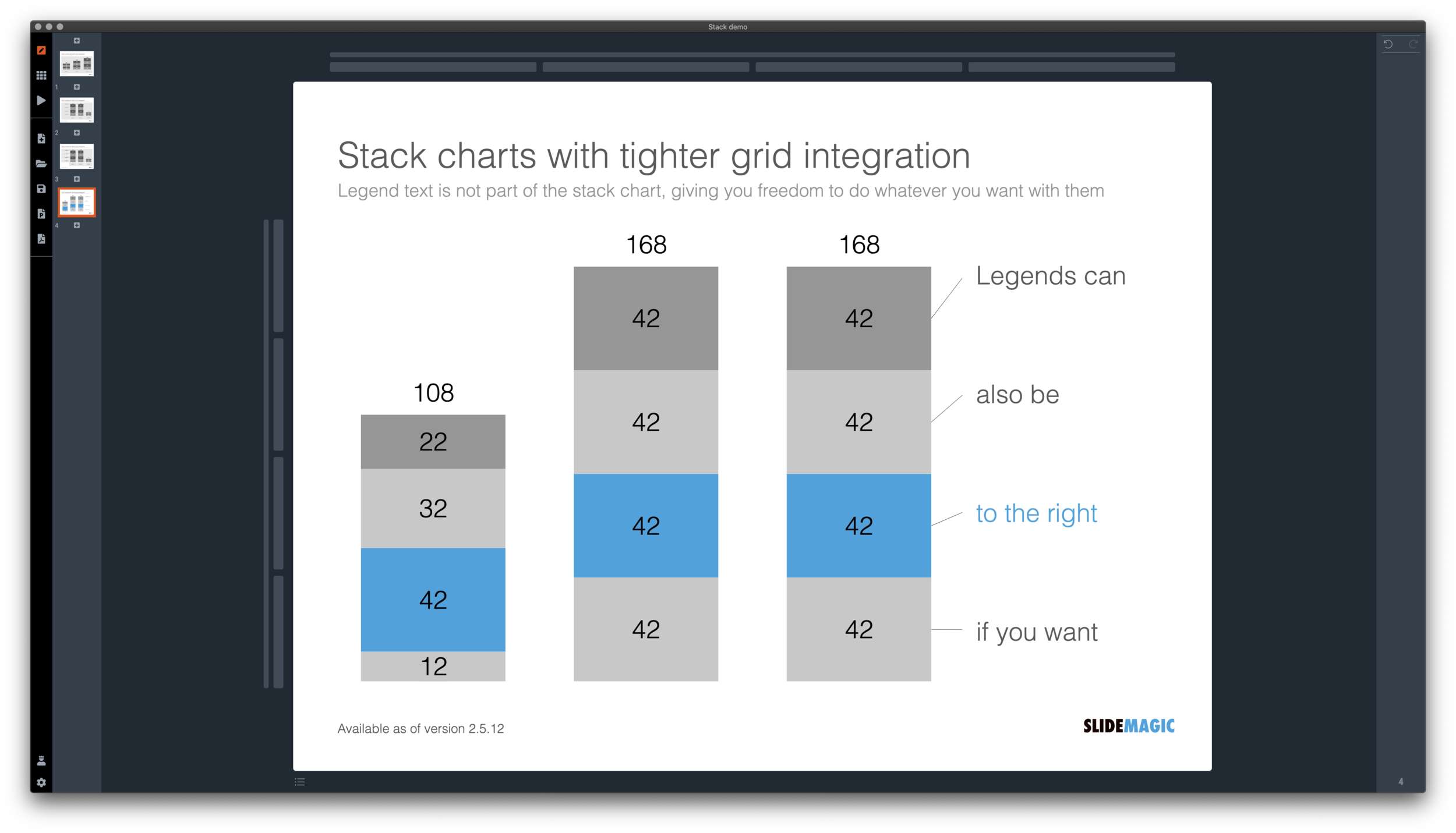
Stack charts are very useful. So useful in fact, that SlideMagic does not support pie charts (by design).

They are very easy to make in Excel, but using them straight in a presentation is tricky. First there is the overall formatting of the chart, then there is the legend which is never connected to the chart itself, and does not leave enough space for text other than ‘new’, ‘old’.

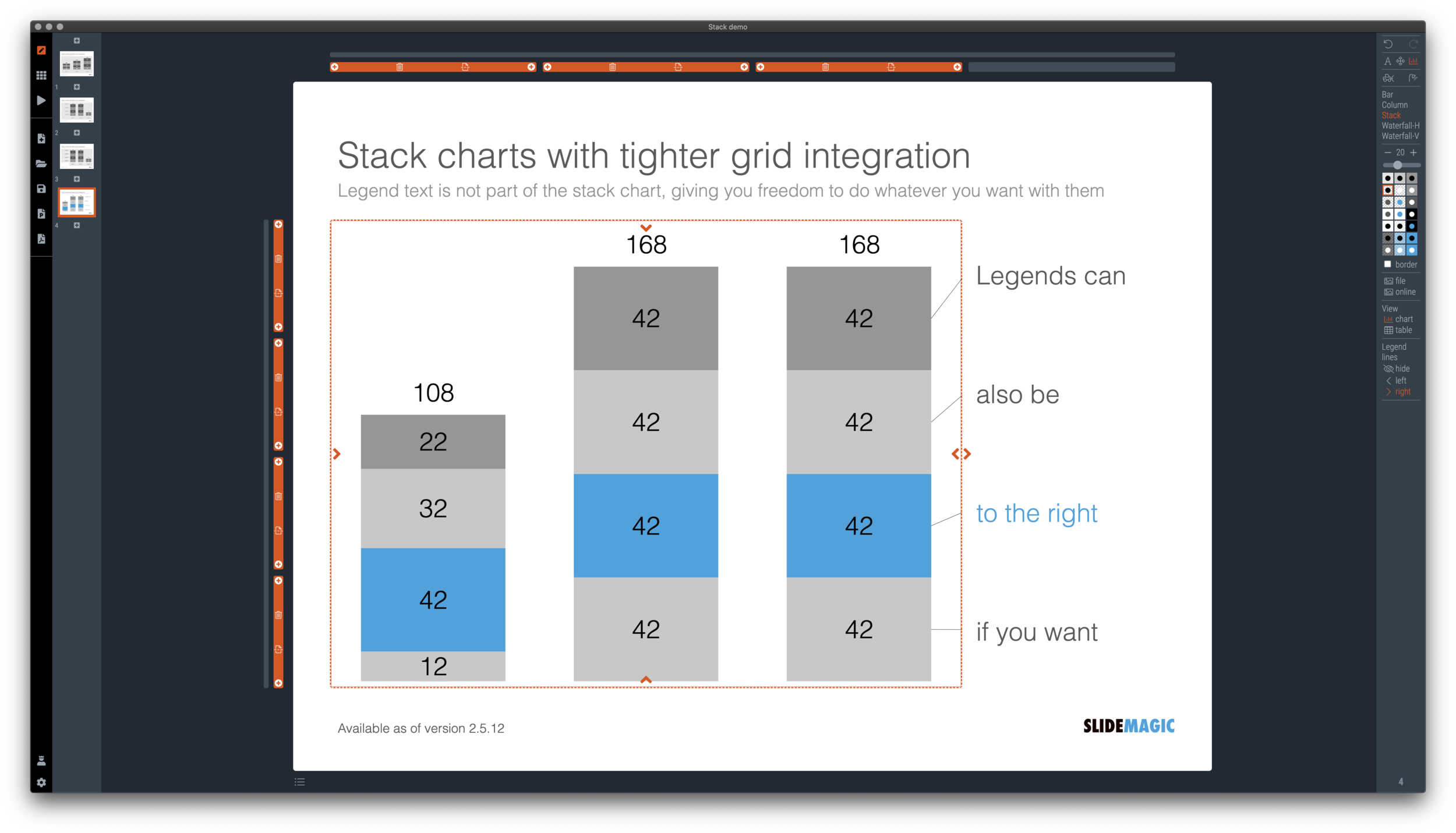
I just overhauled the stack chart in SlideMagic and forced to be tightly integrated with the slide grid. Adding/deleting rows to your slide will add/delete data series to your stack chart. Furthermore I have actually removed the legend from the stack chart shape itself, what is left is only the option to add lines that point to boxes outside the chart. This gives you total freedom to do whatever you want with the chart legend, small, big, or even huge text boxes. Everything lines up, you can even fit stack charts in tables if you want.

The charts below give you a sense of what the new engine does:

Screen Shot 2020-12-02 at 9.44.35.png
Screen Shot 2020-12-02 at 9.49.56.png
Screen Shot 2020-12-02 at 9.51.28.png
Screen Shot 2020-12-02 at 9.51.36.png

The old stack charts will continue to work in SlideMagic for the moment. If your charts have them, you can edit them. If you want to make new ones, click <SHIFT> + <STACK> and you can still make them. An old stack chart can instantly be converted into a new one by selecting it and clicking the <STACK> icon.

Stack charts in the template database are still in the old format, I will convert them over the coming weeks to the new format.

Stack charts convert to native Excel charts when saving your presentation as a PowerPoint file (the connecting legend lines are still missing for the moment). In PDF, you have exactly “what you see is what you get”.

SlideMagic: a platform for magical presentations. Free student plan available. LEARN MORE
Creative with bar labels

Creative with bar labels

Below a screenshot from an Economist instagram post:

Screen Shot 2020-11-29 at 12.07.13.png

The labels of the first 2 bars have been placed over the bars themselves to save space: there is now more room for the bars themselves. Other labels to the right of the bars.

I am not a fan:

  • The white over red of the top labels is hard to read

  • There is no nice and simple list of the top players, aligned in a consistent way

  • The names inside the chart area makes it harder to relate the bar to the axis

  • (I also prefer to put data labels in the chart rather than having a very imprecise value axis)

Here is a quick illustration of a bar chart in SlideMagic (The Eonomist did not provide the exact values, hence the dummy data).

Screen Shot 2020-11-29 at 12.30.44.png

SlideMagic: a platform for magical presentations. Free student plan available. LEARN MORE
How to make a source of change waterfall chart (Apple quarterly results)

How to make a source of change waterfall chart (Apple quarterly results)

In between the election news: waterfall charts….

Waterfall charts are a great tool to explain the difference between 2 scenarios. In SlideMagic, they are really easy to create. Below is one I put together quickly with data from Apple’s 2020 Q4 earnings result, and a photo I found using SlideMagic’s built-in Unsplash image search. Notice how I opted for an unusual vertical waterfall, to create more space for the axis labels.

Screen Shot 2020-11-02 at 13.42.33.png

Some people would argue that you could make the chart even clearer by breaking the axes: showing them as ‘5.6’ and ‘4.7’ for example. Yes, it would highlight the deltas better, but in general, I think manipulating axes, well, manipulates the message. The fact that the changes are relatively small to the total is part of the message.

Screen Shot 2020-11-02 at 13.42.27.png

I reshuffled the rows a bit to group the decreases and increases. That makes it more clear in one sense, but less clear in another. Your choice.

\How do you go about making such an analysis? I put my numbers in a Google Sheet that you can view yourself.

  1. Enter the data for the 2 comparable quarters in 2 columns. Add the totals as calculations rather than hard-coded numbers to check that you did not make any typos. (The blue cells are the one that I type in, the white ones are calculations).

  2. Create space between the 2 columns

  3. Pull numbers from the input that you consider drivers. You see that I deviated a bit from the way the input was presented:

    1. Divided billions by thousands to make it more readable

    2. I use % gross margin rather than absolute COGS and profit numbers

    3. R&D: absolute number, SGA, % of sales

  4. Recalculate the operating income with just these drivers (line 37), it is crucial that you get this right, double check with the input.

  5. Now start varying your drivers one at a time, and recalculate the operating income in the scenario that just that one variable would have changed (see the green numbers in the spreadsheet).

  6. Finally, check whether the component variations add up to the total variation you need to explain (in this case, I was lucky). If you are not, you need to allocate the non-explained differences to the factors somehow.

It is important to keep in mind that these spreadsheet figures are just spreadsheet figures. The change in product gross margin for example is probably not independent from the change in product mix (fewer phones, more laptops). Also there is a small rounding issue (the rounded vales do not add up to 14.8). I would solve that by chopping the biggest factor (-1.7 to -1.6). It is always distracting when small rounding errors create inconsistent numbers on your slide.

Users of SlideMagic can access the waterfall charts with a search for ‘apple’ in the desktop app.

SlideMagic: a platform for magical presentations. Free student plan available. LEARN MORE
Log scales?

Log scales?

With all the talk about exponential growth of the virus, logarithmic scales are popping up in graphs everywhere.

What is a logarithmic scale? Unlike those on a linear scale, the units on a logarithmic scale change. See the chart below.

Screen Shot 2020-10-04 at 12.54.53.png

The result is that the normally speaking rapidly growing line 10^x now appears as a simple straight line.

Exponential functions can be hard to graph, analyse and compare. Toning down the scale makes things more manageable. I remember in high school, I used log mm paper to plot graphs from physics or chemistry experiments. By measuring the incline of the line, I could estimate exponential coefficients, and compare them.

While logarithmic scales are a great practical tool for scientists, I think they are less useful in presentations to a more general audience. “Look at this straight line, but in order to understand how fast tings are really growing, look at the small numbers that reveal the axis measurements”. People simply don’t grasp the concept of a logarithmic scale. If the virus grows exponentially, well, show an exponential line.

If you need to compare exponential growth, make a bar chart of the growth rates, rather than drawing straight lines on logarithmic scales.

SlideMagic: a platform for magical presentations. Free student plan available. LEARN MORE
Architecture diagrams

Architecture diagrams

I am starting to experiment with different chart types in SlideMagic. One experiment: IT architectures that consist of users, servers, databases, clouds and lots of lines.

The built-in icon search, combined with the new line drawing feature does a pretty good job actually. And while SlideMagic is not a dedicated tool to design network architectures, it might actually force you to make better architecture diagrams in presentations. Let me explain.

Detailed network diagrams have the same problem as detailed spreadsheets when it comes to presentations. They are project work tools to run analysis and plan work, they are not tools for communication. When I need to make a data chart, I always disconnect from the spreadsheet and resist the temptation to copy-paste. Instead, I pick the 10 numbers that matter, round them up to the relevant precision, and plop them in a very simple bar/column chart that tells the story.

The same is true for IT architectures. If you want to present an architecture overview on a slide, that slide needs to be understood almost immediately when putting it up (like all slides in your deck). If tangled connections, boxes, servers make that hard, then the only thing your slide communicates is that your architecture is complex, not much more.

Again, disconnect from the working papers. Think about your message: ‘my architecture has 3 layers’, ‘my system connects the systems of 15 suppliers’, ‘my system is entirely on premise’, whatever that message is, make a simple chart that supports it.

Remember, presentation slides are usually not project briefings for network installers.

Screen Shot 2020-09-24 at 17.33.35.png

SlideMagic: a platform for magical presentations. Free student plan available. LEARN MORE
Waterfall charts in SlideMagic!

Waterfall charts in SlideMagic!

Finally, they have arrived. Waterfall charts in SlideMagic. Everything lines up with other elements in your slide. Super easy to make and edit, super easy to convert to editable PowerPoint / Excel charts if needed. Download version 2.4.7 of SlideMagic to try it out (both for Windows and Mac). This is a brand new module in the app, please let me know if you experience any issues or have other suggestions.

Screenshot 2020-07-20 12.41.38.png
Screenshot 2020-07-20 12.41.47.png

SlideMagic: a platform for magical presentations. Free student plan available. LEARN MORE
Chart makeover: where do people get infected with COVID-19

Chart makeover: where do people get infected with COVID-19

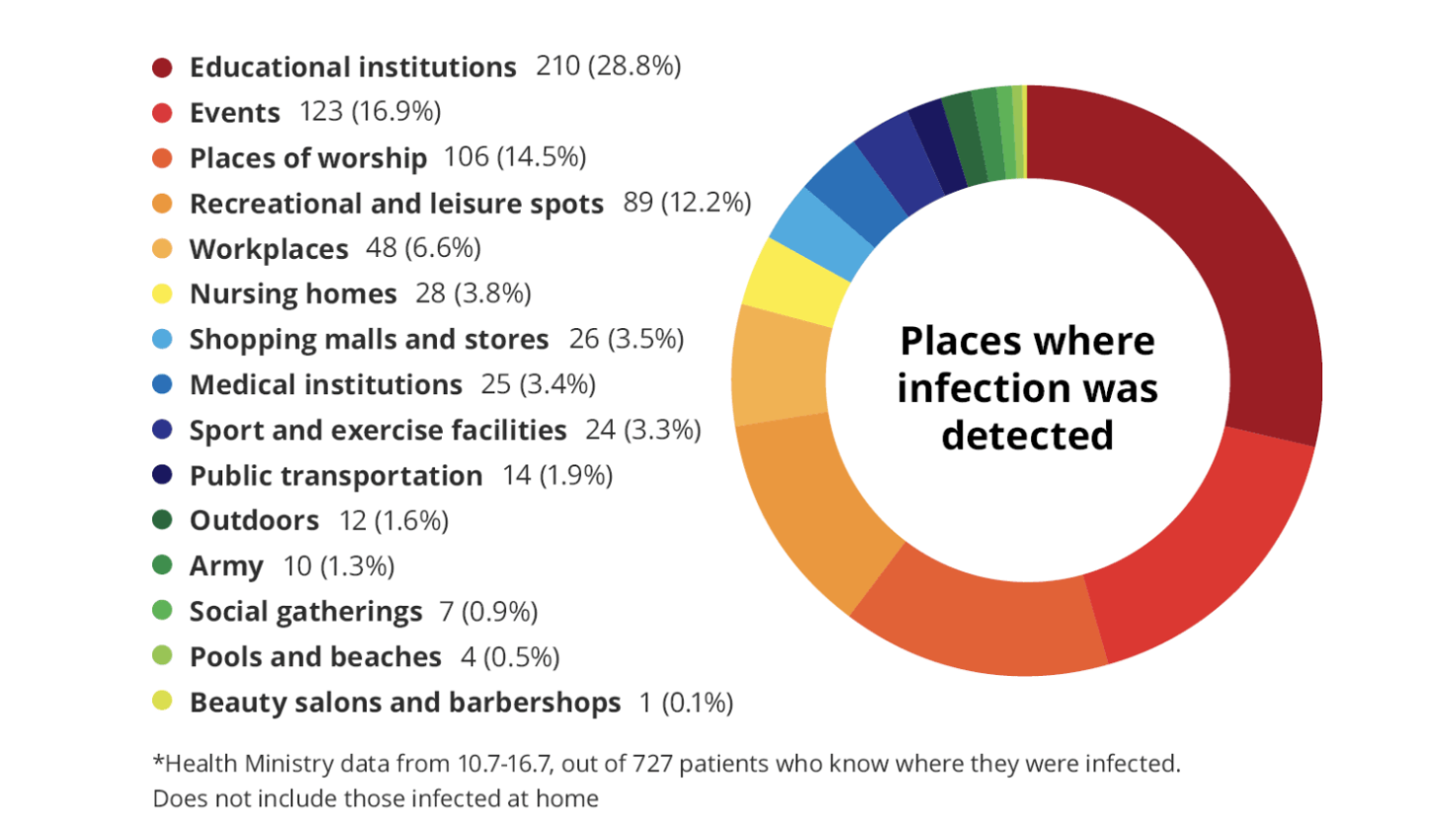
Israel is experiencing a very strong second wave of the virus. Its health ministry recently published data about where people get infected.

Screenshot 2020-07-20 06.32.57.png

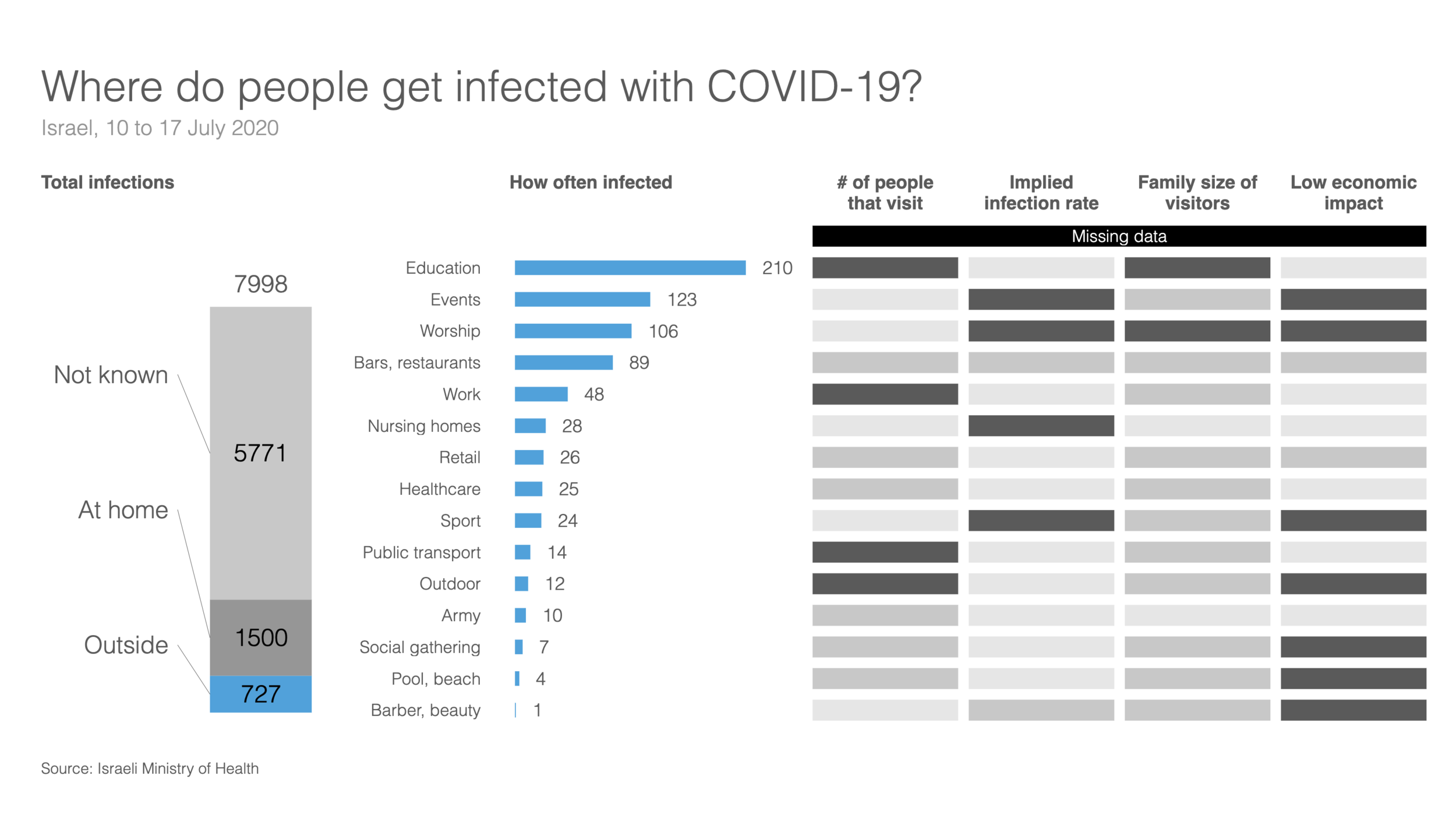
This graph does not tell the entire picture, I tried making a quick slide in SlideMagic:

Screenshot 2020-07-20 07.35.36.png

What did I add?

  • Providing the overall context: for many patients it is not known where they are infected, and many get infected at home (which are probably secondary infections)

  • There is still important data missing. The most important one is how many people in total actually visit a place. Millions of people visit schools, thousands probably visit gyms and places

  • We need to understand the impact on secondary infections (how big are the typical households that these people are coming from).

  • Then there is the question about impact to society…

This SlideMagic slide is free, you can download it here. It is clearly an example of an analysis slide, rather than a visual to be presented to a large audience. While I am not a big fan of stretched 16:9 layouts, in this case I had to go for it to create space.

PS. My opinion re. the strong second wave in Israel? Yes, Israel got the virus under control and then reopened too quickly (school were the main source of infection initially). But, in the end I believe any country re-opening will go through the same process, may just a bit slower. I think Israel is 1-2 months ahead of other countries re-opening.

SlideMagic: a platform for magical presentations. Free student plan available. LEARN MORE
How to design management dashboards

How to design management dashboards

The number of app installs of SlideMagic 2.0 is still small, but the graph has a similar shape as the exponential graphs we all have gotten used to over the past weeks.

Modern analytics tools allow you to track literally everything under the sun in your app and/or web site. Instant information overload supported by colourful graphs that look good, but don’t say much. This overload of data is similar to the ones I would encounter as a consultant at McKinsey. And now, 15+ years later, I find myself following a similar approach to making sense of it for my own app.

Most case examples about analytics are built for established apps and web sites with huge customer flows you can micro analyse whether the check out button should br green or red. SlideMagic is not there yet.

  • I find myself going through a certain cycle. It starts with a basic question, “how many people did actually install the app”, which results in a daily manual routine to find the latest number, which then gets translated into a proper query in an analytics app. I check whether my analytics tool is consistent with the numbers I can dig out of my own server. Slowly, slowly, I get a sense of how the app behaves with a consistent set of data that I can recognise.

  • Slowly, slowly, I start adding more questions to the picture, and make sure that I keep a picture of how they relate.

  • Each factor has a specific visualisation: some are lines, some are bars, some uniques, some totals, some cumulative, you need to play around with it.

The key factor I need to work on now is a very specific one. Of the users that know of SlideMagic, installed it, tried it a first time, then tried it out seriously (now we are down to small numbers), of those, can I get a handful of users that really, really start using it. If we get that final step to work, I am confident that the previous steps in the funnel will work itself out.

Work in progress.

Photo by YIFEI CHEN on Unsplash

SlideMagic: a platform for magical presentations. Free student plan available. LEARN MORE
Bar versus column charts

Bar versus column charts

Sparked by this tweet:

My guideline:

  • Columns to show trends over time. The shape mimics that of a line chart, you don’t need much space for the column labels (usually years, or months)

  • Columns for breakdowns. More horizontal space for complicated labels, and a stacked column is a more natural format than stacked bars.

  • Bars to rank things. The shape mimics a “top 10” top to bottom list, and you can make more space for labels that usually describe things

In this case: bars are better than columns.

Photo by Sophie on Unsplash

SlideMagic: a platform for magical presentations. Free student plan available. LEARN MORE
Visualising quantum mechanics

Visualising quantum mechanics

That is an ambitious title to start my first blog post after my return from a summer holiday in Asia!

Through a series of coincidences I ended up reading through a number of popular science books about quantum mechanics. I remember getting all carried away in the briefing session of a presentation design project for a startup in the field of quantum computing. My academic knowledge of this field was basically high school chemistry, so I added this topic to the list of things that needed a refresh. A holiday was the perfect occasion. I am sure I was the only one at the side of the pool dusting of theoretical physics knowledge.

From a presentation perspective, the fascinating problem that quantum mechanics struggles with a the lack of either a visual or verbal language to describe concepts. The mathematics is water tight and has proven to be really useful (lasers, semiconductors, LEDs, etc. etc.). But when you try to take a step back and want to understand what it actually all means in the context of your daily routines, things get confusing.

It is all the result of some form of Anamorphosis, projections of phenomena that get scrambled when angles or dimensions no longer line up. Every scientist is looking for that ultimate simple underlying concept that can explain/visualise/link quantum on a small scale to the more traditional physics that we see everywhere around us at a human scale.

In case you are interested, here are 2 books on the subject: Beyond Weird, and What is Real?.

Photo by Linus Mimietz on Unsplash

SlideMagic: a platform for magical presentations. Free student plan available. LEARN MORE
Farewell to static charts? Um, no.

Farewell to static charts? Um, no.

A quote from a Venture Beat post that paints a bright future for BI (Business Intelligence) dashboards:

Say farewell to static charts pasted onto presentation slides — the new standard is shareable data stories

I have heard it many times before. Your new BI system plugs into whatever data you have, you click and browse through the data, and automatically the most insightful slides and tables are generated, on the spot.

I think BI vendors are mixing up a few quite different activities:

  • Analysis is finding the problem and solving it, presenting is communicating the results and getting people to act.

  • Freely flowing in data, slicing, dicing, charting, is analysis. It is actually pretty hard to find what is going on in a business, especially with an overload of data available. This is definitely not something you do in front of a live audience.

  • Once you have identified the problem, and even found the solution, it is again pretty hard to craft that one chart that explains it all in less than 5 seconds. You need to take exactly the right data, cut it the right way, and highlight the right trend. Again, something that takes too much time to do live.

Where I see role for these type of dashboards, is after you did the hard work: you figured out what data is important, what statistics to track, what charts to show. Then, you can use the power of modern BI systems to pull together slides on the spot. You get instant updates about the state of the business today, or you can apply your methodology to other business units, other geographies and see what you can learn.

So BI systems don’t solve problems on the fly, they automate the data in your deck, after you did the hard work of actually designing a good old static chart, probably by hand.

Photo by Jason Coudriet on Unsplash

SlideMagic: a platform for magical presentations. Free student plan available. LEARN MORE
Waffle charts in presentations

Waffle charts in presentations

I never have been a big fan of waffle charts:

  • I find it harder to read them then straightforward bar or column charts (in a similar way, pie charts are less readable)

  • They are a pain to maintain in PowerPoint/Keynote (counting boxes)

But, what people do to show the results of the US elections is clever. by adding the semi-saturated colours in, you get a nice sense of how things are developing:

SlideMagic: a platform for magical presentations. Free student plan available. LEARN MORE
2x2 matrix overload

2x2 matrix overload

This 2x2 chart is hard to understand (source on HBR)

From a design point of view:

  • Axes labels are hard to read

  • Axes labels are too blunt, mathematics has its uses

  • Too many dots at locations that are too precise

  • Typography of the labels goes across the boxes

  • The 4 quadrant labels do not stick out enough

And that’s the design part. More importantly, the content… The title of the chart seems to suggest that it is just an example of how to use 2x2 matrices, but I think people are serious about its content. A comparison of apples and oranges. I need to start casually learn how to do data cleaning, and not yet get into AI but be prepared for it, and to use AI, I don’t need to understand statistics at all.

Cover image by Nick Femerling on Unsplash

SlideMagic: a platform for magical presentations. Free student plan available. LEARN MORE
Logarithmic scales

Logarithmic scales

In the 1980s, I remember plotting the results of science experiments in high school on millimeter paper. Logarithmic scales came in handy: they allow you to plot data series with big variabilities accurately, and/or they can show mathematical relationships beautifully (a completely straight line on a logarithmic scale for example).

Scientific charts are for pondering at your desktop, a different setting from a 20 minute all or nothing investment pitch. When you show a boring growth line and have to alert the audience that the tiny labels on your y axis are in fact on a logarithmic scale, you have lost some of your fire power. It looks less spectacular, and more importantly, it requires additional thought steps in the brains of your audience. The hockey stick simply works better.

If you are dealing with serious science, consider 2 charts right after each other, the first (populist) one showing the raw growth, then followed by a logarithmic one that takes the responsible scientific approach.

Cover image by Sawyer Bengtson on Unsplash

SlideMagic: a platform for magical presentations. Free student plan available. LEARN MORE
Mary Meeker slide makeover

Mary Meeker slide makeover

Mary Meeker published her 2018 Internet Report: hundreds of PowerPoint slides filled with dense information. This is a presentation for pondering and study, rather than seeing it as a backdrop for an entertaining TED talk. For this purpose, the slides look pretty decent. I picked a random slide from the beginning of the deck and tried to improve things a bit in "SlideMagic-style"

Mary Meeker original slide.png

Here are some things I changed:

  • The KPCB template features the very heavy coloured bar at the top of the page, I took it out, and tried to apply the fresher green colour that was used for the branding of the web site of the document
  • The duplications of the titles were eliminated
  • The vertical chart axis and grid lines are not required, I took them out
  • I edited the title to make it shorter, put the growth point in the title, the absolute hour value as a bubble
  • The columns don't add up because of rounding, I left it that way, but usually, I would change the value of the biggest column segment to make the numbers add up, it somehow looks sloppy when there are "calculation errors"
  • The legend was hard to read and difficult to link to the data series, I moved them to the right
  • I made the mobile data series pop more with stronger colouring
  • I stretched the data chart a bit horizontally to use the maximum possible space

A complete purist would argue that this chart is actually the wrong one to support the 4% growth point, there are no growth percentages anywhere on the chart.

I put up the above slide on the SlideMagic template store, anyone can download this one free of charge.

SlideMagic: a platform for magical presentations. Free student plan available. LEARN MORE
Quantification as a communication tool

Quantification as a communication tool

The backbone of almost any management consulting project (and final presentation) is some sort of quantification of options. In essence, the quantification is the communication.

Strategic options can be hard to compare, evaluate. Uncertainty, risk, lack of information, dependencies, short term, versus long term. Throw these in an average politically charged management meeting and the outcome is almost certain: indecision.

A quantification is convenient: simple rank the "score" and the answer rolls out. Every option can be compared objectively. Well, objectively to a certain extend. With all the wild assumptions and predictions, you can pretty much force an Excel model to go anywhere.

But that might actually be useful. The process of debating assumptions, seeing how much they actually matter, which ones are certain, which ones are a bit uncertain, and which ones are wildly speculative, weighing all the factors, is the communication process a consulting team and client will go through. At the end, the point estimate of "Option 3 wins with $52.3b value creation in 2035" might not be correct, but the thought process that went into the estimate means that option 3 is probably the most sensible option to take.

Why do people need to hire expensive consultants to lead them through this process?

  • Some sort of objectivity, an outside party who has the run the numbers with a credibility at stake
  • Raw horse power: knowledge how to run complex calculations involving risk and options (and an infinite supply of available human capacity in a certain time span)
  • Privileged access to information: data from another country, disguised industry benchmarks, etc.
  • And the guts to make broad "20% of the effort, 80% of the result" assumptions where it is appropriate

The analyst in the basement sees an endless stream of modifications of assumptions in the spreadsheet, but the client is getting the decision she wants.

Presenting the results of such a project can be tricky. The slides themselves can be super simple (a ranking of 5 options by value created in 2035), but the sequence how to take people through is complicated. Discussing your Excel sheet page by page is not going to cut it. 


Cover image by Tobias Fischer on Unsplash

SlideMagic: a platform for magical presentations. Free student plan available. LEARN MORE
Halving and doubling

Halving and doubling

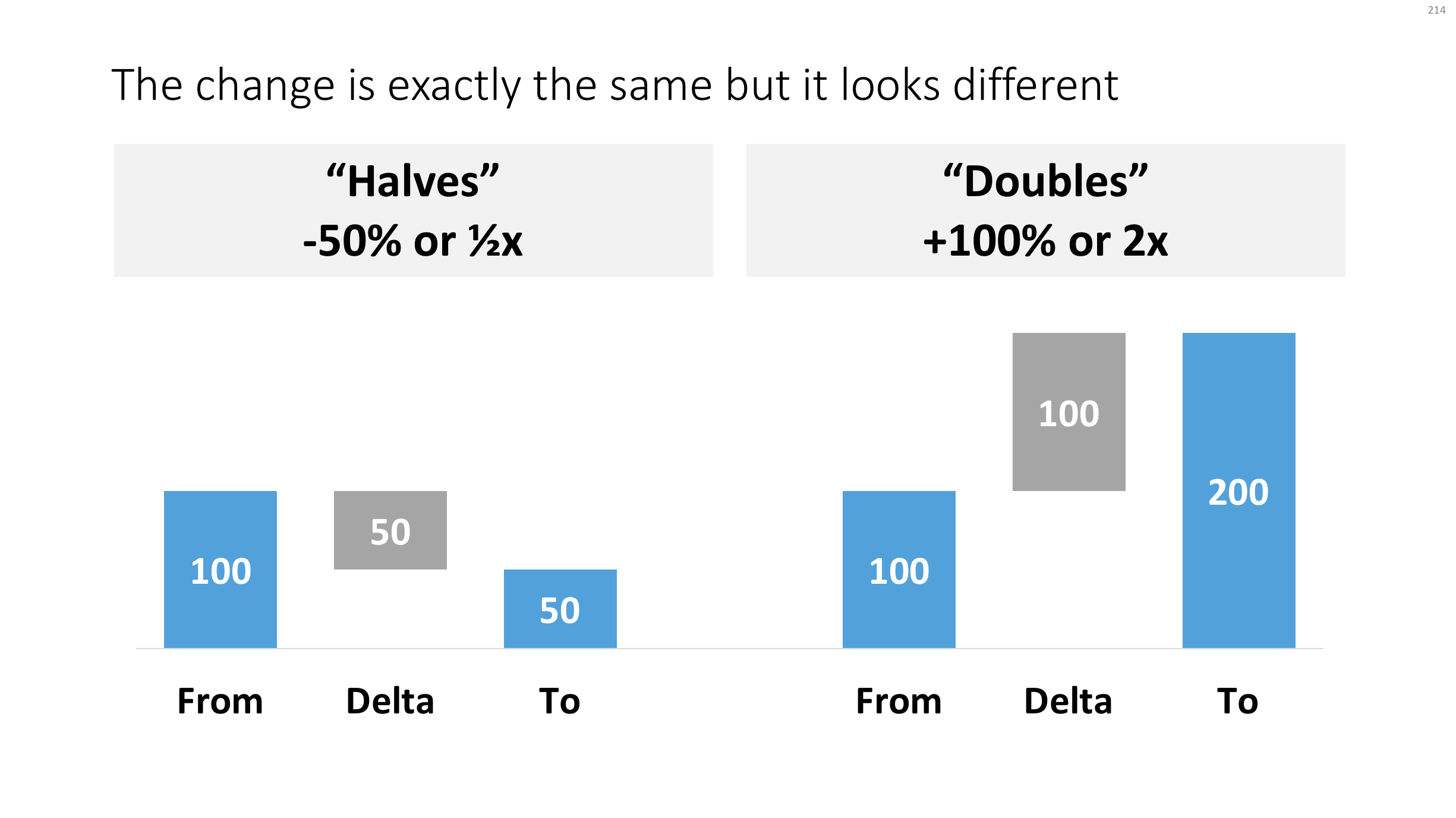
This tweet made me scratch my head, it seems so counter intuitive:

If you create a little waterfall, you can see the effect better. In both cases, the delta is half the size of the bigger column.

Waterfall.png

Yes, using logarithmic scales would be the correct mathematically thing to do, but they are very hard for people other than mathematicians to get their head around. 

Read an earlier blog post about constructing waterfall charts in presentations. Cover image by Ross Findon on Unsplash

SlideMagic: a platform for magical presentations. Free student plan available. LEARN MORE
Years in columns, which way?

Years in columns, which way?

In financial statements, the most recent financial period is put first, and next to it is the previous period for comparison: 2017 - 2016. To the frustration of some accountants and CFOs, I insist on putting the years the other way around: 2016 - 2017.

  • The eye is used to moving left to right when looking at time series data
  • It makes tables match line or column graphs that are in the presentation
  • It makes it easer to compare data across 3 years or more

I am not trying to change the reporting practices for financial statements. In the annual accounts, the current year is the most important one. It needs to be accurate and is usually shown with far more digits (precision) than I would use in a presentation. A comparison to last year's numbers is almost an extra, not the main purpose of the page.

Every financial document has its own purpose and own audience: spreadsheets, financial statements and presentation decks. And among presentation decks you can distinguish between quick and dirty documents to discuss (early results), detailed financial information for the investor community, and more generic financial slides for a general company presentation. Different purpose, different slides.

If you want you can check out financial slides in PowerPoint in my template store. Subscribers can download them free of charge.

SlideMagic: a platform for magical presentations. Free student plan available. LEARN MORE
Trees!

Trees!

A tree visualises the composition (or decomposition) of a number into a number of factors. They are what I call ponder charts, not to be presented during a TED talk, but rather they are useful for  (complex) studying relationships between different factors.

Below are two examples of these analysis trees. The first is a summary profit and loss account for a company. I often use these a tree like this to visualise the business model of a startup by forcing a forecast year 5 P&L of a success scenario into this format. It is impossible to forecast the future accurately, and investors and founders will always disagree on the numbers, but the tree teaches you how to think about this company. What drives its economics? What would you have to believe for the year 5 scenario to be true? A tree always has to add up and multiply, this often leads to insights when it forces you to fill in boxes that you did not originally take into account (i.e., you forecast your sales, you assume market size, and right in the middle sits your implied market share).

A second example is this return on invested capital tree. It explains how (and more importantly, why) company performance is changing over the years. In this version I added miniature line diagrams to make the annual trends clearer. PowerPoint cuts the vertical axes of these graphs automatically, amplifying the trends in the line graph. Normally, I would object to this form of lying with statistics, but in this case with the very small diagrams, it is actually useful.

Both these trees go from left to right, sticking to the McKinsey style of going from big picture to detail. 

Clicking the images takes you to store where you can download the finished slides, subscribers can do so free of charge.

SlideMagic: a platform for magical presentations. Free student plan available. LEARN MORE