Portuguese innovation in newspaper design

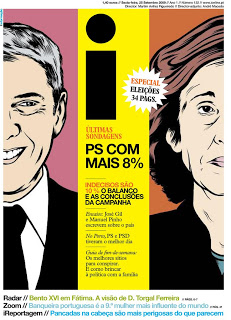
An interesting article in the NYT the other day: the Portuguese newspaper "i" that's breaking the rules of newspaper design. An example of a front page that I found on the "What's next: innovation in newspapers" blog.
Some interesting lessons that could also apply to presentation design:
  • Big images draw the attention of the reader
  • Interestingly, the newspaper abandoned the typical grouping of newspaper articles around specific categories. Research showed that people just scan for interesting headlines and do not need the structure of a detailed content categorization. Newspaper design does not need to resemble the organization structure of the editorial staff.
With regard to the second point: more and more I start to abandon the use of formal structures in presentation design. Simple use the structure or slide sequence that supports the way you want to tell the story. The brain is capable of dealing with a more creative story structure, as long as it is not bored. Novel writers are the ultimate masters in story line design creativity, but I agree that might be overdoing it a bit when designing your next pitch deck.

SlideMagic: a platform for magical presentations. Free student plan available. LEARN MORE
Motion graphics overload

Xplane continues to develop beautifully animated presentations using motion graphics. After Did you know 4.0, there is now another video developed in cooperation with the Economist: The carbon economy.
I really like the effects, textures, typography and animation of this presentation, but I think we still have to learn how to use all this technology effectively. The video is relying heavily on text to explain and compare quantitative data (similar to what bullet points do). The pace is so fast, that I have difficulty processing it all (and I had my 10,000 hours of data processing training).
My early thoughts on how to make the most of motion graphics:
  • Be careful with background music
  • Use text animation only to highlight quotes with non-quantitative information
  • For quantitative data go back to the good old simple data charts, but feel free to leverage those beautiful textures and typography
  • Beef up the animated character animation: things morphing into another shape, things growing/shrinking (the rising water levels in this video is a good example), the blend of animated film design and presentation design is great
  • Think about pacing of animations like you think about pacing of words. Have the courage to pause, accelerate, talk loud, talk softly, pause again. The entire video does not have to be an information roller coaster.
I am curious to hear your thoughts.

SlideMagic: a platform for magical presentations. Free student plan available. LEARN MORE
Zooming in down to cell-level

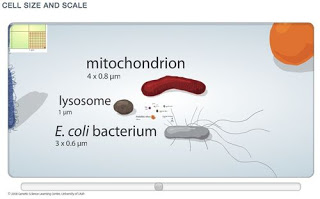
I really like zooming presentation formats such as Prezi, but I am still struggling to find useful application areas. Steve Johnson pointed me to one: to put proportions in perspective. Have a look at this amazing visualization of the relative size of biological cells.

SlideMagic: a platform for magical presentations. Free student plan available. LEARN MORE
Dusting off the McKinsey business system

McKinsey has been posting a number of classic consulting frameworks under the title "enduring ideas" on the McKinsey Quarterly site. I discussed before: consulting frameworks are great for solving problems, but often less good at communicating solutions.
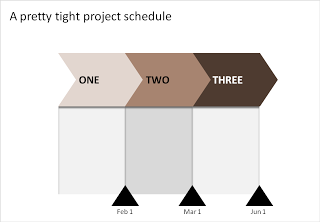
Recently, the business system was discussed. At McKinsey we used it to analyse the value chain of an industry (manufacturing, sales, distribution, etc.). The basic graphic concept of it (simple arrows) can also be used in another context: communicating a project schedule. See the example below.
Related reading:

SlideMagic: a platform for magical presentations. Free student plan available. LEARN MORE

Try to resist the tempation to over-do PowerPoint effects

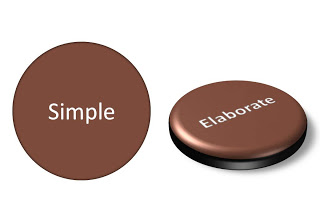
I see them more and more. A bullet point presentation with now and then a spectacularly formated PowerPoint object inserted. Bevels, textures, drop shadows, 3D rotations, lighting angles, they have it all.
Try to resist it. Like with data charts, the fact that you have the ability to use sophisticated effects does not mean that you have to use them.
Oh, one more thing. If you hired a professional presentation designer, and the only thing she does is apply 3D and lighting effects to your diagrams, it is time to find another one.

SlideMagic: a platform for magical presentations. Free student plan available. LEARN MORE

The "what have I done in the past year" slide

This slide always comes in somewhere in the annual management review. Here are all the activities of me (or my department) over the past year. The bullets are coming out:
  • Organized the annual consumer event
  • Biz dev trip to Poland
  • Created a new planning tool
  • Put a trade symposium together
These slides do not justice to your efforts. Break each bullet point up into a separate slide and go through them really quickly, but add something interesting to each slide:
  • Slide: an overview picture of the 80,000 visitors of your consumer event (a rock concert)
  • Slide: an image of you having a flat tire in the middle of Poland on the site of a major new potential customer
  • Slide: head shots + name of the very well-known people from the trade that were present on your symposium
  • Slide: sceen shots of the new sales budget planning tool
Stories make the achievement look much more impressive and people will remember them better ("hey, was that you who did this?").
A second implication: always have camera (or a photographer) at hand during important events, maybe even a better one than the one built in to your phone. Think ahead about next year's annual review presentation.
This same technique is also really useful when making presentations that need to present your company and its activities to a major (international) customer or business partner. The only pictures of the company that usually makes it in these type of presentations are the one of the lonely receptionist waiting for a call to come in.

SlideMagic: a platform for magical presentations. Free student plan available. LEARN MORE

Chart concept - lost in translation

A client in the pharmaceutical industry had this problem: a competitor managed to turn a relatively weak clinical fact and turn it upside down into a forceful message that took over the market. The good old tins cans are great to visualize this. See the example below (sanitized to maintain client confidentiality)
Related reading: an earlier post about classic miscommunication in a project.

SlideMagic: a platform for magical presentations. Free student plan available. LEARN MORE

Israel, startup-nation, and how it turned me into a presentation designer

A slightly off-topic post today.
Malcolm Gladwell talks about how people are the product of the hours they put into something, plus the privileges of experiences they have been given. I am Dutch, not Jewish, do not really speak Hebrew, but ended up living in Israel somehow.
The Israeli startup environment was the main driver behind me becoming a presentation designer. Countless entrepreneurs pitching me their dreams and asking me to "put it in PowerPoint" gave me a rare opportunity to expand my presentation design skills from structured McKinsey-style Board documents to presentations that need to touch someone's heart (often the heart/wallet of an investor).
A short video about a new book "Start-up Nation: The Story of Israel's Economic Miracle" in case you are not familiar with Israel as a hightech center.
Disclosure: I earn a small commission if you purchase items through Amazon links on this site.

SlideMagic: a platform for magical presentations. Free student plan available. LEARN MORE

Social Bees - client work that is not confidential

Most of the presentations I help design for clients are confidential, with some exceptions. Hazel Grace runs a company called Social Bees that helps small businesses establish their presence on Facebook using fan pages. We developed a presentation together to present her company in a session at the BizTechDay conference. It was designed over the course of 2 days (pretty last minute), at different ends of the globe, and I wanted to make sure to adjust it as much as possible to the presentation style of Hazel. SlideShare created some glitches in fonts and graphics, but the presentation below is still pretty close to the final result that was shown in San Francisco.

SlideMagic: a platform for magical presentations. Free student plan available. LEARN MORE

FedEx shows: no need for an elaborate PowerPoint template

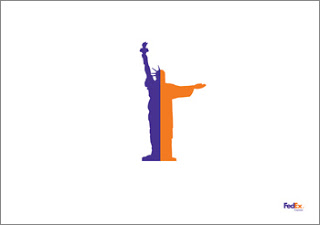
An ad from FedEx found on Ad Goodness:
Proof for one of my 101s of PowerPoint design: ditch the elaborate PowerPoint template (with colorful horizontal bars, big logos, and other graphics repeated on each page). From a mile's distance, anyone can see that this is an ad by FedEx. Achieved by consistent use of colors on a completely white background. They can almost do without the small logo in the bottom right.
Related reading: the 2nd post on this blog from July 2008

SlideMagic: a platform for magical presentations. Free student plan available. LEARN MORE

Photo subtitles (redux)

I talked about slide subtitles before as an idea to add detailed content to a "Zen-style" presentation with big images and few words, content that can be read when the document is viewed without a presenter being present.
I start using photo subtitles more and more as I increasingly move away from staged/fake stock images and use real images in my presentations. When using a creative common image from Flickr, it is important to give credit to the photographer, that is one thing to in the footer.
But the photo footer can also include a little bit more background information on what we see in the image, information that does not always have to contribute to the slide. The full details of the painter, the painting title and the place where the painting is currently displayed. The fact that the Paris cafe you see on the image is actually Cafe de Flore, in an image from 2006.
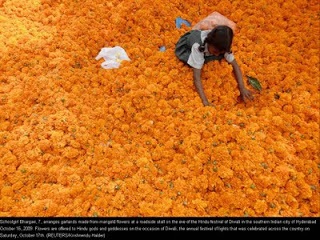
The Big Picture section of boston.com should feature in the RSS reader of every presentation designer. It is an almost daily stream of beautiful images (often more than 1MB a piece). The image below (related to the Diwali celebrations) was taken from it. You see a good way to format an image subtitle (with - in this case a lot of - information) as white text in black at the bottom of the photo.

SlideMagic: a platform for magical presentations. Free student plan available. LEARN MORE

Adoption curves - how long does it take?

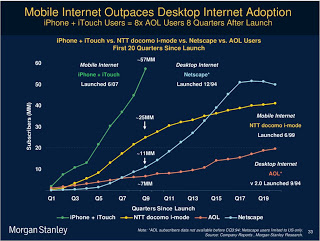
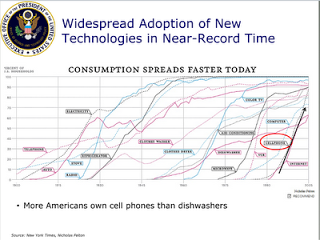
Adoption curves are a great way to compare the speed at which ideas spread, technologies were adopted or great companies were born. They are basic line graphs with the starting year set to zero. An alternative visualization would be a simple bar charts with "number of years before x reached y". While simpler, this approach loses a lot of information: the absolute size, the rate of adoption, and changes in the rate of adoption over time. The classic use is to show that new technologies are getting adopted faster and faster. A good example can be found in Mary Meeker's 2009 Internet presentation:
Mike Pulsifer found a chart that does not make all starting years zero, here is what happened:
Finally, interactive data visualization tools can add another dimension to adoption curves. See this example of a chart that shows how many years it takes to transform a startup into a large company (thank you Michael Eisenberg). The opening chart is far too busy to show in a PowerPoint presentation, but that's not the objective here. These charts are designed for pondering over: select and de-select lines, mouse-over data, etc. If you had to translate this chart into PowerPoint, you would have to use a number of slides to highlight the messages you want to stand out.

SlideMagic: a platform for magical presentations. Free student plan available. LEARN MORE

Book review - "Blink"

I finally managed to get to reading Blink: The Power of Thinking Without Thinking. Malcom Gladwell makes an engaging case for why snap judgement often turn out to be right, providing a constant flow of interesting case examples:
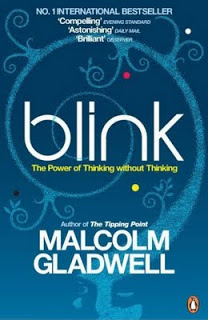
  • Firefighters deciding to leave a building seconds before it collapses
  • Art critiques "knowing" that a sculpture is a fake
  • Police agents making the wrong judgement call in a shooting
  • Autistic people unable to follow a pointing finger
The brain is very powerful, it can "thin slice" all memories of let's say all the people we met in our entire life and stack these up against a new individual in front of us. These powers work best when we are well-rested and not under stress. The human brain is built that in case of stress (i.e., we are trying to shake off a tiger that is chasing us), all non-essential brain functions are shutting down to focus on the immediate task at hand.
This book is not directly related to the subject of presentations, but it is relevant for some issues:
  • The first-second audience judgement that every speaker has to deal with
  • "Thin slicing" of bullet point decks. "Uh oh, the guys starts reading his bullets"/[scan the slide]/[open email on the mobile phone]
  • Count to 10, when a heckler manages to get you upset, wait a bit before answering. In "upset mode" your brain is less effective.
Disclosure: the links to Amazon in this post are affiliate links, I earn a small commission when you purchase items through them.

SlideMagic: a platform for magical presentations. Free student plan available. LEARN MORE

There is no upside in bending the truth in VC pitches

Politicians can make optimistic promises for the future, even if they know deep in their hearts that it will be (almost) impossible to deliver. Four years is a long time, memory is short, and the average member of the audience is unlikely to go through the numbers in detail. A VC (venture capitalist) pitch is totally different. If you make it pas the first VC partner meeting, a gruesome due diligence will start that will bring every fact to the surface. It won't start in four years, it starts tomorrow.
Management team integrity ("can I trust this guy") is probably a more important investment criterium than your actual business idea. If you flunk this test, you will have blown your VC pitch for your current venture, but worse, you are black-listed for years, maybe even decades to come as:
  • a person to invest in
  • a person to do business with
  • a person to build a partnership with
  • a person to hire
  • a person to believe
What to do if there are some not-so-great-details about your startup?
  • Avoid the subject as much as possible in a "cold-call" presentation, a deck that you send out to the world and is mostly read without you being in the room ("more data about customer uptake in recent pilots will be provided upon request")
  • Once in the VC partner meeting, have your perfect explanation ready: why it happened (including the explanation "I -beep- up", and what you will do to turn things around.
It's your only option, think about your integrity, reputation, consciousness, and your chances of winning the VC pitch.

SlideMagic: a platform for magical presentations. Free student plan available. LEARN MORE

Comparing an online presentation and a "Desperate Housewives" episode

For those readers who are not directly involved in the high tech industry (and are not reading Fred Wilson's blog on a daily basis), have a look at this presentation:
  • It is designed using the big images/big fonts style, one that is very suitable for online viewing (we are all impatient clickers).
  • The interesting content makes us click through all the 263 pages, and the key messages will stick in our heads as a result. Something that is hardly the case with most 30-pagers in this style on SlideShare.
  • The presentation is a potpourri of styles but I do not think this is a problem (You can see presentation Zen images, Tom Peters-style giant words, Back of the Napkin sketches). They are all used to build the case: some set the mood, some focus us to pause (and read a detailed quote), some explain a concept.
  • Hey, what about the title for this blog post? If you use 263 images, you have a new technique at your disposal: repeat. Images of Madison Avenue, or Egyptian cave art work bring the reader back to previous points in the presentation. Almost like a TV series such as "Desperate Housewives" in which each episode as a handful of almost independent sub-plots.

SlideMagic: a platform for magical presentations. Free student plan available. LEARN MORE

Setting your presentation's personality

Usually, I still fail to do this 100%: setting the personality of a presentation and using it consistently throughout the slides. What contributes to a presentation personality:
  • The basics: colors and fonts
  • Slide design approach: huge images/few words, "Economist-style" data diagrams (headline message supported by a graph), bullets (uh oh), cartoon-style, etc.
  • Type of images: color or B&W, "tacky" stock images or real pictures, people or landscapes/buildings or isolated objects, funny or serious, vintage or recent, images-only or illustration-only, etc.
One example of a consistent personality is a teenage bedroom: decoration, posters, are all in a consistent style. And the style fits the personality of the owner as well.
Let's think of a few possible presentation personalities:
  • Vintage 1950s images (family scenes, food advertising, first electrical appliances)
  • College humor (brutal, in-your-face, "funny" stock images isolated on white)
  • Zen (few colors, calm images, Helvetica light font)
  • Feminine (paintings, elegant images, some frivolous elements)
  • Economist (clean/neat data charts, one after another)
  • Cartoon (hand drawings, cartoon-type fonts, including very fat ones ["BANG"])
  • Napkin-style (simplistic drawings, hand-written/white-board style comments on printed text)
  • Macho (black background, performance cars)
  • Big words on a white background
  • Big words on a colorful background (Tom Peters)
  • Anti-design presentation (see Dave McClure's work, I am only discussing his presentation personality, not his real one...)
The list can go on forever. Think about personality when designing your next presentation, taking into account your own personality, the topic at hand, your audience's personality, your mood. And try to stick to it.
Related reading a post by Olivia Mitchell on The top 7 PowerPoint slide designs.

SlideMagic: a platform for magical presentations. Free student plan available. LEARN MORE

Filling parts of a data chart with an image

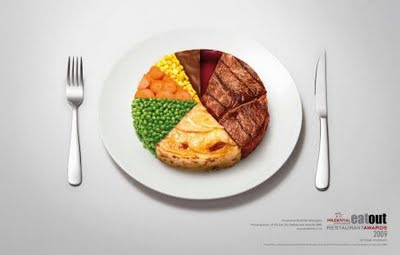
This ad on Ads of the World uses an effect that you can easily replicate in PowerPoint. Select a data point (or a data series), right click, fill, and select "image".

SlideMagic: a platform for magical presentations. Free student plan available. LEARN MORE

Chart concept - not there yet

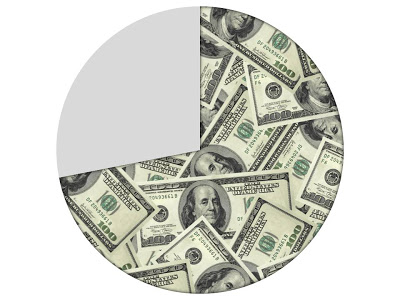
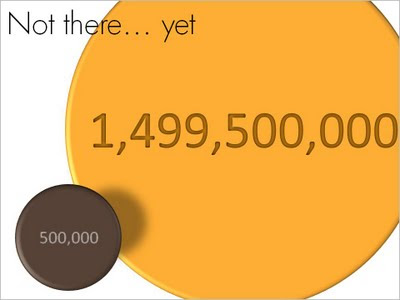
OK, we made some significant achievements, but we still have a loooong way to go. How to visualize this? Here is one solution inspired by a solar system constellation. Working with actual numbers can add a nice twist: take a bite of 0.5 million out of 1.5 billion can be visualized differently.

SlideMagic: a platform for magical presentations. Free student plan available. LEARN MORE

Reduce font size to increase readability

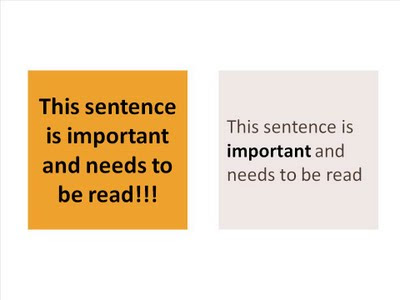
A follow-up on yesterday's post about avoiding bold fonts whenever you can. Sometimes, reducing font sizes can actually help you increase the readability of a point. See the example below.
Why is it easier to read the box on the right? (At least I find it easier to read)
  • There is (empty) white space around the text, drawing my attention to the sentence that now sticks out. On the left side, the sentence blends into the very loud background noise of the slide. The text now looks like a coherent piece of information that can be interpreted by the brain in one snapshot, as opposed to the left side where we need to read out each word left to right, top to bottom to see what's written there.
  • The proportion of the text block is more rectangular, close to the 16:9 aspect ratio of a wide screen TV, a shape that is more natural for the brain to absorb information
  • Removing the bold font except for one word makes the whole typography more calm and easier to read
  • Taking out screaming exclamation marks and left-aligning the paragraph improves readability further
Less is more.

SlideMagic: a platform for magical presentations. Free student plan available. LEARN MORE

Bold fonts as a last resort

Typography designers design a bold variety of a font as if it were a completely new type face. There is no magic computer algorithm that turns a regular font into a bold one. From scratch, designers need to make the call about balance and readability all over again.
I think bold fonts do not look as good as regular ones. They are often bulky and lacking elegance. Italics/bold fonts are usually even worse.
What to do as a presentation designer? Design your slide without bold fonts initially, and only add bold as a last resort. Your first tool of emphasis should be to increase the size of the font/
  • To highlight a single word, rather than inflating a whole sentence
  • To give more contrast to text written over an image as a background
  • To highlight a label in 10pt font or smaller in a complex diagram such as an IT system architecture
(Not) surprisingly, I find that regular slide titles look better than bold ones. Adjust your template if you can.
Somewhat related, a post on color as a last resort.

SlideMagic: a platform for magical presentations. Free student plan available. LEARN MORE