Everything in excess

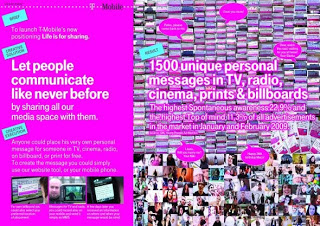
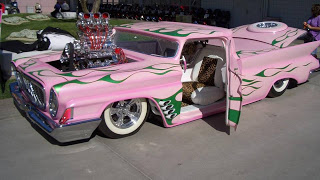
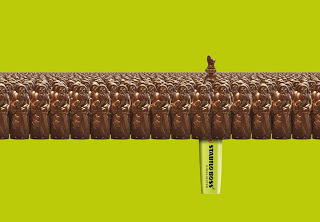
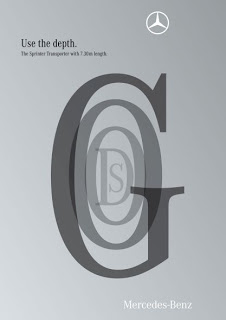
This ad reminds me of many poor PowerPoint slides I see. It sure grabs the attention, but that's probably also the only thing it does.
Let people communicate like never before, let's try to achieve that in 2010 but in a more positive way. A happy new year to you all.

A bigger picture on Ads of the World.

SlideMagic: a platform for magical presentations. Free student plan available. LEARN MORE

Five presentation images your audience will not understand

It is important that your audience "gets" the image on a slide immediately, otherwise they will be staring at it, thinking about it, trying to solve the puzzle, in short everything but return their attention to you as the speaker.
Some reasons why an image that makes perfect sense to you in your office might not work for a big audience:

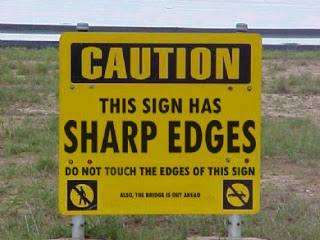
  1. The clue is in the small print (as in the image used in this post). Put a big marker to draw the attention to the sentence that matters
  2. Incredibly busy compositions, Times Square in New York, a screen shot of a video game
  3. Cartoons with a lot of text. Things get worse when a small cartoon image is scaled up, leaving a poor picture quality. Give your audience time to read it, and may black out the screen to focus attention back on you
  4. (Too) interesting people: an image of the red carpet during Oscar night might make people wander off and examine those beautiful dresses rather than listen to your story about Business Process Redesign
  5. Clever graphics such as an Escher drawing. "Hey, how did he do that?"

SlideMagic: a platform for magical presentations. Free student plan available. LEARN MORE

Avoid slide elements with negative connotations

I really like red as a bright contrasting color to put comments or circles on busy slides. Until a meeting with people in the Finance Department of one of my big corporate clients. "Can you please take the red off, in our (financial) language red equals bad news".
Three things to avoid in slide design:
  1. Bright red highlights in fonts, especially when talking about numbers
  2. Arrows pointing down (if you want to visualize something positive), why not redesign the slide and have them point up?
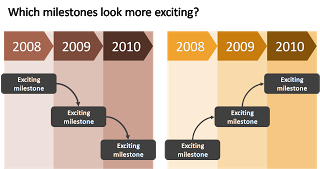
  3. Lines, sequences, or page elements that force the eye to go from top left to bottom right. The milestone graphic in this earlier post is a good example.

As always, these are not rules to be set in stone, it is just another piece of slide design context that you should be aware of.

SlideMagic: a platform for magical presentations. Free student plan available. LEARN MORE

The most expensive printing paper does not always look the best

Printers will always try to sell you the heaviest paper with the glossiest finish. If you are not printing the new corporate brochure or annual report, but need to make nice books of your PowerPoint presentation, I would go for a more modest choice of paper. It looks a lot better and costs a lot less.

Image via airgap

SlideMagic: a platform for magical presentations. Free student plan available. LEARN MORE

The best wishes for 2010

I would like to wish all readers happy holidays and a healthy and prosperous 2010. From a presentation perspective, try to make a difference in 2010, for example:

  • If you are working in an organization with a conservative approach to presentations, try to find an opportunity to demonstrate a different way to get your message across, spreading the ideas we talk about here to more people.
  • If you are a professional presentation designer consider donating some of your time to a really important cause and design the best possible presentation for it.

Since Tel Aviv is bright, warm, and sunny today, and probably the only Xmas tree in the city is put up in my apartment, I actually enjoy watching some of these old masters that have been put too many times on post cards:

Pieter Breugel the Elder, 1565, Hunters in the snow, Oil on wood, 117x162cm, Kunsthistorisches Museum, Vienna

SlideMagic: a platform for magical presentations. Free student plan available. LEARN MORE

A presentation review

You can learn a lot from regularly checking out the SlideShare front page. Here is a presentation that caught my eye. What I like about it:
  • A consistent theme of the images throughout the presentation: (mostly) black and white, retro images of workplace scenes
  • Original typography
  • A very simple list structure, counting down from 14 to 1
Some items that I like less:
  • Inconsistent use of colors (probably done on purpose though)
  • The grunge font and use of colors make the text sometimes hard to read over the image background
  • Putting text in vertical boxes, it looks cute but is hard to read
  • The transition from the presentation content to the "contact me" last page, the beautiful presentation falls back into a more common PowerPoint format including bullet points

SlideMagic: a platform for magical presentations. Free student plan available. LEARN MORE

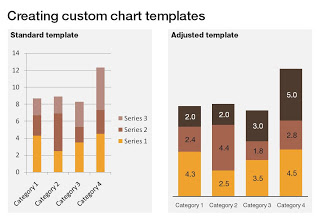
PPT hack - custom chart templates

The standard PowerPoint templates do not look very good. The standard slide layout invites people to write presentations through endless lists of bullet points. But even more time-consuming to change are the standard templates for data charts.
This earlier post with a make-over of a column chart in a presentation by Skype shows some of the pain a presentation designer has to go through over and over again to create decent data charts. It took me around 17 years to discover the option to create your own templates. Let's save you this time, right now.
If you click a chart in PowerPoint 2007, you can find the "save as template" button in the "design" ribbon of the chart. (Confusingly, two "design" ribbons pop up when you have a chart open, one for the chart, one for the slide). Give your template a name and PowerPoint 2007 will save it in the appropriate directory (with a ".CRTX" extension, but you do not need to worry about that).
The next time you select "insert chart", a folder appears at the top of the standard PowerPoint options, open it to create a data chart using your own customer templates.

SlideMagic: a platform for magical presentations. Free student plan available. LEARN MORE

The color orange - since 1512

While reading Chris Brogan's latest book Trust Agents, I came across this interesting factoid: until only very recently there was no word for the color "orange" in Western European languages. Chris claims that it is the main reason why we talk about "red heads" or "goldfish".

Research on Wikipedia provides more background:
The colour is named after the orange fruit, introduced to Europe via the Sanskrit word nāranja. Before this was introduced to the English-speaking world, the colour was referred to (in Old English) as geoluhread, which translates into Modern English as yellow-red. The first recorded use of orange as a colour name in English was in 1512, in the court of King Henry VIII.

SlideMagic: a platform for magical presentations. Free student plan available. LEARN MORE

Chart concept - the zipper

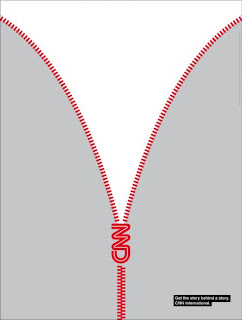
This ad by CNN reminds me of a chart concept that I use often to uncover things: the zipper. It can easily be replicated in PowerPoint using two approaches:
  • Select a stock image and remove the background color if necessary. An example here, or here, or this nice bag full of cash that you will return to your investors in 4 years.
  • If you are in an artistic mood you can actually recreate the zipper using basic PowerPoint rectangles, maybe using straight lines instead of curved ones.

SlideMagic: a platform for magical presentations. Free student plan available. LEARN MORE

Logos on PPT slides / logos on corporate gifts

It's the time of the year for corporate gifts. Many of these could be really nice, where it not for that huge corporate logo that makes you shelve a beautiful pencil instead of using it. A waste. If your gift is nice, you do not need to remind people that it was you who gave it to you, they will remember.
Most corporate PowerPoint templates waste a lot of screen real estate on elaborate graphics to make sure that the audience does not forget who the employer of the presenter is. This is not only a waste of space, but these graphics also disturb the overall balance of the slide. A far better way to reinforce your corporate identity is to use the corporate colors consistently through your presentation. No need for logos.
So far, a consistent message. But what if the presentation is poor, and people walk in and out of the conference room, check email, make a phone call or get a much-needed coffee? In that case, you might need a reminder of who is speaking when you re-enter the room. Maybe template designers just anticipate this situation...

SlideMagic: a platform for magical presentations. Free student plan available. LEARN MORE

Don't underline

Don't underline, ever. It does not look good. There are other ways to emphasize a word. Make it bold, change the word's color. Love these tiny blog posts.

SlideMagic: a platform for magical presentations. Free student plan available. LEARN MORE

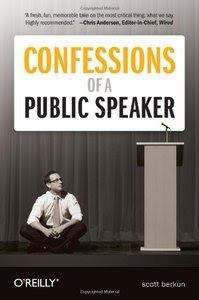
Book review - Confessions of a public speaker

There are many books on public speaking, which probably makes sense: people who are good at speaking on stage usually also enjoy spreading their ideas in print. Many of these follow the same pattern: the experienced speaker explains to us (inexperienced novices who "hum", read out bullets from the screen, and avoid eye contact with the audience) how we can improve our stage performance.

Confessions of a Public Speaker is different. Scott Berkun is a public speaker, he does it for a living. What makes this book so interesting is that he discusses his own mistakes, failures, and stage fright. He puts into practice one of his techniques to gain credibility with your audience: tell the truth and be honest.


Here are some of the examples of the interesting experience and advice that are discussed in the book. Yes, taken out of their context and in random order:
  • Why it is not useful to imagine your audience naked
  • Even if (you think) you fail miserably on stage, the audience probably won't notice
  • You have the mike, you are in control, do something nice for the audience (ask to change the freezing temperature of the A/C)
  • Don't talk endlessly about yourself and your resume
  • I love the chapter about "eating the microphone". When you start a presentation you have all the attention, the audience really wants you to do well, If things go bad, you will hit a point that you lose the audience, nobody is paying attention anymore. You ate the microphone.
  • It pays of to learn how to write better headlines/presentation titles
  • Anticipate the obvious question that any intelligent audience member would ask.
  • The concept of interference (taken from physics): the audience is still digesting one point when you bring on the next. As a result, both points are lost.
The most important thing we learn from the personal experiences and mistakes of Scott is to practice, practice, practice. Never try to wing a presentation.
Disclosure: O'Reilly mailed me a free copy of this book for review. I earn a small commission on products you buy on Amazon via links on this site.

SlideMagic: a platform for magical presentations. Free student plan available. LEARN MORE

As promised my solution to the NYT infographic

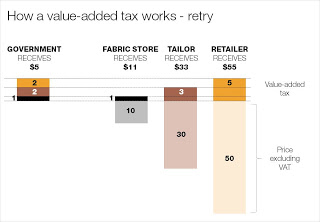
Here is my suggested solution to yesterday's puzzle: improving the NYT's infographic that explains how a value-added tax works. Let me know what you think and/or whether you have alternative suggestions. You can click on the image for a larger picture.

SlideMagic: a platform for magical presentations. Free student plan available. LEARN MORE

What matters now

Seth Godin is the master of spreading ideas, he just published a new ebook:
  1. He convinced more than 70 authors to write a page
  2. Got the collective work to look decent in a PDF
  3. Orchestrated dozens of blogs to discuss it
  4. (Encouraged bloggers like me to push it further in a second wave)
You can download it here, or see it on Scribd below. As you click through it, try to think about why you stopped on certain pages, while skipping others. A good lesson for designing presentations for online audiences. What do you think of page 78 by Dan Roam?

SlideMagic: a platform for magical presentations. Free student plan available. LEARN MORE

Puzzle for tomorrow: improving an NYT infographic

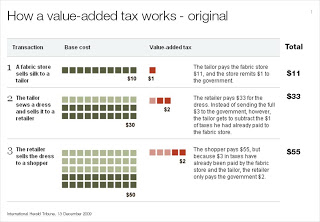
If you see it for the first time, value added tax is a bit tricky to explain. The NYT (equals the Herald Tribune) gave it a go in the infographic below. I am trying to do a better job and will post it in tomorrow's blog post. I am actually not that happy with my result so far.
This is a heads up: give it a try yourself and we can compare notes tomorrow.

I had to modify the image on the NYT web site slightly and added the right column with totals that appeared in print, but was omitted in the online version of the graphic.

SlideMagic: a platform for magical presentations. Free student plan available. LEARN MORE

Creating depth of field on your slides

This ad on Ads of the World reminded me what a difference the angle at which an image is taken can make.The chocolate figures were repeated an almost infinite amount of time and stacked behind the front row. But to create the illusion of depth and infinity, the figures in the back stick just a tiny bit over the heads of the ones in the front row.

Think of this when picking your next image, especially roads or other concepts that need to show a long journey towards somewhere. The best images are those where the photographer was almost flat on the ground. Hopefully the photographer of this image (orangeacid on Flickr), managed to get up before the next train came by.

If you are interested: photographers refer to this effect as depth of field. If you look carefully at the image of the rail road, you see that the focus is narrow: the immediate front of the image is blurred, then follows a narrow strip of pin-sharp railroad beams, after which the rest of the image is blurred again.
Related: extreme use of depth of field to make images look like miniature toy scenes: tilt-shifting

SlideMagic: a platform for magical presentations. Free student plan available. LEARN MORE

Here is a new way to look at 3D typography

This ad uses 3D typography in a way that is obvious, but only after you have seen it. The letters are positioned and sized in such a way that it creates a sense of depth, semi-transparent fills add to the effect. Very well done. It works best for short words that have lots of "open" characters in it, for example "goods". Via Ads of the World.

SlideMagic: a platform for magical presentations. Free student plan available. LEARN MORE

Picking the right portrait images

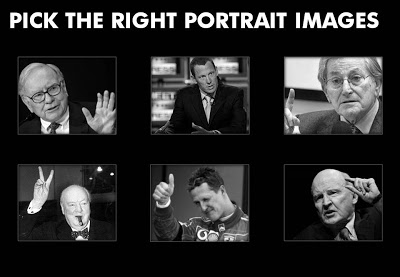
Images of celebrities are like corporate logos: recognizable from a long distance. When selecting images for your presentation, think of the following:
  • Re-size and crop the images in such a way that all of them have roughly the same scale, and that the eye line more or less lines up
  • Choose active pictures: people pointing, making a gesture
  • Have people look towards the center of the page
  • Harmonize the background (light or dark)
  • Harmonize the color, make them black and white if necessary
I stuck to most of these suggestions (not all) in the example slide below:

SlideMagic: a platform for magical presentations. Free student plan available. LEARN MORE

Chart concept - a variation on the Venn diagram

Venn diagrams

are great to show overlapping features. In practice however, it can be hard to position text in the circular shapes. I often use an adjusted version of the Venn diagram, one based on boxes. Boxes are easier to draw, and especially, you can make the center box (the most important one) really large.

As you can see below, I did not rely on semi-transparent colors to create the overlap effect. Rather, I just drew the third box in, giving me complete flexibility to decide on colors. Again something that would be hard to do in a circle Venn diagram.


UPDATE February 2018: I have now added a number of Venn diagrams in PowerPoint to the SlideMagic store, including the rectangular ones that are described above.

SlideMagic: a platform for magical presentations. Free student plan available. LEARN MORE

Testing a new introduction presentation

I am working on a new introduction presentation that should explain potential clients a little bit about my background, but most of all, convince them that an investment in a professionally designed presentation is worth their while.
I would welcome your thoughts, especially on the idea of using the part of the full width of the 16:9 format for an image subtitle.

SlideMagic: a platform for magical presentations. Free student plan available. LEARN MORE