Fixating jumping objects

In the 1990s, when we were still relying on print documents at McKinsey, I would hold the deck against a strong light source to look through it to see whether repeating elements such as titles and page numbers were lined up properly. (Something like this cartoon machine)
"Jumping titles" are the result of slightly misplaced items on a slide sequence: when you hit page down and scroll through a series of slides quickly you see the titles moving up, down, right, and left. How to prevent it?
  1. Use drawing guides (excellent post on PowerPoint Ninja)
  2. Control-C object on one page, control-V on the next page. The element will appear in exactly the same location. Good for sequences of diagrams with buildups.
  3. Set the exact location of an object in PowerPoint (format ribbon, size, position)

SlideMagic: a platform for magical presentations. Free student plan available. LEARN MORE

Zap that lone bullet point

  • Bullet points are bad for presentations, so use the opportunity if you can get away with just one brief sentence on a slide: resist the urge to put a bullet point in front of it, even if the Microsoft PowerPoint template really encourages you to do so. Bullets are only for lists of 2 or more sentences, (and lists of 2 or more sentences should be avoided if you can).

SlideMagic: a platform for magical presentations. Free student plan available. LEARN MORE

Off topic - optical illusion

In the middle of the video, they show you how they did this. After you've seen that, you still don't get it.

SlideMagic: a platform for magical presentations. Free student plan available. LEARN MORE

Chart concept - low hanging fruit (that's gone)

"Low-hanging fruit" is a term that is over-used in corporate meeting rooms. Recently I used a nice giraffe image to create a tongue in cheek slide explaining that all the easy opportunities have been picked away. (Yes I now giraffes eat leaves and not fruit..). Image found on iStockPhoto.

SlideMagic: a platform for magical presentations. Free student plan available. LEARN MORE

Demo slide sequence versus demo video

I get this question a lot when designing presentations for technology startups: "Hey, can you embed our demo video into the presentation?" I almost always try to avoid this:
  • Embedding videos always triggers Murphy's law: on-stage technology fail
  • As a presenter it is impossible to control the pace at which a story in a video is told
I prefer to go low-tech and create a sequence of slides that explains the technology innovation step by step with big arrows and markers highlighting what goes on. Sometimes I even use screen captures from the video as source material. The presenter can explain things in his own style, slowing down if the audience wants to (and without having to fear technology issues).

SlideMagic: a platform for magical presentations. Free student plan available. LEARN MORE

Should you put page numbers on PowerPoint slides?

I think yes, but really tiny ones, in a color with a very low contrast with the background. Standard PowerPoint templates put huge page numbers, dates, and other graphical distractions on every page. It looks ugly, and having a visible counter running on your pages might make your audience wonder how many more numbers there are before the end.
Why still put them on (in a very small font)? It makes it easer to discuss comments/improvement suggestions on your slides, it is easy to run a meeting with printouts and related to that, it makes it easier to put your print deck together if you drop your pages on the floor.

SlideMagic: a platform for magical presentations. Free student plan available. LEARN MORE

The summary page that does not stick

Many presentations start with a summary page, and most of them are stuck in the middle. They give a bit more information than "I am going to tell you why this is the best investment in cloud computing that you can make" and a bit less information than what is needed for the message to stick (the audience internalizing the logic in their head, and more importantly, their heart).
Worst case scenario: you give the presentation twice: spending 20 minutes on the summary page (which the audience does not understand), then repeating the whole story in the presentation (which bores the audience that misses the details and nuances "oh, we covered that already"). Blackberry on, attention off.
So, have the courage to keep the summary page really, really short. On the first page, tell the audience vaguely in what "box" they should put you in. "We do cloud computing platforms". Then use a fast-paced sequence of slides to explain the idea that you try to get across. So, now your audience knows, feels, and understands.
After this, the more traditional stuff can come in, even summarized by an agenda page or summary.

SlideMagic: a platform for magical presentations. Free student plan available. LEARN MORE

Six-figure public speaking fees

Kaitlyn Cole of OnlineUniversities.com research a top ten of the world's best paid public speakers.
Some of these amounts are pretty high, but hey, hiring a celebrity singer to your party will also cost you dear. Scott Berkun talks about public speaking fees in his book Confessions of a Public Speaker as well.
what do you think, value for money?

SlideMagic: a platform for magical presentations. Free student plan available. LEARN MORE

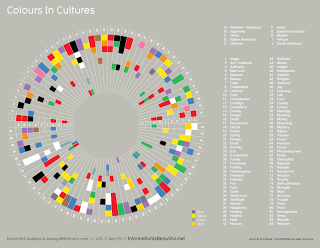
Colors mean different things in different cultures

A nice diagram on the blog Information is Beautiful (original post). Something to take into account when picking your next color template. click the image for a larger picture.

SlideMagic: a platform for magical presentations. Free student plan available. LEARN MORE

Kill procrastination

Productivity and creativity have a very weak correlation with the number of hours you put into your work. This presentation provides some useful lessons:

SlideMagic: a platform for magical presentations. Free student plan available. LEARN MORE

De-cluttering spaghetti charts

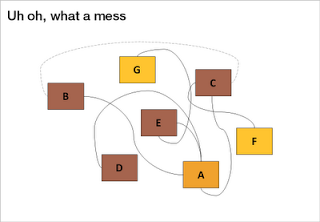
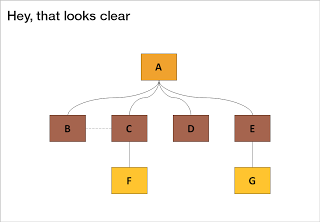
Sometimes, complexity is a visualization issue. When you design your slides, save the audience some work and do the disentangling for them. Example: there are 2 approaches to drawing a technology architecture:
  1. Start with the boxes, then draw the links
  2. Start thinking about the links, then draw the boxes
The second approach always gives a better result.
Thank you Jared Chung for emailing these charts to me in response to the post about the U.S. Army spaghetti chart (in a slightly different context though).

SlideMagic: a platform for magical presentations. Free student plan available. LEARN MORE

Location-based memory

The brain works in funny ways. Recently, I snapped a picture with my mobile phone of a busy and messy whiteboard after a long team discussion. It didn't matter to me that I will not be able to read most of the text (poor handwriting, poor phone camera). Because of the location of the scribbles on the board I was perfectly able to recall the entire discussion without reading a single word.
What happened? The brain had assigned its memory of the entire rich discussion we had to locations on the whiteboard. "Going to a place" is enough to unlock the memory.
Presentation lesson? Credit to management consultants. Sometimes it is good to have that busy chart with all strategic options on one page, it does not have to be pretty, the axes you use to define that 2x2 framework do not really matter. The chart will become the mental map of the discussion. Even when you improve it later on, chances are that your audience will ask you: "hey, that's the fat-cow option in the top right in our previous diagram isn't it?"

SlideMagic: a platform for magical presentations. Free student plan available. LEARN MORE

Over-used adjectives

Create a slide that makes your audience feel and understand that something is extraordinary, huge, massive, revolutionary, game-changing, and/or enormous instead of writing these over-used adjectives in a bullet point.

SlideMagic: a platform for magical presentations. Free student plan available. LEARN MORE
In defense of the U.S. Army spaghetti slide

In defense of the U.S. Army spaghetti slide

This PowerPoint slide by the U.S. Army is making the rounds on the Internet to ridicule ineffective presentations that stifle creativity and decision making.

The article in the NYT

does not actually talk about this busy slide specifically, it attacks the use of bullets points and the fact that the majority of time spent by staff in corporate/army headquarters is wasted on producing PowerPoint slides. Seth Godin is repeating today once more why bullet points are bad for you.

The spaghetti slide itself is not that bad, at least that is my opinion.

It makes the point that things are complex, that issues are related, all contributing to a highly unpredictable cause and effect sequence. Almost like the myth of chaos theory, and the butterfly in China that can cause a hurricane on the other side of the planet. Pretty good slide to visualize that.

I guess the source of the slide must have been some management consulting report that applied the technique of Business Dynamics to a complex problem (I recognize the many loops having used the tool in my previous life as a McKinsey consultant).

What is Business Dynamics? Business Dynamics tries to apply the physics of systems theory (electronic circuits, weather, ocean waves, etc.) to business. Complex problems consist of a number of forces. Forces influence each other. Forces can be good and bad, some cancel each other out, some reinforce each other. Everything is related to everything.

In some cases it is possible to model all these forces in a computer program and you get your hands on a very powerful tool: software can make simulations of what happens if you give the system 1 shock by studying the 2nd, 3rd, 4th, 7th order effect of your action.

My guess is that's what the U.S. Army was trying to do, and the chart cited here is simply a screen dump of the output pages of these Business Dynamics tools. In itself, a sensible approach to the problem. Not sure whether it delivered the solution though.

A better way to present it could have been to start with the overwhelming complexity of the overall problem (serve the spaghetti), after which you pick one counter-intuitive loop and show how a positive action can actually do serious damage to the objective of your mission.



UPDATE: There is now a "business dynamics"-like chart available for download in the template store

SlideMagic: a platform for magical presentations. Free student plan available. LEARN MORE

Presentation lessons from TEDx Tel Aviv

I had the privilege to attend TEDx Tel Aviv. It was a wonderful day. Some (random) observations:
  • 18 minutes are great: short enough to keep the audience attention, but long enough to cover the most complex subject material. Anyone can present their idea in 18 minutes, if you can't, it's the presenters fault, not the audience's intellectual abilities
  • Personal stories are incredibly powerful, especially if they connect to the interests of the audience. "The doctor told me that my daughter will die soon. I did not accept this". You are on the edge of your seat.
  • Polish is not everything. Imperfect English, glitches, as long as your story is passionate and genuine, your audience will forgive you.
  • Many different uses for slides, none of them were speaker notes/bullets: 1) relative proportions between numbers [$250m versus $250bn), 2) setting the mood [screen shots of mountain bike trip surroundings], 3) functional video [mosquitos getting zapped by lasers]
  • Building on that. Slides can be incredibly simple and still be effective. And I mean even more simple than stock image + a few words. 
  • To keep a conference day interesting you need to shift gears all the time. Spectacular presentations, humor, emotional/touching content. Variety keeps up one's attention
  • Related: the power of an emotional ice breaker presentation. My organizational behavior professor in INSEAD was a master at this: start a session with a deeply emotional topic or question, and it makes the audience forget their usual defenses, makes them more receptive/open to subsequent content. Hard to explain why, but it works.
  • Unlike you, yourself, the audience is not really interested in your personal background and history, they want to learn from your ideas and perspectives. Talk less about yourself, talk more about what the audience can learn.
  • Props are great (bottles of algae for example). 
All in all this day was a great presentation experience. Hardly anyone in the audience left the presentation hall, hardly anyone was checking email on their phone/laptop. It is possible to stay a focussed listener for an entire day.

SlideMagic: a platform for magical presentations. Free student plan available. LEARN MORE

Looking back at the UK election debate

I could watch the latest UK election debate live in Israel on Sky News and was fascinated to see these professional debaters in action. In the House of Commons, the UK parliament, debates are very lively and real. In this televised election debate I was a bit disappointed; candidates were hardly listening to one another and tried to find anchor to revert back to their scripts to make a key point.

Where does it get interesting and convincing? When the debaters go off-script and truly try to convince their audience from the heart. They should have the courage to debate like they do in parliament, and stop trying to nail that sound bite. Dry statistics do not move crowds.
The other interesting thing I noticed is the power of the face expression when an opponent makes a point caught by the ever-present cameras. Face expressions reveal one someone thinks an opponent made a really good point.

SlideMagic: a platform for magical presentations. Free student plan available. LEARN MORE

Drawing stick figures

The original PowerPoint stick figure (screen bean) clip art has been overused (although I miss him sometimes). Hand-drawn stick figures can be the basis for an original presentation. This small presentation by Betsy Streeter provides some useful (and funny) suggestions on how to draw them.


Thank you Matt Jahl for pointing me to this.

SlideMagic: a platform for magical presentations. Free student plan available. LEARN MORE

HTML5 and presentations

HTML5 is a major revision of the HTML language that powers web pages (Wikipedia link for the details). You can find an example of a presentation designed entirely in HTML5 here. Use the cursor left and right keys to navigate between slides. The presentation does not have a good design, but it gives a flavor of the capabilities of HTML5.
Could HTML5 become the default file format for all presentations, decoupling software that creates presentations, environments that display them, and sites that build a social infrastructure for sharing on the web?
  • As file sizes become larger, and internet connections become always available, a "in the cloud" file format for presentations becomes more likely
  • I expect the position of Microsoft PowerPoint to go down somewhat, as smaller niche presentation design tools make inroads (Prezi, etc.)
  • New devices with touch interfaces will add a whole new dimension to animations in presentations, HTML5 seems very well suited to deal with those.
I am curious to hear the perspectives of readers which a stronger technical background than mine.
Thank you Eyal Sela for suggesting this link.

SlideMagic: a platform for magical presentations. Free student plan available. LEARN MORE

Your presentation is not a UN Security Council resolution

We have all been in meetings that went on and on about the exact wording of a phrase: legal contracts, mission statements, press releases, UN Security Council resolutions, and yes, also presentations. I am not arguing to be less precise when writing a presentation, but word smithing bullet points is not going to make your message clearer, the opposite is probably true.
  • Everyone knows that bullet point slides make bad presentations. And the more text you cut, the less ability you have to get that exact nuance right.
  • The details of text in a presentation do not register, what matters is the - partly improvised - story told by the presenter; and a good story does not include repeating memorized, carefully crafted sentences.
  • Hollow mission statements (earlier post) are the ultimate example of the information asymmetry between the presenter and her audience. It took months to develop, it contains everything the company stands for, people have thought about every word and punctuation mark in it, and still: nobody understands it.
Photo by Flickr/gruban.

SlideMagic: a platform for magical presentations. Free student plan available. LEARN MORE

Google's latest investor presentation (part 1)

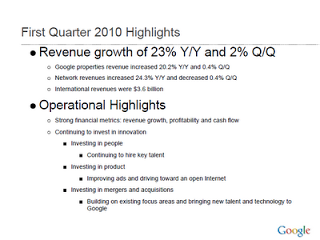
Quarterly results presentations are in the public domain, designed for an external audience. Below is the presentation that Google used to communicate the results for the first quarter.
These types of presentations are usually prepared under great time pressure, as there is very little time between the moment the accountants are producing the figures and the communication to the analyst community. Unfortunately, this impacts the quality of the presentation (form, not content).
I will use this presentation to provide some suggestions on how to improve corporate presentation design. Not that I am picking on Google (Skype was an earlier victim), this presentation is just a typical example of most analyst presentations I see.
Analyst presentations are slideocuments: they need to be packed with a lot of financial information and the audience (equity analysts), usually know the company and its financials very well and are keen to see this quarter's update of last quarter's figures that are already sitting in their spreadsheets. So, adding large images with huge font text is not really appropriate here. Also, I will forgive the use of bullet points in these documents. Still, the quality of the slideocument can be improved.
Let's look at the opening page. The one thing I like is the minimalist template that Google uses: a tiny logo at the bottom right of the page. Great.
Some improvement suggestions:
  • Break it in two pages, one addressing the financials, one the operating highlights
  • Use horizontal bar charts to highlight the growth rates year-on-year and quarter-on-quarter
  • On the second slide, do not use bullets if you just need to make 1 point
  • Try to make the sentences shorter
The way the operational headlines are written is fairly generic, and analysts might not pay attention to them as they are still internalizing the numbers that are written before. The key point that Google was trying to make (I think) is that despite the difficult climate growth is business as usual at Google. At would make that point in some big arrow to the left of the text.
More feedback to come in future posts.

SlideMagic: a platform for magical presentations. Free student plan available. LEARN MORE