
Presentation design and web design

In many of my presentation design projects, the content of the presentation is already 80% available on the client's web site: a startup with an exciting new technology, the strategy of a big Fortune 500 company. But it clearly does not a good job at explaining the messages in an interesting visual way. (Otherwise you could just put a modified version of the web graphics as the background to your presentation).

Over the past years, we have learned a lot about effective design of presentation visuals. Maybe web design is next, and can learn from this process? Fewer buzzwords, fewer environmental policies, less prominent contact details. If bullet points and clutter do not work in a presentation, why would they work in a web site? Instead: the web page as a clutter-free presentation canvas that tells your story.

The implication will be that, similar to presentations, we get a level playing field in web design. A good web site template that can handle big images and sliders is all you need from the technical site. That is the easy part. The difficult bit is to get the story right.

SlideMagic: a platform for magical presentations. Free student plan available. LEARN MORE

Photo compositions that hurt the eye

Photo editing software can do a lot, and it is getting increasingly used in advertising. This ad however shows its limitation. When you try to be photo-realistic and it is not 100% right, it just hurts the eyes. The concept behind the ad is good, the execution not.


Via Ads of the World.

SlideMagic: a platform for magical presentations. Free student plan available. LEARN MORE
Mark Suster on pitching to VCs

The great people of SalesCrunch are beginning to put the videos from my New York presentations online. First up is Mark Suster, a well-known venture capitalist from LA who introduces my presentation on pitching VCs


Mark is one of the best VC bloggers around, and I was honored when he offered to introduce my presentation in New York in person. We found out the night before that we happened to be in the same city (it is a statistically low probability that 2 people from Tel Aviv and Los Angeles are at the same time in New York).

More videos to come. Thank you Ann Lupo for the video recording and editing.

SlideMagic: a platform for magical presentations. Free student plan available. LEARN MORE

Voice pacing

Here is an interesting article about voice pacing on the BBC web site. Researches analyzed voice patterns of 1,400 attempts to get people to do a phone service. Here they are:
  • Speak moderately fast
  • Pause
  • Don't change the pitch of your voice too much
You could re-write these findings as follows:
  • Be energetic and enthusiastic
  • Don't rattle off a pre-programmed script
  • Act normal
In short, have a human conversation.

SlideMagic: a platform for magical presentations. Free student plan available. LEARN MORE
Editable maps in PowerPoint

I do not agree with the design approach of the majority of free template databases on the web. Many of these sites are built to attract Google traffic and host cluttered templates that seem nothing more than a more colorful extension of Microsoft's standard bullet point opening screen.


Presentationmagazine.com fits somewhere in the middle. Managed by Jonty Pearce, It hosts some standard PowerPoint templates that I would not use in a design, but also has a number of useful articles.

The really useful content of this web site however is its library of free editable PowerPoint maps. You can download them and color states, countries and continents with your own colors. An excellent resource.

SlideMagic: a platform for magical presentations. Free student plan available. LEARN MORE

PowerPoint feature wish list for Microsoft

My wish list of features to be included in PowerPoint. Feel free to add your own in the comments.

PowerPoint 2011 for Mac
  • Custom font embed (available in PPT 2010)
  • Ability to set custom theme fonts (available in PPT 2010)
  • Selection pane (available in PPT 2010)
  • Define custom grid spacing (available in PPT 2010)
  • Ability to lock the static grid

PowerPoint 2010 for Windows
  • Better integration with photo browsers (available in PPT 2011)
  • Included weights in font selection menu (available in PPT 2011)

SlideMagic: a platform for magical presentations. Free student plan available. LEARN MORE

Magic Mouse versus Logitec MX mouse versus Magic Trackpad

I have experimenting with various input devices over the past month.
  • The Logitech MX mouse: a leftover from my old PC. Large to fill the palm of your hand completely, this device has worked for me very well over the past years. If there is one drawback it is the materials it is made off. This fake-velvet plastic actually wears off after long use, making the piece of hardware that you touch all day, every day of the year look and feel dirty.
  • The Apple Magic Mouse. I actually had to get used to this device for a few days. Unlike the Logitech mouse, it is small. You move it with your thumb and index finger. The surface is made of glass enabling you to manipulate the cursor and zoom just like you can do on a track pad. I love the clean material (glass), no more sticky plastic on your fingers. Sometimes though, the scrolling can be a bit unpredictable in PowerPoint, oops I just went 2 pages up.
  • The Apple Magic Trackpad is a standalone version of the trackpad that is usually found in laptops. It has a nice large surface, and nice click. For a casual computer user, this would be the one I recommend. For the professional designer (me included), I still prefer a mouse to manipulate and drag shapes across the screen.
After a month, I end up working with the Magic Mouse most of the time. I still need to find a solution for that unpredictable scrolling somehow.

SlideMagic: a platform for magical presentations. Free student plan available. LEARN MORE

Helvetica - the movie

I finally managed to get my hands on the movie Helvetica (affiliate link). It is a wonderful documentary about this famous type face, and how it has managed to infiltrate our daily lives on almost anything we see written in the street. Beautiful movie shots, nice music, and interviews with some well-known typographers.


Somewhere hidden inside the movie is an interview with typographer Erik Spiekermann where he gives his opinion about the typeface helvetica. He speaks very quickly but in a few seconds he makes a great number of points that I have started to notice as well: Helvetica works great with lots of white space around it and Helvetica needs careful attention with weights. (In fact I think one of the reasons that Arial looks so poor is that people usually only use the regular and bold variants. Helvetica comes in an endless range of weights.)

SlideMagic: a platform for magical presentations. Free student plan available. LEARN MORE

Security and presentations

The presentations I design for conferences are in the public domain (these are the ones you will find as examples on my web site). Almost all other ones are confidential. Fund raising pitches for startups (although I think most startups could actually be better off sharing these stories with the world), sales presentations (same here), and last but not least, quarterly results presentations to the stock market (incredibly sensitive a week before the announcement, completely public 5 minutes after).

I have started to beef up the security of my IT infrastructure, especially for these earnings announcement. The biggest risk is not so much becoming the victim of a crime, it is human error. Forgetting your laptop somewhere, typing in the wrong email address and sending a highly confidential document to the wrong person.

Here are some basic steps you can do to beef up your security.
  1. Password-protect your laptop and have the screen lock up after you left your device standing unattended for 15 minutes.
  2. Send confidential files only by hitting "reply" to an earlier message by the trusted person to prevent making typos in the name (and have your email program trying to be helpful and pulling up the email address of a random person)
  3. Put PowerPoint files in an encrypted WinZip file before emailing them. Standard PowerPoint passwords can easily be broken, you can Google the technique to do this easily. An encrypted WinZip file covers you if you send the file to the wrong person by accident. (There is also a WinZip version for Mac, it costs $30)
  4. For added security, apply a full encryption of the harddisk, or put highly confidential files in an encrypted folder on your disk. The free open source utility TrueCrypt is great for this. 

SlideMagic: a platform for magical presentations. Free student plan available. LEARN MORE

When the analogy gets too complicated

Yesterday I spent hours trying to find the perfect analogy for a company that sell a complex storage technology. After a while I realized that while an analogy would be really good to describe one aspect of the story, it would be impossible to find one that covers all issues involved. The analogies become more complex than the technology itself.

Plan B: back to the drawing board and start explaining the technology itself with simple visuals, without analogies.

SlideMagic: a platform for magical presentations. Free student plan available. LEARN MORE

Borrowing frameworks

Consulting firms, market research companies, universities produce an endless amount of complex and sophisticated-looking frameworks. Often, I see people borrowing one, re-drawing it, or overwriting the labels with their own text. It is better than you don't.
  • Frameworks are highly specific to a certain context, so they are unlikely to work when you borrow them for your own presentation
  • Frameworks are great to solve problems, to discuss issues with a small audience who has worked with it before, but are incredibly poor at communicating to a large audience
Instead, sketch your own simple, specific, and relevant diagram on a piece of paper and replicate that in PowerPoint.

SlideMagic: a platform for magical presentations. Free student plan available. LEARN MORE

Bullet points and abs

I always preach that the look and feel of an investor presentation should match the brand identity of the company.


Abercombie & Fitch sticks to this principle. See the investor presentation here.  The Footnote website comments:
We counted no fewer than 13 slides that featured shirtless dudes baring their pecs. That’s nearly 20% of the slides in the 67-slide deck. The PowerPoint was part of the company’s Investors Day earlier this week. The presentation seems to have gone well, judging by this brief WSJ article that notes that Abercrombie stock climbed over 8% on Tuesday, in part, it seems, based on the bullish projections made during the presentation. So there was some substance in between the eye-candy slides.
On a more serious note, this investor presentation has some good and bad practices. The good:
  • Muted formatting
  • The use of maps to highlight global expansion
  • The real images of the customer excitement in the stories
Things that could have been done better:
  • Too many bullet points, the numbers would have looked even more impressive if they were put into data charts
  • I like the big bold "$1.0bn" type text across the maps, just don't put financial data in red.
Thank you Robert Lakin. Image by Abercombie & Fitch.

SlideMagic: a platform for magical presentations. Free student plan available. LEARN MORE

Clean up your mess

Daniel Higginbotham has set a little web site with a useful recap of some important design principles. He called it www.visualmess.com. Worth skimming through. Now that I get to think of it, I am actually in the cleaning business...

SlideMagic: a platform for magical presentations. Free student plan available. LEARN MORE

20 minutes is enough

TED presentations take a bit less than 20 minutes. If you have watched a few of these presentations, you will have noticed that this time is more than enough to get a complex idea across in your presentation.

Apparently, 20 minutes is also the average time a grown up can really focus his attention (source).

Add these two observations up and you realize that you need to design your presentation in such a way that the full pitch comes across in roughly this time. Anything more can be added as additional case studies examples, other plot variations. Possibly again in blocks of 10-20 minutes.

A few people with a lot more knowledge than I have about attention span and the brain are reading this blog, feel free to add your perspective.

SlideMagic: a platform for magical presentations. Free student plan available. LEARN MORE

It takes time to learn how to design well

Ira Glass, an American radio personality, makes an excellent point in this video: (aspiring) designers have great taste, but it will take a long time to get to a quality of work that matches it.

This resonates with me personally, as I find it hard to believe that it was me who designed some of these presentations sitting on my hard drive a few years ago. And I know that I will have the same reaction when I look back at today's work in a few years from now.

Ira says that most people do not make it past the dip, they quit. His message: hang in there and you will get there and good things will happen.


It is worth it to watch the entire 5 minute movie. Ira gives a case example where he shows how a rambling radio report he created 8 years ago (he was not even a beginner then) and how it can be replaced by one sentence that is natural, specific, and to the point. I am not a frequent radio listener, but I find that newspapers often apply this technique of an elaborate, dramatic article opening, taking forever to explain an issue in normal, human language.

Via Jason Kottke.

SlideMagic: a platform for magical presentations. Free student plan available. LEARN MORE

VMware acquires SlideRocket

VMware acquired in-the-cloud PowerPoint alternative SlideRocket. Up until now, VMware focused on virtualization infrastructure, it's software can be used to create multiple virtual computers on one hardware platform. Many of you might be running a Windows PC inside a Mac using this technology (VMware Fusion).

It is not completely clear what the strategic intent of VMware is. Will it try to go up one level from basic infrastructure and start offering cloud applications competing directly with Microsoft? Or does it want to use it for something else?

The big issue with alternatives to PowerPoint is the installed base of corporate users that over the years has learned how to work with it. But maybe the extra financial power of VMware enables SlideRocket to get a shot at doing to PowerPoint what Microsoft Word did to WordPerfect?

SlideMagic: a platform for magical presentations. Free student plan available. LEARN MORE

I don't know

When pitching VCs it is better to say "I don't know" if you do not know the answer to a question than making something up that turns out to be wrong later. Management integrity is a more important investment criterion than having all facts readily accessible in your head.

SlideMagic: a platform for magical presentations. Free student plan available. LEARN MORE

Click-click

When I have not prepared a presentation well enough, and/or made last minute changes to the  deck, I find myself skipping a slide during a live presentation. Click-click, when you see a difficult slide coming up in presenter view (more about PowerPoint presenter view here).

Where do you need to practice most?

The opening of the presentation, and not only because here you are likely to be a bit nervous at this stage of your talk. It is here, where you usually talk about yourself as an introduction. You know the content of this section very well (hey, it is about you) and you do not bother rehearsing. So you are on stage, you go blah, blah, blah, and a feeling starts creeping in. This section takes a long time. Is all this detail about me really interesting to the audience. How should I have told the story about myself in such a way that it sets up the rest of the presentation correctly? It is hard to talk about yourself, better practice it...

Visual mental placeholders. These are slides that are great to talk around in a one-on-one meeting. You probably have used them a lot. You know them inside out, and hence do not bother to practice them. But when you are on stage, you realize that you do not have a good sequential story in your mind to talk a larger audience through this slide.

Bad slides. You will discover them when you practice. DELETE.

SlideMagic: a platform for magical presentations. Free student plan available. LEARN MORE

We need to cut slides!

Think about how a movie director cuts down a movie.
  • She does not just chop a few scenes randomly
  • She does not double the speed at which the movie runs.
  • She does not use picture-in-picture to cram two scenes in one screen shot in parallel.
Instead:
  • She thinks in terms of time, not number of scenes. What can I do in 90 minutes?
  • She thinks about plot lines, not scenes. Can we lose that flashback without impacting the story?
  • She thinks about the overall story. Now that we cut a few plot lines, do we need to overhaul the whole story line?
You are your own presentation director.

SlideMagic: a platform for magical presentations. Free student plan available. LEARN MORE

Emailing presentations without verbal explanation

A presentation designed for a large audience with big images and few words cannot stand on its own without verbal explanation. Ideally, you would design two separate decks; one for the big audience, and one for emailing. But, constantly updating two presentations in parallel is time consuming and prone to errors. Here is a work-around.

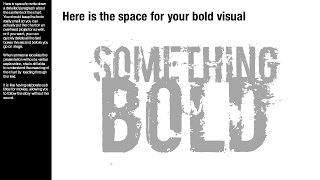
Design your presentation for a 16:9 screen and add a text column on the left side. Put the full narrative of the slide in a tiny font. The email reader gets the full explanation of the chart. The big audience will see a blurry bar on the left of the slide, clearly distinct from the larger visual. You could go further and quickly delete the text bars a few seconds before you go on stage.

Not perfect, but good enough.

SlideMagic: a platform for magical presentations. Free student plan available. LEARN MORE