
Slide make-over secrets

You do not have to pay a professional presentation designer to do basic chart make-overs. Here are the secrets:
  • Take out ugly reflections, bevels, and huge shadows 
  • Center things properly
  • Align and distribute any object on the slide
  • Cut words on bullet points
  • Group bullet point lists in sub categories
  • Take out random colors and replace with those in the logo
  • Remove Times Roman and Comic Sans and replace with Arial
  • Take out italics and underline
  • Round chart numbers and other financial information
  • No ticks on chart axes
  • Chart gap width to 50%
  • Titles all in the same place, on 1 line (chop words if necessary)
  • Replace fuzzy logos with hi-res ones
  • Fix hanging bullet points (i.e., the next line starts under the bullet, rather than at the indent)
  • Reset images to their original aspect ratio
After this, no need for a slide-make-over artist.

SlideMagic: a platform for magical presentations. Free student plan available. LEARN MORE
Ltd. NV. Inc. AG. SA. Gmbh.

OK, officially these company names include these legal classifications, but on slides they just create extra clutter. Take them out.

SlideMagic: a platform for magical presentations. Free student plan available. LEARN MORE
The early-stage VC pitch deck

Ryan Spoon of Polaris Ventures wrote this guest post on TechCrunch about designing a VC pitch presentation for early-stage startups. Most of his guidelines are valid. I have a few comments on some. It is interesting to take a step back and read between the lines how a VC is analyzing a presentation. Ryan does not say everything explicitly.
How to Create an Early Stage Pitch Deck
Quickly go through the deck. I will not repeat his advice. My comments:
  • The elevator pitch. Ryan says he wants one, but he is not looking for that all encompassing sentence with a beautifully crafted vision statement full of buzz words. He wants to understand in a second what you are about. VCs like to put you in a box so they do not have to guess any longer. So the purpose of the elevator pitch is not to convince the VC to invest in you, it is to explain what you are doing and intrigue to flip the page. Parallels to existing startup successes are always great.  “We are Foursquare for 65+ year olds”
  • 10-15 slides. Not true. He means 5 minutes to click through
  • Sharing. Assume your deck will be forwarded. So it should stand on their own, without verbal explanation. People have become a lot more efficient at absorbing information from slides. Where it used to be the case that you had to stand up and explain present your ideas in 45 minutes for people to understand, most VCs probably get the content of your idea right away in 5 minutes. The 45 minute presentation is for questions, and most importantly, to figure you out as an entrepreneur. So, big picture slides are OK, but make the titles understandable
  • The market and opportunity. The questions Ryan is outlining are the right ones, but there is a trap here that they get answered in business school-type language with buzz words. Make these points very specific and real. Make a market sizing that can be understood on the back of an envelope. No fluff here.

SlideMagic: a platform for magical presentations. Free student plan available. LEARN MORE
Making a fool of yourself

Reading through the book The a-z of visual ideas, I came across this tip: do not hesitate to make a fool of yourself in a creative briefing. So true. I think the largest part of my contribution as a presentation designer is asking the stupid questions, and having the courage to take a fresh perspective on things.

If you design your own presentation, ask a friend or colleague to take the role of asking the stupid questions. If you are working in a big corporation and need to design a presentation for a senior executive,  maybe try to get a few minutes of 1-on-1 time to ask the stupid questions, it easier to make a fool of yourself there then in a huge meeting.

SlideMagic: a platform for magical presentations. Free student plan available. LEARN MORE
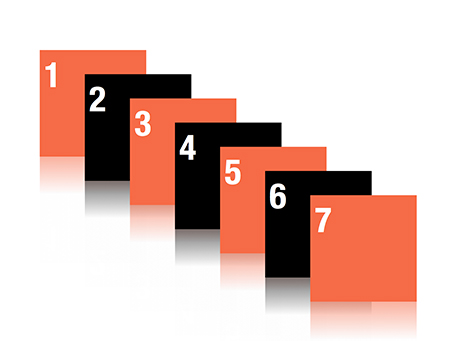
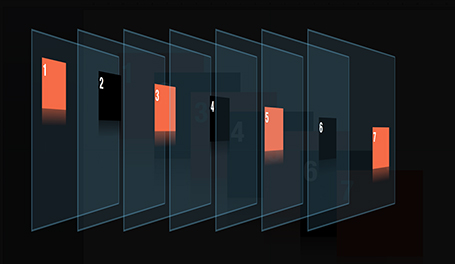
Re-ordering objects

Despite my 10,000 hours of PowerPoint I never bothered to push the re-order objects button in the arrange menu (Mac). Hey, and out came a nice interface to make things to the front or to the back of the slide.


SlideMagic: a platform for magical presentations. Free student plan available. LEARN MORE
Teaching teenagers (2)

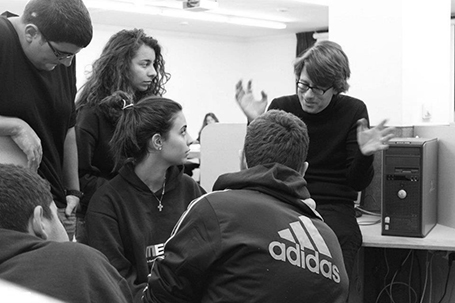
Last week I did my presentation design workshop to this year’s class of MEET (more details in an earlier post) in Jerusalem. I used grown-up stuff for these 15-16 year olds, a slightly modified version of my deck about investor and sales presentations designed for a senior managers. The results surprised me.

Despite being a 09:30am speaker (teenagers do not get a lot of sleep when they stay away from home in a large group), 95% of eyes were hooked on me (5% were deeply a sleep). In my usual audiences I rarely find someone really sleeping, but there are a lot more people distracted, even if your story is interesting.


Afterwards, I coached the students in the design of the pitch presentation of their ideas. It was interesting to see how these kids were sponges of ideas: the presentations were stitched together over the course of 3 hours and often looked better than finalized version 1s of pitch decks that clients sent me at the start of a project. The new generation has not been programmed by overhead transparencies and Microsoft PowerPoint bullet point templates, but is ready to try a fresh approach to design.

Teaching to present your ideas should be introduced in education much earlier than it is today.

SlideMagic: a platform for magical presentations. Free student plan available. LEARN MORE
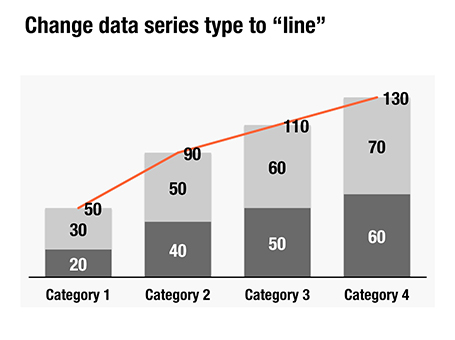
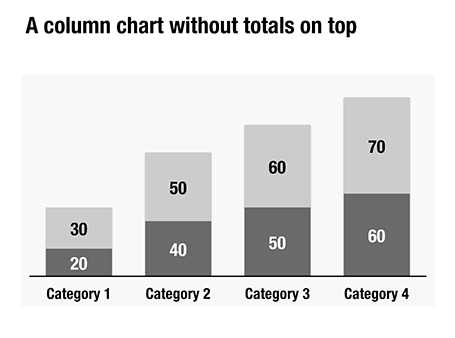
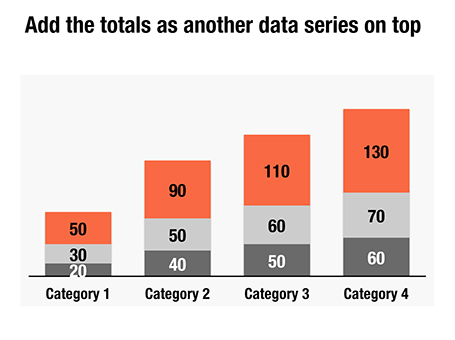
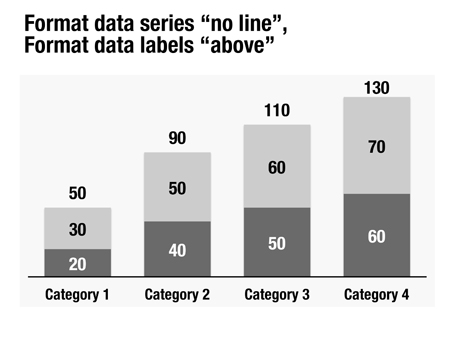
Column chart with totals

Here is a little trick to create automatic totals on top of column charts. This is an alternative to placing text labels manually, and especially useful when the data in the column charts is changing frequently.


SlideMagic: a platform for magical presentations. Free student plan available. LEARN MORE
Book: The a-z of visual ideas

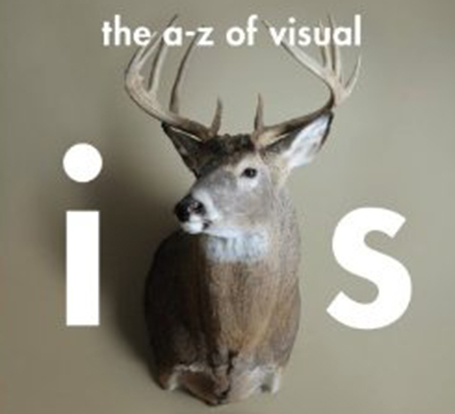
An A-Z of Visual Ideas: How to Solve Any Creative Brief (affiliate link) by John Ingledew, aims to help you solve visual creative deadlock. Organized in 26 sections following the letters of the alphabet, it introduces a number of concepts that you can use as the basis of your design. Examples: counter-intuition, eyes, juxtaposition, and zeitgeist.


It is written more with advertising or poster design in mind, but still it can help you broaden your creative mind with the concepts provided in the book, or by encouraging to think out of the (visual) box yourself.

SlideMagic: a platform for magical presentations. Free student plan available. LEARN MORE
Timing your elevator pitch

Sometimes there is little time to do your pitch. You meet an investor in the corridor, you got a slot at a pitch competition. Seth Godin said the other day that no one has ever bought anything in an elevator: in other words a very short elevator pitch consisting of 2 sentences with hollow buzz words is not going to excite an investor.

Instead, you need to add more specifics to intrigue the investor to invite you to another occasion where there is more time to discuss your idea.


But sometimes, elevator pitches become less effective when you take too much time. You start adding details, provide facts, that take the energy out of your presentation, that require time to close all all the plot lines. There is a dip between the perfect short pitch, and the full-length 25 minute story. Do not get stopped in the middle, it is better to keep it short.

SlideMagic: a platform for magical presentations. Free student plan available. LEARN MORE

Room temperature

A room that is too warm will put your audience to sleep, even when you have the most exciting presentation in the world. Climate control is one more thing to add to the pre-presentation technology check list.

SlideMagic: a platform for magical presentations. Free student plan available. LEARN MORE
Strategy deck <> pitch deck

The other day a client showed me a pitch deck that a management consulting firm had prepared for them. Having been a consultant myself, I recognized it immediately: structured, organized, logical, dense. Great to solve a problem and/or convince an analytical audience with lots of facts.

Not good enough to make the sale: a good sales presentations needs to touch both the heart and the mind. Consulting presentations touch the latter, not the first.

Instead, put the consulting deck aside and start from scratch. What is the story you would like to tell? Sketch visuals without borrowing / Frankensteining / recycling charts from the consulting presentation.

SlideMagic: a platform for magical presentations. Free student plan available. LEARN MORE

A cinematic presentation opening

Have a look at the way Francesco Paciocco credited this short video about Milan. It is a video, but the shots are very close to still images. We do not see the cliché images of the Duomo and other tourist attractions. Instead, a flow of scenes from daily live.


I like cinematic openings in PowerPoint presentations. A series of images to take the audience to a different place. While it might be a bit too complicated for the average designer to create such a video, you can create a very similar effect in PowerPoint by sequencing a series of Flickr images with a Creative Commons license. If you want, you can go one step further and add a slow-zoom effect to your images.

Via Fubiz.

SlideMagic: a platform for magical presentations. Free student plan available. LEARN MORE

Tricky, those switch-overs

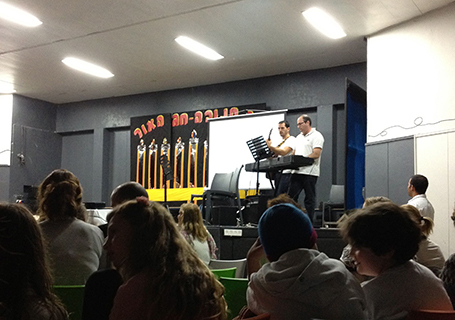
Switch-overs of technology during a presentations are always tricky. That is why I hardly ever recommend clients to use videos played in different software and live demos in short presentations. The worst case scenario happened last night at the school Hanuka event of my daughter.


After the performances of all the groups had been completed, this series of events unfolded:
  1. Mic: “After all the songs we already sang, we will just sing one more, really, only one”
  2. Full lights on in the room, everyone blinking
  3. Mic: “ There are huge amounts of donuts waiting for you outside the room!
  4. People struggling to put up the small PowerPoint projection screen again with lyrics (you can see it behind the band)
  5. People running around the stage looking confused at papers with lyrics, pianist and guitarist flicking through pages
  6. Kids are heading for the donuts...
Happy holidays to everyone!

SlideMagic: a platform for magical presentations. Free student plan available. LEARN MORE

(Brief) venture into print design

I just completed my first print design. Not that I expect this to be my bread and butter, it was a natural extension of a presentation design project I did.

It struck me how simple and fast it is to design a brochure when you start with a good PowerPoint presentation. You have the right flow, you have the right visuals, you have the right visual language. When you start designing print from a blank sheet of paper, people argue and iterate forever to get the wording of the text right, to do the layout, and then, oh, we need a few illustrations as well.

Here are some of the things I had to do.
  1. Teach yourself InDesign. Luckily it was not necessary for this small project extension, I had to go through this process to write my ebook
  2. Print the PowerPoint as a press-quality Adobe PDF to get huge resolution images. If required, remove foot notes, page numbers and other clutter from slides.
  3. Select the right charts from the deck. Out go the ones that describe the story flow, out go the huge-images-one-word slides, what you are left with are the diagrams, the flow charts, the data charts
  4. When you place a chart crop out the titles, foot notes and other distractions
  5. Go through an iterative process of writing text columns, moving images, re-formatting text until you are happy with the result
So my advice to brochure designers: start with a slide deck...

SlideMagic: a platform for magical presentations. Free student plan available. LEARN MORE

Bullet point punctuation

Bullet points can happen to the best of us. If they are short and to the point, there is no need to end them with a period or full stop.

SlideMagic: a platform for magical presentations. Free student plan available. LEARN MORE

MSFT updates Office 2011 for Mac

More details about Microsoft Office 2011 version 14.1.4 are here. PowerPoint is not explicitly mentioned, but it promises that it fixed Excel crashes (hopefully the ones that make my life miserable sometimes).

SlideMagic: a platform for magical presentations. Free student plan available. LEARN MORE

Screaming colors

I just re-designed my Twitter avatar with a dash of fluorescent paint to stand out in the noise of social media. It is interesting how computer screens work. A really bright color is not yellow or orange, but rather the ones that sit on the edges between 2 colors. Mine is in between yellow and green. It is as if our eyes are being teased by interfering light waves that are just a bit off in terms of wave length.

Other examples of interfering colors are on the border of pink and blue, or green and blue. I blogged earlier about how great classical painters manage to create rich colors through a combination of color mixing, patterns, texture.

SlideMagic: a platform for magical presentations. Free student plan available. LEARN MORE

Teaching slide design to teenagers

In a week from now I will be teaching 15/16 year olds about presentation design in Jerusalem.

MEET is an MIT-sponsored high-tech education initiative that aims to bring Israeli and Palestinian students closer together. Over the past years it has become a very prestigious program and only a small fraction of the applicants get in. Admitted students go through an intensive curriculum of programming and other IT-related subjects in addition to their regular high school commitments. A business idea pitch competition is part of the program, and I will be teaching, coaching, and judging the students.

I know that there are many teachers among the readers of this blog and would welcome suggestions on how I can adjust my content aimed at senior executives and startup CEOs to a younger audience.

You can find out more about MEET here.

SlideMagic: a platform for magical presentations. Free student plan available. LEARN MORE

Arial Black in caps

Arial is not as pretty as Helvetica. Arial Black in lower case looks really horrible. However, Arial Black in all-caps looks actually pretty good and is installed standard on most computers in the world. It only fits presentations with very few words on a slide.

SlideMagic: a platform for magical presentations. Free student plan available. LEARN MORE

Subtle reality distortion

Subtle reality distortion in Photoshop can give great results. One of my favorite uses is a black and white background with a small logo or item in color added into it. Here an image of another Idea Transplant truck on its way to a happy client with a little help of the Photoshop vanishing point filter.


SlideMagic: a platform for magical presentations. Free student plan available. LEARN MORE