
Video summary in stills

Embedding video in presentations has its drawbacks. It adds another technical risk factor when setting up the presentation outside your office environment. File sizes become so big that it is hard to email a document. And a PDF version of the presentation does not show the video.


As a solution, you can put in a video summary in your presentation consisting of a few key still images taken from the video. Our brain is powerful enough to make up most of what happens in between, and might even imagine the Star Wars sound track in the background when looking at last year’s Volkswagen Super Bowl ad (which I think was better than the one shown this year).

Look how showing the video, or showing a consecutive series of page-filling images keeps up the suspense of the audience. Showing all images on one page gets the point across as fast as possible. The first approach might be the most fun, the second one is what works best when trying to communicate an idea to busy people.

SlideMagic: a platform for magical presentations. Free student plan available. LEARN MORE
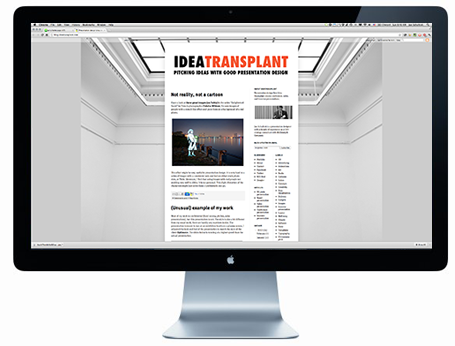
No need to show that monitor

In technical pitch presentations, you often have to show the application through screen shots. While a picture of the application inside a monitor frame might look nice, it is a poor way to get your audience to see the content of the screen.


I would cut the monitor, cut the window bars above and below your application, and even zoom in to parts of the screen to highlight what is important. Cover everything that is not relevant (ads for example) with white boxes to keep things clean.

Having said that, there might be 2 uses for the monitor shot. One for a very quick 5-second slide that enables you to say “Let’s talk about the application” and move on. The second application is a slide that shows that your software is running on multiple platforms, but in that case you need a monitor image, a tablet screen shot, and a mobile phone application all on one page.

SlideMagic: a platform for magical presentations. Free student plan available. LEARN MORE

Not reality, not a cartoon

Have a look at these great images (on Fubiz) in the series “Enlightened Souls” by French photographer Fabrice Wittner. He uses images of people with a stencil-like effect and puts them on a background of a real photo.


This effect might be very useful in presentation design. It is very hard to a series of images with a consistent look and feel on either stock photo sites, or Flickr. Moreover, I find that using images with real people not working very well in slides. It is too personal. This slight distortion of the characters might just solve these 2 problems in one go.

SlideMagic: a platform for magical presentations. Free student plan available. LEARN MORE
(Unusual) example of my work

Most of my work is confidential (fund raising pitches, sales presentations), but this presentation is not. The style is also a bit different from my usual work, there are hardly any numbers inside. The presentation is meant to run at an exhibition booth on a plasma screen. I adjusted the look and feel of the presentation to match the style of the client Optimove. The video below is running at a higher speed than the actual presentation.

SlideMagic: a platform for magical presentations. Free student plan available. LEARN MORE

16:9

The presentation canvas is no longer limited to the overhead projector. Laptops, TV screens are often used to display PowerPoint presentations with a wide screen or 16:9 aspect ratio.

For movies, 16:9 is great. The wider screen is more natural for our eyes. For slide design though, I find it less useful. We can read best when titles are short, or text is set in a narrow column. As a result, with 16:9 my slide design almost always changes to a horizontal story: element or title line on the left, and 1 or 2 other elements to the right. It always takes me a bit longer to comprehend the slide.

So, when I am designing a presentation specifically for a plasma screen (a trade show booth for example), I will stick with 16:9, but for other output devices I revert back to the good old 4:3.

It is always good to contradict yourself, see my earlier post from August 2008.

SlideMagic: a platform for magical presentations. Free student plan available. LEARN MORE
How to export a chart from Excel to PowerPoint?

Yesterday’s post triggered this question: how to export a chart from Excel to PowerPoint? The short answer: copy the data not the chart.

Standard Excel charts are ugly, they have the wrong formatting, they have the wrong colors, axis labels are in the wrong place, data is not rounded up and too precise. Copying and pasting an Excel chart into PowerPoint is also copying all that ugliness. Even worse, copying and pasting it as a picture might make it look blurry.

I believe that data charts in a PowerPoint presentation deserve careful attention and need to be designed by hand. You start by inserting a blank, ugly, PowerPoint chart into your slide, next copy the data across from Excel and then start tweaking until it looks perfect.

Once you have done one, you can use that PowerPoint chart as a template for other charts in your presentation.

SlideMagic: a platform for magical presentations. Free student plan available. LEARN MORE

How to pick the right data chart

PowerPoint offers a vaste number of options for designing a data chart. Which one should you choose? Here are some of the guidelines I use:
  • A ranking by size: horizontal bar
  • Development over time with a handful of data points: column, if there are many data points a (fat) line
  • Decomposition of something in its parts: a waterfall (see a post on how to make waterfalls charts), waterfalls also work great to visualize 1 year of a Profit & Loss statement
  • Showing something as a % of the total: a pie chart if it is one year/period, a series of 100% columns if it is a trend over time.
Data has multiple messages. In the analysis phase of your work, you need to study all of them. But when you are ready to present conclusions, you pick the one and only message that is worth emphasizing. If you cannot settle on one, make 2 charts and present them quickly after each other: the market grew [click], our market share increased.

If things get really complex, for example when there are 3 or more factors driving change going into difference directions, you might have to resort to a source-of-change waterfall chart, followed by a data chart that highlights each of the trends individually.

SlideMagic: a platform for magical presentations. Free student plan available. LEARN MORE
Zapping double Keynote shadows

Usually I blog about grander things than software tricks. Today is an exception with a help-desk-type post. This thing drove me crazy in Keynote: a double drop shadow that just did not want to go away in the data labels of a chart. If I am struggling to find it, there must be a few other people out there getting annoyed by this. Here is a video that explains how to get rid of these ghost shadows. The fonts button at the top right of the screen has some hidden options.


SlideMagic: a platform for magical presentations. Free student plan available. LEARN MORE

Movement without animation

I am not a big fan of animation. It distracts the audience, can sometimes look funny instead of serious, and is not visible when you send people a PDF file, the new standard with the proliferation of platforms (PowerPoint, Keynote, mobile devices).

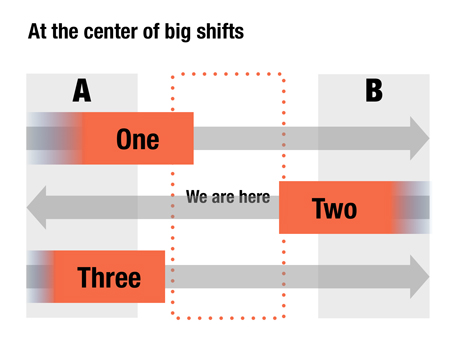
Here is an option to give a sense of movement in your slide without using animations. When filling a box, select the gradient option and let one side fade out to 100% transparent or 0% opaque. The chart below is a sanitized version for a client that is right in the center of some pretty major transformations that are going on now, so if you are an investor, that is where you want to be as well.


It has been a while since I blogged about chart concepts (here are some earlier ones), let me know if these ideas are useful for you.

SlideMagic: a platform for magical presentations. Free student plan available. LEARN MORE

Presenting a mobile demo

Passing a device with your demo app around the audience is not enough, even for a small group of people:
  1. Screens are small and do not make a big impression
  2. People do not know what to do in order to see the best of the app
So the point of passing the device around is mainly to prove that your app exists. It should be supported by very large screen shots on the projector screen that tell the story behind the app, with the right sequence of features. Preferably with different levels of zoom: a user holding the device, the opening screen with the device around it, and then zooming even further to parts of the screen.

SlideMagic: a platform for magical presentations. Free student plan available. LEARN MORE

Projecting black

When a screen projector projects the color black, it projects nothing. Think about this when designing slides. If you have an image with an aspect ratio that is different from a regular slide (4:3, 16:9) and it is not possible to crop it without damaging its visual impact, make the bits of the slide that are not covered black instead of the default slide background color you are using. Once on screen, the black border will blend in with the area outside of the projection screen.

SlideMagic: a platform for magical presentations. Free student plan available. LEARN MORE

Two industrial narrow (free) fonts

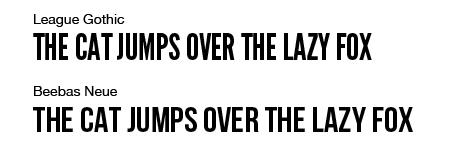
Beebas Neue and League Gothic are my favorite narrow fonts that can fit a lot of text in a headline, and give that industrial modern look to a slide. And best of all, they are open source.


SlideMagic: a platform for magical presentations. Free student plan available. LEARN MORE

Apple iBooks and presentations

Two main take-aways from the announcement by Apple yesterday about the new platform to design and publish interactive books for the iPad:
  1. It removes the excuse that the lizard brain inside me used so far to stop me from writing a book: the thousands of dollars and months in training I would have to invest to port an InDesign document to a working iPad app. Here you go, I committed publicly.
  2. This platform can be fantastic to write investor and sales pitch documents for one-on-one meetings or sending to a prospect before you meet face-to-face. The standard for the boring text “Executive Summary” just got raised in such a way that people might actually start to read them.

SlideMagic: a platform for magical presentations. Free student plan available. LEARN MORE

Diagonal lines

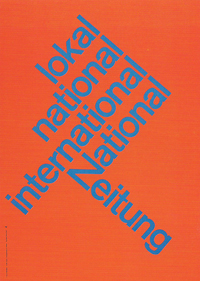
I do not understand why I have not used diagonal lines in presentation slides more, they work great together with simple shapes and colors. The Swiss graphic designers from the 50s and 60s were masters in this. The poster on the left is for the National Zeitung, designed by Karl Gerstner in 1960. On this page, you will find a few more posters that use diagonal lines combined with simple clean typography.

SlideMagic: a platform for magical presentations. Free student plan available. LEARN MORE

Non-wordy-self-explanatory slides

Everyone has bought into the idea that presentation slides full of text are poor communicators of ideas. The result is that many presentations are now so minimalist, that hardly anyone can understand them without verbal explanation. This creates a problem, as more and more, slides are used as commercials of ideas that are shared without the presenter being present (yesterday’s post).

One solutions is to add an audio stream to your slides, or going a step further, turning your slide deck in a small video. This requires some technical skills though. Also, busy important people often prefer to sticking to the communication medium that they have grown up with: slides. But, they like to do so at their own pace (meaning fast), impatiently looking for a visual that catches their attention. Boring blah blah blah gets skipped.

So what to do in situations where you do not have time / resources / patience to separate slide decks for a live presentation and a cold email attachment? Some ideas.

A very clear headline. Write your message out in a human sentence, you can even change your presentation template to allow 2 lines of text at the top of your page.

Pick useful images. A big squished orange to support that your are crushing the competition does not add much. A photograph of bored people waiting and lining up to buy paper lottery tickets to argue that there is a market for mobile lottery makes the point perfectly.

Swap verbs for visual concepts. A tension can be 2 boxes of text with a rope in the middle that is about to snap. An implication can be arrows with 2 words in each pointing to another box with 2 words. Best of both worlds can be a Venn diagram. Contrasts can be 2 boxes with opposing colors.

Minimalist data charts for trends. If you want to make the point that you are the biggest, show a ranking of market shares, do not just write the words #1 with a picture of a sprinter winning the race. Only show market shares, not profit, not growth, not customers, just one simple metric that makes the point.

Full data tables for reading. A P&L contains a lot of stuff. After you have summarized the key trends (1-2 statistics in a minimalist data chart), put in the whole data table (nicely formated). If the reader is interested she will pause, if not, she will skip.

Useful clutter. When things are complex, or the competitive field is crowded, show it. A pages full of logos, or a detailed systems diagram will look very busy and complex, impossible to understand. Well hey, that is the exact point you want to make.

Do not [click] break a [click] human sentence [click] in too many [click] pieces. The stunning photographs are great but by the time the Niagara Falls come up, the viewer has forgotten what the sentence was all about.

SlideMagic: a platform for magical presentations. Free student plan available. LEARN MORE

A shift in my design work

A few years ago, the main purpose of my presentation design work was to arm people with a powerful set of slides for a live stand up presentation. Usually, the meeting would be set up after an initial telephone or in-person conversation, and the audience would see the slides for the first time.

More and more, I see my visuals being used to get to that meeting in the first place. The “cold” email attachment. Presentation slides become a short 3 minute commercial for an idea. The distribution is not in print, not on TV, but through an emailed document or URL. The actual presentation is more about figuring out the people behind the idea, not the idea itself.

There is general presentation format, or universal PowerPoint document. PowerPoint can even be used to write text documents. The 3 minute commercial is yet another one to add to the long list.

SlideMagic: a platform for magical presentations. Free student plan available. LEARN MORE

Introversion and creativity

This article in the New York Times argues something that I have discovered for myself over the past years: working on your own boosts creativity. I think that 50% of the reason why I can be more effective at designing presentations than clients who hire me is my work environment that allows me to focus without noise and distractions. I explain this every time when people get frustrated why it is so hard to get me to answer the phone or why I take some time to respond to voice mail messages.

Why? Design is a process that requires you to be able to finish a line of thought without interruption. To sketch things. To go back and forth over things at your own pace.  To put your feet up the table. To listen to some music. All things that are hard to do in a conference room.

During my career as a management consultant, I was always surprised that competing firms can make a living as pure process facilitators without getting into the substance. They would get everyone in a room, put up a flip chart, and argued that is enough to get the problem solved.

All of this seems to go against the current trend of collaboration and team work. It does not. Collaboration is not sitting all day in a meeting that goes nowhere. Collaboration is splitting up responsibilities, do the work, discuss, and iterate. Collaboration is not talking, it is doing.

Some more reading material that might help you understand introverted people in a world dominated by extroverts better:

SlideMagic: a platform for magical presentations. Free student plan available. LEARN MORE

Martin Luther King day

SlideMagic: a platform for magical presentations. Free student plan available. LEARN MORE

Real images

I am more and more fed up with stock images and turning to alternative sources of photographs for my presentations. Here is a great example of a real image with real people. If you want to make the point that the mobile era has arrived, you can do that with mobile penetration statistics (6b out of 7b people now have a cell phone), or you can just this great image by Josh Liba on Flickr, showing people consumed in their mobile world and not really interacting anymore among each other.

SlideMagic: a platform for magical presentations. Free student plan available. LEARN MORE

Different investors, different pitch

You can be very efficient when pitching to a professional VC and leave the 101 stuff out of your deck. She will have read all the relevant blogs, she is likely to be a power technology user, she sees 1,000s of deals each year, no need to teach her about the market environment anymore.

One, it is a waste of your scarce pitch time, two it shows that you do not have an ability to seize up your audience, which might tell her something about your skills as a manager and sales person.

If you are pitching to a less experienced angel investor, it is a different story, These people require more background and more time. But remember, there are highly seasoned angel investors as well.

SlideMagic: a platform for magical presentations. Free student plan available. LEARN MORE