
Stories need fewer slides

Many clients come to me with fact-packed presentations full of dense bullet point slides, I recommend to break up each slide into multiple visuals that carry just one message. The result: slide count can go five fold, but the time to present them stays the same.

Some clients come to me with stories (much more effective than dry business content), but again, they are written out in bullet points. Here, I advise to do the opposite: cut the number of slides. Put up a picture of the person, situation, place, you are taking about, and give the story verbally. We can read a fiction book without a single illustration and build a rich visualisation of the story right in your head.

If you need to send this presentation full of stories without you having the ability to explain, you might consider adding a small point 12 text box at the bottom of your image with the slide narrative in full sentences.

SlideMagic: a platform for magical presentations. Free student plan available. LEARN MORE

Boring frameworks

If your business has 15 sales channels, it makes sense to review their performance using the same framework: easy to compare, and you make sure that you are covering everything that needs to be covered.

If you work with management consultants, you will notice that they love this approach. You get presented with a framework, asked to fill it out and then - here is the mistake - the 15 analyses are put on the overhead projector for a nice morning-filling channel performance review session.

Analysis slides are not the same as presentation slides. Keep the boring, structured deck as reference material. But, when presenting: try to break the logical structure. Focus on what is different, remarkable, requires attention. And since each of the 15 channels are different, you will find that these stories do not fit into one framework.

SlideMagic: a platform for magical presentations. Free student plan available. LEARN MORE
How did she spot that?

When I just started out as a junior analyst at McKinsey I always wondered how my project manager was able to spot a mistake or inconsistency in my slides in a second. I had been working on this all night (sometimes literally), build all the spreadsheets, mastered all the detail, and in she comes and says after a few seconds: “that number looks wrong to me”, and yes, there was a bug in my analysis.

The secret is take some distance from your work. Look through the slides without connecting them to your Excel sheet. Sales numbers on page 3, should be the same as sales numbers on page 16. A soft drink can is unlikely to cost $50. Simple checks and a cool head.

If you do not check your slides, your manager, or your client will for sure.

SlideMagic: a platform for magical presentations. Free student plan available. LEARN MORE
Monthly reports in PPT

Many technology providers need to write some sort of monthly report with statistics for their clients. The bare output from their applications is too rough and does not contain conclusions, insights, follow-up actions and quantified $$$ savings.

So writing this report is a manual process: data gets uploaded into Excel, analysed, put in graphs in then all of this is put into: Microsoft Word.

Microsoft Word (or any word processor) is not a good tool for creating data reports. It does not have the page layout capabilities of Adobe Illustrator (have you ever tried to move a picture or graph around and see the surrounding text move in unpredictable ways?), and it does not have the graph editing capabilities of Excel.

The solution: create you monthly reports in PowerPoint: managing images and data graphs is much easier. And now that you have left word processing territory, why not cut the amount of blah blah text and force yourself to get to the point with fewer words. If people do not feel like reading long, dense presentations, do you think they have the energy to digest dozens of monthly report prose?

First, the type writer left the enterprise world, and now it is the time to say goodbye to the word processor and leave it to authors of books.

SlideMagic: a platform for magical presentations. Free student plan available. LEARN MORE
Movement in stills

Putting an image smack in the middle of your composition often kills the sense of action in your slide. Experiment with cropping to make things more interesting and dynamic.

SlideMagic: a platform for magical presentations. Free student plan available. LEARN MORE

Word repetition

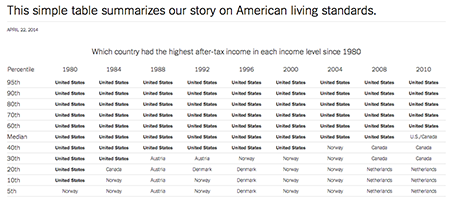
Some busy charts can still be highly effective. See the one below about the declining relative income of wealth classes in the US. The repetitive “United States” could have been replaced with something visually calmer, but the current works actually pretty well.

See that this charts presents other information as well (which countries did well), but the viewer is unlikely to take notice (and she does not need to).


The original article in the New York Times can be found here.

SlideMagic: a platform for magical presentations. Free student plan available. LEARN MORE

Microsoft Office Mix

Microsoft is working to add interactive features to PowerPoint presentations: real-time hand writing, audio/video of the presenter for off line viewing, analytics (who looked at what slide for how long), etc. A more elaborate description here on ZD Net. At the moment, Mix is just an add-in, but it could be a preview of what directions Microsoft will be taking future versions of PowerPoint.

Microsoft has opened Mix for preview, but it requires PowerPoint 2013 (i.e., does not work on a Mac).

My hunch is that the world needs simpler presentation software (working on it), not more complicated, but I am open to be convinced of the opposite.

SlideMagic: a platform for magical presentations. Free student plan available. LEARN MORE

Funny

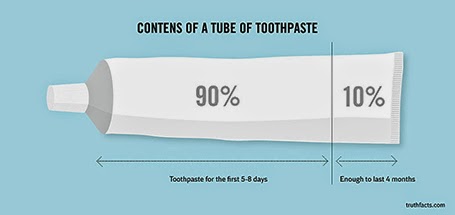
Most infographics are a bombastic compilations of overcomplicated, trying-too-hard, visualisations of facts that are not always that insightful. These simple graphs by Danish writer/artist duo Mikael Wulff and Anders Morgenthale are well executed and actually pretty funny.


A compilation of charts here on the Zero Hedge blog, and here is the web site of the original creators Wumo.

SlideMagic: a platform for magical presentations. Free student plan available. LEARN MORE

Where is that chart again?

The majority of slides in an average presentation are the bubble wrap that protects the real content. These slides are summary pages, set up pages, and lists of bullet points to remind the speaker what she should be saying next.

One indication that a slide is really needed is that you often look for them in one on one meetings. “Hey, wait, where is that email, with that attachment, with that special slide that I made a while ago.”

Spend more energy making slides like these.

SlideMagic: a platform for magical presentations. Free student plan available. LEARN MORE

"That took no time at all"

Many younger employees in big corporations have now understood that presentations with many slides that cover one point each are more effective than short presentations full of dense bullet point slides.

Their bosses might not be there yet.

I found an effective strategy to convince them: design the deck the way you want it, and have a test run. In 25 minutes, your boss understands that it takes the exact same time to present that longer presentation.

SlideMagic: a platform for magical presentations. Free student plan available. LEARN MORE

Visual shelf life

The other day I pointed out to a client that the colours of the corporate sign on top of the building were starting to fade. No, not that many customers of the company drive by the building every day (HQ is in Tel Aviv, customers are all over the globe), and yes, you can still read the sign and understand what company occupies the building. But still, it is the more subtle cultural signal of how the company sets its priorities, mostly influencing the employees who are making things happening every day.

The same applies to the look and feel of your presentations, if it looks worn out and tired, the audience might just think that the same is true for the company as a whole, and maybe their suspicion is right...

SlideMagic: a platform for magical presentations. Free student plan available. LEARN MORE

Zooming without Prezi

If you save your PowerPoint or Keynote file as a PDF and use an iPad with a PDF viewer to project your presentation, you can pinch and zoom into slides without sophisticated slide design techniques or special tools such as Prezi.

PowerPoint for iPad does not support it (yet).

SlideMagic: a platform for magical presentations. Free student plan available. LEARN MORE

The bar is rising

Compared to 10 years ago:
  • Your audience has sat through many more presentations
  • Your audience has watched many TED talks
  • Your audience has eliminated the patience to waste time digesting formal communications (big wordy business documents)
  • Your audience has probably seen/heard many ideas that are similar to yours
  • Your audience has become better at digesting information from multiple channels, devices, quickly
The bar is rising.

SlideMagic: a platform for magical presentations. Free student plan available. LEARN MORE

Bad form

Most form designs are a total disaster. Full of text (long prose) and cluttered, it is impossible to find the information you actually need. Especially if you are a non-Hebrew reader living in Israel, and need to pay a water bill online. The basics of 1) which web site to go, 2) what numbers to enter on the site, and 3) by when to pay are totally unclear.

There is a strong parallel with poorly designed presentation slides. Most forms are designed with the issuer in mind: it follows the structure of the IT infrastructure. Most forms follow a classical form template that has been used for decades, nobody is challenging whether a different layout might by more effective.  Most forms lack any form of human language.

SlideMagic: a platform for magical presentations. Free student plan available. LEARN MORE

Scientific slide analysis

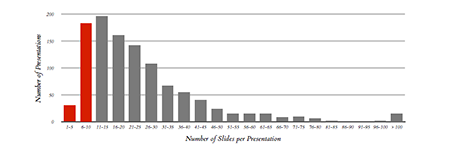
Here is a piece of research that extracts the font sizes, fonts used, lines per slides, slides per presentation of a 1,000 random presentations downloaded from the Internet. Lots or Times New Roman, lots of text, tiny fonts, endlessly long presentations. We knew it intuitively, but now there is the hard data to back it up. Research by Tim Theman.

SlideMagic: a platform for magical presentations. Free student plan available. LEARN MORE

Place holder and data charts

I realised that most presentation slides I create fall in two categories:
  1. Data charts that have information in them that would be impossible to convey verbally (a graph, a table with financial information, a ranking of competitors)
  2. Place holders with some powerful visual (picture, typography) and is merely a placeholder for the story told by the presenter
Things go wrong if you mix them: showing hard core data with a cute picture will not work, putting up a detailed consulting framework as your place holder will not work.

SlideMagic: a platform for magical presentations. Free student plan available. LEARN MORE

The big idea slide

I usually start a presentation design project by digesting all the available information, listen to a verbal version of the pitch, Google for market and competitor information, create a slide template based on a straightforward slide (the profit and loss account for example), and let the whole thing cook in my mind for a while.

I know when I leave the “cooking” phase when I am able to draw up the key idea of the presentation in one slide. That one takes a long time to design, but when it is done, all other slides follow really quickly.

SlideMagic: a platform for magical presentations. Free student plan available. LEARN MORE

Skipping the manual

When buying a new product, nobody reads the manual from beginning to end. People are curious, they try things, go back to a specific page in the manual, and then try again.

Many subject experts want to write the definitive, descriptive manual of their idea. Instead, considering the audience wanting to skip it. How would they go about understanding your idea in a probing dialogue? Anticipate that thought flow and make it the structure of your next presentation.

SlideMagic: a platform for magical presentations. Free student plan available. LEARN MORE

Aide memoire

Many speakers use bullet points to remind themselves what story to tell the audience next. Turn back to audience, say “Uh, and also...” Read out bullet point. Turn back to the audience. Then, improvise (often a very engaging) story. These people actually do not need slides at all. The story is in their head, they just need to be prompted to get the flow going. Two solutions:
  1. Use simple speaker cards instead, and forget about slides all together
  2. Create highly visual prompts: a picture, a slide with just one word on it and use presenter view to avoid having to turn your back on the audience

SlideMagic: a platform for magical presentations. Free student plan available. LEARN MORE

Do not overdo it

A VC complained a about a Prezi presentation today: a combination of motion sickness and impatience (using 30 slides to make a totally obvious point that could be made in 1).

There is nothing wrong with Prezi if it is used right:
  • Use zooming effects to support your story: zoom in on a technical diagram for example, hop in and out of a time sequence, focus on parts of your product, highlight different areas of a map. Zooming for the sake of zooming is not helping anyone.
  • If you are in a small meeting, leverage the non-linear navigation to have a good interactive discussion. Random story sequence shifts for a big audience makes everyone miss the plot.
Everyone knows that 30 slides with 1 message is better than 1 slide with 30 bullet points. However, obvious points can still be made in 1 slide. I see a lot of presentations on Slideshare that use one spectacular photograph after another to [click] make [click] a [click] totally [click] obvious point (especially social media and/or mobile cliches).

SlideMagic: a platform for magical presentations. Free student plan available. LEARN MORE