
Test pitching

As I prepare to start pitching my own startup (a “PowerPoint killer”) to potential investors I am going through the same process many of my own clients go through. Blinded by my own idea, I am surprised what questions, facial expressions, and other feedback I get when talking to other people. After every discussion I learn more about how to pitch my company.

Every idea has the text book pitch story. It is only by talking to people you find out which elements of the story are obvious/taken for granted (i.e., no need to spend time on them), and which ones are controversial and/or hard to understand.

SlideMagic: a platform for magical presentations. Free student plan available. LEARN MORE
Print posters

Sometimes I get questions from clients who want to print a physical copy of a slide in a very large format to use in conference boots. That usually does not work. PowerPoint slides have a low resolution to manage file size. Even recreating the slide with a super high resolution version of the image will not work. The solution: recreate the slide in Adobe Illustrator or Photoshop....

SlideMagic: a platform for magical presentations. Free student plan available. LEARN MORE

Summary does not equal repeat

A summary slide in a presentation is not a slide that repeats your entire story. Repetition is boring, and unless you are preparing your audience for an exam, there is no need to force them to remember the precise content of your presentation. What you want them to do is take some action (invite you for the second meeting for example). The best punch you can give at the end is to repeat a key visual from somewhere inside the deck and keep it to that. The audience will connect to it and think of it in the context of all the other things you said before.

SlideMagic: a platform for magical presentations. Free student plan available. LEARN MORE

3 types of people

There are 3 types of people:
  1. People who can spot that a chart is beautiful or ugly, and can design a beautiful chart in a snap
  2. People who can spot that a chart is beautiful or ugly, but cannot figure out what it is that makes it that way
  3. People who have no sense of design
Most of us are in category 2. How to get to number 1? Save screen shots of designs you liked somewhere on your hard drive. Try to mimic techniques the designer used, and see what effect it has on your own chart.

[Commercial break: I am targeting my upcoming presentation design app at segment number 2]

SlideMagic: a platform for magical presentations. Free student plan available. LEARN MORE
Decision making

Big budgeting projects in large corporates usually end with a short 30 minute meeting with a very senior executive who needs to approve 3 months of work. Of course you have sent the 300 pager the night before. There are a few things that you can do to make the meeting run smoothly.
  1. Top down data, start with an overview, the overall budget, then drill down into components. Make sure the components add back up to the total. You have been working on the figures for 3 months, the CFO might see them for the first time and she needs to be people to create a mental picture of the entire data ocean quickly.
  2. Focus on the important, controversial issues where you need guidance. These are not always the biggest numbers. 
  3. Make trade-offs you made very transparent, lots of pro-s and con-s charts that shows that you have thought about things and that you made the sensible decision.

SlideMagic: a platform for magical presentations. Free student plan available. LEARN MORE

What not to put in a pitch deck

A post with 8 things you should not include in a pitch deck on TNW. My comments:
  1. No detail, 20-30 slides. It depends. If your slides are really light and visual, you can go through a lot of them in 20 minutes. maybe more than 30. Depending on your situation, (some) detail can be good. Really high level pitches lack meat.
  2. No contact information. No reason to overdo it, but an email or phone number on the last page does not harm I think. I do not like it when I cannot find a phone number at the bottom of an email.
  3. Remove a point they can object to. Maybe, but if it is a major point, it has to go in. You cannot change reality... If this is a deal breaker, then this investor is not the right one for you.
  4. Fund allocation. Yes, opening up criticism over your budget might not be smart. Still, an investor wants to know roughly what is going to happen with the funds, and why you need this money, now, and not in 6 months from now
  5. Guestimates. Agree. If you have to make guestimates, make intelligent ones, and make it transparent that it is a guestimate
  6. Unrealistic success prediction. Agree
  7. Saying there is no competition, absolutely agree. Even if there is no direct competitor, there are other solutions, categories, that people are using to solve a particular problem
  8. The "The End" slide, yes, you can take that one off, and replace it with a repeat of a strong visual earlier in the presentation. This is a nice backdrop against which to hold the Q&A discussion. The last slide is the slide that probably sits longest on the projector.

SlideMagic: a platform for magical presentations. Free student plan available. LEARN MORE

Converting PDF to PowerPoint

Until now, I did not notice this feature in the latest Adobe Acrobat XI: converting PDF files to PowerPoint. I tried it on a PDF file that had the look and feel of a typical PowerPoint presentation (boxes with big text) and the results were surprisingly good. Here and there, a slide needed a small manual correction (semitransparents, etc.), but hey, it worked. As expected, data charts do not come out in vanilla Excel format.

Now, I guess that if you want to convert a file that does not have a typical PowerPoint look and feel, your results will be less good, but that is not the point, is it?

How would you use it? I think very few would use the tool to be able to present a PDF file in a PowerPoint environment. The CMD-L option in Acrobat gives a beautiful full screen view of your PDF slides. But the tool could be handy to strip out images quickly from a PDF file.

Adobe Acrobat XI is a premium product, the free Adobe Acrobat Reader will not pull off this trick.

SlideMagic: a platform for magical presentations. Free student plan available. LEARN MORE

Reference points

In my twenties I saw many examples around me that created presentation habits I had to unlearn. Professors at university putting a copy of a syllabus page on an overhead projector. Politicians waffling on TV. Senior student organisation leaders giving very poor speeches. Pompous Microsoft Word memos being printed out and distributed in every employee's mailbox. Boring dinner speeches that everyone sat through politely and quietly.

The world is changing and younger generations have videos of TED talks, Steve Jobs product launches, and other presentations to set new reference points. Still it is worth making sure that you are not following bad habits of other people around you, because this is the way you are supposed to give a presentation.

SlideMagic: a platform for magical presentations. Free student plan available. LEARN MORE

Boring can be good

Many entrepreneurs are great presenters who can energetically sell their idea/vision to a group of investors. That was meeting 1, and you are invited to meeting 2 with questions about the practicalities of your business, how you are going to approach the market, how are you going to charge for it, where are you going to invest the money you are raising in.

Coming back with a slide deck that sells the vision (again) will not score you any (additional) points. There is also no reason to invest in (a professional presentation designer who designs a) a spectacular-looking slide deck that shows your budget. Investors know you can sell, they want to know that you can run a business as well.

In fact, boring slides can be good in meeting #2. Here are the options, I have thought about it, and I pick option number 3. Nobody knows whether option 3 is the right one (things change quickly in a startup), but at least they see someone with a cool, calm head who makes sensible judgement calls. She can be boring when she has to be.

SlideMagic: a platform for magical presentations. Free student plan available. LEARN MORE

Hiding is not possible

Begin cryptic post...

A potential client discovered that what they are trying to offer in the market is really something that is needed, but nobody wants to admit that they need it. (If we admit we do this, our share price will go down by 20%) You cannot talk about this directly. As a result, the sales pitch diluted and dumbed down. The result: no sales pitch.

It is hard to hide a story, in order to tell a story. A possible solution: define the position of your company as something broader, and give 4 example applications of your technology. One of which is the one no one admits they need.

End of cryptic post...

P.S. The activities of this client are perfectly legal.

SlideMagic: a platform for magical presentations. Free student plan available. LEARN MORE

All the same

I have a number of clients in the IT security sector. My main challenge with them is to make them sound less similar to all other IT security companies in the world. IT security presentations or brochures usually follow this pattern:
  1. Scary, scary, scary reminder of awful security risks. The audience knows this already. The visual images are unpleasant to look at. 
  2. A relentless stream of marketing abbreviations and buzzwords that sound exactly the same as the ones the competition is using.
I try to keep a positive mood in the presentation without using images of hackers wearing a balaclava. The marketing buzzwords can be replaced by a deep dive of one particular aspect of your technology that takes a completely different approach to IT security than your competitors use.

SlideMagic: a platform for magical presentations. Free student plan available. LEARN MORE

Focus on the differences

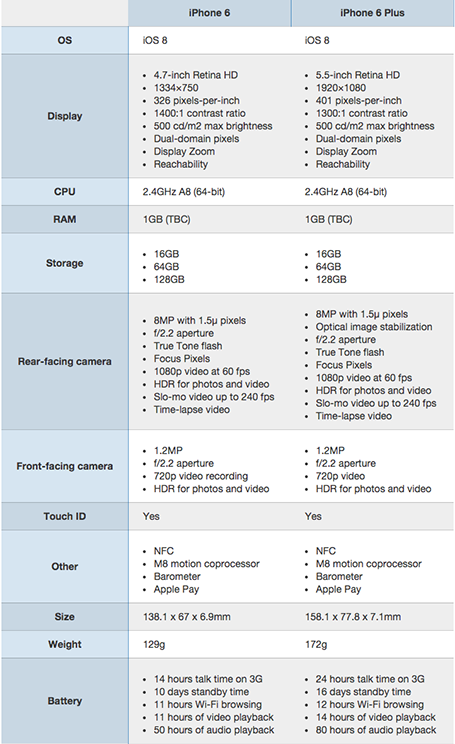
A nice side by side comparison of the new iPhone 6 and 6 Plus on the Cult of Mac. I see many of these tables in business presentations: columns with almost identical content. Why not focus on the differences instead and leave all the other clutter out?

SlideMagic: a platform for magical presentations. Free student plan available. LEARN MORE

Help the VC pitch for you

Startups invest a lot of energy in getting into the door of well-known VCs (step 0 of the process). Strangely enough, some of them drop the ball later on wasting that earlier effort.

After you have convinced a VC partner, she has to take the idea to her other partners, often in some internal meeting without the startup being present. When a startup presents to a VC, mistakes are often forgiven,  and gaps in data can always be filled with a follow up email. Usually the VC partner wants you to succeed.

Internal VC presentations are a bit more brutal. There is less time, people do not need to be polite to guests (people say what they think), and everyone expects the perfect pitch with all information available, there is no second chance. Missing facts often lead to a turn down.

Talking to some of my VC friends, they complain about how startups further on in the investment process are slow with providing information/answer simple questions that can save them in these internal VC grilling sessions. Startups take note of this easy win.

SlideMagic: a platform for magical presentations. Free student plan available. LEARN MORE

Harvesting the Board presentation

The last Board presentation is usually the only document in the company that more or less talks about everything what the organisation is about: strategy, financials, people, product pipeline. It is tempting to harvest the Board slide deck for sales and/or investor presentations. Here is why should not:
  • Board presentations talk about you, not about your (potential) customer, not very useful in sales meetings
  • Board presentations reveal your weaknesses, give a too transparent comparison to competitors.
  • Board presentations are all about trade offs and choices, not a clear articulation of a way forward
  • Board presentations have a boring agenda-like structure, not a captivating story
  • Board presentations are usually stitched together last minute with input from multiple people, not the most creative story writing process
  • Board presentations are designed for long meetings, not 20 minute pitches
  • Board presentations are usually Boaring...

SlideMagic: a platform for magical presentations. Free student plan available. LEARN MORE

PowerPoint on iPad

I have now stopped dragging along a laptop to client meetings. The thing is (relatively) heavy, requires a bag, and being the guy with the lap top in a meeting always put you in an inferior social position somehow. The PowerPoint for iPad app has improved a lot. You no longer have to go through the tedious process of downloading a file from Dropbox, remembering your 365 password, uploading the file to the 365 cloud drive, and downloading the file again. Still potential font rendering issues (even with standard fonts that might drop to the next line), still makes me use the combination of PDF files and iBooks. It renders nicely and the iBooks folder/collection solution is good enough to keep things organised. A lighting-to-ancient-VGA-projector convertor enables you to present on a big screen.

SlideMagic: a platform for magical presentations. Free student plan available. LEARN MORE

90 degrees

Nature prefers curves and round shapes. Steve Jobs likes rounded edges. White board sketches are curved and fluid. People prefer rounded shapes in architecture.

But: curved shapes are a pain to design. It is hard to fit text. It is hard to align them properly. They waste space (the Japanese invented the square water melon that makes better use of fridge space).


This is the reason that I “squarify” almost all diagrams and white board scribbles when designing presentation slides. Circles/ovals become squares/rectangles. Curved connecters become elbow connectors. Business presentations need to be efficient, and as a result they might not always be artistic master pieces.

SlideMagic: a platform for magical presentations. Free student plan available. LEARN MORE

Levels of understanding

As a presentation designer, you need to understand the substance of your slides better than what is reflected in your final work. Here are the levels of understanding:
  • Level 5: the expert, your boss, your client
  • Level 4: the level you need to get to as a designer
  • Level 3: what is reflected in your slides
  • Level 2: the audience right at the end of the presentation
  • Level 1: what the audience remembers in 3 weeks
  • Level 0: where the audience and you start out on
The key lesson for the presentation designers: you need to shoot beyond level 3, if you cannot stand above your substance, you cannot make the right design trade-offs. So ignore the strange looks you get when asking probing questions during the briefing.

SlideMagic: a platform for magical presentations. Free student plan available. LEARN MORE

In the Valley early October

I will be mentoring at a startup event in San Francisco early October. If you are interested to catch up, contact me. The Bay area is a big place, but maybe we find a time to be in the same place. My main presentation might be open to the public, more details to follow.

Image via WikiPedia

SlideMagic: a platform for magical presentations. Free student plan available. LEARN MORE

Freelancing and Uber

Here is a comment I posted on Fred Wilson’s blog about the inevitable rise of market places for professional services, just like Uber did for taxi drivers and passengers.
Perspective from a freelancer.
Platforms/algorithms will do an "Uber" to many professions including probably my own field: presentation design. Competition/bidding to find effective market clearance. In quiet months, prices go down, you want something done tomorrow: pay for it.
For a freelancer, I think this is ultimately a race to the bottom (Godin speak). The only profitable way to build a freelance career is to work on a distinctive personal micro brand in a super niche segment, with an ever growing base of happy clients.
Maybe you use a platform to get started, but the winners will be able to wrestle themselves loose from the platform. Like the best freelancers today are often the ones that freed themselves from high paying consulting, advertising, or investment banking hierarchies.

SlideMagic: a platform for magical presentations. Free student plan available. LEARN MORE

Readability

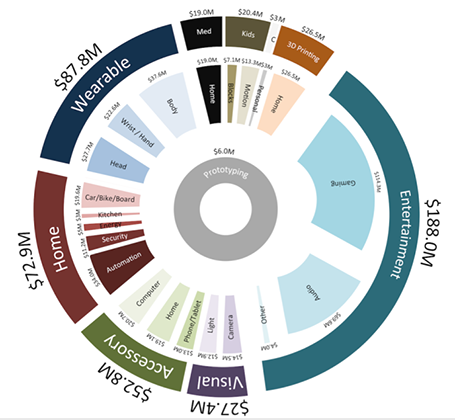
Here is a data chart that was published in TechCrunch, it shows a breakdown of crowdfunding-sourced investments in hardware.


The scattered pie chart looks nice, but is not easy to read:
  • A lot of data and many label are positioned upside down
  • The $ and M signs clutter up space
  • A lot of text is too small
Also, PowerPoint is not very well equipped to make charts like this. You see how the exploded pie points do not line up perfectly, and how the text is not curved right.

To make it readable, I would go for 2 stacked columns, one for the total categories, one for the sub categories. Put horizontal labels to the left of the totals, and to the right of the subcategory column. Use colours to link totals and subcategories together (like it is done in the above pie).

If you wanted to go fro an exploding pie as indicated above, do not explode the pieces in PowerPoint, but rather use extremely fat white lines around the elements of a regular pie to get a more organised diagram.

SlideMagic: a platform for magical presentations. Free student plan available. LEARN MORE