Panels = entertainment

Panels = entertainment

Another good video by VC Mark Suster about how to speak when invited on a panel:

  • Entertain
  • Be energetic
  • Be short and to the point (people don't remember who long you spoke, but what you said)
  • Say something different than the person before you
  • If the moderator asks the wrong question, answer a different one

I would also add that pitch competitions are a form of entertainment. A pitch for such an event is completely different from a pitch to the partner group of a VC.

And most of the time, pitch competitions are far more entertaining than panels. In a pitch competition, the presenter is on the line, sharp. People in panels usually do not prepare and can hide behind the others on stage, making them a lot less interesting to watch.

SlideMagic: a platform for magical presentations. Free student plan available. LEARN MORE
Sounding convincing, versus actually convincing

Sounding convincing, versus actually convincing

Some people naturally sound convincing. They have charisma, they find it easy to tell their story, they are confident, they can wing the presentation, they say that they consider themselves good presenters. They sound convincing, but do they convince?

Many of the people who fall in this category are not very good at reading body language. Maybe the buyer or investor on the other side of the table is (slightly) introvert and does not push back that much. Maybe if the same type of question comes back for the third time (after 2x the same sort of answer), the answer was not very clear. Maybe there is a difference between a great meeting with great energy, and a decision to buy/invest.

As a presentation designer, I have built up another type of self confidence: not being ashamed to ask again if something is not clear, even if it is the fifth time. If I don't get it, the presentation I am going to design will also not get there. Investors and buyers won't be as patient as presentation designers


Image from WikiPedia

SlideMagic: a platform for magical presentations. Free student plan available. LEARN MORE
Triangulating market sizes

Triangulating market sizes

It is hard to forecast the size of a market that exists today in a few years. It is impossible to predict the size of a market for a product that does not even exist. Startups working on new products deal with this issue in every investor presentation.

My suggested solution: come at it from different directions to give a potential investor confidence that there is something there.

  • Big billion dollar point estimates from Gartner or IDC research reports, and pointing out that in the future part of that spend might be cannibalized.
  • Looking at comparable markets. For example IT security spend is roughly 10% of every IT budget. If you are working on a new product category that you think will be as indispensable as IT security, you can provide a market size range by applying a % to a future IT spend forecast.
  • Going down to company level, and point out that of the few pilot customers you have, they were willing to pay x$ per seat, x% of their IT budget, and then scale that up to the total market.
  • Bottom up: customers x product per customer x price per product
  • Etc.

In most cases your "made up" numbers which are backed up by a transparent and logical analysis will be more useful than point estimates lifted from out-of-date, out-of-context research reports.


Image from WikiPedia

SlideMagic: a platform for magical presentations. Free student plan available. LEARN MORE
Designers are upset with Apple

Designers are upset with Apple

Apple launched the new MacBooks a few days ago, and designers are not happy. Read all the comments here for example. The competition makes more powerful machines, Apple still does not make a 4K standalone display.

But there is also a psychological element to this. We designers used to use our Macs to show to everyone that we were different. We were free to buy cool equipment while most of the "other people" were stuck with crappy machines supplied by the corporate IT department.

Maybe reality has caught up with us designers. For most graphics design application, almost any computer will do. PowerPoint being at the bottom of performance-intensive applications, I have stopped looking at horse power as the main buying criterium for computers.

Still Apple is dropping the ball here and there. No innovation in productivity software (I am trying to add my bit of innovation with presentation app SlideMagic), and a proliferation of adaptors to connect devices, even those that are within the Apple ecosystem.

All of this leaves the door open to a new super premium computer brand. If I were Microsoft, I would create a "Lexus" in computing and court those style-conscious designer elitists again. 

SlideMagic: a platform for magical presentations. Free student plan available. LEARN MORE
Small rebranding

Small rebranding

The advantage of being a small operation is that decisions can be executed quickly. My branding has moved from "Axiom One", "Slides that Stick", "Sticky Slides", "Idea Transplant" to "Slide Magic".

SlideMagic is the name of my app, and Idea Transplant stayed the name of my professional presentation design business. I am now retiring Idea Transplant. The name is fantastic, and says exactly what I do, but it is not very catchy "can you spell that email address one more time please?", and is confusing to clients. My presentation design app does not get any "brand aura" (buzz word alert), and most importantly, the blog name SlideMagic does not add value to my professional presentation design business.

So to keep things clean and simple, Idea Transplant will be come "Slidemagic Bespoke" with the same look and feel as the app. In practice, people will call it "SlideMagic" with the bespoke bit mainly used as a small tag line on the web site.

I am now also going through the clean up of all my social media accounts. Bare with me as I cleaning up all the correct URL redirects etc.

SlideMagic: a platform for magical presentations. Free student plan available. LEARN MORE
Status reports in PPT

Status reports in PPT

This Tweet caught my attention:

Yes "status reports" are a distinct category of presentations. Some sort of weekly, monthly, quarterly updates, that follow more or less the same template. A lot of time is spent (wasted) on creating these. In the short run, you can do a lot with workflow automation. For example create the entire presentation in Excel, which has the same drawing and charting capabilities that PowerPoint has. And yes in the end, SAAS dashboards might replace them all together, if, and that is a big if, the dashboard is designed well.

The "other" type of presentation, the one in which you pitch an idea, a budget, an investment, is here to stay. Each story is different, each pitch is different. Still, people spend too much time on PowerPoint to create them (hopefully my presentation design app SlideMagic will change that), but the creative process will not be automated anytime soon.


Image from Wikipedia

SlideMagic: a platform for magical presentations. Free student plan available. LEARN MORE
Two new screen interfaces

Two new screen interfaces

Both Microsoft and Google launched new screen-based devices over the past few days.

The Microsoft Surface Studio is a desktop computer with a very large touch display. It can be used in regular upright mode, or folded down, which turns it into a giant, almost-horizontal tablet. There is a new interface gadget, a cylinder that you put right on the screen. 

I think this might be the future of desk-based design interfaces. Portable tablets are too small. Upright touch screens are to cumbersome. This hybrid looks great. 

Google introduced the Jamboard, a big touch screen that is meant for white boarding in meetings. The main feature is the collaboration supported by Google software. You can upload, edit, move things, and people not in the room can join the conversation remotely.

The features look impressive, the size of the screen might still be a bit small though to enable really productive group collaboration. Time will tell. 

SlideMagic: a platform for magical presentations. Free student plan available. LEARN MORE
"We just need an hour together"

"We just need an hour together"

"I just need an hour of your time to sit together to improve my slides. I know exactly what I want to say in tomorrow's presentation and all the slides are ready, they just need to be more visual"

I get this type of request often, and I usually turn it down. In one hour, 24 hours before the presentation, you can fix the layout of the slides a bit, but this is where it ends...

A proper presentation design process needs to go through a number of stages:

  • The first briefing, what is the idea you are actually pitching
  • Maybe in the same meeting, the more in depth questioning of the issues. The designer needs to ask the naive/ignorant questions
  • Then putting the whole thing to rest, and scribble some ideas for potential slides over the next few days to come
  • The creation of a basic graphical look and feel, usually I pick a "no brainer" slide for that, the content is crystal clear, it is just about style, fonts, colors layout.
  • Then the drafting of the full deck, going back and forth between "no brainer" slides and the tricky ones.
  • This draft gets then iterated back and forth
  • Finally: rehearsing

It takes more than 1 hour, it needs more than 24 hours, it is not a polish of the existing presentation, which will have vanished totally in the process.


Image from Wikipedia

SlideMagic: a platform for magical presentations. Free student plan available. LEARN MORE
Different interpretations

Different interpretations

Here is a picture of a bill board snapped by a friend on Facebook. Venn diagrams are very useful in presentations. But there can be a catch.

There are 2 possible interpretations:

  1. Intended: we are just so much bigger than these good things
  2. Version b: our values do not really include all these good things

Have you key slides checked by a few different people, especially if they go in front of many eyes.

SlideMagic: a platform for magical presentations. Free student plan available. LEARN MORE
"Visual story telling" has become a buzzword

"Visual story telling" has become a buzzword

I noticed this Tweet the other day of buzz words that are banned in the Conrad shop:

"Visual story telling" is one of them. And I must say, there is something to it. (Yes, this is a professional presentation designer speaking). Yes, business presentations should be stories, yes business presentations should be visual. But when you find yourself in stuck in a meeting where 15 captains try to set the plot for a presentation, and you hear someone saying "let's take a step back everyone, and synthesize what we have brainstormed so far, so that we can spend the next hour doing visual story telling", you probably roll your eyes.

Buzzwords are created when you have seen useful concepts being abused too many times and visual story telling is joining the ranks of them.

SlideMagic: a platform for magical presentations. Free student plan available. LEARN MORE
Visualizing contrasts

Visualizing contrasts

This article on Vox tries to find statistics on voting fraud in the US. I will stay out of politics on this blog, but the 2 graphs it uses show the power of a good visualization.

A column chart shows the relative difference, but fails to communicate the large overall absolute value of the right column

A column chart shows the relative difference, but fails to communicate the large overall absolute value of the right column

The image does a better job to depict the statistics. It requires some math and Photoshop skills though to produce

The image does a better job to depict the statistics. It requires some math and Photoshop skills though to produce

The column chart is the correct representation of the 2 values, but it fails to communicate the huge amount of ballots we are talking about in the right column. The image does a better job, but it will be hard to construct for a layman designer.


Image from WikiPedia

SlideMagic: a platform for magical presentations. Free student plan available. LEARN MORE
Investor versus client positioning

Investor versus client positioning

In most big B2B enterprise sales dialogues the client understands the market, knows the key players out there, knows the issues she is trying to solve. They don't care about margins, market sizes.

In most investor pitches, the potential investor knows the broad market segments that sound similar to the one you are operating in, knows how big they are roughly, knows major competitors. They are less interested in specific feature comparisons.

Presenting your differentiation, what makes you special, is different to each of these audiences.


Image from WikiPedia

SlideMagic: a platform for magical presentations. Free student plan available. LEARN MORE
PowerPoint Designer - first impressions

PowerPoint Designer - first impressions

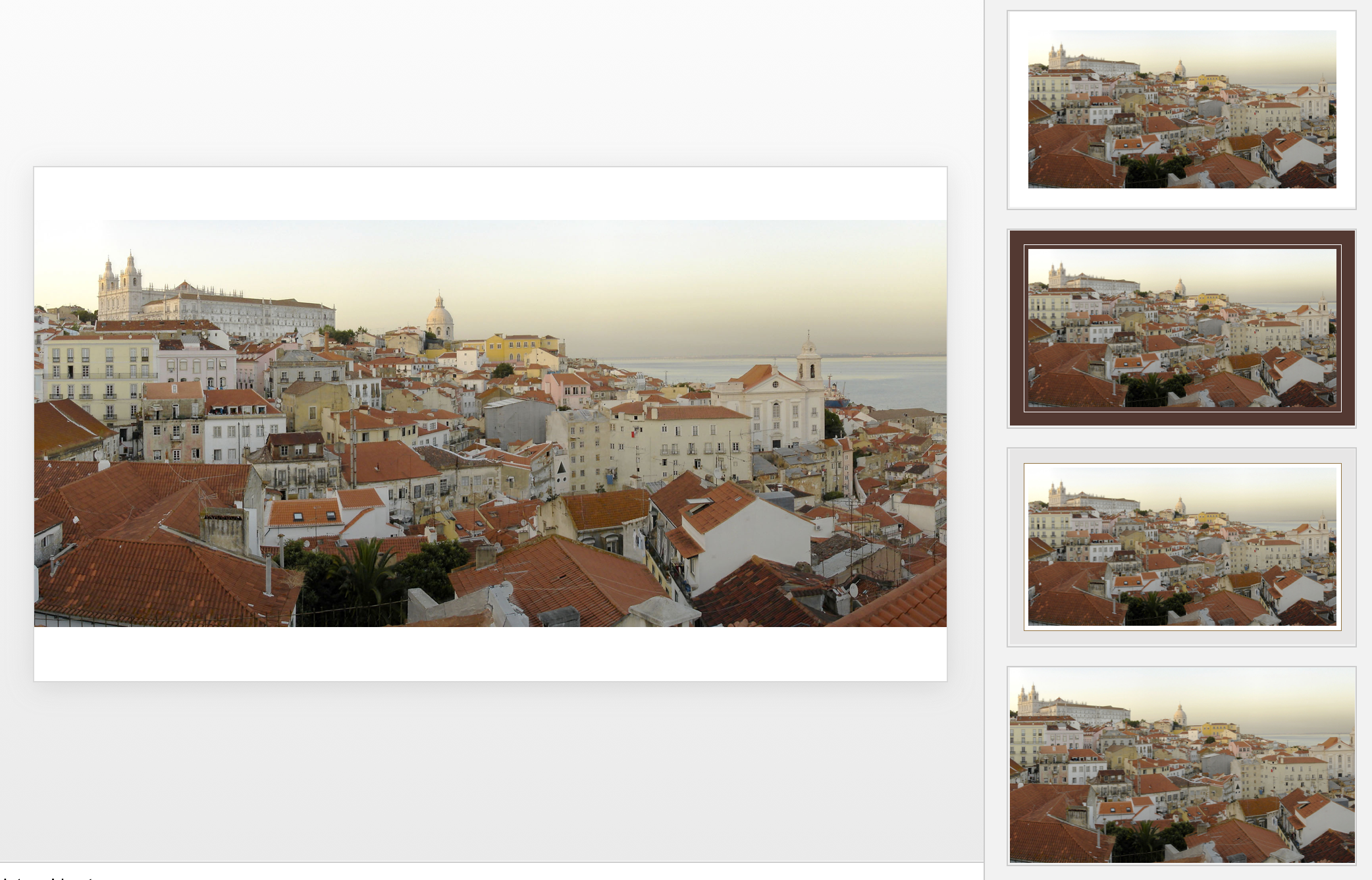
Microsoft has been adding a number of features to PowerPoint recently. One of them is Designer. In the Design tab of the ribbon, a new button appears on the right "Design Ideas". Clicking it generates alternative layouts of your slides on the right side of your screen.

The layouts are pretty nice. Microsoft has "automated" the design of 2 types of slides:

  • Image collages, multiple photos get put in different suggested grids, with place for a title
  • Process bullet points that can be translated to horizontally spaced out sequences of equally sized shapes.

Both are useful. Layman designers usually have no idea how to crop a nice photo collage, and translating that bullet list into a horizontal sequence looks nice, especially on wide 16:9 screen.

But here comes the but. 

  • The algorithm only works on these types of slides, so layman presentations will look inconsistent as same slides cannot be improved by the algorithm
  • And in case of the bullet transformation, PowerPoint needs to analyze the text with language processing, to decide that you are describing some kind of process. I had a hard time to trigger the algorithm, and in the end typed the exact same text as was used in Microsoft's explanation web post.

Microsoft is on the right path, these suggested layouts look a lot nicer than the SmartArt objects. And, getting layman designers to use some sort of grid is the biggest possible improvement you can create in slide design.

But I think it will take some time before language interpretation will be so sophisticated that PowerPoint understands the meaning of a slide and can pull a suggested layout from its library. That's one step above asking Siri to book a movie for you. 

Images get a nice suggested cropping

Images get a nice suggested cropping

Multiple images trigger multiple grid suggestions

Multiple images trigger multiple grid suggestions

No suggestion to clean up this grid

No suggestion to clean up this grid

No suggestions for these charts

No suggestions for these charts

Language interpretation concludes this is not a process

Language interpretation concludes this is not a process

This is a process, text taken from a Microsoft post

This is a process, text taken from a Microsoft post

(* Commercial start *)

This is why designed my presentation app SlideMagic with a forced grid structure, which is a fundamentally different interface approach from PowerPoint and Keynote, which are based on free placement and resizing of objects.

(* End of the commercial break *)

PowerPoint Designer is not 100% there yet, but from its look and feel and general creative direction you see that Microsoft is on the right path.


SlideMagic: a platform for magical presentations. Free student plan available. LEARN MORE
At Web Summit - Lisbon early November

At Web Summit - Lisbon early November

Wearing the hat of a startup CEO (SlideMagic), I will be attending Web Summit in Lisbon the 2nd week of November. Let me know if you are there as well and would like to shake hands.


Image via WikiPedia

SlideMagic: a platform for magical presentations. Free student plan available. LEARN MORE
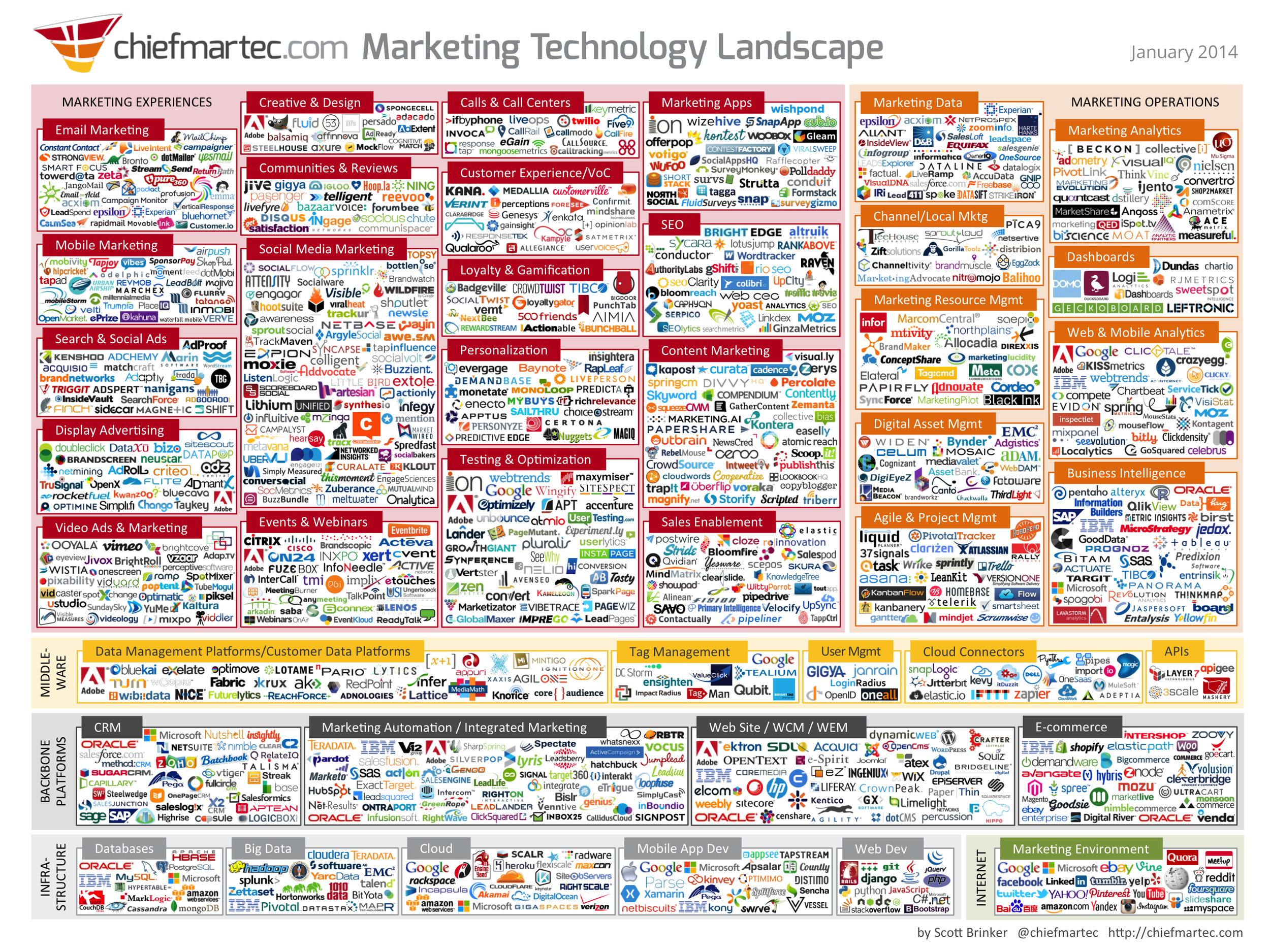
The industry landscape chart

The industry landscape chart

There are a lot of these type of industry charts around. The only message it conveys as a slide is "there are lots of players in the industry". More information is too hard to read. I think zooming presentation tools such as Prezi do not always help make your presentation more effective, but in this case, it could provide useful in creating a "ponder chart" where you can zoom in and out of specific sections.

SlideMagic: a platform for magical presentations. Free student plan available. LEARN MORE
A personal speech

A personal speech

We recently celebrated my daughter's Bat Mitzvah and here is the process I went through to produce my short speech:

  • I did not make too big a deal out of the speech, it is not the State of the Union, I wanted to express my feelings to my daughter, and focus the attention of the entire crowd for a few minutes on her.
  • I created a digital notebook accessible from all my devices weeks in advance. Here I jotted down ideas: stories, memories, jokes, anecdotes, as they came along. It is hard to come up with ideas 24 hours before
  • About a week before the event, I wrote down a whole version, and put it away
  • A few days later during a bike ride a crafted an entire new story in my head, shorter, simpler, and less dry. Immediately after dismounting from the bike I wrote that one down.
  • I rehearsed a couple of time and created a short bullet point lay out of my talk that I could print in small font and hold in my hand. Important points are the key element of a paragraph (you can summarize those in 4 words if you have to), and lists ("what was that 3rd character trait again?")
  • During the speech i made sure that I was really "into the story" feeling the meaning of the words while saying them (i.e, not pressing play from memory and just recite text without processing what it means).
  • Instead of uttering "uhm", I tried to keep the composure and pause to form the next key idea in my mind before speaking it out.
  • And yes, I did not use slides!

SlideMagic: a platform for magical presentations. Free student plan available. LEARN MORE
Which clients raise money?

Which clients raise money?

I see dozens and dozens of technology startups and yesterday I sat back and jotted down the similarities between my clients that manage to raise money. Disclaimer: it is not scientific, it is not conclusive, and in many cases I actually do not get updated on whether the fund raising round was successful or not.

Here are some similarities:

  • More than one exceptional team member, the company is not just carried by one strong CEO
  • Straight to the point discussions during the briefing meeting, no buzz words, no vague marketing frameworks, no empty discussions about flow in the absense of substance
  • A positive and happy working environment. Supportive feedback, respecting people's time instead of negative comments all the time, insisting on unreasonable deadlines, making people wait a long time, calling in person meetings to communicate something that could have been done in a phone call. These are places you want to do your best
  • People are open to reposition, change things that are pretty fundamental to the company. 
  • Taking advice and input form people the right way. Some people get listened to, others ignored.
  • A realistic awareness of strengths and weaknesses

OK, you need to have a good business concept. But looking back at the above points, these are companies that designers like to work with (and presumably investors want to work with them as well). There is a contagious, positive energy among them.

SlideMagic: a platform for magical presentations. Free student plan available. LEARN MORE
It is not your fault

It is not your fault

Back in the days as a junior analyst at McKinsey you would often see a deck or listen to a presentation that you would not understand completely. Being 23, I usually kept quiet and assumed that this was my problem, not the presenter's.

Now at more than double that age, I still have the same issue: I often don't get why something is so special, so unique, so difficult to do from reading a slide or listening to the presenter. My IQ has not changed much (it probably got worse), and yes I have learned things, but the biggest difference that I have gained the confidence to know that it is not my fault. It is OK to ask a question that might sound trivial.


SlideMagic: a platform for magical presentations. Free student plan available. LEARN MORE
Metaphors only when you need them

Metaphors only when you need them

Some concepts are so simple to explain that they do not need a (visual) metaphor. If you don't need one, don't use one. They will sound forced, and actually makes the message of your presentation more difficult to understand.

Here are situations where I do rely on metaphors:

  • Make size comparisons that are hard to imagine 
  • When there are lot of different things that need to be covered. You can set up the metaphor at the beginning of the presentation, and continue to build on it throughout the deck.
  • When it is possible to compare yourself to a winning business idea that revolutionized another market, preferably a long time ago.

Image from WikiPedia

SlideMagic: a platform for magical presentations. Free student plan available. LEARN MORE
Off the grid

Off the grid

We are celebrating the Jewish new year here in Israel. I am off the grid with my family here in the Negev dessert. Apologies for the low post frequency!

SlideMagic: a platform for magical presentations. Free student plan available. LEARN MORE