Bad 1990s design habits

Bad 1990s design habits

Below a repost from 3 years ago, an blog post I put out on a Medium publication that I am taking down. Putting it out here to preserve it.


You can design better presentation slides by getting rid of engrained habits that can go back decades.

Sometimes I work with teenagers to teach them about presentation design. To my surprise, they often are much better students than “grown ups” who are supposed to benefit from decades of business experience. Here is a theory why.

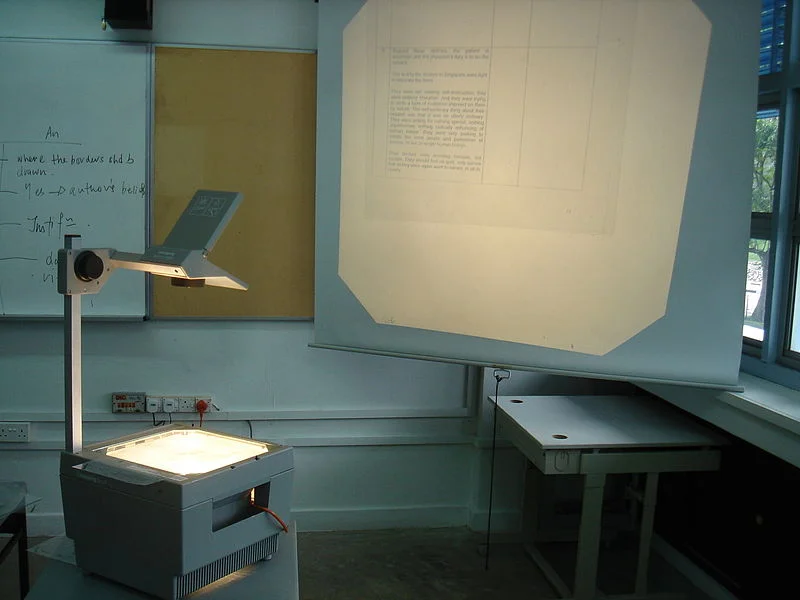
Transparencies for overhead projectors encouraged you to copy pages out of a book and uncovering paragraphs or key points bullet by bullet. Moving to PowerPoint, people just kept writing these bullets.

The first visuals that you felt compelled to project to an audience were data charts: lines, bars, columns. These type of graphs needed to have a title in the top left and a source at the bottom. Most slide designs today use a big title at the top left, other typography on the page is almost never bigger than the title. Very rarely, people leave the title out all together.

Pictures are low resolution and take a lot of memory, hence you can only put in small images in a presentation document that you need to email someone.

PowerPoint was created as a mouse-based drawing software, rising alongside Microsoft Windows. Everything could be dragged, and resized easily to fit. Cropping an image was tricky. The first plasma TV screens confirmed to us that it was OK to stretch an image out of proportion, as long as it fitted whatever you needed to fill easily.

Word processors enabled us to ponder a sentence over and over, editing, adding words until it encapsulated everything we wanted to say. This leads to buzzword-loaded, fluffy, mission statement-type business prose that you would never use in spoken conversation. We were not trained to write razor sharp newspaper headings.

In a word processor, the time it takes to read a document equals the total number of pages. So, to cut the time it takes to deliver your presentation, you need to cut slides. If you still want to cover the same content, just reduce the font size and cram in more information in a slide. Page count rules.

When writing, you create thought flow from top to bottom, so in PowerPoint there is no need to use other visual techniques to express contradictions, overlaps, tensions, win-wins, from-to movements, transitions.

There were only 3 types of fonts: sans serif, serif and Comic Sans, so that’s what we use in Microsoft Office documents.

To make a point we use all those powerful software tools to add stuff: bold, underline, shadows, bright colors. It never occurred to us that by de-emphasising things around what we want to emphasise, it would stand out naturally and more beautifully.

Next time you design a presentation, think how you would tackle it without the baggage from the 1990s, just like a teenager today.

SlideMagic: a platform for magical presentations. Free student plan available. LEARN MORE
Simple or pretty?

Simple or pretty?

This is probably one of these images that has been going around on LinkedIn for the past 5 years, somehow I did not pick it up:

Yes, the right column is better English. But:

  • Some of these words actually take more copy space
  • Some of these words are long, and hard to break to the next line
  • Some of these words might not be understood by non-native English speakers ("destitute"?)

At school, you are writing to learn the most beautiful English possible, in real life you might be pitching a Chinese investor with a complicated startup idea.

SlideMagic: a platform for magical presentations. Free student plan available. LEARN MORE
We need to get everything ready

We need to get everything ready

When I meet with a startup for an investor presentation, I am usually the first external "marketing person" they meet with. (Understandable, no investors, no money, no marketing budget). Some CEOs are nervous about the daunting task (and cash expense) of getting all those marketing materials ready as the company expands beyond product development. Sales presentation, investor presentation, one pager, leaflets, website, introduction video, etc. etc. ("Do you do those as well?")

My advice: take things one step at a time. An investor presentation is a good place to start, since any investor presentation needs to include some sort of customer sales presentation as well. (Investors need to be sold of the product).

The company/product story is often not completely set in early stage startups. So, freezing the spec and commission a lot of money to all kinds of designers might cause problems down the road. A presentation is actually a useful format to play around with visual concepts. Graphical execution might not be the best, but things can look decent enough and are easy to change.

After you feel that the presentation starts to work, you can consider upping the investment in the design of other marketing material. But here, I would do things gradually as well.

When working with video and video producers/designers, make sure you have a version of the footage that does not include text (in a specific font, containing a positioning that could go out of date) and logos (that could be changed later on). Video footage can be useful for a long time.

In short, it is better to do things step by step, rather than all at once.


Image via WikiPedia

SlideMagic: a platform for magical presentations. Free student plan available. LEARN MORE
Office cleanup

Office cleanup

I went through a big cleanup of my office the other day and encountered many of the gadgets I have reviewed on this blog over the past years. Unfortunately, they did not become regular productivity tools (at least most of them). Wacom tablets, Wacom Inkling, lots of different iPad styli. Now looking back at these. Part of the problem is the hardware, but the other part might just be that free hand drawing is not the most convenient interface to design presentations.

An update on the Apple Pencil. I think the pencil hardware is sorted, but there is still a software issue. My note taking app needs to be open in a meeting all the time, with the screen on, it does not survive a long meeting.

Maybe 2017 will be the solution. 


Image by Creative Tools on Flickr.

SlideMagic: a platform for magical presentations. Free student plan available. LEARN MORE
Most presentations are training decks

Most presentations are training decks

In the beginning, you know you have your killer slides to get you through the meeting. The more you give the pitch, the more confident you get with delivering your story and the slides actually become less important.

A special case of this is salesforces. When you design a sales deck for a large group of people who will deliver the pitch without you being present, your presentation is actually a sales training deck.


Image via WikiPedia

SlideMagic: a platform for magical presentations. Free student plan available. LEARN MORE
One software, many uses

One software, many uses

PowerPoint is used for many things in today's corporations:

  • Quickly write documents for internal use
  • Maintain the competitor intelligence database
  • A tool to draw the system architecture diagram
  • Organize your thoughts, make a work plan
  • Brainstorm ideas live in a group
  • Logo / design concept prototype
  • A UI spec (that’s how I used for SlideMagic)
  • Big stand up presentation to outsiders - big audience
  • Big stand up presentation to insiders - big audience
  • Big stand up presentation to outsiders - conference room
  • Big stand up presentation to insiders - conference room
  • One-on-one "coffee chat"
  • Document for reading for outsiders
  • Document for reading for insider 

To name a few. We get problems when we confuse the application and the target audience. A project status update on the overhead of the big annual industry conference, pretty pictures without explanations when you want your budget approved by the CEO.

SlideMagic: a platform for magical presentations. Free student plan available. LEARN MORE
Deep dive

Deep dive

Three ways to show understanding of an industry in 10 minutes:

  1. Construct a 90 minute lecture trying to cover everything, and squeeze it into 10 minutes
  2. A very detailed deep dive in one aspect of the industry, showing an insight that nobody has ever heard anywhere else
  3. Do this deep dive on a random subject that is brought up by your potential investor or client.

1 won't work, 2 is better, 3 is best

SlideMagic: a platform for magical presentations. Free student plan available. LEARN MORE
"They are not interested in this"

"They are not interested in this"

Or maybe: "they understood it". When you don't get questions about a certain issue in your presentation does not mean that you should pull that part of the story. It is most likely that the audience understands your point and is ready to move on.

If it works, then there is no reason to spend a lot of time/slides on something. But leaving that part of the story out, creates a deck with only your contentious issues left without the glue that stitches everything together.


Image via WikiPedia

SlideMagic: a platform for magical presentations. Free student plan available. LEARN MORE
"22 reasons I won't fund you"

"22 reasons I won't fund you"

This is an interesting representation from the investor perspective by Jason Lemkin why he does (not) want to fund you. Some are relevant to presentations (my words):

  • Integrity: gaming metrics, locker room jokes
  • Exit strategy slide shows that you are not committed (not sure all investors will agree)
  • Pooh-poohing competition (better to show that you understand them, rather than hiding their existence)
  • Looooong industry background sections before getting to the point, the first decision point at minute 5, if you survived that one, the second one comes in at minute 20 
  • Document formats that are hard to open

Image via WikiPedia

SlideMagic: a platform for magical presentations. Free student plan available. LEARN MORE
How to brief a presentation template designer

How to brief a presentation template designer

The traditional approach is to hand the designer a blank slide and say "we need a fresh PowerPoint template". You will get a slide back full of supporting graphics, logos, page numbers which shows that the designer added some value.

Here is the better approach: give an actual slide with content and ask her to improve that, including the template. The likely result is a well-designed slide. Now delete all the content and see what you are left with. It is likely to be an empty page... Here is your new PowerPoint template.

Oh, and the most important part of the template design project is not the template (i.e, the blank page). It is to make sure that the standard colors and fonts are programmed correctly. That's a programmer's job, not a designer's job.

In my presentation design app SlideMagic, things are easier. Upload your logo, use the color picker to select your accent color based on the logo, and you are all set.


SlideMagic: a platform for magical presentations. Free student plan available. LEARN MORE
Sales presentation versus investor presentations

Sales presentation versus investor presentations

There is an overlap and there are differences.

Overlap. At the core of both an investor and a sales presentation is some story that said what it is you actually do, and why this is such a great solution that you should buy it. Useful for a customer, but also useful for an investor. The latter will ask: "will someone want to buy this?", but more importantly: "can this person sell in a convincing way?" This overlapping part of the presentation is the core company story.

Sales presentation only: add things that are specific to the potential client's problem/situation. Add a censored competitive positioning (don't bend the truth, but don't volunteer weaknesses either). Add the administrative details about exact pricing, installation, etc. etc. 

Investor presentation only: add a (more) candid competitive positioning, market sizing, profitability, pipeline, team bio, etc.

So, the investor presentation is the broadest in coverage. In terms of number of slides (hours at the computer), each of the above components could be equal in size. In terms of time invested though, the first part, the core sales presentation is the hardest to get right, it is the fundamental story of your company/product.

Bonus, a quick Venn diagram in SlideMagic style (make decent looking simple slides quickly) below. You can clone slides I used in the blog to your own SlideMagic account via this link.

SlideMagic: a platform for magical presentations. Free student plan available. LEARN MORE
Interview questions

Interview questions

Back at McKinsey, doing recruiting interviews was an integral part of a consultant's job. I interviewed hundreds of candidates, mostly back at my business school (INSEAD). When interviewers ask a question, they are most of the times not trying to figure out whether you can produce the 100% right answer. Instead you want to check out:

  • How a person is thinking and reasoning
  • Whether something that is claimed is actually true or not, by forcing the conversation into some sort of depth/details
  • What the integrity of the person in question is, is she lying/talking her way out of things or willing to admit that she does not know
  • How it is to work with someone.

Potential investors or customer will do the same. If you copy some fancy charts, or put in some buzzwords / hollow statements, a few questions will quickly lay bare your actual understanding of a situation.

"[Approach A] is much better than [Approach B]"
"Really, I did not know that?, can you give me a few examples of companies that tried Approach B and failed recently?"

Solution one, don't put the charts in. Solution two, read up and do your homework and form your own opinion.

SlideMagic: a platform for magical presentations. Free student plan available. LEARN MORE
Slides in a foreign language?

Slides in a foreign language?

Should slides and your talk be in the same language? Ideally, yes. Visuals and the audio track are in perfect sync.

But I think for most audiences in Western economies, "business English" slides that support a talk delivered in a local language work perfectly OK. "Business English" is what I call the English that is spoken by most non-native English speakers. A very narrow vocabulary of English that enables you to express most common business concepts.

For some audiences having your slides might give you that added international appeal (a startup raising money across Europe for example, or here in Israel, where high tech slides designed in Hebrew would look really weird).

Slides in English raise the challenge for the presenter though. If you were planning on reading bullet points of the slides, it sounds boring in English, it sounds really awkward when you are live translating from English into your native language. Either things go really slow, or the translation sounds really funny, or - most likely - both.

As always, there are exceptions. Some highly conservative financial institutions have complicated investment approval processes where decks get forwarded/discussed without you being there. If your deck is primary for reading, then consider translating the whole thing.

Be aware that languages can create technical challenges as well if people do not have the right fonts installed on their computers, and mobile devices create additional problems. Always send PDFs.

I have done many of these types of projects for presentations aimed at local Israeli institutional investors. I would start with an English design (but laid out right-centered, graphs flow from right to left), the client would translate (challenge 1: Hebrew, challenge 2: business/science-specific jargon in Hebrew), and would clean up afterwards with a 50% understanding of what's inside the text boxes. 

SlideMagic: a platform for magical presentations. Free student plan available. LEARN MORE
You don't have to be a designer

You don't have to be a designer

You don't have to grow your own food, build your own house, hand-copy your books anymore. The same is true for graphics design in your work environment. Your objective is to make yourself understood in an effective way, and it should be possible to do that without studying for a second major in design.

How do you survive in a world where you open presentation software and see a starting page that is exactly the same one as a professional designer uses? Don't be too ambitious.

A super sophisticated visual concept executed by a layman designer looks much, much worse than a highly minimalist and simple chart created by stealing a poster layout from a famous Swiss graphics designer from the 1960s.

Look at your chart, look at the 1960s poster. Yours looks bad, the poster looks great with around the same amount of words on the page. Make it look the same. Add white space, increase font size, decrease font size, take out the top banner, eliminate colors. Inevitably, your chart will start to look good again.

Once you figured it out and got a chart that works, keep using the same format to save a lot of time to create presentations in the future.

Oh, and feel free to steal layouts from my presentation app SlideMagic.

SlideMagic: a platform for magical presentations. Free student plan available. LEARN MORE
Frankensteining market background charts

Frankensteining market background charts

Google for "market developments" in a specific industry, and your search engine will serve you thousands of consulting charts that fit the bill. It is tempting to "Frankenstein" a deck together with 25 of these and call yourself an industry expert and/or convince investors that you are one.

Here are some health warnings.

  • Frankensteining a deck (stealing charts from different presentations and stapling them together to form a new slide deck), will never give the most coherent story. Start with the points you want to make, and decide in what order they come, then create visuals
  • Google has a long memory and most of the consulting charts out there are dated: old data, expired insights and stale, overused case examples
  • Most charts designed by consulting companies are written for their core customer base: large corporates who are trying to catch up with smaller, leaner, more innovative startups around them. If you are a startup yourself, you are a different audience.
  • Many of these charts are complex frameworks that aim to visualize some micro-economic concept. These frameworks are great for solving a problem, they are less suited to communicate the conclusions. If your message is "it is complex", use a consulting framework as a chart, if it is something else, try a different one.
  • Every consulting project covers the basics: figuring out market sizes, growth rates, segments, shares. All the results of this analysis gets put in charts that shows the homework that has been done, but they are unlikely to be the key insight from the work. Presenting slide-after-slide with growth rates by subcontinent is not going to excite your audience.
  • Long-winded recommendations out of a consulting project specific context or quotes from experts people have never heard of never make for the most appealing or convincing charts in a presentation.

In short, think what you want to say, then create your own charts to say it.


SlideMagic: a platform for magical presentations. Free student plan available. LEARN MORE
Usually one thing is special

Usually one thing is special

Back in the 1990s at McKinsey, a very senior Director told me that while the Firm does high quality work across the board, in ever project there is usually one insight, one piece of analysis, one original idea, just one, that stands out and makes all the difference. And that one insight is enough to break a deadlock where the client or other consulting firms could not solve the problem.

In sales and investor pitches that is pretty much the same. Yes, smart phone use is growing, yes the team consists of a bunch of very smart people, yes security is a major concern of enterprises. People have seen it before. But that one unusual combination of technologies, or that completely new approach to a problem that is interesting.

Show why it is so tricky to solve. Show the solution. Show why it is so clever.


Image from WikiPedia

SlideMagic: a platform for magical presentations. Free student plan available. LEARN MORE
Working with background music

Working with background music

Sometimes it works, sometimes it doesn't. When I have to write something (this blog post for example) or need to come up with a visualization for a tricky concept, background music disturbs me. It like the melody of the music highjacks my brain and takes things in a different direction than the storyline in front of me.

Cleaning up charts (make-over work), or building financial/economical models works great with music in the background though.

That's maybe why many people end up writing things late at night: finally it is quiet.


Image from WikiPedia

SlideMagic: a platform for magical presentations. Free student plan available. LEARN MORE
Uncovering cosmic patterns

Uncovering cosmic patterns

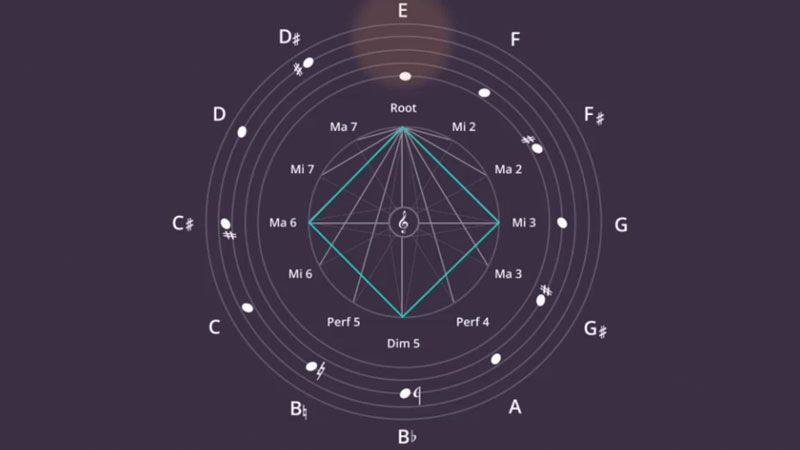
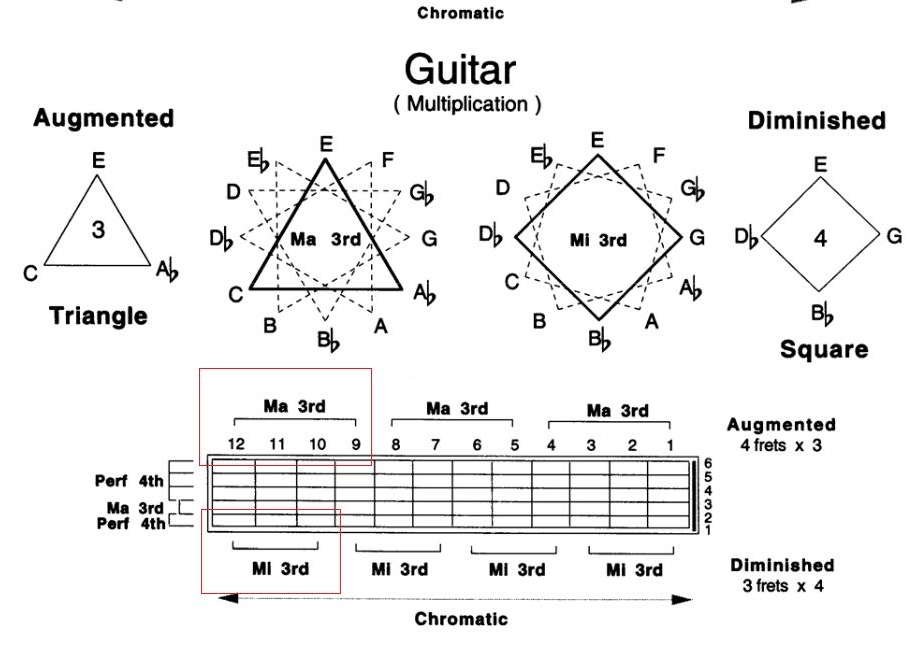
Design is all about uncovering patterns and proportions that are somehow hidden in the cosmos. Architects, music composers, graphics designers, chefs, film directors, painters, authors, each is hoping to uncover a genius composition that has been hiding in plain sight for a few billion years.

Recently, I was introduced to the patterns that jazz guitarist Pat Martino is using to teach chord shapes on the guitar. The diagram in the video (if you are interested) shows how he uses turning triangles and squares (visual objects) to construct chords (audio).

In other videos, Pat explains how he uses words as musical inspiration. For example, he assigns a note to each of the 26 letters of the alphabet, and then creates words ("beautiful" for example) to see what they sound like.

SlideMagic: a platform for magical presentations. Free student plan available. LEARN MORE
Logo cropping

Logo cropping

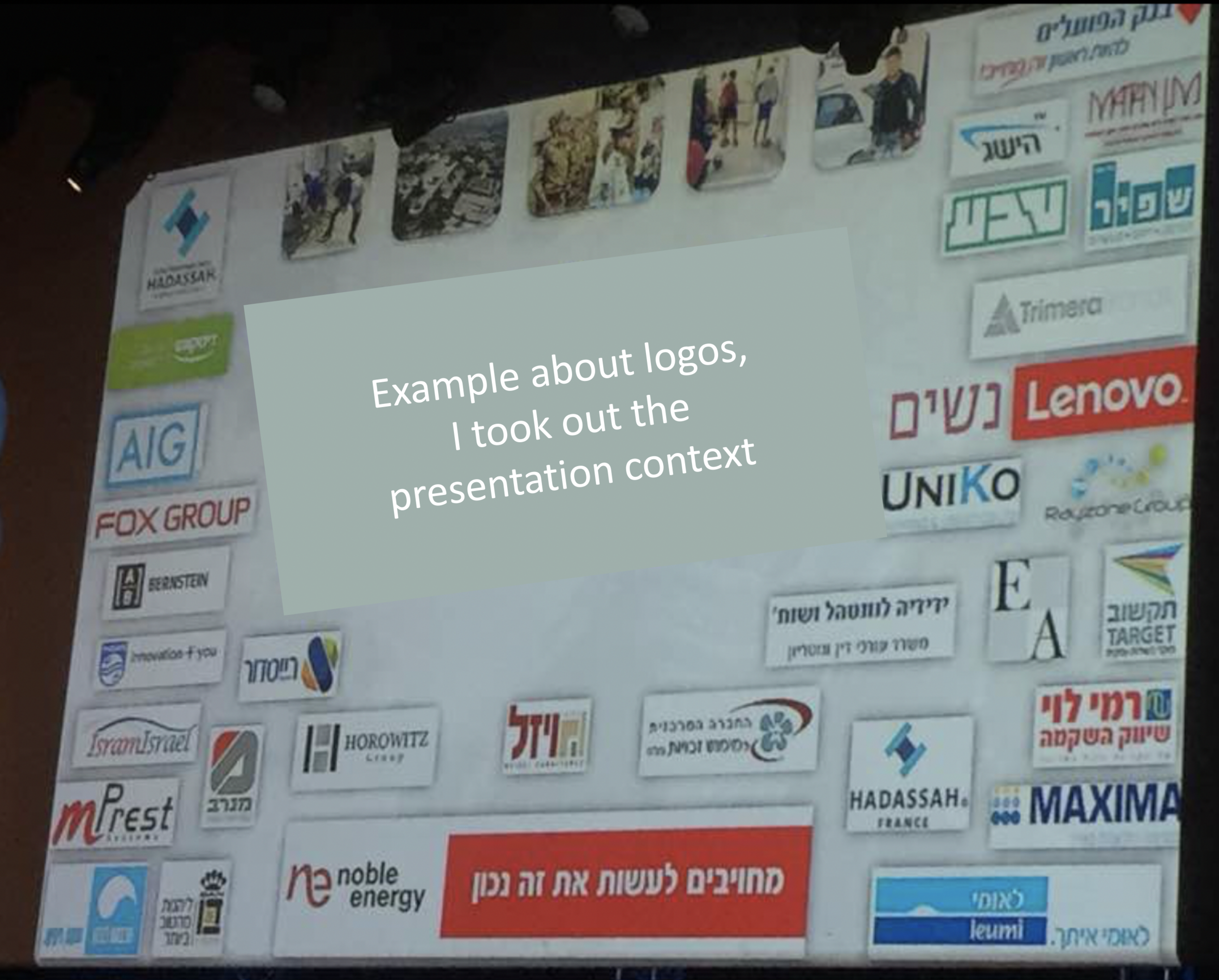
This screen shot is typical for many logo pages in presentations:

Images files are copied into the slide after which a background shading is added. The shadow creates an instant frame around the logo which is too tight, definitely not the framing the logo designer intended. Now that all logos have a box around them, the eye immediately wants everything to be distributed and aligned properly in a grid, which is impossible to do given the different sizes of the boxes. Finally, the drop shadows actually do not look good.

My approach to logo pages is to adhere to a strict grid and keep everything on a white background to give the logos space to breathe. In PowerPoint or Keynote it is a bit fiddly to line up all the logos, I usually put in a temporary table to make sure everything is lined up in rows and columns. When every logo is in its place, I delete the table.

My presentation app SlideMagic makes it easy, it is impossible not to align images in a proper grid.

SlideMagic: a platform for magical presentations. Free student plan available. LEARN MORE
Sign language

Sign language

I was invited to give a guest lecture on "sound" at my daughter's (12 years old) school the other day. I created a small presentation to back up the main elements of the talk: an analogue synthesizer connected to an oscilloscope.

The interesting bit: 12 years old + Hebrew, a language I only master passively (I understand, I can speak a few words, I totally cannot write anything). So my daughter did some translating, and for the slides I relied heavily on icons.

Yes, icons. I made fun of icon slides many times in this blog, but I must say, when used the correct way they can make great slides. I think the key to icons is to pick really original and good ones, use them in very big sizes, use flat designs without colors/shadings/gradients, use icons in a consistent style, and use the same ones repeatedly as a memory shortcut to the same concept.

To find icons, I used the noun project, a much better source for icons than stock image sites.

SlideMagic: a platform for magical presentations. Free student plan available. LEARN MORE