SlideMagic is a desktop app, and it isn't

SlideMagic is a desktop app, and it isn't

“What, you are making a desktop app in 2020? Well, we (the U.S.) have moved totally into the cloud now, everyone is using Google Docs to collaborate. Maybe people in less developed countries might find your product interesting if it is offered at a low price (i.e., people who cannot afford Google Docs and/or are using pirated copies of PowerPoint. Your next challenge is to make your product available in non-English languages and get sales distribution in these markets (do you need some contacts?).”

OK.

I now start to feel first hand what entrepreneurs go through when talking to others (especially investors) with their product. I am not raising money at the moment, but here is a possible way of answering a question like this.

  • On the one hand SlideMagic is a desktop app, on purpose. Presentation design requires a super snappy interface, and deep access to the operating system (dragging things between 2 files open in a window for example).

  • On the other hand, SlideMagic is not a real desktop app. It is written in HTML and Javascript and runs on Google Chromium, the current web development setup, and the app is updated very frequently in the background (sometimes daily).

  • SlideMagic focuses on 1 (huge) issue in presentations: story clarity and design, not online collaboration, not enterprise security, not cloud file storage, not data analysis, not stunning animations, not knowledge storage and search, not intra-employee information sharing. All these are important issues that have great software products built for them, by billion dollar companies.

  • SlideMagic’s economic setup allows it to do this: a super lean cost base, and a former strategy consultant, presentation designer, computer scientist brain combined in one head to try and get product-market fit for what no one has managed to do: get people to make better presentations. Millions of dollars of VC money, huge teams of people with the objective of dethroning Microsoft or Google is not what were are doing here. SlideMagic needs very little to turn profitable, SlideMagic can afford to take its time with product iterations to get there. Only when the formula catches on, investing is growth is on the agenda.

In short, SlideMagic might sound like a crazy idea, but it is a calculated risk where the whole combination of technology, idea, economics, and entrepreneur is in balance and hangs together. It might not work, but it could work, and when it does, presentations will become a lot better.

You see how I tried to answer the question: factual, reasonable, and even a bit vulnerable. Not every investor will agree with you, not every investor will think she is a fit with your business (these are 2 different things) but every one of them should think that you are a sensible person and see where you are coming from.

Photo by Andre Mouton on Unsplash

SlideMagic: a platform for magical presentations. Free student plan available. LEARN MORE
Warren Buffett's investor presentation slides

Warren Buffett's investor presentation slides

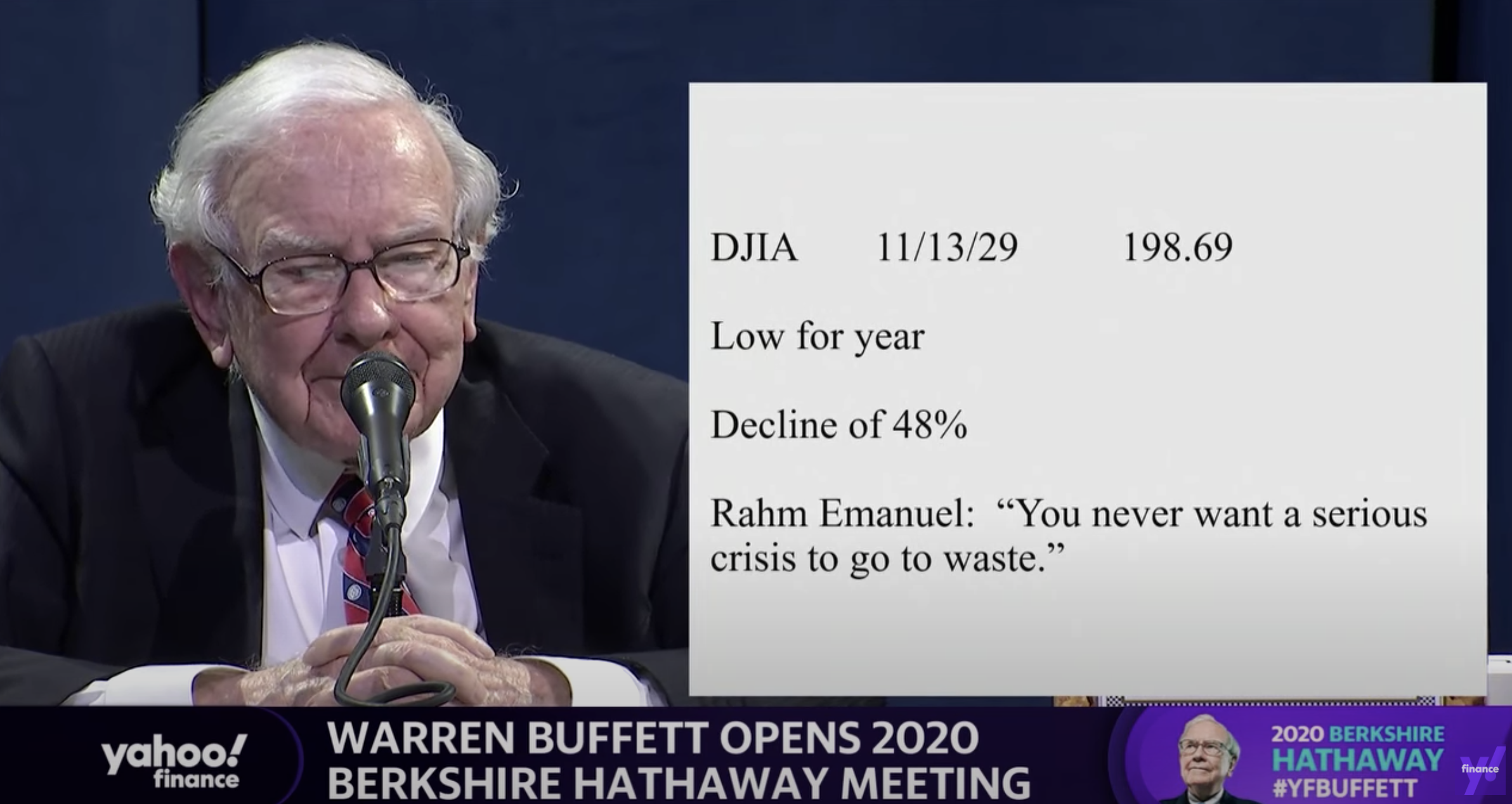
This tweet flew by about Warren Buffett’s slides during his annual investor meeting.

A sans serif font and centering the text would have made it look better, but overall, this slide is actually not that bad. One big message without distractions. (If Warren had used SlideMagic with this template, his slide would have looked like this)

Screenshot 2020-05-03 07.34.29.png

Other slides are less crisp though, as seen in the example below:

Screenshot 2020-05-03 07.24.07.png

But, Warren does not read out the bullet points, he tells a story starting with background about his father. People will read the slide for 2 seconds, wonder about the quote, and then focus all attention back on him.

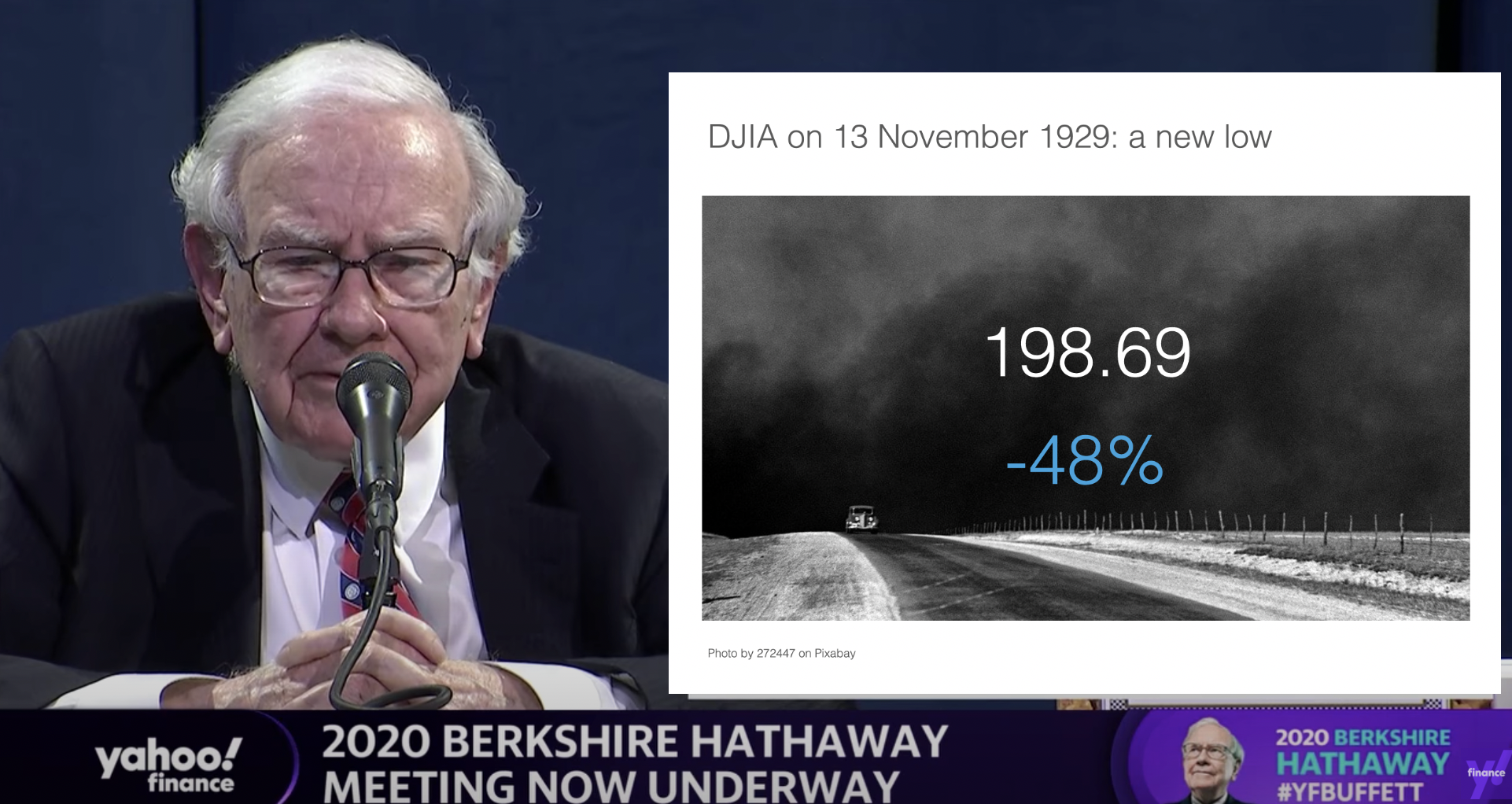
OK, I could not resist, SlideMagic would have produced the following slide (a quick search for “1930” in the built-in Pixabay image search delivers good results)

Screenshot 2020-05-03 07.51.59.png

I would put the quote on a completely separate slide, if at all.

Coming back to the first tweet. If you are Warren Buffett, then you get away with pretty much any slide design. On the contrary, making it all too fancy is a direct contradiction to his modest life style. If you are not Warren Buffett, putting in 2 seconds worth of effort with SlideMagic will definitely make a difference.

I tagged these 2 slide examples with “buffet” in SlideMagic, you can use them in your own designs and find them in the presentation app, or download them here.

SlideMagic: a platform for magical presentations. Free student plan available. LEARN MORE
Integrated Pixabay image search

Integrated Pixabay image search

Pixabay offers a large database of free stock images. The site has become increasingly useful over the past years. In 2020, free images are now often better than paid stock photos, simply because the designer/photographer tries less hard to add effects and edits to the original photographs. (This is all written from the perspective of a corporate presentation designer, there are probably other people out there who value edited images).

Each free image site has its own profile. Unsplash has better aesthetics, more natural images. Pixabay has more functional images.

Screenshot 2020-04-30 16.27.55.png

I have now added the ability to search Pixabay images in the desktop app. (Unsplash images, and the Noun Project icons were already present). All implementations are still beta features, as I finalise the approval for the API. (But I am confident I checked all the right boxes).

In-app image search is not just a “lazy” feature. It can greatly improve your presentation design workflow. Especially when it comes to copying, pasting, cropping and positioning images. In SlideMagic, this is just a few clicks. And, because of SldieMagic’s rigid slide grid, every image will always line up neatly with the other elements of your slide.

You can download the latest version of SlideMagic here (2.3.6). Integrated image search requires a pro subscription plan.

SlideMagic: a platform for magical presentations. Free student plan available. LEARN MORE
"SlideMagic style"

"SlideMagic style"

Even presentations not made in SlideMagic can look like one. Have a look at “Standing on the shoulders of giants” by analyst Ben Evans:

Screenshot 2020-04-22 15.46.45.png

The design approach:

  • One strong accent colour

  • Lots of variations of grey

  • Calm slide layouts

  • Clear grid structure

SlideMagic does not like these circles (yet) though and makes you fit into that boxy look :-).

For your next presentation, put the slides in slide sorter view, and take a step back. Do things look consistent in terms of layout, colour, and the balance between white space vs used space? If you struggle to stick to the discipline, SlideMagic is here to help.

SlideMagic: a platform for magical presentations. Free student plan available. LEARN MORE
Better image search UI

Better image search UI

Version 2.3.5 of SlideMagic went up this morning. The interface for searching images from within the desktop application now looks a lot better in a grid layout that takes into account portrait or landscape aspect ratios of photos.

Screenshot 2020-04-28 11.33.58.png

I will further improve the in-app image search soon, with a preview ability to test the image in your slide, and combining more than one image bank provider. A lot is changing in the world of online stock images at the moment, to the extend where I often find free images to be of better quality than paid ones.

Business presentations are different from ads or consumer graphics design projects: picking the right image and getting the credits right is what matters. More to come soon.

The image search API calls are still a beta feature with limits on the amount of searches per hour and/or the image resolution, as I need to make sure my (unusual desktop) app gets the back linking and credits done in agreement with the image bank provider.

One more feature was added: tool tips for the app icons after feedback from a user. Leave your mouse stationary for a second, and the app will suggest what you can do here. Most icons and actions are obvious, but while placing them, I realised that indeed a few things were hidden and/or unclear.

You can download the latest version of SlideMagic here.

SlideMagic: a platform for magical presentations. Free student plan available. LEARN MORE
Random slides...

Random slides...

I changed the “try a search” page on SlideMagic as I am finally getting around to paying attention to the home page. Now you get a random set of 25. Pressing the link a few times reveals the big variety of slides that are now available in SlideMagic. All for free when searching from within the desktop app.

Screenshot 2020-04-22 17.44.50.png
Screenshot 2020-04-22 17.45.14.png
Screenshot 2020-04-22 17.52.17.png
Screenshot 2020-04-22 17.45.01.png
Screenshot 2020-04-22 17.45.26.png
Screenshot 2020-04-22 17.45.41.png

SlideMagic: a platform for magical presentations. Free student plan available. LEARN MORE
Just push harder

Just push harder

When repositioning images in SlideMagic, there used to be the slightly lag when dragging the mouse. I spent days and days over the past year trying to fix this, but got to a point where I gave up after reading posts of other developer who compromised on a “fudge” approach for the exact same issue (in a different software of course).

Well, no longer. As of version 2.3.1, images follow the mouse button precisely. Deep, deep, down in the world of CSS was a weird way of calculating things, that combined with how I keep track of a slide coordinates made this one particularly tricky to solve, but it is done.

Also in 2.3.1 you icons are no longer “flattened” when you copy paste them, but you can now still change their colour and appearance, just as in the original.

The new version should automatically install in the background, or you can force the upgrade by visiting the SlideMagic app download link and pick your version for either Windows or Mac OSX.

Photo by Alora Griffiths on Unsplash

SlideMagic: a platform for magical presentations. Free student plan available. LEARN MORE
One image, different compositions

One image, different compositions

I am uploading lots of slides now to SlideMagic everyday. Where possible, I create multiple layouts of slides, often depending on the underlying image I use. For example, see the juggler below.

There are lots of degrees of freedom:

  • Image in a frame, or bleeding of the the page

  • Line up text with the balls, or not

  • Different colour options

As a SlideMagic user, you can pick one of these basic layouts and add or subtract boxes easily without messing up the overall of the slide.

Try it out for yourself, the search for juggler slides is here. For the moment, I have made access to the entire slide database from within the desktop app free, so you can experiment with presentations in .magic format. PowerPoint conversion and/or downloads require a pro subscription.

SlideMagic: a platform for magical presentations. Free student plan available. LEARN MORE
V2.2.9

V2.2.9

A new version of the SlideMagic app is now available for download with very detailed improvements to how the app responds to clicks. These are not earth shattering new features, but are incredibly important to make the app workflow even better. You can visit the download link to force a new install, otherwise, your app should update in the background.

UPDATE: Make that 2.3.0, now with direct full access to the entire slide database from within the app. (PowerPoint conversion and downloads require a pro subscriptions)

Photo by Harpal Singh on Unsplash

SlideMagic: a platform for magical presentations. Free student plan available. LEARN MORE
Startup Board update deck

Startup Board update deck

You can now access entire slide decks (“stories”) from the home page of SlideMagic. A few days ago I added a slide deck template for a startup Board update. As I upload the new slide decks, individual slides will get added with the right tags to the slide database as well so they will pop up when you search for relevant layouts.

More slide decks to follow. Let me know if you have any special requests.

SlideMagic: a platform for magical presentations. Free student plan available. LEARN MORE
Squeeze

Squeeze

Here is a sign that says “elevator 6” down in the parking lot of the building I live in. The designer took the functional approach: squeezing the words “elevator”, “6”, and an icon for an elevator and an arrow all in one line. That resulting graphic had an aspect ratio that did not match the sign. Solution: stretching and distorting the text so that now, it does fit all the available space.

Other solutions:

  • Use a sign with a longer aspect ratio

  • Leave white space above and below the text

  • Leave out information that is not required: the word “elevator” is not needed when you put a logo, the arrow does not add much if the sign is straight next to it.

Screenshot 2020-04-19 07.27.44.png
Screenshot 2020-04-19 07.39.02.png

SlideMagic: a platform for magical presentations. Free student plan available. LEARN MORE
Why does Merkel's explanation work?

Why does Merkel's explanation work?

Why does Merkel’s explanation of the virus “R0” (basic reproduction number) work so well?

She makes abstract mathematical concepts very tangible. Instead of talking about R0 being 1.0 or 1.2 and the resulting number of patients, she explains:

  • If that ratio is 1, it means that every patient infects one other, hospitals are full in October

  • If that ratio is 1.2, it means that out of 5 patients, 4 infect another one each, and one infects another 2, we are out of beds in July

No graphs needed.

SlideMagic: a platform for magical presentations. Free student plan available. LEARN MORE
Corporate earnings call deck

Corporate earnings call deck

I am in the process of adding more full slide decks to SlideMagic. Now all the investment in automation starts to pay off. Creating slides is incredibly fast in the app, after that the server takes over and creates thumb nails, organises tags, uploads both individual slides as well as the full deck for download, in powerpoint 4x3, 16x9, and of course .magic format.

Today, I added a possible layout for a big corporate quarterly earnings call deck, loosely based on a recent earnings presentation of a large pharmaceutical company (these presentations are obviously in the public domain).

SlideMagic subscribers can download the earnings call presentation template here.

Let me know what other type of slide decks you are looking for.

SlideMagic: a platform for magical presentations. Free student plan available. LEARN MORE
The asterisk

The asterisk

I am preparing a few more stories to add to SlideMagic, one of which will be a sanitised box-standard quarterly earnings presentation template for a typical manufacturing company. Just stumbling on this tracker page. It probably started out good, but then the legal department got involved and put in all the disclaimers… “36 consecutive years of growth” sounds a bit better… I would have put that in the slide, and then clarified the “adjusted earnings” part all in the foot note.

36 consecutive years of adjusted operational earnings growth*

Screenshot 2020-04-14 14.31.25.png

SlideMagic: a platform for magical presentations. Free student plan available. LEARN MORE
Testing the first SlideMagic stories

Testing the first SlideMagic stories

I reshuffled the code on the server, so I can now stitch entire decks (I call them “stories”) together that you can download in one go. I think these stories can complement the offering of individual slides.

  • Slide templates are focussed on one particular design or image that cover a certain topic

  • Story templates are all about well, the story. I expect them to contain mainly very simple slide layouts, what matters is what is written in them, and in what sequence they are put together.

I am starting with a quick make-over of the YCombinator seed deck, you can download it for free here. See the original post on YC for the background.

It is available both as a .pptx and a .magic file, but it with these simple slide layouts where the power of SlideMagic comes in: quickly adding or deleting rows without messing up your slide layout. You know which I would pick :-)

There is still work to do, you can’t get to the stories easily from the top slide menu. Also, the user interface can be confusing now when as a user you are not sure whether you are browsing slides or stories. Also, in-app story downloads are not your implemented . Work in progress.

SlideMagic: a platform for magical presentations. Free student plan available. LEARN MORE
Pop out of the box

Pop out of the box

The NYT used this pop out technique as a data visualisation tool on the front page. The NY virus casualties literally spike outside the graph, even over the newspaper’s logo.

Screenshot 2020-04-10 07.16.47.png
Screenshot 2020-04-10 07.20.44.png

Similar to a graph about unemployment benefits from last week. You could use something like this in your presentations as well.

I have a few slides on SlideMagic (example here) that use this pop out effect. They are PowerPoint-only though, since the style police of the SlideMagic app protects you against yourself breaking the rules of good graphics design. In 99% of the cases, that is a good thing, this is an example of the other 1%.

SlideMagic: a platform for magical presentations. Free student plan available. LEARN MORE
Stories coming next

Stories coming next

I am using the current quiet to beef up the usefulness of SlideMagic. Next up are stories, bundles of slides with a coherent story that stitches them all together: startup pitches, board updates, budget plans, CVs, strategy reviews, etc.

The slide decks are easy for me to create, I need to solve a technical and a design challenge:

  • Technical: the whole SlideMagic architecture is based on individual slides, I need to start linking them together to stories.

  • Design: I need to come up with an intuitive user interface to browse and select stories easily.

Work in progress.

Photo by Erik Brolin on Unsplash

SlideMagic: a platform for magical presentations. Free student plan available. LEARN MORE
The side track trap

The side track trap

Now that I am teaching my kids how to code with the help of online courses I can see where instructors take the wrong turn. By now, I mastered the material myself, and can put myself in the position of someone who is trying to understand it (I was there myself a year ago).

One mistake is a side track trap. You introduce a completely new concept, but before explaining roughly what it is about, you introduce a few exceptions or unusual use cases where you could also apply this new concept, that the presenter has not fully introduced yet).

From a logic flow perspective, this could look great: we cover all the use cases together. From a teaching perspective, this is confusing. A reference video (‘How did that work again exactly?”), is different from a 101 introduction video.

I am not sure the instructor does this intentionally. Maybe videos get edited later and she needed to find a place to insert this specific concept, “plop”, this seems like the right spot.

Notice the difference between detail and side track. If you need to go into the details to explain something, a newbie can probably follow along as long as you stick to the one specific use case of pieces of information that reinforce each other. Leaving things at a high level (i.e., no details) but lots of different tangents can still be very confusing for the newbie.

This relates to the blog post earlier this week, where I discussed answering questions with the risk of tripping up your story line.

Photo by Jacob Meves on Unsplash

SlideMagic: a platform for magical presentations. Free student plan available. LEARN MORE
Best COVID-19 stats?

Best COVID-19 stats?

There seem to be almost more COVID-19 data charts than cases around the world at the moment. Cases or deaths, log or linear, increase or cumulative. The one I think is most useful is deaths per million on a log scale. It is impossible to get an accurate picture of cases, and you need to adjust for population sizes. This graph shows the current picture.

To see how badly countries have been hit, the absolute deaths per million inhabitants

To see the current state, the new daily deaths, per million inhabitants:

All data provided by Our World in Data

SlideMagic: a platform for magical presentations. Free student plan available. LEARN MORE
Credibility

Credibility

YCombinator VC Paul Graham argues that the current pandemic has exposed politicians that talk confidently about things they do not understand: see the post her about credibility in corona times.

  • He is right

  • Most of these politicians probably did not knowingly lie, I assume they believed they understood things, that’s probably a key asset of being a politician

When it comes to pitching to investors, credibility is crucial, and you can only loose it once. Investors will have to work with you for a long time, they don’t have time to check everything you do, so as soon as one incident gets exposed where it appeared that they cannot trust you, that’s it.

So you get a question you do not know the answer to:

  • If it is factual, give the answer after you consulted with someone who knows, maybe after a short delay

  • If you truly don’t know, say so, with an approach how you mitigate the uncertainty.

Bluffing an answer is not the right thing to do here.

So as a startup CEO, you can still be highly confident that your idea is going to work, and keep credibility while admitting that you do not know everything, and that you might actually be wrong.

Photo by Dayne Topkin on Unsplash

SlideMagic: a platform for magical presentations. Free student plan available. LEARN MORE