Viewing entries in
SlideMagic

Expanding the template database

Expanding the template database

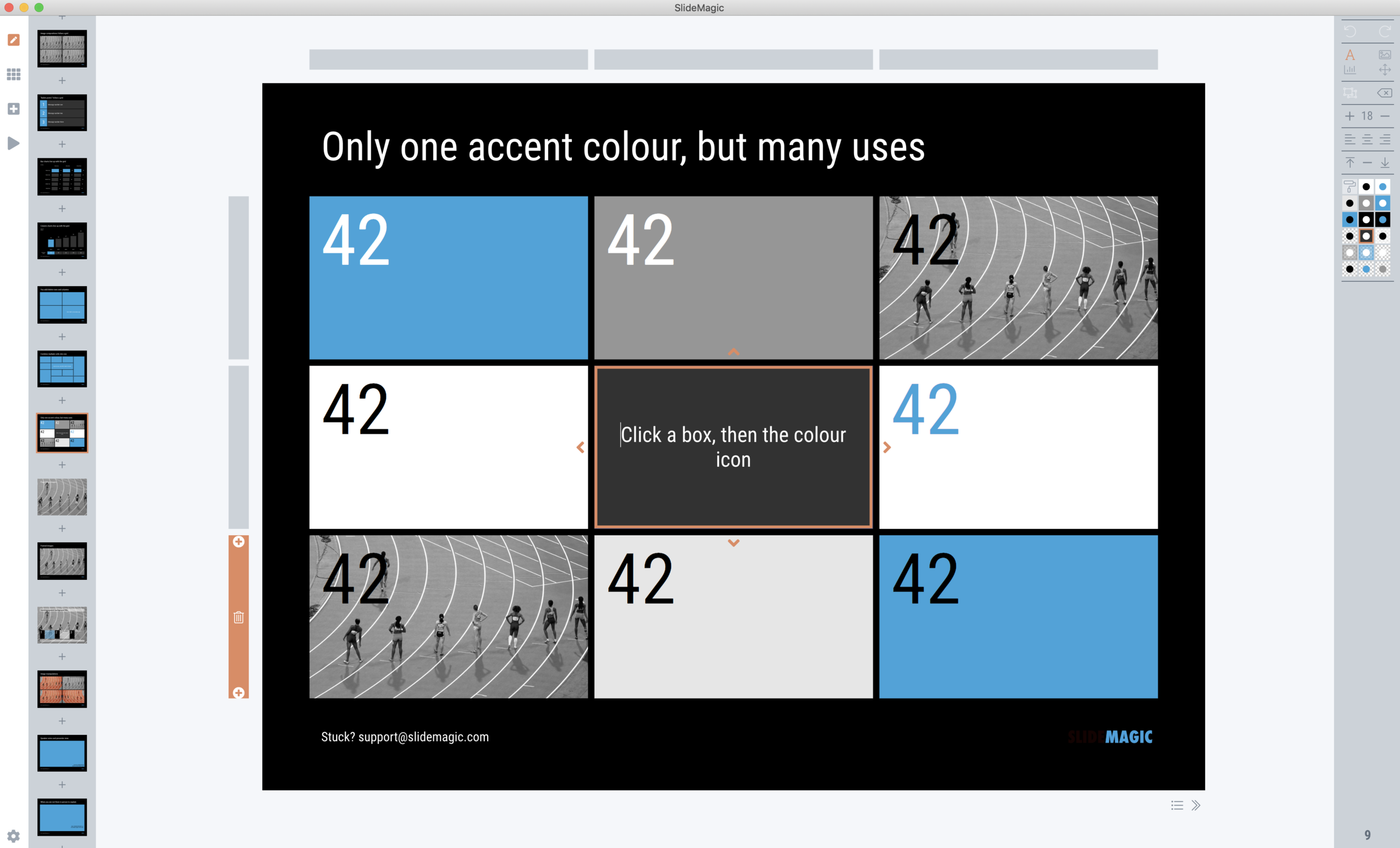
SlideMagic 2.0 has almost reached the point where I am happy with the features for a first release (icon and image search went in last week). Now it is time to focus attention again to what will make SlideMagic stand out: templates for presentations.

Screenshot 2019-11-25 15.28.59.png

I have started to add slides with images to the template database, inspired by the slides that are for sale in the PowerPoint template store. This is also a good stress test to see how the app with big files full of images.

Work in progress, this will take a bit of time to get right.

SlideMagic: a platform for magical presentations. Free student plan available. LEARN MORE
Printing presentations in 2019

Printing presentations in 2019

I don’t think many people are still printing presentations in 2019. The one exception: bankers pitching to institutional investors. The latter still like to flip along (or ahead) with the presentation and make notes in the margin.

Still, I want SlideMagic 2.0 to be fully rounded app, so I start the work on its print function. Printing is often ignored by many application development frameworks. The feature is not that important, it is tricky to develop and get right, but it has to be done.

A positive side effect is that I am coming up with a better way to convert presentations to PDF without the need to rely on open source libraries, and I can soon support conversions as a parallel process that no longer will block the main application process (something that can be annoying especially if you used large images).

(Beta testers can get around the current lack of the print feature by converting to PowerPoint or PDF and then print in those apps).

Photo by James Pond on Unsplash

SlideMagic: a platform for magical presentations. Free student plan available. LEARN MORE
Starting a brand overhaul (once again)

Starting a brand overhaul (once again)

Slowly, slowly, I am starting up overhaul my website and branding once more. The custom presentation design business site has been taken down, marketing for SlideMagic 1.0 has been hidden in a menu, and I started to display a landing page for SlideMagic 2.0.

Sunsetting 2 businesses on which you have worked for years (even more than a decade) feels a bit strange, I remember worrying about SEO and other things, while I am now switching off the whole thing in one click.

All to make space for 2.0.

SlideMagic: a platform for magical presentations. Free student plan available. LEARN MORE
App update

App update

SlideMagic 2.0 beta users will have their app updated over the coming days with a few tweaks and improvements, mostly the result of me now using the app in earnest for the expansion of the template database.

  • I gave up on insisting that you cannot change the layout of the title page of the presentation. Page 1 still looks like it did before out of the box, but you can now change it, delete it, move it, like any other slide in the presentation. Whatever you do to it, the design will be 100% consistent with the other slides in the deck though. Page one is important to brand your presentation, and I was imposing too many restrictions on my users. The side effect of this is that removing the need to distinguish between page 1 and regular pages I could simplify the app code massively (= deleting many, many lines of code). Legacy SlideMagic 1.0 presentations will be converted automatically.

  • I removed the ability to edit slide titles in story mode. Initially I thought it would be a useful way to edit headlines of your slides all together. Now in use, I found that it actually confuses the story user interface.

  • I perfected drag and drop of slides, now also across multiple presentation windows (something that is hard to do in browser-based applications such as Google Slides). As result the clipboard in story view was no longer needed. You can now also drag, copy, delete, move slides in the small thumbnail strip at the side of the main edit screen. There is still work to do here (dragging multiple slides for example)

  • I implemented right-click context menus throughout the presentation, enabling me to declutter the user interface by removing icons that are no longer needed.

  • Popup menus enable you to work with very fine grids now, as I no longer need to render lots of icons.

  • Popups also solve user interface conflicts between drawing connector arrows and combining/splitting shapes

To be continued.

SlideMagic: a platform for magical presentations. Free student plan available. LEARN MORE
Where are the bullet points?

Where are the bullet points?

A question I got from a SlideMagic 2.0 beta tester.

The answer: there aren’t any. I am trying to create a presentation design tool that changes people’s design habits. SlideMagic does not have built-in bullet point formatting options. It is meant to be that buzzer that reminds you to find an alternative design solution the moment you are about to fall back to your old habits.

It is possible to create lists in SlideMagic though. Below a screen shot from a template search in the (still very small) slide library. If you need to make a list as a conscious design decision, you can, if you want to fill a box quickly with a number of bullet points, you can’t.

Maybe I am pushing things too far here, but I am not yet ready to give in.

Photo by Jon Tyson on Unsplash

SlideMagic: a platform for magical presentations. Free student plan available. LEARN MORE
SlideMagic slides, not by SlideMagic

SlideMagic slides, not by SlideMagic

Some designers have a distinct look & feel that you can recognise instantly. Recently, I started to see “SlideMagic-type” visuals on the Internet (boxy grid-based slides with one strong colour). Not by people I recognise immediately (Twitter followers, blog readers, SlideMagic users, etc.), and these were not direct copies of my designs: new charts in the spirit of SlideMagic

I consider this a great compliment. SlideMagic is a culture change in business presentation design. The style, the approach, everything is open source. As a side effect I hope to create a financially viable business by offering a tool that makes it even easier to spread the culture to everyone who needs it.

Photo by Moss on Unsplash

SlideMagic: a platform for magical presentations. Free student plan available. LEARN MORE
Is it just me?

Is it just me?

Years ago I started SlideMagic 1.0 “brain washed” by “modern” application design: cloud, tablet-friendly, SAAS, an always up to date version of software running in the browser.

Bit by bit, I am reverting to a 1990s setup for SlideMagic 2.0, focused on a desktop application with a selected cloud-tweaks:

  • Design apps need to be super snappy and fast, latency because of saving stuff in a database that sits at the other end of the world is not ideal

  • Presentations do get edited on planes that still do not have 100% WiFi coverage

  • Presenting a presentation on a screen that is dependent on a live internet connection is risky, yes even in 2019.

  • Having multiple windows on a screen and copying, pasting, dragging things across is actually useful (not yet implemented in SlideMagic 2.0). It is funny to see the developer discussion on bulletin boards where people are waking up to the challenges of managing multiple windows of the same application. Something web designers usually do not have to do.

  • Storing things in a tried and trusted local file system solves security headaches and is good set up for when creating documents: finding things, copying, pasting. (Long-term storage and archiving is a different story)

Photo by Matthew M on Unsplash

SlideMagic: a platform for magical presentations. Free student plan available. LEARN MORE
App update

App update

Apologies for the quiet blog this week. I am extremely busy ironing out the SlideMagic 2.0 app. This week the focus is on tightening the integration with the Windows and Mac operating systems:

  • Designing app and file icons that look good and stand out next to other desktop icons (clutter)

  • Linking those icons with the ‘.magic’ file extension on a computer

  • Making sure double clicking icons, recent files, recent files in the dock, etc. works

  • Certifying the app both with Apple and with a certification agency for Windows so that double clicking an installer does not generate scary security warnings

  • Adding SSL security to file downloads

  • Accept-cookie banners, and other regulatory issues

To be continued. Beta testers can check in now and then to download a later version of the installer, I am putting a new one up almost every day now.

SlideMagic: a platform for magical presentations. Free student plan available. LEARN MORE
(Careful) beta test for both Mac and Windows

(Careful) beta test for both Mac and Windows

I am ready to release a useable version of SlideMagic 2.0 to a very small group of users. There is an app for both Windows and Mac. If you are interested, you can sign up here: http://cloud.slidemagic.com/beta/apply, and I will let you know in the coming days (maybe week) if you made it to the very first beta test group.

In the not too distant future, there will be a broad/no application beta test program, but at the moment I am keeping things small to make sure I have the bandwidth to support early users.

Photo by Abbie Bernet on Unsplash

SlideMagic: a platform for magical presentations. Free student plan available. LEARN MORE
App update

App update

It took me a few days after the holiday to get back into my own code again (scary how fast you forget things). But I am on a roll again. A major achievement for a 1990s computer scientist is that I got the SlideMagic server running: you can log in as a user to activate the pro features (probably spotless and instant PDF and PowerPoint conversion) and equally important, access to a much broader searchable layout database. The latter works now as well, the server responds with dynamically generated slide suggestions based on search keywords.

The next challenge will be to 1) expand the slide layout database, and make the search suggestions smarter, and 2) to make the user signup/login robust. For most developers, 2) is easy (this is coding 101) and 1) is hard (this requires 25 years of slide design experience). For me it is the other way around.

Photo by Markus Spiske on Unsplash

SlideMagic: a platform for magical presentations. Free student plan available. LEARN MORE
App update

App update

I am posting a bit less frequent these days since all my posts originate directly from the work I do day to day, and presentation design work has pretty much dropped to zero at the moment…

So what is happening with SlideMagic 2.0? I pretty much completed the desktop app but still think it is not ready for public release as small bugs continue to pop up, and I keep on discovering tiny, but annoying usability issues for which I do not need the help of others to discover them. The feature set is frozen, but experience is super important for a presentation design app (the big issue with version 1.0).

Hunting tiny bugs is not the most inspiring things to do, so I split my day now between this, and the next challenge: creating a template “store” with a smart search engine that integrates tightly with the app (unlike the current Shopify site). Technically, this is a lot simpler than the complex desktop app that I created, but for me it is a bigger challenge as I need to dive into the world of server design, which did not really exist when I graduated in Computer Science in 1992.

The potential upside should be interesting though, as this is the final barrier for me to go all out in thinking about what technology can do to help make the creation of presentations easy. Again, I will start with the tinkering approach, slowly iterating towards a product that is useful (which involves backing out of a lot of dead end alleys.

To be continued.

Photo by Christian Kaindl on Unsplash

SlideMagic: a platform for magical presentations. Free student plan available. LEARN MORE
Designing with phone cameras in mind

Designing with phone cameras in mind

A large portion of conference audiences now diligently snaps a photo of every slide that the keynote speaker presents. Some implications:

  • You can no longer hide secrets by quickly going to the next slide. A high resolution camera got all those quarterly sales numbers in that nano second the slide was one. If you don’t want things to end up in the public domain, don’t put it on a slide, not even small. Yes, that might mean investing an extra half hour recreating that graph from the budget document.

  • The opposite is also true. Slides have a second use, pondering over them after the big presentation. This means you could add more content than you normally would do for an in-person presentation. One way to do that is to use an “explanation box”, like this feature in the SlideMagic presentation app. The main slide and the explanation are clearly separated.

  • You could take it even further by designing slides explicitly for the photo: for example, a calculation how you got to a certain number. Show it, say what it is, invite a picture, and move on.

The SlideMagic presentation software has an explanation panel that you can slide in and out.

The SlideMagic presentation software has an explanation panel that you can slide in and out.

SlideMagic: a platform for magical presentations. Free student plan available. LEARN MORE
A matter of speed

A matter of speed

A few years ago when I started thinking about about the SlideMagic project I though it was all about the design. Just find a way for people to make beautiful charts and it will be a big hit.

I am close to completing version 2.0 of the SlideMagic app, and am now in a position I have never been in before: I can design the actual user experience of someone creating slides click by click, being free fom common software design platforms, standards, and practices. And here is the real magic. I make dozens of user interface decisions a day, what colours get copied, what things get highlighted, how font sizes are set, what box is selected after you did an action. Hundreds of small decisions add up to a big experience. You cannot pinpoint why it works, but it does somehow. It is all a matter of incredible attention to detail.

The pitch of SlideMagic is changing. It will all be about the speed at which you can design a pretty decent looking slide.

(Don’t tell this secret to anyone).

Photo by toine Garnier on Unsplash

SlideMagic: a platform for magical presentations. Free student plan available. LEARN MORE
Feature preview: matching slide and user interface colours

Feature preview: matching slide and user interface colours

In SlideMagic 2.0, I have pushed the use of colours in the application user interface further. The look and feel of the application will be the opposite of the slides you are working on:

  • If the slides have a dark background colour, the application will be light

  • The accent colour of the application will be the opposite colour on the colour wheel from the colour .you are using in your slides.

Here are some screen shots from the alpha version:

Brown/red in the slides, green in the app

Brown/red in the slides, green in the app

Switch the slide background to dark, the app turns light

Switch the slide background to dark, the app turns light

Slides on the clipboard are in the template bank are presented in the opposite colour so you can differentiate easily between the slides that are already in your presentation, and the ones you could add.

Slides on the clipboard are in the template bank are presented in the opposite colour so you can differentiate easily between the slides that are already in your presentation, and the ones you could add.

SlideMagic: a platform for magical presentations. Free student plan available. LEARN MORE
Starting to use the store myself

Starting to use the store myself

Recently, I have started to use the template store myself for the few bespoke design projects I still do for long standing clients (SlideMagic gave me a really attractive rate :-)). My hard drive is filled with 1000s of slides and still it is difficult to find a nice clean layout to use as a basis for slide number 1001.

Up until a few weeks ago, I started every slide pretty much from scratch, I have gotten pretty fast in setting up yet another 4x5 table grid. But even I can't beat search the store for "table" and re-download that slide again and hit the ground running.

I am continue to monitor which slides people decide to buy, and which slides are downloaded by subscribers. Many subscribers download a lot of slides right after they made the purchase, and then don't return for a couple of weeks. Initial downloads include slides that you can only use in very specific situations, like these sheep. They hardly ever download the same slide 2x. There could be 2 possible explanations:

  • Less likely: after that $99 annual subscription, you better make sure you get what you paid for, maybe the store will stop running somehow before the 12 months are up.
  • More likely: we have built up the habit of mining through old decks, and recycling slides into a new presentation.

As a designer who now uses its own store, I would encourage you to think Netflix, iStock, Spotify: your slides will always be there, and search is there to help you find the slide you need at the moment (and nothing else). Change your design process:

  • From: open your consolidated SlideMagic deck (which took time to assemble from all the individual slides you had to download), pick 20 designs you think you are going to need, see how you can tell your story with these 20 designs
  • To: scribble your story flow on a piece of paper, create a deck of empty slides with just titles, search the appropriate slide template on SlideMagic

It will take you less time, and you get better presentations. And remember: I am constantly adding new slides so your first burst download will run out of date soon.

Having said that, I am willing to look into a technical solution to combine multiple slide downloads in one deck, my commerce platform cannot handle that (yet).


Cover image by Henrik Dønnestad on Unsplash

SlideMagic: a platform for magical presentations. Free student plan available. LEARN MORE
Mysterious shipping charges

Mysterious shipping charges

It is very hard to tell eCommerce platforms, Google shopping, tax authority and other sites that digital downloads do not require shipping of physical stuff. Deep down in the bowels of my system $20 shipping charges were still present for some countries. I think I cleaned everything up now. Let me know if you see any other irregularities. If it looks wrong to you, it probably is wrong.


Cover image by chuttersnap on Unsplash

SlideMagic: a platform for magical presentations. Free student plan available. LEARN MORE
A Pareto chart

A Pareto chart

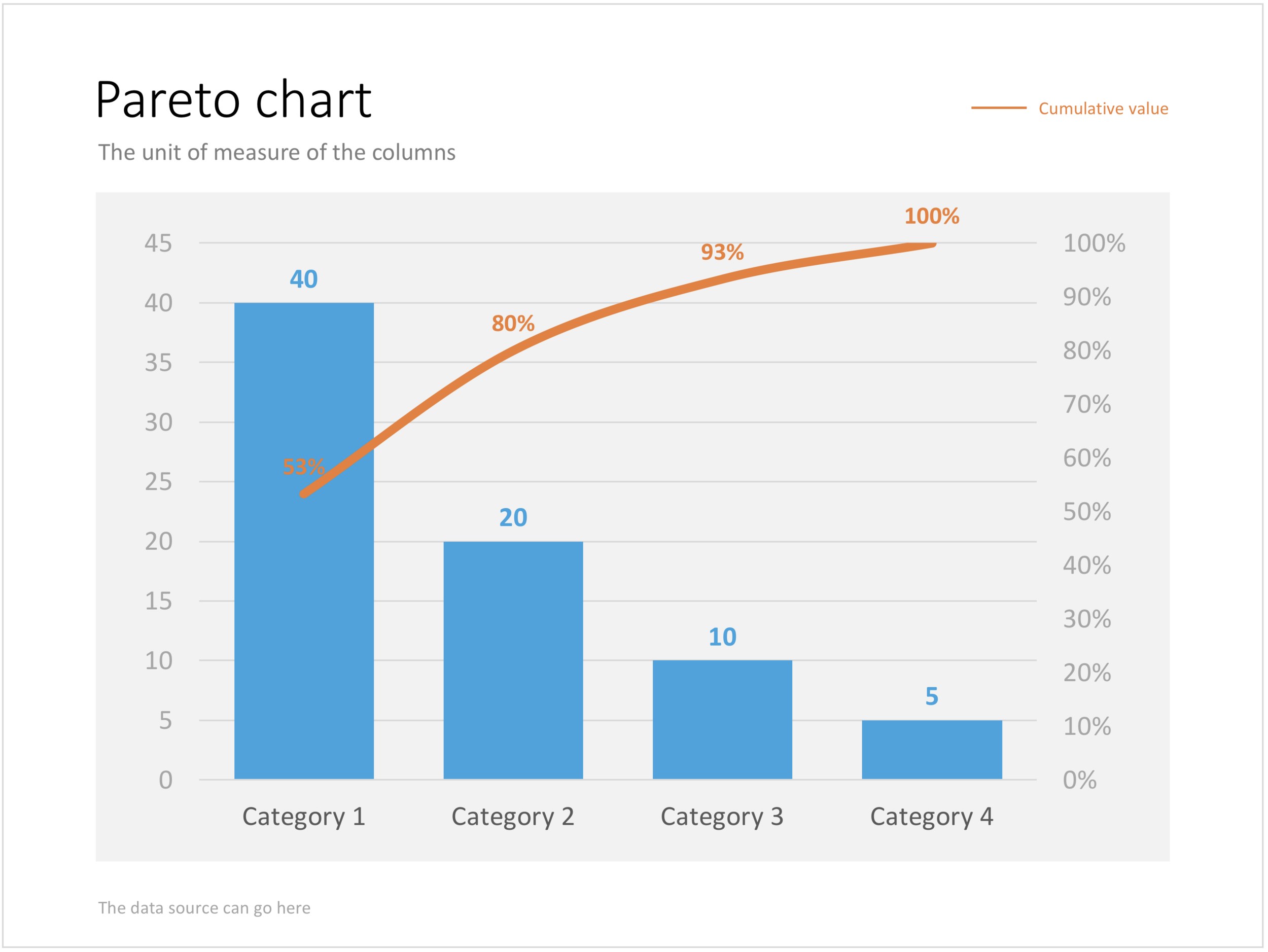
Recently, someone searched for a Pareto chart on my site. I must admit, I had to consult WikiPedia about this type of slide. A Pareto chart shows 2 data series, each with their own vertical axis; the first show the absolute frequency count of something, the second one the cumulative occurrence of the data series, adding up to hundred for the last entry. I have added the Pareto chart to the store. 

SlideMagic: a platform for magical presentations. Free student plan available. LEARN MORE
Puzzle pieces in PowerPoint

Puzzle pieces in PowerPoint

Although you could consider them a presentation cliché, puzzles can work really well in a presentation:

  • Show how things fit beautifully

  • Show how your are missing (hopefully just one) critical piece

  • Show that you finally managed to plug that last gap

Puzzle shapes can also work great when you use them in combination with images. You can go back to this blog post about making Photoshop-like image cut outs in PowerPoint.

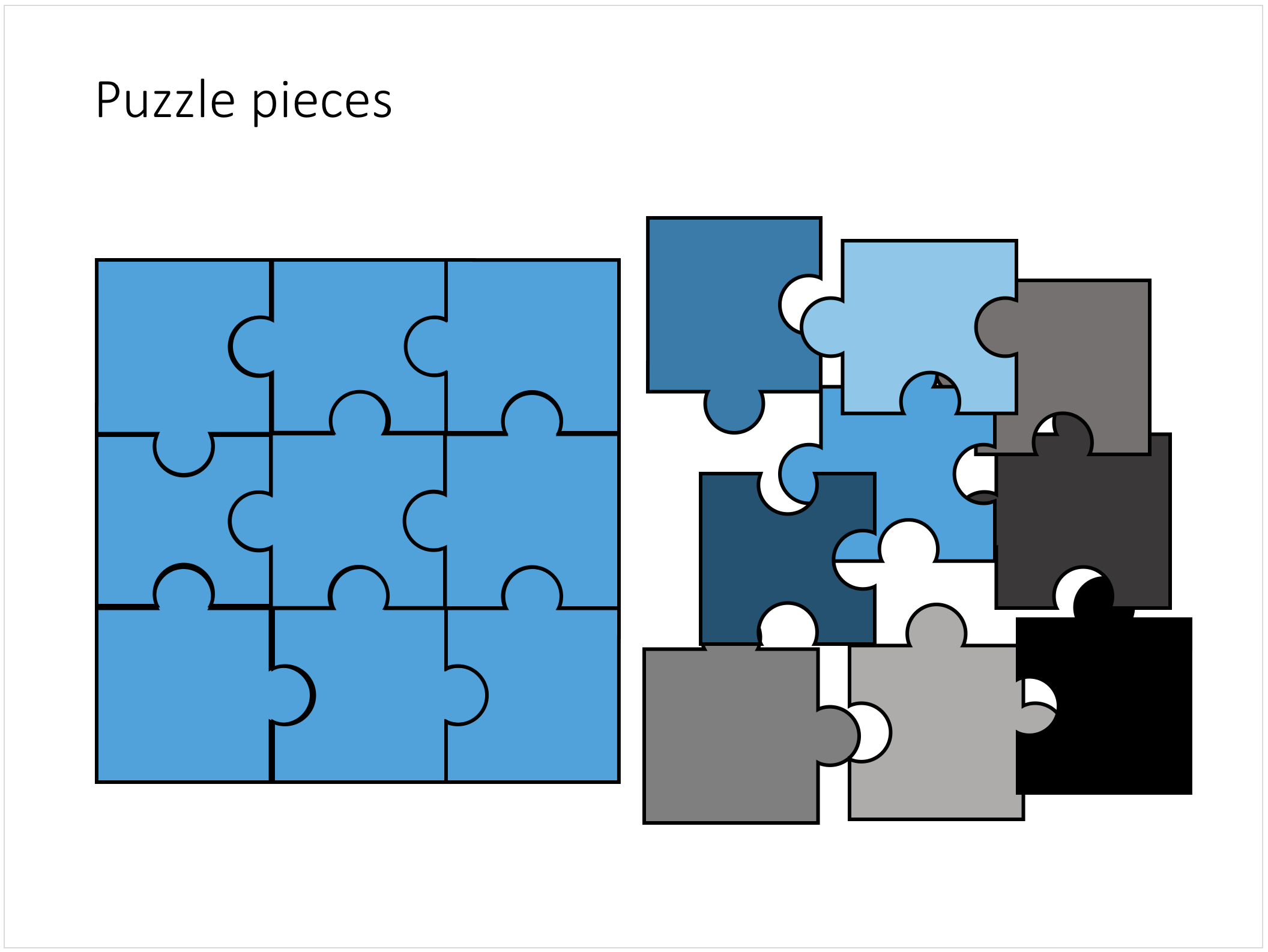
Stock image sites are flooded with millions of puzzle piece designs, but they are not very practical for the average PowerPoint designer (especially late at night working for tomorrow's deadline). Almost all these puzzles pieces are vector objects or images that are impossible to edit in PowerPoint. Moreover, all these puzzle pieces have wildly irregular shapes that make them hard to fit in your slide composition that requires exactly nine of them.

This PowerPoint puzzle slide solves the problem for you. The pieces inside are fully editable PowerPoint shapes, you can change their colour, you can put text in them, you can reconfigure and piece them together as you see fit. Yo'u can download the finished slide by clicking the image (An Apple Keynote version is available as well).

You can try to create the pieces yourself if you want, I used simple square shapes and circles, either joining or subtracting the shapes. Circles and squares might not be the most realistic shapes, but they are very practical when have to piece things together. There is a little bit of math homework to do to determine which type of puzzle shapes you actually need, and which ones you can create by rotating existing pieces.

SlideMagic: a platform for magical presentations. Free student plan available. LEARN MORE
Concentric circles in PowerPoint

Concentric circles in PowerPoint

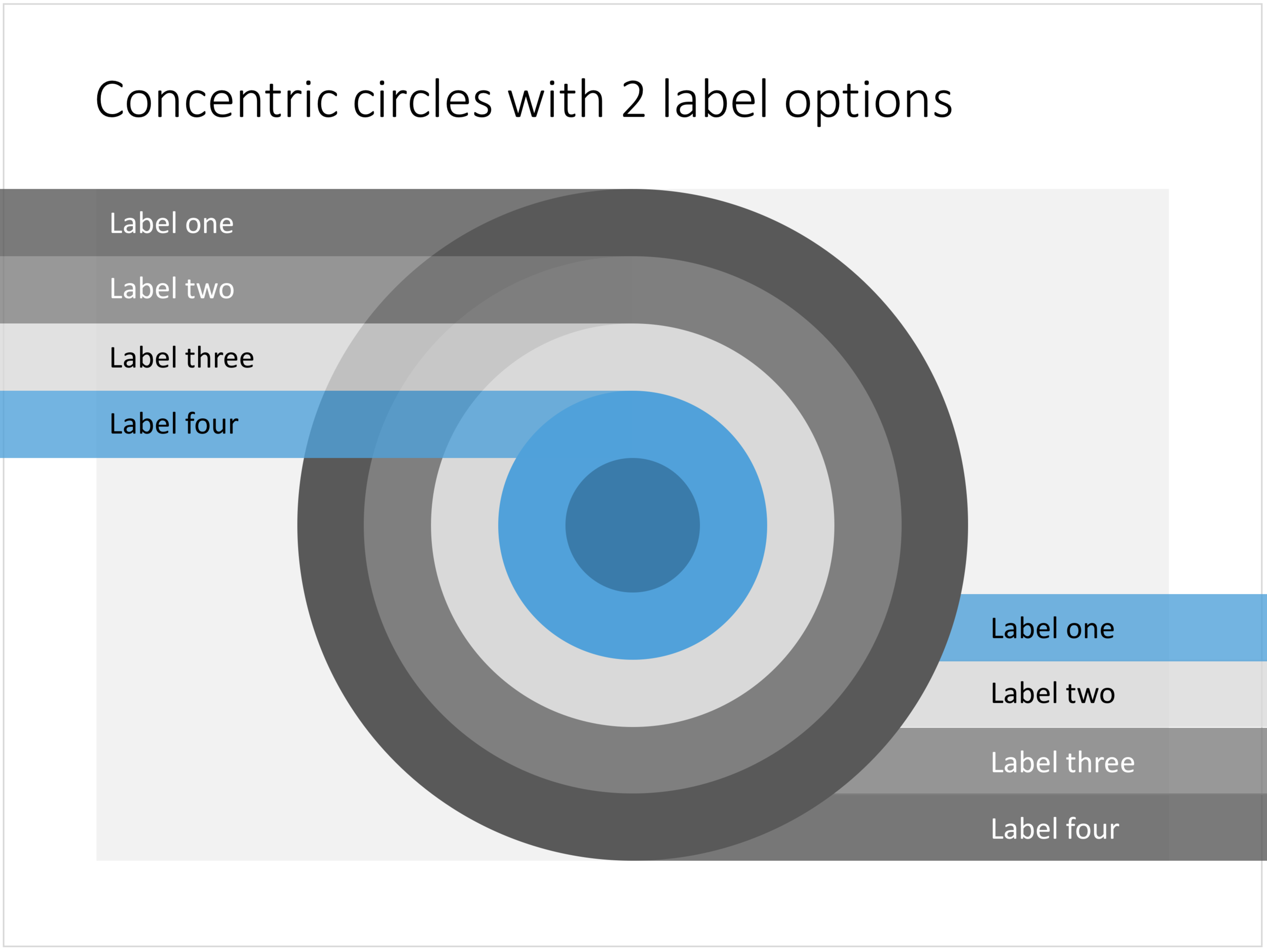
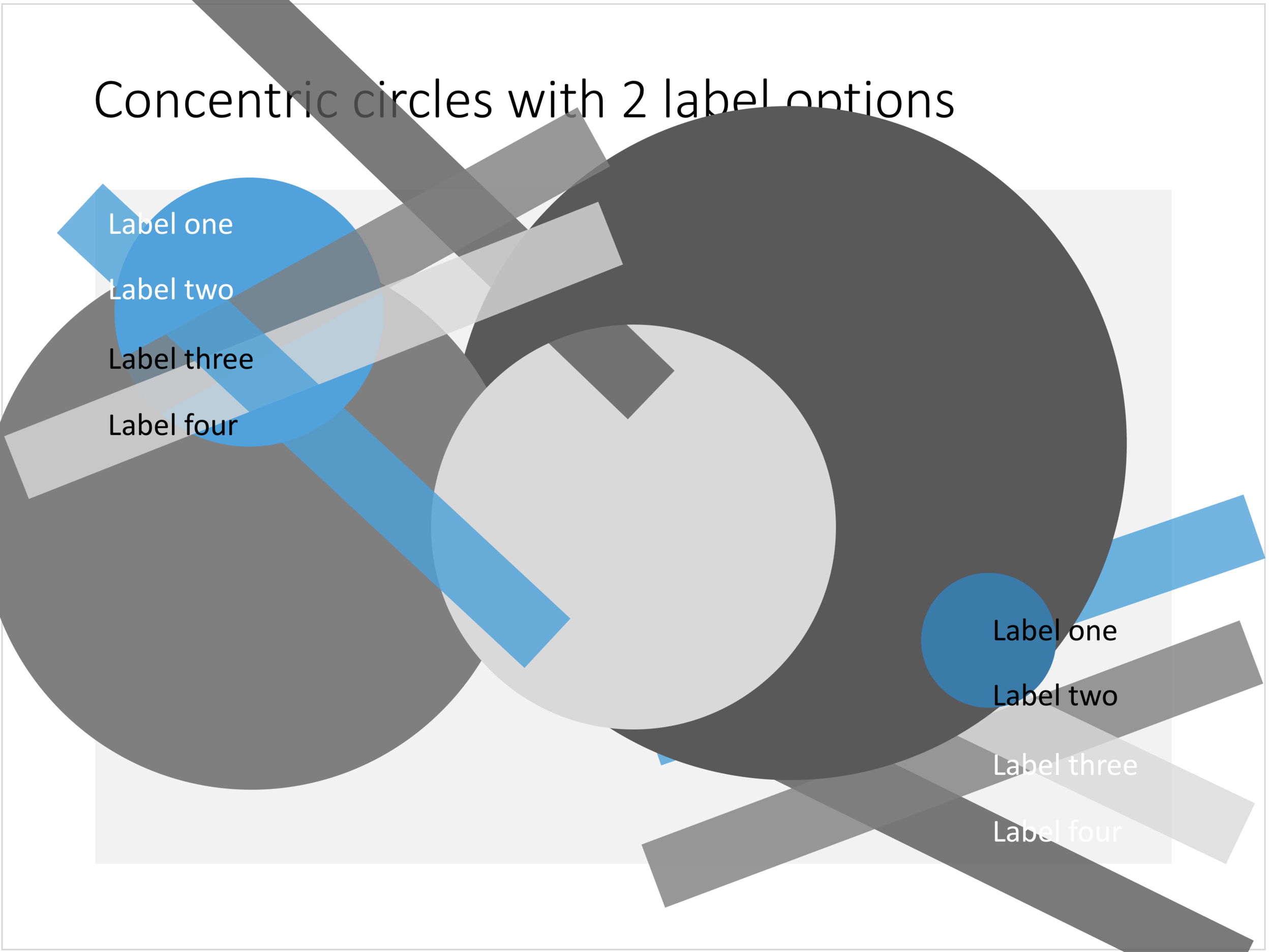
You can create very beautiful compositions by just using basic shapes and a few colours. Below is a presentation slide with concentric circles, and an image that shows how it is constructed. Feel free to borrow the design approach, or you can download the finished slide here.

This technique was often used by the Swiss graphics designers in the 1960s. You can use the slide concept below in a number of ways: show some sort of layering, show multiple layers of security or protection, show a whirl or rolling dynamic. You can take the labels of and just use the circles.

Concentric circles in PowerPoint

Concentric circles in PowerPoint

How to make concentric circles in PowerPoint

How to make concentric circles in PowerPoint

SlideMagic: a platform for magical presentations. Free student plan available. LEARN MORE
Quote slides in presentations

Quote slides in presentations

Quotes can add credibility to your presentation. If experts, celebrities, and/or customers agree with you, you must be right. But, not all quotes have equal weight. They have been overused in many PowerPoint decks. (Anyone can find a picture of a serious-looking person and get her to say what you want her to say in a few mouse clicks).

Here is a check list:

  • The person needs to be relevant and credible (third tier social media "experts" do not carry much weight)
  • The person needs to be identifiable ("Senior marketing executive at major high tech firm" can be anyone and is most likely you)
  • The quote needs to be interesting, cut the buzzwords and marketing language, cut the cliches ("Wow,  these guys really have a targeted value proposition that resonates with my medium-term return on investment objectives")
  • The text needs to be long enough that it is specific, and short enough that it reads like a headline. A full page of verbatim will not come across 
  • The quote needs to be relevant, a generic motivational quote might not help close that enterprise software contract.

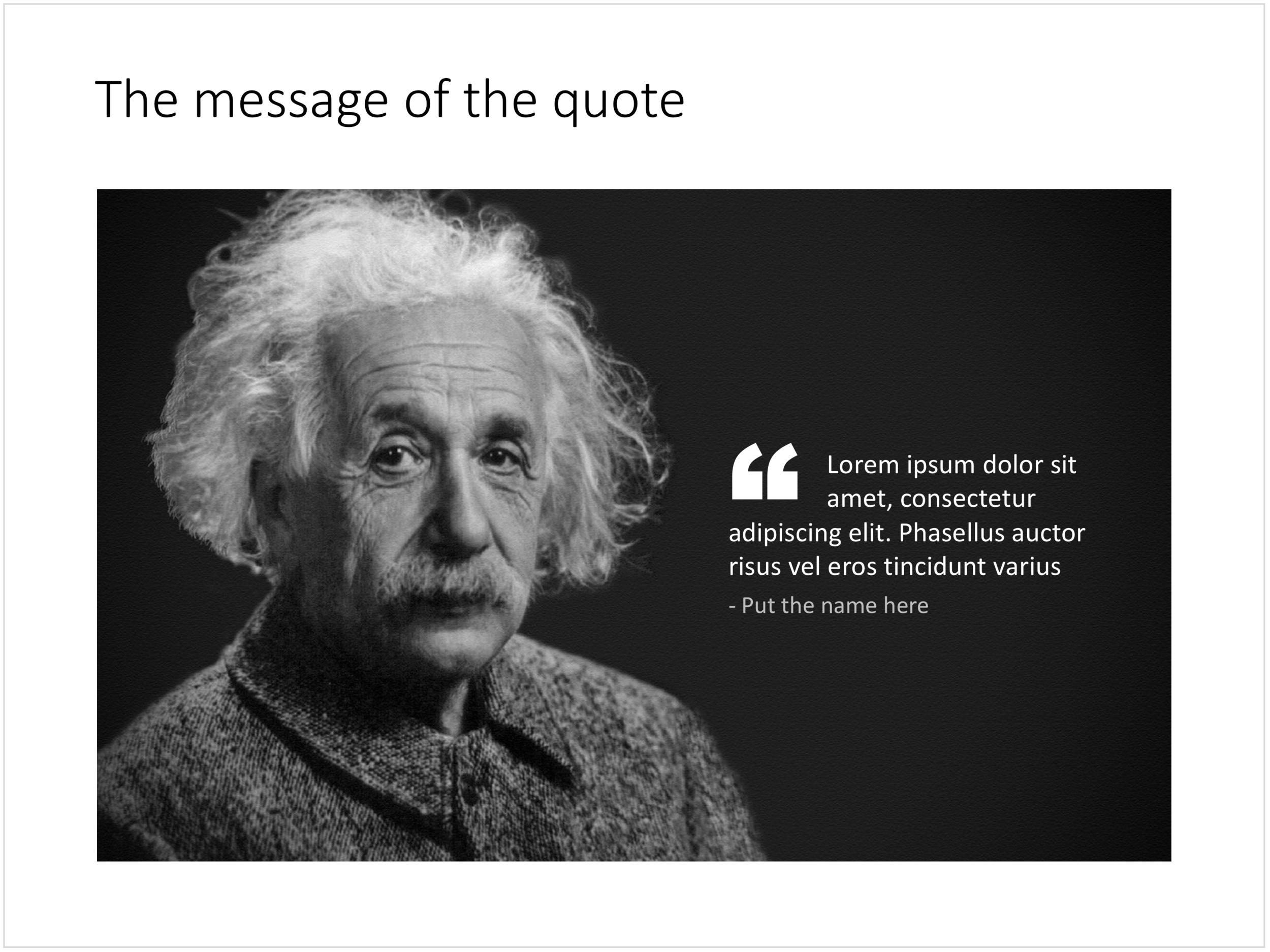
Quote slides are (and should be) pretty simple: a nice big image with a big text overlay. Still there are some things to watch out for. Below is a quote slide that I have added to the SlideMagic template store. Let's go through the design process.

  • The image should have a calm background with enough "white" space for text. You don't need to be a Photoshop guru to extend the background of an image in PowerPoint, it is easy to add a black or white box next to images. You can use the colour picker to match the precise colour, or use semi transparent overlays for the best effects
  • Make the quote symbol stand out. Regular quotes are too small, and the layout does not look good, as the quote pushes the start of the paragraph in. There are endless ways to do it and I settled on this one. One big quote at the beginning of the paragraph with a text indent. Take some time to find a quote in a good font. In the above slide, the text font is the Microsoft Office standard Calibri, but the quotes of this font don't look that "fat", I used Arial.
  • This slide is a framed image slide, which gives me the opportunity to add a big headline at the top of the slide with the main message (the headline can say "Customers are really happy", the quote can say "With product [x], I no longer need to use a pencil".

Feel free to borrow the suggestions above, or you can download the finished slide here. The template store has related designs for quotes, or customers.

SlideMagic: a platform for magical presentations. Free student plan available. LEARN MORE