Google assumes you are smart enough to understand their technology

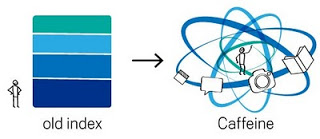
The recent post on the Google blog about an update to the search algorithm is an excellent example of how to explain technology:
  1. No apologies or "I will not bother you with the detail", or "this is kind of complex and only an engineer (read someone more intelligent than you) will understand". No instead, explain things clearly, but without oversimplifying.
  2. A simple graphic supports the verbal/written explanation
In case you missed, an earlier post on how Google uses cartoon characters to explain why its Chrome browser beats the competition.

SlideMagic: a platform for magical presentations. Free student plan available. LEARN MORE

A dense presentation that's actually good

Mary Meeker is a well-known Internet analyst. Every few months she updates her presentation about the state of the online world. Usually, dense slides are boring and fail to communicate a message. Not when every slide is packed with interesting data like in Mary's decks. This presentation will not fit a Steve-Jobs-style keynote address, but it contains a wealth of insights well worth digesting.

SlideMagic: a platform for magical presentations. Free student plan available. LEARN MORE

Microsoft Office web apps are going live

Microsoft is quietly rolling out its office applications in the cloud. They announced that the web-version of major Office applications are live, at least in a number of countries/languages. In Israel I could get it to work. Try for yourself here.
I have been following these in-the-cloud initiatives closely, and must conclude that Microsoft stands a good chance to be the winner. I chose Microsoft over Google docs for a recent project that involved collaboration in multiple countries.
It looks like the world is dividing into 2:
  1. Consumers and freelancers using Google Docs, iPhones, prezi, SlideShare, Windows 7 or Apple OS, gmail, freely sharing stuff over social networks and insecure internet connections
  2. Corporate workers using Blackberry, Microsoft Office 2003, Windows XP as a result of strict security guidelines and cost cutting in IT budgets (i.e., delaying upgrades of software). These people are struggling to find stuff in their bulging Outlook 2003 inbox.
The learning curve of switching user interfaces of Office applications is huge (read: costing a lot of money in downtime and helpdesk support), and for a big corporate to switch means that everyone is required to change habits: the 25-year old tech savvy analyst, the 60 year old secretary of the CEO, the CEO herself, to name a few. It's just hard to move them out of the Microsoft world.
Ultimately, the big corporates will move Office applications/data into the cloud, there are significant benefits to collaboration and simply finding stuff. They will go with Office Live though, and not with Google Docs...
There is another potential direction where this could go: the corporate equivalent of a facebook-style social network. Microsoft might well be the player who can pull this off. Not a place to share jokes and family pictures, but a tool for collaboration and information sharing in the enterprise.

SlideMagic: a platform for magical presentations. Free student plan available. LEARN MORE

BP logo contests

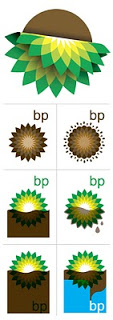
The BP logo was a very powerful one: an environmentally green flower/sun beaming with lots of positive energy. (Apparently it is based on the symbol of Helios, the personification of the sun in Greek mythology).
The fact that it was so good is proven by the enormous number of logo redesign contests that are being conducted now after the oil spill disaster. See this Google search.  Here is one that offers a $200 bounty (still accepting entries), and here is a Flickr page with the entries from a contest organized by Greenpeace. The illustration below is taken from Draplin Design.
It is good to see that graphics design can spark so much emotion. Just a shame that is not a more positive one.

SlideMagic: a platform for magical presentations. Free student plan available. LEARN MORE

Semi-transparent text fills in PowerPoint

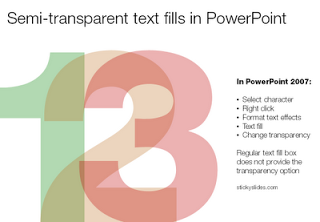
When you pick a color for a shape, PowerPoint gives you the option to set its transparency. However, when you select a color for your font, this dialog box does not appear. How to recreate this effect

in PowerPoint? Here is the work around (PowerPoint 2007).

  1. Select the text
  2. Right click
  3. Format text effects
  4. Text fill
  5. And now you can change the transparency!

SlideMagic: a platform for magical presentations. Free student plan available. LEARN MORE

The real story

We offer quality because we control the entire supply chain.
A bullet point on a presentation that I came across last week. This statement could have come out of any presentation. People hear it, but do not internalize it.
The real story is that competitors are small players working out of tiny factories in emerging markets stitching together poor quality products that just, but just, meet regulatory requirements. If that is the story, tell it.

SlideMagic: a platform for magical presentations. Free student plan available. LEARN MORE

VC pitch: talk about the elephant in the room

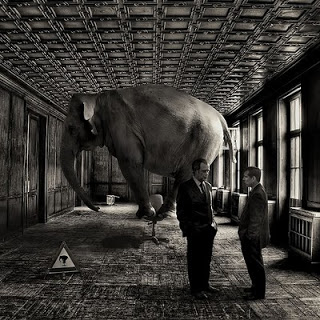
One of the new slides I included in my presentation lessons for entrepreneurs deck: talk about the elephant in the room. Some issues are just so obvious that you have to address them (Mark Suster gives a few examples here).
OK, you can decide to ignore them. The potential investor will say "thank you very much" and mentally shelf your pitch already while shaking your hand on the way to the door (peaking over your shoulder to that enormous animal standing in the corner).
Image via David Blackwell

SlideMagic: a platform for magical presentations. Free student plan available. LEARN MORE

Chart concept: cell division

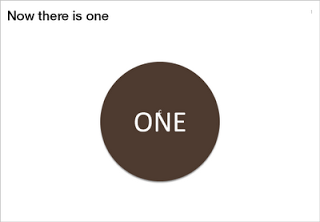
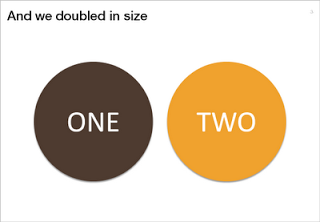
Many presentations are about ambition: "we want to double in size in 5 years". That's basically creating another company exactly as the one you have now. You can use the concept of a biological cell division to visualize this.
The stretching of the circle is done using the edit points function in PowerPoint. The text is stretched using the function "text effects" in the format ribbon of PowerPoint.

SlideMagic: a platform for magical presentations. Free student plan available. LEARN MORE

Useful: 2010 calendar PowerPoint template

I do not use standard Microsoft PowerPoint templates very often, but I must admit that I was pleasantly surprised by this 2010 calendar template on the Microsoft web site. That saved me a lot of time in designing a kick off presentation for a new project. Tons more here.

SlideMagic: a platform for magical presentations. Free student plan available. LEARN MORE

Chart concept - you can do it

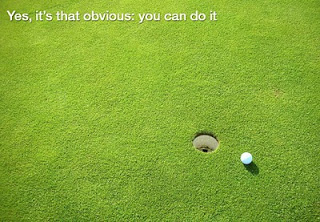
Low hanging fruit, it is easy, a shot for open goal, come on: you can do it.
Image via iStockPhoto

SlideMagic: a platform for magical presentations. Free student plan available. LEARN MORE

Depth in images

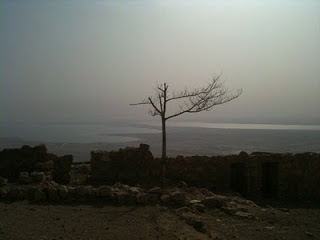
It is very hard to capture the sensation of a wide panoramic view in a photograph. Making a picture of that stunning view will look boring when you view it later. Not when you capture an object nearby as well.
Impressionist painters use this technique in the composition of their works. See this painting by Alfred Sisley (Village On The Banks Of The Seine at Villeneuve La Garenne). Unusually, the background of the scene is actually lighter than the foreground.
I used this lone tree in one of my own photographs of a recent visit to the ruins of the Masada fortress near the Dead Sea here in Israel.
Think about this when your pick your next stock image in your presentation.

SlideMagic: a platform for magical presentations. Free student plan available. LEARN MORE

Unstage

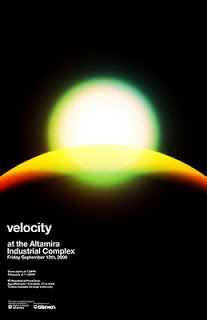
Most presentations are written by people without a professional graphics, design, or art background (including me). While it is almost impossible to catch up on the technical skills of these professional illustrators, it can pay off to take a daily dive in their work. The blog unstage (link here) is an example of a daily source of information that you should add to your RSS reader. Example below: a poster by Network Osaka. (I find poster designs especially useful as a source of ideas for slides.)

SlideMagic: a platform for magical presentations. Free student plan available. LEARN MORE

Chart concept: eye test

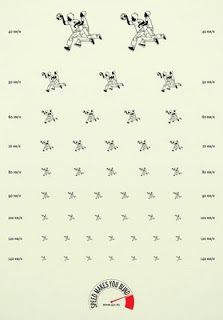
This ad about safe driving uses an interesting concept: the eye test. You can use it in a PowerPoint presentation exactly as it is used here: one variable is declining/increasing and visibility of another goes down.
Another use could be some sort of health check: "how well protected is your business?", using a different image that repeats and gets smaller all the time.

SlideMagic: a platform for magical presentations. Free student plan available. LEARN MORE

Out with the shape outline

Tel Aviv uses a very dominant street painting scheme: red-white and you cannot park, blue-white and you can park but have to pay. The colors are so bright that the city looks like one big Formula One circuit. Why not use more modest colors? Grey blue and olive green? The picture below gives an example, freshly painted pavements (you have to re-paint often in the sunny climate here).
The same is true for PowerPoint shapes. Whenever I can, I omit the lines around shapes (shape outlines). It makes your chart a lot calmer.
Image credit: Flickmor

SlideMagic: a platform for magical presentations. Free student plan available. LEARN MORE

Don't use the business plan to present the business plan

Finally the business plan is ready. You Googled and asked around to make sure everything is inside: the market pain, the technology solution, the team, the market size, the competitive differentiation, the financial forecast, the intellectual property and patents. The result: 150 pages of PowerPoint.
Do not use this business plan to present the business plan. OK, you used PowerPoint, but not to design a presentation. You used PowerPoint to write a document that is not suitable to put on a projector screen.
How can you figure out what presentation you do need? Invite a friend over without any knowledge about your business venture. Take an empty piece of paper or a white board. Start telling your story. Scribble things on the white board. If need, zoom deep into the business plan PowerPoint file and put one chart on the screen (i.e., an overview of the competitors). After 30 minutes take a step back and see:
  • What issues did you discuss, which topics did you ignore?
  • In what order did you discuss them?
  • What were the hand drawings you needed to explain your idea?
  • Which charts in the 150-page deck did you have to pull out?
  • What questions did your friend ask that caught you by surprise?
Here is the outline of your investor pitch presentation.

SlideMagic: a platform for magical presentations. Free student plan available. LEARN MORE

Draw your ideas

Here is a video of Twitter co-founder Jack Dorsey explaining the success of Twitter and other ventures he is working on (with the benefit of hindsight). Interesting from a presentation perspective for 2 reasons:
  1. The importance of visualization to crystallize your ideas
  2. How a minimalist presentation approach (hardly any slides, restraint presentation style) still can inspire an audience.


Found via Fred Wilson

SlideMagic: a platform for magical presentations. Free student plan available. LEARN MORE

Filtering background noise in self-defense

I grew up next to a rail track and always wondered why friends who came over to play looked startled when a massive freight train would shake the house. Currently I live close to an airport and my guest are running to window to see whether that plane actually hit our building or not.
I hardly notice anything. The brain - in a form of self defense - is filtering out the noise.
The same is true in presentations. Endless bullet points, cliche language, we heard it so often that the audience is filtering things out. Speaking louder or using bright colors does not really help. Try to be different/original and people will start paying attention again.

SlideMagic: a platform for magical presentations. Free student plan available. LEARN MORE