
But: Board presentations are different don't you agree?

This was the question I got after my high-paced presentations full of impressionist paintings last week. Here is what is different about a Board presentation:
  • Often you need to go through and approve detailed financials, so some slides will be dense
  • Board members will have gotten used to certain type of slides, because many of them get repeated in every quarterly review. The slides might be bad, but everyone knows exactly where to look for a specific number.
  • The corporate culture might not completely be open to impressionist paintings and other unusual images in a Board presentation
Having said that, Board presentations are actually very similar to other presentations:
  • A well-functioning Board will have read the homework before entering the meeting room, so the detailed number slides can be left for the appendix
  • If you need to convince the Board of a major strategic decision, it is a presentation like any other. Boring, dense bullet points is not going to help you win the hearts and minds of these people.
  • Using visual slides with large images does not mean that you have to pick impressionist paintings. Highly conservative slides can still be highly visual.
So maybe Board meetings are not that different after all...

SlideMagic: a platform for magical presentations. Free student plan available. LEARN MORE

The presentation design market

Last week I attended a Creative Mornings presentation by John Maeda in New York. He is the head of the Rhode Island School of Design and a well-known designer, artist, and author (more information about him here).


He made an interesting point about the graphics design industry. What caused the creation of the graphics design industry as we know it today? The fact that in the 1950s and 1960s, it became customary for publicly traded companies to have well-designed annual reports for their shareholders.

I think we are seeing something similar in presentation design. The bar is rising constantly. Presentations, and videos of presentations are being shared online and are getting wider and wider audiences. Corporations start seeing the value of good slide design. Enterprises will start allocating budget to it.

I do not think this investment will solely go to the design of PowerPoint slides. The corporate story needs to be brought out consistently in presentation slides, documents that can be shared online, videos, and the web site. A new discipline in graphics design, and a new design market is emerging.

SlideMagic: a platform for magical presentations. Free student plan available. LEARN MORE
Great, I do not get a lot of time!

Recently someone asked me: "How much time do you need for your presentation, 30 minutes, 45 minutes?". While I can fill 2 hours with just talking about presentation design I chose to go for the 30 minutes. It focuses you to be to the point and interesting.

TEDTalks can discuss very complex subject matters in just 20 minutes. I have designed 6 minute presentations for startups participating in pitch competitions that managed to convey the entire company's story. Often I find that a time constraint results in a better presentation.

SlideMagic: a platform for magical presentations. Free student plan available. LEARN MORE

80% there

The idea of visual presentations is spreading and I see more and more decks that I would call "80% there": very limited use of bullets points, big images, one message per slide. For those experienced amateurs among you, here is how to get it to 100%:
  • Use only high res images, instead of low res ones borrowed from Google Image search
  • Scale up your images either to full page size, or stick to the same white frame on each page.
  • Think of image aesthetics: people in toilets, eating gross food, a close up of an ugly animal might be funny, but they are in a college humor kind of way. Deep down, humans do not like to look at things that are not pretty. Not every image has to be funny. Funny images can also be beautiful.
  • Resist the temptation of the image barrage. An onscreen presentation is not a SlideShare presentation that requires a click to go to the next word in a sentence. Not all points need to be supported by an image. It is scary, scary face image. We are confused - confused face image. It is difficult - child doing math image. Use images or graphs to show why you are scared, what is confusing you, and how come it is so hard to solve. Much better than pictures of scared and confused people.

SlideMagic: a platform for magical presentations. Free student plan available. LEARN MORE

Photoshop for presentation designers

Photoshop is growing on me, after having confused me for many years. Photoshop is catering to multiple audiences. Professional photographers need the sophisticated tools for correcting camera images. Advertising designers need the engine for creating complex layer compositions.

What is useful for presentation designers? (search help in Photoshop for exact instructions how to find them):
  • The magic wand to remove image backgrounds (the Microsoft PowerPoint option is really poor)
  • Image size and canvas adjustments to get to the exact right size of an image at 300DPI
  • Content-aware fill to extent backgrounds
  • Content-aware extend to extend backgrounds
  • The spot healing tool to fix extended backgrounds
  • The color-replace function to change colors that are slightly off (i.e., make orange red)
  • And (a bit advanced) the vanishing point filter to put text on 3D objects
Whenever a new version of Photoshop is released, I am not so much looking forward to more features, but better implementation of existing ones. 

What features have I missed?

SlideMagic: a platform for magical presentations. Free student plan available. LEARN MORE

In defense of the maligned PowerPoint

Tim Harford is defending PowerPoint in the light of the recently formed Anti PowerPoint Party. I agree. He argues that PowerPoint is a tool used poorly. The link to the article.

SlideMagic: a platform for magical presentations. Free student plan available. LEARN MORE

Presentations on tablets

I am increasingly interested in designing documents for tablets. They could work great in one-on-one meetings (or even stand alone). I have not found the right platform to develop them yet though.

PDFs do not always work (especially when converted using the Microsoft Office plug in) and show up within the frame of the iPad PDF reader (menu bars, chart thumbnails).

HTML5 looks promising. Onswipe aims to be an HTML5 publishing platform for magazines that also could be useful for presentations. If you visit the Marie Claire web site on an iPad for example you see what it can do (it looks like an app, but it is a regular HTML page). But you also see the limitations. A browser-based environment makes page switching slow, and again, you still have the navigation frameworks of the browser application.

Custom apps. Over the past weeks, I taught myself Adobe InDesign, and loaded up software that can turn Adobe InDesign files into custom iPad apps. My computer science background is trying to convince me actually download the entire IOS 4.3 SDK to have a look inside to see what it takes to program an iPad app from scratch. It is a heavy-handed approach though.

Do you have experience with this? Let us know in the comments.

SlideMagic: a platform for magical presentations. Free student plan available. LEARN MORE

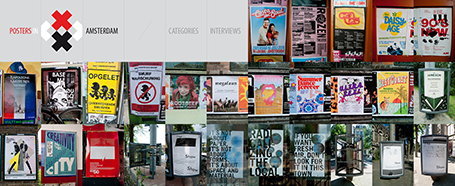
Posters in Amsterdam

The summer is here: time to slow down a bit and look around for design inspiration. The site Posters in Amsterdam by Jarr Geerlings enables you to walk around the city without physically going there.

SlideMagic: a platform for magical presentations. Free student plan available. LEARN MORE

Presenting the slide

A decade ago when I just started my career at McKinsey, I always was very excited when I was asked to “present the slide” to the CEO of a client. Presenting the slide: the slide was primary, the presenter was secondary. There is nothing wrong with that. When designing your slide deck, just realize that this is the audience setting you are designing for.

SlideMagic: a platform for magical presentations. Free student plan available. LEARN MORE

Boring structure = boring presentation

Going systematically through the branches of your organization diagram is not the best way to get visitors from abroad excited about your company.

When you make a biographical movie, it is recommended to spend a bit more time on the period in the life of the artist where she delivered those stunning pieces of sculpture.

Following the sections of that business plan template you found online literally will not encourage investors to write you the check you want.

SlideMagic: a platform for magical presentations. Free student plan available. LEARN MORE

Too many benefits = no benefits

Marketing managers always want to make sure that every single benefit and feature makes it on to “the benefits slide”. ROI. Low cost. Flexible. Scalable. Effective. Efficient. Affordable. Listing more benefits means spending less slide real estate on each individual one (words, visuals). Your remarkable story gets diluted into a generic cloud of buzz words that people find on just about every other benefits slide that they have seen.

You conformed. Marketing managers expect this benefits slide. Customers recognize it as: “hey, here comes the benefits slide”. Everyone follows the script. Presenter presents. Audience does a quick email check. The usual stuff.

Benefits are all about standing out from the competition. Let your benefits slide stand out as well and focus it on what is really different about your company and your product.

SlideMagic: a platform for magical presentations. Free student plan available. LEARN MORE

Surprise? Hardly anyone reads annual reports

An interesting post by investor relations consultant Dominic Jones: very few bother to read a company's annual reports.

It is easy to understand why. Annual accounts consist of 2 parts. One, the financial data. This is read by those who need them (analysts). Two, an attempt by the company to sell its strategy to investors. Here is why this section does not work:
  • The pages are written in a verbose PR style, full of buzzwords and cliches. 
  • The pages contain verbal description of financial data that is much better displayed in graph or table form. "Europe grew by 5%, Asia grew by 10%"
  • Long-hand text does not work very well to communicate business strategy, and the annual report is no exception
  • The slick, polished, permanent look of the annual report instantly reduces its credibility. The audience likes real, genuine, authentic stories. 
A lot of money is invested in the layout, design, and printing of these annual report. Is this money not better spend by improving the quality of that earnings announcement presentation PDF that everyone IS reading?

SlideMagic: a platform for magical presentations. Free student plan available. LEARN MORE

Speaking "live" in NY on 26 July

I will be in New York the last of week of July to speak at a number of events (well, 2 actually). My presentation at the Netherlands-America Foundation is open to the public. Details to register are here. This is a not-for profit event, the proceeds of the small entrance fee will go to support the goal of the foundation. The presentation will be in English.

SlideMagic: a platform for magical presentations. Free student plan available. LEARN MORE

Emailing presentations without verbal explanation

Sending a deck to someone who will open it without verbal explanation is a problem. The slides work great on stage, but reading them stand alone does not provide the required context. There is no obvious solution:
  • Making changes to slides (either modifying them all together, or adding text box subtitles to them) is a lot of work, and maintaining two master files is a big pain
  • Converting them to video and adding audio tracks prevents people from skimming through, they might just give up mid-presentation
  • Adding comments in the note pages does not look very nice, and many people do not know how to find them in PowerPoint.
So at the moment, I am trying something different. Over the past week I trained myself up on Adobe InDesign and am creating a framework to drop high-res images of slides into a template that adds a nice formated paragraph of text to the right of the slide. When you PDF the document, it creates the feeling of a spread with facing pages in a nice book that reads very well on a wide screen monitor. It looks beautiful, and it is easy to modify. Let's see how it works out for my clients.

SlideMagic: a platform for magical presentations. Free student plan available. LEARN MORE

The Anti PowerPoint Party

Matthias Pöehm, a speech coach from Switzerland is trying to create a global movement: The Anti PowerPoint Party or APPP. For the time being, he is trying to establish a regular political party in Switzerland by collecting signatures. He has a point when he says that many presentations would have been much better off if no PowerPoint slides were used. Matthias is offering a book on his site with suggestions on how to present without PowerPoint.

SlideMagic: a platform for magical presentations. Free student plan available. LEARN MORE

Find me on Google Plus

In case you signed up for Google Plus, you can find me here. I share my blog posts there as well.

SlideMagic: a platform for magical presentations. Free student plan available. LEARN MORE

Interview question: do a presentation

In a recent blog post, VC Brad Feld discusses job interviewing. One of the suggestions: give the candidate something to do, for example have potential sales people do a presentation. An excellent suggestion.

To take this a bit further. If you are up for a job interview, think of it as a presentation of your story. What do you want to tell? What clutter can you get rid of? And yes maybe, what visuals do you need to bring along (probably 1-page printouts)? The organization structure of that big project you managed? The personal thank you letter you received from the client's CEO?

SlideMagic: a platform for magical presentations. Free student plan available. LEARN MORE

3 years and almost 1000 posts of Idea Transplant

Today is the anniversary of my blog. Starting it back in 2008 was one of the best decisions I ever made. It gave me many new friends all over the world, it convinced me to devote 100% of my time to presentation design, and it opened up a global client base to work with. I will be hitting post #1000 soon. I cannot believe that number myself. Thank you for reading!

SlideMagic: a platform for magical presentations. Free student plan available. LEARN MORE

A call to stock photographers

For most images I use in PowerPoint, I use Photoshop to extend the background and create more white space for type. You can only do this when the edges of the image have a nice neutral pattern background.

Stock photographers crop their images to get more interesting compositions. The result is that many images will have hard cut offs that cannot be extended. Here is my call to stock photographers: let the designers of the final products do the cropping for you and make the full version of your file available as well.


Maybe stock photography sites should do for images what they already do for vector files: offer a ZIP file for download that contains multiple items: one example crop that creates a nice thumbnail to drive sales on the site, and the original that designers can work with.

Image via iStockPhoto.

Update: Linda Lor linked in the comments to her video on how to extend images in PowerPoint without the help of Photoshop. I am embedding it here:

SlideMagic: a platform for magical presentations. Free student plan available. LEARN MORE