
"We will do that verbally"

Entrepreneurs are often so deep into their own story that they leave the supporting visuals for some of the most fundamental points of their business idea out of the presentation. “Oh, why Amazon would not do this? Well, I have a great story to tell that I usually do verbally when displaying the agenda page.”

Stories are great, verbal explanations without visuals are great, BUT. My two arguments why it might be a good idea to back up your story with visuals (in particular relevant for an investor presentation):
  1. You want people to remember your story, and a big bold visual might help anchor the idea in the mind of your audience. The visual does not necessarily have to explain the idea, it should just trigger the memory when you bring up that story of the banana peel back up 3 weeks later.
  2. The argument for going further than a visual anchor point is that you often lose control of what happens to your file with slides after you have emailed it to an investor. It gets forwarded to partners in the firm, industry experts, etc. Just in case, it is a good idea that someone who did not sit in the room still can understand the idea behind your business.

SlideMagic: a platform for magical presentations. Free student plan available. LEARN MORE

Content before structure

The other day I had a potential client on the phone who was under time pressure. She asked me whether I could work on the structure/framework of the presentation (and the template) while in parallel they would start filling things in.

When you start a project and need to cut up work among multiple team members, a skeleton or presentation framework can be really helpful: someone works on the market, someone works on the competition, while someone else takes on the financials.

When you get to the stage where you have to present your conclusions to others (i.e., the analytical work is done), putting structure before content is wrong. As a presentation designer you need to know the content first, translate that into a story, and in the process you come up with a structure which is engaging and convincing, a structure that often will deviate from business school presentation templates, consulting pyramid structures and other logical frameworks.

Problem solving: structure first, then content.
Convincing: content first, then structure.

SlideMagic: a platform for magical presentations. Free student plan available. LEARN MORE

"Get it down to 8 slides"

People want to be helpful in giving feedback on your presentation, and often when you send a draft to an experienced executive she will say to cut it down to 8 slides. She sat in far too many boring meetings where eager young managers try to pitch ideas with endless and endless pages of bullet point slides. She probably has not read the content of your slides, and just looked at the page count.

We have discussed many times that a 50 page visual presentation can be presented in the same time as an 8 page bullet point deck, but there is something else here.

A bullet point deck can easily be compressed: reduce font size and combine 2 slides into 1. With carefully designed visual slides, this approach will not work. The moment you start cutting and combining, you are back in bullet point land.

Instead of agreeing page count, agree the time you have to present the story.

SlideMagic: a platform for magical presentations. Free student plan available. LEARN MORE
Clear versus stunning

In presentations, clear and stunning are not the same thing. I have seen many stunning infographics that are not clear at all. And more importantly, it is perfectly possible to make a clear and convincing business presentations without stunning visual effects.

Especially in business presentations, people often want to go for stunning first, and commission expensive graphics design or video creation work. It is wiser to hold of with this until you have a simple presentation that 1) makes it clear what you want (touch the head) (believe me, I have seen many presentations that do not even pass this hurdle) and 2) convinces people to do something (touches the heart).

SlideMagic: a platform for magical presentations. Free student plan available. LEARN MORE

"We need to animate that!"

The audience does not see the difference between 4 consecutive slides with different images, or 1 slides with 4 consecutive image build up, so there is no point in trying to cut slides by consolidating 4 images into one. Four slides are easier to edit, and four separate slides are easier to email as PDF.

SlideMagic: a platform for magical presentations. Free student plan available. LEARN MORE

NY Met puts collection online

The New York Metropolitan Museum of Art has put 400,000 super high resolution images of their collection online, free to use. Great for use in presentations.


SlideMagic: a platform for magical presentations. Free student plan available. LEARN MORE

Keynote with Dropbox/Box/Gmail

The new Keynote creates files that look like a single file on a Mac, but on other machine appear as a folder with multiple files in them. This has implications for online file sharing:
  • Gmail: emailing a Keynote file as attachment does not work
  • Box: file syncing, or sharing a download link does not work
  • Dropbox: seems to have fixed the issue.
Has anyone had issues or is it just me?

SlideMagic: a platform for magical presentations. Free student plan available. LEARN MORE

Screenshots are great

Aspect ratios, dots per inch, file formats and conversions, forgetting where you saved that file, these are all problems that are disrupting my creative workflow. More and more I just work with screen shots. If the image looks sharp on my big 27" monitor, I crop it as I want it, and use it in my presentation. It could have been a JPG, a PNG, a web page, a PDF document, a Keynote file, it does not matter. CMD-SHIFT-4- and “click”, done.

SlideMagic: a platform for magical presentations. Free student plan available. LEARN MORE

The green Mac OSX + button

The behaviour of the green + button at the top left of a window is unpredictable. I found out that option-clicking it will maximise the window to the full screen, every time, completely predictable, at last for non-Apple software (Keynote does not play along).

This has probably all to do with Apple’s full screen mode, the two arrows at the top right side of the screen. I use it rarely because this feature does not work very well with multiple monitors.

SlideMagic: a platform for magical presentations. Free student plan available. LEARN MORE

Bunkr presentation design app

The presentation creation and sharing app Bunkr has not appeared on my radar screen until recently. The company raised EUR 1m in a recent fund raising round. In the not too distant future, I am becoming a player in the market myself, so I am watching developments with interest.


I clicked around a little bit in the application and here is my impression. Things I like:
  • Snappy, fast, clean user interface
  • Nice intelligent rulers to snap your objects against
  • Social technology integration (Disqus comments on slides)
  • Online image search integration (Google images, Flickr), but watch those usage rights
  • Easy sharing and embedding
  • Different objects for titles and paragraphs, not just a text box
  • No bullet point template when you create a new slide
My main comment is, is that all PowerPoint alternatives in the market, still stick with the same fundamental approach to slide design and drawing on a computer screen that has been around since the 1980s. And that is the problem I am trying to solve 24/7, and it is not easy...

SlideMagic: a platform for magical presentations. Free student plan available. LEARN MORE

Confusing Keynote?

Apple is known for making beautiful and easy-to-use software, but I am struggling with the new Keynote, especially with the simple task of colouring shapes, and the text inside them. I always pick the wrong colour box, and need to switch a number of different menus to complete very basic actions.

From a UI design perspective the user interface looks perfectly clean and organised. For power-editing at very high speed, it breaks down. This is the reason that the QWERTY keyboard was invented: the logical thing would have been to make ABCDEF keyboards, at high speed though they are less efficient.

Maybe it is me or is it that “the emperor has no clothes”? I got used to working in a certain way? I am in my mid-40s and my ability to learn new UIs slows down? I am not a typical Keynote user and it works perfectly fine for everyone else?

SlideMagic: a platform for magical presentations. Free student plan available. LEARN MORE

Promoting a client: SCiO

[Off topic] One of my clients is running a Kickstarter campaign to fund their project: SCiO reads the chemical make-up of materials. It is a non-intrusive, no-touch optical sensor that connects to your smartphone. You can analyse your food (what is in it?, is it fresh?), medicines,  hand bags (is it real leather?), etc. With almost $1.5m in backing it is now one of the top 40 funded projects ever on Kickstarter. Check it out.

SlideMagic: a platform for magical presentations. Free student plan available. LEARN MORE

Polite VC feedback

A venture capitalist needs to turn down people all the time. Sometimes decisions are scientific, most of the times they are not. Sometimes they are made after extensive deliberations, most of the time in the first minutes of meeting you. It can be that they do not like the sector, do not believe in the idea, do not like you, have a bad day, do not believe that you can pull it of, anything.

When you ask them for feedback, most of them will not tell you the real story. But, VCs want to be helpful. So, some of them will give constructive feedback about your business or the presentation. Some feedback is helpful, some less so. When they do suggest that you include 5 more breakdowns in the year 5 revenue forecast, they were nice to you in giving you a suggestion, but I very much doubt that if you had included those numbers in your first presentation, she would have changed her mind.

Filter feedback and try to drill down to the real issue.

SlideMagic: a platform for magical presentations. Free student plan available. LEARN MORE

Business plan outlines

The Internet is full of business plan/investor pitch outlines (here is a nice one from Sequoia). Use these guidelines as a check list to see whether you covered all the content that investors expect. But do not stick to them too literally. A rigid, generic, structure kills the spontaneity of your specific story. Do not simply copy the sections of the structure and use them as (boring) headlines for your slides, instead write headlines that mean something (The Solution is not very meaningful). The text book approach to TAM calculation might not exactly fit your specific market.

All advice (including the one you will find on this blog) is given to help you. In the end, it is you who makes the call what to use, and what not.

SlideMagic: a platform for magical presentations. Free student plan available. LEARN MORE

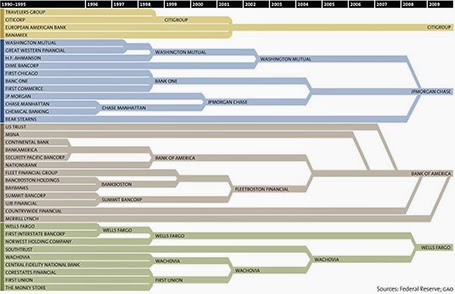
Consolidation chart

This is a nice way to show consolidation in an industry. You can digest the chart in 2 ways: on the podium you see the big picture of consolidating financial institutions, reading in close-up on the screen, you can see the details. The chart could have been better if the width of the arrows would represent the assets under management of the banks, some of these acquisitions were bigger than others.


[Off topic] There is a populist discussion going on in the comments of the original post. I did a lot of strategy work in banking mergers and there are different ways to look at the concentration in an industry. The top level player count is an easy statistic, but what is more relevant is the choice that customers (especially small businesses) have on the ground. How many different bank branches are within a 10km range at any point in the US? If there are 30 banks, but each concentrate on a specific state, then the market looks very competitive, but on the ground, customers face a monopoly. On the other, if all 4 banks are represented in most small villages, the market could be competitive.

SlideMagic: a platform for magical presentations. Free student plan available. LEARN MORE

The best briefing

The worst presentation briefing (and as a result most time-consuming presentation design project) is a long deck of slides full of bullet points that have been shortened (hey, we learned about being concise) to such an extend that they have turned into meaningless, generic prose.

The best presentation briefing (and start of a rapid presentation design project): the audio track of a 15 minute video of the actual presentation, the existing slides are not really needed.

SlideMagic: a platform for magical presentations. Free student plan available. LEARN MORE

Adobe Voice

Adobe launched a new iPad app, Adobe Voice, that enables you to create narrated story videos. There are many apps that help you build animated videos, but this is one of the best I have seen.
  • It is incredibly simple to use (unlike most of Adobe software), with a beautiful user interface that breaks the conventional approach to video editing
  • It comes with dozens of pre-set story lines: tell what happened, follow a hero’s journey, share a growth moment, promote an idea, etc. Once a story line has been selected, the app prompts the user on each slide with a question to answer (why did the hero set out on his journey?).
  • After recording the audio, you can add images, icons, or text
  • The app comes with a large library of background templates and sounds.
There is an 80/20 rule here, in 20% of the time, you get your video 80% right. Still if you want to get to 100% perfection (something that you are confident to share professionally), you need to get put in the other 80% of the effort. Prepare your visuals and images, and prepare your script.

It is cute that this app was developed for iPad, but for professional use Adobe should create a browser version as well for desktop. It can have the exact UI (except for resizing of images etc.). It is a bit tricky to extract your creation out of your iPad at the moment, and usually people do not have their image databanks stored on iPad.


But overall, a nice app.

SlideMagic: a platform for magical presentations. Free student plan available. LEARN MORE

7 time zones away

Yesterday was Independence Day in Israel, so I was not working. One of the costs of working with international suppliers; random holidays. Other drawbacks: time zone differences, and in the case of Israel, a weekend that does not overlap (Friday Saturday here). By the time a west coast client gets in her office by 09:00 on Monday morning, I clocked already two full working days, and will be heading into the weekend 08:00 AM PST Thursday (3 days later).

But the set up has its advantages:
  • Overnight turnarounds, send of input, and you will see it all done the next morning you come into the office
  • A less stressful workflow, once time zones dictate that you need to organise yourself: I have focussed calls with US clients in my afternoon, and have the mornings to do productive work. There is no opportunity for disruptive, live, last minute changes
  • Building on that, an end to time consuming meetings. Input gets collected much more efficiently than in calendar disrupting meetings (maker schedule versus manager schedule).
It turns out that there is virtually no difference in the way I interact with a Tel Aviv or a San Francisco client, apart maybe from that first get-to-know-you meeting.

But: clients self select, people that do not like to work remotely with their suppliers probably do not turn out to be my clients. But hey, the world is a big place.

SlideMagic: a platform for magical presentations. Free student plan available. LEARN MORE

No audience is the same

A company presentation will be used for many different audiences: investors, Board meetings, sales meetings, people who know the company, people who see the company for the first time. There is the temptation to start working on a different presentation for each different audience. Resist.

First of all, I hope your story is the same for all these audiences. I have seen companies that want to change the story depending on who they pitch to. I think it is very hard to build a successful with an inconsistent market positioning and purpose. So let us assume that there is one story.

Even though different audiences require different amounts of detail for specific parts of the story, each audience still needs to put everything in that overarching framework. Leaving things out will break the flow of the story. So, even for highly a knowledgeable scientist audience, I would still put in one (place holder) chart to remind us all of the very basics of a certain medical condition.

From a practical point of view, it is also very difficult to maintain multiple versions of the same presentation. A small correction on page 10, needs to be duplicated everywhere.

The bottom line, I create one overall master deck and sit down for before every presentation meeting to cut down the presentation to size.

SlideMagic: a platform for magical presentations. Free student plan available. LEARN MORE

Cartoons need to be huge

Everyone loves reading cartoons, and they can make great content for presentation slides (watch the copy right). But for an audience to get the cartoon, they need to be able to read it. And given the scribbly nature of cartoon fonts, fonts sizes in the bubbles need to be bigger than what usually works on a regular slide (i.e, font 20 or up). If the bubble text has to be 20 points, that means that the overall image needs to be pretty large, often you do not have enough space for it.

When creating slides that are meant for emailing in advance and reading on a screen, font size is less of an issue.

To get the audience to focus on the cartoon, chop out all the usual slide clutter (titles, footers, logos), just a plain page with a cartoon graphic. Cartoons are usually busy graphics.

SlideMagic: a platform for magical presentations. Free student plan available. LEARN MORE