
Adobe Illustrator designers vs PowerPoint designers

Adobe Illustrator designers vs PowerPoint designers

Now and then I encounter a PowerPoint presentation at a client which is clearly the work of a designer who comes from the world of Adobe / brochures / infographics. Here are the differences with my style:

  • Often, an incredibly spectacular opening slides (sometimes 2-3), lots of detailed artwork, lots of time invested. Serious designers with powerful graphics design tool out-design me easily.
  • But after a few pages, the design quality drops of, and you can see that these slides are created rather last minute, in a back and forth between the executive and the designer. Maybe there is the occasional icon, but most of it is text bullet points, which are formatted by a professional.
  • Usually PowerPoint's template functions are ignored, guides, color schemes, defaults, making it very hard for anyone but the designer to add/change slides. "Insert new slide" gets you a blank standard PowerPoint page with nested bullets
  • Heavy use of custom fonts, looking way better than the standard PowerPoint fonts, but they cause issues when displaying the file on other computers without them. Versions of old presentations usually continue to live through the organization without people even realizing that their headlines show in Arial rather than the intended font
  • Massive file sizes as the images are kept in at their highest resolution

Business presentation design is a blend of practicing good design, and making compromises to deal with the practicality of working with lots of non-designers. Being able to deal with frequent changes, keeping design standards up (also on page 5 to 20), and making sure that everyone can make decent looking edits in the presentation.

I am sure that Adobe Illustrator designers can write a similar post about PowerPoint designers trying to edit a basic vector illustration...

SlideMagic: a platform for magical presentations. Free student plan available. LEARN MORE
Bottom up or top down?

Bottom up or top down?

I do both.

Story design. Contrary to good practice I usually start bottom up, designing one or two slides to get the look and feel of the presentation master right, then usually the "killer slide" that captures the most important message of the presentation. After that, I go top down and layout the entire presentation.

Slide design. Contrary to most people I go top down, loosely putting slide elements and scribbling text that is imprecise and not final yet, cleaning things up later.


Image via WikiPedia

SlideMagic: a platform for magical presentations. Free student plan available. LEARN MORE
Creation versus polishing

Creation versus polishing

Any creative software is full of distractions that give you excuses not to be creative. In presentation design this could be experimenting with fonts, colors, drop shadows, 3D rotations, or checking all those spectacular animation effects.

Creativity requires the opposite. A tool with few features, which you now inside-out, that enable you to jot down/capture your thought somewhere before it is gone. You have an idea how to tell your story, struggle with a PowerPoint feature, spend 15 minutes Googling tutorials, and fail to get back into the creative flow after.

Use a notebook (or my simple presentation design app SlideMagic) to capture your idea from start to finish before it evaporates.


SlideMagic: a platform for magical presentations. Free student plan available. LEARN MORE
Refreshing language?

Refreshing language?

It is tempting to describe your product in a completely new vocabulary to illustrate that you do things differently.

Still, the first thing that a potential customer or investor will do, is to translate that back to the old vocabulary in order to figure out what is different, and what is not.

Often it is better to do part of the work for them. This is especially true for impatient investors who are not always convinced that something that sounds completely different, is in fact, completely different.


SlideMagic: a platform for magical presentations. Free student plan available. LEARN MORE
That annoying junior analyst

That annoying junior analyst

Overheard in a meeting. "Don't put in too much detail in the 5 year financial forecast. It can never be accurate anyway, and you run the risk to wake up that annoying junior analyst who has not said anything the entire meeting, and let her zap the entire momentum of the pitch"

Agree, super precise forecasts 5 years out can never be correct. But:

  • A consistent 5 year P&L with realistic margins and marketing spend is a sign that the company knows what it is getting itself into. It is not a test of accuracy, it is a test of management competence.
  • Analysts can look junior, but could actually be reasonably senior in an investment organization. Or, even if the analyst is junior, convincing rather than bypassing them is a required hurdle in the investment process. "Hey Sally, did their financial planning make sense? You looked at it right"
  • Maybe it is actually good news that the analyst did not ask a lot of questions about the other content in the presentation.

Image: Promotional photo of the cast of the CBS television series Whiz Kids


SlideMagic: a platform for magical presentations. Free student plan available. LEARN MORE
Smart row / column insertion

Smart row / column insertion

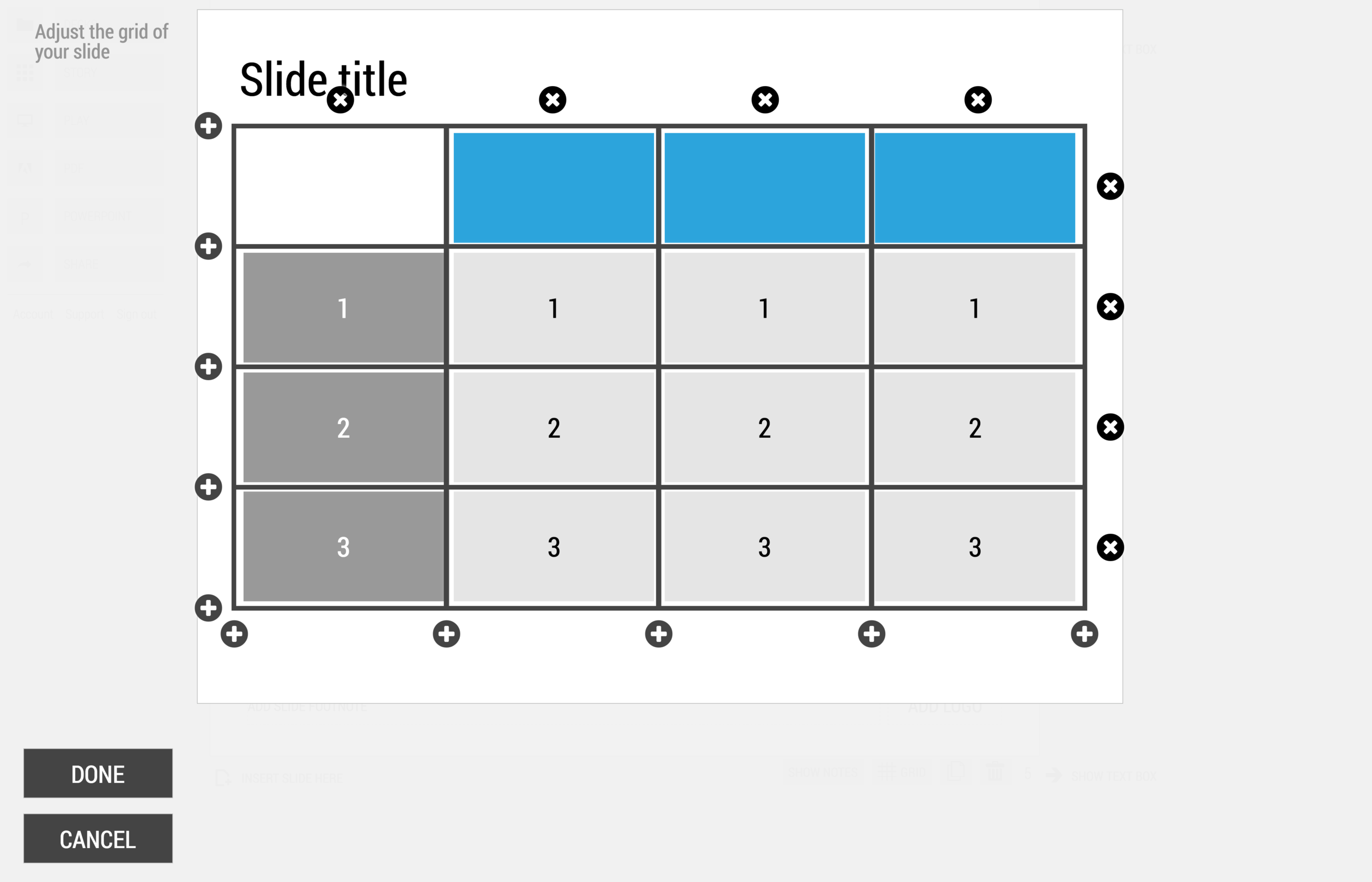
My presentation app SlideMagic is all about the grid. We have made some improvements to make the workflow (even) faster. Now, when you insert rows and or columns, it copies its design and structure from its neighbors. This will save you a lot of time in more complicated table layout with different background colors.

1) Our starting point

1) Our starting point

2) Open the grid editor

2) Open the grid editor

3) Add a row and a column

3) Add a row and a column

4) The result

4) The result


Image via WikiPedia

SlideMagic: a platform for magical presentations. Free student plan available. LEARN MORE
Pitchbot - chat bot to practice investor pitches

Pitchbot - chat bot to practice investor pitches

This is nicely done: pitchbot. It gives you a nice feel about what a discussion with different types of investors might look like.

SlideMagic: a platform for magical presentations. Free student plan available. LEARN MORE
Art to preserve dignity

Art to preserve dignity

Art is a subset of design, it wants to change you. The "Hope" poster from 2008 captured the feelings of many (not all expectations came true though 8 years later). The same artist is part of a broader group who has started a campaign to use design to remind us of humanity. I think it should appeal to everyone across the entire political spectrum who believes in human values, civilized debate, and pragmatic government.

SlideMagic: a platform for magical presentations. Free student plan available. LEARN MORE
"Marketing English"

"Marketing English"

Sometimes I get feedback from marketing communication consultants that the English in my presentations needs to be improved in order for it to become proper "marketing English".

I consider this a compliment. "Marketing English" filled padded with buzzwords and long, elaborate sentences is making every product brochure or presentation in high tech sound pretty much the same.

I do recognize though that I am not a native English speaker, and that a native English speaker can figure that out after reading just one sentence on a slide. But I am not communicating in "proper English", but rather "global business English", which I picked up at business school back in France. It is a subset of English with a vastly reduced vocabulary, just enough to communicate important business concepts to other non-native English speakers. (I am not there yet with business Hebrew though).

If you are not a native English speaker, don't try to force a "grander" language on yourself, instead, it is OK to keep things simple and direct. Fix those typos though (I admit that I can be sloppy here as well) and yes, it never hurts to ask a native English speaker to glance over your text of an important presentation. Then decide what advice to incorporate, and which suggestions to ignore.

SlideMagic: a platform for magical presentations. Free student plan available. LEARN MORE
What questions do you usually get?

What questions do you usually get?

They are an indication of what is missing in your presentation. They come in 2 types:

  • Easy ones. You think something is so blatantly obvious that you saved some slides by taking it out. Apparently your audience disagrees. 
  • Hard ones. If everyone brings up this question, and you know it is one of the weaker point of your story, you might as well address things, since even if you had a meeting where the question was not asked for a change, it is highly likely that the audience did still have it.

Read your audience carefully. Does the same person ask the same sort of question again after she said that she understood a previous answer you gave? Does the person say she understands, but her eyes tell a different story

SlideMagic: a platform for magical presentations. Free student plan available. LEARN MORE
Investment bank memos

Investment bank memos

Investment bankers usually prepare the data rooms for due diligence in M&A transactions. Shelves full of information that is usually summarized in an information memorandum. I never found these summaries very useful. It is impossible to create a financial picture in hour head from just reading text with data. "Last year's sales were x, growth for the 3rd quarter was y, the company is doing business in 3 product segments." The only way to understand this is to extract the information and put it in tables or graphs to see what is going on.

And that is most of the times exactly what the buying side will do, hire a consultant/analyst to go through the material and start creating these charts, then someone more senior will go through the charts and select which ones are important, and which ones not.

You can accelerate the sales process by anticipating all of this, and do some of the homework of the buy side. In the process, you can spoon feed them the right insights you want them to have.

Similar but unrelated, this is also why wordy descriptions of company results in newspaper articles do not work for me. The journalist took the data tables and graphs and translated them into words, the exact opposite direction of where I want her to go.


SlideMagic: a platform for magical presentations. Free student plan available. LEARN MORE
Elephants in the room

Elephants in the room

Client "I don't want to talk about this, because it reminds people of [X] which failed. Let's call that differently because there was that research project 10 years ago that did not work. Hmmm, let's not put that on page 3".

Me "But your technology solves all these problems from the past right?"

Client "Yes"

Me "And in meetings, where do you end up talking about all the time"

Client "People confusing me with technologies from the past"

Sometimes it is just better to take things head on and stop avoiding the big elephant that is sitting in the room but nobody wants to bring up in a conversation.


Image via WikiPedia

SlideMagic: a platform for magical presentations. Free student plan available. LEARN MORE
Company pitch versus product pitch

Company pitch versus product pitch

Product marketers can get bogged down in identifying endless lists of product benefits, each slightly different for different customer segments.

There is a problem with this for potential buyers of a product. The long list of benefits waters down what is truly unique about your product. All benefits sound exactly the same as the benefits that are being claimed by about every company in the world.

There is also a problem with potential investors in your company. Investors are interested in buying your company, not your product, so the scope is broader than product benefits. Also, they are buying into someone who is hopefully able to sell. "If I were a potential client, would I buy this product pitch?" 

SlideMagic: a platform for magical presentations. Free student plan available. LEARN MORE
The lazy brain

The lazy brain

When you are hooked into an exiting novel, your brain savors every word, construct a complex mental image of the story and cannot wait to turn the next page.

Things are different with that business plan, strategy document. Face it, ploughing through them is something our boss told us to do (we better be able to answer those key questions this afternoon), or it is a necessary evil to cut through an endless flow of investment options and get to - finally - meet the exiting ones next week in person.

The bored brain is lazy. Think about that when designing your next presentation. You are creating charts for the wandering eye which is desperate to speed-read over less important passages. You are spoon feeding the visual images ready-made so the lazy brain does not have to construct them by itself. The lazy brain is desperate to make the go/no-go decision as early as possible, and the good thing about a "no" decision: you can move on to the next document, so make sure you postpone that "no" for another page, another page, and then one more.

SlideMagic: a platform for magical presentations. Free student plan available. LEARN MORE

Branching out

Branching out

Most business or scientific concepts come in a lot of flavors and variations. The objectively correct way to explain the concept to someone is to sketch the overall framework of possible permutations, then start filling them out one by one. This is what academic literature does, or a manual with a comprehensive index section.

To a cold audience with no understanding what so ever on the subject, starting with a layout of all the options is either frightening or confusing (probably both). Instead pick one model/option (don't let the audience choose), and take here through the whole thing. Then - and only if necessary - add more variations and options.

In most cases, the audience is not interested in a comprehensive representation of whatever field you are working in, she is pondering whether to buy your product or invest in your company. University-style lectures will not get you there.


SlideMagic: a platform for magical presentations. Free student plan available. LEARN MORE
One level deeper

One level deeper

In order to design a good presentation, you need to understand things one level deeper than what you are actually going to share in your slides. If you are the inventor of the product, or the university teacher of the subject, that is no issue. When you are a junior executive, management consultant or a professional presentation designer, it is not obvious.

The most obvious issue of knowing your slides but nothing more are questions. They will be difficult to answer. In management consulting firms, knowledge documents are shared internally and used freely across the entire firm. Modified versions of slides end up in all kinds of decks and are often presented outside of their original context. A few questions from the audience can undermine the credibility of the entire deck.

As a presentation designer, going one level deeper allows you to think about the story you want to tell from scratch. Often the expert has left out bits of the story that are obvious to her, but crucial for a cold audience to understand the full picture. Or, the expert goes on and on about facts and details which are not important. If your knowledge is not broader than the 20 minutes of content covered in your deck, you cannot choose what to include or not.

Clients are often surprised that I insist on trying the product demo, understanding the mechanism of action of a new drug, or dig into the financial model line by line. It is also the reason that I think presentation designers cannot charge by the slide, since there is a big fixed cost component to understanding a new story, independent of the slide count of your presentation.


Image via WikiPedia

SlideMagic: a platform for magical presentations. Free student plan available. LEARN MORE
More creativity

More creativity

Some tips on creativity from a book on music production that I recently read: Music Habits, The Mental Game, by Jason Timothy. Most of them are applicable to any creative activity, and that includes presentation design. Here are some that stuck with me (in random order):

  • Have a note book / recording device at hand at any time to write down good ideas you will for sure forget 5 seconds later
  • Kill social media distractions
  • Learn what times of the day you are most creative, and don't do your monthly accounting during that time
  • Productive and creative are not the same thing
  • When your brain wants to be distracted it could very well be that you are on to something difficult that nobody has ever done before, keep on pushing
  • The genius just tried harder and for more years than you did
  • Be yourself, find your own style, you can never catch up by imitating someone else's
  • Don't blatantly steal, but instead, write down what inspired you in a piece of art, put it away for 2 weeks, then look back at it again and build on the attributes of the work, rather than the exact same thing
  • Finnish your projects all the way to the end, and do lots of projects
  • Watching more tutorials, reading more books, buying more tools will not really help if you are not applying what you learned/bought instantly. Get good at using the tools you have
  • If you want to build a habit, you have to do it every day, no excuses, even if it is just 15 minutes

SlideMagic: a platform for magical presentations. Free student plan available. LEARN MORE
Flipping the image

Flipping the image

This is a totally obvious trick, but it took me a few years to get it. Flipping a big background image around its vertical axis to change the slide composition.

I like images with a subject off the center, creating a more interesting asymmetric composition and free white space for some text. The overall balance of the slide is set by a big headline, often at the top left. Certain images make the slide look tilted with all the weight on the left side of the slide. Mirroring your image will solve this.

Obviously you can only do this when there is no visible text in the image. In that case you might have to zoom in/crop the image to change its composition, or a bit more advanced, extend the background somehow either in Photoshop, or copying the image, cropping out the background on one site of the copied image and place it to the left of number one. This only works with very even backgrounds (a clear sky for example). See an example of this technique in the images chapter of my book. 

SlideMagic: a platform for magical presentations. Free student plan available. LEARN MORE
Executive Summary?

Executive Summary?

Back in the 1990s, "Executive Summary" pages were summaries that you put in front of a strategy consulting document. They were meant for senior management / decision makers. There was almost something offensive about them, reminding you of your junior position in the hierarchy. Senior managers can skip the detail that you have been sweating on for months and get straight to the point.

The good thing about these summaries was that you actually had to think what it is you wanted the senior management to do, and you had to frame your argument in the best possible way. Writing these summaries often caused major shifts in the recommendations of the project.

Clients ask me frequently about an Executive Summary of a presentation. This time, it is about a summary document that they can email to someone ahead of a presentation, or in most cases, a document that should convince the recipient to agree to a presentation.

I think the classic Executive Summary memo is not the most engaging way to get people excited about your project. There are a number of differences between your need for a summary, and the Executive Summary of the strategy review that is addressed to the CEO of your company.

The CEO is probably very interested in the recommendations (what price should I pay for the acquisition target), and is fully aware of the broad context of the project. She just needs the underlying logic to complete her own understanding of the situation. And, she probably knows you, and can pick up the phone quickly to clarify something that is not clear.

The investor or potential customer might not be very keen to double click a Microsoft Word file and start reading about your investment or sales pitch. Worse even, she he has probably no clear understanding of what it is you are actually doing, and finally, she has no idea who you are, and when she does not understand things, will delete the email instead of calling you.

My advice: forget about the Executive Summary memo, and instead create a short visual presentation that will have many more pages, but will take the exact same time to go through as reading a boring text memo. The object of the summary is not to be complete, it is to get the recipient to want to hear more. Therefore, leave out details that are not yet essential for this stage of the process, you only want to create interest. Most importantly, make sure that it is actually very clear what you are doing / what you want, surprisingly that is not always the case in these summary presentations.


Image via WikiPedia

SlideMagic: a platform for magical presentations. Free student plan available. LEARN MORE
Experimenting with Medium

Experimenting with Medium

I started to experiment with Medium as a now host for my blog. What do you people think, should I move? It is easer to write posts and get people to discover them, integration with my overall side is less strong. And Squarespace has become a bit buggy for some reason when formatting text and inserting links. Check it out here: www.medium.com/slidemagic

SlideMagic: a platform for magical presentations. Free student plan available. LEARN MORE